deactivate Hyundai Sonata
[x] Cancel search | Manufacturer: HYUNDAI, Model Year: , Model line: , Model:Pages: 208, PDF Size: 16.93 MB
Page 126 of 208
DRIVING YOUR HYUNDAI 2- 11
!
o Driving on rough, gravel or snow-cov-
ered roads.
o Driving with tire chains installed.
o Driving on roads where the road surface
is pitted or has different surface height.
During these conditions the vehicle should
be driven at reduced speeds. The safety
features of an ABS equipped vehicle should
not be tested by high speed driving or
cornering. This could endanger the safety
of yourself or others.
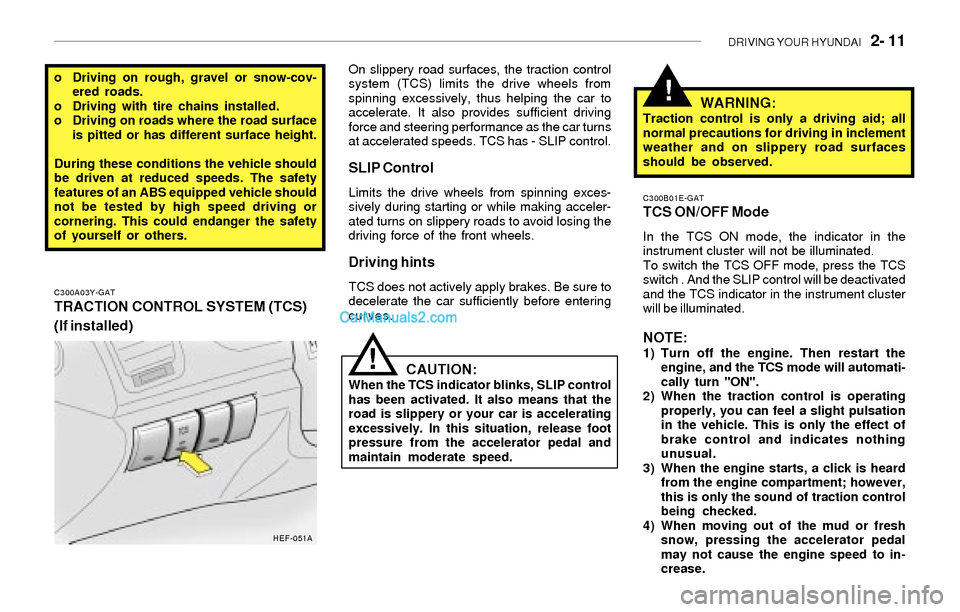
C300A03Y-GAT
TRACTION CONTROL SYSTEM (TCS)
(If installed)
!
C300B01E-GATTCS ON/OFF Mode
In the TCS ON mode, the indicator in the
instrument cluster will not be illuminated.
To switch the TCS OFF mode, press the TCS
switch . And the SLIP control will be deactivated
and the TCS indicator in the instrument cluster
will be illuminated.
NOTE:1) Turn off the engine. Then restart the
engine, and the TCS mode will automati-
cally turn "ON".
2) When the traction control is operating
properly, you can feel a slight pulsation
in the vehicle. This is only the effect of
brake control and indicates nothing
unusual.
3) When the engine starts, a click is heard
from the engine compartment; however,
this is only the sound of traction control
being checked.
4) When moving out of the mud or fresh
snow, pressing the accelerator pedal
may not cause the engine speed to in-
crease. On slippery road surfaces, the traction control
system (TCS) limits the drive wheels from
spinning excessively, thus helping the car to
accelerate. It also provides sufficient driving
force and steering performance as the car turns
at accelerated speeds. TCS has - SLIP control.
SLIP Control
Limits the drive wheels from spinning exces-
sively during starting or while making acceler-
ated turns on slippery roads to avoid losing the
driving force of the front wheels.
Driving hints
TCS does not actively apply brakes. Be sure to
decelerate the car sufficiently before entering
curves.
CAUTION:When the TCS indicator blinks, SLIP control
has been activated. It also means that the
road is slippery or your car is accelerating
excessively. In this situation, release foot
pressure from the accelerator pedal and
maintain moderate speed.
WARNING:Traction control is only a driving aid; all
normal precautions for driving in inclement
weather and on slippery road surfaces
should be observed.
HEF-051A
Page 127 of 208
2- 12 DRIVING YOUR HYUNDAI
!
C130A01A-AATGOOD BRAKING PRACTICES
WARNING:
Nothing should be carried on top of the
cargo area cover behind the rear seat. If
there were an accident or a sudden stop,
such objects could move forward and cause
damage to the vehicle or injure the occu-
pants.
o After being parked, check to be sure the
parking brake is not engaged and that the
parking brake indicator light is out before
driving away.
o Driving through water may get the brakes
wet. They can also get wet when the car is
washed. Wet brakes can be dangerous!
Your car will not stop as quickly if the brakes
are wet. Wet brakes may cause the car to
pull to one side. To dry the brakes, apply the
brakes lightly until the braking action returns
to normal, taking care to keep the car under
control at all times. If the braking action does
not return to normal, stop as soon as it is safe
to do so and call your Hyundai dealer for
assistance.
o Don't coast down hills with the car out of gear.
This is extremely hazardous. Keep the car
in gear at all times, use the brakes to slow
down, then shift to a lower gear so that engine
braking will help you maintain a safe speed.o Don't "ride" the brake pedal. Resting your
foot on the brake pedal while driving can be
dangerous because it can result in the brakes
overheating and losing their effectiveness. It
also increases the wear of the brake com-
ponents.
o If a tire goes flat while you are driving, apply
the brakes gently and keep the car pointed
straight ahead while you slow down. When
you are moving slowly enough for it to be safe
to do so, pull off the road and stop in a safe
place.
o If your car is equipped with an automatic
transaxle, don't let your car creep forward.
To avoid creeping forward, keep your foot on
the brake pedal when the car is stopped.
o Use caution when parking on a hill. Engage
the parking brake and place the gear selec-
tor lever in "P" (automatic transaxle) or in first
or reverse gear (manual transaxle). If your
car is facing downhill, turn the front wheels
into the curb to help keep the car from rolling.
If your car is facing uphill, turn the front
wheels away from the curb to help keep the
car from rolling. If there is no curb or if it is
required by other conditions to keep the car
from rolling, block the wheels.
o Under some conditions your parking brake
can freeze in the engaged position. This is
most likely to happen when there is an ac-
cumulation of snow or ice around or near the
rear brakes or if the brakes are wet. If there
is a risk that the parking brake may freeze,
apply it only temporarily while you put the
gear selector lever in "P" (automatic) or in
C300D02L-GATIndicator and Warning
The indicator should illuminate when the ignition
key is turned to "ON" or "start", but should go
out after three seconds.
If the indicator does not illuminate, have it checked
by an authorized Hyundai dealer.
Should there be any unusual conditions in the
device, TCS illuminates as a warning.
If TCS illuminates, pull your car to a safe place
and stop the engine.
Then, start the engine again to check if the TCS
indicator goes out.
If the indicator remains lit even after the engine
has been started, have your car checked by an
authorized Hyundai dealer.
NOTE:1) When TCS illuminates, traction control
is automatically deactivated for safety.
2) This warning function is not provided
when the driver selects the TCS-OFF
mode.