change time Hyundai Sonata
[x] Cancel search | Manufacturer: HYUNDAI, Model Year: , Model line: , Model:Pages: 380, PDF Size: 7.97 MB
Page 191 of 380
4 111
Features of your vehicle
• AVCThis funtion automatically adjusts the
volume level according to the speed of
the vehicle and can be turned ON/OFF
through the sound quality control knob.
(For PA760YF, Press the [ FOLDER ]
button.)
• SOUND
Pressing the [ FOLDER ] button
to select the sound the following order
: Sound Setup, Variable EQ Select the
Sound Setup and press [ENTER] the
button to set.
Pressing the [ENTER] button to adjust
the Sound Setup the following order :
BASS, MIDDLE, TREBLE, FADER,
BALANCE. Select the BASS and press
the [ FOLDER ] button to set.
Use the same method to adjust MID-
DLE, TREBLE, FADER, BALANCE
and press the button to [ENTER] com-
plete and exit from Sound Setup adjust-
ment mode.
• Variable EQ
to Select the sound the following order
: Sound Setup, Variable EQ Select the
Variable EQ and press the [ENTER]
button to set. Pressing the [ FOLDER ] button
to select the Variable EQ the following
order : Normal, Powerful, Concert
Select and press the [ENTER] button to
complete and exit from Variable EQ set
up mode.
• XM It will be able to change the XM display.
ex) Display by category/channel or
artist/song title.
Select the XM Display through the
[ FOLDER ] button(for PA710YF,
Turn the control knob), and press the
[ENTER] button(for PA710YF, press
[TUNE] knob) to complete and exit
XM setup mode.
• HD RADIO This funtion is used to enable FM/AM
HD RADIO receptions, and detail dis-
play. Press the [ FOLDER ] button
to select the HD RADIO setup the fol-
lowing order : HD RADIO FM, HD
RADIO AM, Details. Press the [ENTER]
button to the HD RADIO setup and can
be turned ON/OFF through the [
FOLDER ] button.
Press the [ENTER] button to complete
and exit HD RADIO setup mode. • CLOCK
Pressing the [ FOLDER ] button
to adjust the clock in the following
order: CLOCK SET, TIME FORMAT,
RETURN. Adjust the CLOCK SET and
press [ENTER] button to set.
Use the same method to adjust TIME
FORMAT and press the [ENTER] but-
ton to complete and exit and from clock
adjustment mode.
9. Manual Channel Selector & Sound Quality Control Knob Turn this control while listening to a radio
channel to manually adjust frequency.
Turn clockwise to increase frequency and
counterclockwise to reduce frequency.
Pressing the button changes the BASS,
MIDDLE, TREBLE, FADER and BAL-
ANCE TUNE mode.
The mode selected is shown on the dis-
play. After selecting each mode, rotate
the Audio control knob clockwise or
counterclockwise.
BASS Control
To increase the BASS, rotate the knob
clockwise, while to decrease the BASS,
rotate the knob counterclockwise.
YF HMA 4-104~(AUDIO).QXP 12/24/2009 5:21 PM Page 111
Page 209 of 380
4 129
Features of your vehicle
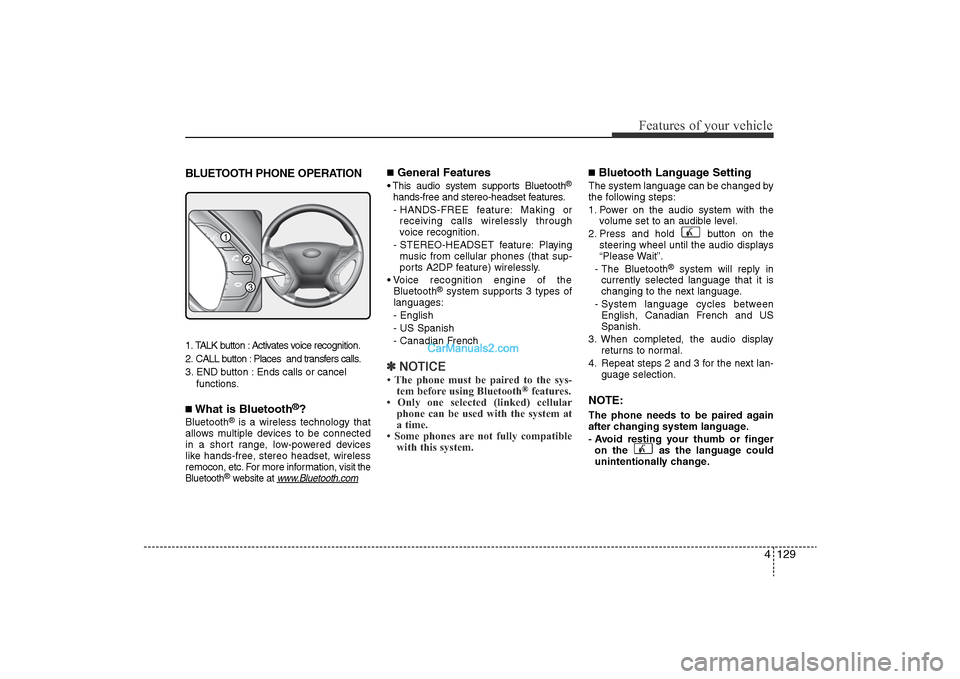
BLUETOOTH PHONE OPERATION1. TALK button : Activates voice recognition.
2. CALL button : Places and transfers calls.
3. END button : Ends calls or cancel functions.■What is Bluetooth
®?
Bluetooth
®is a wireless technology that
allows multiple devices to be connected
in a short range, low-powered devices
like hands-free, stereo headset, wireless
remocon, etc. For more information, visit
the
Bluetooth
®website at
www
.Bluetooth.com
■General Features• This audio system supports Bluetooth
®
hands-free and stereo-headset features.
- HANDS-FREE feature: Making or receiving calls wirelessly through
voice recognition.
- STEREO-HEADSET feature: Playing music from cellular phones (that sup-
ports A2DP feature) wirelessly.
• Voice recognition engine of the Bluetooth
®system supports 3 types of
languages:
- English
- US Spanish
- Canadian French
✽ NOTICE• The phone must be paired to the sys-
tem before using Bluetooth
®features.
• Only one selected (linked) cellular phone can be used with the system at
a time.
• Some phones are not fully compatible with this system.
■Bluetooth Language SettingThe system language can be changed by
the following steps:
1. Power on the audio system with the
volume set to an audible level.
2. Press and hold button on the steering wheel until the audio displays
“Please Wait”.
- The Bluetooth
®
system will reply in
currently selected language that it is
changing to the next language.
- System language cycles between English, Canadian French and US
Spanish.
3. When completed, the audio display returns to normal.
4. Repeat steps 2 and 3 for the next lan- guage selection.
NOTE:The phone needs to be paired again
after changing system language.
- Avoid resting your thumb or fingeron the as the language could
unintentionally change.
1
3
2
YF HMA 4-104~(AUDIO).QXP 12/24/2009 5:22 PM Page 129
Page 211 of 380
4 131
Features of your vehicle
■Voice Recognition Activation• The voice recognition engine containedin the Bluetooth System can be activat-
ed in the following conditions:
- Button Activation The voice recognition system will be
active when the button is
pressed and after the sound of a
Beep.
- Active Listening The voice recognition system will be
active for a period of time when the
Voice Recognition system has asked
for a customer response.
• The system can recognize single digits- from zero to nine while numbers greater
than ten will not be recognized.
• If the command is not recognized, the system will announce "Pardon" or No
input voice signal from microphone. (No
response)
• The system shall cancel voice recogni- tion mode in following cases : When
pressing the button and saying
cancel following the beep. When not
making a call and pressing the but-
ton. When voice recognition has failed 3
consecutive times.
• At any time if you say “help”, the system
will announce what commands are
available.
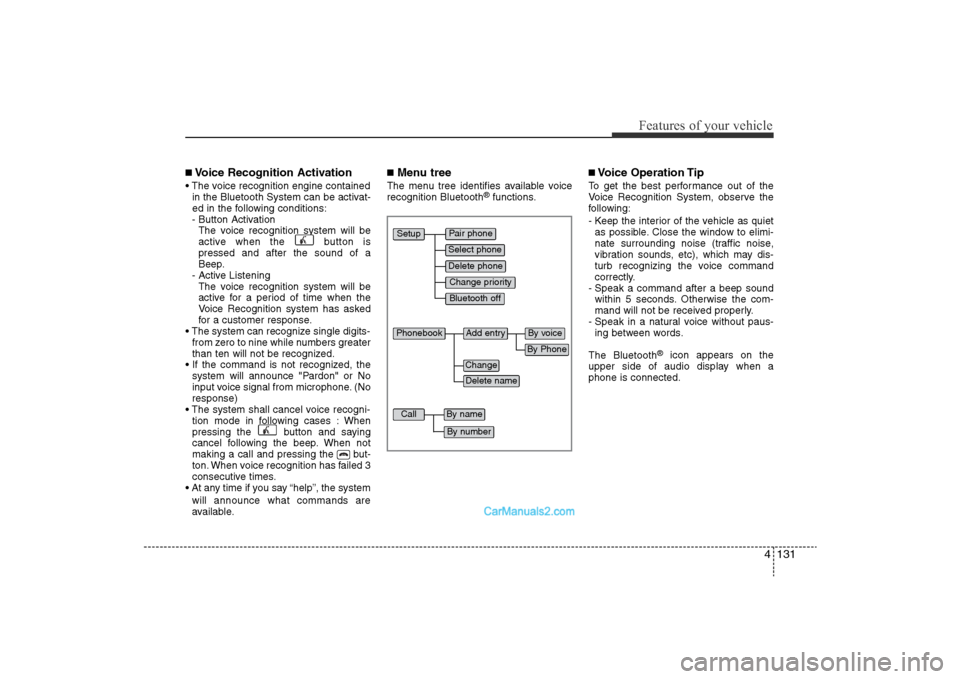
■Menu treeThe menu tree identifies available voice
recognition Bluetooth
®functions.
■Voice Operation TipTo get the best performance out of the
Voice Recognition System, observe the
following:
- Keep the interior of the vehicle as quietas possible. Close the window to elimi-
nate surrounding noise (traffic noise,
vibration sounds, etc), which may dis-
turb recognizing the voice command
correctly.
- Speak a command after a beep sound within 5 seconds. Otherwise the com-
mand will not be received properly.
- Speak in a natural voice without paus- ing between words.
The Bluetooth
®
icon appears on the
upper side of audio display when a
phone is connected.
Pair phone
Select phone
Change priority
Delete phone
Bluetooth off
Setup
Add entry
Phonebook
Change
Delete name
By Phone
By voice
Call
By name
By number
YF HMA 4-104~(AUDIO).QXP 12/24/2009 5:22 PM Page 131
Page 216 of 380
■Talking on the PhoneWhen talking on the phone, “Active Calls”
message and the other party’s phone
number (if available) are displayed on the
audio.
• To Mute the Microphone- Press button on the steeringwheel.
• To Finish a Call -
Press button on the steering wheel.
✽ NOTICEIn the following situations, you or the
other party may have difficulty hear-
ing each other:
1. Speaking at the same time, your voice may not reach the other party. (This is
not a malfunction.) Speak alternately
with the other party on the phone.
2. Keep the Bluetooth(R) volume to a low level. High-level volume may
result in distortion and echo.
3. When driving on a rough road.
4. When driving at high speeds.
5. When the window is open.
6. When the air conditioning vents are facing the microphone.
7. When the sound of the air condition- ing fan is loud.
■Using the head unit as Bluetooth
musicThe head unit supports A2DP (Audio
Advanced Distribution Profile) and
AVRCP(Audio Video Remote Control
Profile).
Both profiles are available for listening to
MP3 music via Bluetooth cellular phone
supporting above Bluetooth profiles.
To play MP3 music from the Bluetooth
cellular phone, press the [AUX] button
until “MP3 Play” is displayed on the LCD.
Then try playing music by phone.
When playing music from the Bluetooth
cellular phone, the head unit displays
MP3 MODE.NOTE:• Not only MP3 files, but all the sounds
that the phone supports can be heard
by the audio system.
• Bluetooth cellular phones must feature A2DP and AVRCP functions.
• Some A2DP and AVRCP Bluetooth cellular phones may not play music
through the head unit on the first try.
Please try the below;
i.e : Menu
➟Filemanager
➟Music
➟
Option
➟Play via Bluetooth • Please refer to the User’s Guide of
your phone for more informations. To
stop music, try stop music by the
phone change audio mode to
AM/FM/XM, CD, iPSod etc.
4 136Features of your vehicle
YF HMA 4-104~(AUDIO).QXP 12/24/2009 5:22 PM Page 136
Page 218 of 380
Driving your vehicle2
5
WARNING
- ENGINE EXHAUST CAN BE DANGEROUS!
Engine exhaust fumes can be extremely dangerous. If, at any time, you smell exhaust fumes inside the vehicle, open the win-
dows immediately.
• Do not inhale exhaust fumes.
Exhaust fumes contain carbon monoxide, a colorless, odorless gas that can cause unconsciousness and death by asphyxia-
tion.
• Be sure the exhaust system does not leak. The exhaust system should be checked whenever the vehicle is raised to change the oil or for any other purpose. If you hear
a change in the sound of the exhaust or if you drive over something that strikes the underneath side of the car, have the
exhaust system checked as soon as possible by an authorized HYUNDAI dealer.
• Do not run the engine in an enclosed area. Letting the engine idle in your garage, even with the garage door open, is a hazardous practice. Never run the engine in your
garage any longer than it takes to start the engine and back the car out.
• Avoid idling the engine for prolonged periods with people inside the car. If it is necessary to idle the engine for a prolonged period with people inside the car, be sure to do so only in an open area
with the air intake set at "Fresh" and fan operating at one of the higher speeds so fresh air is drawn into the interior.
If you must drive with the trunk lid open because you are carrying objects that make this necessary:
1. Close all windows.
2. Open side vents.
3. Set the air intake control at "Fresh", the air flow control at "Floor" or "Face" and the fan at one of the higher speeds.
To assure proper operation of the ventilation system, be sure the ventilation air intakes located just in front of the windshie ld are
kept clear of snow, ice, leaves or other obstructions.
YF hma 5.qxp 11/25/2009 5:41 PM Page 2
Page 224 of 380
Driving your vehicle8
5ACC(Accessory)Press the engine start/stop button while it
is in the OFF position without depressing
the brake pedal.
The electrical accessories are operative.
If you leave the engine start/stop button
in the ACC position for more than 1 hour,
the battery power will turn off automati-
cally to prevent the battery from dis-
charging.ONPress the engine start/stop button while it
button is in the ACC position without
depressing the brake pedal.
The warning lights can be checked
before the engine is started. Do not leave
the ON position if the engine is not run-
ning to prevent battery discharge.STARTTo start the engine, press the brake
pedal and press the engine start/stop
button with the shift lever in the P(Park)
or the N(Neutral) position.
For your safety, start the engine with the
shift lever in the P(Park) position.
✽
NOTICE• If you press the engine start/stop but-
ton without depressing the brake
pedal, the engine does not start and
the engine start/stop button changes
as follows :
OFF →
ACC →
ON →
OFF
• If you leave the engine start/stop but- ton in the ACC or the ON position for
a long time, the battery will be dis-
charged.
WARNING
• Never press the engine start/stop
button while the vehicle is in
motion. This would result in loss
of directional control and braking
function, which could cause an
accident.
• Before leaving the driver’s seat, always make sure the shift lever
is engaged in P (Park), set the
parking brake fully and shut the
engine off. Unexpected and sud-
den vehicle movement may occur
if these precautions are not
taken.
• Never reach for the engine start/stop button, or any other
controls through the steering
wheel while the vehicle is in
motion. The presence of your
hand or arm in this area could
cause a loss of vehicle control,
an accident and serious bodily
injury or death.
• Do not place any movable objects around the driver’s seat as they
may move while driving, interfere
with the driver and lead to an
accident.
YF hma 5.qxp 11/25/2009 5:42 PM Page 8
Page 234 of 380
![Hyundai Sonata
Driving your vehicle18
5With the shift lever in the D position
The paddle shifter can operate when the
vehicle speed is more than 10km/h.
Pull the [+] or [-] paddle shifter once to
shift up or down](/img/35/16817/w960_16817-233.png "Hyundai Sonata
Driving your vehicle18
5With the shift lever in the D position
The paddle shifter can operate when the
vehicle speed is more than 10km/h.
Pull the [+] or [-] paddle shifter once to
shift up or down")
Driving your vehicle18
5With the shift lever in the D position
The paddle shifter can operate when the
vehicle speed is more than 10km/h.
Pull the [+] or [-] paddle shifter once to
shift up or down one gear and the system
changes from automatic mode to manual
mode.
If the vehicle speed is lower than 10km/h,
if you depress the accelerator pedal for
more than 7 seconds or if you shift the
shift lever from D to sport mode and shift
it from sport mode to D again, the system
will change from manual mode to auto-
matic mode.
With the shift lever in the sport mode
Pull the [+] or [-] paddle shifter once to
shift up or down one gear.✽
NOTICEIf you pull the [+] and [-] paddle shifters
at the same time, you can't shift the gear.
Shift lock system For your safety, the automatic transaxle
has a shift lock system which prevents
shifting the transaxle from P (Park) or N
(Neutral) into R (Reverse) unless the
brake pedal is depressed.
To shift the transaxle from P (Park) or N
(Neutral) into R (Reverse):
1. Depress and hold the brake pedal.
2. Start the engine or turn the ignition
switch to the ON position.
3. Move the shift lever.
If the brake pedal is repeatedly
depressed and released with the shift
lever in the P (Park) position, a chattering
noise near the shift lever may be heard.
This is a normal condition. Shift-lock override
If the shift lever cannot be moved from
the P (Park) or N (Neutral) position into R
(Reverse) position with the brake pedal
depressed, continue depressing the
brake, then do the following:
1. Carefully remove the cap (1) covering
the shift-lock access hole.
2. Insert a key (or screwdriver) into the access hole and press down on the
key (or screwdriver).
3. Move the shift lever.
4. Have your vehicle inspected by an authorized HYUNDAI dealer immedi-
ately.
OYF059011N
WARNING
Always fully depress the brake
pedal before and while shifting out
of the P (Park) position into anoth-
er position to avoid inadvertent
motion of the vehicle which could
injure persons in or around the car.
YF hma 5.qxp 11/25/2009 5:44 PM Page 18
Page 249 of 380
533
Driving your vehicle
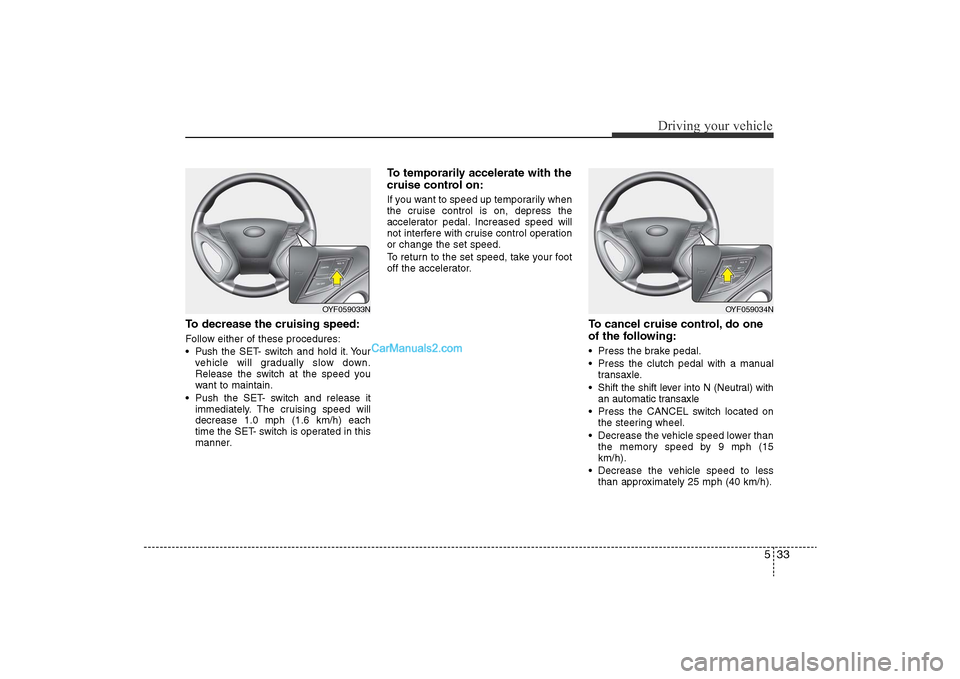
To decrease the cruising speed:Follow either of these procedures:
• Pushthe SET- switch and hold it. Your
vehicle will gradually slow down.
Release the switch at the speed you
want to maintain.
• Push the SET- switch and release it immediately. The cruising speed will
decrease 1.0 mph (1.6 km/h) each
time the SET- switch is operated in this
manner.
To temporarily accelerate with the
cruise control on:If you want to speed up temporarily when
the cruise control is on, depress the
accelerator pedal. Increased speed will
not interfere with cruise control operation
or change the set speed.
To return to the set speed, take your foot
off the accelerator.
To cancel cruise control, do one
of the following:• Press the brake pedal.
• Press the clutch pedal with a manualtransaxle.
• Shift the shift lever into N (Neutral) with an automatic transaxle
• Press the CANCEL switch located on the steering wheel.
• Decrease the vehicle speed lower than the memory speed by 9 mph (15
km/h).
• Decrease the vehicle speed to less than approximately 25 mph (40 km/h).
OYF059034N
OYF059033N
YF hma 5.qxp 11/25/2009 5:46 PM Page 33
Page 259 of 380
543
Driving your vehicle
Use high quality ethylene glycol
coolantYour vehicle is delivered with high quality
ethylene glycol coolant in the cooling
system. It is the only type of coolant that
should be used because it helps prevent
corrosion in the cooling system, lubri-
cates the water pump and prevents
freezing. Be sure to replace or replenish
your coolant in accordance with the
maintenance schedule in section 7.
Before winter, have your coolant tested to
assure that its freezing point is sufficient
for the temperatures anticipated during
the winter.Check battery and cablesWinter puts additional burdens on the
battery system. Visually inspect the bat-
tery and cables as described in section
7. The level of charge in your battery can
be checked by an authorized HYUNDAI
dealer or a service station.
Change to "winter weight" oil if
necessaryIn some climates it is recommended that
a lower viscosity "winter weight" oil be
used during cold weather. See section 8
for recommendations. If you aren't sure
what weight oil you should use, consult
an authorized HYUNDAI dealer.Check spark plugs and ignition
systemInspect your spark plugs as described in
section 7 and replace them if necessary.
Also check all ignition wiring and compo-
nents to be sure they are not cracked,
worn or damaged in any way.
WARNING
- Tire chains
• The use of chains may adverselyaffect vehicle handling.
• Do not exceed 20 mph (30 km/h) or the chain manufacturer’s rec-
ommended speed limit, whichev-
er is lower.
• Drive carefully and avoid bumps, holes, sharp turns, and other
road hazards, which may cause
the vehicle to bounce.
• Avoid sharp turns or locked- wheel braking.
CAUTION
• Chains that are the wrong size or improperly installed can damageyour vehicle's brake lines, sus-pension, body and wheels.
• Stop driving and retighten the chains any time you hear themhitting the vehicle.
YF hma 5.qxp 11/25/2009 5:47 PM Page 43
Page 310 of 380
Maintenance22
7Changing the engine oil and filterHave engine oil and filter changed by an
authorized HYUNDAI dealer according to
the Maintenance Schedule at the begin-
ning of this section.
CALIFORNIA
PROPOSI-
TION 65 WARNING
Engine oil contains chemicals
known to the State of California to
cause cancer, birth defects, and
reproductive harm.
Used engine oil may cause irrita-
tion or cancer of the skin if left in
contact with the skin for prolonged
periods of time. Used engine oil
contains chemicals that have
caused cancer in laboratory ani-
mals. Always protect your skin by
washing your hands thoroughly
with soap and warm water as soon
as possible after handling used oil.
YF HMA 7.QXP 11/25/2009 1:45 PM Page 22