USB port Hyundai Sonata Hybrid 2012 Owner's Manual
[x] Cancel search | Manufacturer: HYUNDAI, Model Year: 2012, Model line: Sonata Hybrid, Model: Hyundai Sonata Hybrid 2012Pages: 403, PDF Size: 7.86 MB
Page 191 of 403
Features of your vehicle
110
4
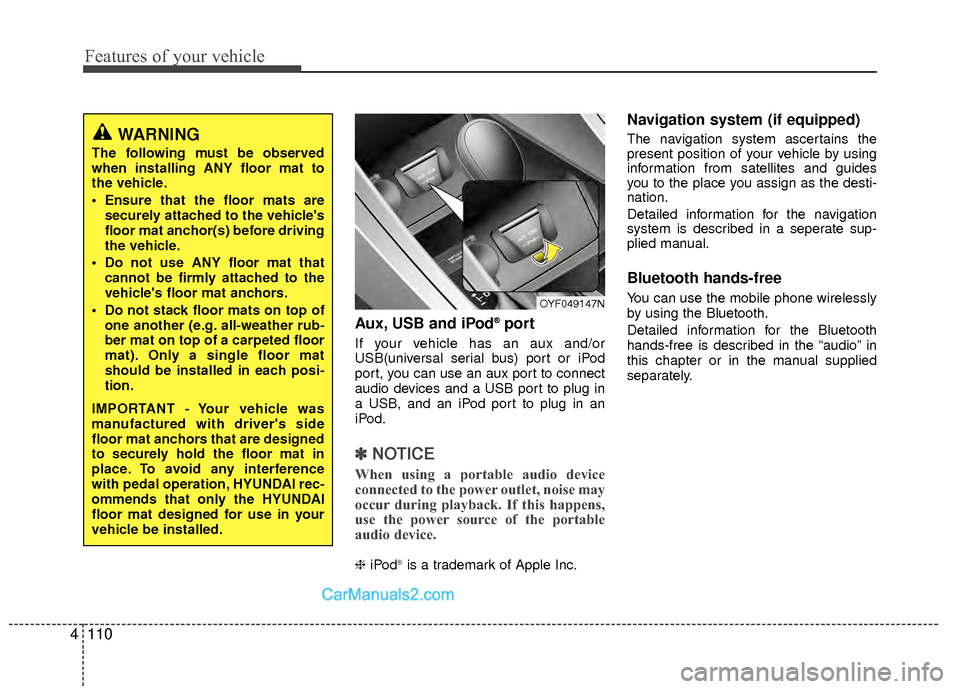
Aux, USB and iPod®port
If your vehicle has an aux and/or
USB(universal serial bus) port or iPod
port, you can use an aux port to connect
audio devices and a USB port to plug in
a USB, and an iPod port to plug in an
iPod.
✽ ✽
NOTICE
When using a portable audio device
connected to the power outlet, noise may
occur during playback. If this happens,
use the power source of the portable
audio device.
❈ iPod®is a trademark of Apple Inc.
Navigation system (if equipped)
The navigation system ascertains the
present position of your vehicle by using
information from satellites and guides
you to the place you assign as the desti-
nation.
Detailed information for the navigation
system is described in a seperate sup-
plied manual.
Bluetooth hands-free
You can use the mobile phone wirelessly
by using the Bluetooth.
Detailed information for the Bluetooth
hands-free is described in the “audio” in
this chapter or in the manual supplied
separately.
WARNING
The following must be observed
when installing ANY floor mat to
the vehicle.
Ensure that the floor mats are
securely attached to the vehicle's
floor mat anchor(s) before driving
the vehicle.
Do not use ANY floor mat that cannot be firmly attached to the
vehicle's floor mat anchors.
Do not stack floor mats on top of one another (e.g. all-weather rub-
ber mat on top of a carpeted floor
mat). Only a single floor mat
should be installed in each posi-
tion.
IMPORTANT - Your vehicle was
manufactured with driver's side
floor mat anchors that are designed
to securely hold the floor mat in
place. To avoid any interference
with pedal operation, HYUNDAI rec-
ommends that only the HYUNDAI
floor mat designed for use in your
vehicle be installed.
OYF049147N
Page 204 of 403
4123
Features of your vehicle
(Continued)
If the USB device is divided by logical drives, only the music fileson the highest-priority drive arerecognized by car audio.
Devices such as MP3 Player/ Cellular phone/Digital camera canbe unrecognizable by standardUSB I/F can be unrecognizable.
Some non-standard USB devices (METAL COVER TYPE USB) can beunrecognizable.
Some USB flash memory readers (such as CF, SD, microSD, etc.) orexternal-HDD type devices can beunrecognizable.
Music files protected by DRM (DIGITAL RIGHTS MANAGEMENT)are not recognizable.
The data in the USB memory may be lost while using this audio.Always back up important data ona personal storage device.
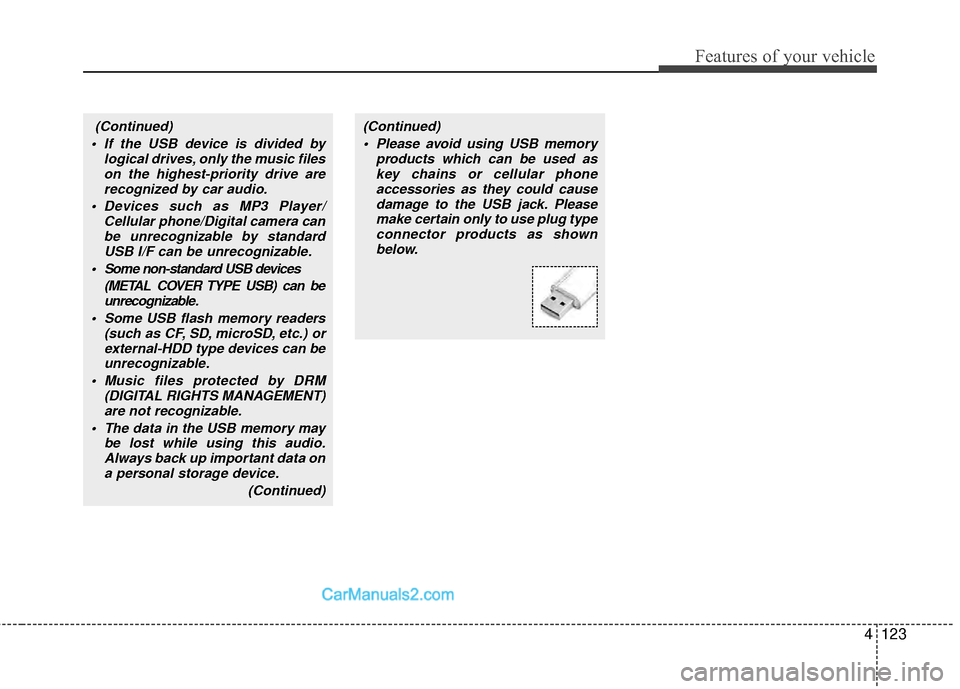
(Continued)(Continued) Please avoid using USB memory products which can be used askey chains or cellular phoneaccessories as they could causedamage to the USB jack. Pleasemake certain only to use plug type connector products as shownbelow.
Page 205 of 403
Features of your vehicle
124
4
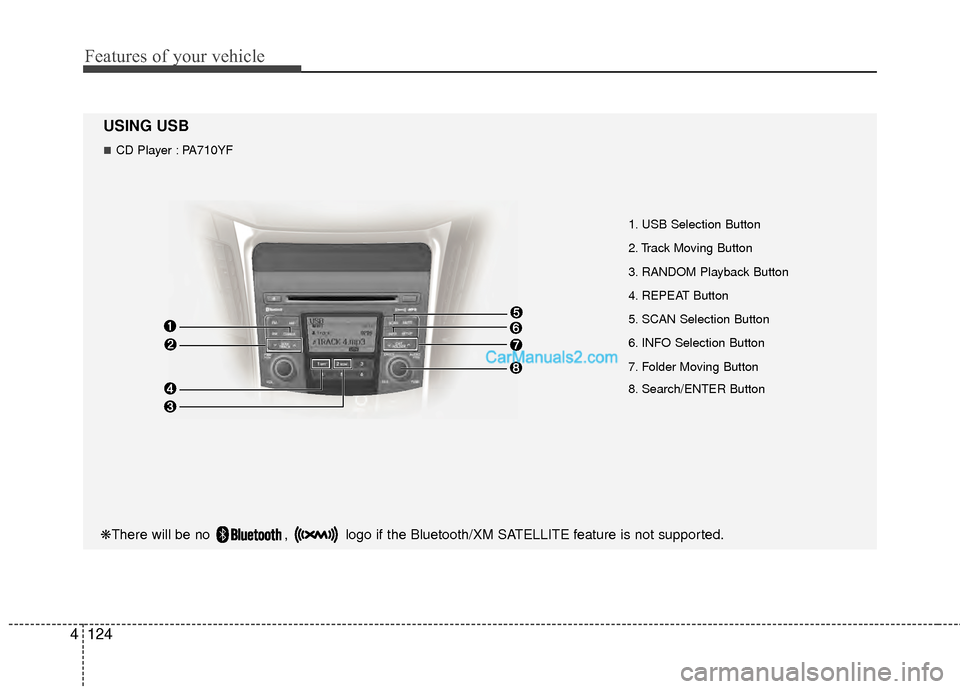
USING USB
1. USB Selection Button
2. Track Moving Button
3. RANDOM Playback Button
4. REPEAT Button
5. SCAN Selection Button
6. INFO Selection Button
7. Folder Moving Button
8. Search/ENTER Button
❋There will be no , logo if the Bluetooth/XM SATELLITE feature is not supported.
CD Player : PA710YF
Page 207 of 403
Features of your vehicle
126
4
✽
✽
NOTICE FOR USING THE
iPod®DEVICE
• Some iPod models might not sup-
port the communication protocol
and the files will not be played.
Supported iPod models:
- iPod Mini
- iPod 4th(Photo) ~ 6th(Classic)
generation
- iPod Nano 1st~4th generation
- iPod Touch 1st~2nd generation
• The order of search or playback of songs in the iPod can be different
from the order searched in the
audio system.
• If the iPod disabled due to its own malfunction, reset the iPod. (Reset:
Refer to iPod manual)
• An iPod may not operate normally on low battery.
• Some iPod devices, such as the iPhone, can be connected through the
Bluetooth
®interface. The device
must have audio Bluetooth®capabili-
ty (such as for stereo headphone
Bluetooth
®). The device can play, but
it will not be controlled by the audio
system.
(Continued)
When the iPod cable is connected, the system can be switched to AUXmode even without iPod deviceand may cause noise. D isconnect
the iPod cable when you are not using the iPod device.
When not using iPod with car audio, detach the iPod cable fromiPod. Otherwise, iPod may remainin accessory mode, and may notwork properly.CAUTION IN USING THE
iPod®DEVICE
The Hyundai iPod Power Cable is
needed in order to operate iPodwith the audio buttons on theaudio system. The USB cable pro-vided by Apple may cause mal-function and should not be usedfor Hyundai vehicles.
❋ The Hyundai iPod Power Cable may be purchased through yourHyundai Dealership.
When connecting iPod with the iPod Power Cable, insert the con-nector to the multimedia socket completely. If not inserted com-pletely, communications betweeniPod and audio may be interrupted.
When adjusting the sound effects of the iPod and the audio system, thesound effects of both devices willoverlap and might reduce or distort the quality of the sound.
Deactivate (turn off) the equalizer function of an iPod when adjust-ing the audio system’s volume,and turn off the equalizer of theaudio system when using theequalizer of an iPod.
(Continued)
Page 396 of 403

Index
2I
Air bags··················\
··················\
··················\
··················\
··3-35Air bag warning label··················\
··················\
············3-62
Air bag warning light ··················\
··················\
············3-38
Curtain air bag··················\
··················\
··················\
·····3-53
Driver's and passenger's front air bag ··················\
·····3-48
Occupant classification system ··················\
···············3-42
Side impact air bag··················\
··················\
················3-52
SRS components and functions ··················\
··············3-39
Air cleaner ··················\
··················\
··················\
···············7-30
Antenna (glass) ··················\
··················\
··················\
······4-111
Anti-lock brake system (ABS) ··················\
··················\
··5-18
Appearance care··················\
··················\
··················\
·······7-69 Exterior care ··················\
··················\
··················\
········7-69
Interior care ··················\
··················\
··················\
·········7-73
Armrest ··················\
··················\
··················\
··················\
··3-13
Audio system ··················\
··················\
··················\
·········4-111 Glass antenna ··················\
··················\
··················\
·····4-111
Steering wheel audio control ··················\
·················4-111
Automatic climate control system (Type A)··················\
4-80 Air conditioning ··················\
··················\
··················\
··4-88
Climate control air filter··················\
··················\
········4-90
Economy air conditioning ··················\
··················\
·····4-87
Heating and air conditioning··················\
··················\
·4-81
Automatic climate control system (Type B)··················\
4-91 Air conditioning ··················\
··················\
··················\
··4-99
Automatic heating and air conditioning··················\
··4-92
Economy air conditioning ··················\
··················\
·····4-98 Manual heating and air conditioning ··················\
······4-93
Automatic transaxle ··················\
··················\
··················\
···5-9 Shift lock system ··················\
··················\
··················\
·5-12
Aux, USB and iPod port ··················\
··················\
··········4-110
Battery ··················\
··················\
··················\
··············7-34, 8-2
Battery saver function··················\
··················\
················4-69
Before driving ··················\
··················\
··················\
············5-3
Bottle holders, see cup holders ··················\
··················\
4-106
Brake system··················\
··················\
··················\
············5-14 Anti-lock brake system (ABS) ··················\
················5-18
Electronic stability control (ESC) ··················\
···········5-19
Hill-start assist control (HAC) ··················\
················5-22
Parking brake ··················\
··················\
··················\
······5-16
Power brakes ··················\
··················\
··················\
·······5-14
Brakes fluid··················\
··················\
··················\
··············7-27
Bulb replacement ··················\
··················\
··················\
·····7-60
Bulb wattage ··················\
··················\
··················\
·············8-3
Button start/stop, see engine start/stop button·················5-5
California perchlorate notice ··················\
··················\
·····7-78
Camera (Rear view) ··················\
··················\
··················\
·4-68
Capacities (Lubricants) ··················\
··················\
···············8-5
Capacity/Weight ·················\
··················\
··················\
·········8-2
A
B
C
Page 399 of 403

I5
Index
GaugeEngine temperature gauge··················\
··················\
·····4-42
Fuel gauge ··················\
··················\
··················\
···········4-43
Glass antenna ··················\
··················\
··················\
·········4-111
Glove box··················\
··················\
··················\
···············4-105
Hazard warning flasher··················\
··················\
··············4-68
Hazardous driving conditions ··················\
··················\
····5-30
Headlight bulb replacement ··················\
··················\
·······7-60
Headrest ··················\
··················\
··················\
············3-7, 3-11
Highway driving ··················\
··················\
··················\
······5-33
Homelink mirror, see the Electric chromic mirror (ECM) with HomeLink system ··················\
··················\
·········4-31
Hood··················\
··················\
··················\
··················\
·······4-21
Horn ··················\
··················\
··················\
··················\
·······4-30
How to use this manual ··················\
··················\
···············1-2
Hybrid HMC Hybrid system··················\
··················\
················H2
State of charge (SOC) ··················\
··················\
··············H3
Sonata hev energy flow ··················\
··················\
··H4, 4-45
The componets of hybrid vehicle ··················\
··············H7
The air intake of hybrid battery ··················\
···············H12
The READY indicator··················\
··················\
···········4-41
The ECO level··················\
··················\
················H2, 4-47\
The EV MODE ··················\
··················\
··················\
···4-53 The service indicator ··················\
··················\
·············4-53
The ECO GUIDE ··················\
··················\
··················\
4-43
Hybrid electric vehicle··················\
··················\
···············4-45
Immobilizer system ··················\
··················\
··················\
···4-7
Indicator symbols on the instrument cluster ··················\
·1-7
Indicators and warnings ··················\
··················\
·············4-53
Inside rearview mirror ··················\
··················\
···············4-31
Instrument cluster ··················\
··················\
··················\
····4-40 Engine temperature gauge··················\
··················\
·····4-42
Fuel gauge ··················\
··················\
··················\
···········4-43
Hybrid electric vehicle ··················\
··················\
··········4-45
Instrument panel illumination ··················\
·················4-41\
Odometer ··················\
··················\
··················\
·············4-41
Speedometer ··················\
··················\
··················\
········4-42
Trip computer ··················\
··················\
··················\
······4-44
Warning and indicators ··················\
··················\
·········4-53
Instrument panel fuse··················\
··················\
·················7-51\
Instrument panel illumination··················\
··················\
····4-41
Instrument panel overview ··················\
··················\
··········2-3
Interior care··················\
··················\
··················\
··············7-73
Interior features··················\
··················\
··················\
······4-106 Aux, USB and iPod port ··················\
··················\
·····4-110
Clothes hanger··················\
··················\
··················\
···4-109
Cup holder ··················\
··················\
··················\
·········4-106
Digital clock ··················\
··················\
··················\
······4-108
Floor mat anchor(s) ··················\
··················\
·············4-109
G
I
H