trip computer Hyundai Sonata Hybrid 2012 Owner's Manual
[x] Cancel search | Manufacturer: HYUNDAI, Model Year: 2012, Model line: Sonata Hybrid, Model: Hyundai Sonata Hybrid 2012Pages: 403, PDF Size: 7.86 MB
Page 121 of 403
Features of your vehicle
40
4
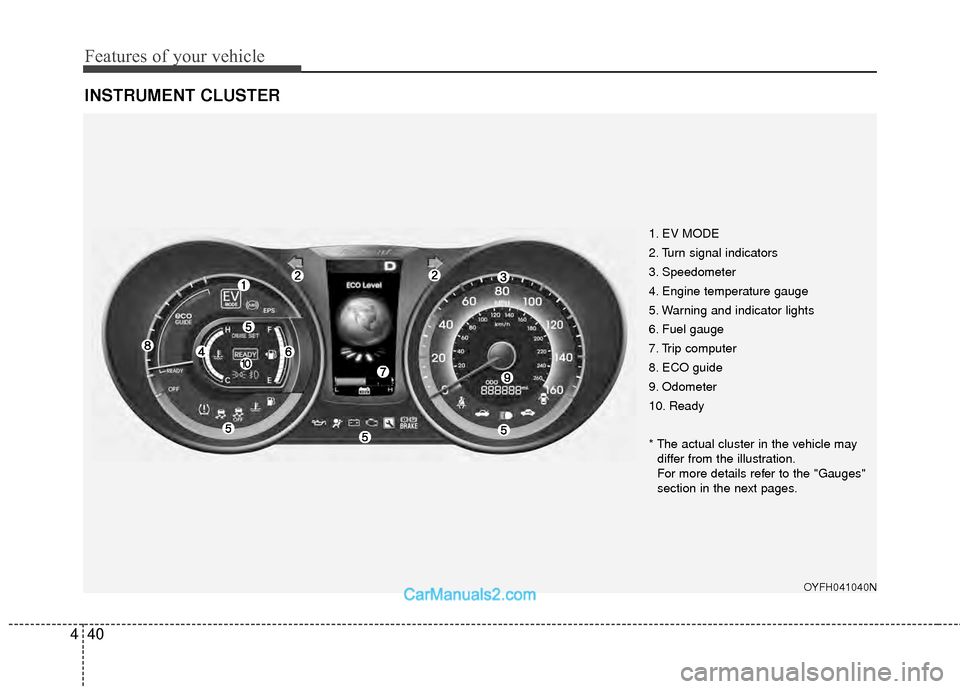
INSTRUMENT CLUSTER
1. EV MODE
2. Turn signal indicators
3. Speedometer
4. Engine temperature gauge
5. Warning and indicator lights
6. Fuel gauge
7. Trip computer
8. ECO guide
9. Odometer
10. Ready
* The actual cluster in the vehicle may
differ from the illustration.
For more details refer to the "Gauges"
section in the next pages.
OYFH041040N
Page 125 of 403
Features of your vehicle
44
4
Blue drive mode
Your vehicle is equipped with a highly
efficient power train based on Hyundai's
BlueDrive technology.
BlueDrive mode is for normal, everyday
driving for smooth efficient operation.
Each time you start the vehicle, BlueDrive is activated automatically.
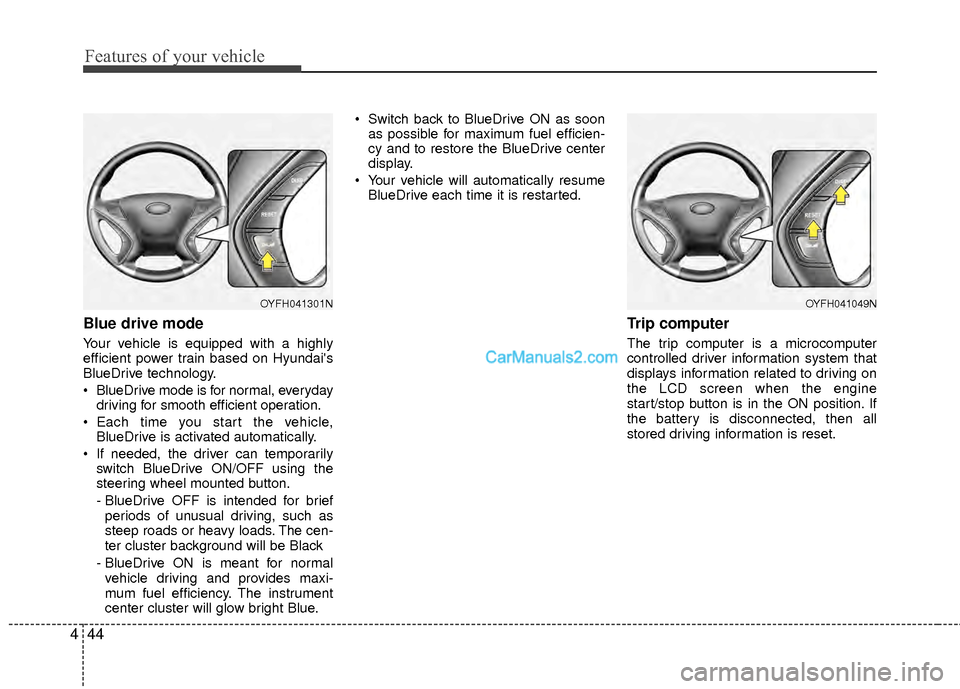
If needed, the driver can temporarily switch BlueDrive ON/OFF using the
steering wheel mounted button.
- BlueDrive OFF is intended for brief
periods of unusual driving, such as
steep roads or heavy loads. The cen-
ter cluster background will be Black
- BlueDrive ON is meant for normal vehicle driving and provides maxi-
mum fuel efficiency. The instrument
center cluster will glow bright Blue. Switch back to BlueDrive ON as soon
as possible for maximum fuel efficien-
cy and to restore the BlueDrive center
display.
Your vehicle will automatically resume BlueDrive each time it is restarted.
Trip computer
The trip computer is a microcomputer
controlled driver information system that
displays information related to driving on
the LCD screen when the engine
start/stop button is in the ON position. If
the battery is disconnected, then all
stored driving information is reset.
OYFH041049NOYFH041301N
Page 132 of 403
451
Features of your vehicle
✽
✽NOTICE
• If the vehicle is not on level ground or
the battery power has been interrupt-
ed, the “Distance to empty” function
may not operate correctly.
The trip computer may not register
additional fuel if less than 1.6 gallons (6
liters) of fuel are added to the vehicle.
• The fuel consumption and distance to empty values may vary significantly
based on driving conditions, driving
habits, and condition of the vehicle.
• The distance to empty value is an esti- mate of the available driving distance.
This value may differ from the actual
driving distance available.
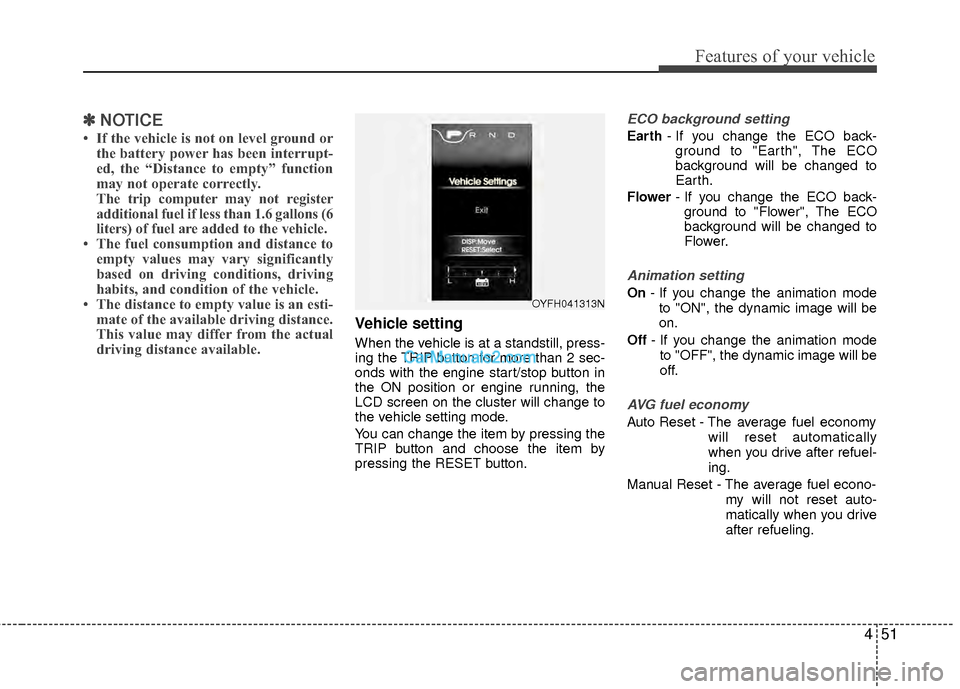
Vehicle setting
When the vehicle is at a standstill, press-
ing the TRIP button for more than 2 sec-
onds with the engine start/stop button in
the ON position or engine running, the
LCD screen on the cluster will change to
the vehicle setting mode.
You can change the item by pressing the
TRIP button and choose the item by
pressing the RESET button.
ECO background setting
Earth - If you change the ECO back-
ground to "Earth", The ECO
background will be changed to
Earth.
Flower - If you change the ECO back-
ground to "Flower", The ECO
background will be changed to
Flower.
Animation setting
On - If you change the animation mode
to "ON", the dynamic image will be
on.
Off - If you change the animation mode
to "OFF", the dynamic image will be
off.
AVG fuel economy
Auto Reset - The average fuel economy will reset automatically
when you drive after refuel-
ing.
Manual Reset - The average fuel econo- my will not reset auto-
matically when you drive
after refueling.
OYFH041313N
Page 329 of 403
Maintenance
36
7
Reset items
Items should be reset after the battery
has been discharged or the battery has
been disconnected.
Auto up/down window (See section 4)
Sunroof (See section 4)
Trip computer (See section 4)
Climate control system
(See section 4)
Clock (See section 4)
Audio (See section 4)WARNING
Before performing maintenance or recharging the battery, turn off
all accessories and stop the
engine.
The negative battery cable must be removed first and installed
last when the battery is discon-
nected.
Operation related to the battery should be done in an authorized
HYUNDAI dealer.
WARNING- Rechargingbattery
When recharging the battery,
observe the following precautions:
The battery must be removed
from the vehicle and placed in an
area with good ventilation.
Do not allow cigarettes, sparks, or flame near the battery.
Watch the battery during charg- ing, and stop or reduce the charg-
ing rate if the battery cells begin
gassing (boiling) violently or if
the temperature of the electrolyte
of any cell exceeds 120°F (49°C).
Wear eye protection when check- ing the battery during charging.
Disconnect the battery charger in the following order.
1. Turn off the battery charger main switch.
2. Unhook the negative clamp from the negative battery terminal.
3. Unhook the positive clamp from the positive battery terminal.
Page 399 of 403

I5
Index
GaugeEngine temperature gauge··················\
··················\
·····4-42
Fuel gauge ··················\
··················\
··················\
···········4-43
Glass antenna ··················\
··················\
··················\
·········4-111
Glove box··················\
··················\
··················\
···············4-105
Hazard warning flasher··················\
··················\
··············4-68
Hazardous driving conditions ··················\
··················\
····5-30
Headlight bulb replacement ··················\
··················\
·······7-60
Headrest ··················\
··················\
··················\
············3-7, 3-11
Highway driving ··················\
··················\
··················\
······5-33
Homelink mirror, see the Electric chromic mirror (ECM) with HomeLink system ··················\
··················\
·········4-31
Hood··················\
··················\
··················\
··················\
·······4-21
Horn ··················\
··················\
··················\
··················\
·······4-30
How to use this manual ··················\
··················\
···············1-2
Hybrid HMC Hybrid system··················\
··················\
················H2
State of charge (SOC) ··················\
··················\
··············H3
Sonata hev energy flow ··················\
··················\
··H4, 4-45
The componets of hybrid vehicle ··················\
··············H7
The air intake of hybrid battery ··················\
···············H12
The READY indicator··················\
··················\
···········4-41
The ECO level··················\
··················\
················H2, 4-47\
The EV MODE ··················\
··················\
··················\
···4-53 The service indicator ··················\
··················\
·············4-53
The ECO GUIDE ··················\
··················\
··················\
4-43
Hybrid electric vehicle··················\
··················\
···············4-45
Immobilizer system ··················\
··················\
··················\
···4-7
Indicator symbols on the instrument cluster ··················\
·1-7
Indicators and warnings ··················\
··················\
·············4-53
Inside rearview mirror ··················\
··················\
···············4-31
Instrument cluster ··················\
··················\
··················\
····4-40 Engine temperature gauge··················\
··················\
·····4-42
Fuel gauge ··················\
··················\
··················\
···········4-43
Hybrid electric vehicle ··················\
··················\
··········4-45
Instrument panel illumination ··················\
·················4-41\
Odometer ··················\
··················\
··················\
·············4-41
Speedometer ··················\
··················\
··················\
········4-42
Trip computer ··················\
··················\
··················\
······4-44
Warning and indicators ··················\
··················\
·········4-53
Instrument panel fuse··················\
··················\
·················7-51\
Instrument panel illumination··················\
··················\
····4-41
Instrument panel overview ··················\
··················\
··········2-3
Interior care··················\
··················\
··················\
··············7-73
Interior features··················\
··················\
··················\
······4-106 Aux, USB and iPod port ··················\
··················\
·····4-110
Clothes hanger··················\
··················\
··················\
···4-109
Cup holder ··················\
··················\
··················\
·········4-106
Digital clock ··················\
··················\
··················\
······4-108
Floor mat anchor(s) ··················\
··················\
·············4-109
G
I
H
Page 403 of 403

I9
Index
Tires and wheels ··················\
··················\
··················\
········8-4
Towing ··················\
··················\
··················\
··················\
···6-27
Trailer towing ··················\
··················\
··················\
··········5-44
TransaxleAutomatic transaxle ··················\
··················\
················5-9
Trip computer ··················\
··················\
··················\
··········4-44
Trunk ··················\
··················\
··················\
··················\
······4-15
Trunk overview ··················\
··················\
··················\
··········2-5
Using the tire mobility kit ··················\
··················\
·········6-24
Vehicle break-in process ··················\
··················\
··············1-5
Vehicle certification label ··················\
··················\
············8-7
Vehicle data collection and event data recorders (EDR)·1-6
Vehicle identification number (VIN) ··················\
·············8-7
Vehicle load limit ··················\
··················\
··················\
·····5-38 Certification label ··················\
··················\
··················\
5-41
Vehicle weight ··················\
··················\
··················\
·········5-43 Base curb weight ··················\
··················\
··················\
·5-43
Cargo weight ··················\
··················\
··················\
·······5-43
GAW (Gross axle weight) ··················\
··················\
·····5-43
GAWR (Gross axle weight rating)··················\
··········5-43
GVW (Gross vehicle weight)··················\
··················\
5-43
GVWR (Gross vehicle weight rating) ··················\
····5-43 Warning and indicators ··················\
··················\
··············4-53
Washer fluid ··················\
··················\
··················\
·············7-28
Weight ··················\
··················\
··················\
··················\
····5-43
Base curb weight ··················\
··················\
··················\
·5-43
Cargo weight ··················\
··················\
··················\
·······5-43
GAW (Gross axle weight) ··················\
··················\
·····5-43
GAWR (Gross axle weight rating)··················\
··········5-43
GVW (Gross vehicle weight)··················\
··················\
5-43
GVWR (Gross vehicle weight rating) ··················\
····5-43
Wheel alignment and tire balance ··················\
···············7-40
Wheel replacement ··················\
··················\
··················\
··7-42
Windows ··················\
··················\
··················\
··················\
4-17 Auto down window ··················\
··················\
···············4-18
Auto up/down window ··················\
··················\
··········4-19
Power window lock button ··················\
··················\
···4-20
Windshield defrosting and defogging··················\
········4-102 Defogging logic··················\
··················\
··················\
·4-104
Winter driving ··················\
··················\
··················\
··········5-34 Snow tires ··················\
··················\
··················\
············5-34
Tire chains ··················\
··················\
··················\
···········5-35
Wiper blades ··················\
··················\
··················\
············7-32
Wipers and washers ··················\
··················\
··················\
·4-74
U
V
W