ev system Hyundai Sonata Hybrid 2013 Repair Manual
[x] Cancel search | Manufacturer: HYUNDAI, Model Year: 2013, Model line: Sonata Hybrid, Model: Hyundai Sonata Hybrid 2013Pages: 425, PDF Size: 36.95 MB
Page 105 of 425
425
Features of your vehicle
PANORAMA SUNROOF (IF EQUIPPED)
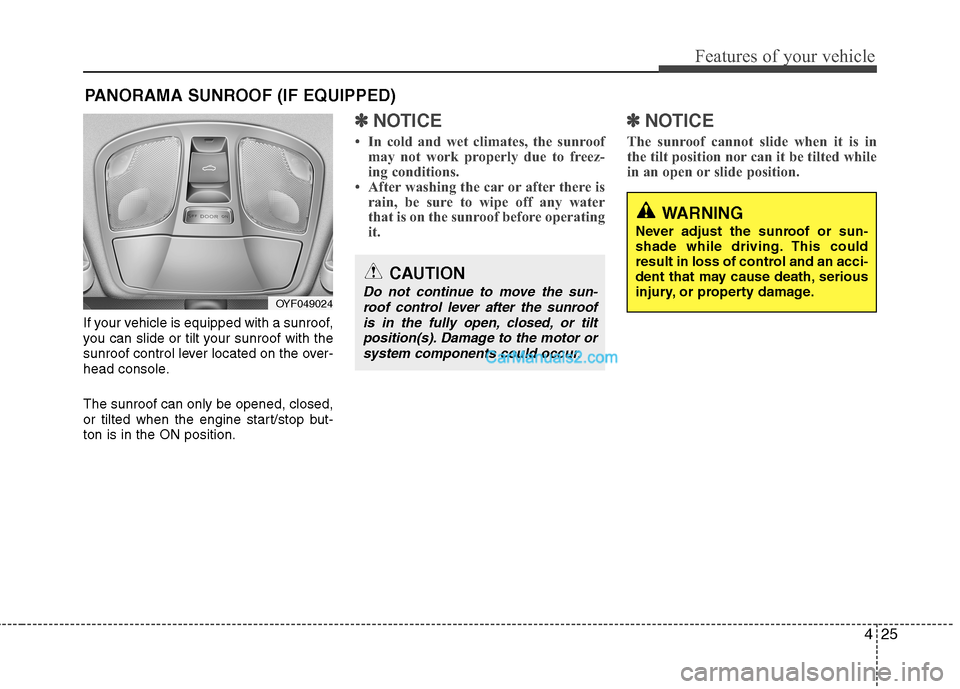
If your vehicle is equipped with a sunroof,
you can slide or tilt your sunroof with the
sunroof control lever located on the over-
head console.
The sunroof can only be opened, closed,
or tilted when the engine start/stop but-
ton is in the ON position.
✽ ✽
NOTICE
• In cold and wet climates, the sunroof
may not work properly due to freez-
ing conditions.
• After washing the car or after there is
rain, be sure to wipe off any water
that is on the sunroof before operating
it.
✽ ✽
NOTICE
The sunroof cannot slide when it is in
the tilt position nor can it be tilted while
in an open or slide position.
OYF049024
CAUTION
Do not continue to move the sun-
roof control lever after the sunroof
is in the fully open, closed, or tilt
position(s). Damage to the motor or
system components could occur.
WARNING
Never adjust the sunroof or sun-
shade while driving. This could
result in loss of control and an acci-
dent that may cause death, serious
injury, or property damage.
Page 108 of 425
Features of your vehicle
28 4
Resetting the sunroof
Whenever the vehicle battery is discon-
nected or discharged, or related fuse is
blown, you must reset your sunroof sys-
tem as follows:
1. Turn the engine start/stop button to the
ON position and close the sunroof
glass and sunshade completely.
2. Release the control lever.
3. Push the sunroof control lever forward
in the direction of close (about 10 sec-
onds) until the sunroof is moved a little.
Then, release the lever.
4. Push the sunroof control lever forward
in the direction of close until the sun-
roof operates as follows;
SUNSHADE OPEN →TILT OPEN →
SLIDE OPEN →SLIDE CLOSE →
SUNSHADE CLOSE
Then, release the control lever.
When this is complete, the sunroof
system is reset.
❈For more detailed information, contact
an authorized HYUNDAI dealer.CAUTION
If the sunroof is not reset when the
vehicle battery is disconnected or
discharged, or related fuse is
blown, the sunroof may operate
improperly.
Page 109 of 425
429
Features of your vehicle
Electric power steering (EPS)
The power steering uses a motor to
assist you in steering the vehicle. If the
engine is off or if the power steering sys-
tem becomes inoperative, the vehicle
may still be steered, but it will require
increased steering effort.
The motor driven power steering is con-
trolled by a power steering control unit
which senses the steering wheel torque
and vehicle speed to command the
motor.
The steering becomes heavier as the
vehicle’s speed increases and becomes
lighter as the vehicle’s speed decreases
for optimum steering control.
Should you notice any change in the
effort required to steer during normal
vehicle operation, have the power steer-
ing checked by an authorized HYUNDAI
dealer.
✽ ✽
NOTICE
The following symptoms may occur dur-
ing normal vehicle operation:
• The EPS warning light does not illumi-
nate.
• The steering effort is high immediately
after turning the engine start/stop but-
ton on. This happens as the system
performs the EPS system diagnostics.
When the diagnostics is completed, the
steering wheel will return to its normal
condition.
• A click noise may be heard from the
EPS relay after the engine start/stop
button is turned to the ON or LOCK
position.
• A motor noise may be heard when the
vehicle is at a stop or at a low driving
speed.
• If the Electric Power Steering System
does not operate normally, the warn-
ing light will illuminate on the instru-
ment cluster. The steering wheel may
become difficult to control or operate
abnormally. Take your vehicle to an
authorized HYUNDAI dealer and
have the vehicle checked as soon as
possible.
• When you operate the steering wheel
in low temperature, noise could occur.
If temperature rises, the noise will dis-
appear. This is a normal condition.
STEERING WHEEL
CAUTION
If the Electric Power Steering
System does not operate normal-
ly, the warning light will illuminate
on the instrument cluster. The
steering wheel may become diffi-
cult to control or operate abnor-
mally. Take your vehicle to an
authorized HYUNDAI dealer and
have the vehicle checked as soon
as possible.
When you operate the steering
wheel in low temperature, abnor-
mal noise could occur. If tempera-
ture rises, the noise will disap-
pear. This is a normal condition.
Page 111 of 425
431
Features of your vehicle
MIRRORS
Inside rearview mirror
Adjust the rearview mirror so that the
center view through the rear window is
seen. Make this adjustment before you
start driving.
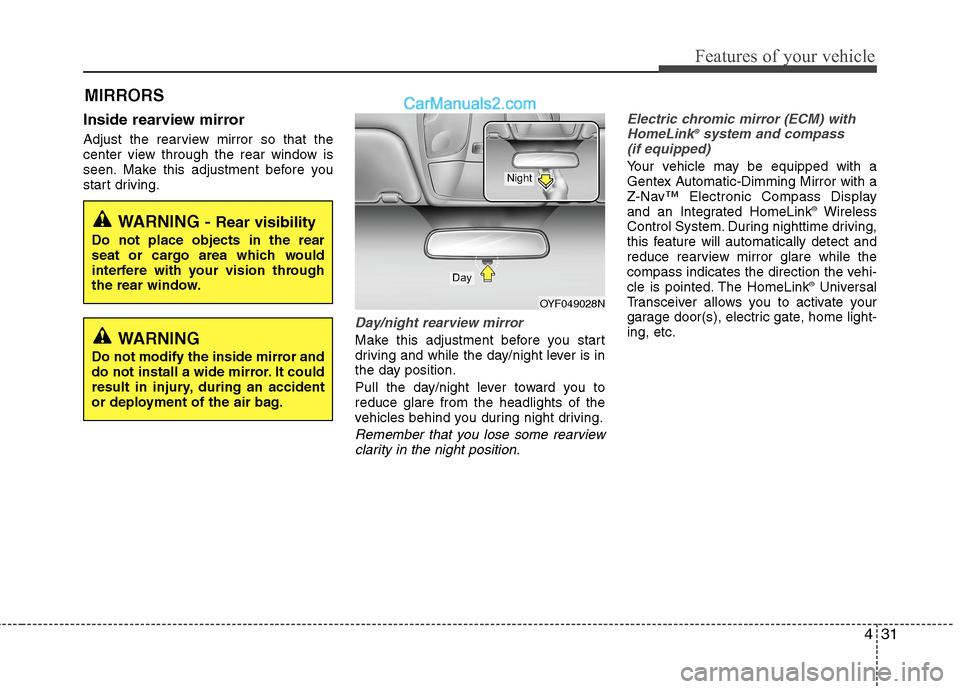
Day/night rearview mirror
Make this adjustment before you start
driving and while the day/night lever is in
the day position.
Pull the day/night lever toward you to
reduce glare from the headlights of the
vehicles behind you during night driving.
Remember that you lose some rearview
clarity in the night position.Electric chromic mirror (ECM) with
HomeLink
®system and compass
(if equipped)
Your vehicle may be equipped with a
Gentex Automatic-Dimming Mirror with a
Z-Nav™ Electronic Compass Display
and an Integrated HomeLink
®Wireless
Control System. During nighttime driving,
this feature will automatically detect and
reduce rearview mirror glare while the
compass indicates the direction the vehi-
cle is pointed. The HomeLink
®Universal
Transceiver allows you to activate your
garage door(s), electric gate, home light-
ing, etc.
WARNING - Rear visibility
Do not place objects in the rear
seat or cargo area which would
interfere with your vision through
the rear window.
OYF049028N
Day
Night
WARNING
Do not modify the inside mirror and
do not install a wide mirror. It could
result in injury, during an accident
or deployment of the air bag.
Page 114 of 425
Features of your vehicle
34 4
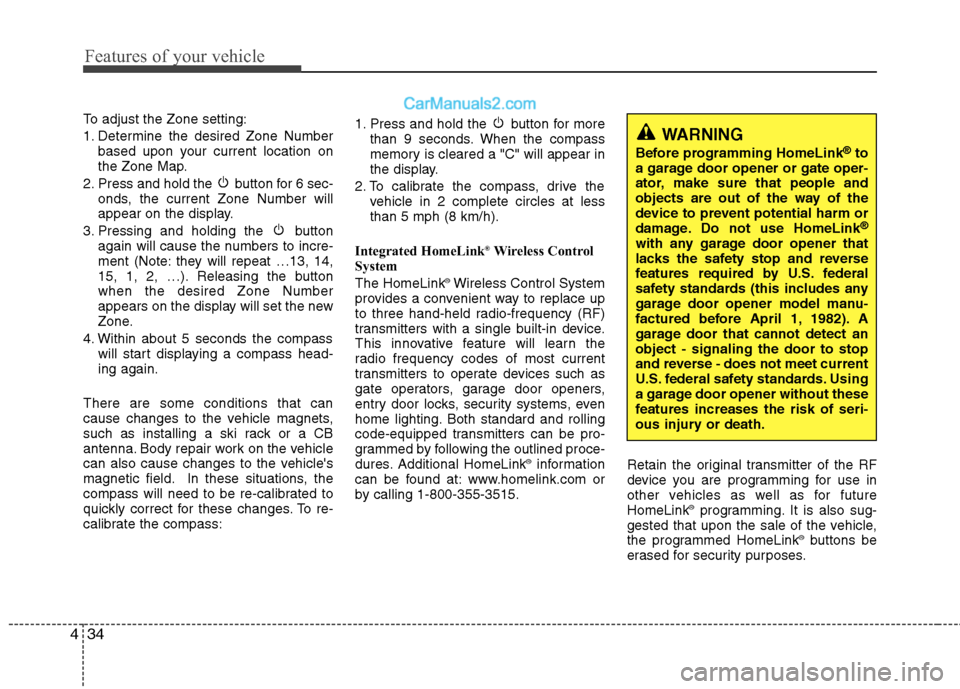
To adjust the Zone setting:
1. Determine the desired Zone Number
based upon your current location on
the Zone Map.
2. Press and hold the button for 6 sec-
onds, the current Zone Number will
appear on the display.
3. Pressing and holding the button
again will cause the numbers to incre-
ment (Note: they will repeat …13, 14,
15, 1, 2, …). Releasing the button
when the desired Zone Number
appears on the display will set the new
Zone.
4. Within about 5 seconds the compass
will start displaying a compass head-
ing again.
There are some conditions that can
cause changes to the vehicle magnets,
such as installing a ski rack or a CB
antenna. Body repair work on the vehicle
can also cause changes to the vehicle's
magnetic field. In these situations, the
compass will need to be re-calibrated to
quickly correct for these changes. To re-
calibrate the compass:1. Press and hold the button for more
than 9 seconds. When the compass
memory is cleared a "C" will appear in
the display.
2. To calibrate the compass, drive the
vehicle in 2 complete circles at less
than 5 mph (8 km/h).
Integrated HomeLink
®Wireless Control
System
The HomeLink
®Wireless Control System
provides a convenient way to replace up
to three hand-held radio-frequency (RF)
transmitters with a single built-in device.
This innovative feature will learn the
radio frequency codes of most current
transmitters to operate devices such as
gate operators, garage door openers,
entry door locks, security systems, even
home lighting. Both standard and rolling
code-equipped transmitters can be pro-
grammed by following the outlined proce-
dures. Additional HomeLink
®information
can be found at: www.homelink.com or
by calling 1-800-355-3515.Retain the original transmitter of the RF
device you are programming for use in
other vehicles as well as for future
HomeLink
®programming. It is also sug-
gested that upon the sale of the vehicle,
the programmed HomeLink
®buttons be
erased for security purposes.
WARNING
Before programming HomeLink®to
a garage door opener or gate oper-
ator, make sure that people and
objects are out of the way of the
device to prevent potential harm or
damage. Do not use HomeLink
®
with any garage door opener that
lacks the safety stop and reverse
features required by U.S. federal
safety standards (this includes any
garage door opener model manu-
factured before April 1, 1982). A
garage door that cannot detect an
object - signaling the door to stop
and reverse - does not meet current
U.S. federal safety standards. Using
a garage door opener without these
features increases the risk of seri-
ous injury or death.
Page 117 of 425
437
Features of your vehicle
Gate operator & Canadian program-
ming
During programming, your handheld
transmitter may automatically stop trans-
mitting. Continue to press the Integrated
HomeLink
®Wireless Control System but-
ton (note steps 2 through 3 in the
Programming portion of this document)
while you press and re-press ("cycle")
your handheld transmitter every two sec-
onds until the frequency signal has been
learned. The indicator light will flash
slowly and then rapidly after several sec-
onds upon successful training.
Operating HomeLink
®
To operate, simply press and release the
programmed HomeLink®button.
Activation will now occur for the trained
device (i.e. garage door opener, gate
operator, security system, entry door
lock, home/office lighting, etc.). For con-
venience, the hand-held transmitter of
the device may also be used at any time.Reprogramming a single HomeLink
®
button
To program a device to HomeLink®using
a HomeLink®button previously trained,
follow these steps:
1. Press and hold the desired HomeLink
®
button. DO NOT release the button.
2. The indicator light will begin to flash
after 20 seconds. Without releasing the
HomeLink
®button, proceed with
"Programming" step 2.
For questions or comments, contact
HomeLink
®at www.homelink.comor 1-
800-355-3515.
Erasing HomeLink
®buttons
Individual buttons cannot be erased.
However, to erase all three programmed
buttons:
1. Press and hold the two outer
HomeLink
®buttons until the indicator
light begins to flash after 10 seconds.
2. Release both buttons. Do not hold for
longer than 20 seconds.
The Integrated HomeLink
®Wireless
Control System is now in the training
(learn) mode and can be programmed at
any time following the appropriate steps
in the Programming sections above.FCC ID: NZLTLMHL4
IC: 4112A-TLMHL4
This device complies with Part 15 of
the FCC Rules.
Operation is subject to the following two
conditions:
1. This device may not cause harmful
interference, and
2. This device must accept any interfer-
ence received, including interference
that may cause undesired operation.
NVS
®is a registered trademark and Z-
Nav™ is a trademark of the Gentex
Corporation, Zeeland, Michigan.
HomeLink
®is a registered trademark
owned by Johnson Controls,
Incorporated, Milwaukee, Wisconsin.
CAUTION
The transceiver has been tested and
complies with FCC and Industry
Canada rules. Changes or modifica-
tions not expressly approved by the
party responsible for compliance
could void the user's authority to
operate the device.
Page 124 of 425
Features of your vehicle
44 4
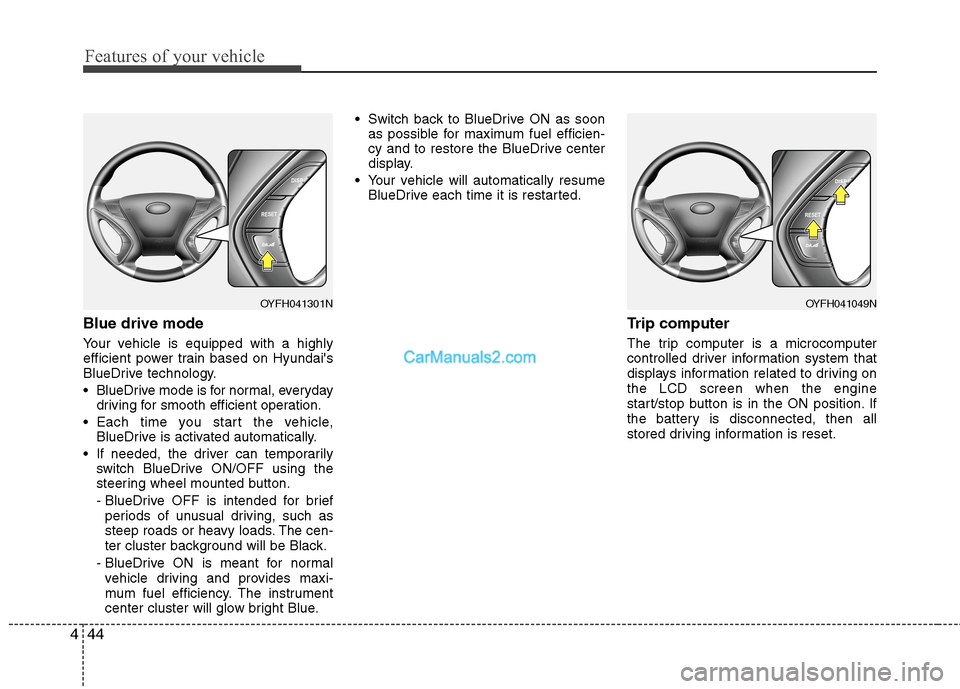
Blue drive mode
Your vehicle is equipped with a highly
efficient power train based on Hyundai's
BlueDrive technology.
BlueDrive mode is for normal, everyday
driving for smooth efficient operation.
Each time you start the vehicle,
BlueDrive is activated automatically.
If needed, the driver can temporarily
switch BlueDrive ON/OFF using the
steering wheel mounted button.
- BlueDrive OFF is intended for brief
periods of unusual driving, such as
steep roads or heavy loads. The cen-
ter cluster background will be Black.
- BlueDrive ON is meant for normal
vehicle driving and provides maxi-
mum fuel efficiency. The instrument
center cluster will glow bright Blue. Switch back to BlueDrive ON as soon
as possible for maximum fuel efficien-
cy and to restore the BlueDrive center
display.
Your vehicle will automatically resume
BlueDrive each time it is restarted.
Trip computer
The trip computer is a microcomputer
controlled driver information system that
displays information related to driving on
the LCD screen when the engine
start/stop button is in the ON position. If
the battery is disconnected, then all
stored driving information is reset.
OYFH041049NOYFH041301N
Page 125 of 425
445
Features of your vehicle
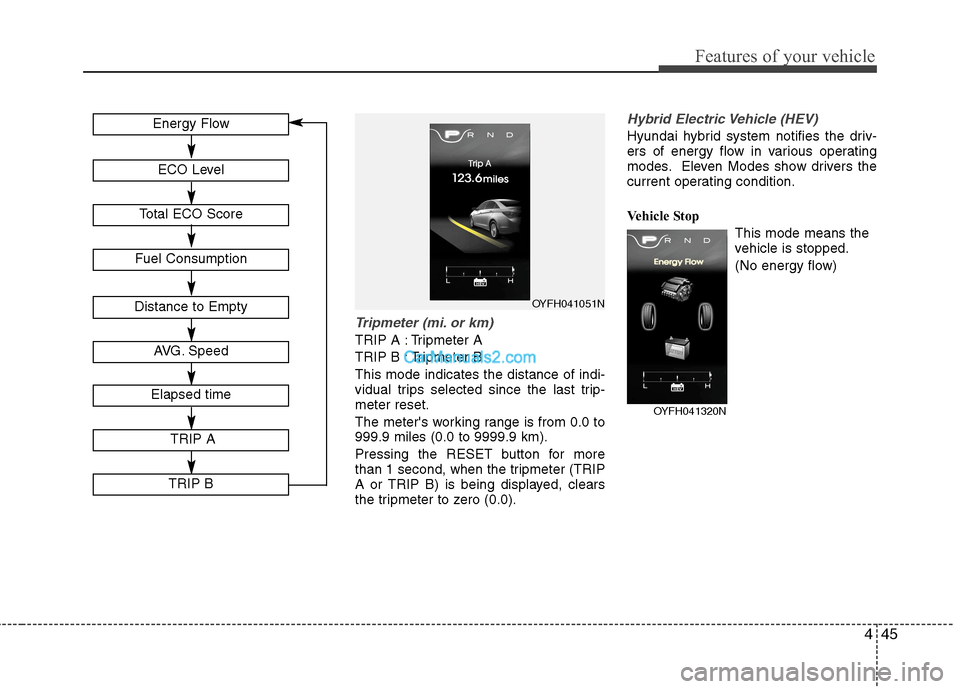
Tripmeter (mi. or km)
TRIP A : Tripmeter A
TRIP B : Tripmeter B
This mode indicates the distance of indi-
vidual trips selected since the last trip-
meter reset.
The meter's working range is from 0.0 to
999.9 miles (0.0 to 9999.9 km).
Pressing the RESET button for more
than 1 second, when the tripmeter (TRIP
A or TRIP B) is being displayed, clears
the tripmeter to zero (0.0).
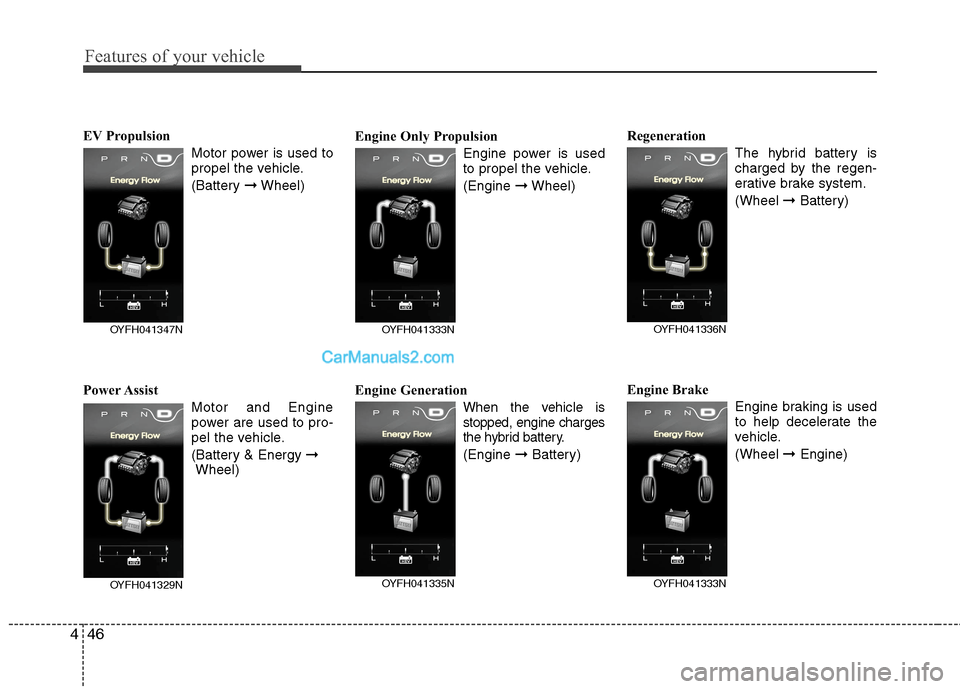
Hybrid Electric Vehicle (HEV)
Hyundai hybrid system notifies the driv-
ers of energy flow in various operating
modes. Eleven Modes show drivers the
current operating condition.
Vehicle Stop
This mode means the
vehicle is stopped.
(No energy flow)
OYFH041051NDistance to Empty
Fuel Consumption
Energy Flow
ECO Level
Total ECO Score
AVG. Speed
Elapsed time
TRIP A
TRIP B
OYFH041320N
Page 126 of 425
Features of your vehicle
46 4
EV Propulsion
Motor power is used to
propel the vehicle.
(Battery ➞Wheel)
Power Assist
Motor and Engine
power are used to pro-
pel the vehicle.
(Battery & Energy ➞
Wheel)Engine Only Propulsion
Engine power is used
to propel the vehicle.
(Engine ➞Wheel)
Engine Generation
When the vehicle is
stopped, engine charges
the hybrid battery.
(Engine ➞Battery)Regeneration
The hybrid battery is
charged by the regen-
erative brake system.
(Wheel ➞Battery)
Engine Brake
Engine braking is used
to help decelerate the
vehicle.
(Wheel ➞Engine)
OYFH041333N
OYFH041335N
OYFH041336N
OYFH041333N
OYFH041347N
OYFH041329N
Page 127 of 425
447
Features of your vehicle
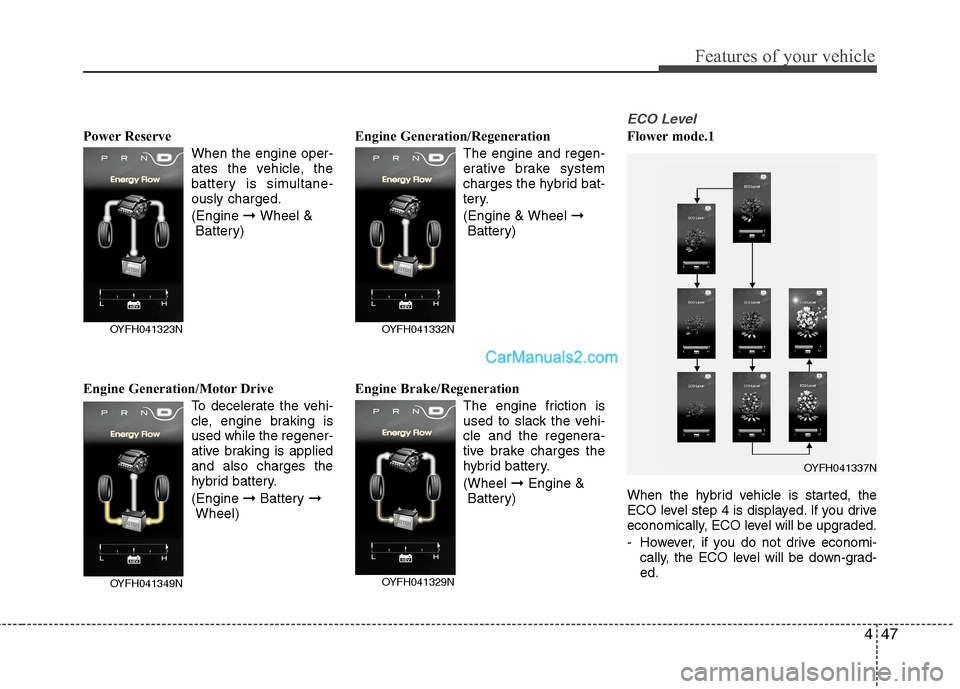
Power Reserve
When the engine oper-
ates the vehicle, the
battery is simultane-
ously charged.
(Engine ➞ Wheel &
Battery)
Engine Generation/Motor Drive
To decelerate the vehi-
cle, engine braking is
used while the regener-
ative braking is applied
and also charges the
hybrid battery.
(Engine ➞Battery ➞
Wheel)Engine Generation/Regeneration
The engine and regen-
erative brake system
charges the hybrid bat-
tery.
(Engine & Wheel ➞
Battery)
Engine Brake/Regeneration
The engine friction is
used to slack the vehi-
cle and the regenera-
tive brake charges the
hybrid battery.
(Wheel ➞Engine &
Battery)
ECO Level
Flower mode.1
When the hybrid vehicle is started, the
ECO level step 4 is displayed. If you drive
economically, ECO level will be upgraded.
- However, if you do not drive economi-
cally, the ECO level will be down-grad-
ed.
OYFH041349N
OYFH041323N
OYFH041329N
OYFH041332N
OYFH041337N