power steering Hyundai Sonata Hybrid 2013 Owner's Manual
[x] Cancel search | Manufacturer: HYUNDAI, Model Year: 2013, Model line: Sonata Hybrid, Model: Hyundai Sonata Hybrid 2013Pages: 425, PDF Size: 36.95 MB
Page 13 of 425
17
Introduction
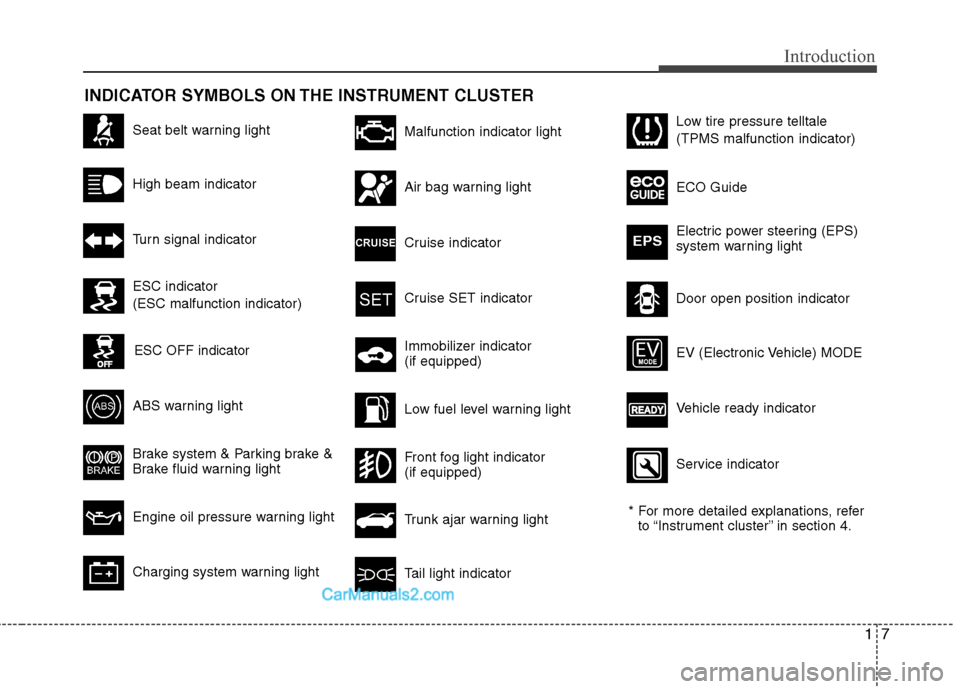
INDICATOR SYMBOLS ON THE INSTRUMENT CLUSTER
Seat belt warning light
High beam indicator
Turn signal indicator
ABS warning light
Brake system & Parking brake &
Brake fluid warning light
Engine oil pressure warning light
Malfunction indicator light
Air bag warning light
Cruise indicator
Cruise SET indicator
Immobilizer indicator
(if equipped)
Low fuel level warning light
* For more detailed explanations, refer
to “Instrument cluster” in section 4.
Charging system warning lightTail light indicator
Trunk ajar warning light
Front fog light indicator
(if equipped)
Door open position indicator Low tire pressure telltale
(TPMS malfunction indicator)
ECO Guide
Electric power steering (EPS)
system warning light
EPS
ESC indicator
(ESC malfunction indicator)
ESC OFF indicator
Vehicle ready indicator EV (Electronic Vehicle) MODE
Service indicator
Page 15 of 425
Your vehicle at a glance
2 2
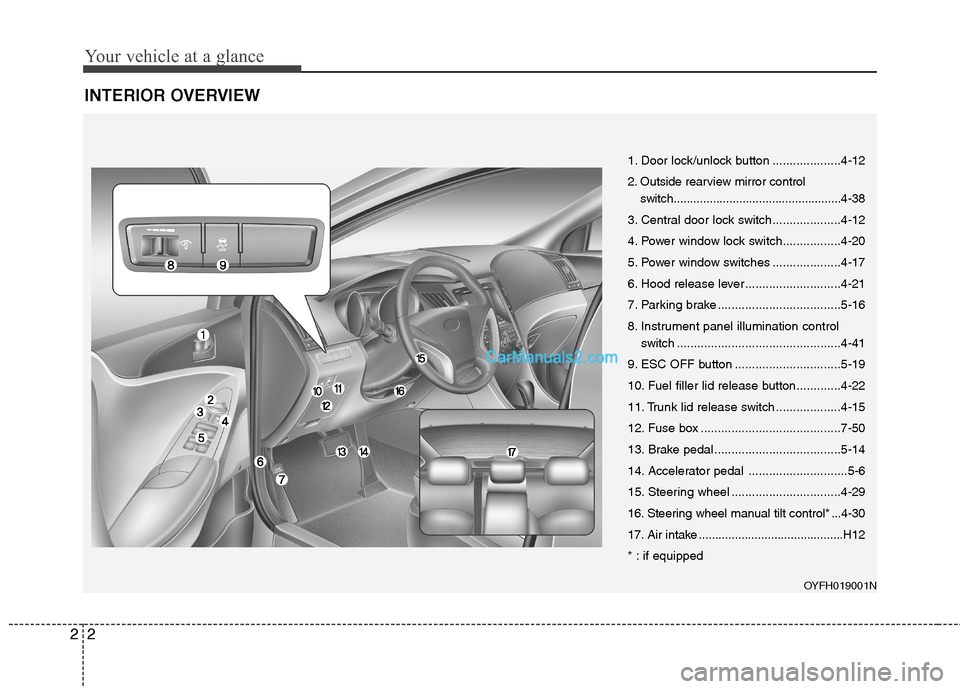
INTERIOR OVERVIEW
OYFH019001N
1. Door lock/unlock button ....................4-12
2. Outside rearview mirror control
switch...................................................4-38
3. Central door lock switch....................4-12
4. Power window lock switch.................4-20
5. Power window switches ....................4-17
6. Hood release lever ............................4-21
7. Parking brake ....................................5-16
8. Instrument panel illumination control
switch ................................................4-41
9. ESC OFF button ...............................5-19
10. Fuel filler lid release button.............4-22
11. Trunk lid release switch ...................4-15
12. Fuse box .........................................7-50
13. Brake pedal .....................................5-14
14. Accelerator pedal .............................5-6
15. Steering wheel ................................4-29
16. Steering wheel manual tilt control* ...4-30
17. Air intake ............................................H12
* : if equipped
Page 23 of 425
35
Safety features of your vehicle
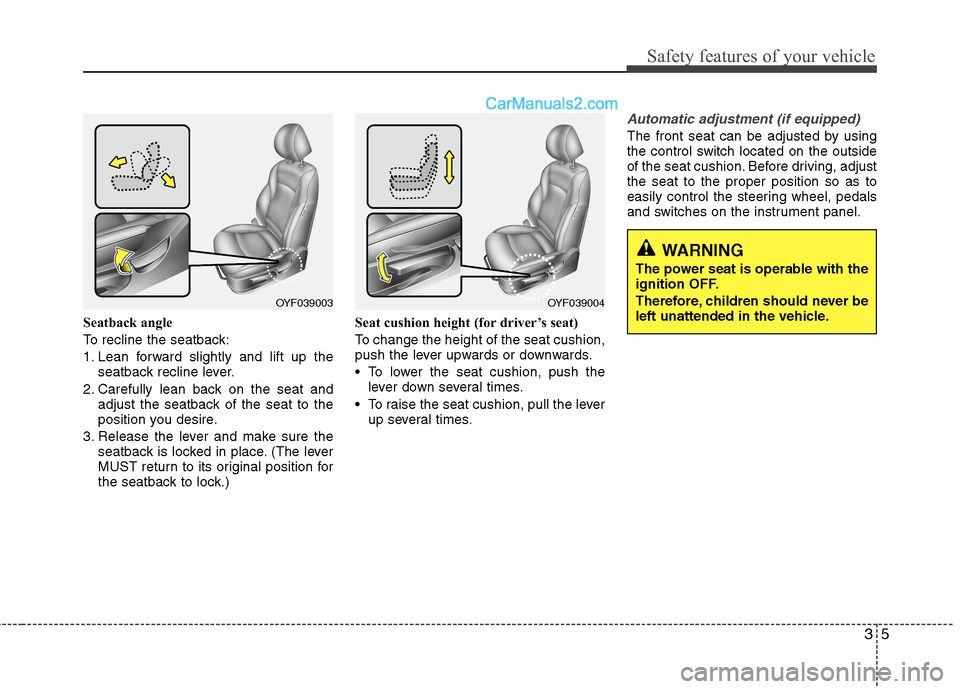
Seatback angle
To recline the seatback:
1. Lean forward slightly and lift up the
seatback recline lever.
2. Carefully lean back on the seat and
adjust the seatback of the seat to the
position you desire.
3. Release the lever and make sure the
seatback is locked in place. (The lever
MUST return to its original position for
the seatback to lock.)Seat cushion height (for driver’s seat)
To change the height of the seat cushion,
push the lever upwards or downwards.
• To lower the seat cushion, push the
lever down several times.
To raise the seat cushion, pull the lever
up several times.
Automatic adjustment (if equipped)
The front seat can be adjusted by using
the control switch located on the outside
of the seat cushion. Before driving, adjust
the seat to the proper position so as to
easily control the steering wheel, pedals
and switches on the instrument panel.
WARNING
The power seat is operable with the
ignition OFF.
Therefore, children should never be
left unattended in the vehicle.
OYF039003OYF039004
Page 109 of 425
429
Features of your vehicle
Electric power steering (EPS)
The power steering uses a motor to
assist you in steering the vehicle. If the
engine is off or if the power steering sys-
tem becomes inoperative, the vehicle
may still be steered, but it will require
increased steering effort.
The motor driven power steering is con-
trolled by a power steering control unit
which senses the steering wheel torque
and vehicle speed to command the
motor.
The steering becomes heavier as the
vehicle’s speed increases and becomes
lighter as the vehicle’s speed decreases
for optimum steering control.
Should you notice any change in the
effort required to steer during normal
vehicle operation, have the power steer-
ing checked by an authorized HYUNDAI
dealer.
✽ ✽
NOTICE
The following symptoms may occur dur-
ing normal vehicle operation:
• The EPS warning light does not illumi-
nate.
• The steering effort is high immediately
after turning the engine start/stop but-
ton on. This happens as the system
performs the EPS system diagnostics.
When the diagnostics is completed, the
steering wheel will return to its normal
condition.
• A click noise may be heard from the
EPS relay after the engine start/stop
button is turned to the ON or LOCK
position.
• A motor noise may be heard when the
vehicle is at a stop or at a low driving
speed.
• If the Electric Power Steering System
does not operate normally, the warn-
ing light will illuminate on the instru-
ment cluster. The steering wheel may
become difficult to control or operate
abnormally. Take your vehicle to an
authorized HYUNDAI dealer and
have the vehicle checked as soon as
possible.
• When you operate the steering wheel
in low temperature, noise could occur.
If temperature rises, the noise will dis-
appear. This is a normal condition.
STEERING WHEEL
CAUTION
If the Electric Power Steering
System does not operate normal-
ly, the warning light will illuminate
on the instrument cluster. The
steering wheel may become diffi-
cult to control or operate abnor-
mally. Take your vehicle to an
authorized HYUNDAI dealer and
have the vehicle checked as soon
as possible.
When you operate the steering
wheel in low temperature, abnor-
mal noise could occur. If tempera-
ture rises, the noise will disap-
pear. This is a normal condition.
Page 124 of 425
Features of your vehicle
44 4
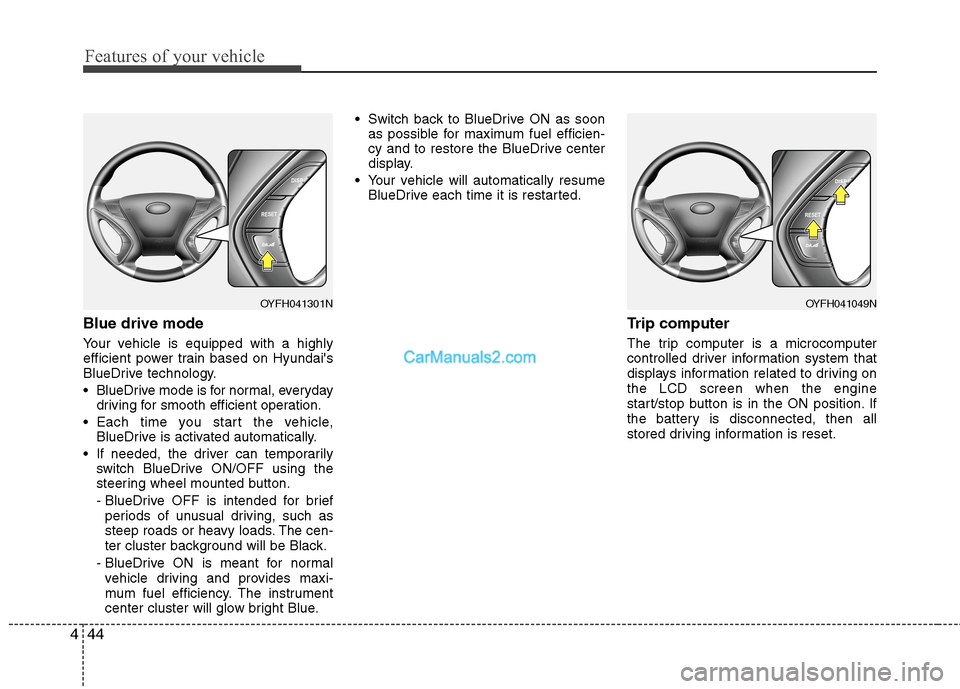
Blue drive mode
Your vehicle is equipped with a highly
efficient power train based on Hyundai's
BlueDrive technology.
BlueDrive mode is for normal, everyday
driving for smooth efficient operation.
Each time you start the vehicle,
BlueDrive is activated automatically.
If needed, the driver can temporarily
switch BlueDrive ON/OFF using the
steering wheel mounted button.
- BlueDrive OFF is intended for brief
periods of unusual driving, such as
steep roads or heavy loads. The cen-
ter cluster background will be Black.
- BlueDrive ON is meant for normal
vehicle driving and provides maxi-
mum fuel efficiency. The instrument
center cluster will glow bright Blue. Switch back to BlueDrive ON as soon
as possible for maximum fuel efficien-
cy and to restore the BlueDrive center
display.
Your vehicle will automatically resume
BlueDrive each time it is restarted.
Trip computer
The trip computer is a microcomputer
controlled driver information system that
displays information related to driving on
the LCD screen when the engine
start/stop button is in the ON position. If
the battery is disconnected, then all
stored driving information is reset.
OYFH041049NOYFH041301N
Page 141 of 425
461
Features of your vehicle
Cruise SET indicator
The indicator light illuminates when the
cruise function switch (SET- or RES+) is
ON.
The cruise SET indicator light in the
instrument cluster is illuminated when
the cruise control switch (SET- or RES+)
is pushed. The cruise SET indicator light
does not illuminate when the cruise con-
trol switch (CANCEL) is pushed or the
system is disengaged.Electric power steering
(EPS) system warning light
This indicator light comes on after the
engine start/stop button is turned to the
ON position and then it will go out.
This light also comes on when the EPS
needs repairs. If it comes on while driv-
ing, have your vehicle inspected by an
authorized HYUNDAI dealer.
Key reminder warning chime
(if equipped)
If the driver’s door is opened while the
smart key is in the vehicle with the
engine start/stop button in ACC or the
smart key is in the smart key holder with
the engine start/stop button in OFF, the
key reminder warning chime will sound.
The chime sounds until the smart key is
removed from the smart key holder or the
driver’s door is closed.SETEPS
Page 190 of 425
Features of your vehicle
110 4
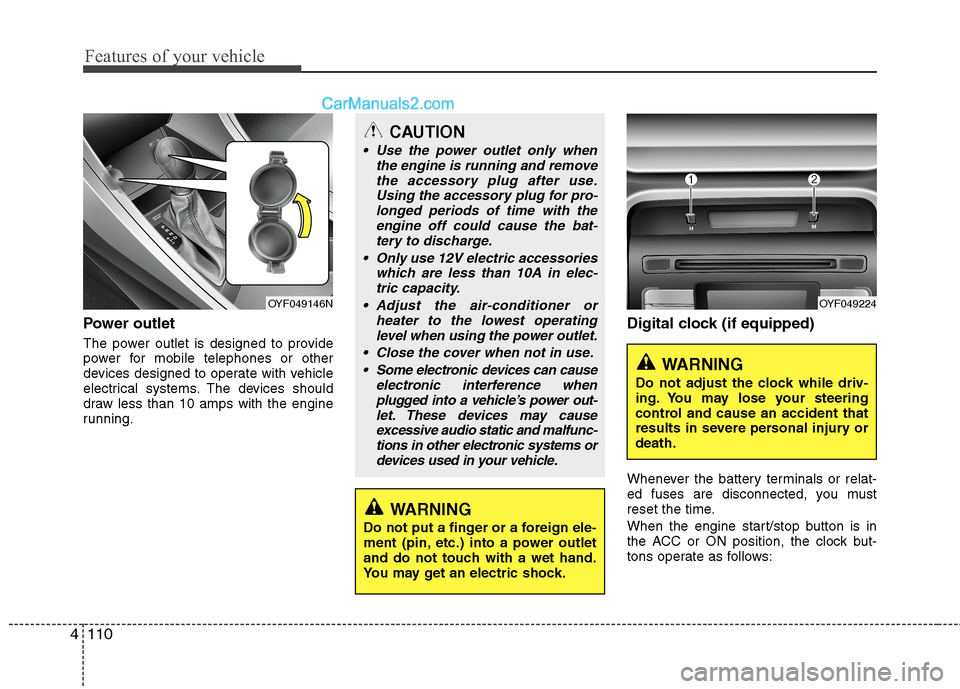
Power outlet
The power outlet is designed to provide
power for mobile telephones or other
devices designed to operate with vehicle
electrical systems. The devices should
draw less than 10 amps with the engine
running.
Digital clock (if equipped)
Whenever the battery terminals or relat-
ed fuses are disconnected, you must
reset the time.
When the engine start/stop button is in
the ACC or ON position, the clock but-
tons operate as follows:
CAUTION
Use the power outlet only when
the engine is running and remove
the accessory plug after use.
Using the accessory plug for pro-
longed periods of time with the
engine off could cause the bat-
tery to discharge.
Only use 12V electric accessories
which are less than 10A in elec-
tric capacity.
Adjust the air-conditioner or
heater to the lowest operating
level when using the power outlet.
Close the cover when not in use.
Some electronic devices can cause
electronic interference when
plugged into a vehicle’s power out-
let. These devices may cause
excessive audio static and malfunc-
tions in other electronic systems or
devices used in your vehicle.
WARNING
Do not put a finger or a foreign ele-
ment (pin, etc.) into a power outlet
and do not touch with a wet hand.
You may get an electric shock.
OYF049146NOYF049224
WARNING
Do not adjust the clock while driv-
ing. You may lose your steering
control and cause an accident that
results in severe personal injury or
death.
Page 227 of 425
4147
Features of your vehicle
Phone
Before using the Bluetooth®Wireless
Technology enabled phone features
In order to use
Bluetooth®Wireless
Technology phone, you must first pair
and connect the
Bluetooth®Wireless
Technology mobile phone.
If the mobile phone is not paired or
connected, it is not possible to enter
Phone mode. Once a phone is paired
or connected, the guidance screen will
be displayed.
If Priority is set upon vehicle ignition
(IGN/ACC ON), the
Bluetooth®
Wireless Technology enabled phone
will be automatically connected. Even if
you are outside, the
Bluetooth®
Wireless Technology enabled phone
will be automatically connected once
you are in the vicinity of the vehicle. If
you do not want automatic
Bluetooth®
Wireless Technology enabled phone
connection, set the Bluetooth®
Wireless Technology power to OFF.
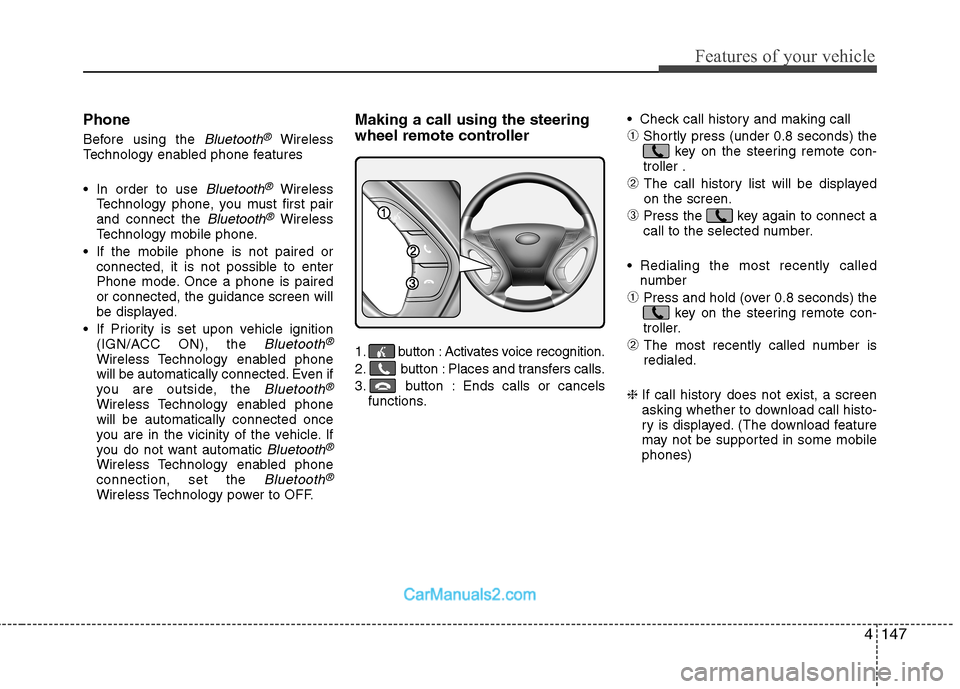
Making a call using the steering
wheel remote controller
1. button : Activates voice recognition.
2. button : Places and transfers calls.
3. button : Ends calls or cancels
functions. Check call history and making call
➀Shortly press (under 0.8 seconds) the
key on the steering remote con-
troller .
➁ The call history list will be displayed
on the screen.
➂Press the key again to connect a
call to the selected number.
Redialing the most recently called
number
➀Press and hold (over 0.8 seconds) the
key on the steering remote con-
troller.
➁ The most recently called number is
redialed.
❈ If call history does not exist, a screen
asking whether to download call histo-
ry is displayed. (The download feature
may not be supported in some mobile
phones)
Page 271 of 425
529
Driving your vehicle
Use your air conditioning sparingly.
The air conditioning system is operat-
ed by engine power so your fuel econ-
omy is reduced when you use it.
Open windows at high speeds can
reduce fuel economy.
Fuel economy is less in crosswinds
and headwinds. To help offset some of
this loss, slow down when driving in
these conditions.
Keeping a vehicle in good operating con-
dition is important both for economy and
safety. Therefore, have an authorized
HYUNDAI dealer perform scheduled
inspections and maintenance.
WARNING - HEV system
off during motion
Never turn the HEV system off to
coast down hills or anytime the
vehicle is in motion. The power
steering and power brakes will not
function properly without the HEV
system running. Instead, keep the
HEV system on and downshift to an
appropriate gear for engine braking
effect. In addition, turning off the
ignition while driving could engage
the steering wheel lock resulting in
loss of vehicle steering which
could cause serious injury or
death.
Page 311 of 425
625
What to do in an emergency
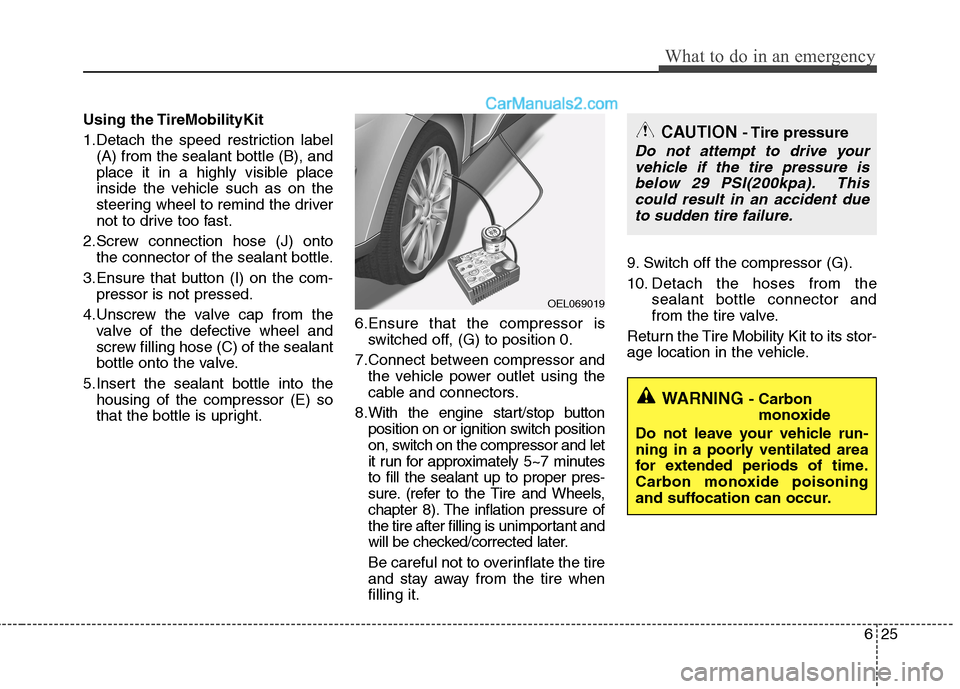
Using the TireMobilityKit
1.Detach the speed restriction label
(A) from the sealant bottle (B), and
place it in a highly visible place
inside the vehicle such as on the
steering wheel to remind the driver
not to drive too fast.
2.Screw connection hose (J) onto
the connector of the sealant bottle.
3.Ensure that button (I) on the com-
pressor is not pressed.
4.Unscrew the valve cap from the
valve of the defective wheel and
screw filling hose (C) of the sealant
bottle onto the valve.
5.Insert the sealant bottle into the
housing of the compressor (E) so
that the bottle is upright.6.Ensure that the compressor is
switched off, (G) to position 0.
7.Connect between compressor and
the vehicle power outlet using the
cable and connectors.
8.With the engine start/stop button
position on or ignition switch position
on, switch on the compressor and let
it run for approximately 5~7 minutes
to fill the sealant up to proper pres-
sure. (refer to the Tire and Wheels,
chapter 8). The inflation pressure of
the tire after filling is unimportant and
will be checked/corrected later.
Be careful not to overinflate the tire
and stay away from the tire when
filling it.9. Switch off the compressor (G).
10. Detach the hoses from the
sealant bottle connector and
from the tire valve.
Return the Tire Mobility Kit to its stor-
age location in the vehicle.
OEL069019
CAUTION - Tire pressure
Do not attempt to drive your
vehicle if the tire pressure is
below 29 PSI(200kpa). This
could result in an accident due
to sudden tire failure.
WARNING - Carbon
monoxide
Do not leave your vehicle run-
ning in a poorly ventilated area
for extended periods of time.
Carbon monoxide poisoning
and suffocation can occur.