Service Hyundai Sonata Hybrid 2015 User Guide
[x] Cancel search | Manufacturer: HYUNDAI, Model Year: 2015, Model line: Sonata Hybrid, Model: Hyundai Sonata Hybrid 2015Pages: 543, PDF Size: 25.53 MB
Page 174 of 543
493
Features of your vehicle
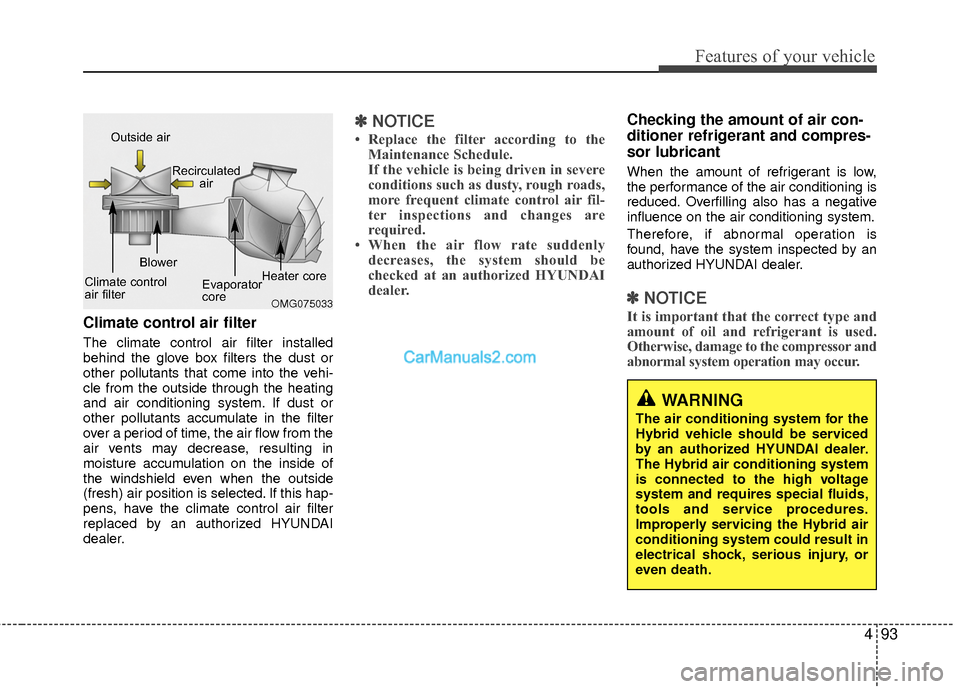
Climate control air filter
The climate control air filter installed
behind the glove box filters the dust or
other pollutants that come into the vehi-
cle from the outside through the heating
and air conditioning system. If dust or
other pollutants accumulate in the filter
over a period of time, the air flow from the
air vents may decrease, resulting in
moisture accumulation on the inside of
the windshield even when the outside
(fresh) air position is selected. If this hap-
pens, have the climate control air filter
replaced by an authorized HYUNDAI
dealer.
✽ ✽NOTICE
• Replace the filter according to the
Maintenance Schedule.
If the vehicle is being driven in severe
conditions such as dusty, rough roads,
more frequent climate control air fil-
ter inspections and changes are
required.
• When the air flow rate suddenly decreases, the system should be
checked at an authorized HYUNDAI
dealer.
Checking the amount of air con-
ditioner refrigerant and compres-
sor lubricant
When the amount of refrigerant is low,
the performance of the air conditioning is
reduced. Overfilling also has a negative
influence on the air conditioning system.
Therefore, if abnormal operation is
found, have the system inspected by an
authorized HYUNDAI dealer.
✽ ✽ NOTICE
It is important that the correct type and
amount of oil and refrigerant is used.
Otherwise, damage to the compressor and
abnormal system operation may occur.
WARNING
The air conditioning system for the
Hybrid vehicle should be serviced
by an authorized HYUNDAI dealer.
The Hybrid air conditioning system
is connected to the high voltage
system and requires special fluids,
tools and service procedures.
Improperly servicing the Hybrid air
conditioning system could result in
electrical shock, serious injury, or
even death.
OMG075033
Outside air
Recirculatedair
Climate control
air filter Blower
Evaporator
coreHeater core
Page 185 of 543
Features of your vehicle
104
4
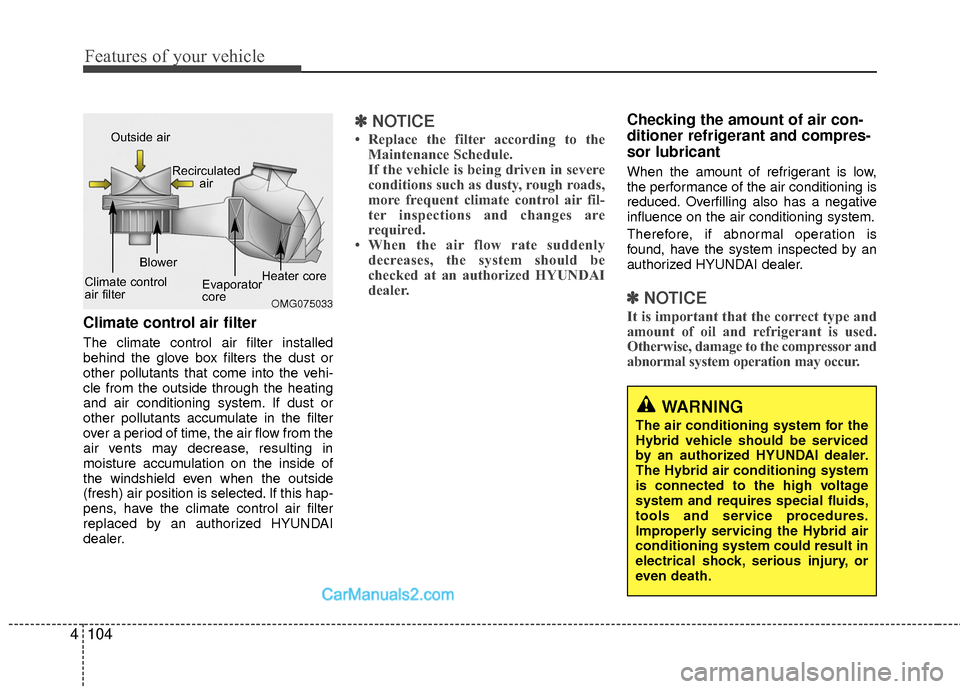
Climate control air filter
The climate control air filter installed
behind the glove box filters the dust or
other pollutants that come into the vehi-
cle from the outside through the heating
and air conditioning system. If dust or
other pollutants accumulate in the filter
over a period of time, the air flow from the
air vents may decrease, resulting in
moisture accumulation on the inside of
the windshield even when the outside
(fresh) air position is selected. If this hap-
pens, have the climate control air filter
replaced by an authorized HYUNDAI
dealer.
✽ ✽
NOTICE
• Replace the filter according to the
Maintenance Schedule.
If the vehicle is being driven in severe
conditions such as dusty, rough roads,
more frequent climate control air fil-
ter inspections and changes are
required.
• When the air flow rate suddenly decreases, the system should be
checked at an authorized HYUNDAI
dealer.
Checking the amount of air con-
ditioner refrigerant and compres-
sor lubricant
When the amount of refrigerant is low,
the performance of the air conditioning is
reduced. Overfilling also has a negative
influence on the air conditioning system.
Therefore, if abnormal operation is
found, have the system inspected by an
authorized HYUNDAI dealer.
✽ ✽ NOTICE
It is important that the correct type and
amount of oil and refrigerant is used.
Otherwise, damage to the compressor and
abnormal system operation may occur.OMG075033
Outside air
Recirculatedair
Climate control
air filter Blower
Evaporator
coreHeater core
WARNING
The air conditioning system for the
Hybrid vehicle should be serviced
by an authorized HYUNDAI dealer.
The Hybrid air conditioning system
is connected to the high voltage
system and requires special fluids,
tools and service procedures.
Improperly servicing the Hybrid air
conditioning system could result in
electrical shock, serious injury, or
even death.
Page 196 of 543
4115
Features of your vehicle
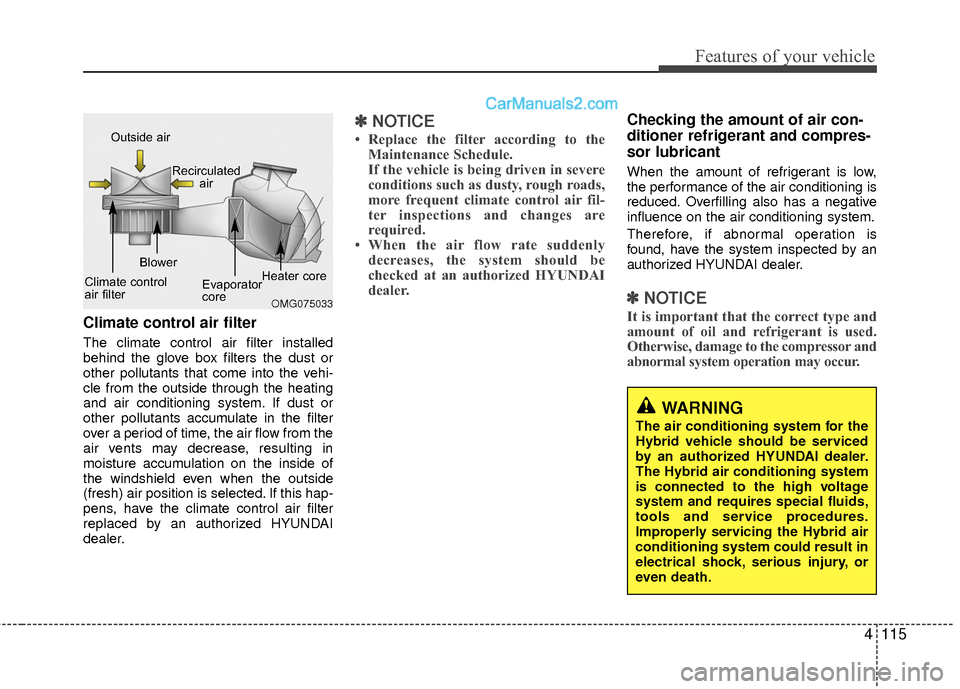
Climate control air filter
The climate control air filter installed
behind the glove box filters the dust or
other pollutants that come into the vehi-
cle from the outside through the heating
and air conditioning system. If dust or
other pollutants accumulate in the filter
over a period of time, the air flow from the
air vents may decrease, resulting in
moisture accumulation on the inside of
the windshield even when the outside
(fresh) air position is selected. If this hap-
pens, have the climate control air filter
replaced by an authorized HYUNDAI
dealer.
✽ ✽NOTICE
• Replace the filter according to the
Maintenance Schedule.
If the vehicle is being driven in severe
conditions such as dusty, rough roads,
more frequent climate control air fil-
ter inspections and changes are
required.
• When the air flow rate suddenly decreases, the system should be
checked at an authorized HYUNDAI
dealer.
Checking the amount of air con-
ditioner refrigerant and compres-
sor lubricant
When the amount of refrigerant is low,
the performance of the air conditioning is
reduced. Overfilling also has a negative
influence on the air conditioning system.
Therefore, if abnormal operation is
found, have the system inspected by an
authorized HYUNDAI dealer.
✽ ✽ NOTICE
It is important that the correct type and
amount of oil and refrigerant is used.
Otherwise, damage to the compressor and
abnormal system operation may occur. OMG075033
Outside air
Recirculatedair
Climate control
air filter Blower
Evaporator
coreHeater core
WARNING
The air conditioning system for the
Hybrid vehicle should be serviced
by an authorized HYUNDAI dealer.
The Hybrid air conditioning system
is connected to the high voltage
system and requires special fluids,
tools and service procedures.
Improperly servicing the Hybrid air
conditioning system could result in
electrical shock, serious injury, or
even death.
Page 213 of 543
Features of your vehicle
132
4
(Continued)
Do not place beverages close to the audio system. Spilling bever-ages may lead to system mal-function.
In case of product malfunction, please contact your place of pur-chase or After Service center.
Placing the audio system within an electromagnetic environmentmay result in noise interference.
Prevent caustic solutions such as perfume and cosmetic oil fromcontacting the dashboardbecause they may cause damageor discoloration.✽
✽ NOTICE - USING THE USB
DEVICE
• To use an external USB device,
make sure the device is not connect-
ed when starting up the vehicle.
Connect the device after starting
up.
• If you start the engine when the USB device is connected, it may
damage the USB device. (USB
flashdrives are very sensitive to
electric shock.)
• If the engine is started up or turned off while the external USB device is
connected, the external USB device
may not work.
• The System may not play unau- thenticated MP3 or WMA files.
1) It can only play MP3 files with the compression rate between
8Kbps~320Kbps.
2) It can only play WMA music files with the compression rate between
8Kbps~320Kbps.
• Take precautions for static electric- ity when connecting or disconnect-
ing the external USB device. (Continued)(Continued)
• An encrypted MP3 PLAYER is not
recognizable.
• Depending on the condition of the external USB device, the connected
external USB device can be unrec-
ognizable.
• When the formatted byte/sector setting of External USB device is
not either 512BYTE or 2048BYTE,
then the device will not be recog-
nized.
• Use only a USB device formatted to FAT 12/16/32.
• USB devices without USB I/F authentication may not be recog-
nizable.
• Make sure the USB connection ter- minal does not come in contact with
the human body or other objects.
• If you repeatedly connect or discon- nect the USB device in a short peri-
od of time, it may break the device.
• You may hear a strange noise when connecting or disconnecting a USB
device. (Continued)
Page 216 of 543
4135
Features of your vehicle
✽
✽NOTICE - Bluetooth®
Wireless Technology
• The Bluetooth®word mark and logos
are registered trademarks owned by
Bluetooth SIG, lnc. and any use of
such marks is under license.
A Bluetooth
®enabled call phone is
required to use Bluetooth®wireless
technology.
• Bluetooth
®Wirelss Technology phone
compatibility can be checked by visit-
ing www
. hyundaiusa.comand under
the SERVICE & PARTS - BLUE-
TOOTH COMPATIBILITY menu.
✽ ✽ NOTICE - BEFORE USING
THE
Bluetooth®
HANDSFREE
What is Bluetooth®?
•Bluetooth®refers to a short-distance
wireless networking technology which
uses a 2.4GHz ~ 2.48GHz frequency to
connect various devices within a short
distance.
• Supported within PCs, external devices, Bluetooth
®phones, PDAs,
various electronic devices, and auto-
motive environments, Bluetooth
®
allows data to be transmitted at high
speeds without having to use a con-
nector cable.
• Bluetooth
®Handsfree refers to a
device which allows the user to conve-
niently make phone calls with
Bluetooth
®mobile phones through the
audio system.
• Bluetooth
®Handsfree may not be sup-
ported in some mobile phones. To learn
more about mobile device compatibility,
visit www
. hyundaiusa.com.
✽ ✽ NOTICE - PRECAUTIONS
FOR SAFE DRIVING
•Bluetooth®Handsfree is a feature that
enables drivers to practice safe driv-
ing. Connecting the head unit with a
Bluetooth
®phone allows the user to
conveniently make and receive calls
and use contacts. Before using
Bluetooth
®, carefully read the contents
of this user’s manual.
• Excessive use or operations while driving may lead to negligent driving
practices and result in accidents.
Refrain from excessive operations
while driving.
• Viewing the screen for prolonged peri- ods of time is dangerous and may lead
to accidents. When driving, view the
screen only for short periods of time.
Page 225 of 543
Features of your vehicle
144
4
HD RadioTMTechnology
(for HD RADIOTMequipped model)
HD Radio Technology manufactured
under license from iBiquity Digital
Corporation. U.S. and Foreign Patents.
HD Radio™ and the HD, HD Radio, and
“Arc” logos are proprietary trademarks of
iBiquity Digital Corp. Program Service Data: Contributes to the
superior user experience of HD Radio
Technology. Presents song name, artist,
station IDs, HD2/HD3 Channel Guide,
and other relevant data streams.
Adjacent to traditional main stations are
extra local FM channels. These
HD2/HD3 Channels provide new, original
music as well as deep cuts into tradition-
al genre.
Digital, CD-quality sound. HD Radio
Technology enables local radio stations
to broadcast a clean digital signal. AM
sounds like today’s FM and FM sounds
like a CD.
HD RadioTMsignal delay
To overcome the delay that digital sys-
tems inherently produce, HD RadioTM
technology first uses the audio signal of
the analog broadcasting when you tune
to an AM station or to the main channel
of a FM station. After that, the system will
blend from analog to digital signal.
Normally, this blending is very smooth. If
you experience a skip in program content
of several seconds, the radio station has
not implemented HD Radio
TMbroadcast-
ing correctly. This is not a problem with
your audio system.
Due to the fact that sub channels are only
broadcasting digital, blending from analog
to digital signal is not possible if you tune
to a sub channel. In this case playback of
the sub channel starts after several sec-
onds, this is a normal function.
Page 285 of 543
Features of your vehicle
204
4
Blue Link®
(if equipped)
Hyundai aims to offer differentiated cus-
tomer values through a ‘Connected Car
Life,’ which is to provide consumers with
fast and reliable IT technology. As con-
sumers’ lifestyles become more and more
mobile in thanks to remarkable advances
in smart phones, tablet PCs and overall
wireless telecommunication, new lifestyle
patterns demand seamless connection
between one’s office, home, outdoors and
automobiles.
Automobile companies are now faced with
the task of shifting their paradigm from
vehicle-centered services to customer
value-centered services, with the ultimate
goal of securing global leadership in the
field of vehicle IT and telematics. Hyundai Motor plans to achieve this by
realizing a terminal platform flexible to
changes in IT technology, cooperating
with global IT companies, creating an
eco-system and providing the latest con-
tents & services based on an open envi-
ronment.
Using the Room Mirror Key
Selecting the room mirror key will allow
you to make service required inquiries,
POI info searches, and emergency res-
cues by connecting to the Blue Link
®
Center.
Such features can be used only after
subscribing to the Blue Link
®service.
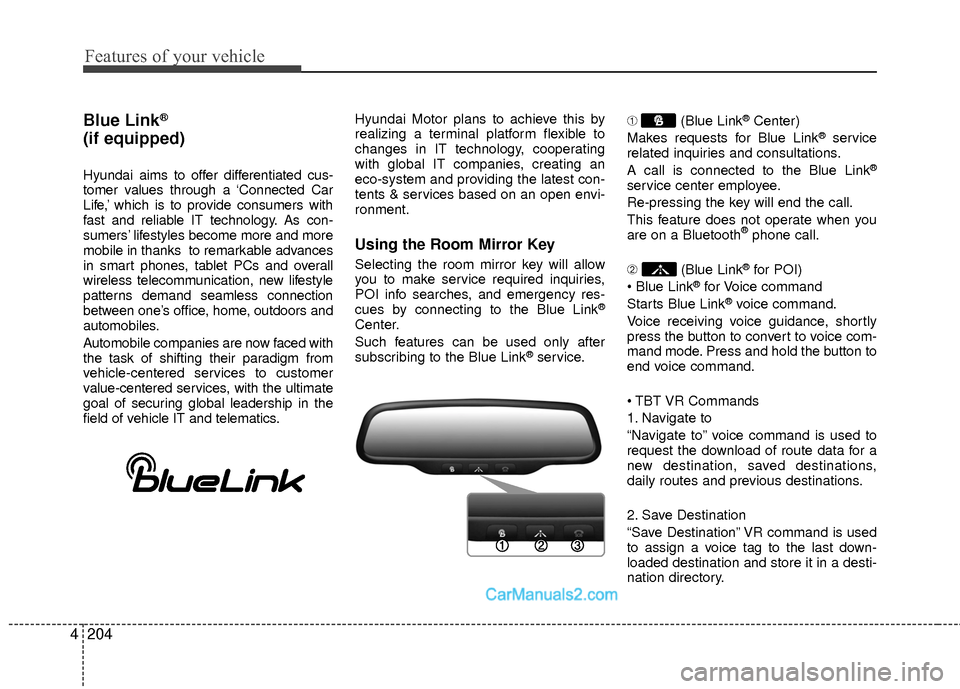
➀
(Blue Link
®Center)
Makes requests for Blue Link®service
related inquiries and consultations.
A call is connected to the Blue Link
®
service center employee.
Re-pressing the key will end the call.
This feature does not operate when you
are on a Bluetooth
®phone call.
\b (Blue Link
®for POI)
®for Voice command
Starts Blue Link®voice command.
Voice receiving voice guidance, shortly
press the button to convert to voice com-
mand mode. Press and hold the button to
end voice command.
1. Navigate to
“Navigate to” voice command is used to
request the download of route data for a
new destination, saved destinations,
daily routes and previous destinations.
2. Save Destination
“Save Destination” VR command is used
to assign a voice tag to the last down-
loaded destination and store it in a desti-
nation directory.
Page 294 of 543
4213
Features of your vehicle
HD RadioTMTechnology
(for HD RADIOTMequipped model)
HD Radio Technology manufactured
under license from iBiquity Digital
Corporation. U.S. and Foreign Patents.
HD Radio™ and the HD, HD Radio, and
“Arc” logos are proprietary trademarks of
iBiquity Digital Corp. Program Service Data: Contributes to the
superior user experience of HD Radio
Technology. Presents song name, artist,
station IDs, HD2/HD3 Channel Guide,
and other relevant data streams.
Adjacent to traditional main stations are
extra local FM channels. These
HD2/HD3 Channels provide new, original
music as well as deep cuts into tradition-
al genre.
Digital, CD-quality sound. HD Radio
Technology enables local radio stations
to broadcast a clean digital signal. AM
sounds like today’s FM and FM sounds
like a CD.
HD RadioTMsignal delay
To overcome the delay that digital sys-
tems inherently produce, HD RadioTM
technology first uses the audio signal of
the analog broadcasting when you tune
to an AM station or to the main channel
of a FM station. After that, the system will
blend from analog to digital signal.
Normally, this blending is very smooth. If
you experience a skip in program content
of several seconds, the radio station has
not implemented HD Radio
TMbroadcast-
ing correctly. This is not a problem with
your audio system.
Due to the fact that sub channels are only
broadcasting digital, blending from analog
to digital signal is not possible if you tune
to a sub channel. In this case playback of
the sub channel starts after several sec-
onds, this is a normal function.
Page 354 of 543
4273
Features of your vehicle
Blue Link®
(if equipped)
Hyundai aims to offer differentiated cus-
tomer values through a ‘Connected Car
Life,’ which is to provide consumers with
fast and reliable IT technology. As con-
sumers’ lifestyles become more and more
mobile in thanks to remarkable advances
in smart phones, tablet PCs and overall
wireless telecommunication, new lifestyle
patterns demand seamless connection
between one’s office, home, outdoors and
automobiles.
Automobile companies are now faced with
the task of shifting their paradigm from
vehicle-centered services to customer
value-centered services, with the ultimate
goal of securing global leadership in the
field of vehicle IT and telematics.Hyundai Motor plans to achieve this by
realizing a terminal platform flexible to
changes in IT technology, cooperating
with global IT companies, creating an
eco-system and providing the latest con-
tents & services based on an open envi-
ronment.
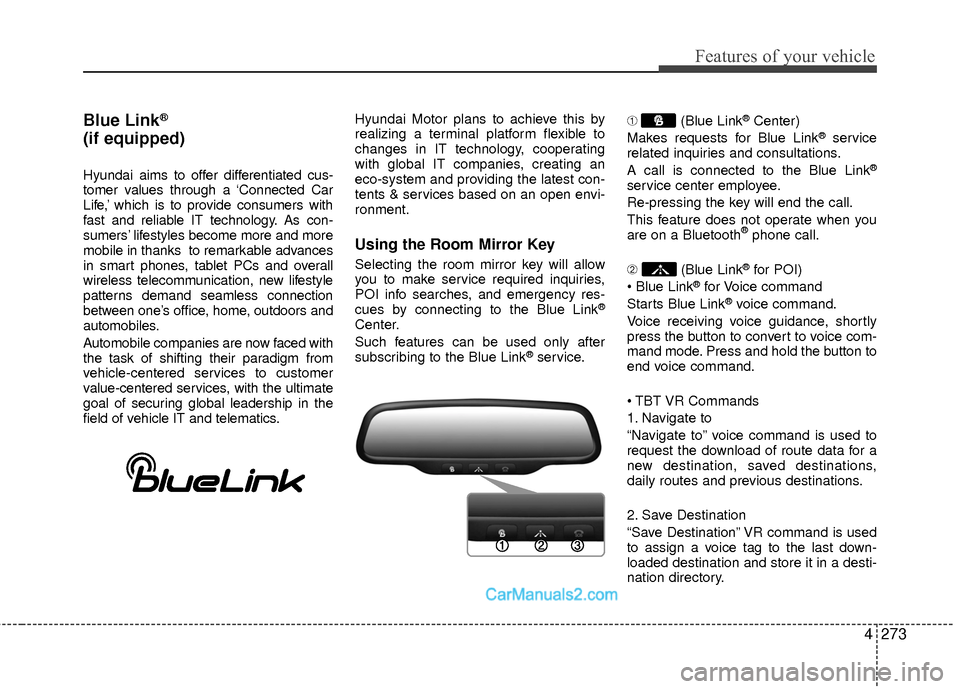
Using the Room Mirror Key
Selecting the room mirror key will allow
you to make service required inquiries,
POI info searches, and emergency res-
cues by connecting to the Blue Link
®
Center.
Such features can be used only after
subscribing to the Blue Link
®service.
➀
(Blue Link
®Center)
Makes requests for Blue Link®service
related inquiries and consultations.
A call is connected to the Blue Link
®
service center employee.
Re-pressing the key will end the call.
This feature does not operate when you
are on a Bluetooth
®phone call.
\b (Blue Link
®for POI)
®for Voice command
Starts Blue Link®voice command.
Voice receiving voice guidance, shortly
press the button to convert to voice com-
mand mode. Press and hold the button to
end voice command.
1. Navigate to
“Navigate to” voice command is used to
request the download of route data for a
new destination, saved destinations,
daily routes and previous destinations.
2. Save Destination
“Save Destination” VR command is used
to assign a voice tag to the last down-
loaded destination and store it in a desti-
nation directory.
Page 368 of 543
511
Driving your vehicle
R (Reverse)
Use this position to drive the vehicle
backward.N (Neutral)
The wheels and transaxle are not
engaged. The vehicle will roll freely even
on the slightest incline unless the parking
brake or service brakes are applied.
D (Drive)
This is the normal forward driving posi-
tion. The transaxle will automatically shift
through a 6-gear sequence, providing the
best fuel economy and power.
For extra power when passing another
vehicle or climbing grades, depress the
accelerator, at which time the transaxle
will automatically downshift to a lower
gear.
✽ ✽
NOTICE
Always come to a complete stop before
shifting into D (Drive).
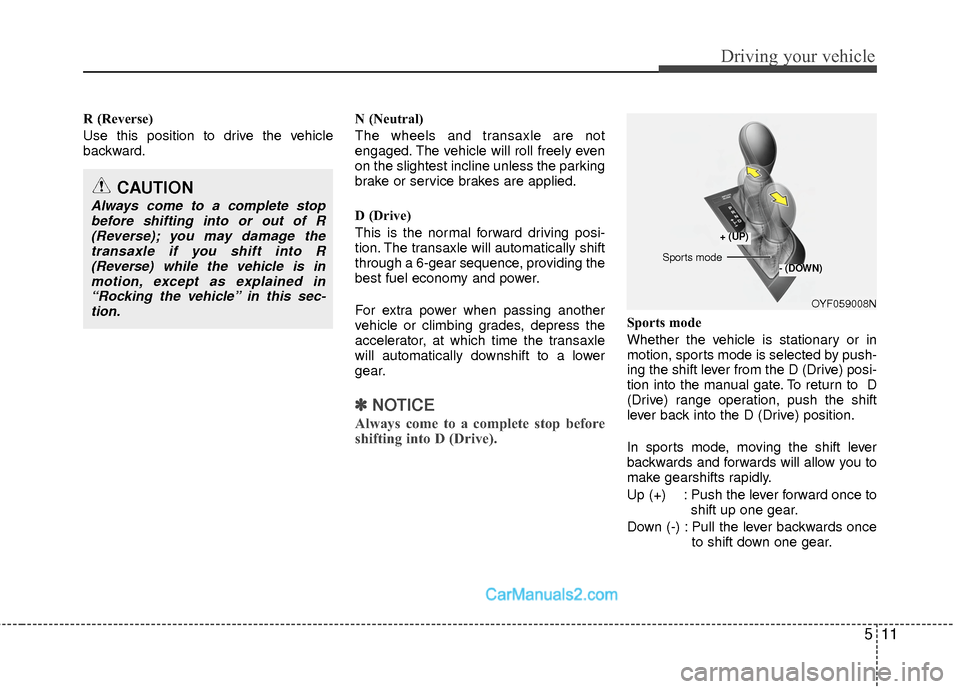
Sports mode
Whether the vehicle is stationary or in
motion, sports mode is selected by push-
ing the shift lever from the D (Drive) posi-
tion into the manual gate. To return to D
(Drive) range operation, push the shift
lever back into the D (Drive) position.
In sports mode, moving the shift lever
backwards and forwards will allow you to
make gearshifts rapidly.
Up (+) : Push the lever forward once to
shift up one gear.
Down (-) : Pull the lever backwards once to shift down one gear.
CAUTION
Always come to a complete stopbefore shifting into or out of R(Reverse); you may damage thetransaxle if you shift into R(Reverse) while the vehicle is in motion, except as explained in“Rocking the vehicle” in this sec-tion.
OYF059008N
+ (UP)
- (DOWN)Sports mode