trip Hyundai Sonata Hybrid 2016 Owner's Manual
[x] Cancel search | Manufacturer: HYUNDAI, Model Year: 2016, Model line: Sonata Hybrid, Model: Hyundai Sonata Hybrid 2016Pages: 708, PDF Size: 25.92 MB
Page 13 of 708

F13F13
Accessing your vehicle .........................................3-3
Smart Key ........................................................................\
....3-3
Immobilizer System ...........................................................3-7
Door locks ...............................................................3-9
Operating Door Locks from Outside the Vehicle ......3-9
Operating Door Locks from Inside the Vehicle .......3-10
Auto Door Lock/Unlock Features ...............................3-12
Child-Protector Rear Door locks ................................3-12
Theft-alarm system.............................................3-13
Driver position memory system .........................3-14
Storing Positions into Memory ....................................3-14
Easy Access Function ....................................................3-15
Steering wheel......................................................3-16
Electric Power Steering (EPS) .....................................3-16
Tilt Steering / Telescope Steering ..............................3-17
Heated Steering Wheel ..................................................3-17
Horn ........................................................................\
............3-18
Mirrors ...................................................................3-19
Inside Rearview Mirror ..................................................3-19
Outside Rearview Mirror ...............................................3-34
Reverse Parking Aid Function......................................3-37
Windows ................................................................3-38
Power Windows ...............................................................3-39
Panoramic sunroof ..............................................3-42
Sunshade ........................................................................\
...3-42
Sliding the Sunroof .........................................................3-43
Tilting the Sunroof .........................................................3-43
Closing the Sunroof........................................................3-44
To Reset the Sunroof.....................................................3-45
Exterior features .................................................3-46
Hood ........................................................................\
...........3-46
Trunk ........................................................................\
..........3-47
Smart Trunk ......................................................................3-\
50
Fuel Filler Door ................................................................3-53
Instrument cluster................................................3-57
Instrument cluster control ............................................3-58
Gauges ........................................................................\
.......3-59
Engine coolant temperature gauge ............................3-61
Warning and indicator lights ........................................3-63
Warning messages ..........................................................3-76
LCD Display .......................................................................3\
-88
Trip computer ...................................................................3-98
Light .....................................................................3-1\
07
Exterior Lights ...............................................................3-107
Smart High Beam ..........................................................3-109
Welcome System ...........................................................3-115
Interior Lights ................................................................3-116
3Convenient features of your vehicle
Page 30 of 708
Safety Precautions
Adjusting the seats so that you are sit-
ting in a safe, comfortable position
plays an important role in driver and
passenger safety together with the
seat belts and air bags in an accident.
Air bags
You can take steps to reduce the risk
of being injured by an inflating air
bag. Sitting too close to an air bag
greatly increases the risk of injury in
the event the air bag inflates.The National Highway Traffic Safety
Administration (NHTSA) recommends
that drivers allow at least 10 inches
(25 cm) between the center of the
steering wheel and their chest.
Seat belts
Always fasten your seat belt before
starting any trip.
At all times, passengers should sit
upright and be properly restrained.
Infants and small children must be
restrained in appropriate child restraint
systems. Children who have outgrown
a booster seat and adults must be
restrained using the seat belts.
Do not use a cushion that
reduces friction between the seat
and the passenger. The passen-
ger’s hips may slide under the
lap portion of the seat belt during
an accident or a sudden stop.
Serious or fatal internal injuries
could result because the seat
belt cannot operate properly.
WARNING To reduce the risk of serious
injury or death from an inflating
air bag, take the following pre-
cautions:
Adjust the driver’s seat as far to
the rear as possible while main-
taining the ability to maintain
full control of the vehicle.
Adjust the front passenger seat
as far to the rear as possible.
Hold the steering wheel by the
rim with hands at the 9 o’clock
and 3 o’clock positions to mini-
mize the risk of injuries to your
hands and arms.
NEVER place anything or any-
one between the steering wheel
and the air bag.
Do not allow the front passen-
ger to place feet or legs on the
dashboard to minimize the risk
of leg injuries.
WARNING
2-5
Safety system of your vehicle
2
Page 49 of 708
2-24
Safety system of your vehicle
This section describes how to use the
seat belts properly. It also describes
some of the things not to do when
using seat belts.
Seat Belt Safety Precautions
Always fasten your seat belt and
make sure all passengers have fas-
tened their seat belts before starting
any trip. Air bags are designed to
supplement the seat belt as an addi-
tional safety device, but they are not a
substitute. Most states require all
occupants of a vehicle to wear seat
belts.
S S E
E A
A T
T
B
B E
EL
LT
T S
S
Seat belts must be used by ALL
passengers whenever the vehi-
cle is moving. Take the following
precautions when adjusting and
wearing seat belts:
ALWAYS properly restrain
children under age 13 in the
rear seats.
(Continued)
WARNING
(Continued)
NEVER allow children to ride
in the front passenger seat. If
a child age 13 or older must be
seated in the front seat, move
the seat as far back as possi-
ble and properly restrain them
in the seat.
NEVER allow an infant or child
to be carried on an occupant’s
lap.
NEVER ride with the seatback
reclined when the vehicle is
moving.
Do not allow children to share
a seat or seat belt.
Do not wear the shoulder belt
under your arm or behind your
back.
Always wear both the shoul-
der portion and lap portion of
the lap/shoulder belt.
Do not use the seat belt if it is
twisted. A twisted seat belt
will not protect you properly
in an accident.(Continued)
(Continued)
Do not use a seat belt if the
webbing or hardware is dam-
aged.
Do not latch the seat belt into
the buckles of other seats.
NEVER unfasten the seat belt
while driving. This may cause
loss of vehicle control result-
ing in an accident.
Make sure there is nothing in
the buckle interfering with the
seat belt latch mechanism.
This may prevent the seat belt
from fastening securely.
No modifications or additions
should be made by the user
which will either prevent the
seat belt adjusting devices
from operating to remove
slack, or prevent the seat belt
assembly from being adjusted
to remove slack.
Page 73 of 708
2-48
Safety system of your vehicle
This vehicle is equipped with an
Advanced Supplemental Air Bag
System for the driver’s seat and front
passenger’s seats.
The front air bags are designed to
supplement the three-point seat
belts. For these air bags to provide
protection, the seat belts must be
worn at all times when driving.
You can be severely injured or killed
in an accident if you are not wearing
a seat belt. Air bags are designed to
supplement seat belts, but do not
replace them. Also, air bags are not
designed to deploy in every collision.
In some accidents, the seat belts are
the only restraint protecting you. AIR BAG SAFETY PRECAUTIONS
ALWAYS use seat belts and child restraints - every trip, every time,
everyone! Even with air bags, you can be seriously injured or killed in
a collision if you are improperly belted or not wearing your seat belt
when the air bag inflates.
NEVER place a child in any child restraint or booster seat in the front
passenger seat. An inflating air bag could forcefully strike the infant
or child causing serious or fatal injuries.
ABC - Always Buckle Children under age 13 in the back seat. It is the
safest place for children of any age to ride. If a child age 13 or older
must be seated in the front seat, he or she must be properly belted
and the seat should be moved as far back as possible.
All occupants should sit upright with the seatback in an upright posi-
tion, centered on the seat cushion with their seat belt on, legs com-
fortably extended and their feet on the floor until the vehicle is parked
and the engine is turned off. If an occupant is out of position during
an accident, the rapidly deploying air bag may forcefully contact the
occupant causing serious or fatal injuries.
You and your passengers should never sit or lean unnecessarily
close to the air bags or lean against the door or center console.
Move your seat as far back as possible from front air bags, while still
maintaining control of the vehicle. The U.S. National Highway Traffic
Safety Administration (NHTSA) recommends that drivers allow at
least 10 inches (25 cm) between the center of the steering wheel and
the chest.
WARNING
Page 96 of 708

Convenient features of your vehicle
Accessing your vehicle .........................................3-3
Smart Key ........................................................................\
....3-3
Immobilizer System ...........................................................3-7
Door locks ...............................................................3-9
Operating Door Locks from Outside the Vehicle ......3-9
Operating Door Locks from Inside the Vehicle .......3-10
Auto Door Lock/Unlock Features ...............................3-12
Child-Protector Rear Door locks ................................3-12
Theft-alarm system.............................................3-13
Driver position memory system .........................3-14
Storing Positions into Memory ..................................3-14
Easy Access Function ....................................................3-15
Steering wheel......................................................3-16
Electric Power Steering (EPS) .....................................3-16
Tilt Steering / Telescope Steering ..............................3-17
Heated Steering Wheel ..................................................3-17
Horn ........................................................................\
............3-18
Mirrors ...................................................................3-19
Inside Rearview Mirror ..................................................3-19
Outside Rearview Mirror ...............................................3-34
Reverse Parking Aid Function......................................3-37
Windows ................................................................3-38
Power Windows ...............................................................3-39
Panoramic sunroof ..............................................3-42
Sunshade ........................................................................\
...3-42
Sliding the Sunroof .........................................................3-43
Tilting the Sunroof .........................................................3-43
Closing the Sunroof........................................................3-44
To Reset the Sunroof.....................................................3-45
Exterior features .................................................3-46
Hood ........................................................................\
...........3-46
Trunk ........................................................................\
..........3-47
Smart Trunk ......................................................................3-\
50
Fuel Filler Door ................................................................3-53
Instrument cluster................................................3-57
Instrument cluster control ............................................3-58
Gauges ........................................................................\
.......3-59
Engine coolant temperature gauge ............................3-61
Warning and indicator lights ........................................3-63
Warning messages ..........................................................3-76
LCD Display .......................................................................3\
-88
Trip computer ...................................................................3-98
Light .....................................................................3-1\
07
Exterior Lights ...............................................................3-107
Smart High Beam ..........................................................3-109
Welcome System ...........................................................3-115
Interior Lights ................................................................3-116
3
Page 152 of 708
3-57
Convenient features of your vehicle
3
I
IN
N S
ST
T R
R U
U M
M E
EN
N T
T
C
C L
LU
U S
ST
T E
ER
R
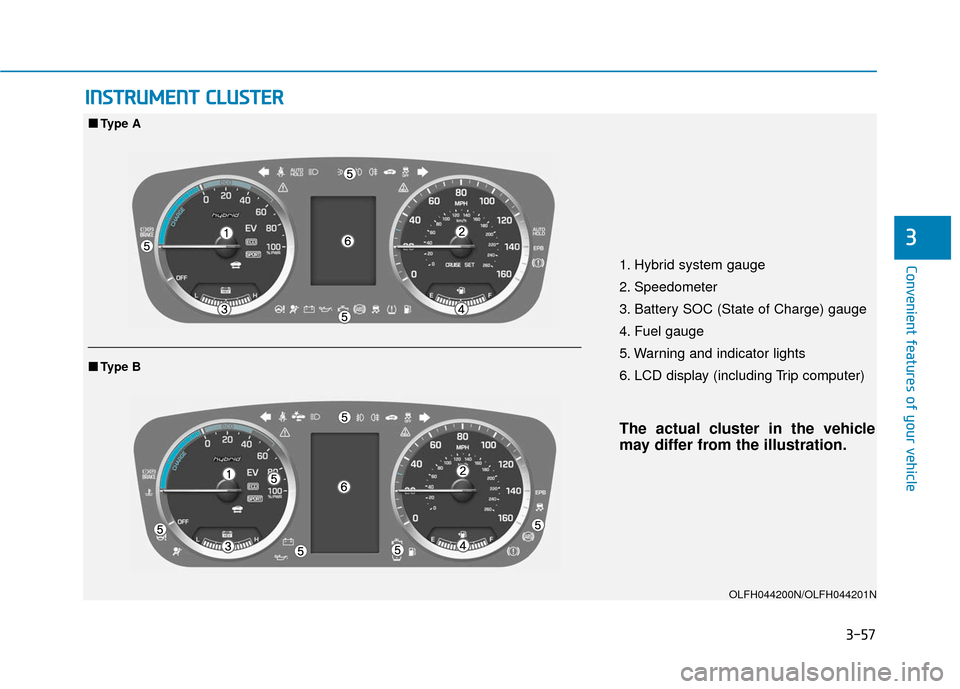
1. Hybrid system gauge
2. Speedometer
3. Battery SOC (State of Charge) gauge
4. Fuel gauge
5. Warning and indicator lights
6. LCD display (including Trip computer)
The actual cluster in the vehicle
may differ from the illustration.
OLFH044200N/OLFH044201N
■ ■
Type A
■
■Type B
Page 162 of 708
3-67
Convenient features of your vehicle
3
Information
When the ABS warning light illumi-
nates, or when both the ABS and the
Parking Brake & Brake Fluid warning
lights illuminate, the speedometer, the
odometer, or the tripmeter may not
properly operate. Also, the EPS
Warning Light may illuminate, and the
efforts to operate the steering wheel
may need to be increased or decreased.
In this case, have the vehicle inspected
by an authorized HYUNDAI dealer as
soon as possible.
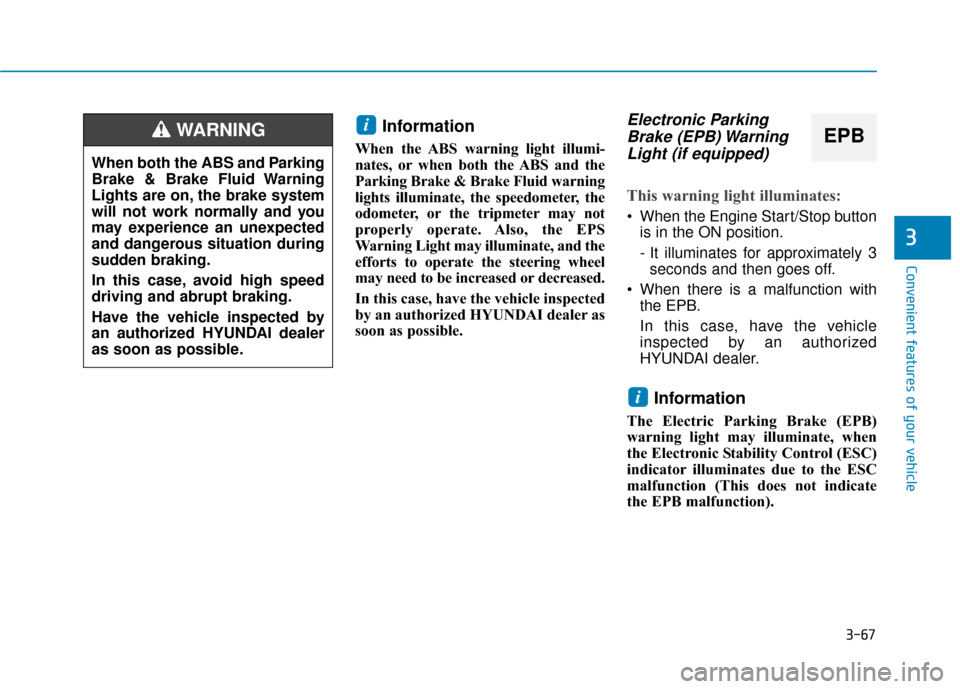
Electronic ParkingBrake (EPB) WarningLight (if equipped)
This warning light illuminates:
When the Engine Start/Stop button
is in the ON position.
- It illuminates for approximately 3seconds and then goes off.
When there is a malfunction with the EPB.
In this case, have the vehicle
inspected by an authorized
HYUNDAI dealer.
Information
The Electric Parking Brake (EPB)
warning light may illuminate, when
the Electronic Stability Control (ESC)
indicator illuminates due to the ESC
malfunction (This does not indicate
the EPB malfunction).
i
i
When both the ABS and Parking
Brake & Brake Fluid Warning
Lights are on, the brake system
will not work normally and you
may experience an unexpected
and dangerous situation during
sudden braking.
In this case, avoid high speed
driving and abrupt braking.
Have the vehicle inspected by
an authorized HYUNDAI dealer
as soon as possible.
WARNINGEPB
Page 183 of 708
3-88
Convenient features of your vehicle
LCD Display
LCD display control
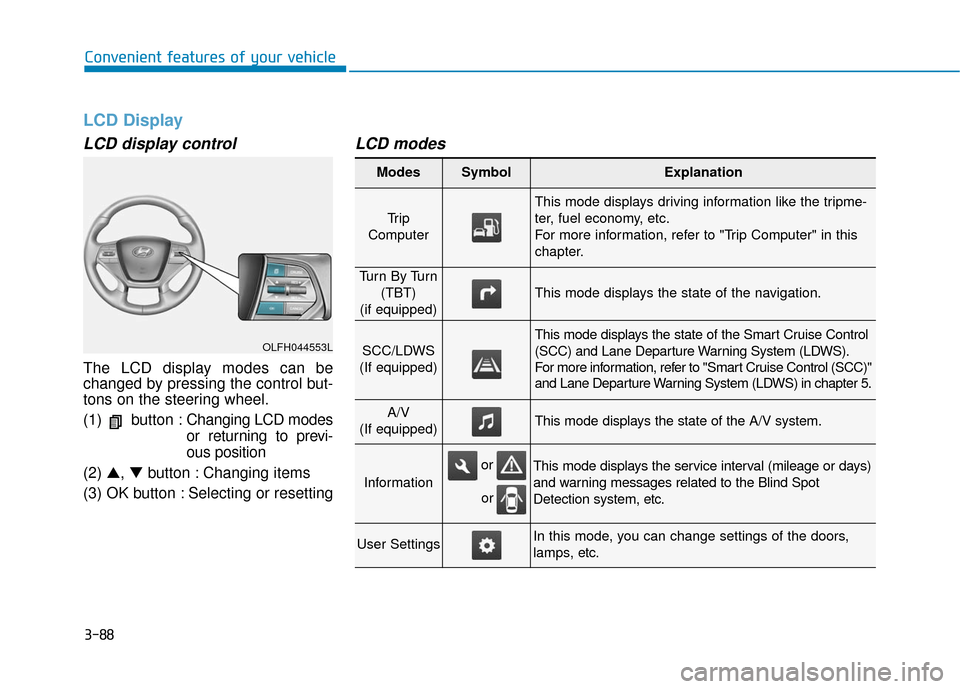
The LCD display modes can be
changed by pressing the control but-
tons on the steering wheel.
(1) button :Changing LCD modes
or returning to previ-
ous position
(2) ▲, ▼button : Changing items
(3) OK button : Selecting or resetting
LCD modes
OLFH044553L
Modes SymbolExplanation
Tr i p
Computer
This mode displays driving information like the tripme-
ter, fuel economy, etc.
For more information, refer to "Trip Computer" in this
chapter.
Tu r n B y Tu r n (TBT)
(if equipped)
This mode displays the state of the navigation.
SCC/LDWS
(If equipped)
This mode displays the state of the Smart Cruise Control
(SCC) and Lane Departure Warning System (LDWS).
For more information, refer to "Smart Cruise Control (SCC)"
and Lane Departure Warning System (LDWS) in chapter 5.
A/V
(If equipped)This mode displays the state of the A/V system.
Information
This mode displays the service interval (mileage or days)
and warning messages related to the Blind Spot
Detection system, etc.
User SettingsIn this mode, you can change settings of the doors,
lamps, etc.
or
or
Page 184 of 708
3-89
Convenient features of your vehicle
3
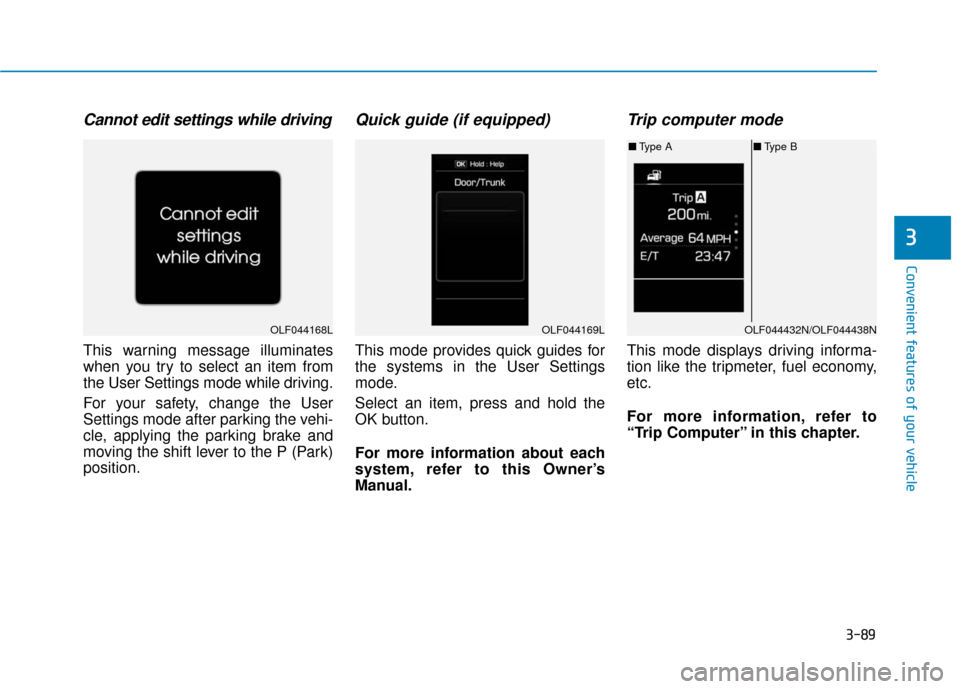
Cannot edit settings while driving
This warning message illuminates
when you try to select an item from
the User Settings mode while driving.
For your safety, change the User
Settings mode after parking the vehi-
cle, applying the parking brake and
moving the shift lever to the P (Park)
position.
Quick guide (if equipped)
This mode provides quick guides for
the systems in the User Settings
mode.
Select an item, press and hold the
OK button.
For more information about each
system, refer to this Owner’s
Manual.
Trip computer mode
This mode displays driving informa-
tion like the tripmeter, fuel economy,
etc.
For more information, refer to
“Trip Computer” in this chapter.
OLF044168LOLF044169LOLF044432N/OLF044438N
■Type A ■Type B
Page 192 of 708
3-97
Convenient features of your vehicle
3
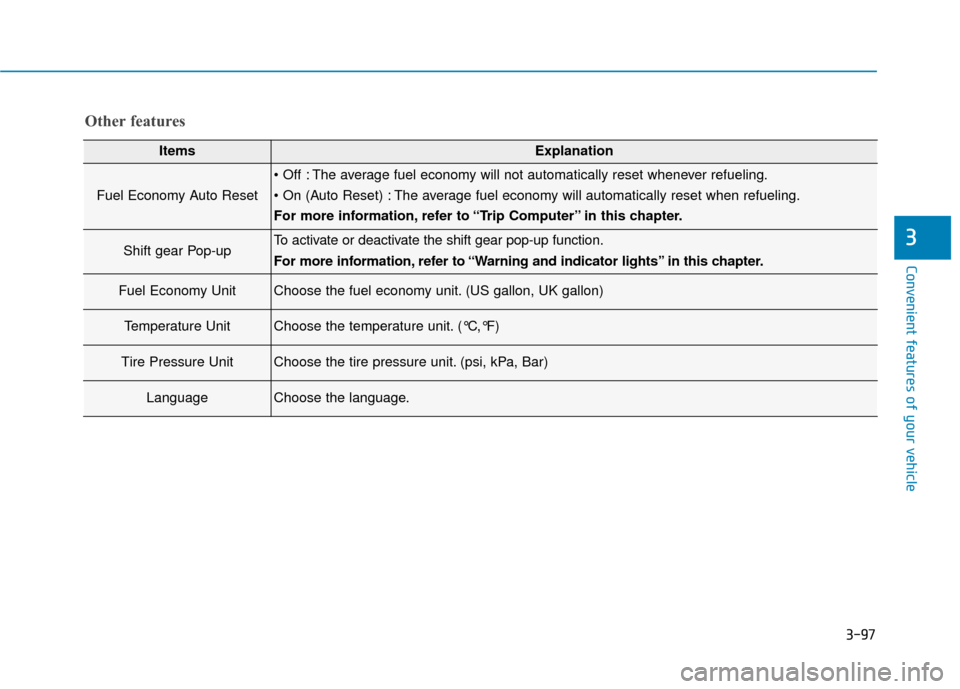
Other features
ItemsExplanation
Fuel Economy Auto Reset
The average fuel economy will not automatically reset whenever refueling.
The average fuel economy will automatically reset when refueling.
For more information, refer to “Trip Computer” in this chapter.
Shift gear Pop-upTo activate or deactivate the shift gear pop-up function.
For more information, refer to “Warning and indicator lights” in this chapter.
Fuel Economy UnitChoose the fuel economy unit. (US gallon, UK gallon)
Temperature UnitChoose the temperature unit. (°C,°F)
Tire Pressure UnitChoose the tire pressure unit. (psi, kPa, Bar)
LanguageChoose the language.