ad blue Hyundai Sonata Hybrid 2017 Owner's Manual
[x] Cancel search | Manufacturer: HYUNDAI, Model Year: 2017, Model line: Sonata Hybrid, Model: Hyundai Sonata Hybrid 2017Pages: 562, PDF Size: 16.44 MB
Page 16 of 562
I-5
Ecoshift dual clutch transmission ...................................5-18Shift indicator .............................................................3-73
Manual shift mode......................................................5-23
Electric chromic mirror (ECM) with compass and HomeLink
®system.......................................................3-33
Electric chromic mirror (ECM) with HomeLink®
system, compass and Blue Link®.................................3-26
Electronic parking brake (EPB) ......................................5-31
Electric power steering (EPS).........................................3-22
Electronic stability control (ESC)...................................5-43
Emission control system .................................................7-89
Engine ........................................................................\
.......8-2
Engine compartment..................................................1-6, 7-3
Engine compartment panel fuse .....................................7-59
Engine coolant ................................................................7-27
Engine coolant temperature gauge .................................3-71
Engine number ................................................................8-10
Engine oil ........................................................................\
7-24
Engine start/stop button ....................................................5-9
Explanation of scheduled maintenance items.................7-21
Exterior care....................................................................7-82\
Exterior overview (front) ..................................................1-2
Exterior overview (rear) ...................................................1-3 Flat tire (with spare tire) .................................................6-15
Changing tires ............................................................6-16
Compact spare tire......................................................6-20
Jack and tools .............................................................6-15
Flat tire (with Tire Mobility Kit) ....................................6-23
Floor mat anchor (s) .....................................................3-162
Fluid Brake fluid ..................................................................7-30
Washer fluid ...............................................................7-31
Folding rear seats ............................................................2-12
Folding the side view mirrors .........................................3-42
Front seats ........................................................................\
.2-6
Fuel filler lid ...................................................................3-63 Emergency fuel filler door release .............................3-66
Fuel gauge .......................................................................3\
-72
Fuel requirements .............................................................F-7
Fuse switch .....................................................................7-5\
9
Fuses ........................................................................\
.......7-57 Engine compartment panel fuse .................................7-59
Fuse switch .................................................................7-59
Fuse/relay panel description .......................................7-61
Instrument panel fuse .................................................7-58
Main fuse ....................................................................7-60\
Multi fuse ...................................................................7-60
I
Index
FE
Page 19 of 562
 mode .......................")
I-8
SCC/LDWS mode ......................................................3-77
Trip computer modes..................................................3-76\
Turn by turn (TBT) mode ..........................................3-77
User settings mode .....................................................3-80
Warning messages ......................................................3-85
LCD Display Control......................................................3-70
LCD modes .....................................................................3-7\
5
Light ........................................................................\
......3-109 AFLS (Adaptive Front Lighting System) ................3-116
Auto light position....................................................3-109
Battery saver function ..............................................3-115
Daytime running light ..............................................3-116
Headlamp delay function..........................................3-115
Headlamp position ....................................................3-110
High - beam operation ..............................................3-111
Interior lights ............................................................3-118
Parking lamp position...............................................3-110
Smart high beam .......................................................3-111
Turn signals ..............................................................3-114
Light bulbs ......................................................................7-\
69
Lubricants and capacities..................................................8-6
Luggage net holder .......................................................3-163
Main fuse ........................................................................\
7-60
Maintenance Explanation of scheduled maintenance items ............7-21
Maintenance services ...................................................7-6 Owner maintenance ......................................................7-7
Scheduled maintenance service....................................7-9
Tire maintenance ........................................................7-47
Maintenance schedule .......................................................7-9 Maintenance under severe usage conditions ..............7-20
Normal maintenance schedule ...................................7-10
Maintenance services ........................................................7-6
Manual climate control system .....................................3-129 Air conditioning .......................................................3-134
Climate control air filter ...........................................3-137
Heating and air conditioning ....................................3-130
Manual shift mode ....................................................5-17, 23
Map lamp ......................................................................3-\
118
Mirrors ........................................................................\
....3-25 Blind spot mirror ........................................................3-41
Day/night rearview mirror..........................................3-25
Electric chromic mirror (ECM) with compass and HomeLink
®system ..................................................3-33
Electric chromic mirror (ECM) with HomeLink®
system, compass and Blue Link®.............................3-26
Folding the side view mirrors ....................................3-42
Inside rearview mirror ................................................3-25
Side view mirrors .......................................................3-42
Reverse parking aid function ....................................3-43
Moonroof, see panorama sunroof ...................................3-52
Multi box.......................................................................3\
-156
Multi fuse ........................................................................\
7-60
Index
M
Page 20 of 562
I-9
Multimedia system............................................................4-23.8 Inch Mono TFT ....................................................4-17
Antenna ........................................................................\
4-2
AUX, USB and iPod
®port ..........................................4-2
Blue Link®..................................................................4-54
Steering wheel audio control........................................4-3
Voice recognition........................................................4-46
Occupant classification system (OCS) ...........................2-56
Odometer........................................................................\
.3-72
Oil (Engine) ....................................................................7-24\
Outside temperature gauge .............................................3-73
Owner maintenance ..........................................................7-7
Paddle shifter ..................................................................5-24
Panoramic sunroof ..........................................................3-52
Parking brake ..................................................................7-31
Parking brake (Manual) ..................................................5-29
Parking lamp position ...................................................3-110
Passenger’s front air bag.................................................2-47
Power brakes ...................................................................5-28
Power outlet ..................................................................3-158
Power window lock button .............................................3-47 Rear combination light bulb replacement.......................7-76
Rear parking assist system(RPAS) ...............................3-125
Rear seats ........................................................................\
2-12
Rear view camera .........................................................3-124
Recommended cold tire inflation pressure .....................7-42
Recommended lubricants and capacities ..........................8-6
Recommended lubricants and capacities
Recommended SAE viscosity number .........................8-8
Refrigerant label .............................................................8-10
Remote key .......................................................................3\
-4
Replacement light bulb ...................................................7-69
Reporting safety defects .................................................8-12
Reverse parking aid function ..........................................3-43
Rocking the vehicle ........................................................5-93
Room lamp ....................................................................3-119
Rotation (Tire) ................................................................7-44
Safety messages ................................................................F-6
SCC/LDWS mode...........................................................3-77
Scheduled maintenance service ........................................7-9
I
Index
O
P
R
S
Page 28 of 562
I
IN
N S
ST
T R
R U
U M
M E
EN
N T
T
P
P A
A N
N E
EL
L
O
O V
VE
ER
R V
V I
IE
E W
W
1-5
Your vehicle at a glance
1
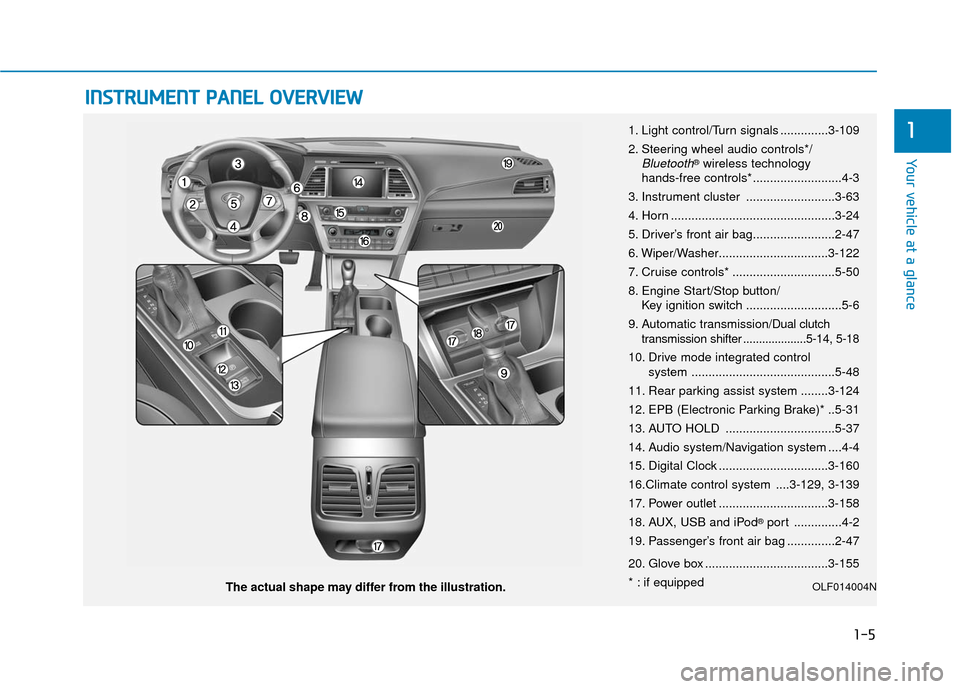
The actual shape may differ from the illustration. 1. Light control/Turn signals ..............3-109
2. Steering wheel audio controls*/
Bluetooth®wireless technology
hands-free controls* ..........................4-3
3. Instrument cluster ..........................3-63
4. Horn ................................................3-24
5. Driver’s front air bag........................2-47
6. Wiper/Washer................................3-122
7. Cruise controls* ..............................5-50
8. Engine Start/Stop button/ Key ignition switch ............................5-6
9. Automatic transmission/
Dual clutch
transmission shifter ....................5-14, 5-18
10. Drive mode integrated control system ..........................................5-48
11. Rear parking assist system ........3-124
12. EPB (Electronic Parking Brake)* ..5-31
13. AUTO HOLD ................................5-37
14. Audio system/Navigation system ....4-4
15. Digital Clock ................................3-160
16.Climate control system ....3-129, 3-139
17. Power outlet ................................3-158
18. AUX, USB and iPod
®port ..............4-2
19. Passenger’s front air bag ..............2-47
20. Glove box ....................................3-155
* : if equipped
OLF014004N
Page 123 of 562
3-26
Convenient features of your vehicle
Pull the day/night lever toward you to
reduce glare from the headlights of
the vehicles behind you during night
driving.
Remember that you lose some
rearview clarity in the night position.
Blue Link®center (if equipped)
For details, refer to the Blue Link®
Owner’s Guide, Navigation Manual
or Audio Manual.
Electric chromic mirror (ECM) with HomeLink®system,
compass and Blue Link®
(for U.S.A)
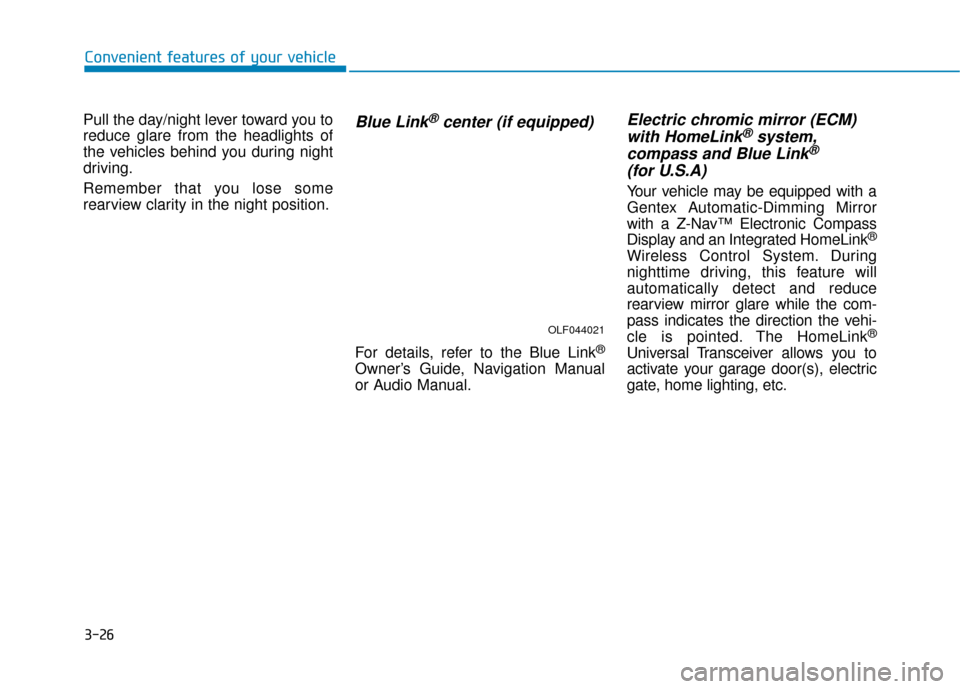
Your vehicle may be equipped with a
Gentex Automatic-Dimming Mirror
with a Z-Nav™ Electronic Compass
Display and an Integrated HomeLink
®
Wireless Control System. During
nighttime driving, this feature will
automatically detect and reduce
rearview mirror glare while the com-
pass indicates the direction the vehi-
cle is pointed. The HomeLink
®
Universal Transceiver allows you to
activate your garage door(s), electric
gate, home lighting, etc.
OLF044021
Page 261 of 562
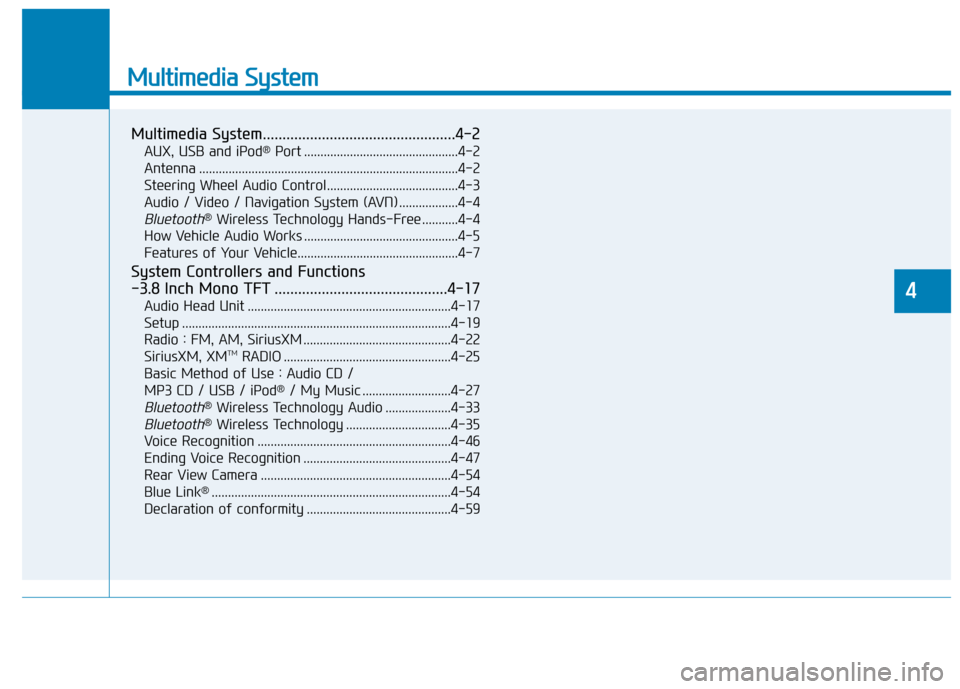
Multimedia System
Multimedia System.................................................4-2
AUX, USB and iPod®Port ...............................................4-2
Antenna ........................................................................\
.......4-2
Steering Wheel Audio Control........................................4-3
Audio / Video / Navigation System (AVN) ..................4-4
Bluetooth®Wireless Technology Hands-Free ...........4-4
How Vehicle Audio Works ...............................................4-5
Features of Your Vehicle.................................................4-7
System Controllers and Functions
-3.8 Inch Mono TFT ............................................4-17
Audio Head Unit ..............................................................4-17
Setup ........................................................................\
..........4-19
Radio : FM, AM, SiriusXM .............................................4-22
SiriusXM, XM
TMRADIO ...................................................4-25
Basic Method of Use : Audio CD /
MP3 CD / USB / iPod
®/ My Music ...........................4-27
Bluetooth®Wireless Technology Audio ....................4-33
Bluetooth®Wireless Technology ................................4-35
Voice Recognition ...........................................................4-46
Ending Voice Recognition .............................................4-47
Rear View Camera ..........................................................4-54
Blue Link
®........................................................................\
.4-54
Declaration of conformity ............................................4-59
4
Page 264 of 562
4-4
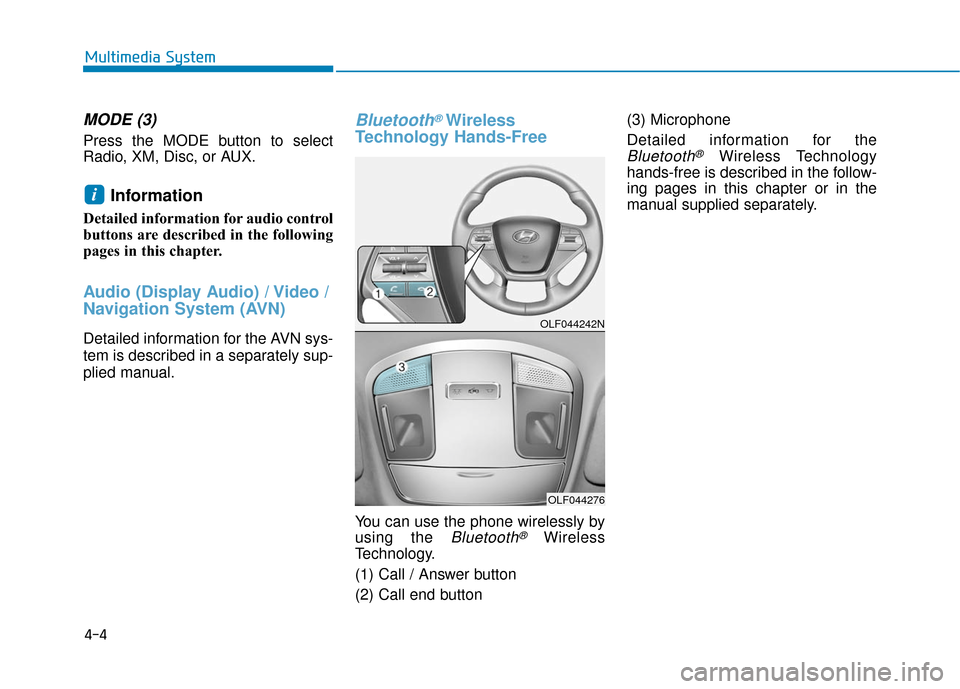
MODE (3)
Press the MODE button to select
Radio, XM, Disc, or AUX.
Information
Detailed information for audio control
buttons are described in the following
pages in this chapter.
Audio (Display Audio) / Video /
Navigation System (AVN)
Detailed information for the AVN sys-
tem is described in a separately sup-
plied manual.
Bluetooth®Wireless
Technology Hands-Free
You can use the phone wirelessly by
using the
Bluetooth®Wireless
Technology.
(1) Call / Answer button
(2) Call end button (3) Microphone
Detailed information for the
Bluetooth®Wireless Technology
hands-free is described in the follow-
ing pages in this chapter or in the
manual supplied separately.
i
Multimedia System
OLF044242N
OLF044276
Page 274 of 562
4-14
(Continued)
• If your iPhone
®is connected to both
the Bluetooth®Wireless Technology
and USB, the sound may not be
properly played. In your iPhone
®,
select the Dock c onnector or
Bluetooth
®Wireless Technology to
change the sound output (source).
• iPod mode cannot be operated when the iPod
®cannot be recognized due
to versions that do not support com-
munication protocols.
• For fifth generation iPod
®Nano
devices, the iPod®may not be recog-
nized when the battery level is low.
Please charge the iPod
®for use.
• Search/play orders shown within the iPod
®device may differ with the
orders shown within the audio sys-
tem.
• If the iPod
®malfunctions due to an
iPod®device defect, reset the iPod®
and try again. (To learn more, refer to
your iPod®manual)
(Continued) (Continued)
• Some iPod
®s may not sync with the
System depending on its version. If
the Media is removed before the
Media is recognized, then the sys-
tem may not properly restore the
previously operated mode. (iPad
®
charging is not supported.)
Information - Using the AUX
device
• If an external device connector is connected with the AUX terminal,
then AUX mode will automatically
operate. Once the connector is dis-
connected, the previous mode will
be restored.
• AUX mode can be used only when an external audio player (cam-
corder, car VCR, etc.) has been con-
nected.
• The AUX volume can be controlled separately from other audio modes.
• Connecting a connector jack to the AUX terminal without an external
device will convert the system to
AUX mode, but only output noise.
When an external device is not
being used, also remove the connec-
tor jack.
• When the external device power is connected to the power jack, play-
ing the external device may output
noise. In such cases, disconnect the
power connection before use.
• Fully insert the AUX cable to the AUX jack upon use.i
Multimedia System
Page 275 of 562
4-15
Multimedia System
Information - Before using
the
Bluetooth®handsfree
What is Bluetooth®?
• Bluetooth®refers to a short-distance
wireless networking technology
which uses a 2.4GHz ~ 2.48GHz fre-
quency to connect various devices
within a certain distance.
• Supported within PCs, external devices, Bluetooth
®phones, PDAs,
various electronic devices, and auto-
motive environments, Bluetooth
®
allows data to be transmitted at high
speeds without having to use a con-
nector cable.
• Bluetooth
®Handsfree refers to a
device which allows the user to con-
veniently make phone calls with
Bluetooth
®mobile phones through
the audio system.
• Bluetooth
®Handsfree may not be sup-
ported in some mobile phones. To learn
more about mobile device compatibility,
visit www
. hyundaiusa.com.
Information - Precautions for
safe driving
• Bluetooth
®Handsfree is a feature
that enables drivers to practice safe
driving. Connecting the head unit
with a Bluetooth
®phone allows the
user to conveniently make and
receive calls and use contacts.
Before using Bluetooth
®, carefully
read the contents of this user’s man-
ual.
• Excessive use or operations while driving may lead to negligent driv-
ing practices and result in accidents.
Refrain from excessive operations
while driving.
• Viewing the screen for prolonged periods of time is dangerous and
may lead to accidents. When driv-
ing, view the screen only for short
periods of time.
Information - When connect-
ing a
Bluetooth®phone
• Before connecting the head unit with the mobile phone, check to see
that the mobile phone supports
Bluetooth
®features.
• Even if the phone supports Bluetooth
®, the phone will not be
found during device searches if the
phone has been set to hidden state
or the Bluetooth
®power is turned
off. Disable the hidden state or turn
on the Bluetooth
®power prior to
searching/connecting with the Head
unit.
• Bluetooth phone is automatically connected when the ignition on.
• If you do not want automatic con- nection with your Bluetooth
®device,
turn off the Bluetooth®feature with-
in your mobile phone.
• The Handsfree call volume and quality may differ depending on the
mobile phone.
(Continued)
iii
4
Page 276 of 562
4-16
(Continued)
• Park the vehicle when connectingthe head unit with the mobile phone.
• Bluetooth
®connection may become
intermittently disconnected in some
mobile phones. Follow these steps to
try again.
1. Within the mobile phone, turn the Bluetooth
®function off/on and try
again.
2. Turn the mobile phone power Off/On and try again.
3. Completely remove the mobile phone battery, reboot, and then
again.
4. Reboot the Audio System and try again.
5. Delete all paired devices, pair and try again.
• Handsfree call quality and volume may differ depending on the model
of your mobile phone.
Information - Using the voicerecognition
• When using the voice recognition feature, only commands listed with-
in the user's manual are supported.
• Be aware that during the operation of the voice recognition system,
pressing any key other than the
key terminate voice recognition
mode.
• For superior voice recognition per- formance, position the microphone
used for voice recognition above the
head of the driver’s seat and main-
tain a proper position when saying
commands.
• Within the following situations, voice recognition may not function
properly due to external sound.
- When the windows and sunroofare open
- When the wind of the cooling / heating device is strong
- When entering and passing through tunnels
(Continued)(Continued)
- When driving on rugged anduneven roads
- During severe rain (heavy rains, windstorms)
• Phone related voice commands can be used only when a Bluetooth
®
Wireless Technology device is con-
nected.
• When making calls by stating a name, the corresponding contact
must be downloaded and stored
within the audio system.
• After downloading the Bluetooth
®
Wireless Technology phone book, it
takes some times to convert the
phone book data into voice informa-
tion. During this time, voice recogni-
tion may not properly operate.
• Pronounce the voice commands nat- urally and clearly as if in a normal
conversation.
i
Multimedia System