phone HYUNDAI SONATA HYBRID 2019 Owners Manual
[x] Cancel search | Manufacturer: HYUNDAI, Model Year: 2019, Model line: SONATA HYBRID, Model: HYUNDAI SONATA HYBRID 2019Pages: 546, PDF Size: 78.75 MB
Page 2 of 546
F2Your HYUNDAI should not be modified in any way. Such modifications may adversely affect
the performance, safety or durability of your HYUNDAI and may, in addition, violate condi-
tions of the limited warranties covering the vehicle. Certain modifications may also be in vio-
lation of regulations established by the Department of Transportation and other government
agencies in your country.
Your vehicle is equipped with electronic fuel injection and other electronic components. It is
possible for an improperly installed/adjusted two-way radio or cellular telephone to adversely
affect electronic systems. For this reason, we recommend that you carefully follow the radio
manufacturer's instructions or consult your HYUNDAI dealer for precautionary measures or
special instructions if you choose to install one of these devices.
CAUTION: MODIFICATIONS TO YOUR HYUNDAI
TWO-WAY RADIO OR CELLULAR TELEPHONE INSTALLATION
Page 65 of 546
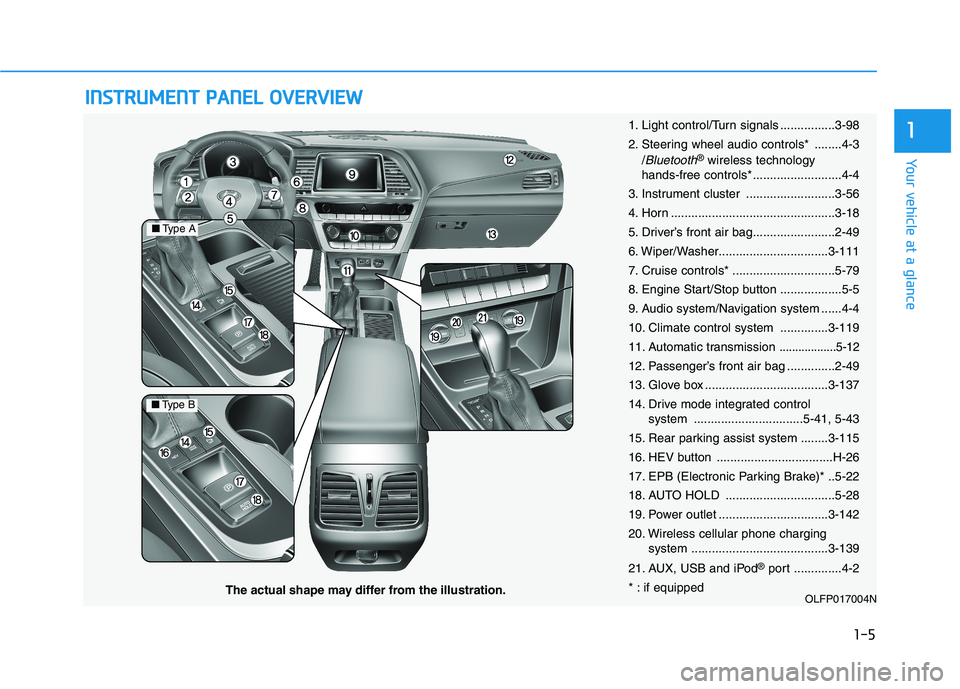
IINN SSTT RR UU MM EENN TT PP AA NN EELL OO VVEERR VV IIEE WW
1-5
Your vehicle at a glance
1
OLFP017004N
■Type A
■Type B
The actual shape may differ from the illustration. 1. Light control/Turn signals ................3-98
2. Steering wheel audio controls* ........4-3
/
Bluetooth®wireless technology
hands-free controls* ..........................4-4
3. Instrument cluster ..........................3-56
4. Horn ................................................3-18
5. Driver’s front air bag........................2-49
6. Wiper/Washer................................3-111
7. Cruise controls* ..............................5-79
8. Engine Start/Stop button ..................5-5
9. Audio system/Navigation system ......4-4
10. Climate control system ..............3-119
11. Automatic transmission
..................5-12
12. Passenger’s front air bag ..............2-49
13. Glove box ....................................3-137
14. Drive mode integrated control system ................................5-41, 5-43
15. Rear parking assist system ........3-115
16. HEV button ..................................H-26
17. EPB (Electronic Parking Brake)* ..5-22
18. AUTO HOLD ................................5-28
19. Power outlet ................................3-142
20. Wireless cellular phone charging system ........................................3-139
21. AUX, USB and iPod ®
port ..............4-2
* : if equipped
Page 68 of 546
2-2
You will find many safety precautions and recommendations throughoutthis section, and throughout this man-
ual. The safety precautions in this sec-
tion are among the most important.
Always Wear Your Seat Belt
A seat belt is your best protection in
all types of accidents. Air bags are
designed to supplement seat belts,
not replace them. So even though
your vehicle is equipped with air bags,
ALWAYS make sure you and your
passengers wear your seat belts, and
wear them properly.
Restrain All Children
All children under age 13 should ride
in your vehicle properly restrained in
a rear seat, not the front seat. Infantsand small children should be
restrained in an appropriate child
restraint. Larger children should usea booster seat with the lap/shoulder
belt until they can use the seat belt
properly without a booster seat.
Air Bag Hazards
While air bags can save lives, they
can also cause serious or fatal
injuries to occupants who sit tooclose to them, or who are not prop-
erly restrained. Infants, young chil-
dren, and shorter adults are at the
greatest risk of being injured by an
inflating air bag. Follow all instruc-
tions and warnings in this manual.
Driver Distraction
Driver distraction presents a serious
and potentially deadly danger, espe-
cially for inexperienced drivers. Safety
should be the first concern when
behind the wheel and drivers need to
be aware of the wide array of potential
distractions, such as drowsiness,
reaching for objects, eating, personal
grooming, other passengers, and
using cellular phones.
Drivers can become distracted when
they take their eyes and attention offthe road or their hands off the wheel
to focus on activities other than driv-
ing. To reduce your risk of distractionor getting into an accident:
II
MM PPOO RRTTAA NN TT SS AA FFEE TT YY PP RR EECCAA UU TTIIOO NNSS
Safety system of your vehicle
Page 69 of 546
2-3
Safety system of your vehicle
• ALWAYS set up your mobiledevices (i.e., MP3 players, phones,
navigation units, etc.) when your
vehicle is parked or safely stopped.
ONLY use your mobile device when allowed by laws and when
conditions permit safe use. NEVER
text or email while driving. Most
countries have laws prohibiting
drivers from texting. Some coun-
tries and cities also prohibit drivers
from using handheld phones.
NEVER let the use of a mobile device distract you from driving.
You have a responsibility to yourpassengers and others on the road
to always drive safely, with your
hands on the wheel as well as your
eyes and attention on the road.Control Your Speed
Excessive speed is a major factor in
crash injuries and deaths. Generally,
the higher the speed, the greater the
risk, but serious injuries can also
occur at lower speeds. Never drive
faster than is safe for current condi-
tions, regardless of the maximumspeed posted.
Keep Your Vehicle in Safe Condition
Having a tire blowout or a mechanical
failure can be extremely hazardous. Toreduce the possibility of such prob-
lems, check your tire pressures and
condition frequently, and perform all
regularly scheduled maintenance.
2
Page 116 of 546
2-50
Safety system of your vehicle
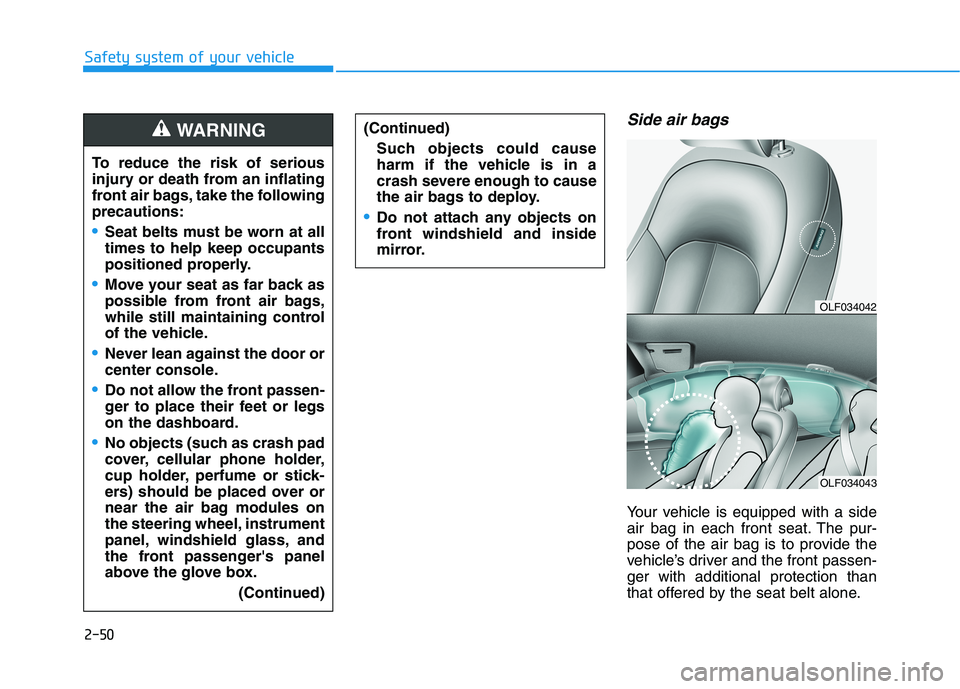
Side air bags
Your vehicle is equipped with a side
air bag in each front seat. The pur-
pose of the air bag is to provide the
vehicle’s driver and the front passen-ger with additional protection than
that offered by the seat belt alone.
OLF034042
OLF034043
To reduce the risk of serious
injury or death from an inflating
front air bags, take the followingprecautions:
Seat belts must be worn at all times to help keep occupants
positioned properly.
Move your seat as far back as
possible from front air bags,
while still maintaining control
of the vehicle.
Never lean against the door or
center console.
Do not allow the front passen-
ger to place their feet or legs
on the dashboard.
No objects (such as crash pad
cover, cellular phone holder,
cup holder, perfume or stick-
ers) should be placed over or
near the air bag modules on
the steering wheel, instrument
panel, windshield glass, and
the front passenger's panel
above the glove box.(Continued)
(Continued)
Such objects could cause
harm if the vehicle is in a
crash severe enough to cause
the air bags to deploy.
Do not attach any objects on
front windshield and inside
mirror.
WARNING
Page 138 of 546
Light .......................................................................3-98Exterior Lights .................................................................3-98
Smart High Beam ..........................................................3-100
Welcome System ...........................................................3-106
Interior Lights ................................................................3-107
Wipers and washers ..........................................3-111 Windshield Wipers ........................................................3-111
Windshield Washers .....................................................3-112
Driver assist system ..........................................3-113 Rear view camera .........................................................3-113
Rear parking assist system ........................................3-114
Rear parking assist system precautions .................3-117
Defroster .............................................................3-118 Rear Window Defroster ..............................................3-118
Automatic climate control system ...................3-119 Automatic heating and air conditioning ..................3-120
Manual heating and air conditioning .......................3-121
System operation ..........................................................3-129
System maintenance ....................................................3-131
Windshield defrosting and defogging ............3-133 Automatic Climate Control System ...........................3-134
Defogging logic..............................................................3-135
Climate control additional features.................3-136 Automatic Ventilation ...................................................3-136
Sunroof Inside Air Recirculation ...............................3-136 Storage compartment ........................................3-137
Center Console Storage ..............................................3-137
Glove Box ........................................................................3-137
Sunglass Holder.............................................................3-138
Multi box .........................................................................3-138
Interior features.................................................3-139 Wireless Cellular Phone Charging System..............3-139
Cup Holder ......................................................................3-141
Sunvisor ...........................................................................3-142
Power Outlet ..................................................................3-142
Clock .................................................................................3-144
Clothes Hanger ..............................................................3-144
Floor Mat Anchor(s).....................................................3-145
Rear curtain....................................................................3-146
Side Curtain ....................................................................3-147
Luggage Net Holder .....................................................3-147
3
Page 142 of 546
3-6
Convenient features of your vehicle
Loss of a smart key
A maximum of two Smart Keys can
be registered to a single vehicle. If
you happen to lose your smart key,
you should immediately take the
vehicle and remaining keys to your
authorized HYUNDAI dealer or tow
the vehicle, if necessary.
Smart key precautions
The smart key will not work if any of
the following occur:
The smart key is close to a radiotransmitter such as a radio station
or an airport which can interfere
with normal operation of the trans-
mitter.
The smart key is near a mobile two way radio system or a cellular
phone.
Another vehicle's smart key is being operated close to your vehi-
cle.
When the smart key does not work
correctly, open and close the door
with the mechanical key. If you have
a problem with the smart key, contact
an authorized HYUNDAI dealer. If the smart key is in close proximity
to your mobile phone, the signal
could be blocked by your mobile
phone's normal operational signals.
This is especially important when the
phone is active such as making and
receiving calls, text messaging,
and/or sending/receiving emails.
When possible, avoid placing the
remote key and your mobile phone inthe same location such as a pants or
jacket pocket in order to avoid inter-
ference between the two devices.
Keep the smart key away from
electromagnetic materials that
blocks electromagnetic waves
to the key surface.
CAUTION
Page 182 of 546
3-46
Convenient features of your vehicle
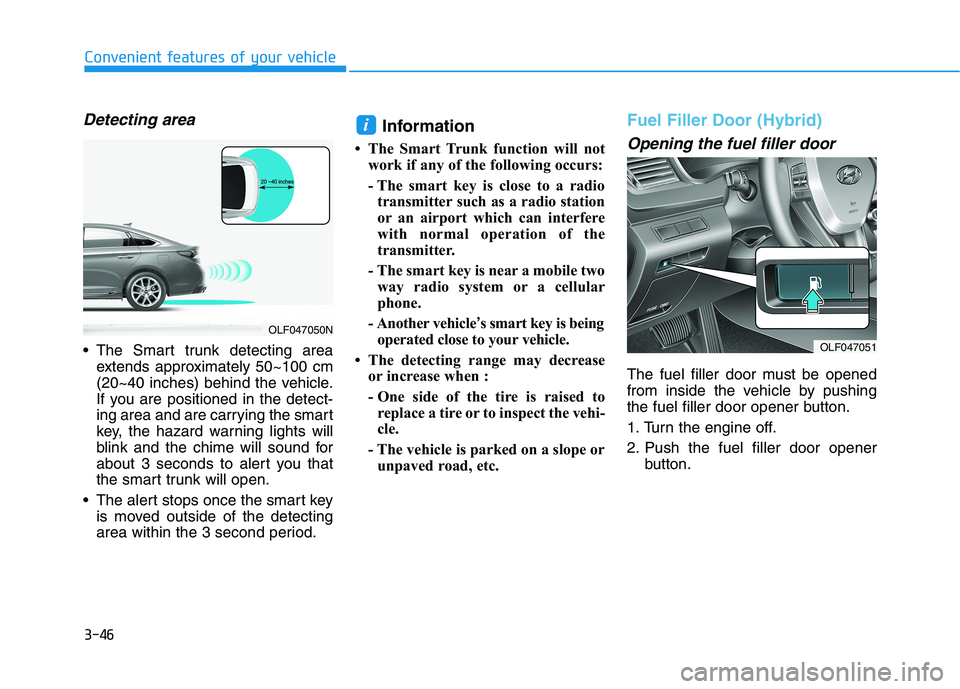
Detecting area
The Smart trunk detecting areaextends approximately 50~100 cm
(20~40 inches) behind the vehicle.
If you are positioned in the detect-
ing area and are carrying the smart
key, the hazard warning lights will
blink and the chime will sound for
about 3 seconds to alert you that
the smart trunk will open.
The alert stops once the smart key is moved outside of the detecting
area within the 3 second period. Information
The Smart Trunk function will not work if any of the following occurs:
- The smart key is close to a radiotransmitter such as a radio station
or an airport which can interfere
with normal operation of the
transmitter.
- The smart key is near a mobile two way radio system or a cellular
phone.
- Another vehicle ’s smart key is being
operated close to your vehicle.
The detecting range may decrease or increase when :
- One side of the tire is raised toreplace a tire or to inspect the vehi-
cle.
- The vehicle is parked on a slope or unpaved road, etc.
Fuel Filler Door (Hybrid)
Opening the fuel filler door
The fuel filler door must be opened
from inside the vehicle by pushing
the fuel filler door opener button.
1. Turn the engine off.
2. Push the fuel filler door opener button.
i
OLF047051
OLF047050N
Page 184 of 546
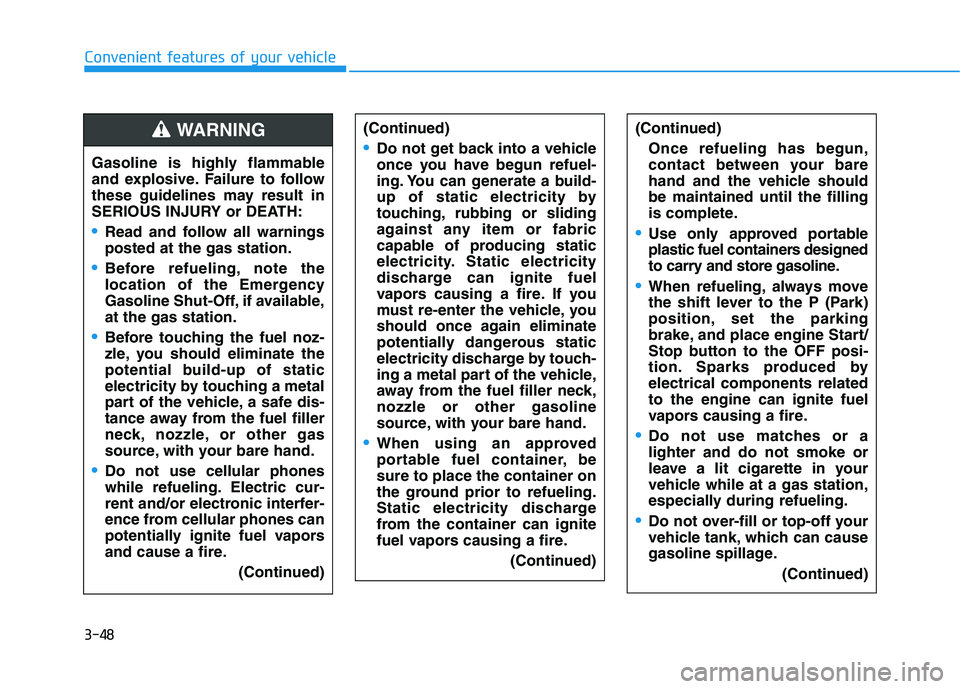
3-48
Convenient features of your vehicle
(Continued)
Do not get back into a vehicle
once you have begun refuel-
ing. You can generate a build-
up of static electricity by
touching, rubbing or sliding
against any item or fabric
capable of producing static
electricity. Static electricity
discharge can ignite fuel
vapors causing a fire. If you
must re-enter the vehicle, you
should once again eliminate
potentially dangerous static
electricity discharge by touch-
ing a metal part of the vehicle,
away from the fuel filler neck,nozzle or other gasoline
source, with your bare hand.
When using an approved
portable fuel container, besure to place the container on
the ground prior to refueling.
Static electricity discharge
from the container can ignite
fuel vapors causing a fire.(Continued)
(Continued)
Once refueling has begun,
contact between your bare
hand and the vehicle shouldbe maintained until the filling
is complete.
Use only approved portable
plastic fuel containers designed
to carry and store gasoline.
When refueling, always move
the shift lever to the P (Park)
position, set the parking
brake, and place engine Start/
Stop button to the OFF posi-
tion. Sparks produced byelectrical components relatedto the engine can ignite fuel
vapors causing a fire.
Do not use matches or a lighter and do not smoke or
leave a lit cigarette in your
vehicle while at a gas station,
especially during refueling.
Do not over-fill or top-off your
vehicle tank, which can cause
gasoline spillage. (Continued)
Gasoline is highly flammable
and explosive. Failure to follow
these guidelines may result in
SERIOUS INJURY or DEATH:
Read and follow all warnings posted at the gas station.
Before refueling, note the
location of the Emergency
Gasoline Shut-Off, if available,at the gas station.
Before touching the fuel noz-
zle, you should eliminate the
potential build-up of static
electricity by touching a metal
part of the vehicle, a safe dis-
tance away from the fuel filler
neck, nozzle, or other gas
source, with your bare hand.
Do not use cellular phones
while refueling. Electric cur-
rent and/or electronic interfer-
ence from cellular phones can
potentially ignite fuel vapors
and cause a fire.
(Continued)
WARNING
Page 187 of 546
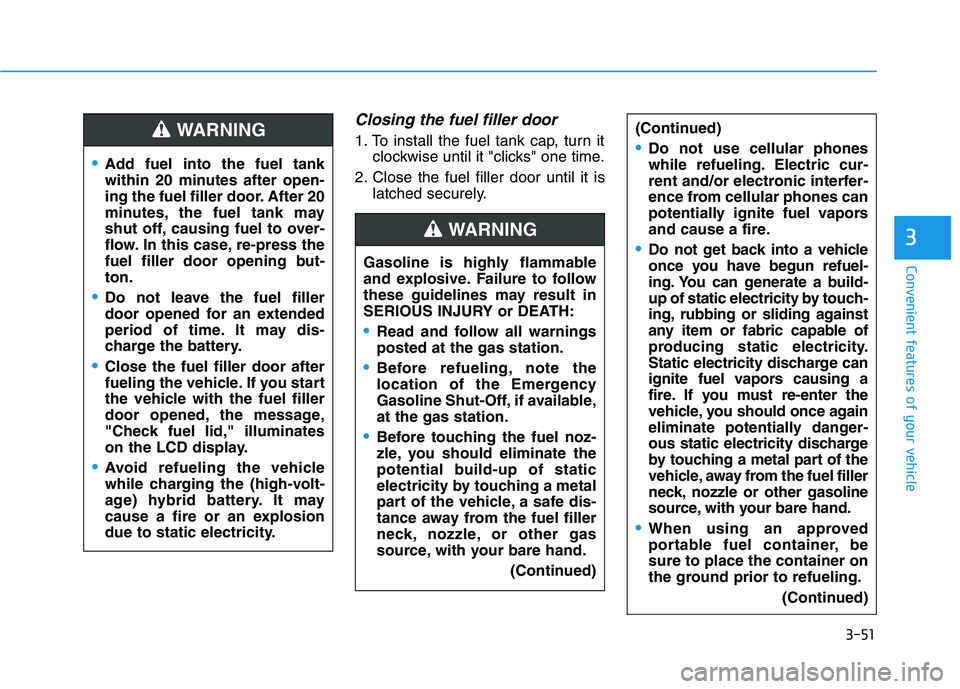
3-51
Convenient features of your vehicle
Closing the fuel filler door
1. To install the fuel tank cap, turn itclockwise until it "clicks" one time.
2. Close the fuel filler door until it is latched securely.
3
Add fuel into the fuel tank
within 20 minutes after open-
ing the fuel filler door. After 20
minutes, the fuel tank may
shut off, causing fuel to over-
flow. In this case, re-press the
fuel filler door opening but-ton.
Do not leave the fuel filler
door opened for an extended
period of time. It may dis-
charge the battery.
Close the fuel filler door after
fueling the vehicle. If you start
the vehicle with the fuel filler
door opened, the message,
"Check fuel lid," illuminates
on the LCD display.
Avoid refueling the vehicle
while charging the (high-volt-
age) hybrid battery. It may
cause a fire or an explosion
due to static electricity.
WARNING (Continued)
Do not use cellular phones
while refueling. Electric cur-
rent and/or electronic interfer-
ence from cellular phones can
potentially ignite fuel vapors
and cause a fire.
Do not get back into a vehicle
once you have begun refuel-
ing. You can generate a build-
up of static electricity by touch-
ing, rubbing or sliding against
any item or fabric capable of
producing static electricity.
Static electricity discharge can
ignite fuel vapors causing a
fire. If you must re-enter the
vehicle, you should once again
eliminate potentially danger-
ous static electricity discharge
by touching a metal part of the
vehicle, away from the fuel filler
neck, nozzle or other gasoline
source, with your bare hand.
When using an approved
portable fuel container, besure to place the container on
the ground prior to refueling.
(Continued)
Gasoline is highly flammable
and explosive. Failure to follow
these guidelines may result in
SERIOUS INJURY or DEATH:
Read and follow all warnings posted at the gas station.
Before refueling, note the
location of the Emergency
Gasoline Shut-Off, if available,at the gas station.
Before touching the fuel noz-
zle, you should eliminate the
potential build-up of static
electricity by touching a metal
part of the vehicle, a safe dis-
tance away from the fuel filler
neck, nozzle, or other gas
source, with your bare hand.(Continued)
WARNING