audio HYUNDAI SONATA HYBRID 2022 User Guide
[x] Cancel search | Manufacturer: HYUNDAI, Model Year: 2022, Model line: SONATA HYBRID, Model: HYUNDAI SONATA HYBRID 2022Pages: 527, PDF Size: 64.14 MB
Page 334 of 527
While Driving
6-58
• When you replace the windshield
glass, front view camera or related
parts of the steering wheel, have the
vehicle inspected by an authorized
HYUNDAI dealer and have the system
checked for calibration.
• The system detects lane markers
and controls the steering wheel
by a camera, therefore, if the lane
markers are hard to detect, the
system may not work properly.
Please refer to “Limitations of the
S y s t e m ”.
• Do not remove or damage the related
parts of LKA system.
• You may not hear a warning sound
of LKA system if the audio volume is
high.
• Do not place objects on the
dashboard that reflects light such as
mirrors, white paper, etc. This may
prevent LKA system from functioning
properly. •
Always have your hands on the
steering wheel while LKA system is
activated. If you continue to drive
with your hands off the steering
wheel after the “Keep hands on
steering wheel” warning message
appears, the system will stop
controlling the steering wheel.
• The steering wheel is not
continuously controlled so if the
vehicle speed is at a higher rate
when leaving a lane the vehicle may
not be controlled by the system. The
driver must always follow the speed
limit when using the system.
• If you attach objects to the steering
wheel, the system may not assist
steering or the hands off alarm may
not work properly.
Page 345 of 527
06
6-69
WARNING
• The warning light on the side view
mirror will illuminate whenever a
vehicle is detected at the rear side by
the system.
To avoid accidents, do not focus only
on the warning light and neglect to
see the surrounding of the vehicle.
• Drive safely even though the
vehicle is equipped with Blind-Spot
Collision-Avoidance Assist system.
Do not solely rely on the system
but check your surrounding before
changing lanes or backing the
vehicle up.
• The system may not alert the driver
in some conditions so always check
your surroundings while driving.
CAUTION
• The driver should always use
extreme caution while operating
the vehicle, whether or not the
warning light on the side view mirror
illuminates or there is a warning
alarm.
• Playing the vehicle audio system at
high volume may offset the Blind-
Spot Collision Warning system
warning sounds.
• The warning of Blind-Spot Collision-
Avoidance Assist system may not
sound while other system’s warning
sounds.
Blind-Spot Collision-Avoidance
Assist
Blind-Spot Collision-Avoidance Assist
system may apply braking power, when
an approaching vehicle is detected
within a certain distance next to or
behind your vehicle.
It gently applies braking power on the
tire, which is located in the opposite
side of the possibly-colliding point. The
instrument cluster will inform the driver
of the system activation.
Blind-Spot Collision-Avoidance Assist
system is automatically deactivated
when:
-The vehicle drives a certain distance
away
-The vehicle direction is changed
against the possible-colliding point
-The steering wheel is abruptly moved
-The brake pedal is depressed
-After a certain period of time
The driver should drive the vehicle in the
middle of the vehicle lanes to keep the
system in the ready status.
When the vehicle drives too close to one
side of the vehicle lanes, the system may
not properly operate.
In addition, the system may not properly
control your vehicle in accordance with
driving situations. Thus, always pay close
attention to road situations.
Page 358 of 527
While Driving
6-82
Information
The system may suggest a break according
to the driver’s driving pattern or habits
even if the driver doesn’t feel fatigue.
NOTICE
• Driver Attention Warning system
utilizes the camera sensor on the
front windshield for its operation. To
keep the camera sensor in the best
condition, you should observe the
followings:
• Never install any accessories or
stickers on the front windshield, or
tint the front windshield.
• NEVER place any reflective objects
(i.e. white paper, mirror) over the
dashboard. Any light reflection
may cause a malfunction of Driver
Attention Warning system.
• Pay extreme caution to keep the
camera sensor dry.
• Never disassemble the camera
assembly, or apply any impact on the
camera assembly.
If the sensor is forcibly moved out
of proper alignment, the system
may not operate correctly. Have the
vehicle inspected by an authorized
HYUNDAI dealer.
CAUTION
• Driver Attention Warning system may
not provide alerts in the following
situations:
• Driver Attention Warning system
is using the front view camera. To
optimize the function of the front
view camera, the driver should
manage carefully. For detailed
information, please refer to the
warning statements in Lane Keeping
Assist system section.
• The lane detection performance
is limited. (For more information,
refer to “Lane Keeping Assist (LKA)”
section in this chapter.)
• The vehicle is erratically driven
or is abruptly turned for obstacle
avoidance (e.g. construction area,
other vehicles, fallen objects, bumpy
road).
• Forward drivability of the vehicle is
severely undermined (possibly due
to wide variation in tire pressures,
uneven tire wear-out, toe-in/toe-out
alignment).
• The vehicle is driven on a curvy road.
• The vehicle is driven through a windy
area.
• The vehicle is driven on a bumpy
road.
• The vehicle is controlled by the
following driving assist systems:
-Forward Collision-Avoidance Assist
system
-Lane Keeping Assist system
-Smart Cruise Control system
-Lane Following Assist system
CAUTION
Playing the vehicle audio system at
high volume may prevent occupants
from hearing Driver Attention Warning
system warning sounds.
Page 372 of 527
While Driving
6-96
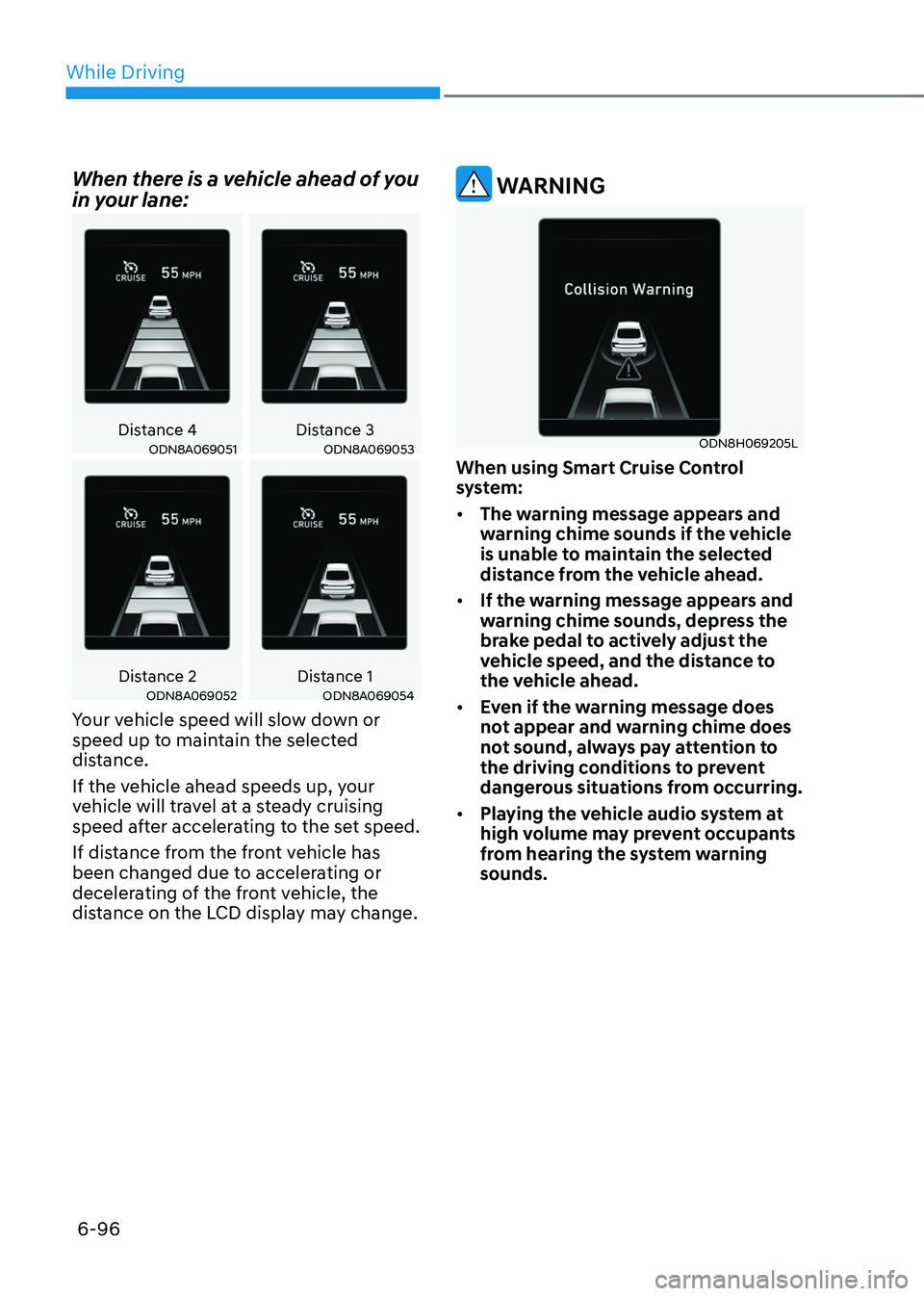
When there is a vehicle ahead of you
in your lane:
Distance 4Distance 3ODN8A069051ODN8A069053
Distance 2Distance 1ODN8A069052ODN8A069054
Your vehicle speed will slow down or
speed up to maintain the selected
distance.
If the vehicle ahead speeds up, your
vehicle will travel at a steady cruising
speed after accelerating to the set speed.
If distance from the front vehicle has
been changed due to accelerating or
decelerating of the front vehicle, the
distance on the LCD display may change.
WARNING
ODN8H069205L
When using Smart Cruise Control
system:
• The warning message appears and
warning chime sounds if the vehicle
is unable to maintain the selected
distance from the vehicle ahead.
• If the warning message appears and
warning chime sounds, depress the
brake pedal to actively adjust the
vehicle speed, and the distance to
the vehicle ahead.
• Even if the warning message does
not appear and warning chime does
not sound, always pay attention to
the driving conditions to prevent
dangerous situations from occurring.
• Playing the vehicle audio system at
high volume may prevent occupants
from hearing the system warning
sounds.
Page 385 of 527
06
6-109
• When you replace the windshield
glass, LFA system camera or related
parts of the steering wheel, have the
vehicle inspected by an authorized
HYUNDAI dealer.
• The system helps detect lane
markers and controls the steering
wheel by a camera, therefore, if the
lane markers are hard to detect, the
system may not work properly.
• Please refer to “Limitations of the
S y s t e m ”.
• Do not remove or damage the related
parts of LFA system.
• You may not hear a warning sound
of LFA system if the audio volume is
high.
• Do not place objects on the
dashboard that reflects light such as
mirrors, white paper, etc. This may
prevent LFA system from functioning
properly. •
Always have your hands on the
steering wheel while LFA system is
activated. If you continue to drive
with your hands off the steering
wheel after the “Keep hands on
steering wheel” warning message
appears, the system will turn off
automatically.
However, if the driver has their
hands on the steering wheel again,
the system will start controlling the
steering wheel.
• The steering wheel is not
continuously controlled so if the
vehicle speed is at a higher rate
when leaving a lane the vehicle may
not be controlled by the system. The
driver must always follow the speed
limit when using the system.
• If you attach objects to the steering
wheel, the system may not assist
steering or the hands off alarm may
not work properly.
Page 401 of 527
06
6-125
CAUTION
• When the operation condition of
Rear Cross-Traffic Collision Warning
system is satisfied, the warning
will occur every time a vehicle
approaches the side or rear of your
stopped (0 mph (0 km/h) vehicle
speed) vehicle.
• The system’s warning or brake may
not operate properly if the left or
right of your vehicle’s rear bumper is
blocked by a vehicle or obstacle.
• The driver should always use
extreme caution while operating
the vehicle, whether or not the
warning light on the side view mirror
illuminates or there is a warning
alarm.
• Playing the vehicle audio system at
high volume may offset the system’s
warning sounds.
• The warning of Rear Cross-Traffic
Collision Warning System may not
sound while other system’s warning
sounds.
• If any other warning sound such as
seat belt warning chime is already
generated, Rear Cross-Traffic
Collision Warning system warning
may not sound.
WARNING
• Drive safely even though the vehicle
is equipped with Rear Cross-Traffic
Collision Warning system and Rear
Cross-Traffic Collision-Avoidance
Assist system. Do not solely rely
on the system but check your
surrounding when backing the
vehicle up.
• The driver is responsible for accurate
brake control.
• Always pay extreme caution while
driving. Rear Cross-Traffic Collision
Warning system and Rear Cross-
Traffic Collision-Avoidance Assist
system may not operate properly or
unnecessarily operate in accordance
with your driving situations.
• Rear Cross-Traffic Collision-
Avoidance Assist system is not a
substitute for safe driving practices,
but a convenience function only. It
is the responsibility of the driver to
always drive cautiously to prevent
unexpected and sudden situations
from occurring. Pay attention to the
road conditions at all times.
Page 424 of 527
Emergency situations
7-4
Before Jump Starting
This vehicle does not have a regular 12V
battery that needs periodic replacement.
It is lithium ion polymer type integrated
into the HEV high voltage battery. The
vehicle has a 12V battery protection
system that cuts 12V battery from vehicle
draw to prevent full discharge.
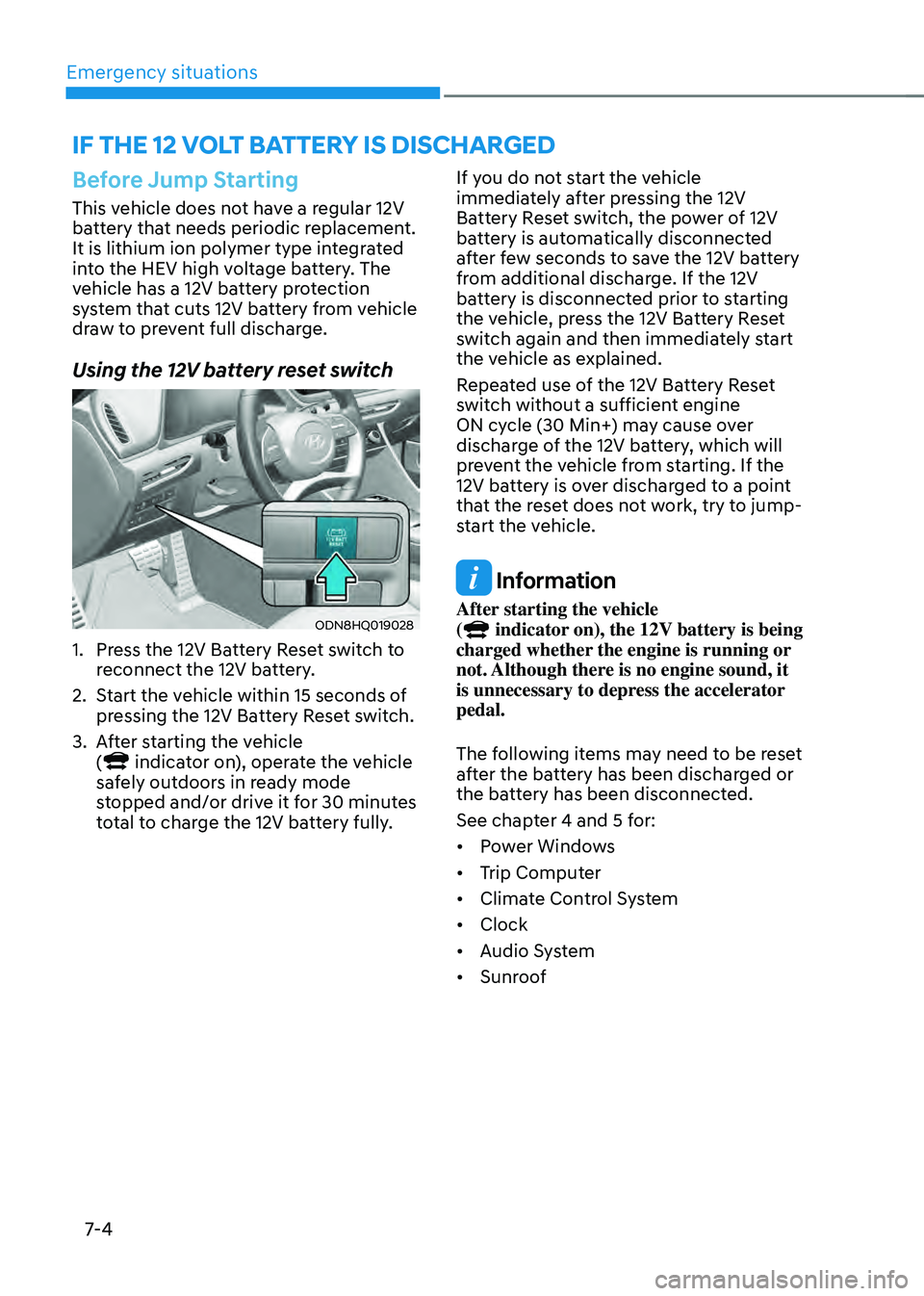
Using the 12V battery reset switch
ODN8HQ019028
1. Press the 12V Battery Reset switch to
reconnect the 12V battery.
2. Start the vehicle within 15 seconds of
pressing the 12V Battery Reset switch.
3. After starting the vehicle
( indicator on), operate the vehicle
safely outdoors in ready mode
stopped and/or drive it for 30 minutes
total to charge the 12V battery fully. If you do not start the vehicle
immediately after pressing the 12V
Battery Reset switch, the power of 12V
battery is automatically disconnected
after few seconds to save the 12V battery
from additional discharge. If the 12V
battery is disconnected prior to starting
the vehicle, press the 12V Battery Reset
switch again and then immediately start
the vehicle as explained.
Repeated use of the 12V Battery Reset
switch without a sufficient engine
ON cycle (30 Min+) may cause over
discharge of the 12V battery, which will
prevent the vehicle from starting. If the
12V battery is over discharged to a point
that the reset does not work, try to jump-
start the vehicle.
Information
After starting the vehicle
( indicator on), the 12V battery is being
charged whether the engine is running or
not. Although there is no engine sound, it
is unnecessary to depress the accelerator
pedal.
The following items may need to be reset
after the battery has been discharged or
the battery has been disconnected.
See chapter 4 and 5 for:
• Power Windows
• Trip Computer
• Climate Control System
• Clock
• Audio System
• Sunroof
IF THE 12 VOLT BATTERY IS DISCHARGED
Page 510 of 527

Index
I-2
A
Air bag warning labels
........................................................................\
.................3-58
Air bag
........................................................................\
.........................................3-37
Driver’s air bag
........................................................................\
.......................3-39
Passenger’s front air bag
........................................................................\
.........3-39
Side air bags
........................................................................\
............................3-40
Curtain air bags
........................................................................\
.......................3-41
How does the air bags system operate? ...........................................................3-42
SRS warning light
........................................................................\
...................3-43
What to expect after an air bag inflates
...........................................................3-46
Occupant Classification System (OCS)
..........................................................3-47
Why didn’t my air bag go off in a collision
....................................................3-53
Air bag collision sensors
........................................................................\
.........3-54
Air bag inflation conditions
........................................................................\
....3-55
Air bag non-inflation conditions
.....................................................................3-55
SRS Care
........................................................................\
.................................3-57
Additional safety precautions
........................................................................\
..3-58
Air bag warning labels
........................................................................\
............3-58
Air cleaner
........................................................................\
...................................8-22
filter replacement
........................................................................\
...................8-22
Air conditioning system specification
................................................................2-10
Antenna
........................................................................\
......................................5-126
Anti-lock Brake System (ABS)
........................................................................\
..6-27
Appearance care ........................................................................\
........................... 8-50
Exterior care
........................................................................\
...........................8-50
Interior care
........................................................................\
............................8-54
Armrest
........................................................................\
.......................................3-11
Audio / Video / Navigation system
...................................................................5-129
Auto defogging system
........................................................................\
..............5-115
AUTO headlamp position
........................................................................\
...........5-72
Auto LOCK - Enable on shift
........................................................................\
.....5-31
Auto LOCK - Enable on speed
........................................................................\
...5-31
Auto UNLOCK - Enable on shift
.......................................................................5-31
Auto UNLOCK -Air bag deployment
................................................................5-31
Page 517 of 527

I
I-9
I
If the 12 volt battery is discharged
........................................................................\
7-4
If the engine overheats
........................................................................\
..................7-7
If the engine stalls at a crossroad or crossing
........................................................7-2
If the engine stalls while driving
........................................................................\
..7-2
If the engine will not start
........................................................................\
.............7-3
If you have a flat tire while driving
......................................................................7-3
Ignition switch
........................................................................\
..............................6-6
Engine Start/Stop button
........................................................................\
..........6-6
Remote start
........................................................................\
.............................6-9
Immobilizer system
........................................................................\
....................5-11
Important safety precautions ........................................................................\
.......... 3-2
Always wear your seat belt
........................................................................\
......3-2
Restrain all children
........................................................................\
.................3-2
Air bag hazards
........................................................................\
........................3-2
Driver distraction
........................................................................\
.....................3-2
Control your speed
........................................................................\
...................3-2
Keep your vehicle in safe condition
.................................................................3-2
In case of an emergency while driving
.................................................................7-2
Infotainment system ........................................................................\
................... 5-126
USB and iPod® port
........................................................................\
............5-126
Antenna
........................................................................\
................................5-126
Steering wheel audio controls
......................................................................5-127
Bluetooth® Wireless Technology hands-free ...............................................5-128
Audio / Video / Navigation system
..............................................................5-128
Blue Link® center
........................................................................\
................5-128
Inside rearview mirror
........................................................................\
................5-42
Instrument cluster
........................................................................\
.........................4-4
Adjusting instrument cluster illumination
........................................................4-5
Gauges and meters
........................................................................\
...................4-5
Transmission shift indicator
........................................................................\
.....4-9
Warning and indicator lights
........................................................................\
..4-10
LCD display messages
........................................................................\
...........4-19
LCD display (Type A, B)
........................................................................\
.......4-26
LCD display (Type C)
........................................................................\
............4-39
Page 524 of 527

Index
I-16
Seats ........................................................................\
..............................................3-3
Safety precautions
........................................................................\
....................3-4
Front seat adjustment
........................................................................\
...............3-5
Rear seat adjustment
........................................................................\
..............3-10
Head restraints
........................................................................\
........................3-11
Front seat warmers
........................................................................\
.................3-15
Side curtain
........................................................................\
................................5-125
Side view mirrors
........................................................................\
........................5-49
Smart Cruise Control (SCC)
........................................................................\
.......6-87
Smart key
........................................................................\
......................................5-5
Locking
........................................................................\
....................................5-5
Unlocking
........................................................................\
.................................5-7
Trunk opening
........................................................................\
..........................5-8
Mechanical key
........................................................................\
........................5-9
Battery replacement
........................................................................\
...............5-10
Smooth cornering
........................................................................\
.....................6-133
Snow tires
........................................................................\
.................................6-135
Spare tire
........................................................................\
.....................................7-14
Special driving conditions
........................................................................\
.........6-132
Hazardous driving conditions
......................................................................6-132
Rocking the vehicle
........................................................................\
..............6-132
Smooth cornering
........................................................................\
.................6-133
Driving at night
........................................................................\
....................6-133
Driving in the rain
........................................................................\
................6-133
Driving in flooded areas
........................................................................\
.......6-134
Highway driving ........................................................................\
.................... 6-134
Speedometer
........................................................................\
.................................4-5
Steering wheel
........................................................................\
............................5-38
Electric Power Steering (EPS)
.......................................................................5-38
Tilt steering / Telescope steering
....................................................................5-39
Heated steering wheel
........................................................................\
............5-40
Horn ........................................................................\
......................................... 5-41
Steering wheel audio control
........................................................................\
.....5-127
Storage compartment
........................................................................\
................5-118
Center console storage
........................................................................\
.........5-118
Glove box
........................................................................\
.............................5-118
Sunvisor
........................................................................\
....................................5-120
Surround View Monitor (SVM)
........................................................................\
..5-86