lights HYUNDAI SONATA HYBRID 2022 User Guide
[x] Cancel search | Manufacturer: HYUNDAI, Model Year: 2022, Model line: SONATA HYBRID, Model: HYUNDAI SONATA HYBRID 2022Pages: 527, PDF Size: 64.14 MB
Page 122 of 527
Instrument Cluster
4-18
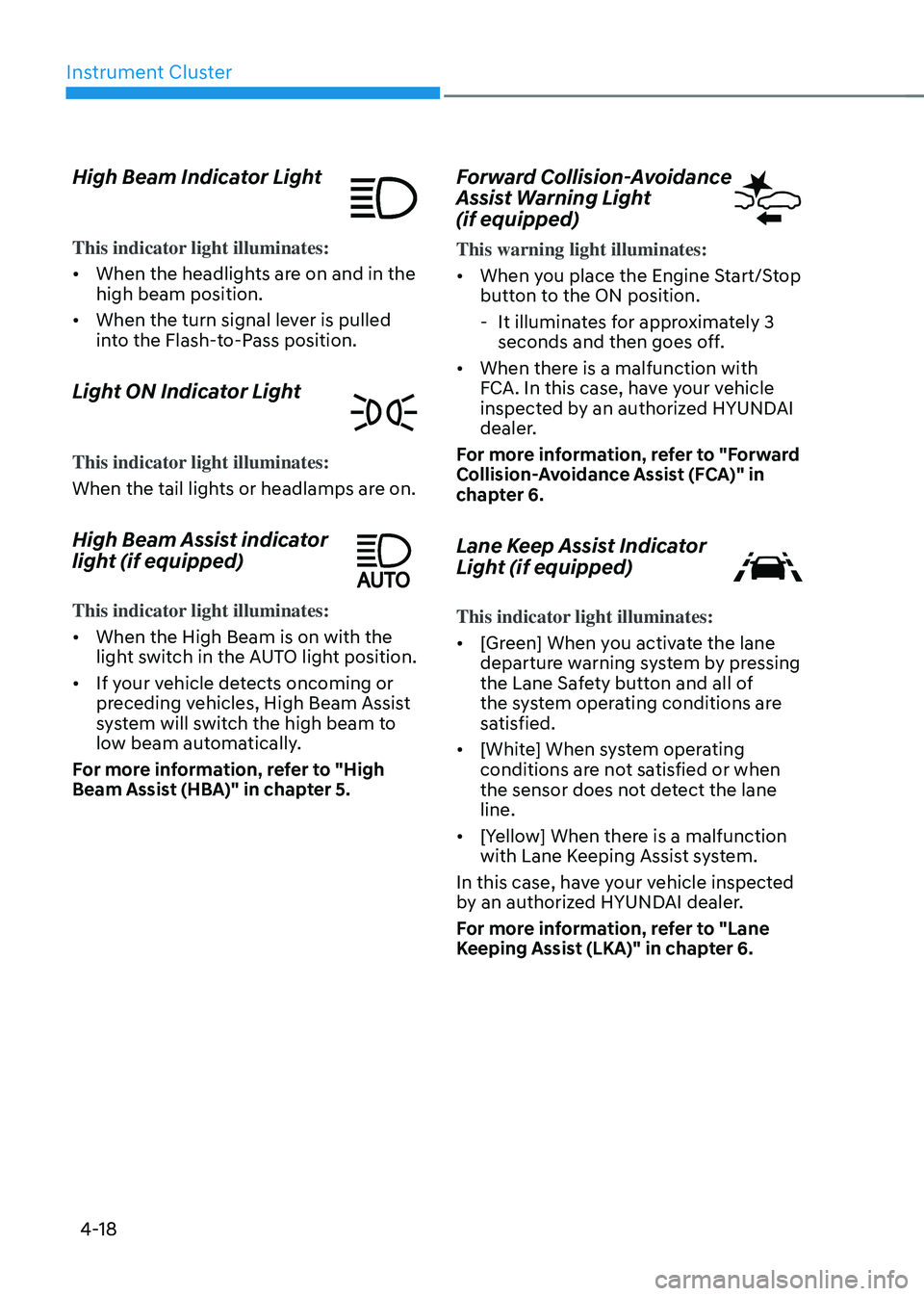
High Beam Indicator Light
This indicator light illuminates:
• When the headlights are on and in the
high beam position.
• When the turn signal lever is pulled
into the Flash-to-Pass position.
Light ON Indicator Light
This indicator light illuminates:
When the tail lights or headlamps are on.
High Beam Assist indicator
light (if equipped)
This indicator light illuminates:
• When the High Beam is on with the
light switch in the AUTO light position.
• If your vehicle detects oncoming or
preceding vehicles, High Beam Assist
system will switch the high beam to
low beam automatically.
For more information, refer to "High
Beam Assist (HBA)" in chapter 5.
Forward Collision-Avoidance
Assist Warning Light
(if equipped)
This warning light illuminates:
• When you place the Engine Start/Stop
button to the ON position.
-It illuminates for approximately 3
seconds and then goes off.
• When there is a malfunction with
FCA. In this case, have your vehicle
inspected by an authorized HYUNDAI
dealer.
For more information, refer to "Forward
Collision-Avoidance Assist (FCA)" in
chapter 6.
Lane Keep Assist Indicator
Light (if equipped)
This indicator light illuminates:
• [Green] When you activate the lane
departure warning system by pressing
the Lane Safety button and all of
the system operating conditions are
satisfied.
• [White] When system operating
conditions are not satisfied or when
the sensor does not detect the lane
line.
• [Yellow] When there is a malfunction
with Lane Keeping Assist system.
In this case, have your vehicle inspected
by an authorized HYUNDAI dealer.
For more information, refer to "Lane
Keeping Assist (LKA)" in chapter 6.
Page 125 of 527
04
4-21
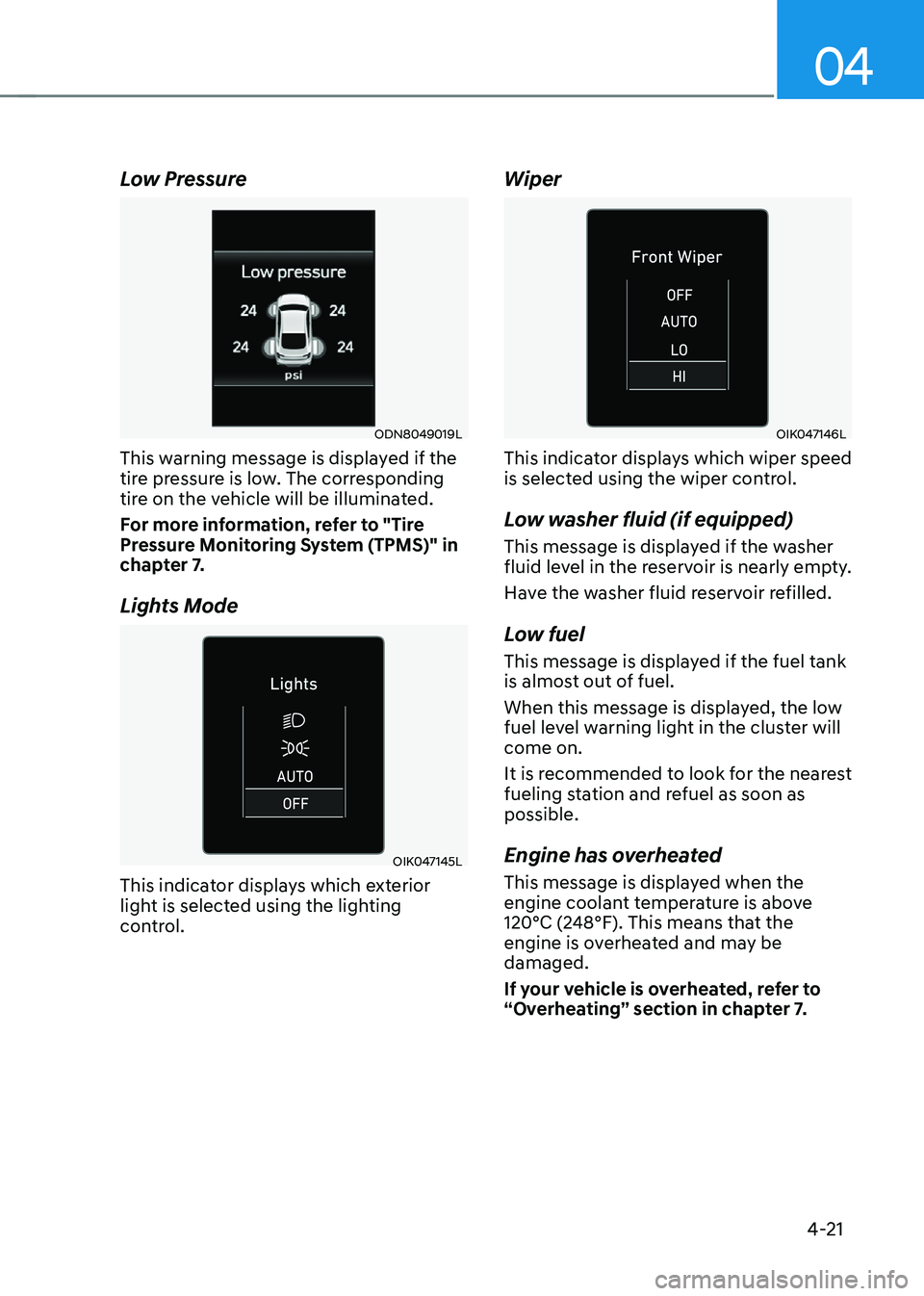
Low Pressure
ODN8049019L
This warning message is displayed if the
tire pressure is low. The corresponding
tire on the vehicle will be illuminated.
For more information, refer to "Tire
Pressure Monitoring System (TPMS)" in
chapter 7.
Lights Mode
OIK047145L
This indicator displays which exterior
light is selected using the lighting
control.
Wiper
OIK047146L
This indicator displays which wiper speed
is selected using the wiper control.
Low washer fluid (if equipped)
This message is displayed if the washer
fluid level in the reservoir is nearly empty.
Have the washer fluid reservoir refilled.
Low fuel
This message is displayed if the fuel tank
is almost out of fuel.
When this message is displayed, the low
fuel level warning light in the cluster will
come on.
It is recommended to look for the nearest
fueling station and refuel as soon as
possible.
Engine has overheated
This message is displayed when the
engine coolant temperature is above
120°C (248°F). This means that the
engine is overheated and may be
damaged.
If your vehicle is overheated, refer to
“Overheating” section in chapter 7.
Page 126 of 527
Instrument Cluster
4-22
Check exhaust system (if equipped)
This message is displayed if there is a
problem with the GPF system. At this
time, the GPF warning light will also
blink. If this occurs, we recommend that
you have the GPF system checked by an
authorized HYUNDAI dealer.
GPF : Gasoline Particulate Filter
Check headlight (if equipped)
This message is displayed if the
headlights are not operating properly. A
headlight bulb may need to be replaced.
Make sure to replace the burned out
bulb with a new one of the same wattage
rating.
Check turn signal (if equipped)
This message is displayed if the turn
signal lamps are not operating properly.
A lamp may need to be replaced.
Make sure to replace the burned out
bulb with a new one of the same wattage
rating.
Check brake light (if equipped)
This message is displayed if the stop
lamps are not operating properly. A lamp
may need to be replaced.
Make sure to replace the burned out
bulb with a new one of the same wattage
rating.
Check headlamp LED (if equipped)
This message is displayed if there is a
problem with the LED headlamp. We
recommend that you have the vehicle
inspected by an authorized HYUNDAI
dealer.
Check Active Air Flap system
This message is displayed in the
following situations:
-There is a malfunction with the flap
-There is a malfunction with the
controller or sensor
When all of the above conditions are
fixed, the warning will disappear.
Ready to start driving
This message is displayed when the
vehicle is ready to be driven.
Check regenerative brakes
This message is displayed when the brake
performance is low or the regenerative
brake does not work properly due to a
problem in the brake system.
If this occurs, it may take longer for the
brake pedal to operate and the braking
distance may become longer.
Stop vehicle and check brakes
This message is displayed when there is
a problem in the brake system.
If this occurs, park the vehicle in a
safe location and we recommend that
you tow your vehicle to the nearest
authorized HYUNDAI dealer and have the
vehicle inspected.
Page 131 of 527
04
4-27
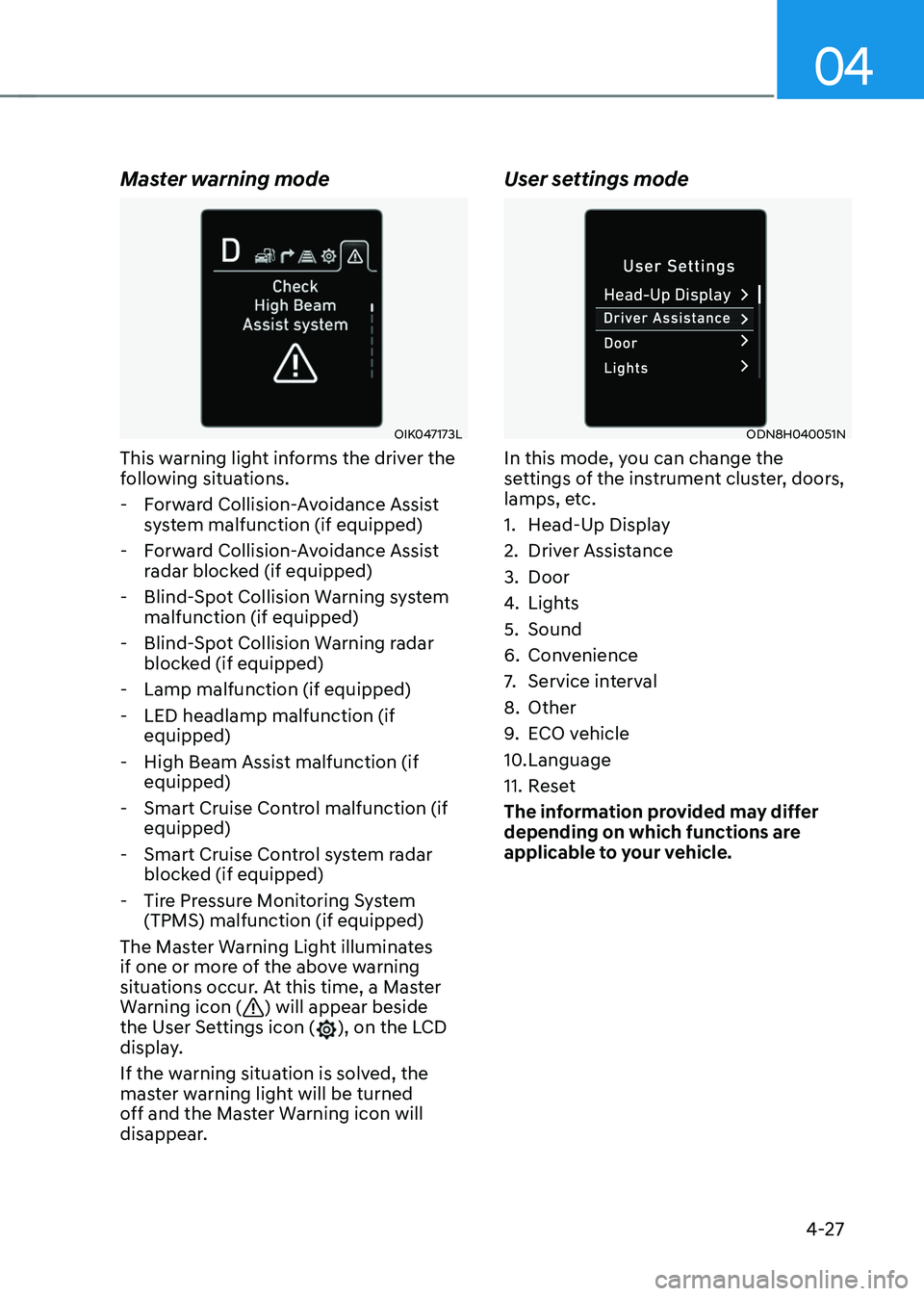
Master warning mode
OIK047173L
This warning light informs the driver the
following situations.
-Forward Collision-Avoidance Assist
system malfunction (if equipped)
-Forward Collision-Avoidance Assist
radar blocked (if equipped)
-Blind-Spot Collision Warning system
malfunction (if equipped)
-Blind-Spot Collision Warning radar
blocked (if equipped)
-Lamp malfunction (if equipped)
-LED headlamp malfunction (if
equipped)
-High Beam Assist malfunction (if
equipped)
-Smart Cruise Control malfunction (if
equipped)
-Smart Cruise Control system radar
blocked (if equipped)
-Tire Pressure Monitoring System
(TPMS) malfunction (if equipped)
The Master Warning Light illuminates
if one or more of the above warning
situations occur. At this time, a Master
Warning icon (
) will appear beside
the User Settings icon (), on the LCD
display.
If the warning situation is solved, the
master warning light will be turned
off and the Master Warning icon will
disappear.
User settings mode
ODN8H040051N
In this mode, you can change the
settings of the instrument cluster, doors,
lamps, etc.
1. Head-Up Display
2. Driver Assistance
3. Door
4. Lights
5. Sound
6. Convenience
7. Service interval
8. Other
9. ECO vehicle
10. Language
11. Reset
The information provided may differ
depending on which functions are
applicable to your vehicle.
Page 136 of 527
Instrument Cluster
4-32
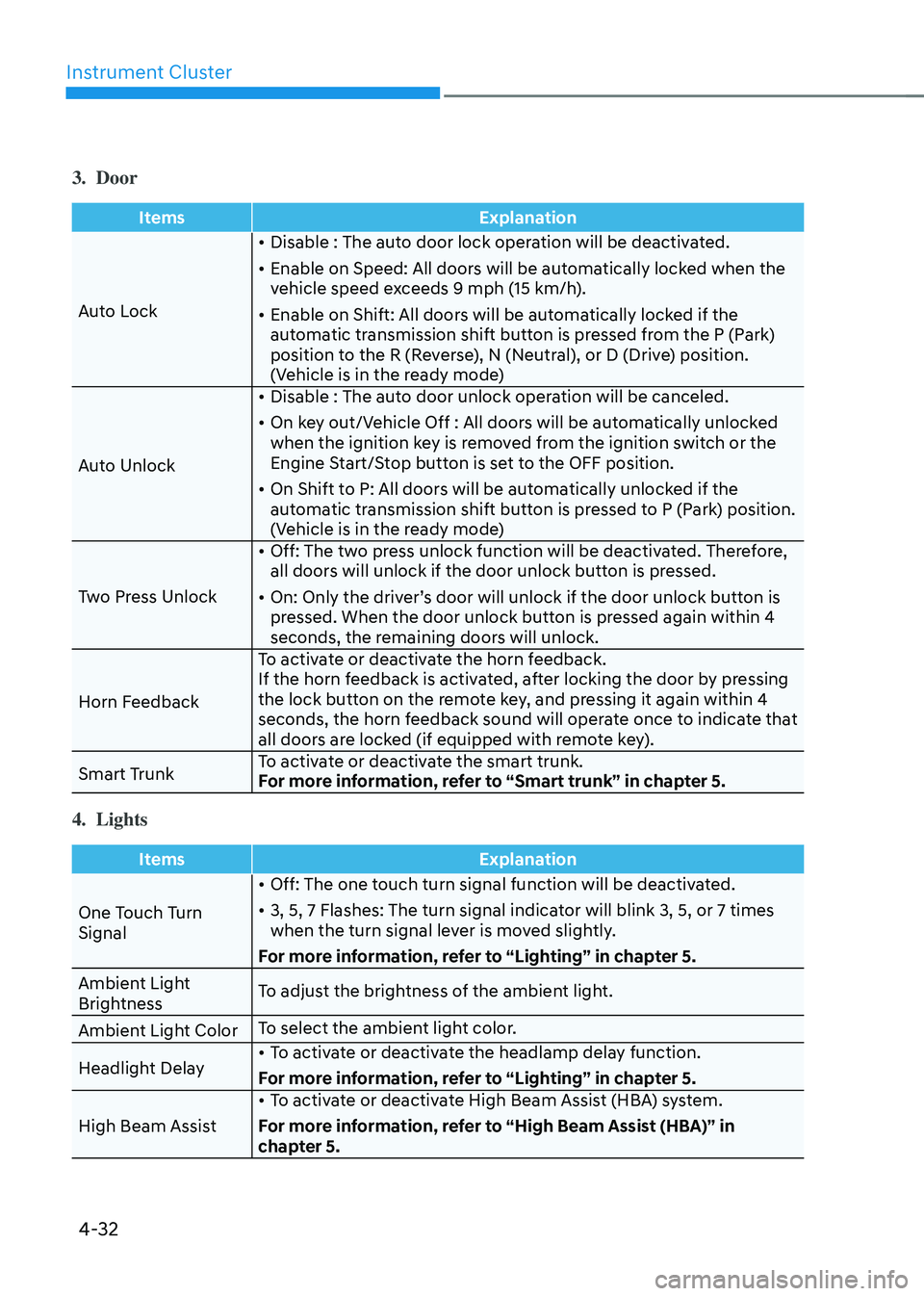
3. Door
ItemsExplanation
Auto Lock •
Disable : The auto door lock operation will be deactivated.
• Enable on Speed: All doors will be automatically locked when the
vehicle speed exceeds 9 mph (15 km/h).
• Enable on Shift: All doors will be automatically locked if the
automatic transmission shift button is pressed from the P (Park)
position to the R (Reverse), N (Neutral), or D (Drive) position.
(Vehicle is in the ready mode)
Auto Unlock •
Disable : The auto door unlock operation will be canceled.
• On key out/Vehicle Off : All doors will be automatically unlocked
when the ignition key is removed from the ignition switch or the
Engine Start/Stop button is set to the OFF position.
• On Shift to P: All doors will be automatically unlocked if the
automatic transmission shift button is pressed to P (Park) position.
(Vehicle is in the ready mode)
Two Press Unlock •
Off: The two press unlock function will be deactivated. Therefore,
all doors will unlock if the door unlock button is pressed.
• On: Only the driver’s door will unlock if the door unlock button is
pressed. When the door unlock button is pressed again within 4
seconds, the remaining doors will unlock.
Horn Feedback To activate or deactivate the horn feedback.
If the horn feedback is activated, after locking the door by pressing
the lock button on the remote key, and pressing it again within 4
seconds, the horn feedback sound will operate once to indicate that
all doors are locked (if equipped with remote key).
Smart Trunk To activate or deactivate the smart trunk.
For more information, refer to “Smart trunk” in chapter 5.
4. Lights
Items
Explanation
One Touch Turn
Signal •
Off: The one touch turn signal function will be deactivated.
• 3, 5, 7 Flashes: The turn signal indicator will blink 3, 5, or 7 times
when the turn signal lever is moved slightly.
For more information, refer to “Lighting” in chapter 5.
Ambient Light
Brightness To adjust the brightness of the ambient light.
Ambient Light Color To select the ambient light color.
Headlight Delay •
To activate or deactivate the headlamp delay function.
For more information, refer to “Lighting” in chapter 5.
High Beam Assist •
To activate or deactivate High Beam Assist (HBA) system.
For more information, refer to “High Beam Assist (HBA)” in
chapter 5.
Page 137 of 527
04
4-33
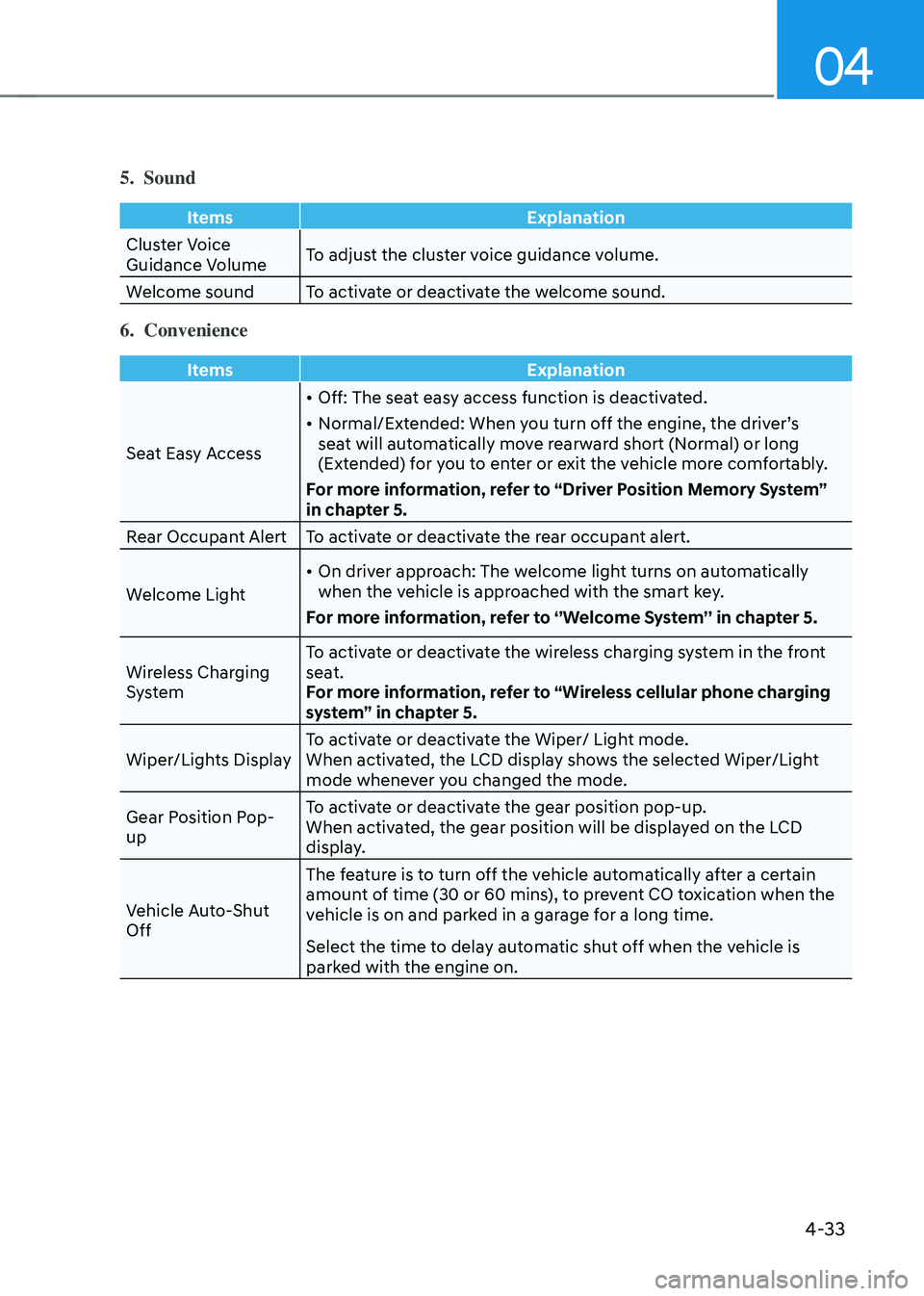
5. Sound
ItemsExplanation
Cluster Voice
Guidance Volume To adjust the cluster voice guidance volume.
Welcome sound To activate or deactivate the welcome sound.
6. Convenience
Items Explanation
Seat Easy Access •
Off: The seat easy access function is deactivated.
• Normal/Extended: When you turn off the engine, the driver’s
seat will automatically move rearward short (Normal) or long
(Extended) for you to enter or exit the vehicle more comfortably.
For more information, refer to “Driver Position Memory System”
in chapter 5.
Rear Occupant Alert To activate or deactivate the rear occupant alert.
Welcome Light •
On driver approach: The welcome light turns on automatically
when the vehicle is approached with the smart key.
For more information, refer to ‘’Welcome System’’ in chapter 5.
Wireless Charging
System To activate or deactivate the wireless charging system in the front
seat.
For more information, refer to “Wireless cellular phone charging
system” in chapter 5.
Wiper/Lights Display To activate or deactivate the Wiper/ Light mode.
When activated, the LCD display shows the selected Wiper/Light
mode whenever you changed the mode.
Gear Position Pop-
up To activate or deactivate the gear position pop-up.
When activated, the gear position will be displayed on the LCD
display.
Vehicle Auto-Shut
Off The feature is to turn off the vehicle automatically after a certain
amount of time (30 or 60 mins), to prevent CO toxication when the
vehicle is on and parked in a garage for a long time.
Select the time to delay automatic shut off when the vehicle is
parked with the engine on.
Page 148 of 527
Instrument Cluster
4-44
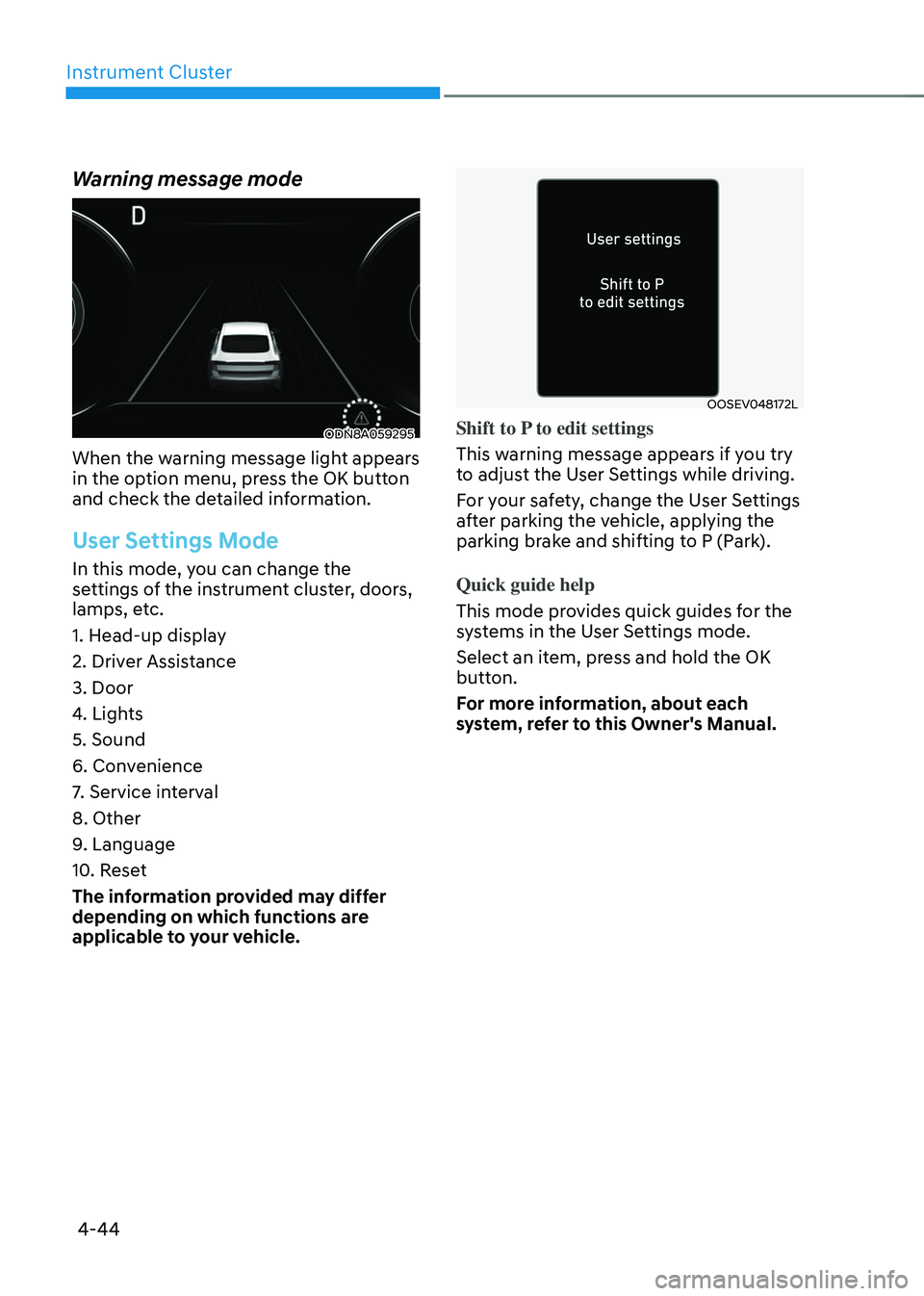
Warning message mode
ODN8A059295
When the warning message light appears
in the option menu, press the OK button
and check the detailed information.
User Settings Mode
In this mode, you can change the
settings of the instrument cluster, doors,
lamps, etc.
1. Head-up display
2. Driver Assistance
3. Door
4. Lights
5. Sound
6. Convenience
7. Service interval
8. Other
9. Language
10. Reset
The information provided may differ
depending on which functions are
applicable to your vehicle.
OOSEV048172L
Shift to P to edit settings
This warning message appears if you try
to adjust the User Settings while driving.
For your safety, change the User Settings
after parking the vehicle, applying the
parking brake and shifting to P (Park).
Quick guide help
This mode provides quick guides for the
systems in the User Settings mode.
Select an item, press and hold the OK
button.
For more information, about each
system, refer to this Owner's Manual.
Page 150 of 527

5
Closing the Sunroof ........................................................................\
...........................5-57
Resetting the Sunroof ........................................................................\
........................5-58
Sunroof Open Warning ........................................................................\
......................5-58
Solar Roof ........................................................................\
................................5-59How to Use ........................................................................\
.........................................5-59
Battery Charging Amount ........................................................................\
..................5-59
Solar Roof Operation Lamp ........................................................................\
...............5-59
Check Solar Roof Operation ........................................................................\
..............5-59
Consume and Generating amount up to environmental condition ......................5-60
System Malfunction ........................................................................\
...........................5-61
Exterior Features ........................................................................\
.....................5-62Hood ........................................................................\
....................................................5-62
Trunk ........................................................................\
....................................................5-63
Emergency Trunk Safety Release ........................................................................\
.....5-64
Fuel Filler Door ........................................................................\
..................................5-68
Head Up Display (HUD) ........................................................................\
..........5-70
Lighting
........................................................................\
.....................................5-72Exterior Lights ........................................................................\
....................................5-72
Interior Lights ........................................................................\
.....................................5-78
Welcome System ........................................................................\
................................5-81
Wipers and Washers ........................................................................\
...............5-82Windshield Wipers ........................................................................\
.............................5-82
Windshield Washers ........................................................................\
...........................5-83
Rear View Monitor (RVM) ........................................................................\
.......5-84Rear View Monitor with Parking Guidance ..............................................................5-84
Rear View Monitor - Top View ........................................................................\
..........5-84
Surround View Monitor (SVM) .......................................................................5-86
Reverse Parking Distance Warning (PDW)
....................................................5-87Operation of Reverse Parking Distance Warning System ........................................5-87
To Turn off Reverse Parking Distance Warning System ..........................................5-89
Non-Operational Conditions of Reverse Parking Distance Warning System ........5-89
Reverse Parking Distance Warning System Precautions ........................................5-90
Page 153 of 527
05
5-5
Smart Key
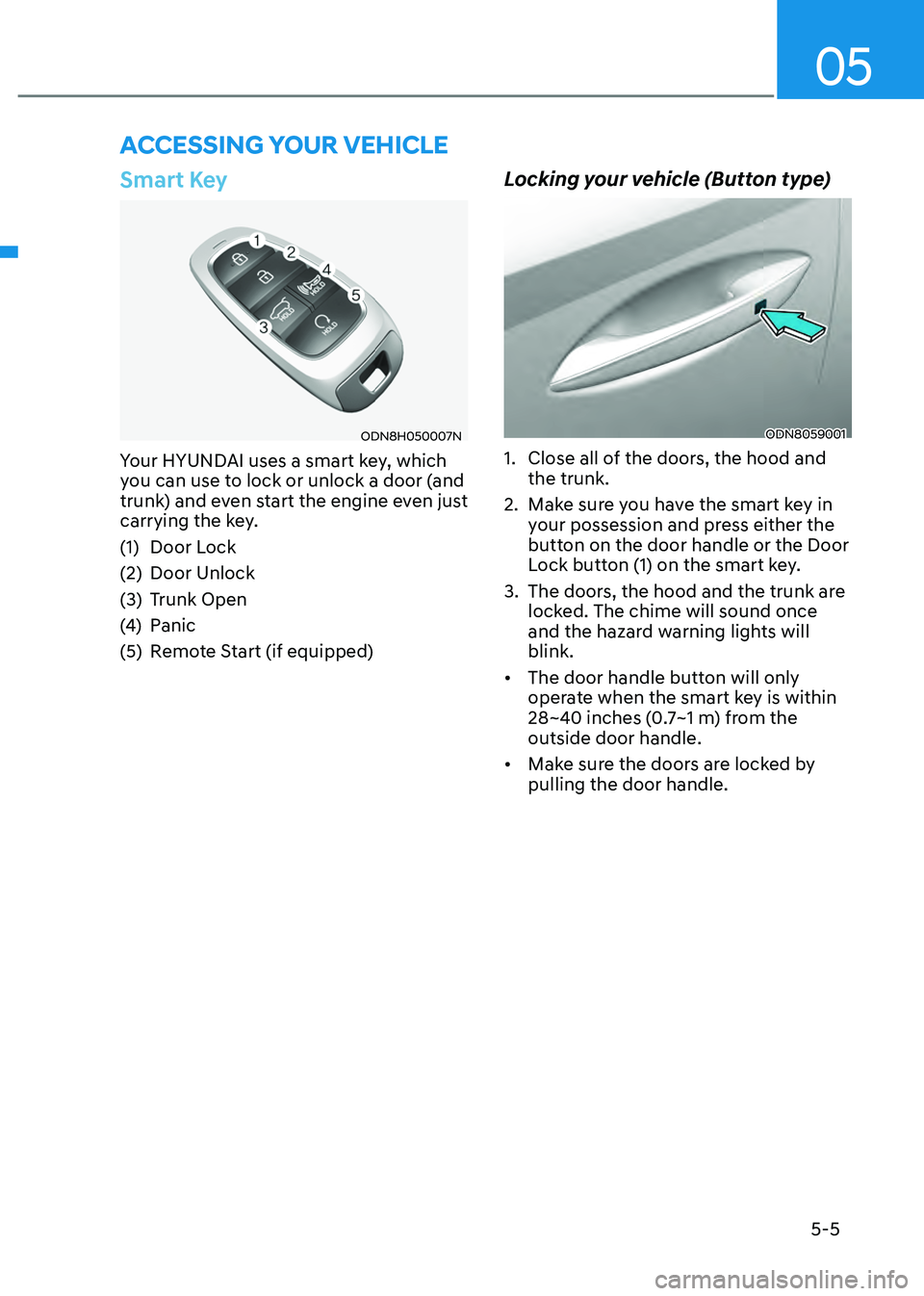
ODN8H050007N
Your HYUNDAI uses a smart key, which
you can use to lock or unlock a door (and
trunk) and even start the engine even just
carrying the key.
(1) Door Lock
(2) Door Unlock
(3) Trunk Open
(4) Panic
(5) Remote Start (if equipped)
Locking your vehicle (Button type)
ODN8059001
1. Close all of the doors, the hood and
the trunk.
2. Make sure you have the smart key in
your possession and press either the
button on the door handle or the Door
Lock button (1) on the smart key.
3. The doors, the hood and the trunk are
locked. The chime will sound once
and the hazard warning lights will
blink.
• The door handle button will only
operate when the smart key is within
28~40 inches (0.7~1 m) from the
outside door handle.
• Make sure the doors are locked by
pulling the door handle.
ACCESSING YOUR VEHICLE
Page 154 of 527
Convenient Features
5-6
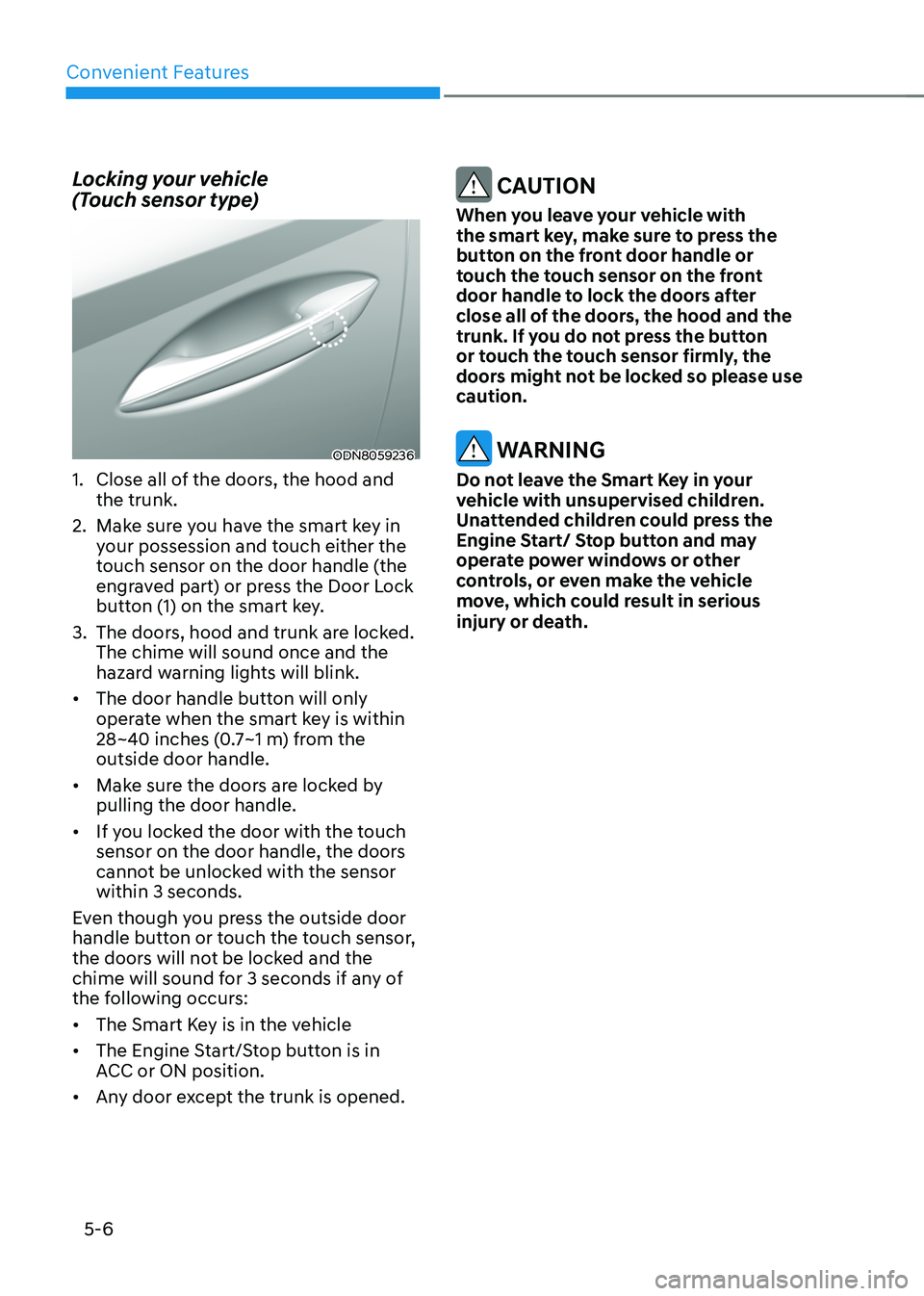
Locking your vehicle
(Touch sensor type)
ODN8059236
1. Close all of the doors, the hood and
the trunk.
2. Make sure you have the smart key in
your possession and touch either the
touch sensor on the door handle (the
engraved part) or press the Door Lock
button (1) on the smart key.
3. The doors, hood and trunk are locked.
The chime will sound once and the
hazard warning lights will blink.
• The door handle button will only
operate when the smart key is within
28~40 inches (0.7~1 m) from the
outside door handle.
• Make sure the doors are locked by
pulling the door handle.
• If you locked the door with the touch
sensor on the door handle, the doors
cannot be unlocked with the sensor
within 3 seconds.
Even though you press the outside door
handle button or touch the touch sensor,
the doors will not be locked and the
chime will sound for 3 seconds if any of
the following occurs:
• The Smart Key is in the vehicle
• The Engine Start/Stop button is in
ACC or ON position.
• Any door except the trunk is opened.
CAUTION
When you leave your vehicle with
the smart key, make sure to press the
button on the front door handle or
touch the touch sensor on the front
door handle to lock the doors after
close all of the doors, the hood and the
trunk. If you do not press the button
or touch the touch sensor firmly, the
doors might not be locked so please use
caution.
WARNING
Do not leave the Smart Key in your
vehicle with unsupervised children.
Unattended children could press the
Engine Start/ Stop button and may
operate power windows or other
controls, or even make the vehicle
move, which could result in serious
injury or death.