steering HYUNDAI SONATA HYBRID 2022 Owner's Manual
[x] Cancel search | Manufacturer: HYUNDAI, Model Year: 2022, Model line: SONATA HYBRID, Model: HYUNDAI SONATA HYBRID 2022Pages: 527, PDF Size: 64.14 MB
Page 188 of 527
Convenient Features
5-40
Heated Steering Wheel
(if equipped)
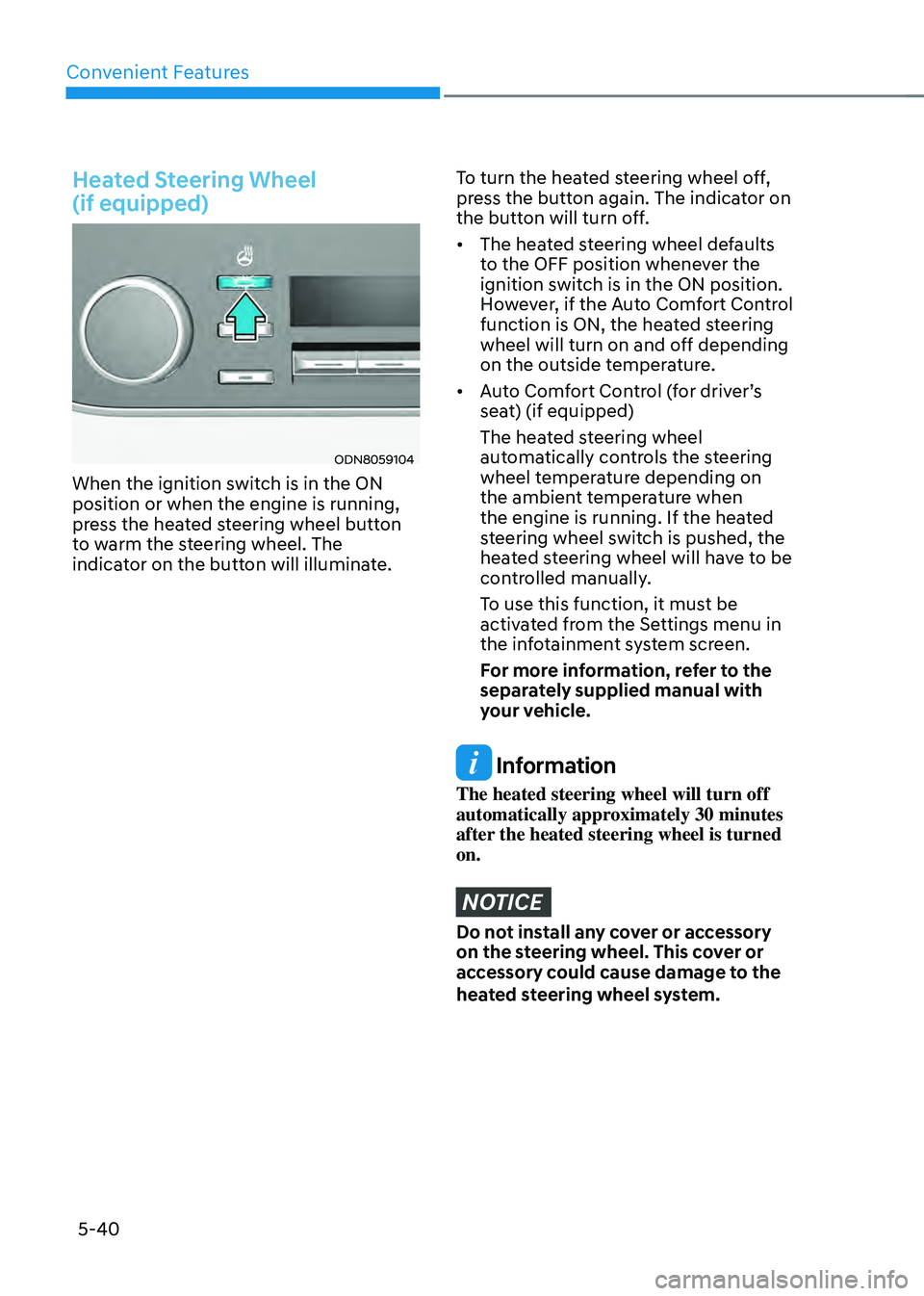
ODN8059104
When the ignition switch is in the ON
position or when the engine is running,
press the heated steering wheel button
to warm the steering wheel. The
indicator on the button will illuminate.
To turn the heated steering wheel off,
press the button again. The indicator on
the button will turn off.
• The heated steering wheel defaults
to the OFF position whenever the
ignition switch is in the ON position.
However, if the Auto Comfort Control
function is ON, the heated steering
wheel will turn on and off depending
on the outside temperature.
• Auto Comfort Control (for driver’s
seat) (if equipped)
The heated steering wheel
automatically controls the steering
wheel temperature depending on
the ambient temperature when
the engine is running. If the heated
steering wheel switch is pushed, the
heated steering wheel will have to be
controlled manually.
To use this function, it must be
activated from the Settings menu in
the infotainment system screen.
For more information, refer to the
separately supplied manual with
your vehicle.
Information
The heated steering wheel will turn off
automatically approximately 30 minutes
after the heated steering wheel is turned
on.
NOTICE
Do not install any cover or accessory
on the steering wheel. This cover or
accessory could cause damage to the
heated steering wheel system.
Page 189 of 527
05
5-41
Horn
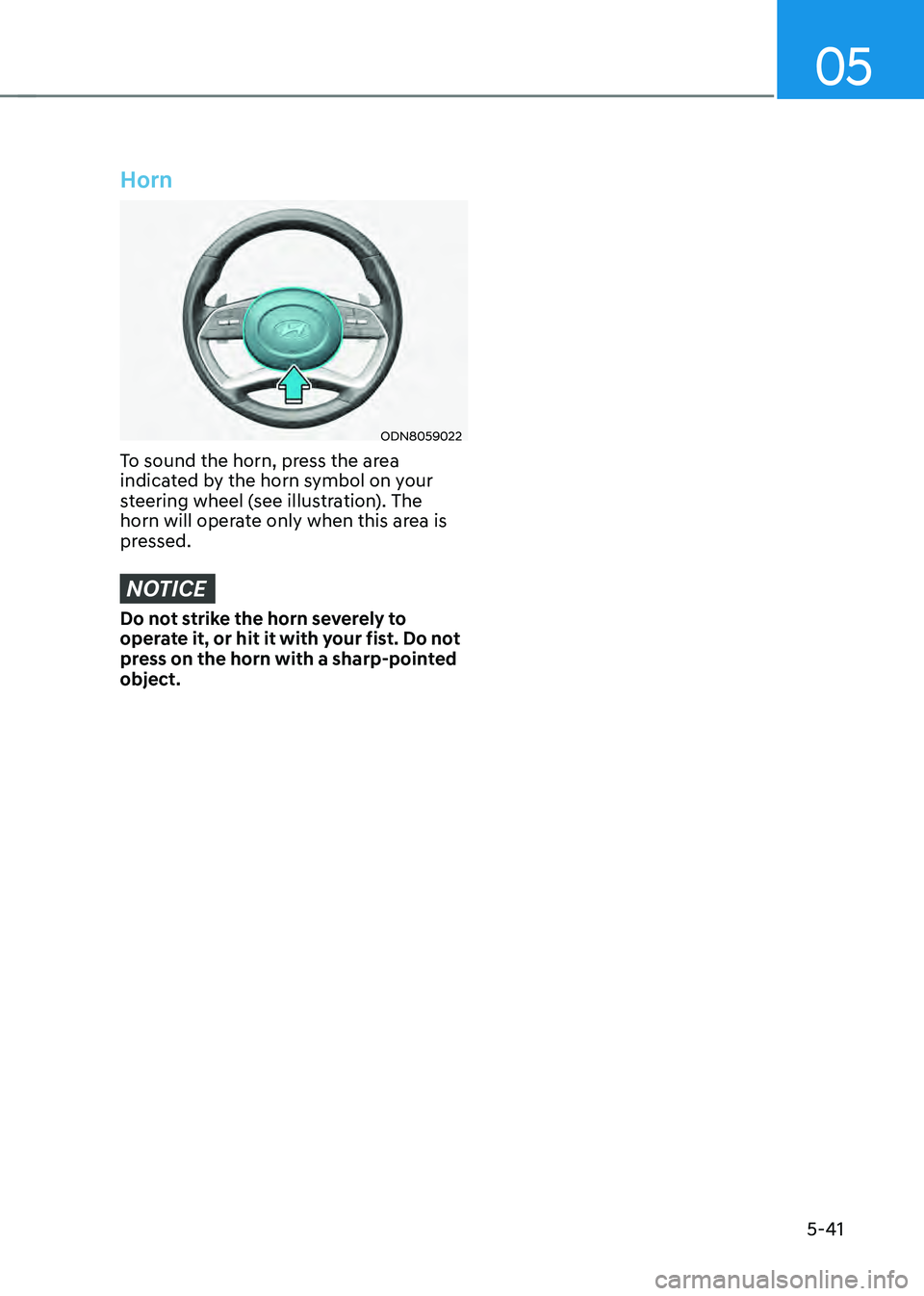
ODN8059022
To sound the horn, press the area
indicated by the horn symbol on your
steering wheel (see illustration). The
horn will operate only when this area is
pressed.
NOTICE
Do not strike the horn severely to
operate it, or hit it with your fist. Do not
press on the horn with a sharp-pointed
object.
Page 225 of 527
05
5-77
Turn signals and lane change signals
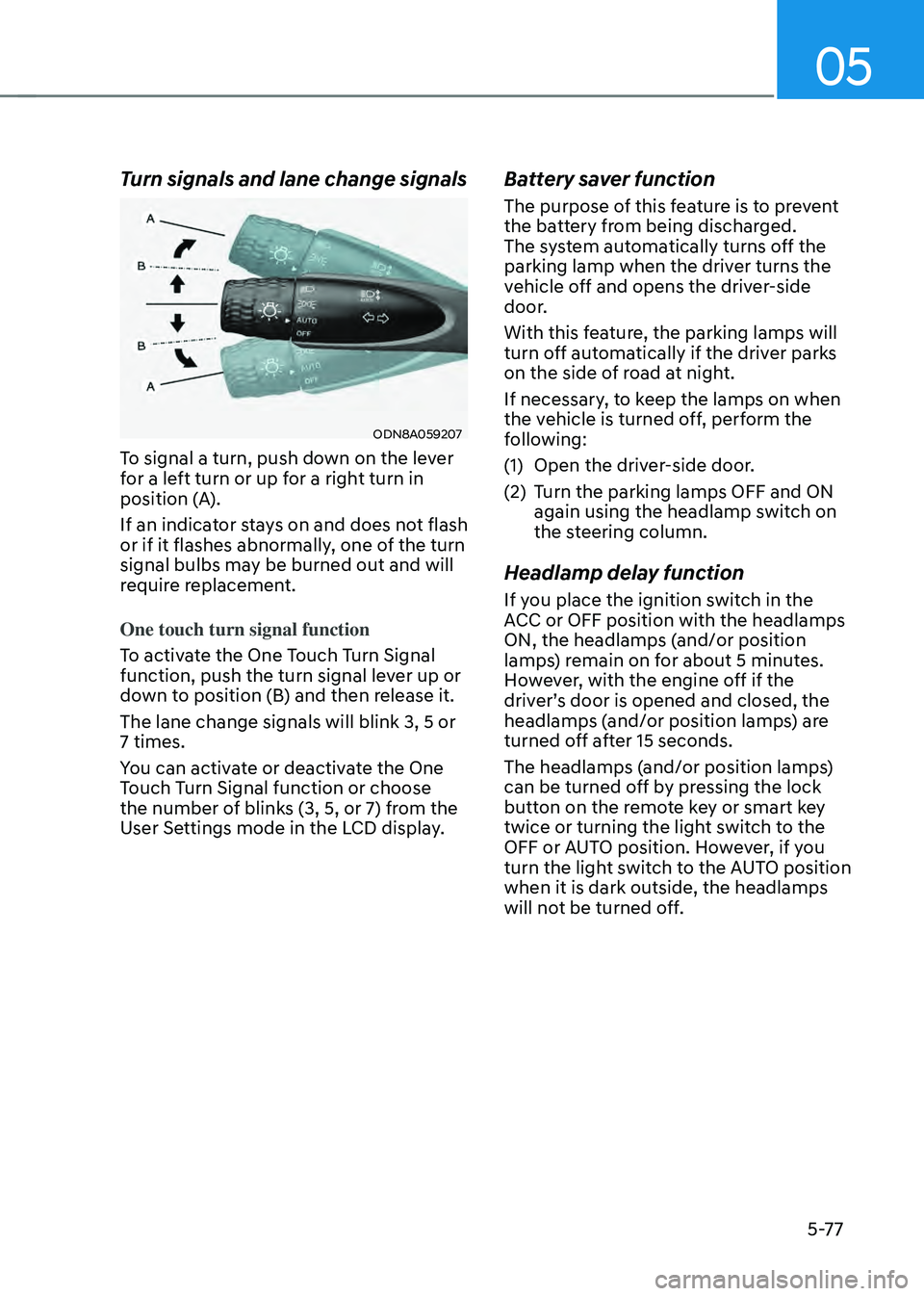
ODN8A059207
To signal a turn, push down on the lever
for a left turn or up for a right turn in
position (A).
If an indicator stays on and does not flash
or if it flashes abnormally, one of the turn
signal bulbs may be burned out and will
require replacement.
One touch turn signal function
To activate the One Touch Turn Signal
function, push the turn signal lever up or
down to position (B) and then release it.
The lane change signals will blink 3, 5 or
7 times.
You can activate or deactivate the One
Touch Turn Signal function or choose
the number of blinks (3, 5, or 7) from the
User Settings mode in the LCD display.
Battery saver function
The purpose of this feature is to prevent
the battery from being discharged.
The system automatically turns off the
parking lamp when the driver turns the
vehicle off and opens the driver-side
door.
With this feature, the parking lamps will
turn off automatically if the driver parks
on the side of road at night.
If necessary, to keep the lamps on when
the vehicle is turned off, perform the
following:
(1) Open the driver-side door.
(2) Turn the parking lamps OFF and ON
again using the headlamp switch on
the steering column.
Headlamp delay function
If you place the ignition switch in the
ACC or OFF position with the headlamps
ON, the headlamps (and/or position
lamps) remain on for about 5 minutes.
However, with the engine off if the
driver’s door is opened and closed, the
headlamps (and/or position lamps) are
turned off after 15 seconds.
The headlamps (and/or position lamps)
can be turned off by pressing the lock
button on the remote key or smart key
twice or turning the light switch to the
OFF or AUTO position. However, if you
turn the light switch to the AUTO position
when it is dark outside, the headlamps
will not be turned off.
Page 244 of 527
Convenient Features
5-96
Operating conditions
Reverse Parking Collision-Avoidance
Assist system enters the ready status,
when ‘Active Assist’ or ‘Warning Only’
is selected in the H/UNIT system
screen and the following conditions are
satisfied:
• The trunk is closed
• The shift lever is in R (Reverse)
• Vehicle speed is below 6 mph (10
km/h)
• System components such as the rear
view camera and the rear ultrasonic
sensors are in normal conditions
The driver needs to select ‘Active Assist’
on the LCD display or infotainment
system display for collision-avoidance
assist.
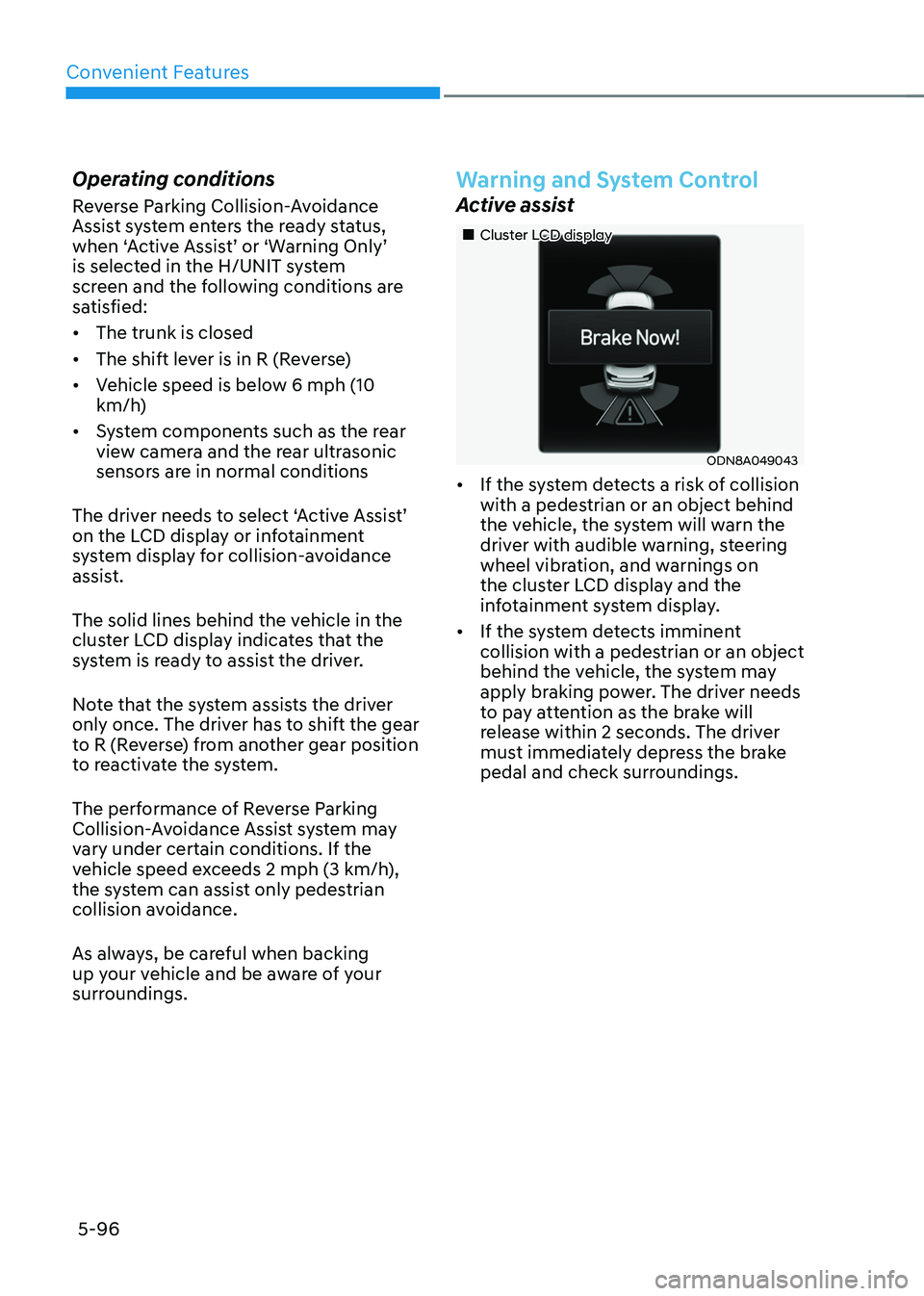
The solid lines behind the vehicle in the
cluster LCD display indicates that the
system is ready to assist the driver.
Note that the system assists the driver
only once. The driver has to shift the gear
to R (Reverse) from another gear position
to reactivate the system.
The performance of Reverse Parking
Collision-Avoidance Assist system may
vary under certain conditions. If the
vehicle speed exceeds 2 mph (3 km/h),
the system can assist only pedestrian
collision avoidance.
As always, be careful when backing
up y our vehicle and be aware of your
surroundings.
Warning and System Control
Active assist
„„Cluster LCD display
ODN8A049043
• If the system detects a risk of collision
with a pedestrian or an object behind
the vehicle, the system will warn the
driver with audible warning, steering
wheel vibration, and warnings on
the cluster LCD display and the
infotainment system display.
• If the system detects imminent
collision with a pedestrian or an object
behind the vehicle, the system may
apply braking power. The driver needs
to pay attention as the brake will
release within 2 seconds. The driver
must immediately depress the brake
pedal and check surroundings.
Page 249 of 527
5-101
05
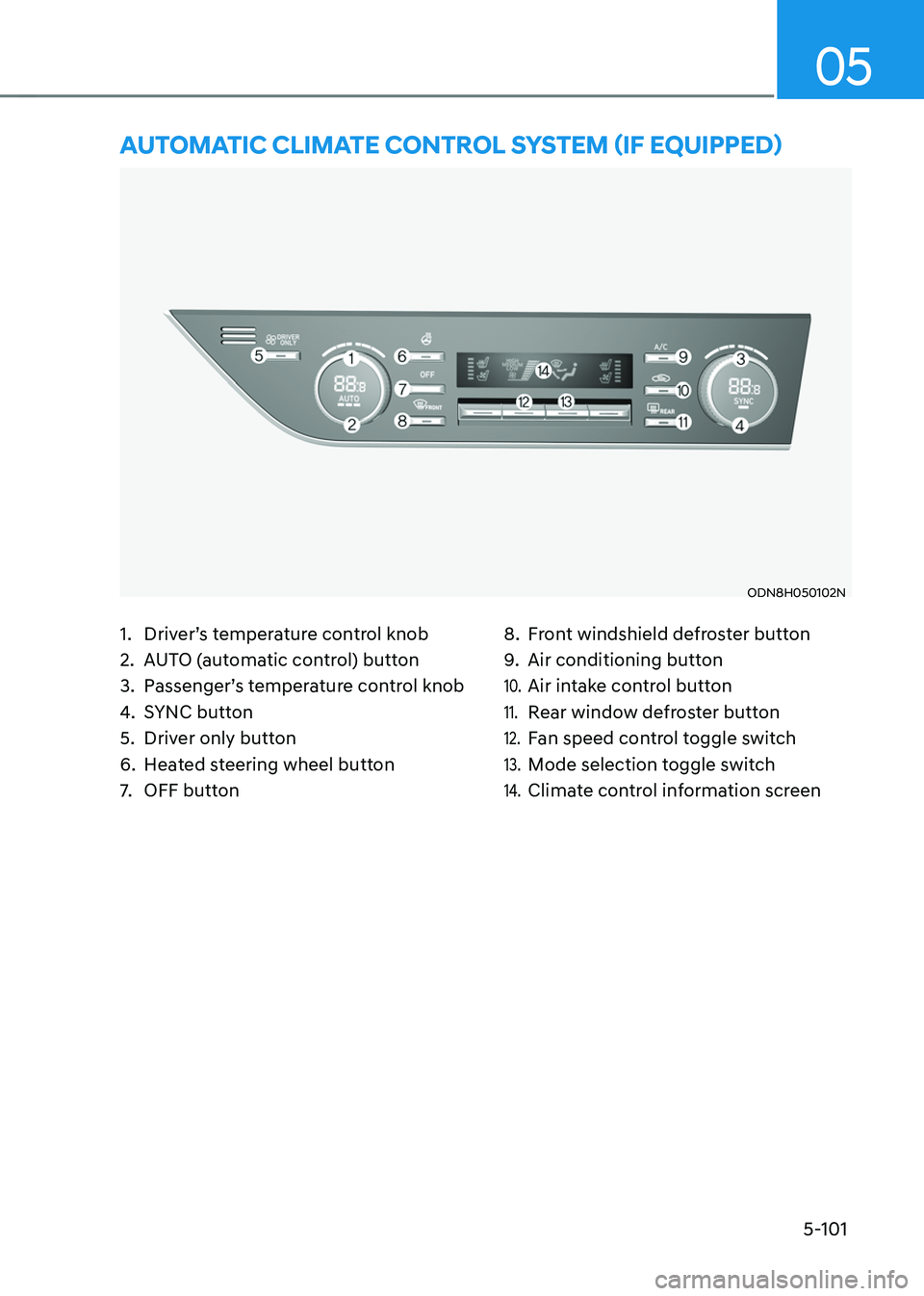
1. Driver’s temperature control knob
2. AUTO (automatic control) button
3. Passenger’s temperature control knob
4. SYNC button
5. Driver only button
6. Heated steering wheel button
7. OFF button
8. Front windshield defroster button
9. Air conditioning button
10. Air intake control button
11. Rear window defroster button
12. Fan speed control toggle switch
13. Mode selection toggle switch
14. Climate control information screen
AUTOMATIC CLIMATE CONTROL SYSTEM (IF EQUIPPED)
ODN8H050102N
Page 265 of 527
05
5-117
CLIMATE CONTROL ADDITIONAL FEATURES
Sunroof Inside Air Recirculation
(if equipped)
When the sunroof is opened, outside
(fresh) air will be automatically selected.
At this time, if you press the air intake
control button, recirculated air position
will be selected but will change back
to outside (fresh) air after 3 minutes.
When the sunroof is closed, the air
intake position will return to the original
position that was selected.
Automatic Ventilation
The system automatically selects the
fresh mode when the climate control
system operates Floor-Level or Bi-Level
for more than 5 minutes and the outdoor
temperature is under 59°F (15°C).
Smart Seat Warmer/Air
Ventilation Seat (Automatic
Control Interworking with the
Driver’s Seat System)
(if equipped)
According to the heating and air
conditioning setting and internal and
external temperature of the vehicle,
the temperature of the seat warmer/
air ventilation seat and steering wheel
warmer are controlled automatically.
The system can be selected as follows on
the LCD or infotainment system display:
Settings → Seat → Heated/Ventilated Features → Seat Warmer/Ventilation
Washer Fluid Logic
While spraying the washer fluid on the
windshield, the air recirculation mode
is automatically operated in order to
prevent the outside air intake.
When the outside temperature is low,
the external air inflow is maintained to
prevent moisture condensed on the
window.
To set up the air recirculation
1. Start the engine.
2. Set the air flow outlet direction to
the Floor Level Mode by pressing the
mode selection button.
3. While pressing the air conditioning
button, push the recirculation mode
button over 4 times within 2 seconds.
4. If the function is set, the recirculation
button indicator will blink 6 times.
To release the air recirculation
1. Start the engine.
2. Set the air flow outlet direction to
the Floor Level Mode by pressing the
mode selection button.
3. While pressing the air conditioning
button, push the recirculation mode
button indicator over 4 times within 2
seconds.
4. If the function is released, the
recirculation button indicator will
blink 3 times.
The system can be selected as follows on
the LCD or infotainment system display
(if equipped):
Settings → Climate → Recirculate Air → Activate upon Washer Fluid Use
Page 275 of 527
05
5-127
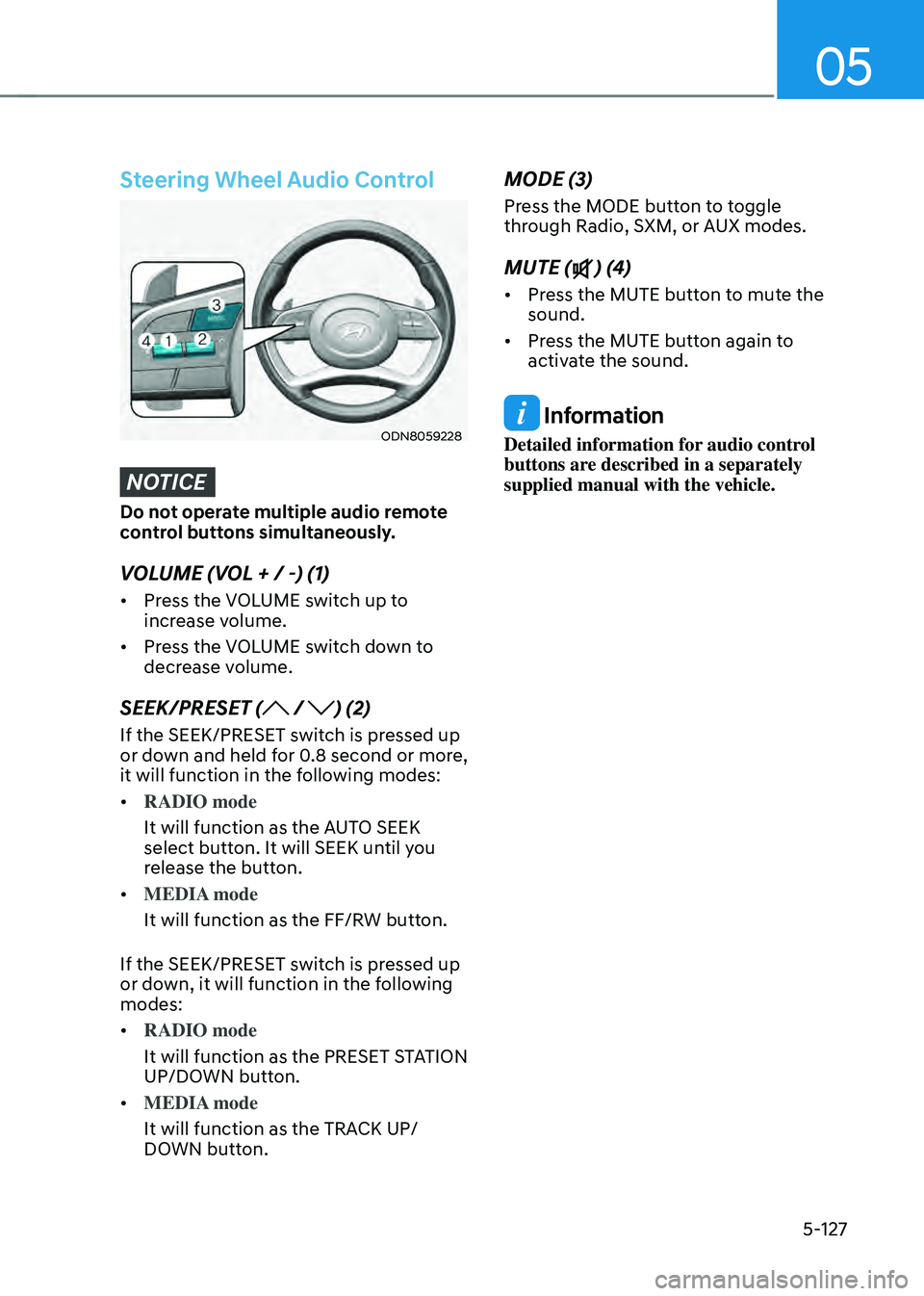
Steering Wheel Audio Control
ODN8059228
NOTICE
Do not operate multiple audio remote
control buttons simultaneously.
VOLUME (VOL + / -) (1)
• Press the VOLUME switch up to
increase volume.
• Press the VOLUME switch down to
decrease volume.
SEEK/PRESET ( / ) (2)
If the SEEK/PRESET switch is pressed up
or down and held for 0.8 second or more,
it will function in the following modes:
• RADIO mode
It will function as the AUTO SEEK
select button. It will SEEK until you
release the button.
• MEDIA mode
It will function as the FF/RW button.
If the SEEK/PRESET switch is pressed up
or down, it will function in the following
modes:
• RADIO mode
It will function as the PRESET STATION
UP/DOWN button.
• MEDIA mode
It will function as the TRACK UP/
DOWN button.
MODE (3)
Press the MODE button to toggle
through Radio, SXM, or AUX modes.
MUTE () (4)
• Press the MUTE button to mute the
sound.
• Press the MUTE button again to
activate the sound.
Information
Detailed information for audio control
buttons are described in a separately
supplied manual with the vehicle.
Page 281 of 527
06
6-5
Before Entering the Vehicle
• Be sure all windows, outside mirror(s),
and outside lights are clean and
unobstructed.
• Remove frost, snow, or ice.
• Visually check the tires for uneven
wear and damage.
• Check under the vehicle for any sign
of leaks.
• Be sure there are no obstacles behind
you if you intend to back up.
Before Starting
• Make sure the hood, the trunk, and
the doors are securely closed and
locked.
• Adjust the position of the seat and
steering wheel.
• Adjust the inside and side view
mirrors.
• Verify all the lights work.
• Fasten your seatbelt. Check that
all passengers have fastened their
seatbelts.
• Check the gauges and indicators
in the instrument panel and the
messages on the instrument display
when the ignition switch is in the ON
position.
• Check that any items you are carrying
are stored properly or fastened down
securely.
WARNING
To reduce the risk of SERIOUS INJURY or
DEATH, take the following precautions:
• ALWAYS wear your seat belt. All
passengers must be properly belted
whenever the vehicle is moving.
For more information, refer to "Seat
Belts" in chapter 3.
• Always drive defensively. Assume
other drivers or pedestrians may be
careless and make mistakes.
• Stay focused on the task of driving.
Driver distraction can cause
accidents.
• Leave plenty of space between you
and the vehicle in front of you.
WARNING
NEVER drink alcohol or take drugs and
drive.
Drinking alcohol or taking drugs and
driving is dangerous and may result in
an accident and SERIOUS INJURY or
DEATH.
Drunk driving is the number one
contributor to the highway death
toll each year. Even a small amount
of alcohol will affect your reflexes,
perceptions and judgment. Just
one drink can reduce your ability to
respond to changing conditions and
emergencies and your reaction time
gets worse with each additional drink.
Driving while under the influence
of drugs is as dangerous or more
dangerous than driving under the
influence of alcohol.
You are much more likely to have a
serious accident if you drink or take
drugs and drive. If you are drinking or
taking drugs, don't drive. Do not ride
with a driver who has been drinking
or taking drugs. Choose a designated
driver or call a taxi.
BEFORE DRIVING
Page 282 of 527
While Driving
6-6
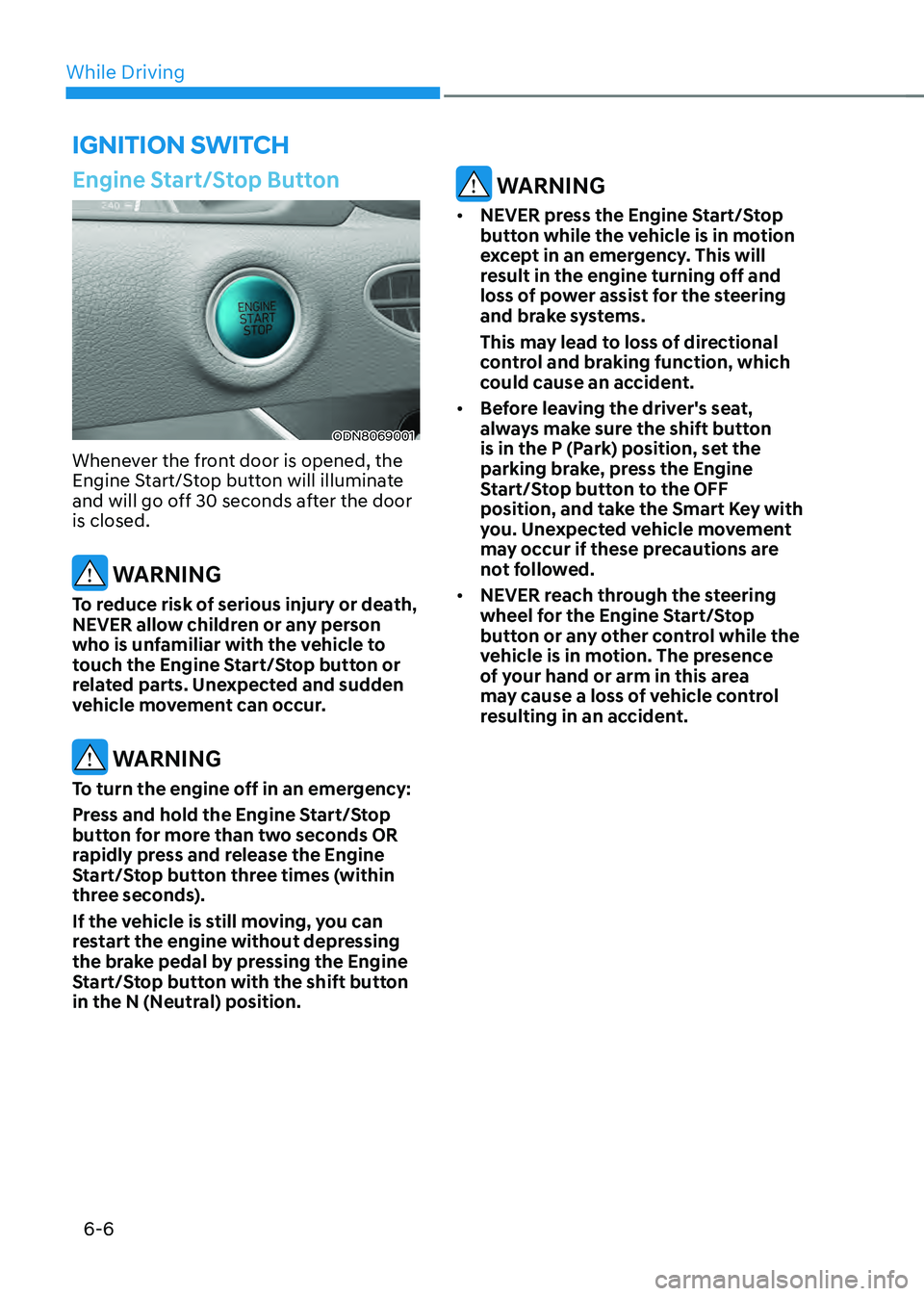
Engine Start/Stop Button
ODN8069001
Whenever the front door is opened, the
Engine Start/Stop button will illuminate
and will go off 30 seconds after the door
is closed.
WARNING
To reduce risk of serious injury or death,
NEVER allow children or any person
who is unfamiliar with the vehicle to
touch the Engine Start/Stop button or
related parts. Unexpected and sudden
vehicle movement can occur.
WARNING
To turn the engine off in an emergency:
Press and hold the Engine Start/Stop
button for more than two seconds OR
rapidly press and release the Engine
Start/Stop button three times (within
three seconds).
If the vehicle is still moving, you can
restart the engine without depressing
the brake pedal by pressing the Engine
Start/Stop button with the shift button
in the N (Neutral) position.
WARNING
• NEVER press the Engine Start/Stop
button while the vehicle is in motion
except in an emergency. This will
result in the engine turning off and
loss of power assist for the steering
and brake systems.
This may lead to loss of directional
control and braking function, which
could cause an accident.
• Before leaving the driver's seat,
always make sure the shift button
is in the P (Park) position, set the
parking brake, press the Engine
Start/Stop button to the OFF
position, and take the Smart Key with
you. Unexpected vehicle movement
may occur if these precautions are
not followed.
• NEVER reach through the steering
wheel for the Engine Start/Stop
button or any other control while the
vehicle is in motion. The presence
of your hand or arm in this area
may cause a loss of vehicle control
resulting in an accident.
IGNITION SWITCH
Page 288 of 527
While Driving
6-12
D (Drive)
This is the normal driving position. The
transmission will automatically shift
through a 6-gear sequence, providing
the best fuel economy and power.
To start the vehicle forward, push the D
(Drive) button by depressing the brake
pedal with the engine ON. Then depress
the accelerator pedal smoothly.
For extra power when passing another
vehicle or driving uphill, depress the
accelerator fully. The transmission will
automatically downshift to the next
lower gear (or gears, as appropriate).
When the vehicle is stopped in D (Drive)
position, if you open the driver's door
with the seat belt unfastened, the gear is
shifted to P (Park) position automatically.
However when the vehicle moves in D
(Drive) position, if you open the driver's
door with the seat belt unfastened, the
gear may not shift to P (Park) position
automatically to protect the automatic
transmission.
Shift-lock system
For your safety, the automatic
transmission has a shift-lock system
which prevents shifting the gear from
P (Park) or N (Neutral) to R (Reverse)
or D (Drive) unless the brake pedal is
depressed.
To shift the gear from P (Park) or N
(Neutral) to R (Reverse) or D (Drive):
1. Depress and hold the brake pedal.
2. Start the engine.
3. Depress the brake pedal and push the
R (Reverse) or D (Drive) button.
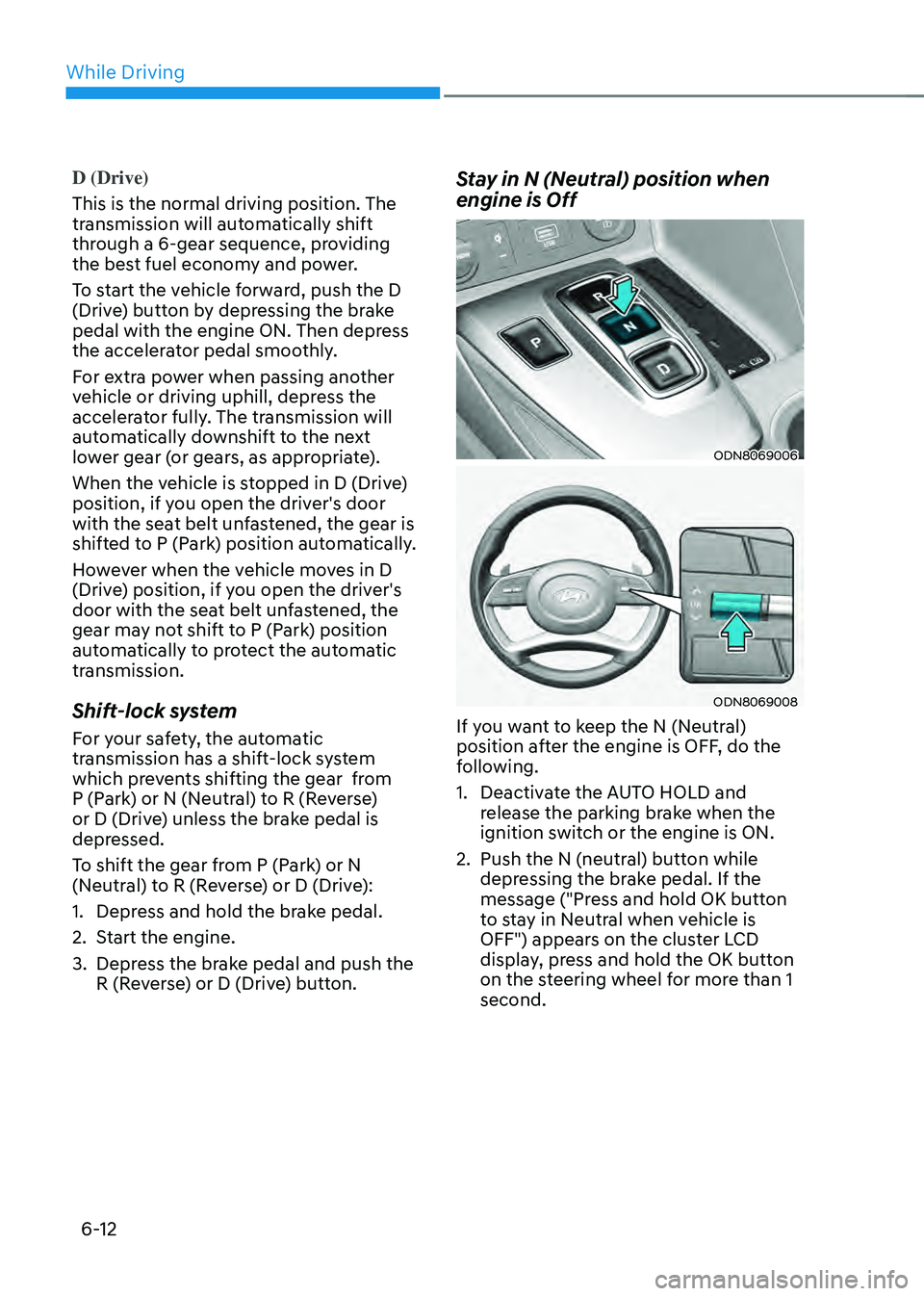
Stay in N (Neutral) position when
engine is Off
ODN8069006
ODN8069008
If you want to keep the N (Neutral)
position after the engine is OFF, do the
following.
1. Deactivate the AUTO HOLD and
release the parking brake when the
ignition switch or the engine is ON.
2. Push the N (neutral) button while
depressing the brake pedal. If the
message ("Press and hold OK button
to stay in Neutral when vehicle is
OFF") appears on the cluster LCD
display, press and hold the OK button
on the steering wheel for more than 1
second.