mirror HYUNDAI SONATA HYBRID 2022 Owner's Guide
[x] Cancel search | Manufacturer: HYUNDAI, Model Year: 2022, Model line: SONATA HYBRID, Model: HYUNDAI SONATA HYBRID 2022Pages: 527, PDF Size: 64.14 MB
Page 385 of 527
06
6-109
• When you replace the windshield
glass, LFA system camera or related
parts of the steering wheel, have the
vehicle inspected by an authorized
HYUNDAI dealer.
• The system helps detect lane
markers and controls the steering
wheel by a camera, therefore, if the
lane markers are hard to detect, the
system may not work properly.
• Please refer to “Limitations of the
S y s t e m ”.
• Do not remove or damage the related
parts of LFA system.
• You may not hear a warning sound
of LFA system if the audio volume is
high.
• Do not place objects on the
dashboard that reflects light such as
mirrors, white paper, etc. This may
prevent LFA system from functioning
properly. •
Always have your hands on the
steering wheel while LFA system is
activated. If you continue to drive
with your hands off the steering
wheel after the “Keep hands on
steering wheel” warning message
appears, the system will turn off
automatically.
However, if the driver has their
hands on the steering wheel again,
the system will start controlling the
steering wheel.
• The steering wheel is not
continuously controlled so if the
vehicle speed is at a higher rate
when leaving a lane the vehicle may
not be controlled by the system. The
driver must always follow the speed
limit when using the system.
• If you attach objects to the steering
wheel, the system may not assist
steering or the hands off alarm may
not work properly.
Page 389 of 527
06
6-113
• The shadow is on the lane marker by
a median strip, trees, guardrail, noise
barriers, etc.
• The lane markers are complicated or a
structure substitutes for the lines such
as a construction area.
• There are crosswalk signs or other
symbols on the road.
• The lane marker in a tunnel is stained
with oil, etc.
• The lane suddenly disappears such as
at the intersection.
• Driving the shared lane usage (bicycle
lane, pedestrians lane, etc.)
When external condition is intervened
• The brightness outside changes
suddenly such as when entering or
exiting a tunnel, or when passing
under a bridge.
• The brightness outside is too low such
as when the headlamps are not on at
night or the vehicle is going through
a tunnel.
• There is a boundary structure in the
roadway such as a concrete barrier,
guardrail and reflector post that is
inadvertently being detected by the
camera.
• When light coming from a street light
or an oncoming vehicle is reflected on
a wet road surface such as a puddle in
the road.
• The field of view in front is obstructed
by sun glare. •
There is not enough distance between
you and the vehicle in front to be
able to detect the lane marker or the
vehicle ahead is driving on the lane
marker.
• Driving on a steep grade, over a hill, or
when driving on a curved road.
• The adverse road conditions cause
excessive vehicle vibrations while
driving.
• The surrounding of the inside rear
view mirror temperature is high due to
direct sunlight, etc.
• The sensor recognition changes
suddenly when passing over a speed
bump or driving on a steep up/down
or right/left grade
When front visibility is poor
• The windshield or the camera lens is
blocked with dirt or debris.
• The windshield glass is fogged up; a
clear view of the road is obstructed.
• Placing objects on the dashboard, etc.
• The sensor cannot detect the lane
because of fog, heavy rain or snow.
Page 397 of 527
06
6-121
WARNING
• Always be aware of road conditions
while driving and be alert for
unexpected situations even though
Rear Cross-Traffic Collision Warning
system and Rear Cross-Traffic
Collision-Avoidance Assist system
are operating.
• Rear Cross-Traffic Collision Warning
system and Rear Cross-Traffic
Collision-Avoidance Assist system
are supplemental systems to assist
you. Do not entirely rely on the
systems. Always pay attention, while
driving, for your safety.
• Rear Cross-Traffic Collision Warning
system and Rear Cross-Traffic
Collision-Avoidance Assist system
are not substitutes for proper and
safe driving. Always drive safely and
use caution when backing up the
vehicle.
System Setting and Activation
System setting
• The driver can activate the systems
by placing the ignition switch to the
ON position and by selecting “User
Settings → Driver Assistance → Parking Safety → Rear Cross-Traffic Safety”. RCCW and RCCA turn on and get
ready to be activated when ‘Rear
Cross-Traffic safety’ is selected.
• When the engine is turned off then on
again, the systems are always ready to
be activated.
• When the system is initially turned
on and when the engine is turned off
then on again, the warning light will
illuminate for 3 seconds on the side
view mirror.
The driver can select the initial warning
activation time in the User Settings in
the LCD display or infotainment system
display by selecting ‘User Settings → Driver Assistance → Warning Timing’.
Page 399 of 527
06
6-123
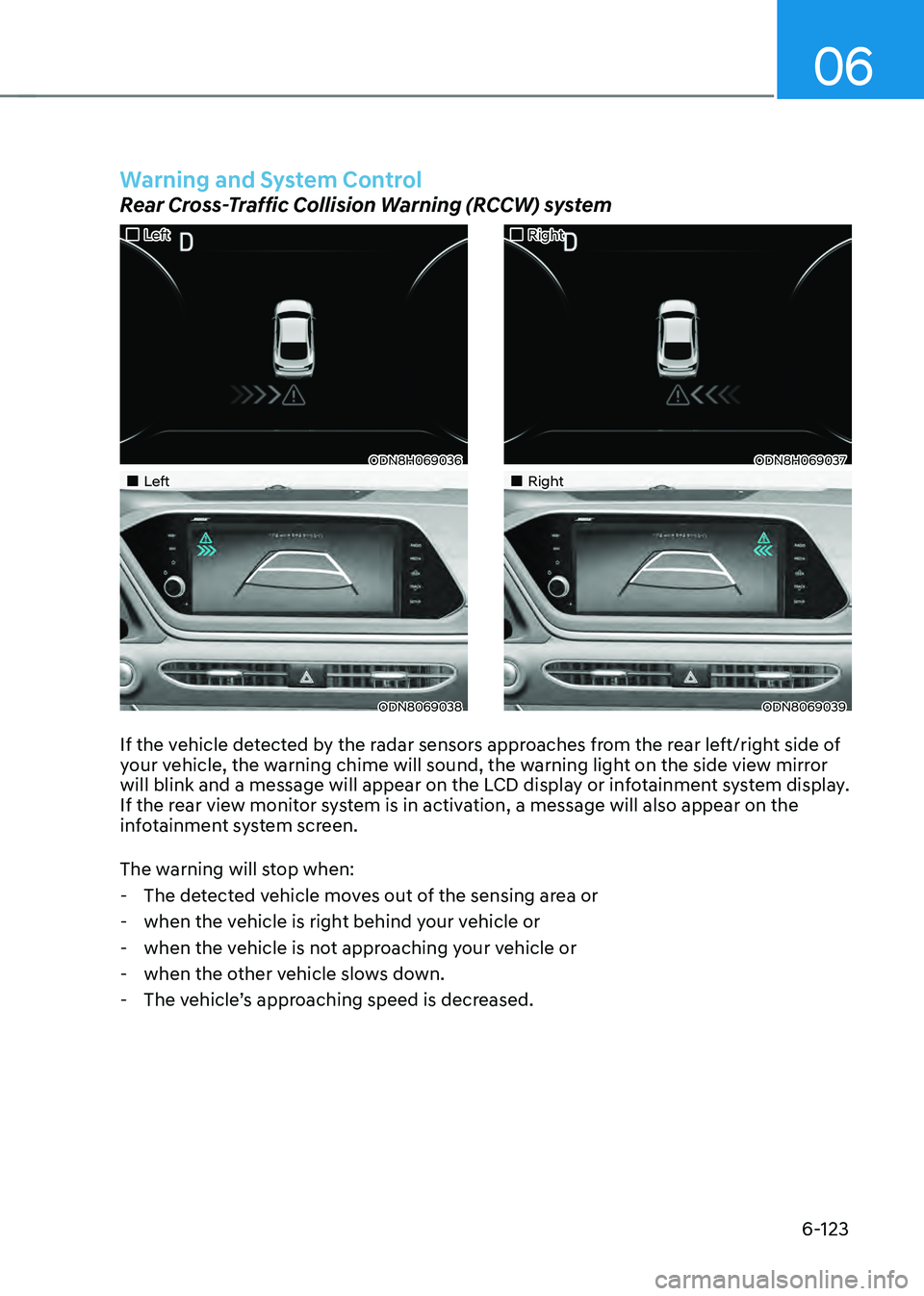
If the vehicle detected by the radar sensors approaches from the rear left/right side of
your vehicle, the warning chime will sound, the warning light on the side view mirror
will blink and a message will appear on the LCD display or infotainment system display.
If the rear view monitor system is in activation, a message will also appear on the
infotainment system screen.
The warning will stop when:
-The detected vehicle moves out of the sensing area or
-when the vehicle is right behind your vehicle or
-when the vehicle is not approaching your vehicle or
-when the other vehicle slows down.
-The vehicle’s approaching speed is decreased.
„„Left
ODN8H069036
„„Left
ODN8069038
„„Right
ODN8H069037
„„Right
ODN8069039
Warning and System Control
Rear Cross-Traffic Collision Warning (RCCW) system
Page 401 of 527
06
6-125
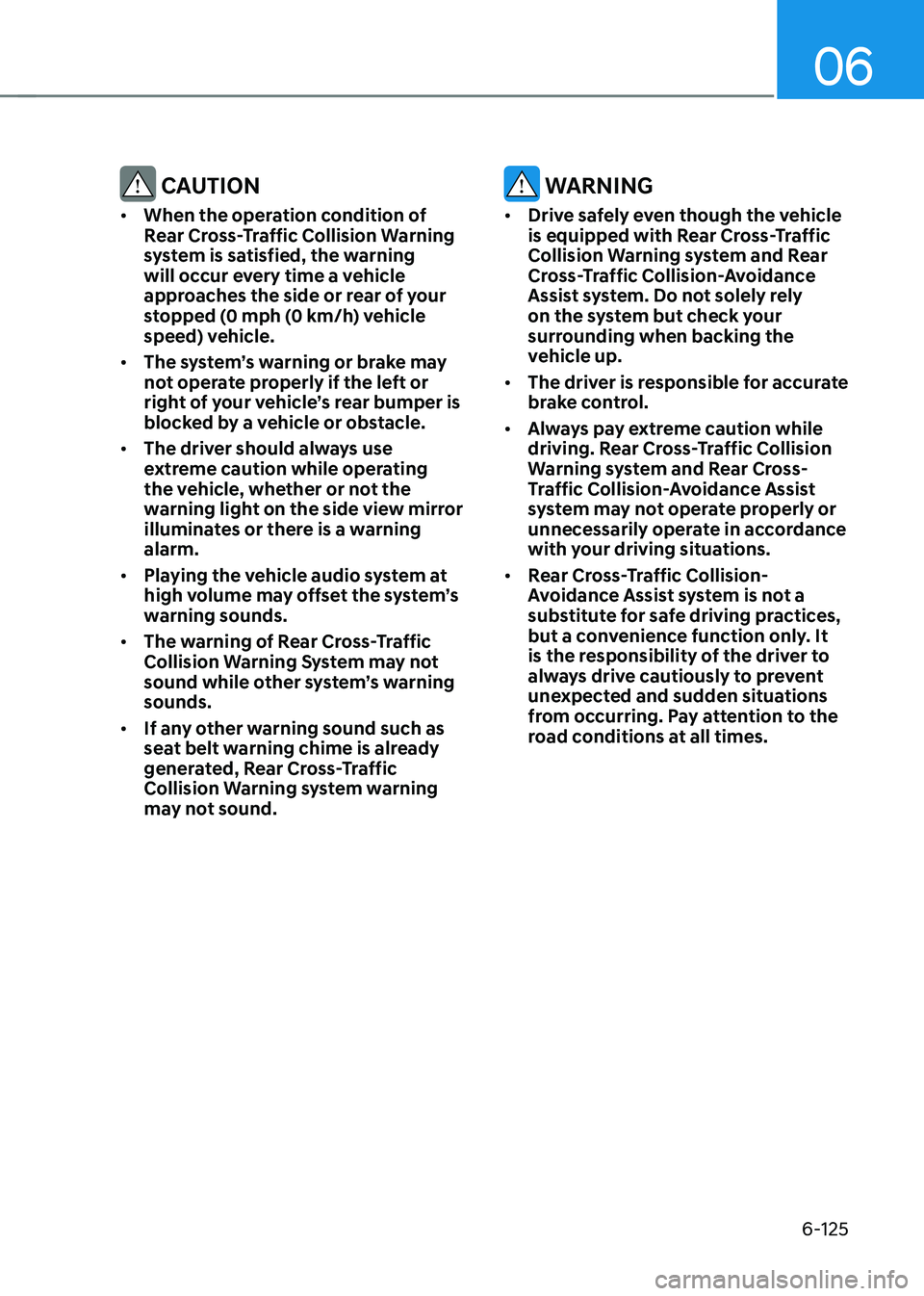
CAUTION
• When the operation condition of
Rear Cross-Traffic Collision Warning
system is satisfied, the warning
will occur every time a vehicle
approaches the side or rear of your
stopped (0 mph (0 km/h) vehicle
speed) vehicle.
• The system’s warning or brake may
not operate properly if the left or
right of your vehicle’s rear bumper is
blocked by a vehicle or obstacle.
• The driver should always use
extreme caution while operating
the vehicle, whether or not the
warning light on the side view mirror
illuminates or there is a warning
alarm.
• Playing the vehicle audio system at
high volume may offset the system’s
warning sounds.
• The warning of Rear Cross-Traffic
Collision Warning System may not
sound while other system’s warning
sounds.
• If any other warning sound such as
seat belt warning chime is already
generated, Rear Cross-Traffic
Collision Warning system warning
may not sound.
WARNING
• Drive safely even though the vehicle
is equipped with Rear Cross-Traffic
Collision Warning system and Rear
Cross-Traffic Collision-Avoidance
Assist system. Do not solely rely
on the system but check your
surrounding when backing the
vehicle up.
• The driver is responsible for accurate
brake control.
• Always pay extreme caution while
driving. Rear Cross-Traffic Collision
Warning system and Rear Cross-
Traffic Collision-Avoidance Assist
system may not operate properly or
unnecessarily operate in accordance
with your driving situations.
• Rear Cross-Traffic Collision-
Avoidance Assist system is not a
substitute for safe driving practices,
but a convenience function only. It
is the responsibility of the driver to
always drive cautiously to prevent
unexpected and sudden situations
from occurring. Pay attention to the
road conditions at all times.
Page 409 of 527
06
6-133
Smooth Cornering
Avoid braking or gear changing in
corners, especially when roads are wet.
Ideally, corners should always be taken
under gentle acceleration.
Driving at Night
Night driving presents more hazards than
driving in the daylight. Here are some
important tips to remember:
• Slow down and keep more distance
between you and other vehicles, as it
may be more difficult to see at night,
especially in areas where there may
not be any street lights.
• Adjust your mirrors to reduce the glare
from other driver's headlamps.
• Keep your headlamps clean and
properly aimed. Dirty or improperly
aimed headlamps will make it much
more difficult to see at night.
• Avoid staring directly at the
headlamps of oncoming vehicles. You
could be temporarily blinded, and it
will take several seconds for your eyes
to readjust to the darkness.
Driving in the Rain
Rain and wet roads can make driving
dangerous. Here are a few things to
consider when driving in the rain or on
slick pavement:
• Slow down and allow extra following
distance. A heavy rainfall makes
it harder to see and increases the
distance needed to stop your vehicle.
• Turn OFF your Cruise Control.
• Replace your windshield wiper blades
when they show signs of streaking or
missing areas on the windshield.
• Tires should be properly maintained
with at least 2/32nds of an inch of
tread depth. If your tires do not have
enough tread, making a quick stop on
wet pavement can cause a skid and
possibly lead to an accident. See "Tire
Tread" in chapter 8.
• Turn on your headlamps to make it
easier for others to see you.
• Driving too fast through large puddles
can affect your brakes. If you must go
through puddles, try to drive through
them slowly.
• If you believe your brakes may be wet,
apply them lightly while driving until
normal braking operation returns.
Hydroplaning
If the road is wet enough and you are
going fast enough, your vehicle may
have little or no contact with the road
surface and actually ride on the water.
The best advice is SLOW DOWN when
the road is wet.
The risk of hydroplaning increases as
the depth of tire tread decreases, refer
to "Tire Tread" in chapter 8.
Page 498 of 527
08
8-49
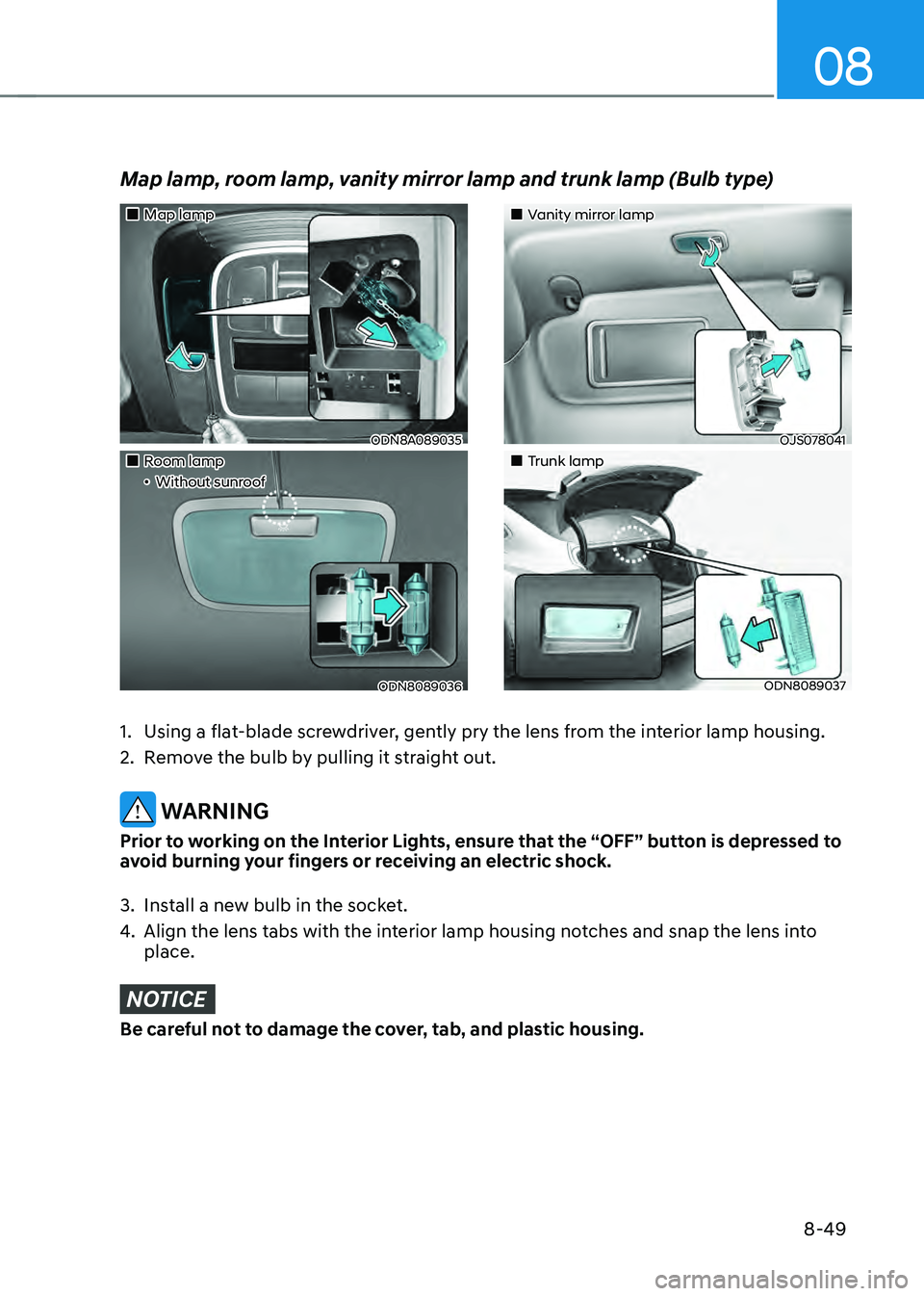
„„Map lamp
ODN8A089035
„„Room lamp„ǴWithout sunroof
ODN8089036
„„Vanity mirror lamp
OJS078041
„„Trunk lamp
ODN8089037
Map lamp, room lamp, vanity mirror lamp and trunk lamp (Bulb type)
1. Using a flat-blade screwdriver, gently pry the lens from the interior lamp housing.
2. Remove the bulb by pulling it straight out.
WARNING
Prior to working on the Interior Lights, ensure that the “OFF” button is depressed to
avoid burning your fingers or receiving an electric shock.
3. Install a new bulb in the socket.
4. Align the lens tabs with the interior lamp housing notches and snap the lens into
place.
NOTICE
Be careful not to damage the cover, tab, and plastic housing.
Page 517 of 527

I
I-9
I
If the 12 volt battery is discharged
........................................................................\
7-4
If the engine overheats
........................................................................\
..................7-7
If the engine stalls at a crossroad or crossing
........................................................7-2
If the engine stalls while driving
........................................................................\
..7-2
If the engine will not start
........................................................................\
.............7-3
If you have a flat tire while driving
......................................................................7-3
Ignition switch
........................................................................\
..............................6-6
Engine Start/Stop button
........................................................................\
..........6-6
Remote start
........................................................................\
.............................6-9
Immobilizer system
........................................................................\
....................5-11
Important safety precautions ........................................................................\
.......... 3-2
Always wear your seat belt
........................................................................\
......3-2
Restrain all children
........................................................................\
.................3-2
Air bag hazards
........................................................................\
........................3-2
Driver distraction
........................................................................\
.....................3-2
Control your speed
........................................................................\
...................3-2
Keep your vehicle in safe condition
.................................................................3-2
In case of an emergency while driving
.................................................................7-2
Infotainment system ........................................................................\
................... 5-126
USB and iPod® port
........................................................................\
............5-126
Antenna
........................................................................\
................................5-126
Steering wheel audio controls
......................................................................5-127
Bluetooth® Wireless Technology hands-free ...............................................5-128
Audio / Video / Navigation system
..............................................................5-128
Blue Link® center
........................................................................\
................5-128
Inside rearview mirror
........................................................................\
................5-42
Instrument cluster
........................................................................\
.........................4-4
Adjusting instrument cluster illumination
........................................................4-5
Gauges and meters
........................................................................\
...................4-5
Transmission shift indicator
........................................................................\
.....4-9
Warning and indicator lights
........................................................................\
..4-10
LCD display messages
........................................................................\
...........4-19
LCD display (Type A, B)
........................................................................\
.......4-26
LCD display (Type C)
........................................................................\
............4-39
Page 518 of 527
Index
I-10
Instrument panel fuse replacement ......................................................................8-39
Instrument panel overview
........................................................................\
...........2-5
Interior care
........................................................................\
.................................8-54
Interior features
........................................................................\
.........................5-119
Cup holder
........................................................................\
............................5-119
Sunvisor ........................................................................\
................................. 5-120
Power outlet
........................................................................\
.........................5-120
USB charger
........................................................................\
.........................5-121
Wireless cellular phone charging system
.....................................................5-122
Clock
........................................................................\
....................................5-124
Clothes hanger
........................................................................\
......................5-124
Floor mat anchor(s)
........................................................................\
..............5-125
Interior lights
........................................................................\
..............................5-78
Front lamps ........................................................................\
.............................. 5-79
Rear lamps
........................................................................\
..............................5-79
Luggage compartment lamp
........................................................................\
...5-80
Vanity mirror lamp
........................................................................\
.................5-80
Interior overview
........................................................................\
...........................2-4
J
Jack and tools
........................................................................\
..............................7-14
Jump starting
........................................................................\
.................................7-5
L
Label
........................................................................\
..................................................-
Vehicle certification label
........................................................................\
.......2-13
Tire specification and pressure label
..............................................................2-14
Refrigerant label
........................................................................\
...................5-112
Lane change signals
........................................................................\
....................5-77
Lane Following Assist (LFA)
........................................................................\
....6-108
Lane Keeping Assist (LKA)
........................................................................\
........6-57
LCD display (Type A, B)
........................................................................\
.............4-24
LCD display control
........................................................................\
...............4-24
LCD display modes
........................................................................\
................4-25
Trip computer
........................................................................\
.........................4-36
Page 521 of 527

I
I-13
M
Maintenance
........................................................................\
.......................................-
Maintenance services
........................................................................\
...............8-4
Owner maintenance
........................................................................\
..................8-5
Scheduled maintenance services
......................................................................8-7
Normal maintenance schedule
........................................................................\
.8-8
Maintenance under severe usage conditions
..................................................8-11
Explanation of scheduled maintenance items
................................................8-13
Tire maintenance
........................................................................\
....................8-30
Maintenance services
........................................................................\
....................8-4
Mirrors
........................................................................\
........................................5-42
Inside rearview mirror
........................................................................\
............5-42
HomeLink® system
........................................................................\
................5-43
Side view mirrors
........................................................................\
...................5-49
Adjusting the side view mirrors
.....................................................................5-49
Folding the side view mirrors
........................................................................\
5-50
Reverse parking aid function
........................................................................\
.5-50
N
Navigation-based Smart Cruise Control (NSCC)
..............................................6-104
O
Occupant Classification System (OCS)
..............................................................3-47
Odometer
........................................................................\
......................................4-5
Oil (Engine)
........................................................................\
................................8-15
Outside temperature gauge
........................................................................\
...........4-7
Owner maintenance
........................................................................\
......................8-5