stop start HYUNDAI SONATA HYBRID 2022 Workshop Manual
[x] Cancel search | Manufacturer: HYUNDAI, Model Year: 2022, Model line: SONATA HYBRID, Model: HYUNDAI SONATA HYBRID 2022Pages: 527, PDF Size: 64.14 MB
Page 277 of 527

While Driving
6
6. While Driving
Before Driving ........................................................................\
...........................6-5Before Entering the Vehicle ........................................................................\
.................6-5
Before Starting ........................................................................\
.....................................6-5
Ignition Switch ........................................................................\
..........................6-6Engine Start/Stop Button ........................................................................\
...................6-6
Remote Start ........................................................................\
........................................6-9
Automatic Transmission ........................................................................\
..........6-10Automatic Transmission Operation ........................................................................\
...6-10
Parking ........................................................................\
................................................6-13
LCD Display Message ........................................................................\
.........................6-14
Good Driving Practices ........................................................................\
.....................6-15
Paddle Shifter (Manual Shift Mode) ........................................................................\
..6-16
Coasting guide ........................................................................\
.........................6-17
Brake System
........................................................................\
............................6-18Power Brakes ........................................................................\
......................................6-18
Disc Brakes Wear Indicator ........................................................................\
................ 6-19
Electronic Parking Brake (EPB)
........................................................................\
..........6-19
Auto Hold ........................................................................\
............................................6-24
Anti-lock Brake System (ABS) ........................................................................\
.6-27Electronic Stability Control (ESC) ........................................................................\
.....6-28
Vehicle Stability Management (VSM) .......................................................................6-31
Hill-Start Assist Control (HAC) ........................................................................\
...........6-32
Good Braking Practices ........................................................................\
.....................6-32
Drive Mode Integrated Control System .........................................................6-33Drive Mode ........................................................................\
.........................................6-33
Drive Mode on Trip Computer ........................................................................\
...........6-37
Forward Collision – Avoidance Assist (FCA) - Sensor Fusion ......................6-38System Setting and Activation ........................................................................\
.........6-38
FCA Warning Message and Brake Control ...............................................................6-40
FCA Sensor ........................................................................\
........................................6-43
System Malfunction ........................................................................\
..........................6-45
Limitations of the System ........................................................................\
..................6-47
Junction Turning ........................................................................\
................................6-53
Page 282 of 527
While Driving
6-6
Engine Start/Stop Button
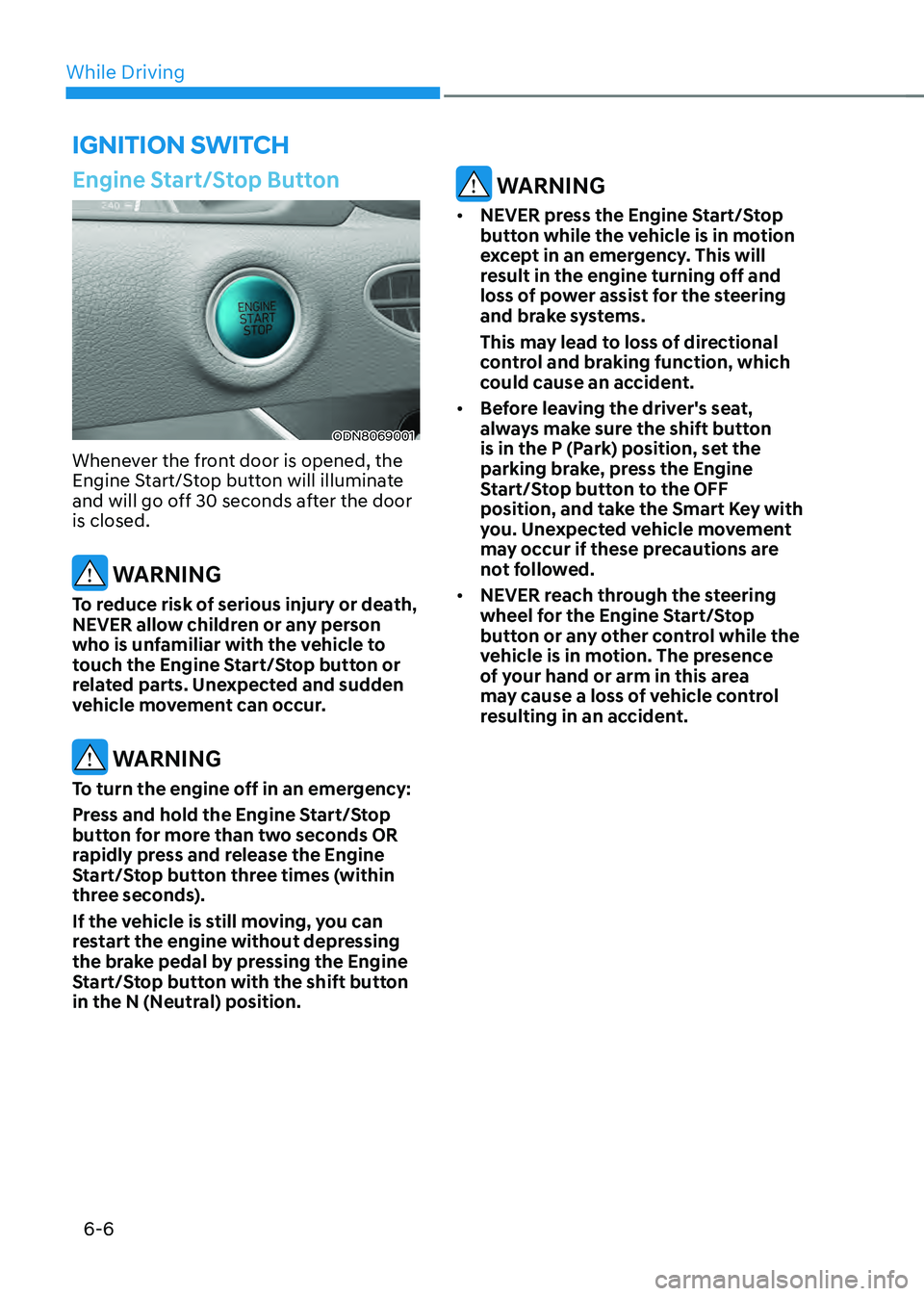
ODN8069001
Whenever the front door is opened, the
Engine Start/Stop button will illuminate
and will go off 30 seconds after the door
is closed.
WARNING
To reduce risk of serious injury or death,
NEVER allow children or any person
who is unfamiliar with the vehicle to
touch the Engine Start/Stop button or
related parts. Unexpected and sudden
vehicle movement can occur.
WARNING
To turn the engine off in an emergency:
Press and hold the Engine Start/Stop
button for more than two seconds OR
rapidly press and release the Engine
Start/Stop button three times (within
three seconds).
If the vehicle is still moving, you can
restart the engine without depressing
the brake pedal by pressing the Engine
Start/Stop button with the shift button
in the N (Neutral) position.
WARNING
• NEVER press the Engine Start/Stop
button while the vehicle is in motion
except in an emergency. This will
result in the engine turning off and
loss of power assist for the steering
and brake systems.
This may lead to loss of directional
control and braking function, which
could cause an accident.
• Before leaving the driver's seat,
always make sure the shift button
is in the P (Park) position, set the
parking brake, press the Engine
Start/Stop button to the OFF
position, and take the Smart Key with
you. Unexpected vehicle movement
may occur if these precautions are
not followed.
• NEVER reach through the steering
wheel for the Engine Start/Stop
button or any other control while the
vehicle is in motion. The presence
of your hand or arm in this area
may cause a loss of vehicle control
resulting in an accident.
IGNITION SWITCH
Page 283 of 527
06
6 -7
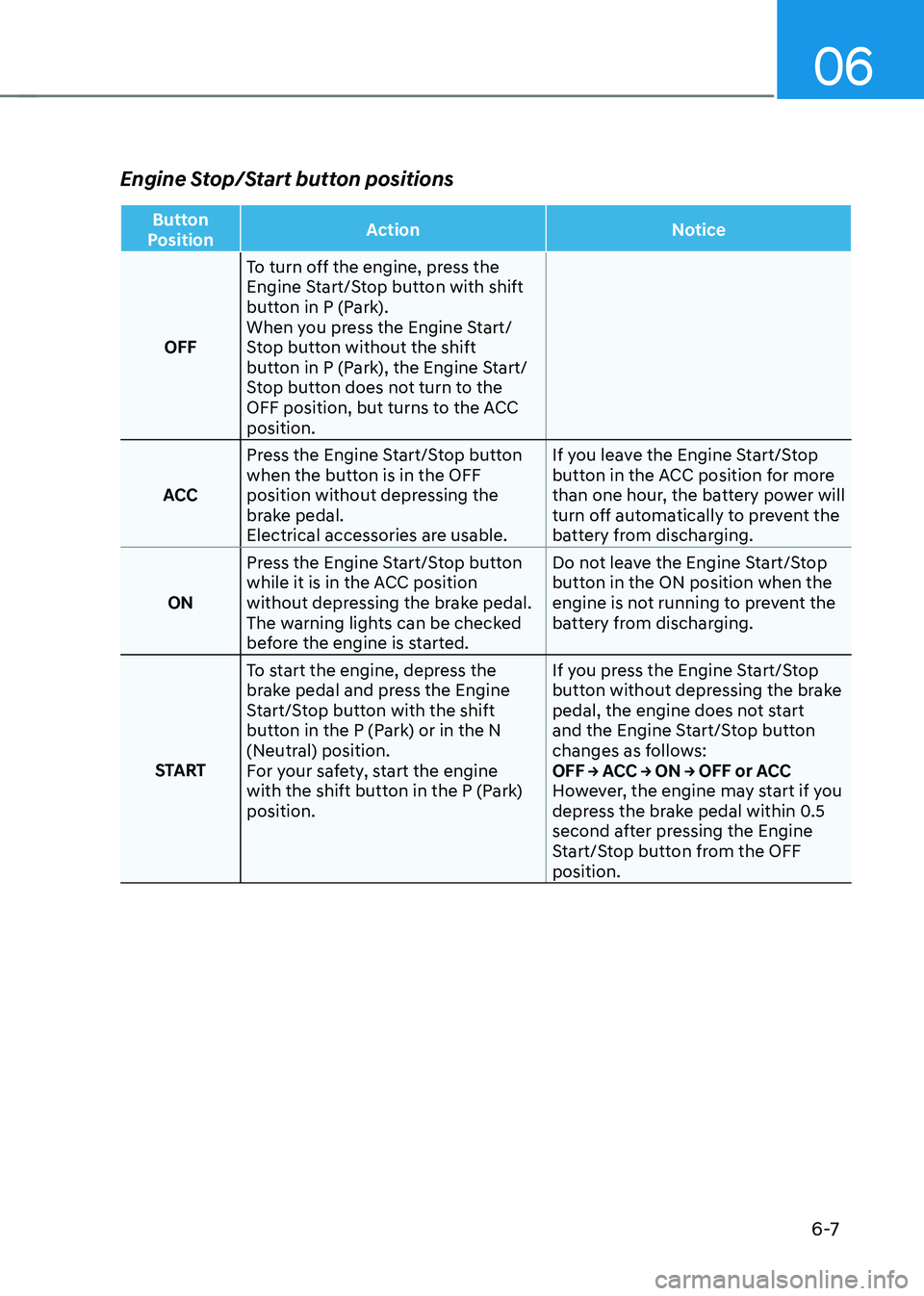
Engine Stop/Start button positions
Button
Position Action
Notice
OFF To turn off the engine, press the
Engine Start/Stop button with shift
button in P (Park).
When you press the Engine Start/
Stop button without the shift
button in P (Park), the Engine Start/
Stop button does not turn to the
OFF position, but turns to the ACC
position.
ACC Press the Engine Start/Stop button
when the button is in the OFF
position without depressing the
brake pedal.
Electrical accessories are usable. If you leave the Engine Start/Stop
button in the ACC position for more
than one hour, the battery power will
turn off automatically to prevent the
battery from discharging.
ON Press the Engine Start/Stop button
while it is in the ACC position
without depressing the brake pedal.
The warning lights can be checked
before the engine is started. Do not leave the Engine Start/Stop
button in the ON position when the
engine is not running to prevent the
battery from discharging.
START To start the engine, depress the
brake pedal and press the Engine
Start/Stop button with the shift
button in the P (Park) or in the N
(Neutral) position.
For your safety, start the engine
with the shift button in the P (Park)
position. If you press the Engine Start/Stop
button without depressing the brake
pedal, the engine does not start
and the Engine Start/Stop button
changes as follows:
OFF → ACC → ON → OFF or ACC
However, the engine may start if you
depress the brake pedal within 0.5
second after pressing the Engine
Start/Stop button from the OFF
position.
Page 284 of 527
While Driving
6-8
Starting the engine
WARNING
• Always wear appropriate shoes when
operating your vehicle.
Unsuitable shoes, such as high heels,
ski boots, sandals, flip-flops, etc.,
may interfere with your ability to use
the brake and accelerator pedals.
• Do not start the vehicle with the
accelerator pedal depressed. The
vehicle can move and lead to an
accident.
• Wait until the engine rpm is normal.
The vehicle may suddenly move if
the brake pedal is released when the
rpm is high.
Information
• The engine will start by pressing the
Engine Start/Stop button, only when
the smart key is in the vehicle.
• Even if the smart key is in the vehicle,
if it is far away from the driver, the
engine may not start.
• When the Engine Start/Stop button
is in the ACC or ON position, if any
door is open, the system checks for the
smart key. If the smart key is not in the
vehicle, the “
” indicator will blink
and the warning "Key not in vehicle"
will come on and if all doors are closed,
the chime will also sound for about
5 seconds. Keep the smart key in the
vehicle when using the ACC position or
if the vehicle engine is ON.
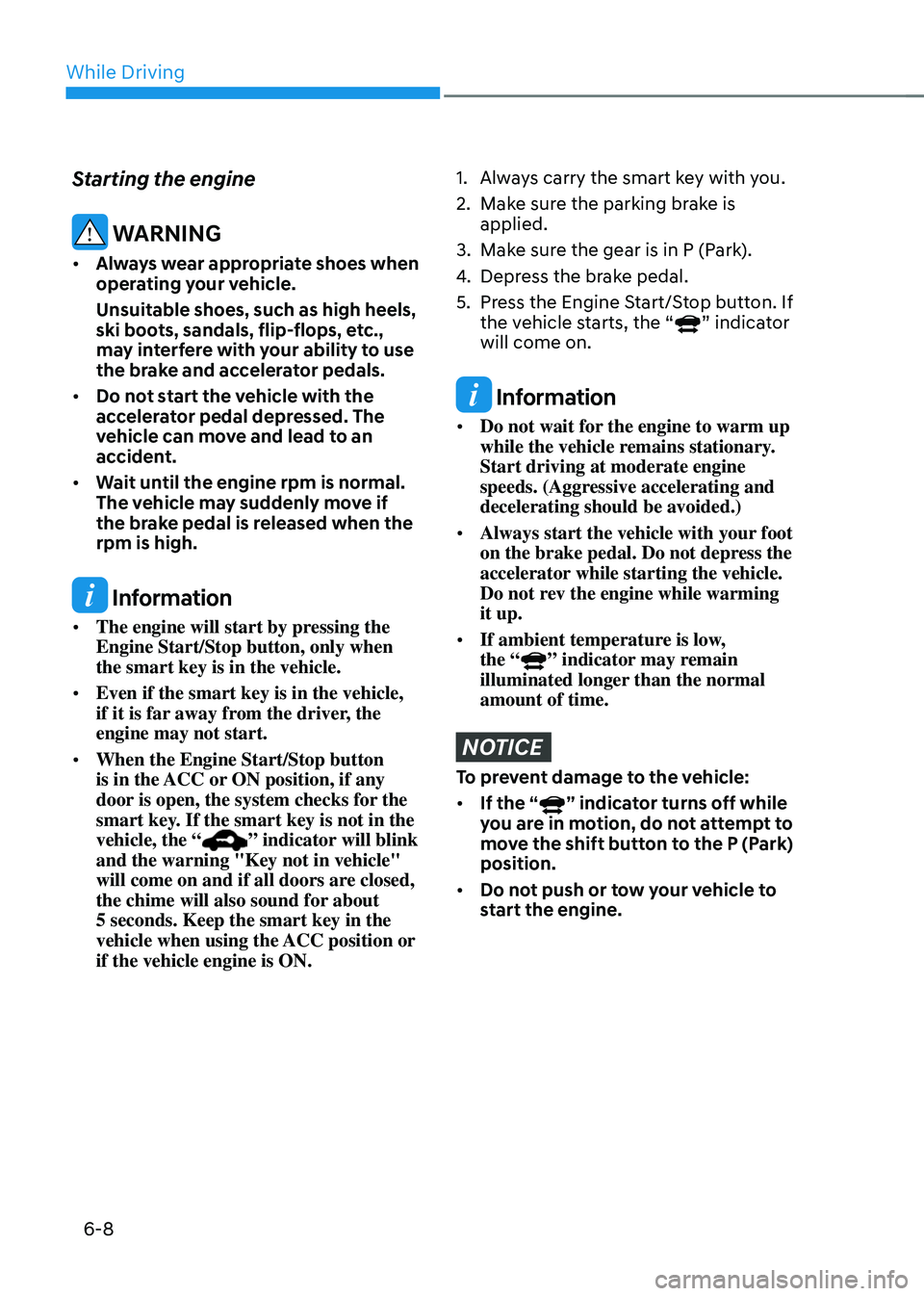
1. Always carry the smart key with you.
2. Make sure the parking brake is
applied.
3. Make sure the gear is in P (Park).
4. Depress the brake pedal.
5. Press the Engine Start/Stop button. If
the vehicle starts, the “” indicator
will come on.
Information
• Do not wait for the engine to warm up
while the vehicle remains stationary.
Start driving at moderate engine
speeds. (Aggressive accelerating and
decelerating should be avoided.)
• Always start the vehicle with your foot
on the brake pedal. Do not depress the
accelerator while starting the vehicle.
Do not rev the engine while warming
it up.
• If ambient temperature is low,
the “
” indicator may remain
illuminated longer than the normal
amount of time.
NOTICE
To prevent damage to the vehicle:
• If the “
” indicator turns off while
you are in motion, do not attempt to
move the shift button to the P (Park)
position.
• Do not push or tow your vehicle to
start the engine.
Page 285 of 527
06
6-9
NOTICE
To prevent damage to the vehicle:
When the stop lamp switch fuse is
blown, you can't start the engine
normally. Replace the fuse with a new
one. If you are not able to replace
the fuse, you can start the engine by
pressing and holding the Engine Start/
Stop button for 10 seconds with the
Engine Start/Stop button in the ACC
position.
Do not press the Engine Start/Stop
button for more than 10 seconds except
when the stop lamp switch fuse is
blown.
For your safety always depress the
brake pedal before starting the engine.
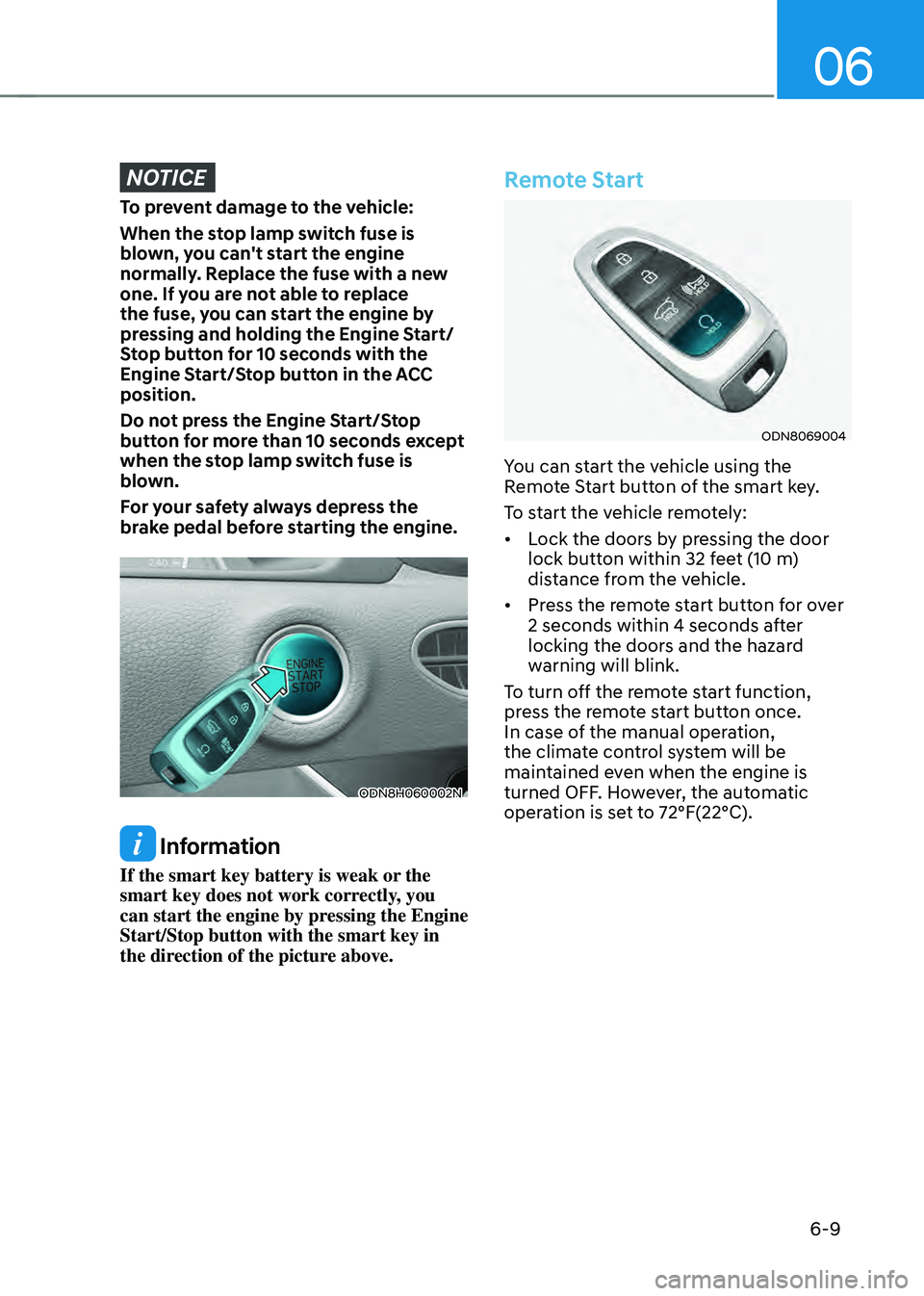
ODN8H060002N
Information
If the smart key battery is weak or the
smart key does not work correctly, you
can start the engine by pressing the Engine
Start/Stop button with the smart key in
the direction of the picture above.
Remote Start
ODN8069004
You can start the vehicle using the
Remote Start button of the smart key.
To start the vehicle remotely:
• Lock the doors by pressing the door
lock button within 32 feet (10 m)
distance from the vehicle.
• Press the remote start button for over
2 seconds within 4 seconds after
locking the doors and the hazard
warning will blink.
To turn off the remote start function,
press the remote start button once.
In case of the manual operation,
the climate control system will be
maintained even when the engine is
turned OFF. However, the automatic
operation is set to 72°F(22°C).
Page 288 of 527
While Driving
6-12
D (Drive)
This is the normal driving position. The
transmission will automatically shift
through a 6-gear sequence, providing
the best fuel economy and power.
To start the vehicle forward, push the D
(Drive) button by depressing the brake
pedal with the engine ON. Then depress
the accelerator pedal smoothly.
For extra power when passing another
vehicle or driving uphill, depress the
accelerator fully. The transmission will
automatically downshift to the next
lower gear (or gears, as appropriate).
When the vehicle is stopped in D (Drive)
position, if you open the driver's door
with the seat belt unfastened, the gear is
shifted to P (Park) position automatically.
However when the vehicle moves in D
(Drive) position, if you open the driver's
door with the seat belt unfastened, the
gear may not shift to P (Park) position
automatically to protect the automatic
transmission.
Shift-lock system
For your safety, the automatic
transmission has a shift-lock system
which prevents shifting the gear from
P (Park) or N (Neutral) to R (Reverse)
or D (Drive) unless the brake pedal is
depressed.
To shift the gear from P (Park) or N
(Neutral) to R (Reverse) or D (Drive):
1. Depress and hold the brake pedal.
2. Start the engine.
3. Depress the brake pedal and push the
R (Reverse) or D (Drive) button.
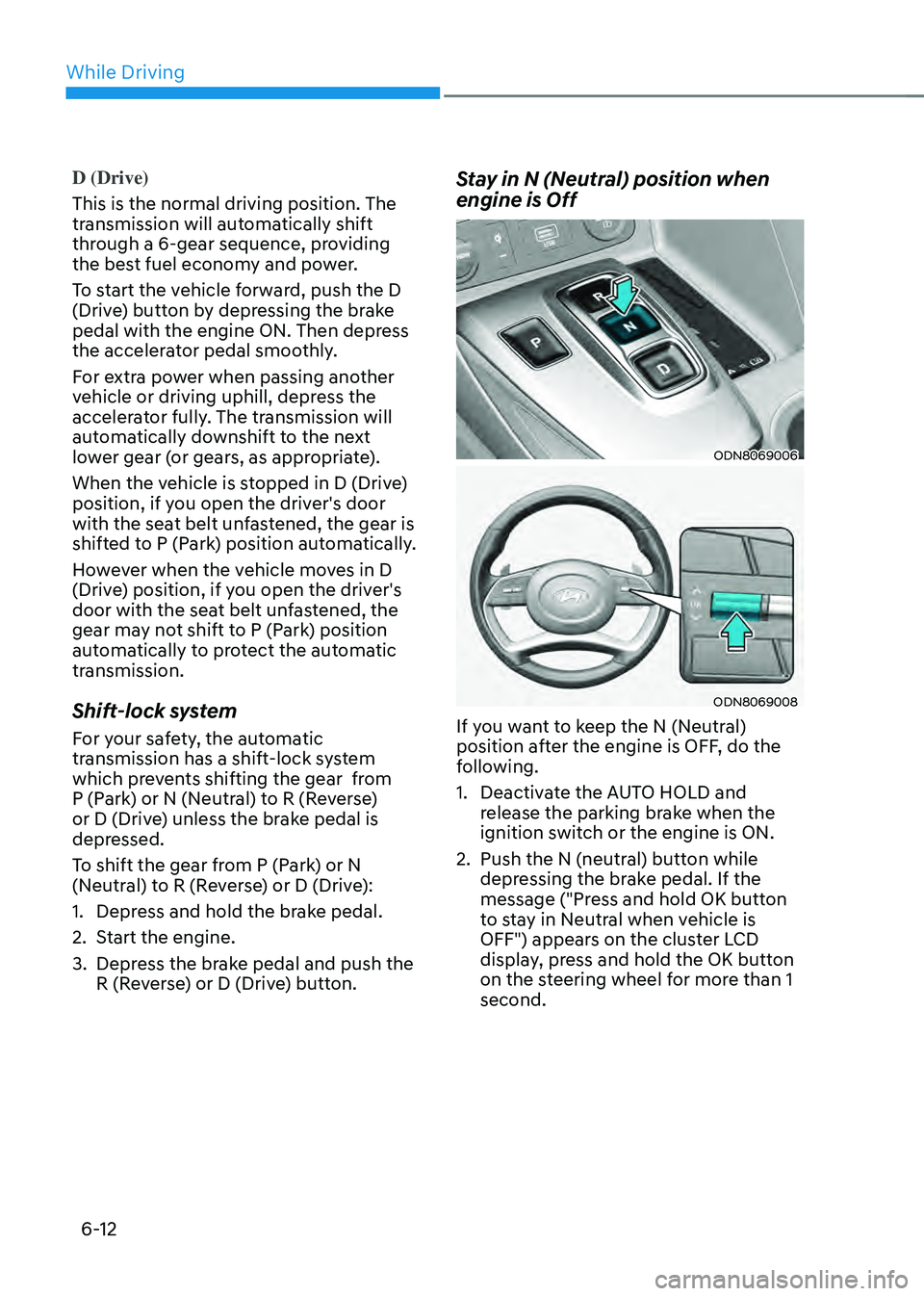
Stay in N (Neutral) position when
engine is Off
ODN8069006
ODN8069008
If you want to keep the N (Neutral)
position after the engine is OFF, do the
following.
1. Deactivate the AUTO HOLD and
release the parking brake when the
ignition switch or the engine is ON.
2. Push the N (neutral) button while
depressing the brake pedal. If the
message ("Press and hold OK button
to stay in Neutral when vehicle is
OFF") appears on the cluster LCD
display, press and hold the OK button
on the steering wheel for more than 1
second.
Page 289 of 527
06
6-13
3. When the message ("Vehicle will
stay in (N). Change gear to cancel")
appears on the cluster LCD display,
turn off the engine.
In this situation, if you unfasten the
driver's seat belt and open the driver's
door within 3 minutes, the gear is shifted
to P(Park) position automatically and the
ignition switch is turned off.
When the battery is discharged:
You cannot shift the gear when the
battery is discharged.
In emergencies, do the following to
move the shift button to N (Neutral) on a
level ground.
1. Connect the battery cables from
another vehicle or from a another
battery to the jump-starting terminals
inside the engine compartment.
For more information refer to "Jump
Starting" in chapter 7.
2. Release the parking brake with the
Engine Start/Stop button in the ON
position.
3. Shift the gear to the N(Neutral)
position. Refer to the "Stay in N
(Neutral) position when engine is Off"
in this chapter.
Parking
Always come to a complete stop and
continue to depress the brake pedal.
Press the P button, apply the parking
brake, and place the ignition switch in
the LOCK/OFF position. Take the Key
with you when exiting the vehicle.
• The gear is shifted to P (Park) position
automatically for safety under the
following conditions.
-When the driver unfastens the seat
belt and opens the driver’s door.
-When the engine is turned off with
the gear shifted to R (Reverse), D
(Drive) or N (Neutral).
WARNING
When you stay in the vehicle with
the engine running, be careful not to
depress the accelerator pedal for a long
period of time. The engine or exhaust
system may overheat and start a fire.
The exhaust gas and the exhaust system
are very hot. Keep away from the
exhaust system components.
Do not stop or park over flammable
materials, such as dry grass, paper or
leaves. They may ignite and cause a fire.
Page 296 of 527
While Driving
6-20
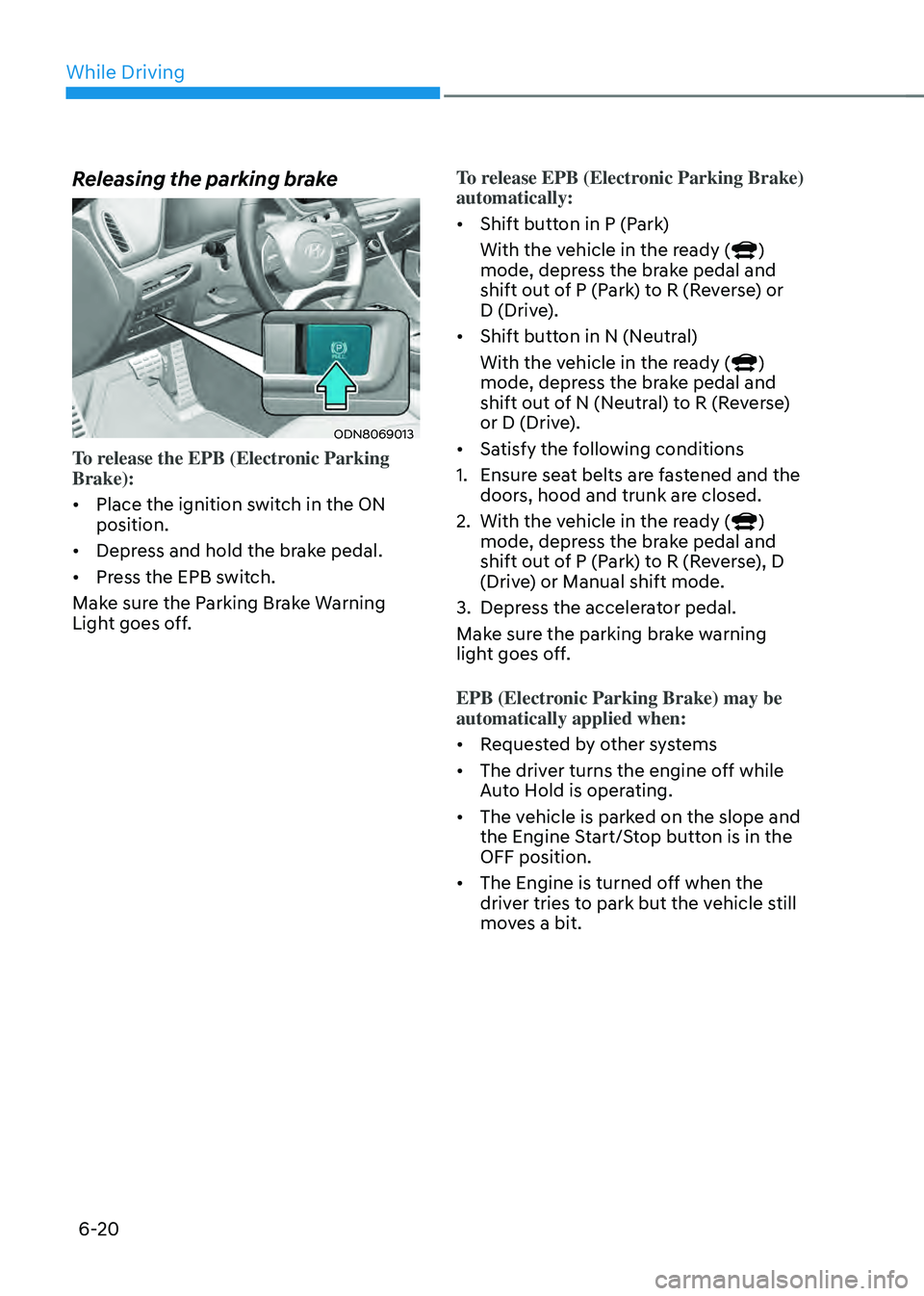
Releasing the parking brake
ODN8069013
To release the EPB (Electronic Parking
Brake):
• Place the ignition switch in the ON
position.
• Depress and hold the brake pedal.
• Press the EPB switch.
Make sure the Parking Brake Warning
Light goes off. To release EPB (Electronic Parking Brake)
automatically:
•
Shift button in P (Park)
With the vehicle in the ready (
)
mode, depress the brake pedal and
shift out of P (Park) to R (Reverse) or
D (Drive).
• Shift button in N (Neutral)
With the vehicle in the ready (
)
mode, depress the brake pedal and
shift out of N (Neutral) to R (Reverse)
or D (Drive).
• Satisfy the following conditions
1. Ensure seat belts are fastened and the
doors, hood and trunk are closed.
2. With the vehicle in the ready ()
mode, depress the brake pedal and
shift out of P (Park) to R (Reverse), D
(Drive) or Manual shift mode.
3. Depress the accelerator pedal.
Make sure the parking brake warning
light goes off.
EPB (Electronic Parking Brake) may be
automatically applied when:
• Requested by other systems
• The driver turns the engine off while
Auto Hold is operating.
• The vehicle is parked on the slope and
the Engine Start/Stop button is in the
OFF position.
• The Engine is turned off when the
driver tries to park but the vehicle still
moves a bit.
Page 300 of 527
While Driving
6-24
Auto Hold
The Auto Hold maintains the vehicle in a
standstill even though the brake pedal is
not depressed after the driver brings the
vehicle to a complete stop by depressing
the brake pedal.
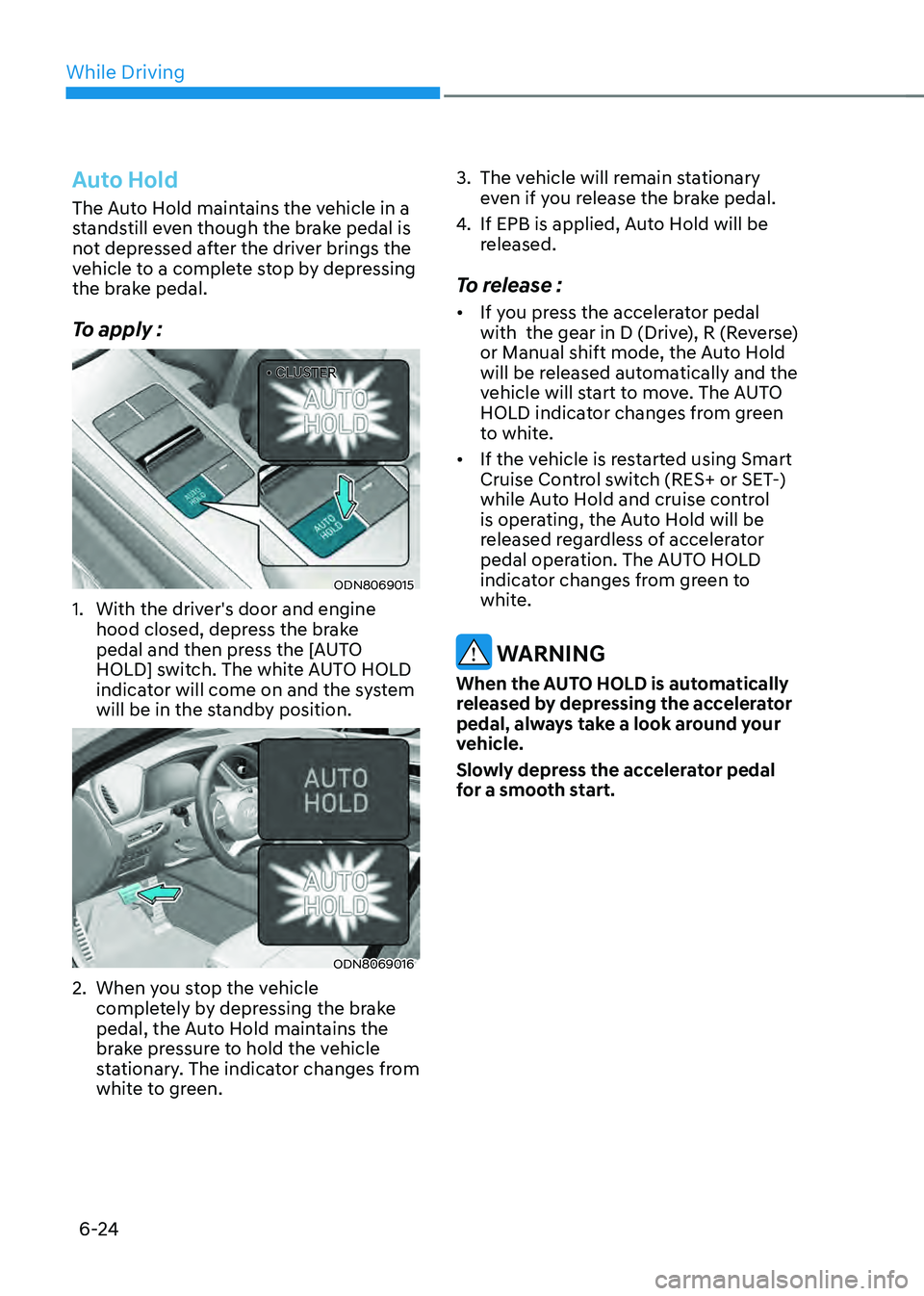
To apply :
• CLUSTER• CLUSTER
ODN8069015
1. With the driver's door and engine
hood closed, depress the brake
pedal and then press the [AUTO
HOLD] switch. The white AUTO HOLD
indicator will come on and the system
will be in the standby position.
ODN8069016
2. When you stop the vehicle
completely by depressing the brake
pedal, the Auto Hold maintains the
brake pressure to hold the vehicle
stationary. The indicator changes from
white to green.
3. The vehicle will remain stationary
even if you release the brake pedal.
4. If EPB is applied, Auto Hold will be
released.
To release :
• If you press the accelerator pedal
with the gear in D (Drive), R (Reverse)
or Manual shift mode, the Auto Hold
will be released automatically and the
vehicle will start to move. The AUTO
HOLD indicator changes from green
to white.
• If the vehicle is restarted using Smart
Cruise Control switch (RES+ or SET-)
while Auto Hold and cruise control
is operating, the Auto Hold will be
released regardless of accelerator
pedal operation. The AUTO HOLD
indicator changes from green to
white.
WARNING
When the AUTO HOLD is automatically
released by depressing the accelerator
pedal, always take a look around your
vehicle.
Slowly depress the accelerator pedal
for a smooth start.
Page 301 of 527
![HYUNDAI SONATA HYBRID 2022 Workshop Manual 06
6-25
To cancel :
• CLUSTER• CLUSTER
ODN8069017
1. Depress the brake pedal.
2. Press the [AUTO HOLD] switch.
The AUTO HOLD indicator will turn off.
Information
• The Auto Hold does not oper](/img/35/56188/w960_56188-300.png "HYUNDAI SONATA HYBRID 2022 Workshop Manual 06
6-25
To cancel :
• CLUSTER• CLUSTER
ODN8069017
1. Depress the brake pedal.
2. Press the [AUTO HOLD] switch.
The AUTO HOLD indicator will turn off.
Information
• The Auto Hold does not oper")
06
6-25
To cancel :
• CLUSTER• CLUSTER
ODN8069017
1. Depress the brake pedal.
2. Press the [AUTO HOLD] switch.
The AUTO HOLD indicator will turn off.
Information
• The Auto Hold does not operate when:
-The driver's door is opened
-The engine hood is opened
-The gear is in P (Park)
-The EPB is applied
• For your safety, the Auto Hold
automatically switches to EPB when:
-The driver's door is opened with the
gear in D (Drive) or N (Neutral)
-The trunk is opened with the gear in
R (Reverse)
-The engine hood is opened with the
gear in D (Drive) or N (Neutral)
-The vehicle stops for more than 10
minutes
-The vehicle stands on a steep slope
-The vehicle moves several times
In these cases, the parking brake
warning light comes on, the AUTO
HOLD indicator changes from green
to white, and a warning sound and a
message will appear to inform you that
EPB has been automatically engaged.
Before driving off again, press foot
brake pedal, check the surrounding
area near your vehicle and release
parking brake manually with the EPB
switch.
• While operating Auto Hold, you may
hear mechanical noise. However, it is
normal operating noise.
NOTICE
If the AUTO HOLD indicator changes
to yellow, the Auto Hold is not working
properly. Contact an authorized
HYUNDAI dealer.
WARNING
• Depress the accelerator pedal slowly
when you start the vehicle.
• For your safety, cancel the Auto Hold
when you drive downhill, back up the
vehicle or park the vehicle.
NOTICE
If there is a malfunction with the
driver's door or engine hood open
detection system, the Auto Hold may
not work properly.
Contact an authorized HYUNDAI dealer.