turn signal HYUNDAI SONATA HYBRID 2022 Owners Manual
[x] Cancel search | Manufacturer: HYUNDAI, Model Year: 2022, Model line: SONATA HYBRID, Model: HYUNDAI SONATA HYBRID 2022Pages: 527, PDF Size: 64.14 MB
Page 40 of 527
Vehicle Information
2-8
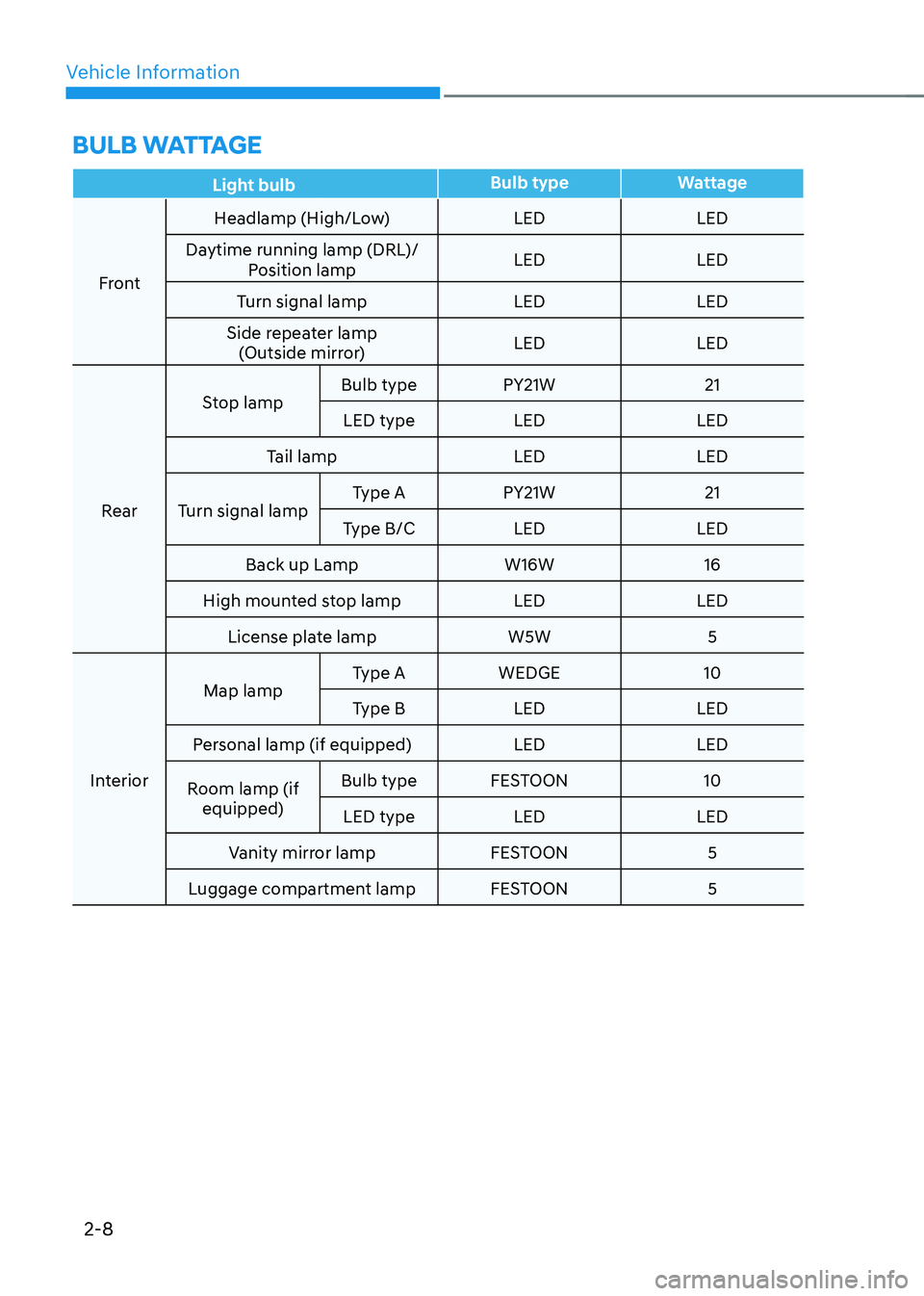
BULB WATTAGE
Light bulbBulb type
Wattage
Front Headlamp (High/Low)
LEDLED
Daytime running lamp (DRL)/ Position lamp LED
LED
Turn signal lamp LEDLED
Side repeater lamp (Outside mirror) LED
LED
Rear Stop lamp
Bulb type
PY21W 21
LED type LED LED
Tail lamp LEDLED
Turn signal lamp Type A
PY21W 21
Type B/C LED LED
Back up Lamp W16W16
High mounted stop lamp LEDLED
License plate lamp W5W5
Interior Map lamp
Type A
WEDGE 10
Type B LED LED
Personal lamp (if equipped) LEDLED
Room lamp (if equipped) Bulb type
FESTOON 10
LED type LED LED
Vanity mirror lamp FESTOON5
Luggage compartment lamp FESTOON5
Page 89 of 527
03
3-43
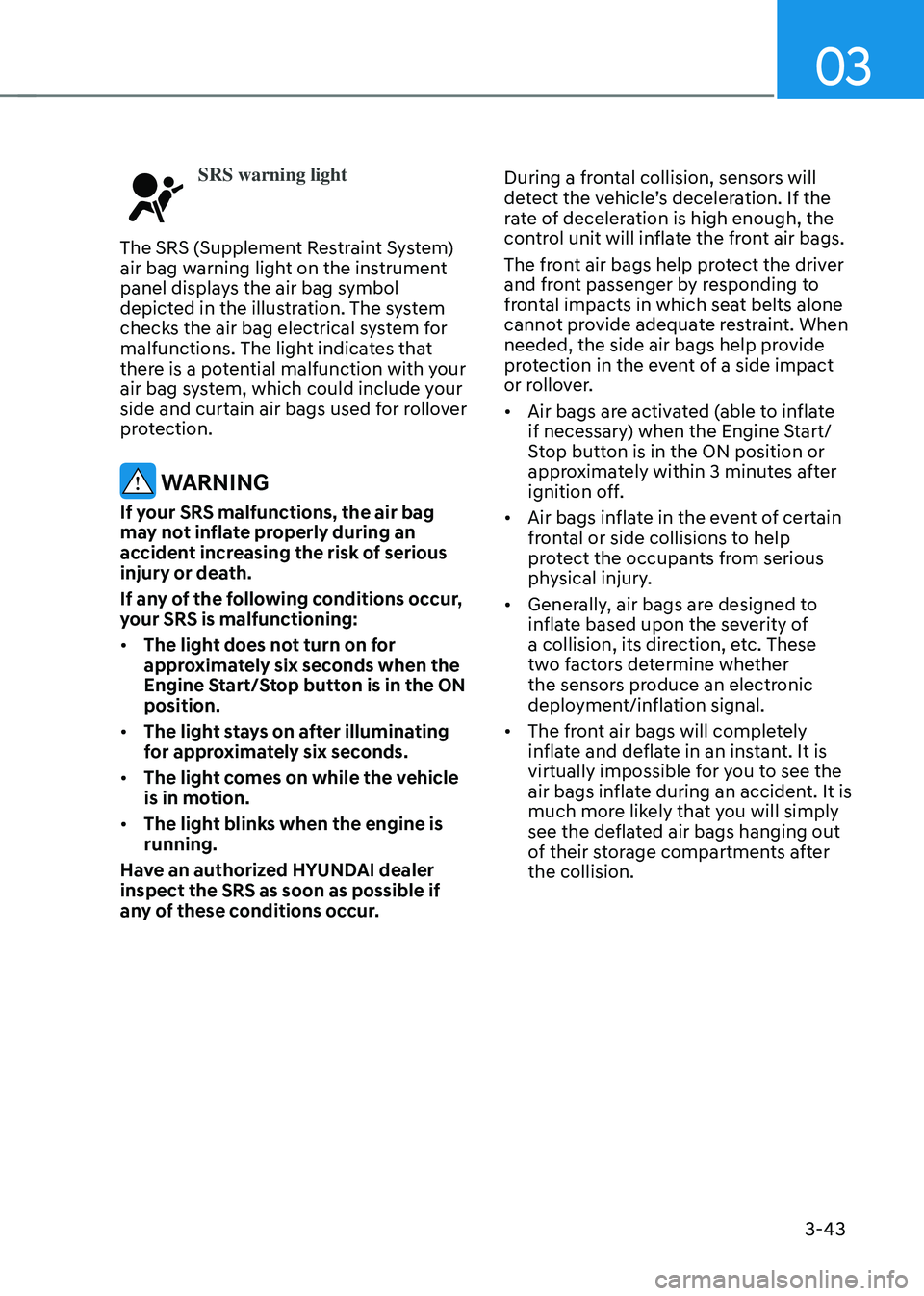
SRS warning light
The SRS (Supplement Restraint System)
air bag warning light on the instrument
panel displays the air bag symbol
depicted in the illustration. The system
checks the air bag electrical system for
malfunctions. The light indicates that
there is a potential malfunction with your
air bag system, which could include your
side and curtain air bags used for rollover
protection.
WARNING
If your SRS malfunctions, the air bag
may not inflate properly during an
accident increasing the risk of serious
injury or death.
If any of the following conditions occur,
your SRS is malfunctioning:
• The light does not turn on for
approximately six seconds when the
Engine Start/Stop button is in the ON
position.
• The light stays on after illuminating
for approximately six seconds.
• The light comes on while the vehicle
is in motion.
• The light blinks when the engine is
running.
Have an authorized HYUNDAI dealer
inspect the SRS as soon as possible if
any of these conditions occur. During a frontal collision, sensors will
detect the vehicle’s deceleration. If the
rate of deceleration is high enough, the
control unit will inflate the front air bags.
The front air bags help protect the driver
and front passenger by responding to
frontal impacts in which seat belts alone
cannot provide adequate restraint. When
needed, the side air bags help provide
protection in the event of a side impact
or rollover.
•
Air bags are activated (able to inflate
if necessary) when the Engine Start/
Stop button is in the ON position or
approximately within 3 minutes after
ignition off.
• Air bags inflate in the event of certain
frontal or side collisions to help
protect the occupants from serious
physical injury.
• Generally, air bags are designed to
inflate based upon the severity of
a collision, its direction, etc. These
two factors determine whether
the sensors produce an electronic
deployment/inflation signal.
• The front air bags will completely
inflate and deflate in an instant. It is
virtually impossible for you to see the
air bags inflate during an accident. It is
much more likely that you will simply
see the deflated air bags hanging out
of their storage compartments after
the collision.
Page 105 of 527

Instrument Cluster
4
Instrument Cluster ........................................................................\
....................4-4Instrument Cluster Control ........................................................................\
..................4-5
Adjusting instrument cluster illumination ................................................................4-5
Gauges and Meters ........................................................................\
..............................4-5
Speedometer ........................................................................\
.....................................4-5
Power gauge ........................................................................\
......................................4-5
Hybrid battery SOC (State of Charge) gauge ..........................................................4-6
Fuel gauge ........................................................................\
.........................................4-6
Outside temperature gauge ........................................................................\
..............4 -7
Odometer ........................................................................\
..........................................4-8
Range ........................................................................\
.................................................4-8
Transmission Shift Indicator ........................................................................\
...............4-9
Automatic transmission shift indicator ...................................................................4-9
Warning and Indicator Lights ........................................................................\
............4-10
Air Bag Warning Light ........................................................................\
......................4-10
Seat Belt Warning Light ........................................................................\
...................4-10
Parking Brake & Brake Fluid Warning Light ............................................................4-10
Regenerative brake warning light ........................................................................\
....4-11
Anti-lock Brake System (ABS) Warning Light ..........................................................4-11
Electronic Brake Force Distribution (EBD) System Warning Light ........................4-11
Electronic Parking Brake (EPB) Warning Light .......................................................4-12
AUTO HOLD Indicator Light ........................................................................\
............4-12
Electric Power Steering (EPS) Warning Light .........................................................4-12
Malfunction Indicator Lamp (MIL) ........................................................................\
..4-13
Charging System Warning Light ........................................................................\
.....4-13
Engine Oil Pressure Warning Light ........................................................................\
.4-13
Low Fuel Level Warning Light ........................................................................\
.........4-14
Service warning light ........................................................................\
.......................4-14
Exhaust system (GPF)warning light ........................................................................\
4-14
Master Warning Light ........................................................................\
......................4-15
Low Tire Pressure Warning Light ........................................................................\
....4-15
Electronic Stability Control (ESC) Indicator Light .................................................4-15
Electronic Stability Control (ESC) OFF Indicator Light ..........................................4-16
Immobilizer Indicator Light ........................................................................\
.............4-16
Immobilizer Indicator Light (with smart key) .........................................................4-16
Turn Signal Indicator Light ........................................................................\
...............4-17
Headlamp Warning Light ........................................................................\
.................4-17
4. Instrument Cluster
Page 106 of 527

Ready indicator ........................................................................\
.................................4-17
EV mode indicator ........................................................................\
............................4-17
High Beam Indicator Light ........................................................................\
..............4-18
Light ON Indicator Light ........................................................................\
..................4-18
High Beam Assist indicator light ........................................................................\
.....4-18
Forward Collision-Avoidance Assist Warning Light ...............................................4-18
Lane Keep Assist Indicator Light ........................................................................\
..... 4-18
LCD Display Messages
........................................................................\
.......................4-19
Shift to P to start engine ........................................................................\
..................4-19
Shift to P ........................................................................\
...........................................4-19
Low key battery ........................................................................\
................................4-19
Press brake pedal to start engine ........................................................................\
...4-19
Key not in vehicle ........................................................................\
............................4-19
Key not detected ........................................................................\
..............................4-19
Press START button again ........................................................................\
..............4-19
12V battery discharging due to additional electrical devices ...............................4-19
Press START button with key ........................................................................\
...........4-20
Check BRAKE SWITCH fuse ........................................................................\
............4-20
Press START button while turning wheel ...............................................................4-20
Check steering wheel lock system ........................................................................\
.4-20
Door, Hood, Trunk Open Indicator ........................................................................\
.. 4-20
Sunroof Open
........................................................................\
...................................4-20
Low Pressure ........................................................................\
.....................................4-21
Lights Mode ........................................................................\
....................................... 4-21
Wiper
........................................................................\
.................................................4-21
Low washer fluid ........................................................................\
...............................4-21
Low fuel ........................................................................\
.............................................4-21
Engine has overheated ........................................................................\
.....................4-21
Check exhaust system ........................................................................\
.....................4-22
Check headlight ........................................................................\
...............................4-22
Check turn signal ........................................................................\
.............................4-22
Check brake light ........................................................................\
.............................4-22
Check headlamp LED ........................................................................\
......................4-22
Check Active Air Flap system ........................................................................\
..........4-22
Ready to start driving ........................................................................\
......................4-22
Check regenerative brakes ........................................................................\
.............. 4-22
Stop vehicle and check brakes
........................................................................\
.......4-22
4
Page 121 of 527
04
4-17
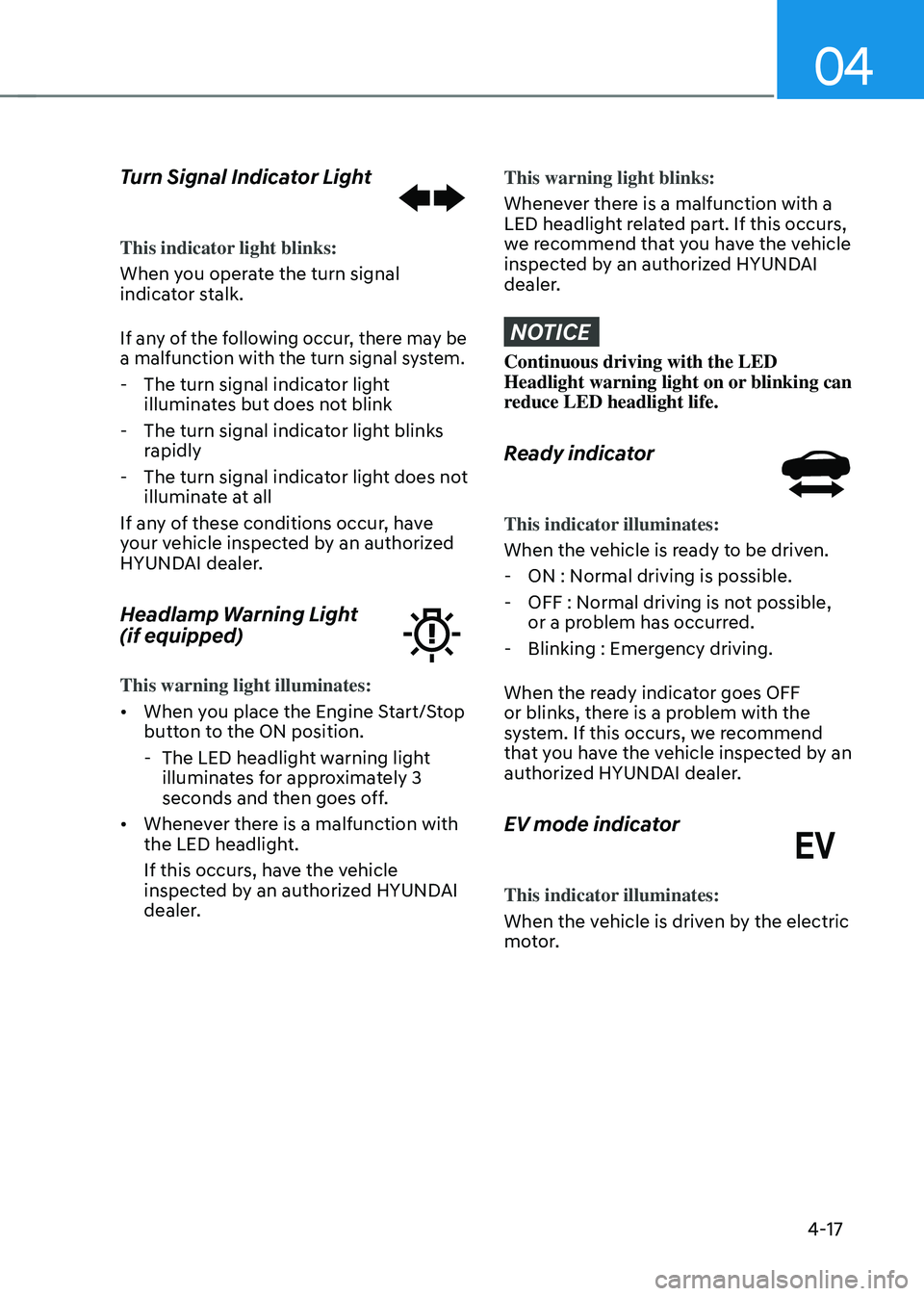
Turn Signal Indicator Light
This indicator light blinks:
When you operate the turn signal
indicator stalk.
If any of the following occur, there may be
a malfunction with the turn signal system.
-The turn signal indicator light
illuminates but does not blink
-The turn signal indicator light blinks
rapidly
-The turn signal indicator light does not
illuminate at all
If any of these conditions occur, have
your vehicle inspected by an authorized
HYUNDAI dealer.
Headlamp Warning Light
(if equipped)
This warning light illuminates:
• When you place the Engine Start/Stop
button to the ON position.
-The LED headlight warning light
illuminates for approximately 3
seconds and then goes off.
• Whenever there is a malfunction with
the LED headlight.
If this occurs, have the vehicle
inspected by an authorized HYUNDAI
dealer.
This warning light blinks:
Whenever there is a malfunction with a
LED headlight related part. If this occurs,
we recommend that you have the vehicle
inspected by an authorized HYUNDAI
dealer.
NOTICE
Continuous driving with the LED
Headlight warning light on or blinking can
reduce LED headlight life.
Ready indicator
This indicator illuminates:
When the vehicle is ready to be driven.
-ON : Normal driving is possible.
-OFF : Normal driving is not possible,
or a problem has occurred.
-Blinking : Emergency driving.
When the ready indicator goes OFF
or blinks, there is a problem with the
system. If this occurs, we recommend
that you have the vehicle inspected by an
authorized HYUNDAI dealer.
EV mode indicator
This indicator illuminates:
When the vehicle is driven by the electric
motor.
Page 122 of 527
Instrument Cluster
4-18
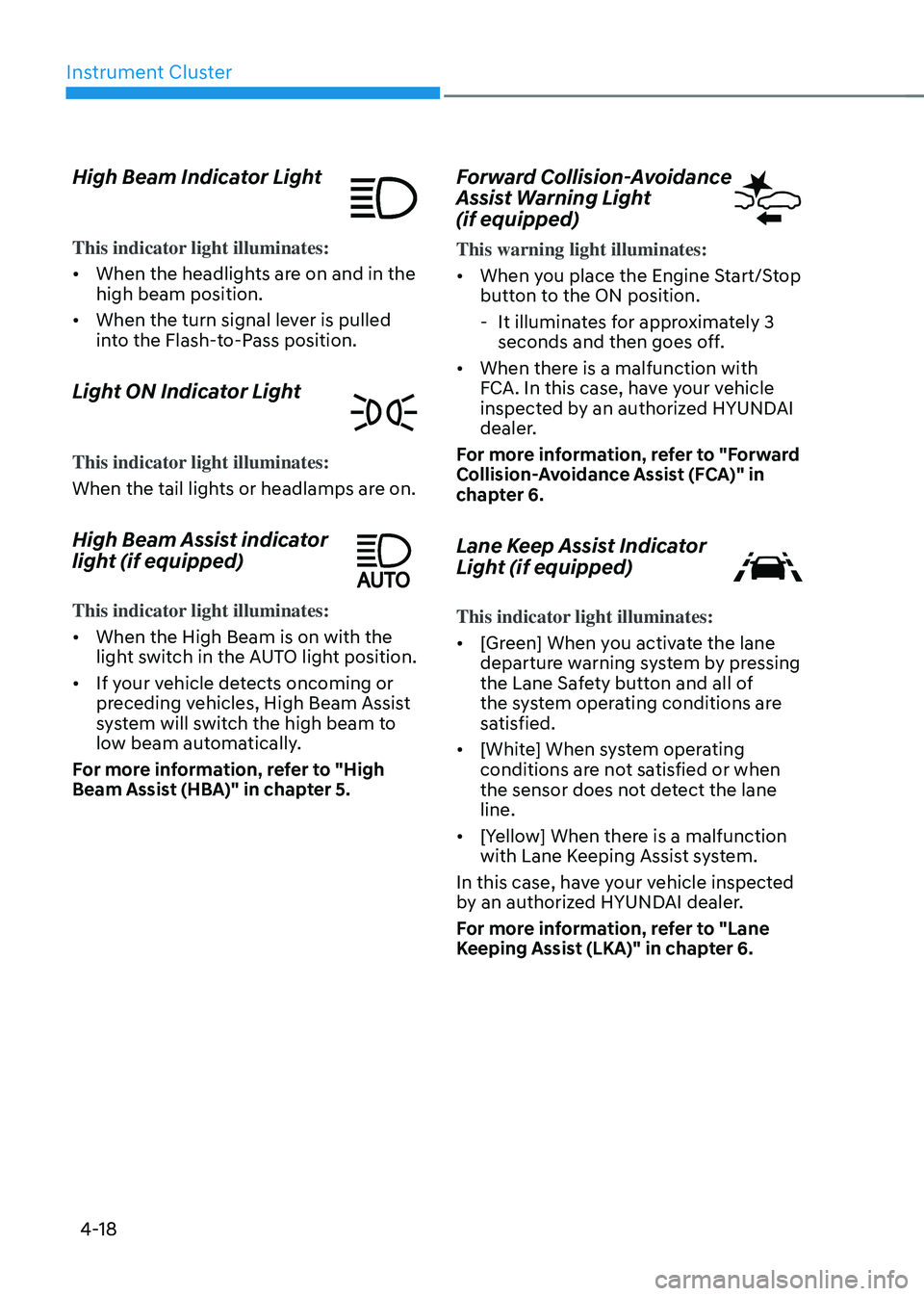
High Beam Indicator Light
This indicator light illuminates:
• When the headlights are on and in the
high beam position.
• When the turn signal lever is pulled
into the Flash-to-Pass position.
Light ON Indicator Light
This indicator light illuminates:
When the tail lights or headlamps are on.
High Beam Assist indicator
light (if equipped)
This indicator light illuminates:
• When the High Beam is on with the
light switch in the AUTO light position.
• If your vehicle detects oncoming or
preceding vehicles, High Beam Assist
system will switch the high beam to
low beam automatically.
For more information, refer to "High
Beam Assist (HBA)" in chapter 5.
Forward Collision-Avoidance
Assist Warning Light
(if equipped)
This warning light illuminates:
• When you place the Engine Start/Stop
button to the ON position.
-It illuminates for approximately 3
seconds and then goes off.
• When there is a malfunction with
FCA. In this case, have your vehicle
inspected by an authorized HYUNDAI
dealer.
For more information, refer to "Forward
Collision-Avoidance Assist (FCA)" in
chapter 6.
Lane Keep Assist Indicator
Light (if equipped)
This indicator light illuminates:
• [Green] When you activate the lane
departure warning system by pressing
the Lane Safety button and all of
the system operating conditions are
satisfied.
• [White] When system operating
conditions are not satisfied or when
the sensor does not detect the lane
line.
• [Yellow] When there is a malfunction
with Lane Keeping Assist system.
In this case, have your vehicle inspected
by an authorized HYUNDAI dealer.
For more information, refer to "Lane
Keeping Assist (LKA)" in chapter 6.
Page 126 of 527
Instrument Cluster
4-22
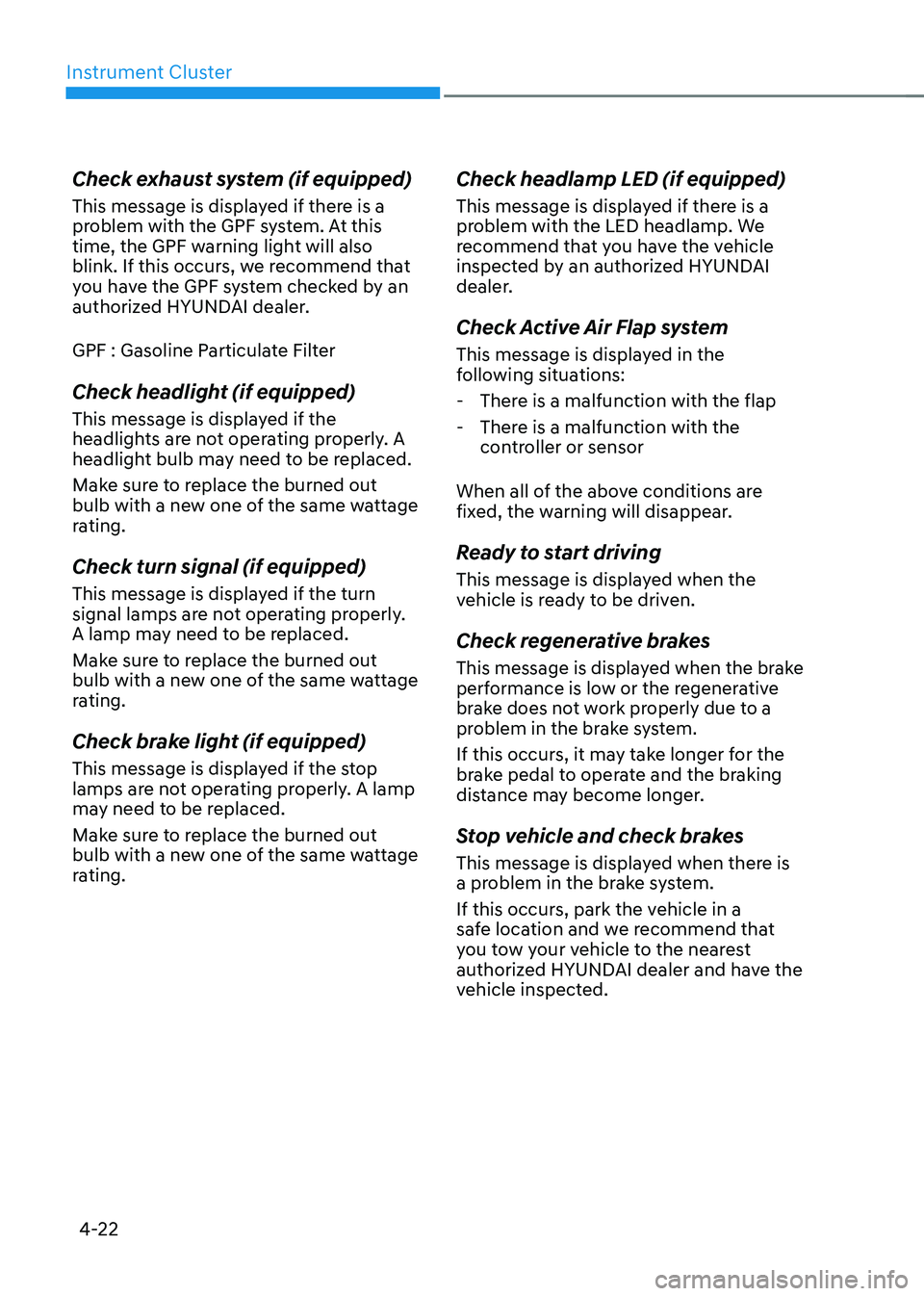
Check exhaust system (if equipped)
This message is displayed if there is a
problem with the GPF system. At this
time, the GPF warning light will also
blink. If this occurs, we recommend that
you have the GPF system checked by an
authorized HYUNDAI dealer.
GPF : Gasoline Particulate Filter
Check headlight (if equipped)
This message is displayed if the
headlights are not operating properly. A
headlight bulb may need to be replaced.
Make sure to replace the burned out
bulb with a new one of the same wattage
rating.
Check turn signal (if equipped)
This message is displayed if the turn
signal lamps are not operating properly.
A lamp may need to be replaced.
Make sure to replace the burned out
bulb with a new one of the same wattage
rating.
Check brake light (if equipped)
This message is displayed if the stop
lamps are not operating properly. A lamp
may need to be replaced.
Make sure to replace the burned out
bulb with a new one of the same wattage
rating.
Check headlamp LED (if equipped)
This message is displayed if there is a
problem with the LED headlamp. We
recommend that you have the vehicle
inspected by an authorized HYUNDAI
dealer.
Check Active Air Flap system
This message is displayed in the
following situations:
-There is a malfunction with the flap
-There is a malfunction with the
controller or sensor
When all of the above conditions are
fixed, the warning will disappear.
Ready to start driving
This message is displayed when the
vehicle is ready to be driven.
Check regenerative brakes
This message is displayed when the brake
performance is low or the regenerative
brake does not work properly due to a
problem in the brake system.
If this occurs, it may take longer for the
brake pedal to operate and the braking
distance may become longer.
Stop vehicle and check brakes
This message is displayed when there is
a problem in the brake system.
If this occurs, park the vehicle in a
safe location and we recommend that
you tow your vehicle to the nearest
authorized HYUNDAI dealer and have the
vehicle inspected.
Page 136 of 527
Instrument Cluster
4-32
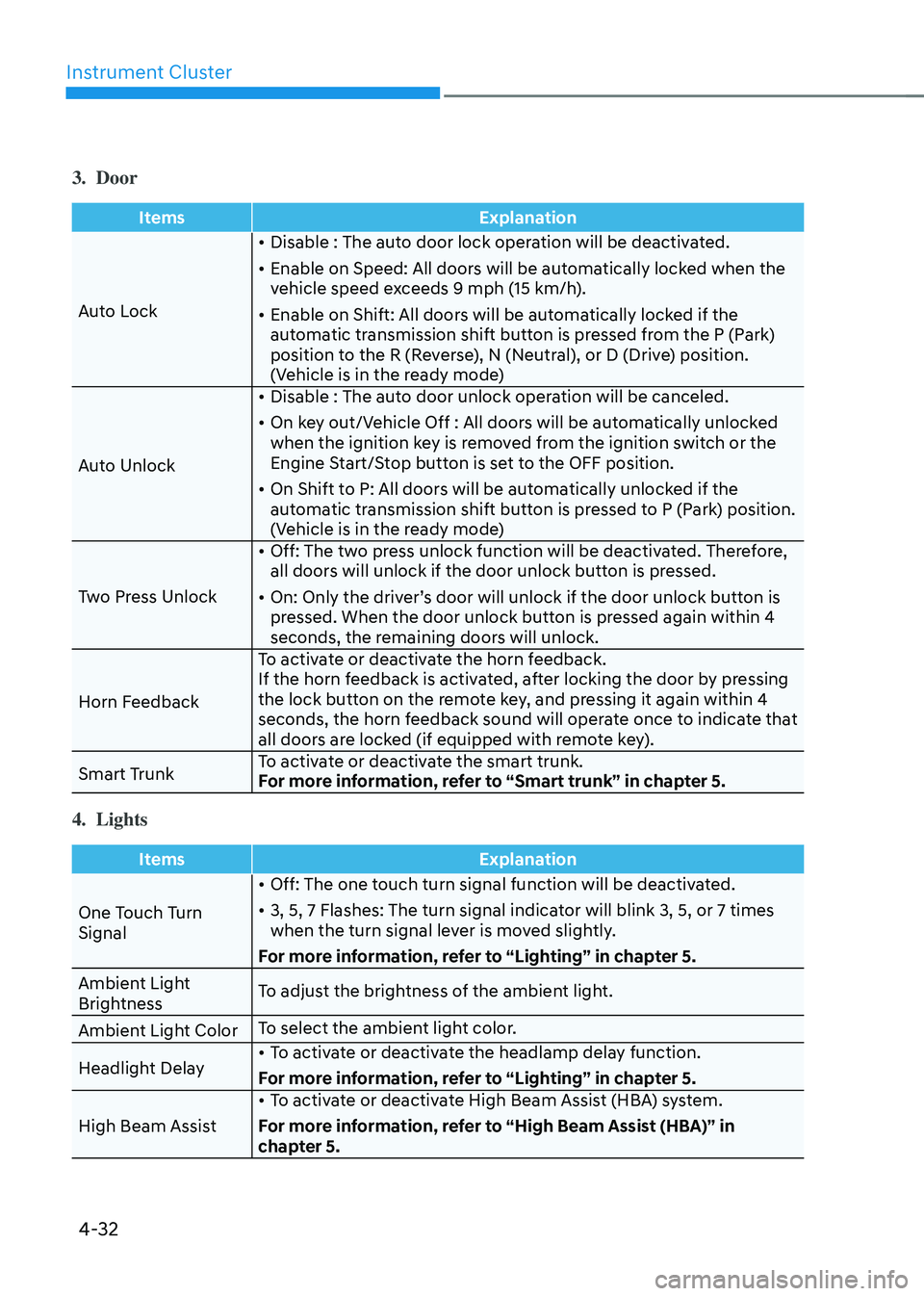
3. Door
ItemsExplanation
Auto Lock •
Disable : The auto door lock operation will be deactivated.
• Enable on Speed: All doors will be automatically locked when the
vehicle speed exceeds 9 mph (15 km/h).
• Enable on Shift: All doors will be automatically locked if the
automatic transmission shift button is pressed from the P (Park)
position to the R (Reverse), N (Neutral), or D (Drive) position.
(Vehicle is in the ready mode)
Auto Unlock •
Disable : The auto door unlock operation will be canceled.
• On key out/Vehicle Off : All doors will be automatically unlocked
when the ignition key is removed from the ignition switch or the
Engine Start/Stop button is set to the OFF position.
• On Shift to P: All doors will be automatically unlocked if the
automatic transmission shift button is pressed to P (Park) position.
(Vehicle is in the ready mode)
Two Press Unlock •
Off: The two press unlock function will be deactivated. Therefore,
all doors will unlock if the door unlock button is pressed.
• On: Only the driver’s door will unlock if the door unlock button is
pressed. When the door unlock button is pressed again within 4
seconds, the remaining doors will unlock.
Horn Feedback To activate or deactivate the horn feedback.
If the horn feedback is activated, after locking the door by pressing
the lock button on the remote key, and pressing it again within 4
seconds, the horn feedback sound will operate once to indicate that
all doors are locked (if equipped with remote key).
Smart Trunk To activate or deactivate the smart trunk.
For more information, refer to “Smart trunk” in chapter 5.
4. Lights
Items
Explanation
One Touch Turn
Signal •
Off: The one touch turn signal function will be deactivated.
• 3, 5, 7 Flashes: The turn signal indicator will blink 3, 5, or 7 times
when the turn signal lever is moved slightly.
For more information, refer to “Lighting” in chapter 5.
Ambient Light
Brightness To adjust the brightness of the ambient light.
Ambient Light Color To select the ambient light color.
Headlight Delay •
To activate or deactivate the headlamp delay function.
For more information, refer to “Lighting” in chapter 5.
High Beam Assist •
To activate or deactivate High Beam Assist (HBA) system.
For more information, refer to “High Beam Assist (HBA)” in
chapter 5.
Page 192 of 527
Convenient Features
5-44
WARNING
Before programming HomeLink® to a
garage door opener or gate operator,
make sure people and objects are out
of the way of the device to prevent
potential harm or damage. Do not
use the HomeLink® with any garage
door opener that lacks the safety
stop and reverse features required
by U.S. federal safety standards (this
includes any garage door opener model
manufactured before April 1, 1982).
A garage door that cannot detect an
object - signaling the door to stop and
reverse - does not meet current U.S.
federal safety standards. Using a garage
door opener without these features
increases the risk of serious injury or
death.
Programming HomeLink
®
Please note the following:
• When programming a garage door
opener, it is advised to park the
vehicle outside of the garage.
• It is recommended that a new battery
be placed in the hand-held transmitter
of the device being programmed to
HomeLink® for quicker training and
accurate transmission of the radio-
frequency signal.
• Some vehicles may require the
Engine Start/Stop button to be in the
ACC (or “Accessories”) position for
programming and/or operation of
HomeLink®.
• In the event that there are still
programming difficulties or questions
after following the programming steps
listed below, contact HomeLink® at:
www.homelink.com, www.youtube.
com/HomeLinkGentex or by calling
1-800-355-3515. Programming
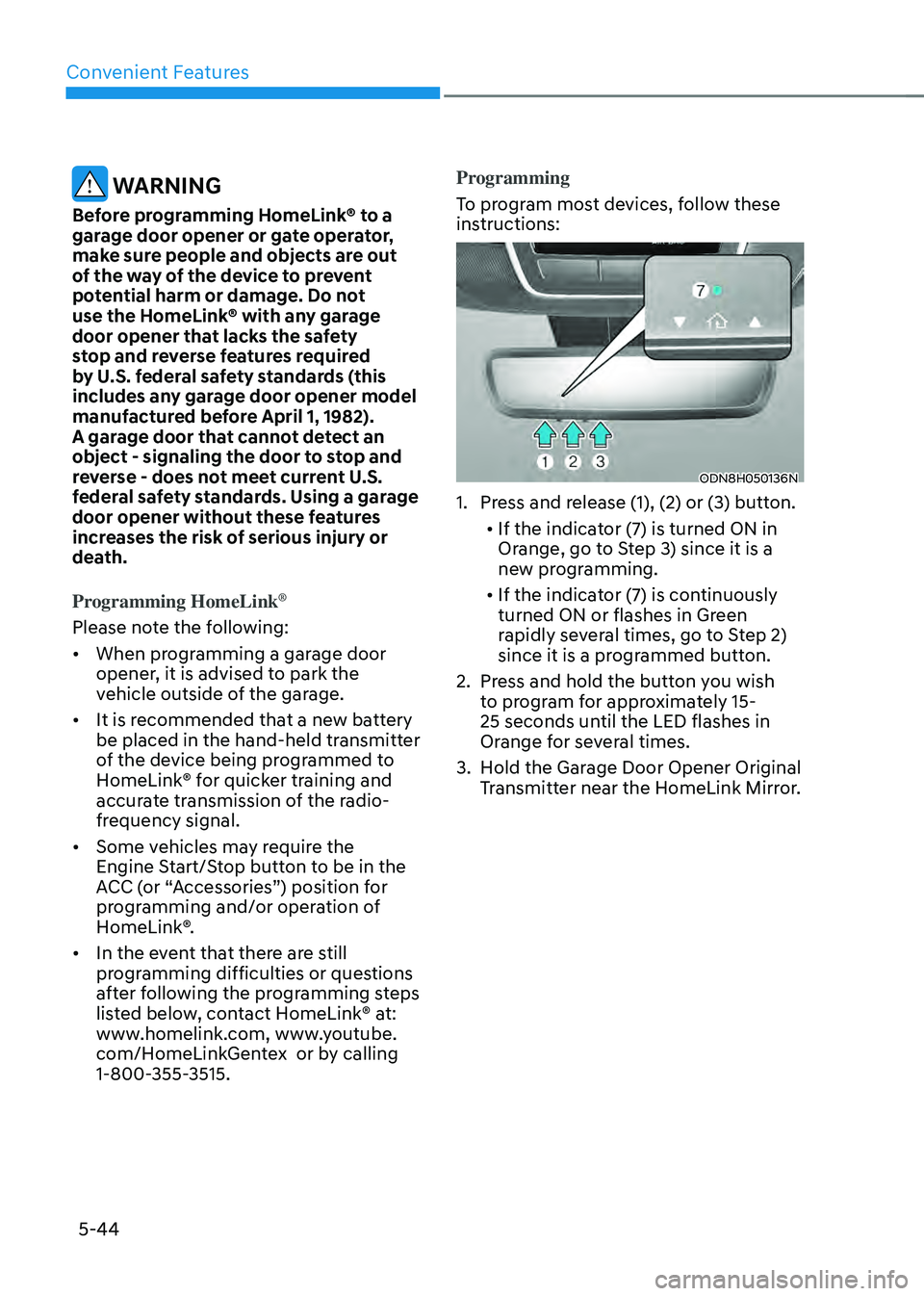
To program most devices, follow these
instructions:
ODN8H050136N
1. Press and release (1), (2) or (3) button.
• If the indicator (7) is turned ON in
Orange, go to Step 3) since it is a
new programming.
• If the indicator (7) is continuously
turned ON or flashes in Green
rapidly several times, go to Step 2)
since it is a programmed button.
2. Press and hold the button you wish
to program for approximately 15-
25 seconds until the LED flashes in
Orange for several times.
3. Hold the Garage Door Opener Original
Transmitter near the HomeLink Mirror.
Page 194 of 527
Convenient Features
5-46
Gate operator & Canadian programming
During programming, your handheld
transmitter may automatically stop
transmitting. Continue to press the
Integrated HomeLink® Wireless Control
System button while you press and re-
press (“cycle”) your handheld transmitter
every two seconds until the frequency
signal has been learned. The indicator
light will flash slowly and then rapidly
after several seconds upon successful
training.
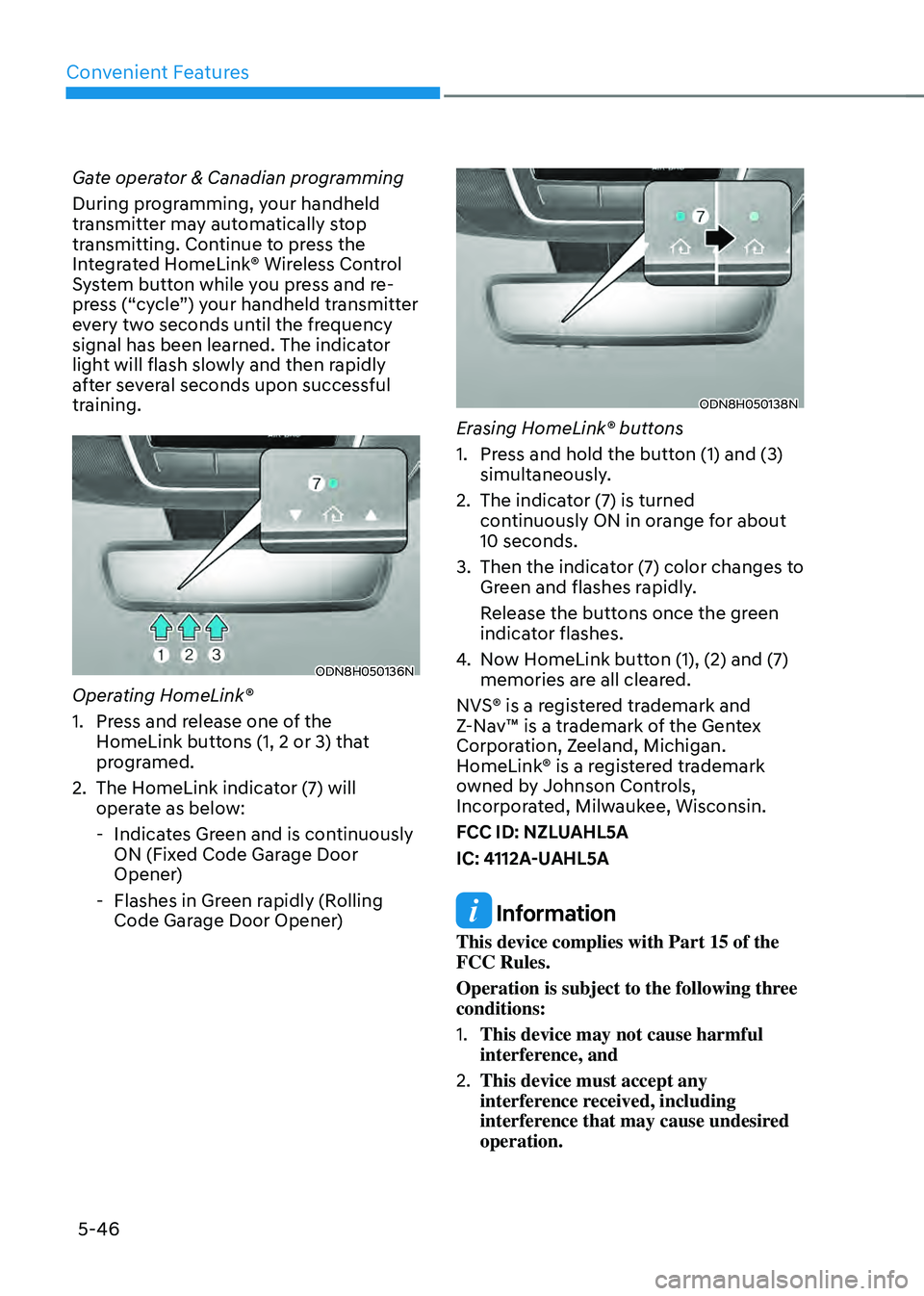
ODN8H050136N
Operating HomeLink®
1. Press and release one of the
HomeLink buttons (1, 2 or 3) that
programed.
2. The HomeLink indicator (7) will
operate as below:
-Indicates Green and is continuously
ON (Fixed Code Garage Door
Opener)
-Flashes in Green rapidly (Rolling
Code Garage Door Opener)
ODN8H050138N
Erasing HomeLink® buttons
1. Press and hold the button (1) and (3)
simultaneously.
2. The indicator (7) is turned
continuously ON in orange for about
10 seconds.
3. Then the indicator (7) color changes to
Green and flashes rapidly.
Release the buttons once the green
indicator flashes.
4. Now HomeLink button (1), (2) and (7)
memories are all cleared.
NVS® is a registered trademark and
Z-Nav™ is a trademark of the Gentex
Corporation, Zeeland, Michigan.
HomeLink® is a registered trademark
owned by Johnson Controls,
Incorporated, Milwaukee, Wisconsin.
FCC ID: NZLUAHL5A
IC: 4112A-UAHL5A
Information
This device complies with Part 15 of the
FCC Rules.
Operation is subject to the following three
conditions:
1. This device may not cause harmful
interference, and
2. This device must accept any
interference received, including
interference that may cause undesired
operation.