navigation system HYUNDAI SONATA LIMITED 2016 User Guide
[x] Cancel search | Manufacturer: HYUNDAI, Model Year: 2016, Model line: SONATA LIMITED, Model: HYUNDAI SONATA LIMITED 2016Pages: 708, PDF Size: 25.96 MB
Page 246 of 708
3-151
Convenient features of your vehicle
3
GPS Time check
The clock is automatically updated
through the navigation system.
GPS Time non-check
The clock can be manually adjusted.
1. Select the "System Settings" onthe "INFO/Setup" screen.
2. Select the "Clock Settings".
3. Select the "Time Settings" by rotating the controller on the cen-
ter console panel.
4. Select the "Time Format" to the 12 hour or 24 hour format.
For more information, please refer to
the manual that was separately sup-
plied with your vehicle.
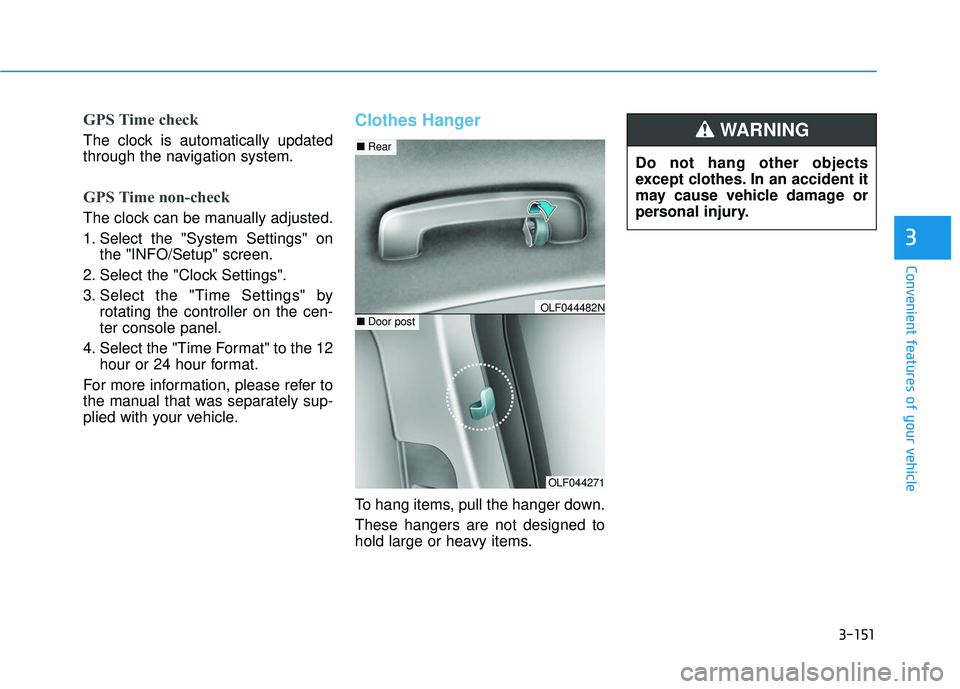
Clothes Hanger
To hang items, pull the hanger down.
These hangers are not designed to
hold large or heavy items. Do not hang other objects
except clothes. In an accident it
may cause vehicle damage or
personal injury.
WARNING
OLF044271
■
Rear
■Door postOLF044482N
Page 249 of 708
Multimedia System
Multimedia System.................................................4-2
AUX, USB and iPod®Port ...............................................4-2
Antenna ........................................................................\
.......4-2
Steering Wheel Audio Control........................................4-3
Audio / Video / Navigation System (AVN) ..................4-4
Bluetooth®Wireless Technology Hands-Free ...........4-4
How Vehicle Audio Works ...............................................4-5
Features of Your Vehicle.................................................4-7
System Controllers and Functions
-3.8 Inch Mono TFT ................................4-18, 4-111
Audio Head Unit .................................................4-18, 4-111
Setup .....................................................................4-2\
0, 4-113
Radio : FM, AM, SiriusXM ...............................4-23, 4-116
SiriusXM, XM
TMRADIO ......................................4-26, 4-117
Basic Method of Use : Audio CD /
MP3 CD / USB / iPod
®/ My Music .............4-28, 4-119
Bluetooth®Wireless Technology Audio .......4-34, 4-125
Bluetooth®Wireless Technology ...................4-36, 4-127
Voice Recognition ..............................................4-47, 4-138
Ending Voice Recognition ................................4-48, 4-139
System Controllers and Functions
- 5 Inch Color TFT LCD ..........................4-55, 4-145
Audio Head Unit .................................................4-55, 4-145
Steering-Wheel Mounted Controls ...............4-57, 4-147
Radio Mode .........................................................4-59, 4-149
SiriusXM, XM
TMRadio Mode ...........................4-63, 4-151
Media Mode ........................................................4-65, 4-153
Audio CD Mode ..................................................4-66, 4-154
MP3 CD Mode.....................................................4-68, 4-156
USB Mode............................................................4-71, 4-159
iPod
®Mode .........................................................4-74, 4-162
AUX Mode ...........................................................4-76, 4-164
MY Music Mode.................................................4-77, 4-165
Bluetooth®Wireless Technology
Audio Mode .........................................................4-80, 4-168
Voice Recognition ..............................................4-95, 4-183
Setup...................................................................4-101\
, 4-190
Rear View Camera ...........................................4-106, 4-194
Blue Link
®..........................................................4-106, 4-194
Declaration of conformity ..........................................4-198
4
Page 252 of 708
4-4
MODE (3)
Press the MODE button to select
Radio, XM, Disc, or AUX.
Information
Detailed information for audio control
buttons are described in the following
pages in this chapter.
Audio / Video / Navigation
System (AVN)
Detailed information for the AVN sys-
tem is described in a separately sup-
plied manual.
Bluetooth®Wireless
Technology Hands-Free
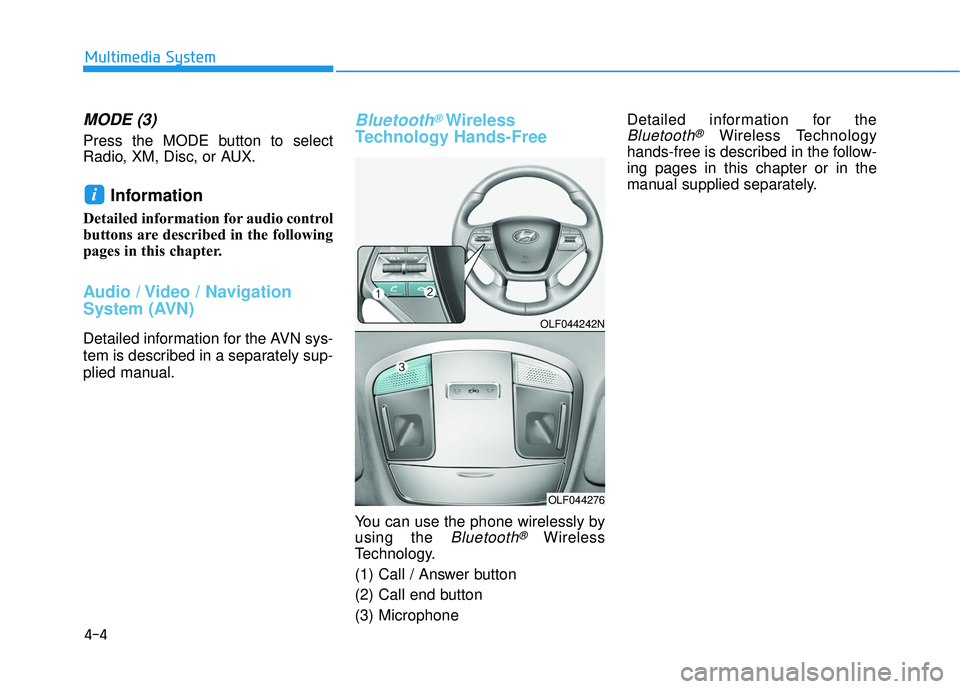
You can use the phone wirelessly by
using the
Bluetooth®Wireless
Technology.
(1) Call / Answer button
(2) Call end button
(3) Microphone Detailed information for the
Bluetooth®Wireless Technology
hands-free is described in the follow-
ing pages in this chapter or in the
manual supplied separately.
i
Multimedia System
OLF044242N
OLF044276
Page 674 of 708

I-2
A/V mode ........................................................................\
3-90
Air bag warning labels....................................................2-70
Air bags ........................................................................\
...2-47Additional safety precautions .....................................2-69
Air bag collision sensors ............................................2-63
Air bag inflation conditions .......................................2-65
Air bag non-inflation conditions ................................2-66
Air bag warning labels ...............................................2-70
Curtain air bags ..........................................................2-51
Do not install a child restraint on the front passenger seat..........................................................2-58
Driver’s front air bag..................................................2-49
How does the air bag system operate? .......................2-52
Occupant Classification System (OCS) .....................2-58
Passenger’s front air bag ............................................2-49
Side air bags ...............................................................2-50
SRS Care ....................................................................2-68\
SRS warning light .....................................................2-53
What to expect after an air bag inflates .....................2-57
Where are the air bags? ..............................................2-49
Why didn’t my air bag go off in a collision ..............2-63
Air cleaner.......................................................................7\
-35
Air ventilation seats ........................................................2-22 Airconditioning system
Automatic climate control system............................3-128
Manual climate control system ................................3-129
Refrigerant and Compressor ........................................8-5
Alarm system ..................................................................3-13
Antenna ........................................................................\
.....4-2
Anti-lock brake system (ABS) .......................................5-32
Appearance care..............................................................7-86 Exterior care ...............................................................7-86
Interior care ................................................................7-91
Armrest ........................................................................\
...2-14
Audio/Video/Navigation system (AVN) ...........................4-4
Auto door lock/unlock features ......................................3-12
Auto hold ........................................................................\
5-28
Auto light position ........................................................3-107
Automatic climate control system ................................3-127 Air conditioning .......................................................3-136
Automatic heating and air conditioning ...................3-128
Climate control air filter ...........................................3-139
Manual heating and air conditioning .......................3-129
Automatic transaxle ........................................................5-12 Sports mode ................................................................5-15
AUX, USB and iPod
®port ...............................................4-2
Index
A
Page 680 of 708

I-8
Maintenance services ........................................................7-4
Mirrors ........................................................................\
....3-19Day/night rearview mirror..........................................3-19
Electric chromic mirror (ECM)..................................3-20
Folding the outside rearview mirror...........................3-36
Inside rearview mirror ................................................3-19
Outside rearview mirror .............................................3-34
Reverse parking aid function .....................................3-37
Moonroof, see panoramic sunroof ..................................3-42
Multi box.......................................................................3\
-146
Multi fuse ........................................................................\
7-63
Multimedia system Antenna ........................................................................\
4-2
Audio/Video/Navigation system(AVN) .......................4-4
AUX, USB and iPod
®port ...........................................4-2
Bluetooth®Wireless Technology Hands-Free ..............4-4
Steering wheel audio control........................................4-3
Odometer........................................................................\
.3-63
Oil (Engine) ....................................................................7-27\
Outside rearview mirror..................................................3-34
Outside temperature gauge .............................................3-62
Owner maintenance ..........................................................7-5 Panoramic sunroof ..........................................................3-42
Parking brake ..................................................................7-34
Parking lamp position ...................................................3-108
Passenger’s front air bag.................................................2-49
Power brakes ...................................................................5-19
Power outlet ..................................................................3-148
Power window lock button .............................................3-41
Rear combination light bulb replacement.......................7-79
Rear lamp ......................................................................3-\
118
Rear parking assist system (RPAS) ..............................3-123
Rear seats ........................................................................\
2-12
Rear view camera .........................................................3-122
Recommended cold tire inflation pressures ...................7-45
Recommended lubricants and capacities ..........................8-6
Recommended SAE viscosity number .........................8-7
Replacement light bulb ...................................................7-73 Back-up lamp .............................................................7-83
High mounted stop lamp ............................................7-84
Interior light bulb replacement ...................................7-84
License plate light bulb replacement .........................7-84
Reporting safety defects .................................................8-10
Reverse parking aid function .........................................3-37
Index
O
P
R
Page 691 of 708
H8
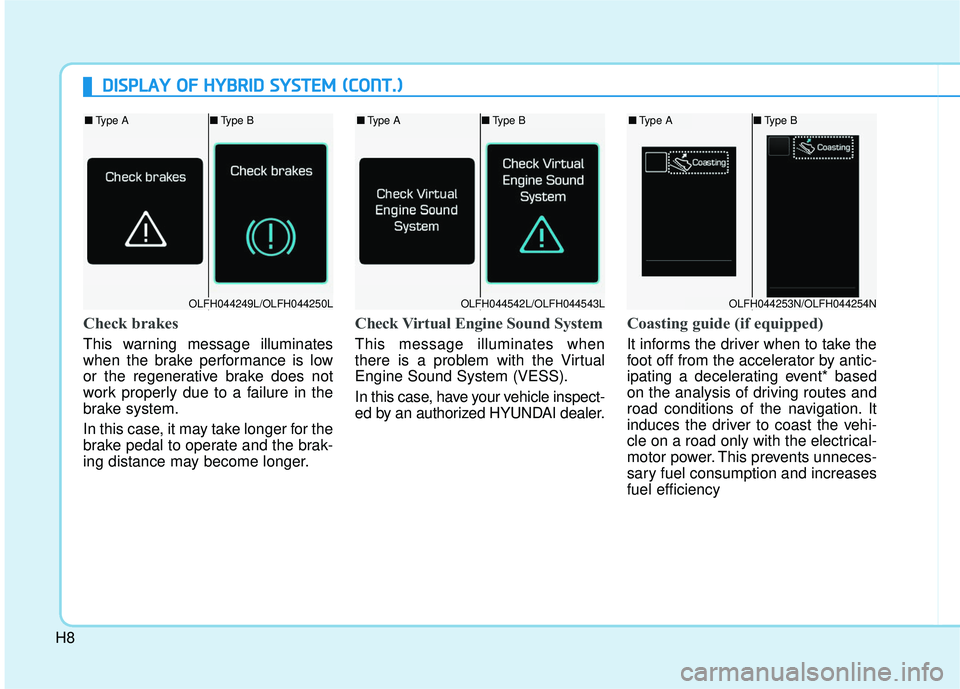
Check brakes
This warning message illuminates
when the brake performance is low
or the regenerative brake does not
work properly due to a failure in the
brake system.
In this case, it may take longer for the
brake pedal to operate and the brak-
ing distance may become longer.
Check Virtual Engine Sound System
This message illuminates when
there is a problem with the Virtual
Engine Sound System (VESS).
In this case, have your vehicle inspect-
ed by an authorized HYUNDAI dealer.
Coasting guide (if equipped)
It informs the driver when to take the
foot off from the accelerator by antic-
ipating a decelerating event* based
on the analysis of driving routes and
road conditions of the navigation. It
induces the driver to coast the vehi-
cle on a road only with the electrical-
motor power. This prevents unneces-
sary fuel consumption and increases
fuel efficiency
D DI
IS
S P
P L
LA
A Y
Y
O
O F
F
H
H Y
Y B
BR
RI
ID
D
S
S Y
Y S
ST
T E
EM
M
(
( C
C O
O N
NT
T.
.)
)
OLFH044542L/OLFH044543L
■ Type A ■Type B
OLFH044249L/OLFH044250L
■Type A ■Type B
OLFH044253N/OLFH044254N
■Type A ■Type B
Page 692 of 708
H9
❈Examples of decelerating events:
U-turn, turnings to the right/left,
traffic circles, highway junctions,
tollgates, and roadside unmanned
cameras to detect speeding.■Type B
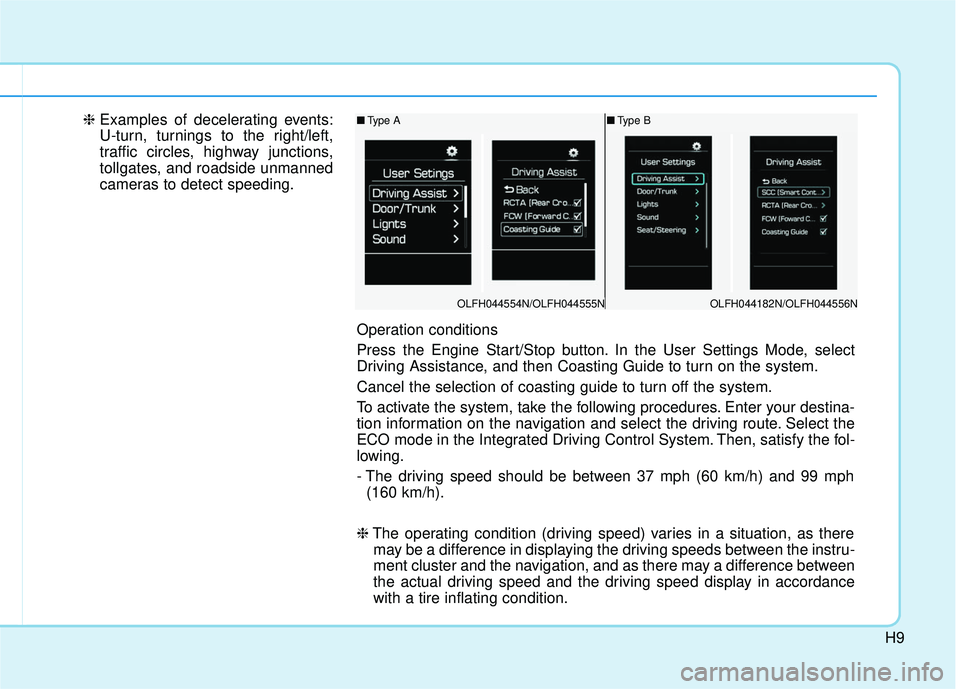
Operation conditions
Press the Engine Start/Stop button. In the User Settings Mode, select
Driving Assistance, and then Coasting Guide to turn on the system.
Cancel the selection of coasting guide to turn off the system.
To activate the system, take the following procedures. Enter your destina-
tion information on the navigation and select the driving route. Select the
ECO mode in the Integrated Driving Control System. Then, satisfy the fol-
lowing.
- The driving speed should be between 37 mph (60 km/h) and 99 mph
(160 km/h).
❈ The operating condition (driving speed) varies in a situation, as there
may be a difference in displaying the driving speeds between the instru-
ment cluster and the navigation, and as there may a difference between
the actual driving speed and the driving speed display in accordance
with a tire inflating condition.
OLFH044554N/OLFH044555N
■ Type A
OLFH044182N/OLFH044556N