key HYUNDAI SONATA LIMITED 2016 Owner's Guide
[x] Cancel search | Manufacturer: HYUNDAI, Model Year: 2016, Model line: SONATA LIMITED, Model: HYUNDAI SONATA LIMITED 2016Pages: 708, PDF Size: 25.96 MB
Page 265 of 708
4-17
Multimedia System
4
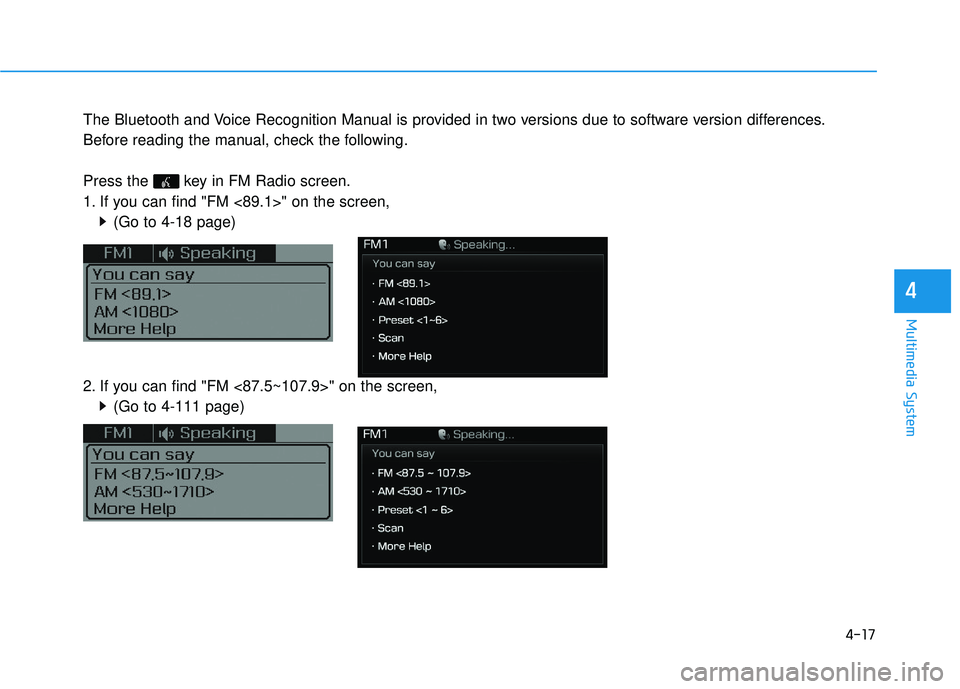
The Bluetooth and Voice Recognition Manual is provided in two versions due to software version differences.
Before reading the manual, check the following.
Press the key in FM Radio screen.
1. If you can find "FM <89.1>" on the screen,(Go to 4-18 page)
2. If you can find "FM <87.5~107.9>" on the screen, (Go to 4-111 page)
Page 266 of 708
4-18
Multimedia System
S
SY
Y S
ST
T E
EM
M
C
C O
O N
NT
TR
R O
O L
LL
LE
E R
R S
S
A
A N
N D
D
F
F U
U N
NC
CT
T I
IO
O N
NS
S
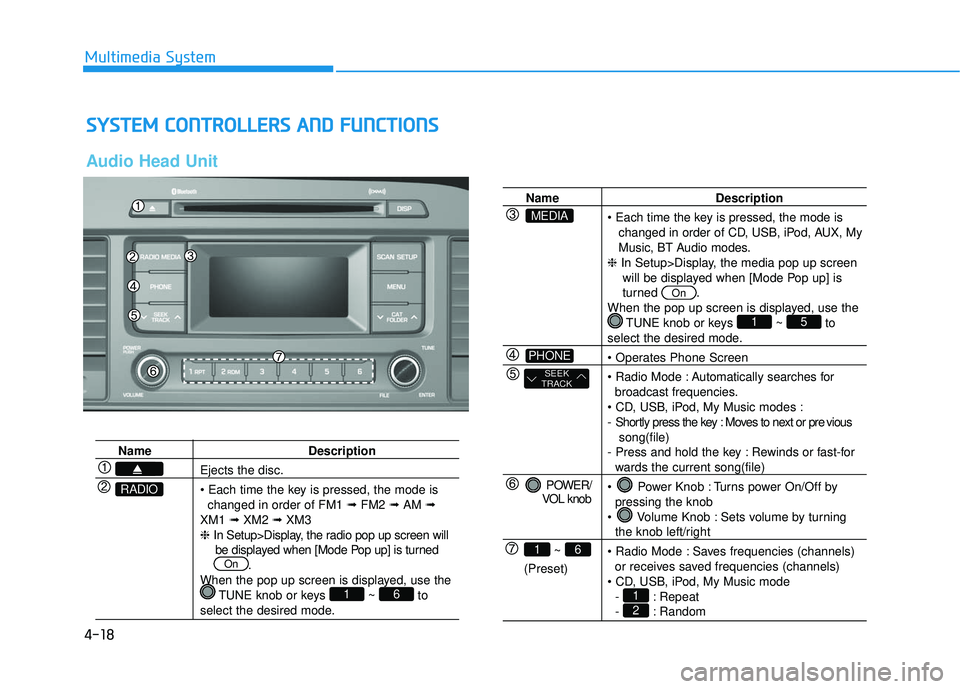
Audio Head Unit
Name Description
Ejects the disc.
changed in order of FM1 ➟FM2 ➟AM ➟
XM1 ➟XM2 ➟XM3
❈ In Setup>Display, the radio pop up screen will
be displayed when [Mode Pop up] is turned .
When the pop up screen is displayed, use the TUNE knob or keys ~ to
select the desired mode.
61
On
RADIO
Name Description
changed in order of CD, USB, iPod, AUX, My
Music, BT Audio modes.
❈ In Setup>Display, the media pop up screen
will be displayed when [Mode Pop up] is
turned .
When the pop up screen is displayed, use the TUNE knob or keys ~ to
select the desired mode.
Automatically searches for broadcast frequencies.
- Shortly press the key : Moves to next or pre vious song(file)
- Press and hold the key : Rewinds or fast-for
wards the current song(file)
Power Knob : Turns power On/Off by pressing the knob
Volume Knob : Sets volume by turning
the knob left/right
Saves frequencies (channels) or receives saved frequencies (channels)
- : Repeat
- : Random21
51
On
POWER/
VOL knob
~
(Preset)
61
SEEK
TRACK
PHONE
MEDIA
Page 267 of 708
4-19
Multimedia System
4
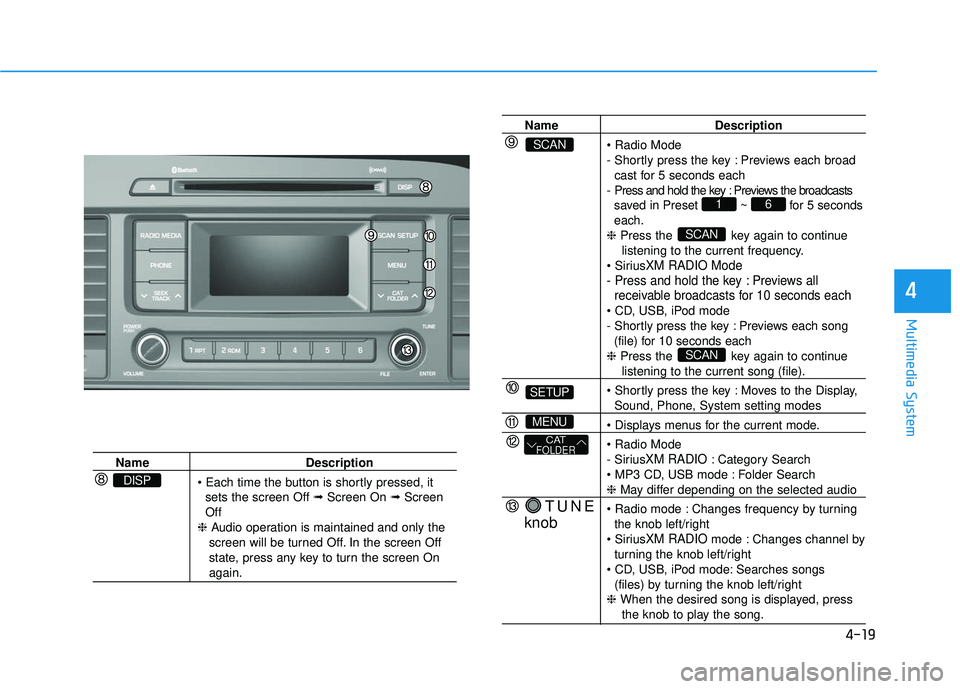
NameDescription
sets the screen Off ➟ Screen On ➟Screen
Off
❈ Audio operation is maintained and only the
screen will be turned Off. In the screen Off
state, press any key to turn the screen On
again.
DISP
Name Description
- Shortly press the key : Previews each broad cast for 5 seconds each
- Press and hold the key : Previews the broadcasts saved in Preset ~ for 5 seconds
each.
❈ Press the key again to continue
listening to the current frequency.
XM RADIO Mode
- Press and hold the key : Previews all receivable broadcasts for 10 seconds each
- Shortly press the key : Previews each song
(file) for 10 seconds each
❈ Press the key again to continue
listening to the current song (file).
Moves to the Display,
Sound, Phone, System setting modes
- Sirius
XM RADIO: Category Search
Folder Search
❈ May differ depending on the selected audio
Changes frequency by turning the knob left/right
XM RADIO mode : Changes channel by
turning the knob left/right
Searches songs (files) by turning the knob left/right
❈ When the desired song is displayed, press
the knob to play the song.
SCAN
SCAN
61
TUNE
knob
CATFOLDER
MENU
SETUP
SCAN
Page 268 of 708
![HYUNDAI SONATA LIMITED 2016 Owners Guide 4-20
Multimedia System
S
SE
E T
T U
U P
P
Display Settings
Press the key Select
[Display] through TUNE knob or
key Mode Pop up
[Mode Pop up] Changes
/
selection mode
During On state, press the
or](/img/35/56186/w960_56186-267.png "HYUNDAI SONATA LIMITED 2016 Owners Guide 4-20
Multimedia System
S
SE
E T
T U
U P
P
Display Settings
Press the key Select
[Display] through TUNE knob or
key Mode Pop up
[Mode Pop up] Changes
/
selection mode
During On state, press the
or")
4-20
Multimedia System
S
SE
E T
T U
U P
P
Display Settings
Press the key Select
[Display] through TUNE knob or
key Mode Pop up
[Mode Pop up] Changes
/
selection mode
During On state, press the
or key to display the mode
change pop up screen. Media Display
When playing an MP3 file, select the
desired display info from ‘Folder/File’
or ‘Album/Artist/Song’.MEDIA
RADIO
OffOn
1
SETUP
Page 269 of 708
![HYUNDAI SONATA LIMITED 2016 Owners Guide 4-21
Multimedia System
4
Sound Settings
Press the key Select
[Sound] through TUNE knob orkey
Tone
This menu allows you to set the
Bass, Middle, Treble.
Select [Tone] Select menu throughTUNE knob Tur](/img/35/56186/w960_56186-268.png "HYUNDAI SONATA LIMITED 2016 Owners Guide 4-21
Multimedia System
4
Sound Settings
Press the key Select
[Sound] through TUNE knob orkey
Tone
This menu allows you to set the
Bass, Middle, Treble.
Select [Tone] Select menu throughTUNE knob Tur")
4-21
Multimedia System
4
Sound Settings
Press the key Select
[Sound] through TUNE knob orkey
Tone
This menu allows you to set the
Bass, Middle, Treble.
Select [Tone] Select menu throughTUNE knob Turn TUNE knob
left/right to set
Bass, Middle, Treble : Selects the
sound tone.
Default : Restores default settings.
❈ Return : While adjusting values,
pressing the TUNE knob will
restore the parent menu.
Position
This menu allows you to set the
‘Bass, Middle, Treble’ and the Sound
Fader and Balance.
Select [Position] Select menu
through TUNE knob Turn
TUNE knob left/right to set.
Fader, Balance : Selects the sound
fader and balance.
Default : Restores default settings.
❈ Return : While adjusting values,
pressing the TUNE knob will
restore the parent menu. Speed Dependent Volume Control
This feature is used to automatically
control the volume level according to
the speed of the vehicle.
Select [SDVC] Turn SDVC On/Off
by pressing the Tune knob.
Voice Recognition Volume
Adjusts voice recognition volume.
Select [Voice Recognition Vol.] Set
volume of
TUNEknob
2
SETUP
Page 270 of 708
![HYUNDAI SONATA LIMITED 2016 Owners Guide 4-22
Multimedia System
System Settings
Press the key Select [System]
through tune knob or key
Memory Information
Displays currently used memory and
total system memory.
Select [Memory Information] O](/img/35/56186/w960_56186-269.png "HYUNDAI SONATA LIMITED 2016 Owners Guide 4-22
Multimedia System
System Settings
Press the key Select [System]
through tune knob or key
Memory Information
Displays currently used memory and
total system memory.
Select [Memory Information] O")
4-22
Multimedia System
System Settings
Press the key Select [System]
through tune knob or key
Memory Information
Displays currently used memory and
total system memory.
Select [Memory Information] OK
The currently used memory is dis-
played on the left side while the total
system memory is displayed on the
right side.
Prompt Feedback
This feature is used to change voice
command feedback between Normal
and Expert modes.
Select [Prompt Feedback] Set
through
TUNEknob
Normal(On) : This mode is for beginner users and provides
detailed instructions during voice
command operation.
Expert(Off) : This mode is for expert
users and omits some information
during voice command operation.
(When using Expert mode, guid-
ance instructions can be heard
through the [Help] or [Menu] com-
mands. Language
This menu is used to set the display
and voice recognition language.
Select [Language] Set through TUNE
knob
❈
The system will reboot after the
language is changed.
❈ Language support by region
-
4
SETUP
Page 271 of 708
4-23
Multimedia System
4
R
RA
A D
DI
IO
O
:
:
F
F M
M ,
,
A
A M
M ,
,
S
S i
ir
r i
iu
u s
sX
X M
M
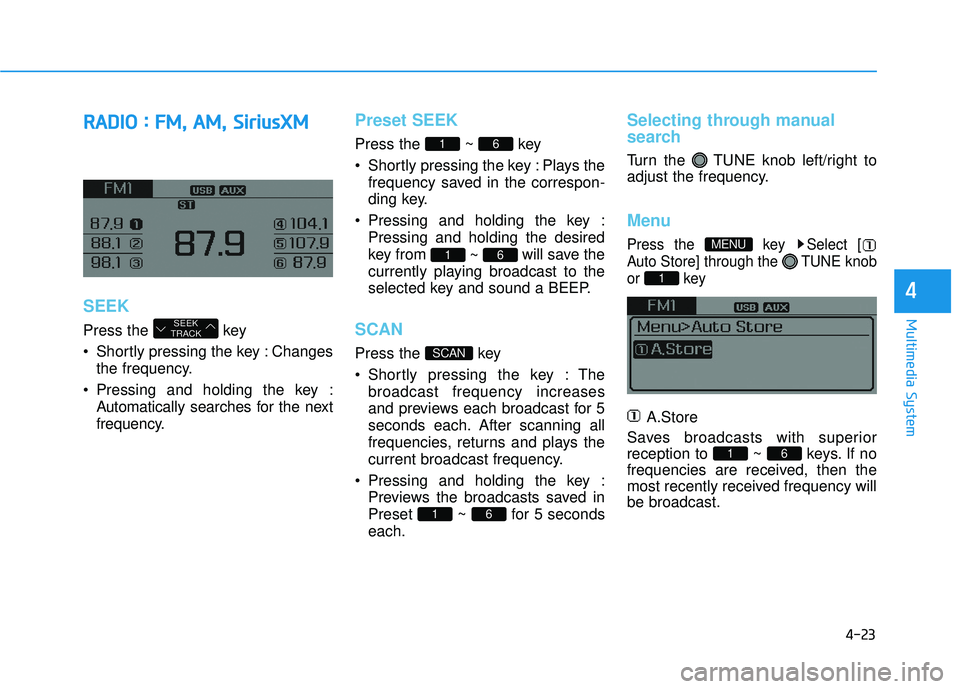
SEEK
Press the key
Shortly pressing the key : Changes
the frequency.
Pressing and holding the key : Automatically searches for the next
frequency.
Preset SEEK
Press the ~ key
Shortly pressing the key : Plays thefrequency saved in the correspon-
ding key.
Pressing and holding the key : Pressing and holding the desired
key from ~ will save the
currently playing broadcast to the
selected key and sound a BEEP.
SCAN
Press the key
Shortly pressing the key : The broadcast frequency increases
and previews each broadcast for 5
seconds each. After scanning all
frequencies, returns and plays the
current broadcast frequency.
Pressing and holding the key : Previews the broadcasts saved in
Preset ~ for 5 seconds
each.
Selecting through manual
search
Turn the TUNE knob left/right to
adjust the frequency.
Menu
Press the key Select [
Auto Store] through the TUNE knob
or key
A.Store
Saves broadcasts with superior
reception to ~ keys. If no
frequencies are received, then the
most recently received frequency will
be broadcast.
61
1
MENU
61
SCAN
61
61
SEEK
TRACK
Page 274 of 708
4-26
Multimedia System
S
Si
ir
r i
iu
u s
sX
X M
M
R
R A
A D
DI
IO
O
Using SiriusXMSatellite Radio
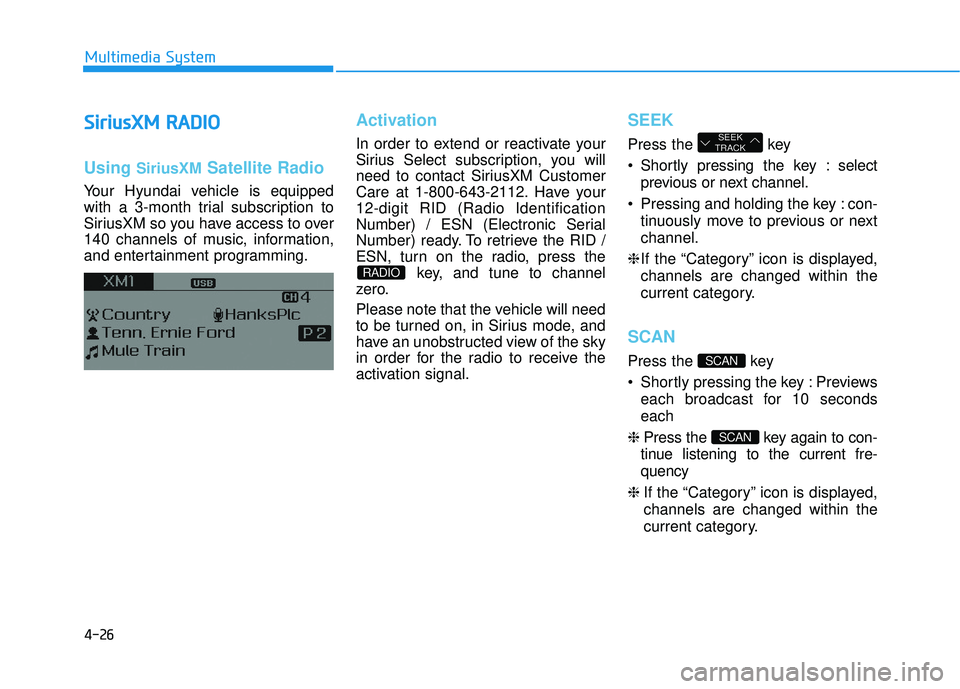
Your Hyundai vehicle is equipped
with a 3-month trial subscription to
SiriusXM so you have access to over
140 channels of music, information,
and entertainment programming.
Activation
In order to extend or reactivate your
Sirius Select subscription, you will
need to contact SiriusXM Customer
Care at 1-800-643-2112. Have your
12-digit RID (Radio Identification
Number) / ESN (Electronic Serial
Number) ready. To retrieve the RID /
ESN, turn on the radio, press the
key, and tune to channel
zero.
Please note that the vehicle will need
to be turned on, in Sirius mode, and
have an unobstructed view of the sky
in order for the radio to receive the
activation signal.
SEEK
Press the key
Shortly pressing the key : select
previous or next channel.
Pressing and holding the key : con- tinuously move to previous or next
channel.
❈ If the “Category” icon is displayed,
channels are changed within the
current category.
SCAN
Press the key
Shortly pressing the key : Previews each broadcast for 10 seconds
each
❈ Press the key again to con-
tinue listening to the current fre-
quency
❈ If the “Category” icon is displayed,
channels are changed within the
current category.
SCAN
SCAN
SEEK
TRACK
RADIO
Page 275 of 708
4-27
Multimedia System
4
Category
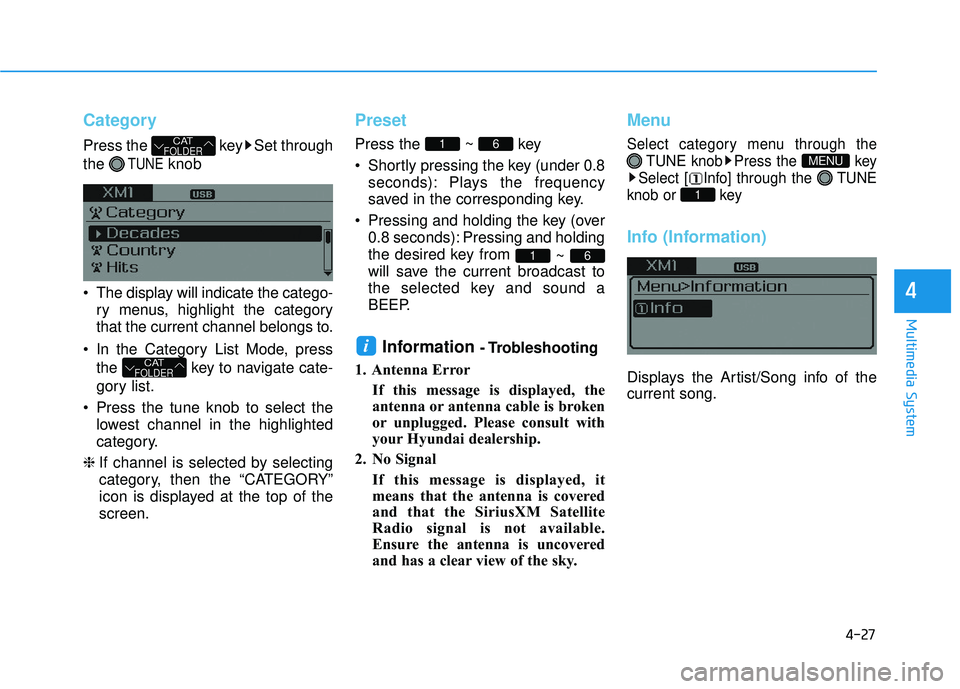
Press the key Set through
the
TUNEknob
The display will indicate the catego- ry menus, highlight the category
that the current channel belongs to.
In the Category List Mode, press the key to navigate cate-
gory list.
Press the tune knob to select the lowest channel in the highlighted
category.
❈ If channel is selected by selecting
category, then the “CATEGORY”
icon is displayed at the top of the
screen.
Preset
Press the ~ key
Shortly pressing the key (under 0.8
seconds): Plays the frequency
saved in the corresponding key.
Pressing and holding the key (over 0.8 seconds): Pressing and holding
the desired key from ~
will save the current broadcast to
the selected key and sound a
BEEP.
Information - Trobleshooting
1. Antenna Error If this message is displayed, the
antenna or antenna cable is broken
or unplugged. Please consult with
your Hyundai dealership.
2. No Signal If this message is displayed, it
means that the antenna is covered
and that the SiriusXM Satellite
Radio signal is not available.
Ensure the antenna is uncovered
and has a clear view of the sky.
Menu
Select category menu through the TUNE knob Press the key
Select [ Info] through the TUNE
knob or key
Info (Information)
Displays the Artist/Song info of the
current song.
1
MENU
i
61
61
CATFOLDER
CATFOLDER
Page 276 of 708
4-28
Multimedia System
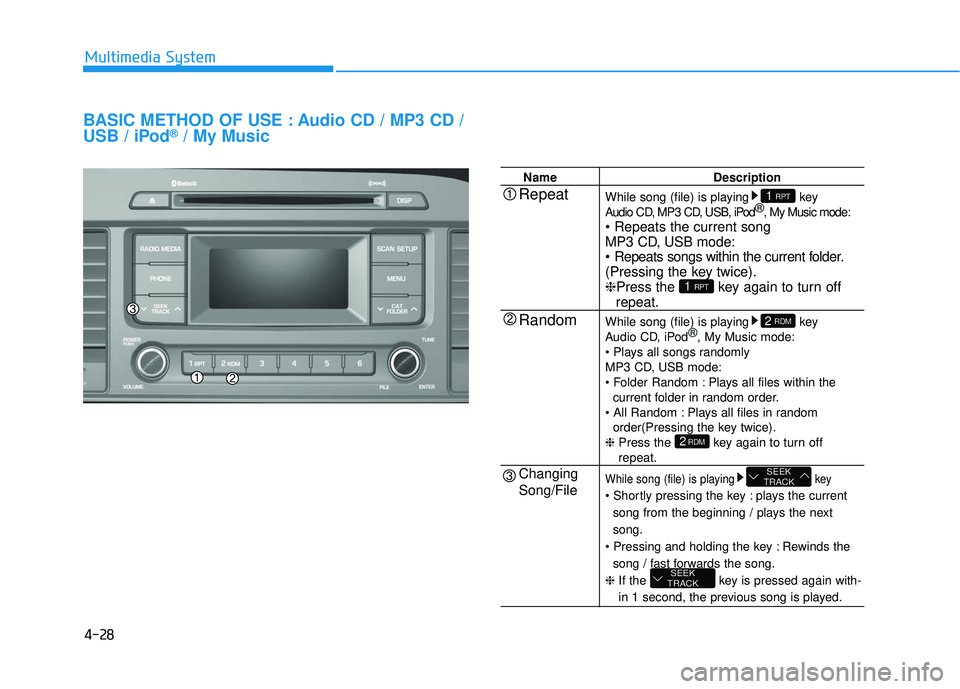
BASIC METHOD OF USE : Audio CD / MP3 CD /
USB / iPod®/ My Music
NameDescription
While song (file) is playing key
Audio CD, MP3 CD, USB, iPod ®
, My Music mode:
MP3 CD, USB mode:
(Pressing the key twice).
❈ Press the key again to turn off
repeat.
While song (file) is playing key
Audio CD, iPod ®
, My Music mode:
MP3 CD, USB mode:
Plays all files within the current folder in random order.
Plays all files in random order(Pressing the key twice).
❈ Press the key again to turn off
repeat.
While song (file) is playing key
plays the current
song from the beginning / plays the next
song.
Rewinds the song / fast forwards the song.
❈ If the key is pressed again with-
in 1 second, the previous song is played.
SEEK
TRACK
SEEK
TRACK
2RDM
2 RDM
1 RPT
1 RPTRepeat
Random
Changing
Song/File