maintenance HYUNDAI SONATA LIMITED 2020 User Guide
[x] Cancel search | Manufacturer: HYUNDAI, Model Year: 2020, Model line: SONATA LIMITED, Model: HYUNDAI SONATA LIMITED 2020Pages: 546, PDF Size: 51.21 MB
Page 133 of 546
5
Automatic Climate Control System ...........................................................5- 127Automatic Heating and Air Conditioning ............................................................5- 128
Manual Temperature Control Mode ..................................................................... 5-129
System Operation
........................................................................\
.......................... 5-135
System Maintenance
........................................................................\
.................... 5-136
Windshield Defrosting and Defogging ......................................................5- 138Manual Climate Control System........................................................................\
...5-138
Automatic Climate Control System......................................................................5-139
Defogging Logic
........................................................................\
.......................... 5-140
Auto Defogging System (Only for Automatic Climate Control System)
............5-141
Defroster
........................................................................\
........................................ 5-142
Climate Control Additional Features .........................................................5- 143Sunroof Inside Air Recirculation ........................................................................\
..5- 143
Automatic Ventilation ........................................................................\
................... 5-143
Storage Compartment ........................................................................\
........5- 144Center Console Storage ........................................................................\
................5- 144
Glove Box ........................................................................\
....................................... 5-144
Interior Features ........................................................................\
..................5- 145Cup Holder ........................................................................\
.....................................5- 145
Sunvisor ........................................................................\
......................................... 5-146
Power Outlet
........................................................................\
.................................. 5-146
USB Charger
........................................................................\
................................. 5-147
Wireless Cellular Phone Charging System
..........................................................5-148
Clock
........................................................................\
.............................................. 5-150
Clothes Hanger
........................................................................\
.............................. 5-150
Floor Mat Anchor(S)
........................................................................\
....................... 5-151
Infotainment System ........................................................................\
..........5- 152USB And Ipod® Port ........................................................................\
.......................5- 152
Antenna ........................................................................\
.......................................... 5-152
Steering Wheel Audio Control
........................................................................\
...... 5-153
Bluetooth® Wireless Technology Hands-Free
.....................................................5-154
Audio (Display Audio) / Video / Navigation System (AVN)
................................5-154
Head Up Display (HUD) ........................................................................\
...... 5-72
Lighting ........................................................................\
................................. 5 -74
Exterior Lights ........................................................................\
................................. 5 -74
Interior Lights ........................................................................\
................................. 5-80
Welcome System ........................................................................\
........................... 5-83
Wipers and Washers ........................................................................\
............5-84Windshield Wipers ........................................................................\
......................... 5-84
Windshield Washers ........................................................................\
....................... 5-85
Rear View Monitor (RVM) ........................................................................\
... 5-86Rear View Monitor with Parking Guidance ........................................................... 5-86
Rear View Monitor - Top View ........................................................................\
....... 5-86
Surround View Monitor (SVM) ................................................................... 5-88
Reverse Parking Collision-Avoidance Assist .............................................. 5-89
System Setting and Operation ........................................................................\
...... 5-89
Warning and System Control ........................................................................\
......... 5-90
Detecting Sensor ........................................................................\
............................ 5-92
System Malfunction ........................................................................\
....................... 5-93
Limitations of the System ........................................................................\
.............. 5-93
Reverse Parking Distance Warning (PDW) ................................................5-95Operation of Reverse Parking Distance Warning System .................................... 5-95
To Turn Off Reverse Parking Distance Warning System ..................................... 5-97
Non-Operational Conditions of Reverse Parking Distance Warning System ..... 5-97
Reverse Parking Distance Warning System Precautions ..................................... 5-98
Forward/Reverse Parking Distance Warning (PDW) ................................5-99Operation of Forward/Reverse Parking Distance Warning System .................. 5-100
Non-Operational Conditions of Forward/Reverse Parking Distance Warning
System ........................................................................\
............................................ 5-102
Forward/Reverse Parking Distance Warning System Precautions .................... 5-103
Remote Smart Parking Assist (RSPA) .......................................................5-104Operating Condition ........................................................................\
..................... 5-105
How Remote Smart Parking Assist System Works ............................................. 5-108
Additional Instructions ........................................................................\
................... 5-113
Display Operation Status ........................................................................\
.............. 5-114
How the Remote Moving Forward/Backward System Works ............................. 5-115
Manual Climate Control System ............................................................... 5-118Heating and Air Conditioning ........................................................................\
....... 5-119
System Operation ........................................................................\
.......................... 5-124
System Maintenance ........................................................................\
.................... 5-125
5. Convenient Features
Page 145 of 546
05
5-15
hyundai Digital Key
Digital Key Application
To use Hyundai Digital Key mobile app,
you should install Hyundai digital key
application. Search ‘Hyundai digital key’
in the Google Play Store and download
the app. Please refer to the detailed
manual of the digital key app. The option
can be found under the following app
menu:
Menu → Application Info → Tutorial
Please note the manual before using the
app.
ÃThis service is only a
vailable for
Android smartphones. Please confirm
supported/compatible devices on our
website.
WARNING
For used vehicle
If any of the digital key (smartphone key
or card key) is already registered when
you press ON button after unlocking the
doors, the message ‘Digital key(s) active’
appears on the instrument cluster once.
If you buy a used vehicle, you should
confirm the message and delete the
registered smartphone key and card key.
In addition, please notify the Hyundai
Customer Care Center.
If the card key does not work properly,
please delete the card key and register
the smartphone key and re-register the
card key.
For vehicle maintenance
If you need to have your Digital Key
System repaired or replaced please
ensure you Smartphone Key is still active.
You may have to pair your phone again.
In the case, re-initialize your Digital Keys
using the Hyundai Digital Key mobile app.
Digital key (smartphone) NFC
function
You can use the Digital Key NFC (Near
Field Communication) function after turn
your smartphone NFC settings on. And
you should unlock & turn on smartphone
screen to use it.
à T
o change the NFC mode of the
smartphone, please refer to the
smartphone manual or contact
to the customer service center of
smartphone manufacturers.
Page 147 of 546
05
5-17
ODN8A059129
ODN8A059130
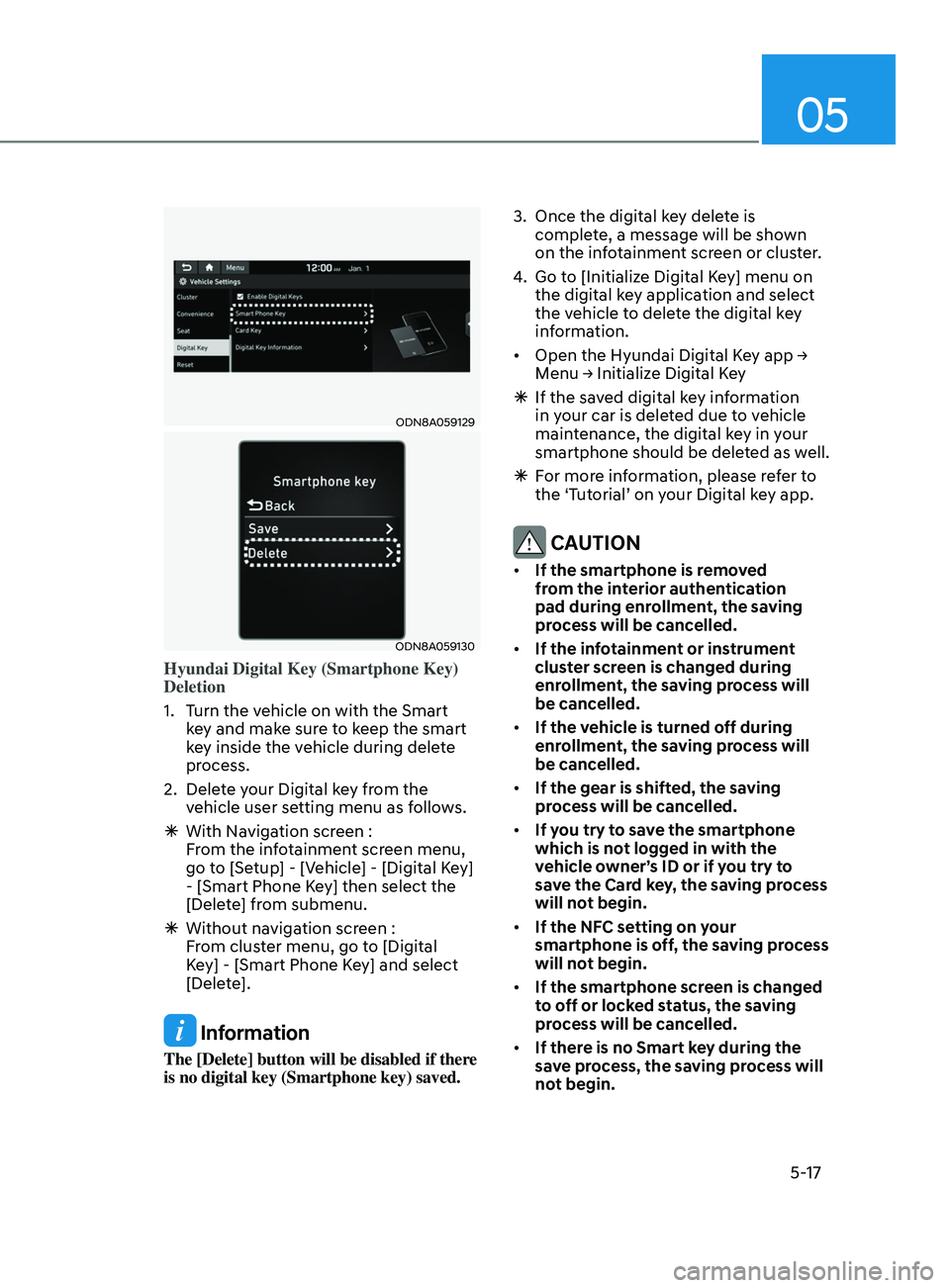
Hyundai Digital Key (Smartphone Key)
Deletion
1.
T
urn the vehicle on with the Smart
key and make sure to keep the smart
key inside the vehicle during delete
process.
2.
Dele
te your Digital key from the
vehicle user setting menu as follows.
à With Na
vigation screen :
From the infotainment screen menu,
go to [Setup] - [Vehicle] - [Digital Key]
- [Smart Phone Key] then select the
[Delete] from submenu.
à Without na
vigation screen :
From cluster menu, go to [Digital
Key] - [Smart Phone Key] and select
[Delete].
Information
The [Delete] button will be disabled if there
is no digital key (Smartphone key) saved. 3.
Once the digital k
ey delete is
complete, a message will be shown
on the infotainment screen or cluster.
4.
Go t
o [Initialize Digital Key] menu on
the digital key application and select
the vehicle to delete the digital key
information.
• Open the Hyundai Digital Key app →
M
enu → Initialize Digital Key
Ã
If the sa
ved digital key information
in your car is deleted due to vehicle
maintenance, the digital key in your
smartphone should be deleted as well.
à F
or more information, please refer to
the ‘Tutorial’ on your Digital key app.
CAUTION
• If the smartphone is removed
from the interior authentication
pad during enrollment, the saving
process will be cancelled.
• If the infotainment or instrument
cluster screen is changed during
enrollment, the saving process will
be cancelled.
• If the vehicle is turned off during
enrollment, the saving process will
be cancelled.
• If the gear is shifted, the saving
process will be cancelled.
• If you try to save the smartphone
which is not logged in with the
vehicle owner’s ID or if you try to
save the Card key, the saving process
will not begin.
• If the NFC setting on your
smartphone is off, the saving process
will not begin.
• If the smartphone screen is changed
to off or locked status, the saving
process will be cancelled.
• If there is no Smart key during the
save process, the saving process will
not begin.
Page 255 of 546
05
5-125
Air conditioning system operation tips
• If the vehicle has been parked in
direct sunlight during hot weather,
open the windows for a short time
to let the hot air inside the vehicle
escape.
• After sufficient cooling has been
achieved, switch back from the
recirculated air to the fresh outside air
position.
• To help reduce moisture inside of
the windows on rainy or humid
days, decrease the humidity inside
the vehicle by operating the air
conditioning system with the windows
and sunroof closed.
• Use the air conditioning system
every month only for a few minutes
to ensure maximum system
performance.
• If you operate air conditioner
excessively, the difference between
the temperature of the outside air and
that of the windshield could cause
the outer surface of the windshield
to fog up, causing loss of visibility. In
this case, set the mode selection knob
or button to the
position and fan
speed control to the lower speed.
System Maintenance
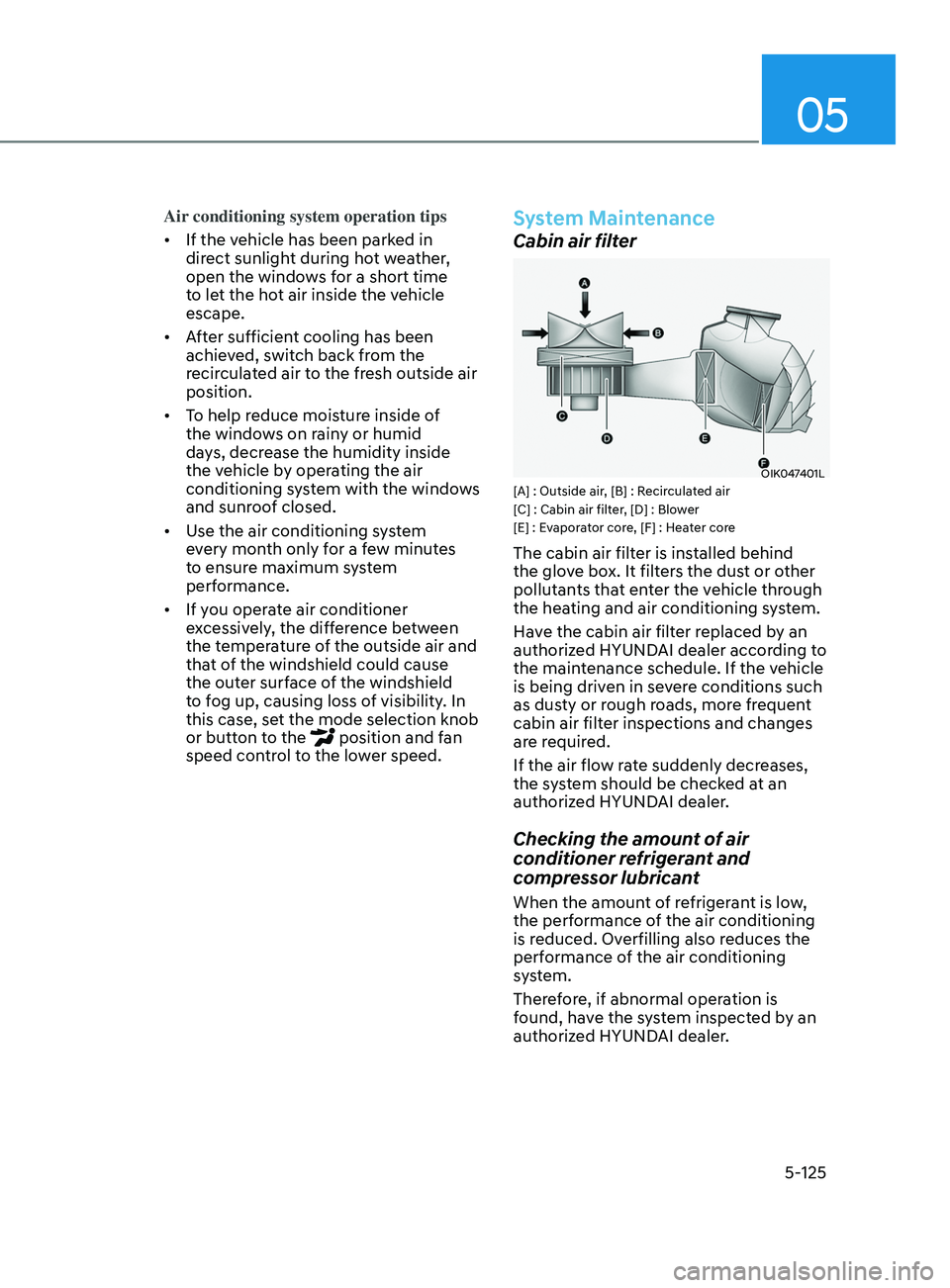
Cabin air filter
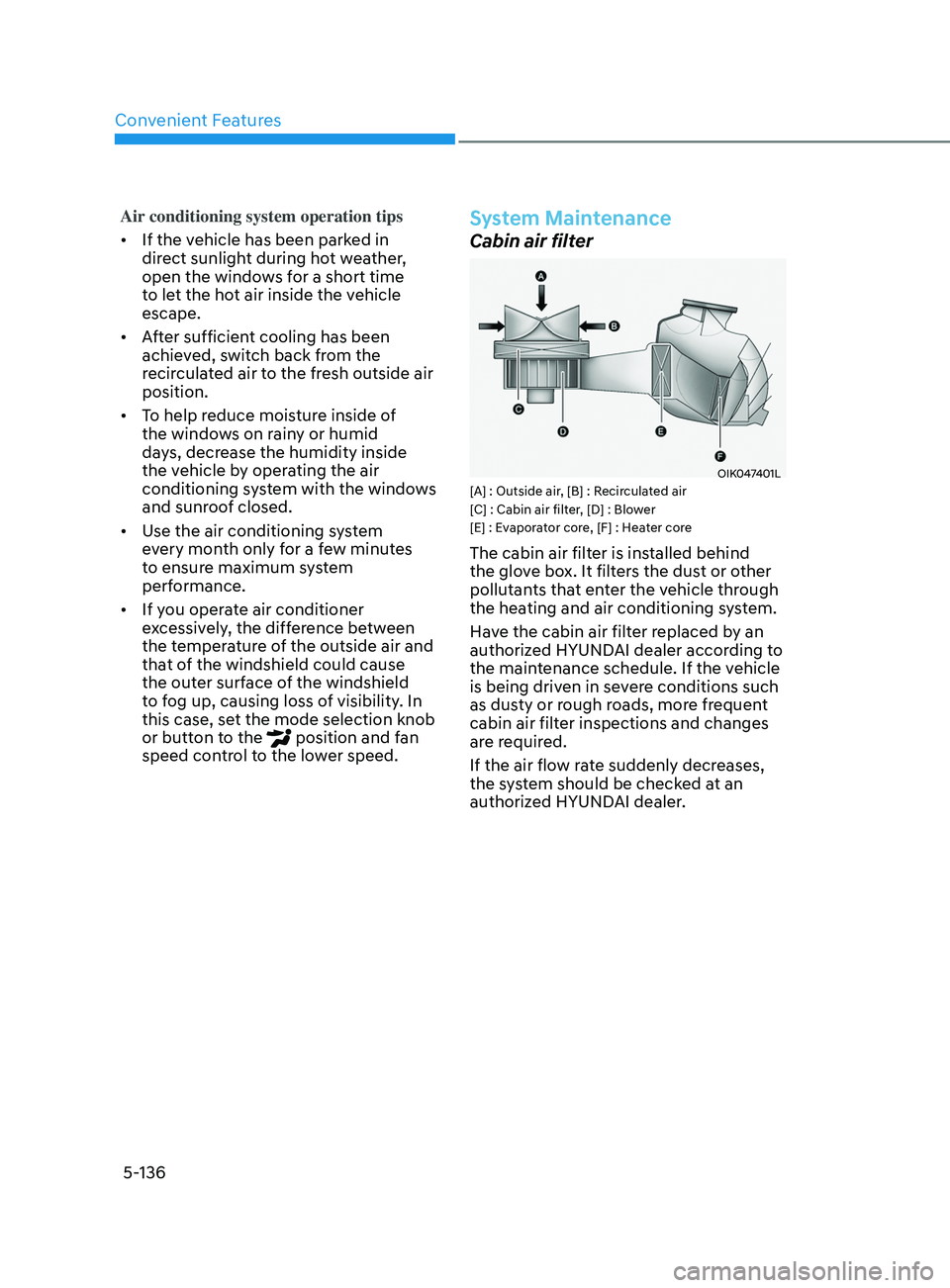
OIK047401L[A] : Outside air, [B] : Recirculated air
[C] : Cabin air filter, [D] : Blower
[E] : Evaporator core, [F] : Heater core
The cabin air filter is installed behind
the glove box. It filters the dust or other
pollutants that enter the vehicle through
the heating and air conditioning system.
Have the cabin air filter replaced by an
authorized HYUNDAI dealer according to
the maintenance schedule. If the vehicle
is being driven in severe conditions such
as dusty or rough roads, more frequent
cabin air filter inspections and changes
are required.
If the air flow rate suddenly decreases,
the system should be checked at an
authorized HYUNDAI dealer.
Checking the amount of air
conditioner refrigerant and
compressor lubricant
When the amount of refrigerant is low,
the performance of the air conditioning
is reduced. Overfilling also reduces the
performance of the air conditioning
system.
Therefore, if abnormal operation is
found, have the system inspected by an
authorized HYUNDAI dealer.
Page 266 of 546
Convenient Features
5-136
Air conditioning system operation tips
• If the vehicle has been parked in
direct sunlight during hot weather,
open the windows for a short time
to let the hot air inside the vehicle
escape.
• After sufficient cooling has been
achieved, switch back from the
recirculated air to the fresh outside air
position.
• To help reduce moisture inside of
the windows on rainy or humid
days, decrease the humidity inside
the vehicle by operating the air
conditioning system with the windows
and sunroof closed.
• Use the air conditioning system
every month only for a few minutes
to ensure maximum system
performance.
• If you operate air conditioner
excessively, the difference between
the temperature of the outside air and
that of the windshield could cause
the outer surface of the windshield
to fog up, causing loss of visibility. In
this case, set the mode selection knob
or button to the
position and fan
speed control to the lower speed.
System Maintenance
Cabin air filter
OIK047401L[A] : Outside air, [B] : Recirculated air
[C] : Cabin air filter, [D] : Blower
[E] : Evaporator core, [F] : Heater core
The cabin air filter is installed behind
the glove box. It filters the dust or other
pollutants that enter the vehicle through
the heating and air conditioning system.
Have the cabin air filter replaced by an
authorized HYUNDAI dealer according to
the maintenance schedule. If the vehicle
is being driven in severe conditions such
as dusty or rough roads, more frequent
cabin air filter inspections and changes
are required.
If the air flow rate suddenly decreases,
the system should be checked at an
authorized HYUNDAI dealer.
Page 320 of 546
![HYUNDAI SONATA LIMITED 2020 User Guide 6-36
Battery Sensor Deactivation
ODN8A069204
[A] : Battery sensor
The battery sensor is deactivated, when
the battery is disconnected from the
negative pole for maintenance purpose.
In this case, t](/img/35/56187/w960_56187-319.png "HYUNDAI SONATA LIMITED 2020 User Guide 6-36
Battery Sensor Deactivation
ODN8A069204
[A] : Battery sensor
The battery sensor is deactivated, when
the battery is disconnected from the
negative pole for maintenance purpose.
In this case, t")
6-36
Battery Sensor Deactivation
ODN8A069204
[A] : Battery sensor
The battery sensor is deactivated, when
the battery is disconnected from the
negative pole for maintenance purpose.
In this case, the ISG system is limitedly
operated due to the battery sensor
deactivation. Thus, the driver needs
to take the following procedures to
reactivate the battery sensor after
disconnecting the battery.
Prerequisites to reactivate the
battery sensor
Switch "ON" and "OFF" the ignition one
time. Park the vehicle for a minimum of 4
hours with the hood and all doors closed.
Pay extreme caution not to connect any
accessories (i.e. navigation and black
box) to the vehicle with the engine in the
OFF status. If not, the battery sensor may
not be reactivated.
Information
The ISG system may not operate in the
following situations.
-Ther
e is a malfunction with the ISG
system.
- The battery is weak.
-The brake vacuum pr
essure is low.
If this occurs, have the ISG system
checked by an authorized HYUNDAI
dealer.
NOTICE
• Use only a genuine HYUNDAI
Absorbent Glass Mat (AGM) battery
for replacement. If not, the ISG
system may not operate normally.
• Do not recharge the Absorbent Glass
Mat (AGM) battery with a general
battery charger. It may damage or
explode the Absorbent Glass Mat
(AGM) battery.
• Do not remove the battery cap. The
battery electrolyte, which is harmful
to the human body, may leak out.
While Driving
Page 428 of 546
6-144
WARNING
The use of tire chains may adversely
affect vehicle handling:
• Drive less than 20 mph (30 km/h)
or the chain manufacturer's
recommended speed limit,
whichever is lower.
• Drive carefully and avoid bumps,
holes, sharp turns, and other road
hazards, which may cause the
vehicle to bounce.
• Avoid sharp turns or locked wheel
braking.
Information
• Install tire chains on both left and right
front tires. It should be noted that
installing tire chains on the tires will
provide a greater driving force, but will
not prevent side skids.
• Do not install studded tires without
first checking local, state and municipal
regulations for possible restrictions
against their use.
Chain installation
When installing tire chains, follow the
manufacturer’s instructions and mount
them as tightly possible. Drive slowly
(less than 20 mph (30 km/h)) with
chains installed. If you hear the chains
contacting the body or chassis, stop and
tighten them. If they still make contact,
slow down until the noise stops. Remove
the tire chains as soon as you begin
driving on cleared roads.
When mounting snow chains, park the
vehicle on level ground away from traffic.
Turn on the vehicle Hazard Warning
Flasher and place a triangular emergency
warning device behind the vehicle (if
available). Always place the vehicle in P
(Park), apply the parking brake and turn
off the engine before installing snow
chains.
NOTICE
When using tire chains:
• Wrong size chains or improperly
installed chains can damage your
vehicle's brake lines, suspension,
body and wheels.
• Use SAE "S" class or wire chains.
• If you hear noise caused by chains
contacting the body, retighten the
chain to prevent contact with the
vehicle body.
• To prevent body damage, retighten
the chains after driving 0.3~0.6 miles
(0.5~1.0 km).
• Do not use tire chains on vehicles
equipped with aluminum wheels. If
unavoidable, use a wire type chain.
• Use wire chains less than 0.59 inch
(15mm) wide to prevent damage to
the chain’s connection.
Winter Precautions
Use high quality ethylene glycol
coolant
Your vehicle is delivered with high
quality ethylene glycol coolant in the
cooling system. It is the only type of
coolant that should be used because it
helps prevent corrosion in the cooling
system, lubricates the water pump and
prevents freezing. Be sure to replace or
replenish your coolant in accordance
with the maintenance schedule in
chapter 8. Before winter, have your
coolant tested to assure that its freezing
point is sufficient for the temperatures
anticipated during the winter.
While Driving
Page 443 of 546
Emergency Situations
7-8
Tire Pressure Monitoring System
WARNING
Over-inflation or under-inflation can
reduce tire life, adversely affect vehicle
handling, and lead to sudden tire failure
that may cause loss of vehicle control
resulting in an accident.
Each tire, including the spare (if
provided), should be checked monthly
when cold and inflated to the inflation
pressure recommended by the vehicle
manufacturer on the vehicle placard
or tire inflation pressure label. If your
vehicle has tires of a different size than
the size indicated on the vehicle placard
or tire inflation pressure label, you should
determine the proper tire inflation
pressure for those tires.
As an added safety feature, your
vehicle has been equipped with a tire
pressure monitoring system (TPMS)
that illuminates a low tire pressure
telltale when one or more of your tires is
significantly under-inflated. Accordingly,
when the low tire pressure telltale
illuminates, you should stop and check
your tires as soon as possible, and inflate
them to the proper pressure. Driving on
a significantly under-inflated tire causes
the tire to overheat and can lead to tire
failure.
Under-inflation also reduces fuel
efficiency and tire tread life, and may
affect the vehicle’s handling and
stopping ability.
Please note that the TPMS is not a
substitute for proper tire maintenance,
and it is the driver’s responsibility to
maintain correct tire pressure, even if
under-inflation has not reached the level
to trigger illumination of the TPMS low
tire pressure telltale.
Your vehicle has also been equipped with
a TPMS malfunction indicator to indicate
when the system is not operating
properly. The TPMS malfunction
indicator is combined with the low
tire pressure telltale. When the system
detects a malfunction, the telltale will
flash for approximately one minute and
then remain continuously illuminated.
This sequence will continue upon
subsequent vehicle start-ups as long as
the malfunction exists.
When the malfunction indicator is
illuminated, the system may not be able
to detect or signal low tire pressure as
intended. TPMS malfunctions may occur
for a variety of reasons, including the
installation of replacement or alternate
tires or wheels on the vehicle that
prevent the TPMS from functioning
properly.
Always check the TPMS malfunction
telltale after replacing one or more tires
or wheels on your vehicle to ensure that
the replacement or alternate tires and
wheels allow the TPMS to continue to
function properly.
NOTICE
If any of the below happens, have
the system checked by an authorized
HYUNDAI dealer.
1.
The L
ow Tire Pressure TPMS
Malfunction Indicator does not
illuminate for 3 seconds when the
ignition switch is placed to the ON
position or engine is running.
2.
The TPMS M
alfunction Indicator
remains illuminated after blinking for
approximately 1 minute.
3.
The L
ow Tire Pressure LCD display
remains illuminated
Page 455 of 546

Engine Compartment ........................................................................\
............8 -3
Maintenance Services ........................................................................\
........... 8-4
Owner’s Responsibility ........................................................................\
.................... 8-4
Owner Main tenance Precautions ........................................................................\
.... 8-4
Owner Maintenance ........................................................................\
.............. 8-5Owner Maintenance Schedule ........................................................................\
........8-5
Scheduled Maintenance Services ................................................................8 -7Normal Maintenance Schedule (Smartstream G1.6 T-GDi) ...................................8-8
Main tenance Under Severe Usage Conditions (Smartstream G1.6 T-GDi) .........8-11
Severe Driving Conditions
........................................................................\
.............. 8-11
Normal Maintenance Schedule (Smartstream G2.5 GDi)
.....................................8-12
Maintenance Under Severe Usage Conditions (Smartstream G2.5 GDi)
................8-15
Severe Driving Conditions
........................................................................\
.............. 8-15
Explanation of Scheduled Maintenance Items ..........................................8- 16
Engine Oil ........................................................................\
............................. 8-19
Checking the Engine Oil Level ........................................................................\
........8- 19
Checking the Engine Oil and Filter ....................................................................... 8-20
Checking the Engine Coolant Level
....................................................................... 8-
21
Engine Coolant ........................................................................\
......................8- 21Changing Engine Coolant ........................................................................\
..............8- 23
Brake Fluid ........................................................................\
............................8 -24Checking the Brake Fluid Level ........................................................................\
.....8 -24
Washer Fluid ........................................................................\
.........................8- 25Checking the Washer Fluid Level ........................................................................\
..8- 25
Air Cleaner ........................................................................\
............................8- 26Filter Replacement ........................................................................\
.........................8- 26
Climate Control Air Filter ........................................................................\
.....8- 28Filter Inspection........................................................................\
.............................. 8-28
Filter replacement
........................................................................\
.......................... 8-28
Wiper Blades ........................................................................\
........................8- 29Blade Inspection ........................................................................\
............................8- 29
Blade Replacement ........................................................................\
........................ 8-29
Battery ........................................................................\
................................... 8- 31For Best Battery Service ........................................................................\
................8- 32
Battery Recharging ........................................................................\
........................ 8-32
Reset Features
........................................................................\
................................ 8-33
Maintenance
8. Maintenance
8
Page 456 of 546

Tires and Wheels ........................................................................\
..................8- 34Tire Care ........................................................................\
..........................................8- 34
Recommended Cold Tire Inflation Pressures .......................................................8-34
Check Tire Inflation Pressure
........................................................................\
......... 8-35
Tire Rotation
........................................................................\
................................... 8-36
Wheel Alignment and Tire Balance
....................................................................... 8-
37
Tire Replacement
........................................................................\
........................... 8-38
Wheel Replacement
........................................................................\
....................... 8-39
Tire Traction
........................................................................\
.................................... 8-39
Tire Maintenance........................................................................\
............................ 8-39
Tire Sidewall Labeling
........................................................................\
.................... 8-39
Tire Terminology and Definitions
........................................................................\
.. 8-43
All Season Tir
es ........................................................................\
............................... 8-46
Summer Tires
........................................................................\
................................. 8-46
Snow Tires........................................................................\
.......................................8-46
Radial-Ply Tires
........................................................................\
............................... 8-46
Low Aspect Ratio Tires
........................................................................\
................... 8-47
Fuses ........................................................................\
.................................... 8-48Instrument Panel Fuse Replacement ....................................................................8-49
E ngine Compartment Panel Fuse Replacement ..................................................8-50
Fuse/Relay Panel Description........................................................................\
.........8-51
Light Bulbs ........................................................................\
............................ 8-57Headlamp, Parking Lamp, Daytime Running Light, Turn Signal Lamp,
Cornering Lamp and Side Marker
........................................................................\
. 8-57
Side R
epeater Lamp Replacement ...................................................................... 8-58
Rear Combination Light Bulb Replacement
.........................................................8-58
High Mounted Stop Lamp Replacement
.............................................................8-60
License Plate Light Bulb Replacement
................................................................ 8-60
In
terior Light Bulb Replacement
........................................................................\
... 8-61
Appearance Care ........................................................................\
................. 8-63Exterior Care ........................................................................\
................................... 8-63
In terior Care ........................................................................\
.................................... 8-67
Emission Control System ........................................................................\
....8-69
Calif ornia perchlorate notice
...................................................................... 8-
72
Consumer Information
........................................................................\
........ 8-73
Reporting Safety Defects
........................................................................\
.... 8
-74
8