charging HYUNDAI SONATA LIMITED 2021 User Guide
[x] Cancel search | Manufacturer: HYUNDAI, Model Year: 2021, Model line: SONATA LIMITED, Model: HYUNDAI SONATA LIMITED 2021Pages: 546, PDF Size: 51.21 MB
Page 278 of 546
![HYUNDAI SONATA LIMITED 2021 User Guide Convenient Features
5-148
Wireless Cellular Phone
Charging System (if equipped)
ODN8059223
[A]: Indicator light, [B]: Charging pad
On certain models, the vehicle comes
equipped with a wireless cellu](/img/35/56193/w960_56193-277.png "HYUNDAI SONATA LIMITED 2021 User Guide Convenient Features
5-148
Wireless Cellular Phone
Charging System (if equipped)
ODN8059223
[A]: Indicator light, [B]: Charging pad
On certain models, the vehicle comes
equipped with a wireless cellu")
Convenient Features
5-148
Wireless Cellular Phone
Charging System (if equipped)
ODN8059223
[A]: Indicator light, [B]: Charging pad
On certain models, the vehicle comes
equipped with a wireless cellular phone
charger.
The system is available when all doors
are closed, and when the ignition switch
is ON.
To charge a cellular phone
The wireless cellular phone charging
system charges only the Qi-enabled
cellular phones. Read the label on the
cellular phone accessory cover or visit
your cellular phone manufacturer’s
website to check whether your cellular
phone supports the Qi technology.
The wireless charging process starts
when you put a Qi-enabled cellular
phone on the wireless charging unit.
1.
R
emove other items, including the
smart key, from the wireless charging
unit. If not, the wireless charging
process may be interrupted. Place
the cellular phone on the center of
the charging pad (
).
2.
The indica
tor light is orange when
the cellular phone is charging. The
indicator light turns green when
phone charging is complete.
3.
Y
ou can turn ON or OFF the wireless
charging function in the user settings
mode on the instrument cluster. For
further information, refer to the “LCD
Display Modes” in this chapter.
If your cellular phone is not charging:
-
Sligh
tly change the position of the
cellular phone on the charging pad.
-
Mak
e sure the indicator light is
orange.
The indicator light will blink orange for 10
seconds if there is a malfunction in the
wireless charging system.
In this case, temporarily stop the
charging process, and re-attempt to
charge your cellular phone again.
The system warns you with a message
on the LCD display if the cellular phone
is still on the wireless charging unit after
the engine is turned OFF and the front
door is opened.
Information
For some manufacturers’ cellular phones,
the system may not warn you even though
the cellular phone is left on the wireless
charging unit. This is due to the particular
characteristic of the cellular phone and
not a malfunction of the wireless charging.
NOTICE
• The wireless cellular phone charging system may not support certain
cellular phones, which are not
verified for the Qi specification (
).
•
When placing y
our cellular phone
on the charging mat, position the
phone in the middle of the mat for
optimal charging performance. If
your cellular phone is off to the side,
the charging rate may be less and in
some cases the cellular phone may
experience higher heat conduction.
•
In some cases, the wir
eless charging
may stop temporarily when the
Remote Key or Smart Key is used,
either when starting the vehicle or
locking/unlocking the doors, etc.
•
When char
ging certain cellular
phones, the charging indicator
may not change to green when the
cellular phone is fully charged.
Page 279 of 546
05
5-149
• The wireless charging process may temporarily stop, when temperature
abnormally increases inside the
wireless cellular phone charging
system. Stop the charging cellular
phone and wait until temperature
falls to a certain level.
•
The wir
eless charging process may
temporarily stop when there is
any metallic item, such as a coin,
between the wireless cellular phone
charging system and the cellular
phone.
•
When char
ging some cellular phones
with a self-protection feature,
the wireless charging speed may
decrease and the wireless charging
may stop.
•
I
f the cellular phone has a thick
cover, the wireless charging may not
be possible.
•
I
f the cellular phone is not
completely contacting the charging
pad, wireless charging may not
operate properly.
•
Some magne
tic items like credit
cards, phone cards or rail tickets may
be damaged if left with the cellular
phone during the charging process.
•
When an
y cellular phone without
a wireless charging function or a
metallic object is placed on the
charging pad, a small noise may
sound. This small sound is due to the
vehicle discerning compatibility of
the object placed on the charging
pad. It does not affect your vehicle or
the cellular phone in any way. Information
If the ignition switch is in the OFF
position, the charging also stops.
Information
This device complies with part 15 of the
FCC Rules.
Operation is subject to the following two
conditions:
1.
This device may not cause harmful
interfer
ence, and
2.
This device must accept any
interfer
ence received, including
interference that may cause undesired
operation.
Page 291 of 546
06
6 -7
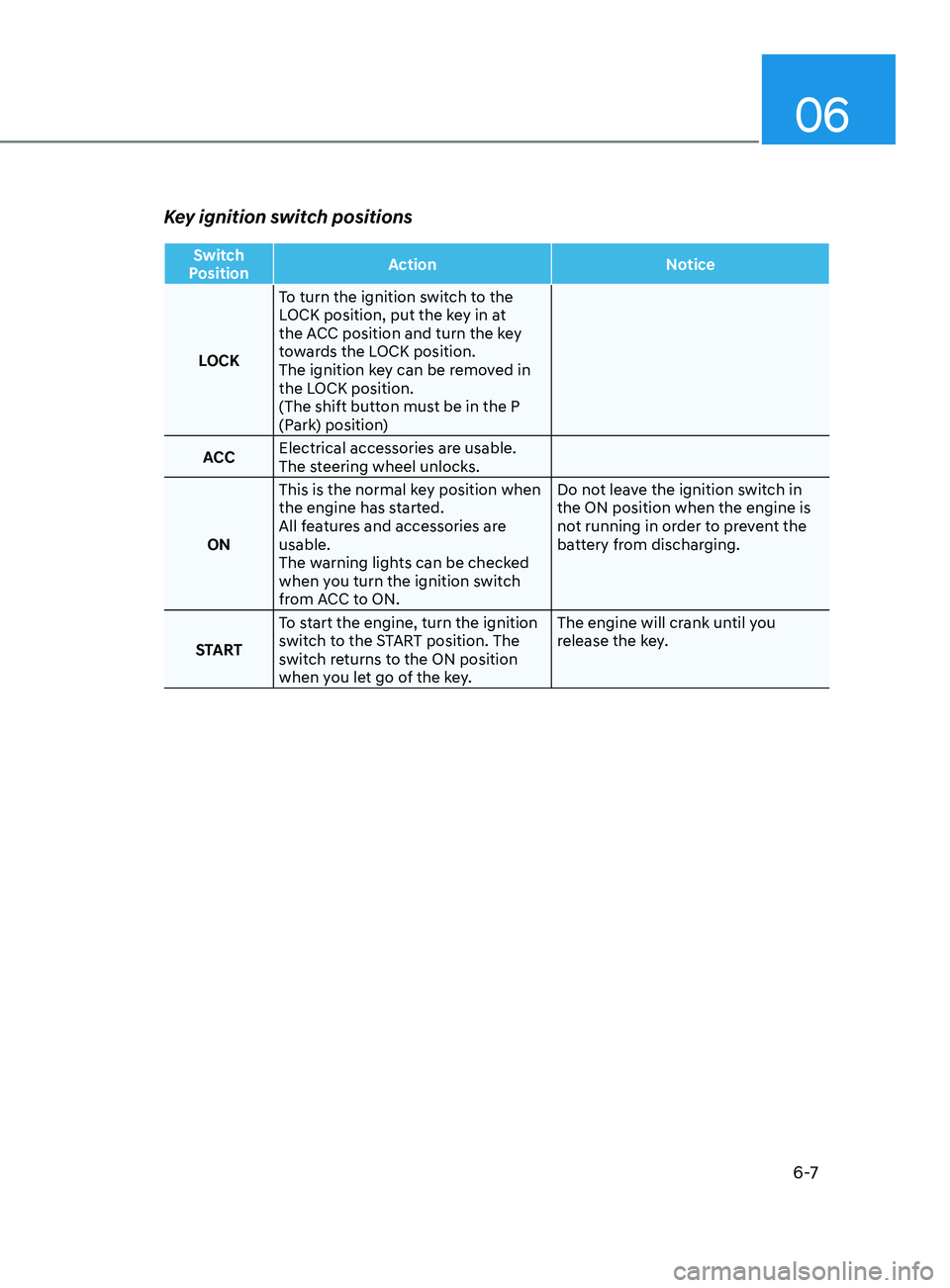
Key ignition switch positions
Switch
Position Action
Notice
LOCK To turn the ignition switch to the
LOCK position, put the key in at
the ACC position and turn the key
towards the LOCK position.
The ignition key can be removed in
the LOCK position.
(The shift button must be in the P
(Park) position)
ACC Electrical accessories are usable.
The steering wheel unlocks.
ON This is the normal key position when
the engine has started.
All features and accessories are
usable.
The warning lights can be checked
when you turn the ignition switch
from ACC to ON. Do not leave the ignition switch in
the ON position when the engine is
not running in order to prevent the
battery from discharging.
START To start the engine, turn the ignition
switch to the START position. The
switch returns to the ON position
when you let go of the key. The engine will crank until you
release the key.
Page 294 of 546
6-10
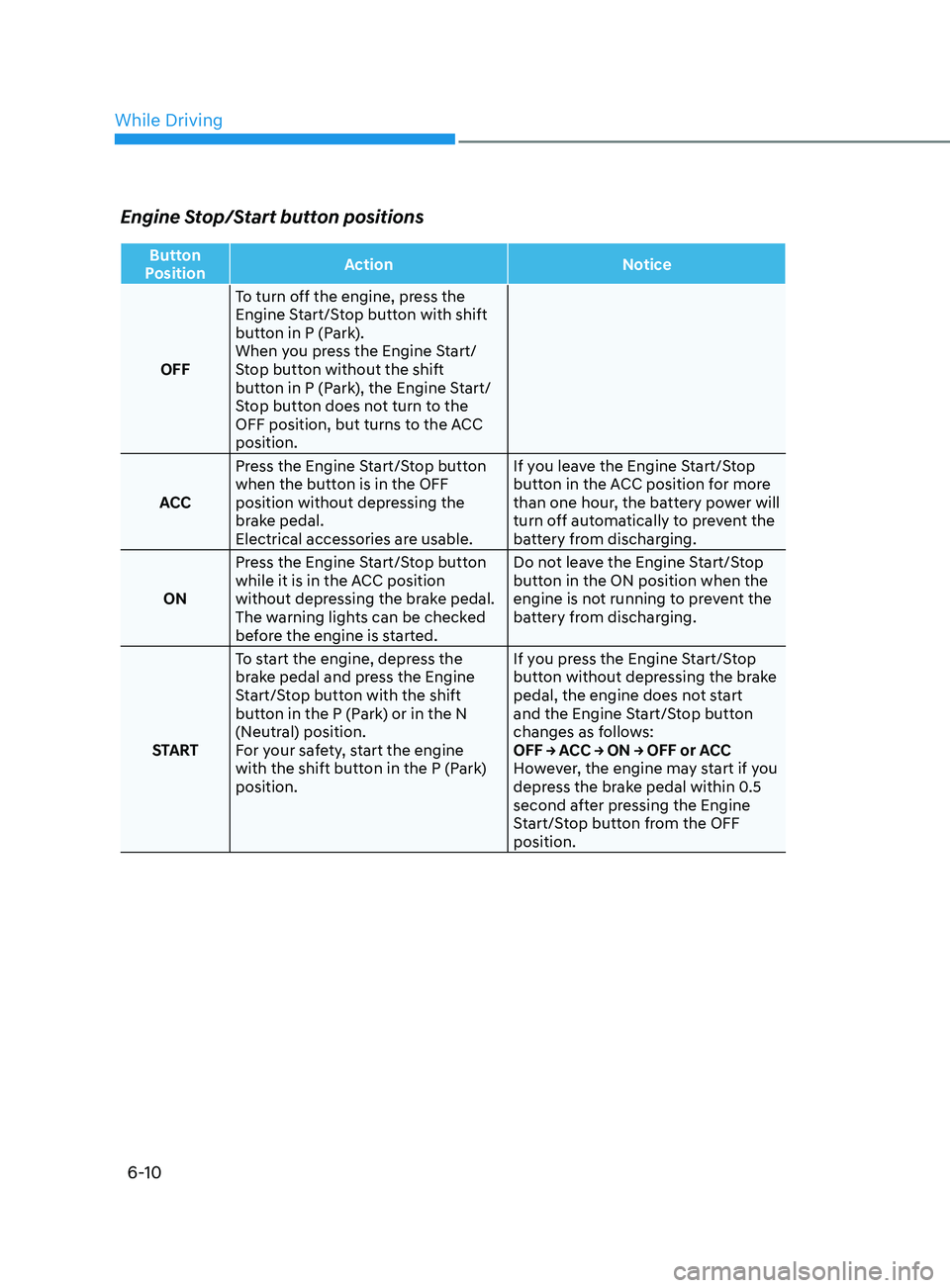
Engine Stop/Start button positions
Button
Position Action
Notice
OFF To turn off the engine, press the
Engine Start/Stop button with shift
button in P (Park).
When you press the Engine Start/
Stop button without the shift
button in P (Park), the Engine Start/
Stop button does not turn to the
OFF position, but turns to the ACC
position.
ACC Press the Engine Start/Stop button
when the button is in the OFF
position without depressing the
brake pedal.
Electrical accessories are usable. If you leave the Engine Start/Stop
button in the ACC position for more
than one hour, the battery power will
turn off automatically to prevent the
battery from discharging.
ON Press the Engine Start/Stop button
while it is in the ACC position
without depressing the brake pedal.
The warning lights can be checked
before the engine is started. Do not leave the Engine Start/Stop
button in the ON position when the
engine is not running to prevent the
battery from discharging.
START To start the engine, depress the
brake pedal and press the Engine
Start/Stop button with the shift
button in the P (Park) or in the N
(Neutral) position.
For your safety, start the engine
with the shift button in the P (Park)
position. If you press the Engine Start/Stop
button without depressing the brake
pedal, the engine does not start
and the Engine Start/Stop button
changes as follows:
OFF → ACC → ON → OFF or ACC
However, the engine may start if you
depress the brake pedal within 0.5
second after pressing the Engine
Start/Stop button from the OFF
position.
While Driving
Page 440 of 546
07
7-5
Jump starting procedure
1. Position the vehicles close enough that the jumper cables will reach, but
do not allow the vehicles to touch.
2.
A
void fans or any moving parts in the
engine compartment at all times, even
when the vehicles are turned off.
3.
T
urn off all electrical devices such as
radios, lights, air conditioning, etc.
Put the vehicles in P (Park) and set
the parking brakes. Turn both vehicles
OFF.
ODN8A079022
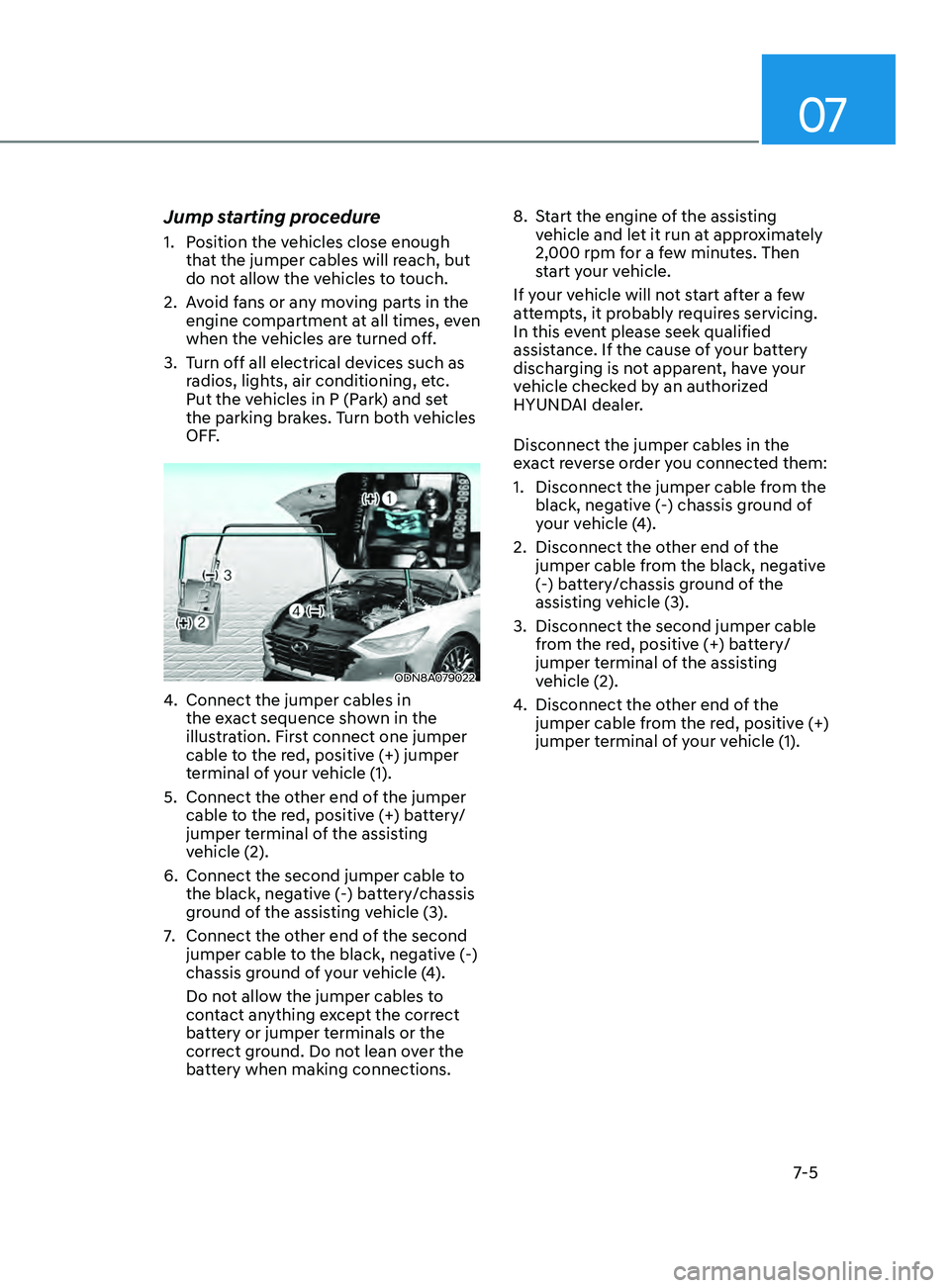
4. Connect the jumper cables in
the e xact sequence shown in the
illustration. First connect one jumper
cable to the red, positive (+) jumper
terminal of your vehicle (1).
5.
Connect the o
ther end of the jumper
cable to the red, positive (+) battery/
jumper terminal of the assisting
vehicle (2).
6.
Connect the second jumper cable t
o
the black, negative (-) battery/chassis
ground of the assisting vehicle (3).
7.
Connect the o
ther end of the second
jumper cable to the black, negative (-)
chassis ground of your vehicle (4).
Do not allow the jumper cables to
contact anything except the correct
battery or jumper terminals or the
correct ground. Do not lean over the
battery when making connections. 8.
S
tart the engine of the assisting
vehicle and let it run at approximately
2,000 rpm for a few minutes. Then
start your vehicle.
If your vehicle will not start after a few
attempts, it probably requires servicing.
In this event please seek qualified
assistance. If the cause of your battery
discharging is not apparent, have your
vehicle checked by an authorized
HYUNDAI dealer.
Disconnect the jumper cables in the
exact reverse order you connected them:
1.
Disconnect the jumper cable fr
om the
black, negative (-) chassis ground of
your vehicle (4).
2.
Disconnect the o
ther end of the
jumper cable from the black, negative
(-) battery/chassis ground of the
assisting vehicle (3).
3.
Disconnect the second jumper cable
fr
om the red, positive (+) battery/
jumper terminal of the assisting
vehicle (2).
4. Disconnect the o ther end of the
jumper cable from the red, positive (+)
jumper terminal of your vehicle (1).
Page 455 of 546

Engine Compartment ........................................................................\
............8 -3
Maintenance Services ........................................................................\
........... 8-4
Owner’s Responsibility ........................................................................\
.................... 8-4
Owner Main tenance Precautions ........................................................................\
.... 8-4
Owner Maintenance ........................................................................\
.............. 8-5Owner Maintenance Schedule ........................................................................\
........8-5
Scheduled Maintenance Services ................................................................8 -7Normal Maintenance Schedule (Smartstream G1.6 T-GDi) ...................................8-8
Main tenance Under Severe Usage Conditions (Smartstream G1.6 T-GDi) .........8-11
Severe Driving Conditions
........................................................................\
.............. 8-11
Normal Maintenance Schedule (Smartstream G2.5 GDi)
.....................................8-12
Maintenance Under Severe Usage Conditions (Smartstream G2.5 GDi)
................8-15
Severe Driving Conditions
........................................................................\
.............. 8-15
Explanation of Scheduled Maintenance Items ..........................................8- 16
Engine Oil ........................................................................\
............................. 8-19
Checking the Engine Oil Level ........................................................................\
........8- 19
Checking the Engine Oil and Filter ....................................................................... 8-20
Checking the Engine Coolant Level
....................................................................... 8-
21
Engine Coolant ........................................................................\
......................8- 21Changing Engine Coolant ........................................................................\
..............8- 23
Brake Fluid ........................................................................\
............................8 -24Checking the Brake Fluid Level ........................................................................\
.....8 -24
Washer Fluid ........................................................................\
.........................8- 25Checking the Washer Fluid Level ........................................................................\
..8- 25
Air Cleaner ........................................................................\
............................8- 26Filter Replacement ........................................................................\
.........................8- 26
Climate Control Air Filter ........................................................................\
.....8- 28Filter Inspection........................................................................\
.............................. 8-28
Filter replacement
........................................................................\
.......................... 8-28
Wiper Blades ........................................................................\
........................8- 29Blade Inspection ........................................................................\
............................8- 29
Blade Replacement ........................................................................\
........................ 8-29
Battery ........................................................................\
................................... 8- 31For Best Battery Service ........................................................................\
................8- 32
Battery Recharging ........................................................................\
........................ 8-32
Reset Features
........................................................................\
................................ 8-33
Maintenance
8. Maintenance
8
Page 486 of 546
Maintenance
8-32
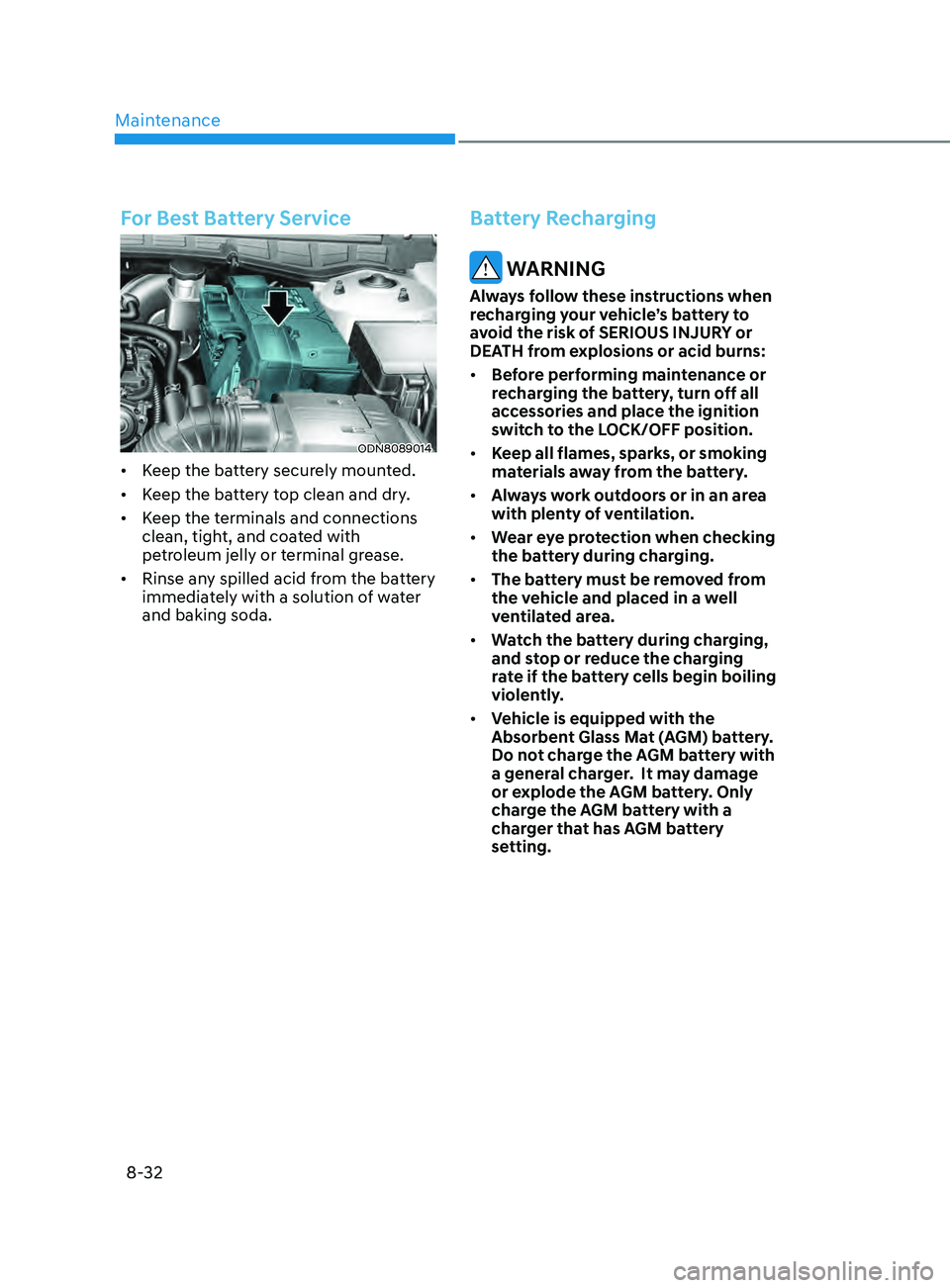
For Best Battery Service
ODN8089014
• Keep the battery securely mounted.
• Keep the battery top clean and dry.
• Keep the terminals and connections
clean, tight, and coated with
petroleum jelly or terminal grease.
• Rinse any spilled acid from the battery
immediately with a solution of water
and baking soda.
Battery Recharging
WARNING
Always follow these instructions when
recharging your vehicle’s battery to
avoid the risk of SERIOUS INJURY or
DEATH from explosions or acid burns:
• Before performing maintenance or
recharging the battery, turn off all
accessories and place the ignition
switch to the LOCK/OFF position.
• Keep all flames, sparks, or smoking
materials away from the battery.
• Always work outdoors or in an area
with plenty of ventilation.
• Wear eye protection when checking
the battery during charging.
• The battery must be removed from
the vehicle and placed in a well
ventilated area.
• Watch the battery during charging,
and stop or reduce the charging
rate if the battery cells begin boiling
violently.
• Vehicle is equipped with the
Absorbent Glass Mat (AGM) battery.
Do not charge the AGM battery with
a general charger. It may damage
or explode the AGM battery. Only
charge the AGM battery with a
charger that has AGM battery
setting.
Page 531 of 546

I
I-3
Mode selection ........................................................................\
...................... 5-130
Instrument panel vents
........................................................................\
.......... 5-132
Temperature control
........................................................................\
.............. 5-132
Air intake control
........................................................................\
.................. 5-133
Fan speed control
........................................................................\
.................. 5-134
Air conditioning
........................................................................\
.................... 5-134
OFF mode........................................................................\
.............................. 5-134
System operation
........................................................................\
................... 5-135
System maintenance
........................................................................\
.............. 5-136
Air conditioning refrigerant label.................................................................. 5-137
Automatic transmission
........................................................................\
............... 6-13
Transmission ranges
........................................................................\
................ 6-14
Paddle shifter (manual shift mode)
................................................................. 6-19
Shift-lock system
........................................................................\
..................... 6-15
Good driving practices
........................................................................\
............ 6-18
Parking
........................................................................\
.................................... 6-16
Automatic ventilation
........................................................................\
................ 5-143
AUX, USB and iPod
® port ........................................................................\
........ 5-152
B
Battery
........................................................................\
......................................... 8-31
Battery recharging
........................................................................\
................... 8-32
Battery saver function
........................................................................\
.................. 5-79
Before driving
........................................................................\
................................ 6-5
Blind-Spot Collision Warning (BCW)
................................................................. 6-67
Blind-Spot Collision-Avoidance Assist (BCA)
................................................... 6-67
Blind-Spot View Monitor (BVM)
....................................................................... 6-94
Blue Link
® center ........................................................................\
....................... 5-154
Bluetooth® Wireless Technology hands-free ..................................................... 5-154
Brake fluid
........................................................................\
................................... 8-24
Brake system
........................................................................\
................................ 6-20
Power brakes
........................................................................\
........................... 6-20
Disc brakes wear indicator
........................................................................\
...... 6-20
Electronic Parking Brake (EPB)
..................................................................... 6-21
Auto Hold
........................................................................\
................................ 6-24
Anti-lock Brake System (ABS)
....................................................................... 6-27
Electronic Stability Control (ESC).................................................................. 6-29
Vehicle Stability Management (VSM)
............................................................ 6-31
Good braking practices
........................................................................\
........... 6-32
Page 537 of 546

I
I-9
Instrument cluster ........................................................................\
.......................... 4-2
Instrument cluster illumination
........................................................................\
. 4-3
Gauges and meters
........................................................................\
.................... 4-3
Transmission shift indicator
........................................................................\
...... 4-6
Warning and indicator lights
........................................................................\
..... 4-7
LCD display messages
........................................................................\
............ 4-15
LCD display (Type A, B)
........................................................................\
........ 4-19
LCD display (Type C)
........................................................................\
............. 4-34
Instrument panel fuse replacement
...................................................................... 8-49
Instrument panel overview
........................................................................\
............ 2-5
Interior care
........................................................................\
.................................. 8-67
Interior features
........................................................................\
.......................... 5-145
Cup holder
........................................................................\
............................. 5-145
Sunvisor........................................................................\
................................. 5-146
Power outlet
........................................................................\
.......................... 5-146
USB charger
........................................................................\
.......................... 5-147
Wireless cellular phone charging system
......................................................5-148
Clock
........................................................................\
..................................... 5-150
Clothes hanger
........................................................................\
....................... 5-150
Floor mat anchor(s)
........................................................................\
............... 5-151
Interior lights
........................................................................\
............................... 5-80
Front lamps........................................................................\
.............................. 5-81
Rear lamps
........................................................................\
............................... 5-81
Luggage compartment lamp
........................................................................\
.... 5-82
Vanity mirror lamp
........................................................................\
.................. 5-82
Interior overview
........................................................................\
........................... 2-4
ISG (Idle Stop and Go) system
........................................................................\
.... 6-33
J
Jack and tools
........................................................................\
............................... 7-12
Jump starting
........................................................................\
.................................. 7-4
K
Key ignition switch
........................................................................\
........................ 6-6
Page 538 of 546

Index
I-10
L
LabelVehicle certification label
........................................................................\
........ 2-13
Tire specification and pressure label
............................................................... 2-14
Refrigerant label
........................................................................\
...................... 2-15
Lane change signals
........................................................................\
..................... 5-79
Lane Following Assist (LFA)
........................................................................\
.... 6-116
Lane Keeping Assist (LKA)
........................................................................\
........ 6-59
LCD display (T
ype A, B) ........................................................................\
............. 4-19
LCD display control
........................................................................\
................ 4-19
LCD display modes
........................................................................\
................. 4-20
Trip computer
........................................................................\
.......................... 4-31
LCD display (Type C)
........................................................................\
................. 4-34
LCD display control
........................................................................\
................ 4-34
View modes
........................................................................\
............................. 4-35
Utility view mode
........................................................................\
.................... 4-36
Option menu
........................................................................\
............................ 4-38
User settings mode
........................................................................\
.................. 4-39
LCD display messages
........................................................................\
................. 4-15
Shift to P
or N to start engine
........................................................................\
.. 4-15
Shift to P
........................................................................\
.................................. 4-15
Low key battery........................................................................\
....................... 4-15
Press brake pedal to start engine
..................................................................... 4-15
Key not in vehicle
........................................................................\
................... 4-16
Key not detected
........................................................................\
...................... 4-16
Press START button again
........................................................................\
...... 4-16
Press START button with key
........................................................................\
. 4-16
Battery discharging due to external electrical devices
....................................4-16
Check BRAKE SWITCH fuse
........................................................................\
4-16
Door, Hood, Trunk open indicator
.................................................................. 4-17
Sunroof open indicator
........................................................................\
............ 4-17
Lights mode
........................................................................\
............................. 4-17
Wiper mode
........................................................................\
............................. 4-18
Low pressure
........................................................................\
........................... 4-17