warning light HYUNDAI SONATA LIMITED 2021 Repair Manual
[x] Cancel search | Manufacturer: HYUNDAI, Model Year: 2021, Model line: SONATA LIMITED, Model: HYUNDAI SONATA LIMITED 2021Pages: 546, PDF Size: 51.21 MB
Page 274 of 546
Convenient Features5-144
WARNING
Never store cigarette lighters, propane
cylinders, or other flammable/explosive
materials in the vehicle. These items
may catch fire and/or explode if the
vehicle is exposed to hot temperatures
for extended periods.
WARNING
ALWAYS keep the storage compartment
covers closed securely while driving.
Items inside your vehicle are moving as
fast as the vehicle. If you have to stop
or turn quickly, or if there is a crash, the
items may fly out of the compartment
and may cause an injury if they strike
the driver or a passenger.
NOTICE
To avoid possible theft, do not leave
valuables in the storage compartments.
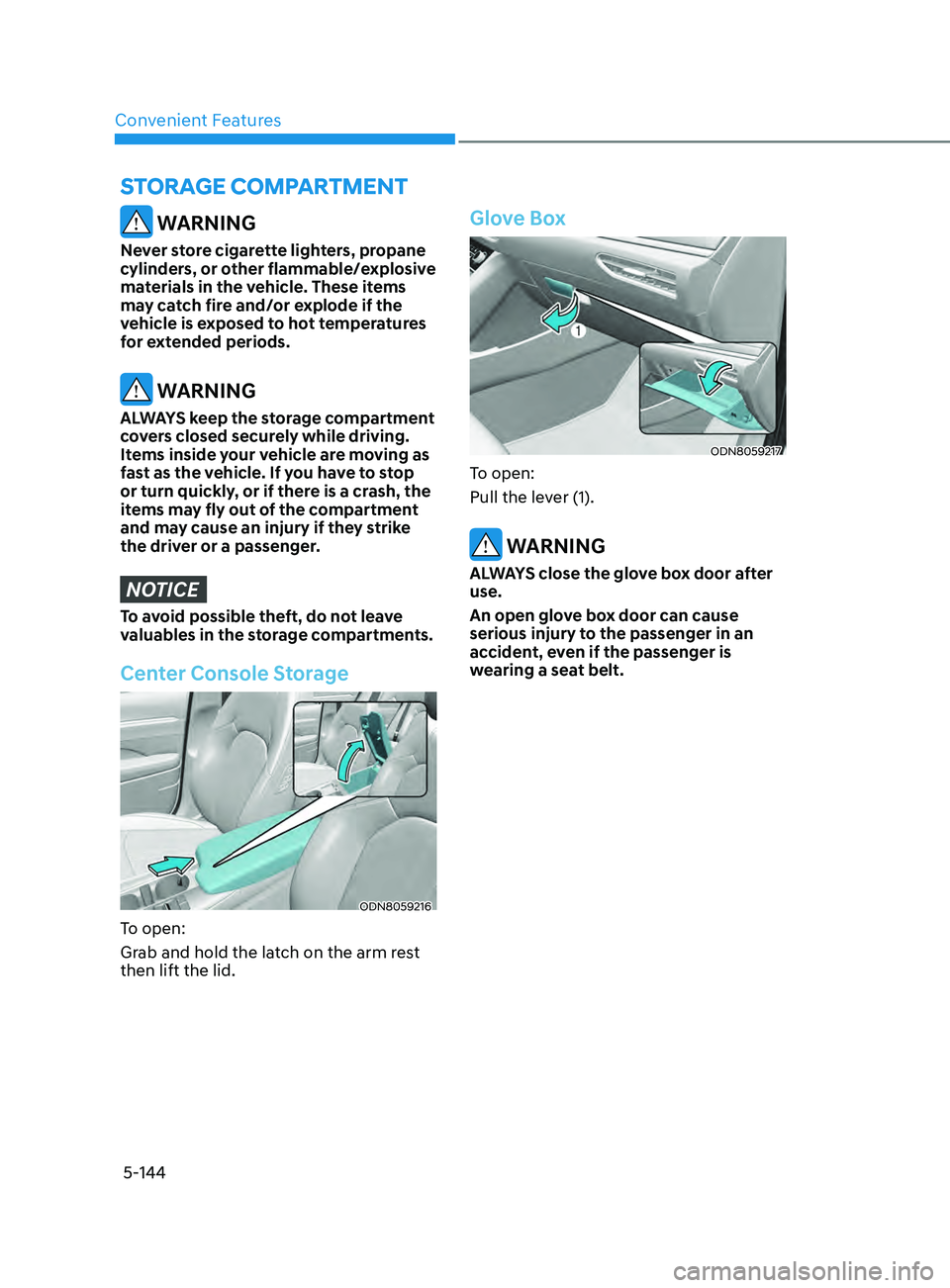
Center Console Storage
ODN8059216
To open:
Grab and hold the latch on the arm rest
then lift the lid.
Glove Box
ODN8059217
To open:
Pull the lever (1).
WARNING
ALWAYS close the glove box door after
use.
An open glove box door can cause
serious injury to the passenger in an
accident, even if the passenger is
wearing a seat belt.
STor AG e compA rT men T
Page 275 of 546
05
5-145
interior FeAtures
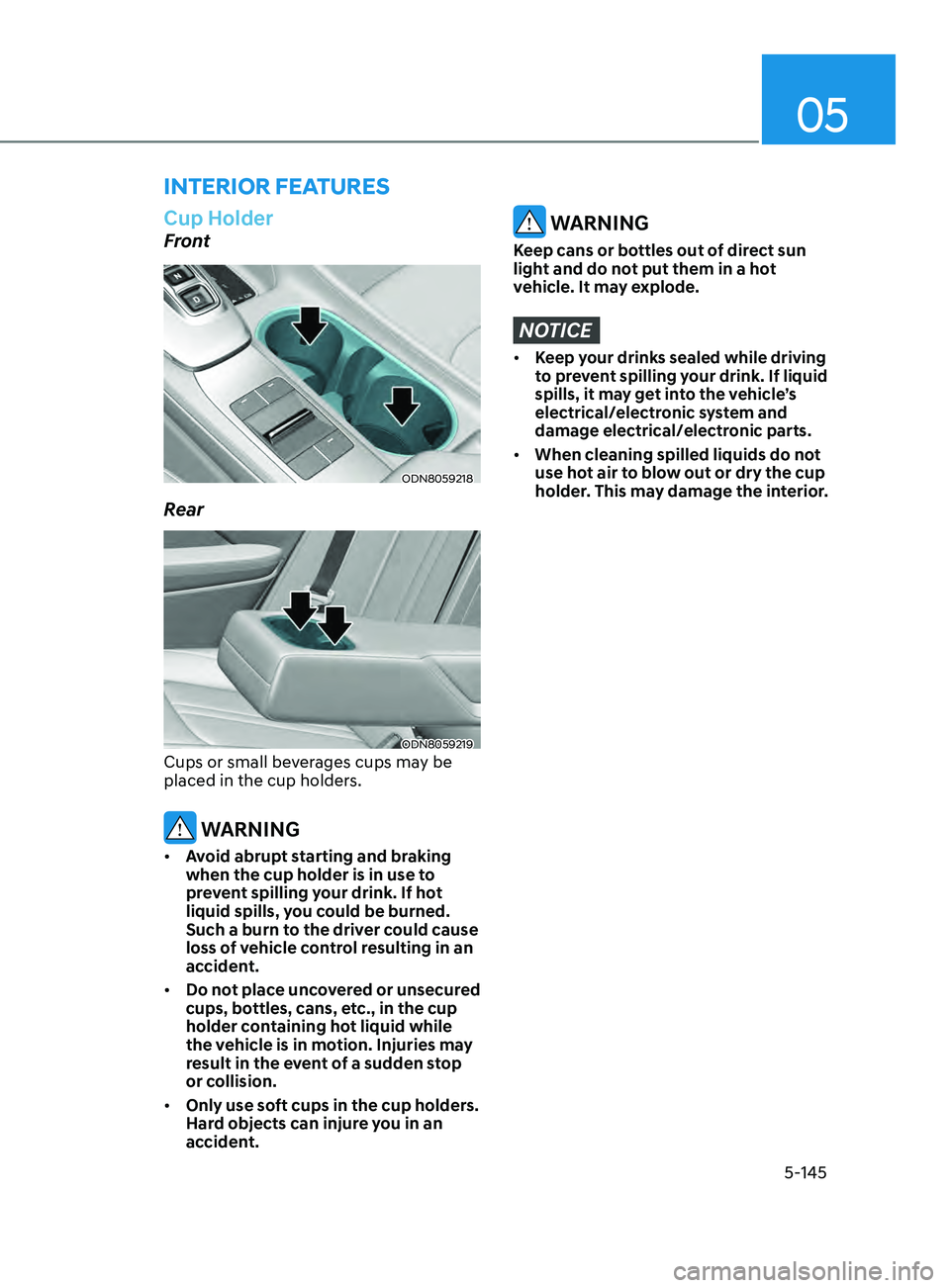
Cup Holder
Front
ODN8059218
Rear
ODN8059219
Cups or small beverages cups may be
placed in the cup holders.
WARNING
• Avoid abrupt starting and braking
when the cup holder is in use to
prevent spilling your drink. If hot
liquid spills, you could be burned.
Such a burn to the driver could cause
loss of vehicle control resulting in an
accident.
• Do not place uncovered or unsecured
cups, bottles, cans, etc., in the cup
holder containing hot liquid while
the vehicle is in motion. Injuries may
result in the event of a sudden stop
or collision.
• Only use soft cups in the cup holders.
Hard objects can injure you in an
accident.
WARNING
Keep cans or bottles out of direct sun
light and do not put them in a hot
vehicle. It may explode.
NOTICE
• Keep your drinks sealed while driving
to prevent spilling your drink. If liquid
spills, it may get into the vehicle’s
electrical/electronic system and
damage electrical/electronic parts.
• When cleaning spilled liquids do not
use hot air to blow out or dry the cup
holder. This may damage the interior.
Page 286 of 546
 ........................................................................\
..6-59LKA Operation ........................................................................\
.....")
Lane Keeping Assist (LKA) ........................................................................\
..6-59LKA Operation ........................................................................\
................................ 6-61
LKA S ystem Function Change ........................................................................\
....... 6-61
Warning Light and Message
........................................................................\
.......... 6-64
Limitations of the System
........................................................................\
.............. 6-65
Blind-Spot Collision Warning (BCW) /
Blind-Spot Collision-Avoidance Assist (BCA)
............................................6-67
System Description ........................................................................\
........................ 6-67
S ystem Setting and Activation ........................................................................\
...... 6-68
Warning and System Control
........................................................................\
......... 6-70
Detecting Sensors
(Front view camera and Rear corner radar).......................................................... 6-72
Limitations of the System
........................................................................\
.............. 6-75
Declaration of Conformity ........................................................................\
...6- 79The radio frequency components (Rear Corner Radar) complies: .....................6- 79
Safe Exit Assist (SEA) ........................................................................\
.........6-80Function settings ........................................................................\
............................ 6-81
F unction operation ........................................................................\
......................... 6-82
Function malfunction and limitations
................................................................... 6-84
Driver Attention Warning (DAW) ................................................................6-86System Setting and Operation ........................................................................\
...... 6-86
R esetting the System ........................................................................\
..................... 6-88
System Standby
........................................................................\
.............................. 6-89
System Malfunction
........................................................................\
....................... 6-89
Leading Vehicle Departure Alert
........................................................................\
... 6-91
Blind-Spot View Monitor (BVM) .................................................................6-94
Smart cruise con trol (SCC) ........................................................................\
. 6-95
Smart Cruise Control Switch ........................................................................\
......... 6-96
T o Convert to Cruise Control Mode ...................................................................... 6-96
Smart Cruise Con
trol Speed ........................................................................\
.......... 6-97
Smart Cruise Control Vehicle-to-Vehicle Distance
............................................6-103
Limitations of the System
........................................................................\
............ 6-108
Navigation-Based Smart Cruise Control ..................................................6- 112System Setting and Operation ........................................................................\
.....6- 113
Lane Following Assist (LFA) .......................................................................6- 116LFA Operation ........................................................................\
................................6- 118
Warning Message ........................................................................\
.......................... 6-118
Limitations of the System
........................................................................\
............ 6-120
6
Page 287 of 546
Highway Driving Assist (HDA) ...................................................................6- 122System Setting and Operation ........................................................................\
.....6- 123
Warning Message ........................................................................\
.......................... 6-125
Rear Cross-Traffic Collision Warning (RCCW) /
Rear Cross-Traffic Collision-Avoidance Assist (RCCA)
...........................6-128
System Description ........................................................................\
....................... 6- 128
System Setting and Activation ........................................................................\
..... 6-129
Warning and System Control
........................................................................\
........ 6-131
Detecting Sensors
........................................................................\
.........................6-134
Limitations of the System
........................................................................\
............. 6-135
Special Driving Conditions ........................................................................\
6- 140Hazardous Driving Conditions ........................................................................\
....6- 140
Rocking the Vehicle ........................................................................\
..................... 6-140
Smooth Cornering
........................................................................\
......................... 6-141
Driving at Night
........................................................................\
............................. 6-141
Driving in the Rain
........................................................................\
......................... 6-141
Driving in Flooded Areas
........................................................................\
............... 6-142
Highway Driving
........................................................................\
............................ 6-142
Winter Driving ........................................................................\
....................6- 143Snow or Icy Conditions ........................................................................\
.................6-143
Win ter Precautions ........................................................................\
....................... 6-144
Vehicle load limit........................................................................\
................ 6-146
Tire Loading Information Label ........................................................................\
...6- 146
Trailer Towing ........................................................................\
......................6- 151
Lane Keeping Assist (LKA) ........................................................................\
..6-59LKA Operation ........................................................................\
................................ 6-61
LKA System Function Change ........................................................................\
....... 6-61
Warning Light and Message ........................................................................\
.......... 6-64
Limitations of the System ........................................................................\
.............. 6-65
Blind-Spot Collision Warning (BCW) /
Blind-Spot Collision-Avoidance Assist (BCA) ............................................6-67
System Description ........................................................................\
........................ 6-67
System Setting and Activation ........................................................................\
...... 6-68
Warning and System Control ........................................................................\
......... 6-70
Detecting Sensors
(Front view camera and Rear corner radar).......................................................... 6-72
Limitations of the System ........................................................................\
.............. 6-75
Declaration of Conformity ........................................................................\
...6-79The radio frequency components (Rear Corner Radar) complies: ..................... 6-79
Safe Exit Assist (SEA) ........................................................................\
.........6-80Function settings ........................................................................\
............................ 6-81
Function operation ........................................................................\
......................... 6-82
Function malfunction and limitations ................................................................... 6-84
Driver Attention Warning (DAW) ................................................................ 6-86System Setting and Operation ........................................................................\
...... 6-86
Resetting the System ........................................................................\
..................... 6-88
System Standby ........................................................................\
.............................. 6-89
System Malfunction ........................................................................\
....................... 6-89
Leading Vehicle Departure Alert ........................................................................\
... 6-91
Blind-Spot View Monitor (BVM) ................................................................. 6-94
Smart cruise control (SCC) ........................................................................\
. 6-95
Smart Cruise Control Switch ........................................................................\
......... 6-96
To Convert to Cruise Control Mode ...................................................................... 6-96
Smart Cruise Control Speed ........................................................................\
.......... 6-97
Smart Cruise Control Vehicle-to-Vehicle Distance ............................................ 6-103
Limitations of the System ........................................................................\
............ 6-108
Navigation-Based Smart Cruise Control ..................................................6-112System Setting and Operation ........................................................................\
..... 6-113
Lane Following Assist (LFA) ....................................................................... 6-116LFA Operation ........................................................................\
................................ 6-118
Warning Message ........................................................................\
.......................... 6-118
Limitations of the System ........................................................................\
............ 6-120
6
6. While Driving
Page 289 of 546
06
6-5
Before Entering the Vehicle
• Be sure all windows, outside mirror(s),
and outside lights are clean and
unobstructed.
• Remove frost, snow, or ice.
• Visually check the tires for uneven
wear and damage.
• Check under the vehicle for any sign
of leaks.
• Be sure there are no obstacles behind
you if you intend to back up.
Before Starting
• Make sure the hood, the trunk, and
the doors are securely closed and
locked.
• Adjust the position of the seat and
steering wheel.
• Adjust the inside and side view
mirrors.
• Verify all the lights work.
• Fasten your seatbelt. Check that
all passengers have fastened their
seatbelts.
• Check the gauges and indicators
in the instrument panel and the
messages on the instrument display
when the ignition switch is in the ON
position.
• Check that any items you are carrying
are stored properly or fastened down
securely.
WARNING
To reduce the risk of SERIOUS INJURY or
DEATH, take the following precautions:
• ALWAYS wear your seat belt. All
passengers must be properly belted
whenever the vehicle is moving.
For more information, refer to "Seat
Belts" in chapter 3.
• Always drive defensively. Assume
other drivers or pedestrians may be
careless and make mistakes.
• Stay focused on the task of driving.
Driver distraction can cause
accidents.
• Leave plenty of space between you
and the vehicle in front of you.
WARNING
NEVER drink alcohol or take drugs and
drive.
Drinking alcohol or taking drugs and
driving is dangerous and may result in
an accident and SERIOUS INJURY or
DEATH.
Drunk driving is the number one
contributor to the highway death
toll each year. Even a small amount
of alcohol will affect your reflexes,
perceptions and judgment. Just
one drink can reduce your ability to
respond to changing conditions and
emergencies and your reaction time
gets worse with each additional drink.
Driving while under the influence
of drugs is as dangerous or more
dangerous than driving under the
influence of alcohol.
You are much more likely to have a
serious accident if you drink or take
drugs and drive. If you are drinking or
taking drugs, don't drive. Do not ride
with a driver who has been drinking
or taking drugs. Choose a designated
driver or call a taxi.
Before Driving
Page 290 of 546
6-6
Key Ignition Switch (if equipped)
WARNING
To reduce the risk of SERIOUS INJURY or
DEATH, take the following precautions:
• NEVER allow children or any person
who is unfamiliar with the vehicle to
touch the ignition switch or related
parts. Unexpected and sudden
vehicle movement can occur.
• NEVER reach through the steering
wheel for the ignition switch, or any
other control, while the vehicle is in
motion. The presence of your hand
or arm in this area may cause a loss
of vehicle control resulting in an
accident.
OAE056172L
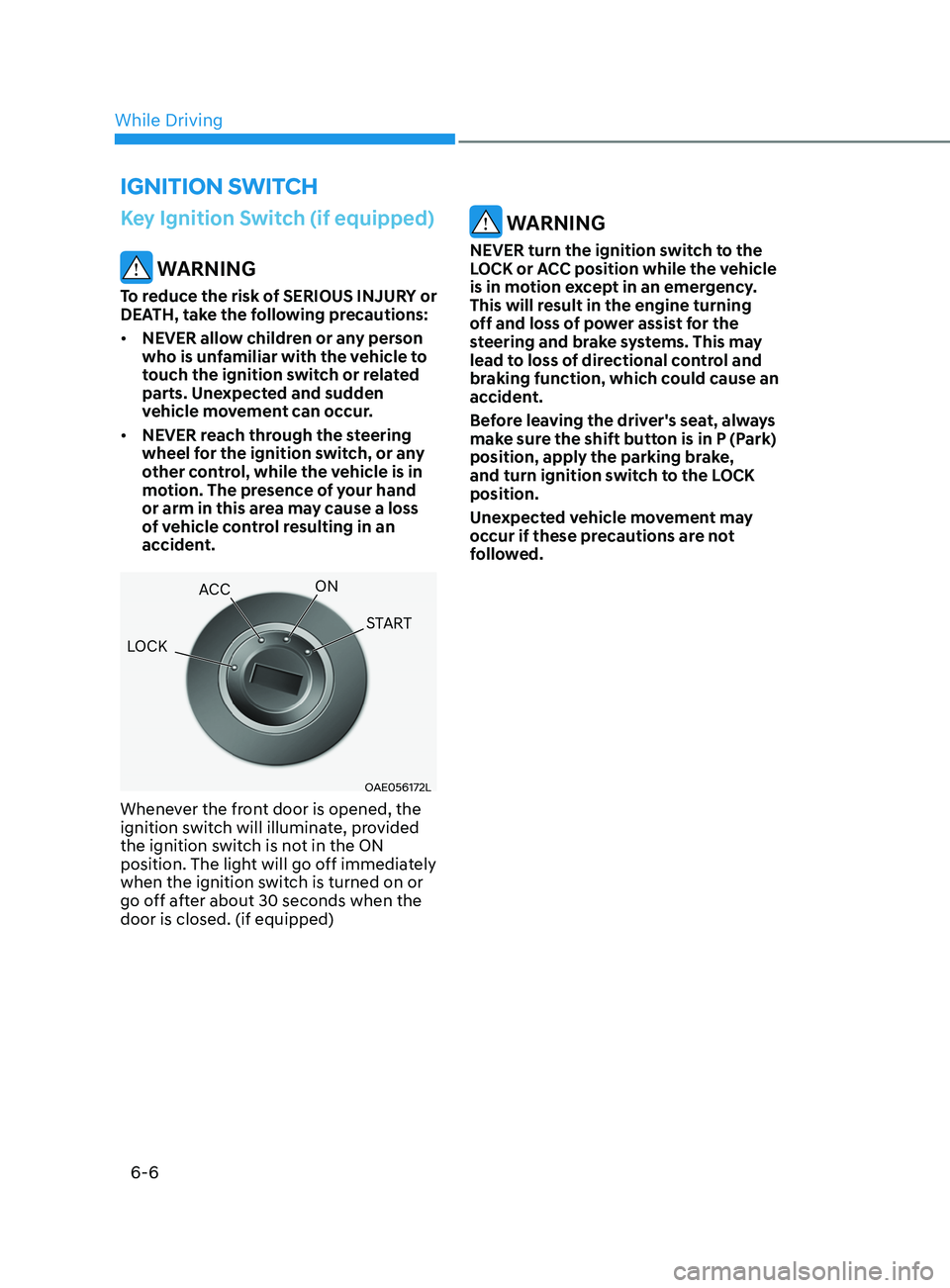
Whenever the front door is opened, the
ignition switch will illuminate, provided
the ignition switch is not in the ON
position. The light will go off immediately
when the ignition switch is turned on or
go off after about 30 seconds when the
door is closed. (if equipped)
WARNING
NEVER turn the ignition switch to the
LOCK or ACC position while the vehicle
is in motion except in an emergency.
This will result in the engine turning
off and loss of power assist for the
steering and brake systems. This may
lead to loss of directional control and
braking function, which could cause an
accident.
Before leaving the driver's seat, always
make sure the shift button is in P (Park)
position, apply the parking brake,
and turn ignition switch to the LOCK
position.
Unexpected vehicle movement may
occur if these precautions are not
followed.
ignition Switch
LOCK ACC
ON
START
While Driving
Page 291 of 546
06
6 -7
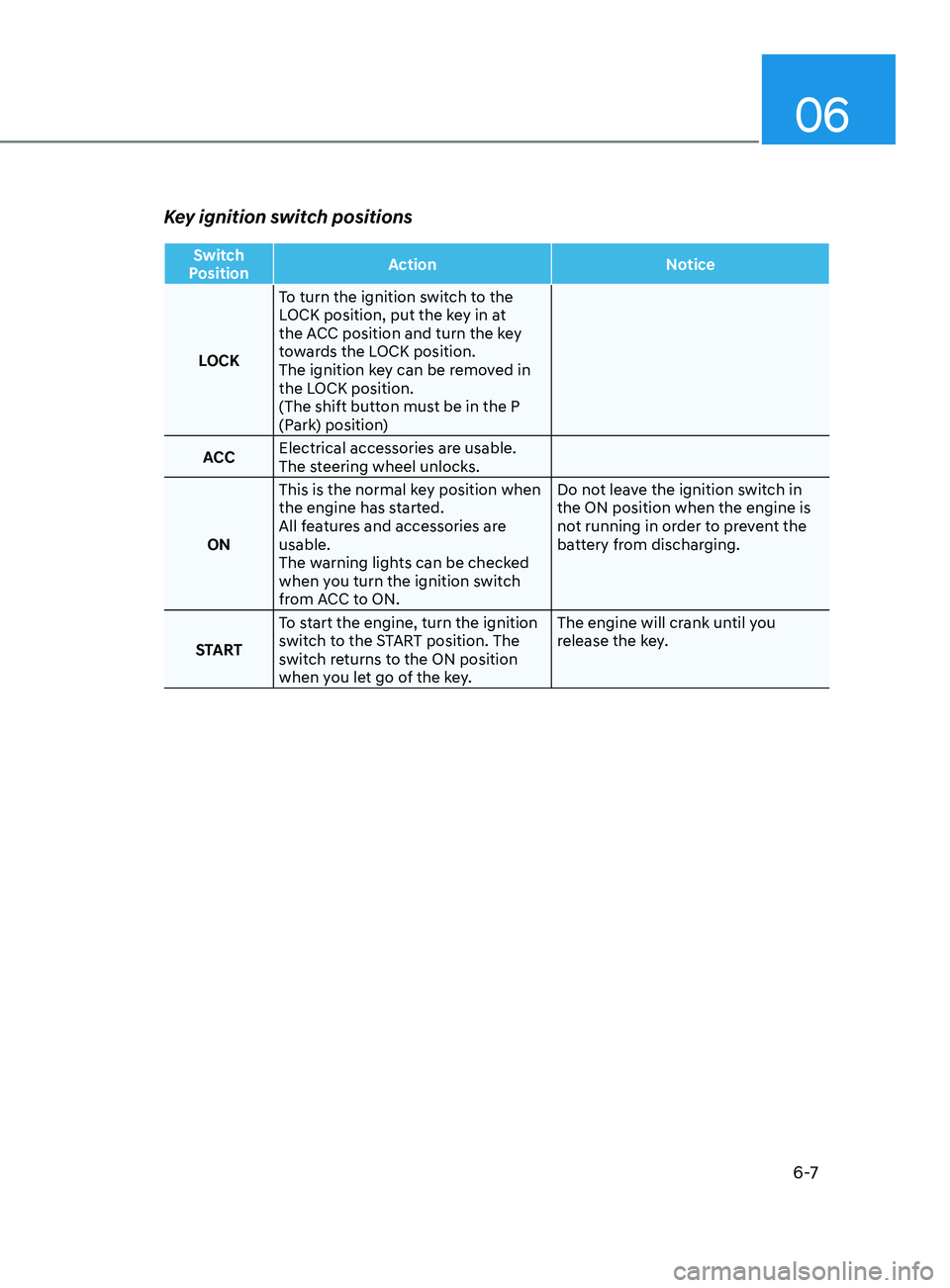
Key ignition switch positions
Switch
Position Action
Notice
LOCK To turn the ignition switch to the
LOCK position, put the key in at
the ACC position and turn the key
towards the LOCK position.
The ignition key can be removed in
the LOCK position.
(The shift button must be in the P
(Park) position)
ACC Electrical accessories are usable.
The steering wheel unlocks.
ON This is the normal key position when
the engine has started.
All features and accessories are
usable.
The warning lights can be checked
when you turn the ignition switch
from ACC to ON. Do not leave the ignition switch in
the ON position when the engine is
not running in order to prevent the
battery from discharging.
START To start the engine, turn the ignition
switch to the START position. The
switch returns to the ON position
when you let go of the key. The engine will crank until you
release the key.
Page 294 of 546
6-10
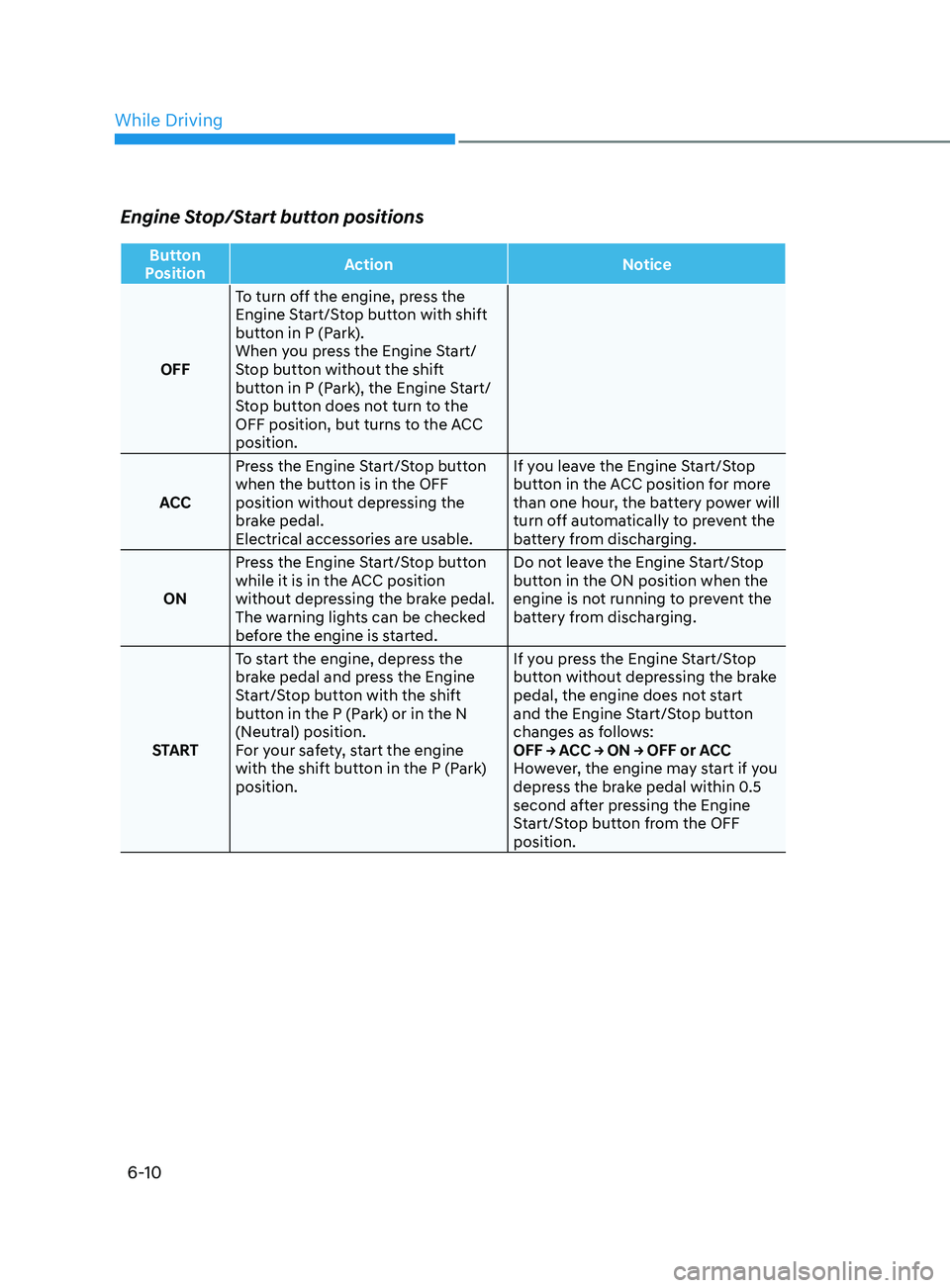
Engine Stop/Start button positions
Button
Position Action
Notice
OFF To turn off the engine, press the
Engine Start/Stop button with shift
button in P (Park).
When you press the Engine Start/
Stop button without the shift
button in P (Park), the Engine Start/
Stop button does not turn to the
OFF position, but turns to the ACC
position.
ACC Press the Engine Start/Stop button
when the button is in the OFF
position without depressing the
brake pedal.
Electrical accessories are usable. If you leave the Engine Start/Stop
button in the ACC position for more
than one hour, the battery power will
turn off automatically to prevent the
battery from discharging.
ON Press the Engine Start/Stop button
while it is in the ACC position
without depressing the brake pedal.
The warning lights can be checked
before the engine is started. Do not leave the Engine Start/Stop
button in the ON position when the
engine is not running to prevent the
battery from discharging.
START To start the engine, depress the
brake pedal and press the Engine
Start/Stop button with the shift
button in the P (Park) or in the N
(Neutral) position.
For your safety, start the engine
with the shift button in the P (Park)
position. If you press the Engine Start/Stop
button without depressing the brake
pedal, the engine does not start
and the Engine Start/Stop button
changes as follows:
OFF → ACC → ON → OFF or ACC
However, the engine may start if you
depress the brake pedal within 0.5
second after pressing the Engine
Start/Stop button from the OFF
position.
While Driving
Page 304 of 546
6-20
BrAke SySteM
Power Brakes
Your vehicle has power-assisted brakes
that adjust automatically through normal
usage.
If the engine is not running or is turned
off while driving, the power assist for
the brakes will not work. You can still
stop your vehicle by applying greater
force to the brake pedal than typical.
The stopping distance, however, will be
longer than with power brakes.
When the engine is not running, the
reserve brake power is partially depleted
each time the brake pedal is applied.
Do not pump the brake pedal when the
power assist has been interrupted.
Only pump the brakes on slippery
surfaces if the power assist has been
interrupted to maintain steering control.
Do not pump the brakes on slippery
surfaces if the brakes are operating
normally.
WARNING
Take the following precautions:
• Do not drive with your foot resting
on the brake pedal. This will create
abnormal high brake temperatures,
excessive brake lining and pad wear,
and increased stopping distances.
• When descending down a long or
steep hill, move the gear shift button
to Manual Shift Mode and manually
downshift to a lower gear in order
to control your speed without using
the brake pedal excessively. Applying
the brakes continuously will cause
the brakes to overheat and could
result in a temporary loss of braking
performance.
• Wet brakes may impair the vehicle's
ability to safely slow down; the
vehicle may also pull to one side
when the brakes are applied.
Applying the brakes lightly will
indicate whether they have been
affected in this way. Always test your
brakes in this fashion after driving
through deep water. To dry the
brakes, lightly tap the brake pedal to
heat up the brakes while maintaining
a safe forward speed until brake
performance returns to normal.
Avoid driving at high speeds until the
brakes function correctly.
Disc Brakes Wear Indicator
When your brake pads are worn and new
pads are required, you will hear a high
pitched warning sound from your front
or rear brakes. You may hear this sound
come and go or it may occur whenever
you depress the brake pedal.
Note that some driving conditions or
climates may cause a brake squeal
when you first apply (or lightly apply)
the brakes. This is normal and does not
indicate a problem with your brakes.
NOTICE
To avoid costly brake repairs, do not
continue to drive with worn brake pads.
Information
Always replace brake pads as complete
front or rear axle sets.
While Driving
Page 305 of 546
06
6-21
Electronic Parking Brake (EPB)
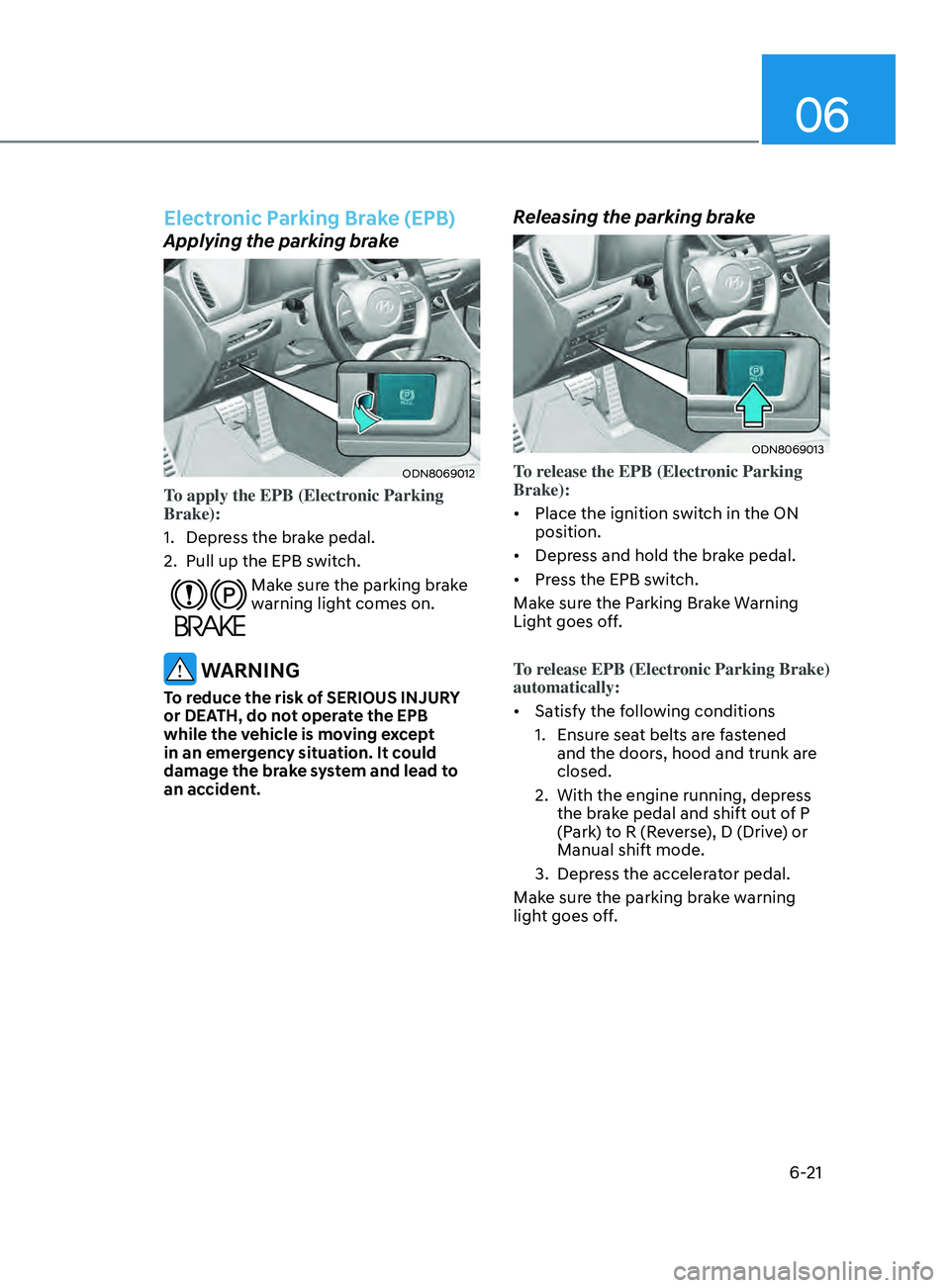
Applying the parking brake
ODN8069012
To apply the EPB (Electronic Parking
Brake):
1.
Depr
ess the brake pedal.
2.
Pull up the EPB s
witch.
Make sure the parking brake
warning light comes on.
WARNING
To reduce the risk of SERIOUS INJURY
or DEATH, do not operate the EPB
while the vehicle is moving except
in an emergency situation. It could
damage the brake system and lead to
an accident.
Releasing the parking brake
ODN8069013
To release the EPB (Electronic Parking
Brake):
• Place the ignition switch in the ON
position.
• Depress and hold the brake pedal.
• Press the EPB switch.
Make sure the Parking Brake Warning
Light goes off.
To release EPB (Electronic Parking Brake)
automatically:
• Satisfy the following conditions
1.
E
nsure seat belts are fastened
and the doors, hood and trunk are
closed.
2.
With the engine running, depr
ess
the brake pedal and shift out of P
(Park) to R (Reverse), D (Drive) or
Manual shift mode.
3.
Depr
ess the accelerator pedal.
Make sure the parking brake warning
light goes off.