8 -31 HYUNDAI SONATA LIMITED 2021 Owners Manual
[x] Cancel search | Manufacturer: HYUNDAI, Model Year: 2021, Model line: SONATA LIMITED, Model: HYUNDAI SONATA LIMITED 2021Pages: 546, PDF Size: 51.21 MB
Page 16 of 546
2-3
02
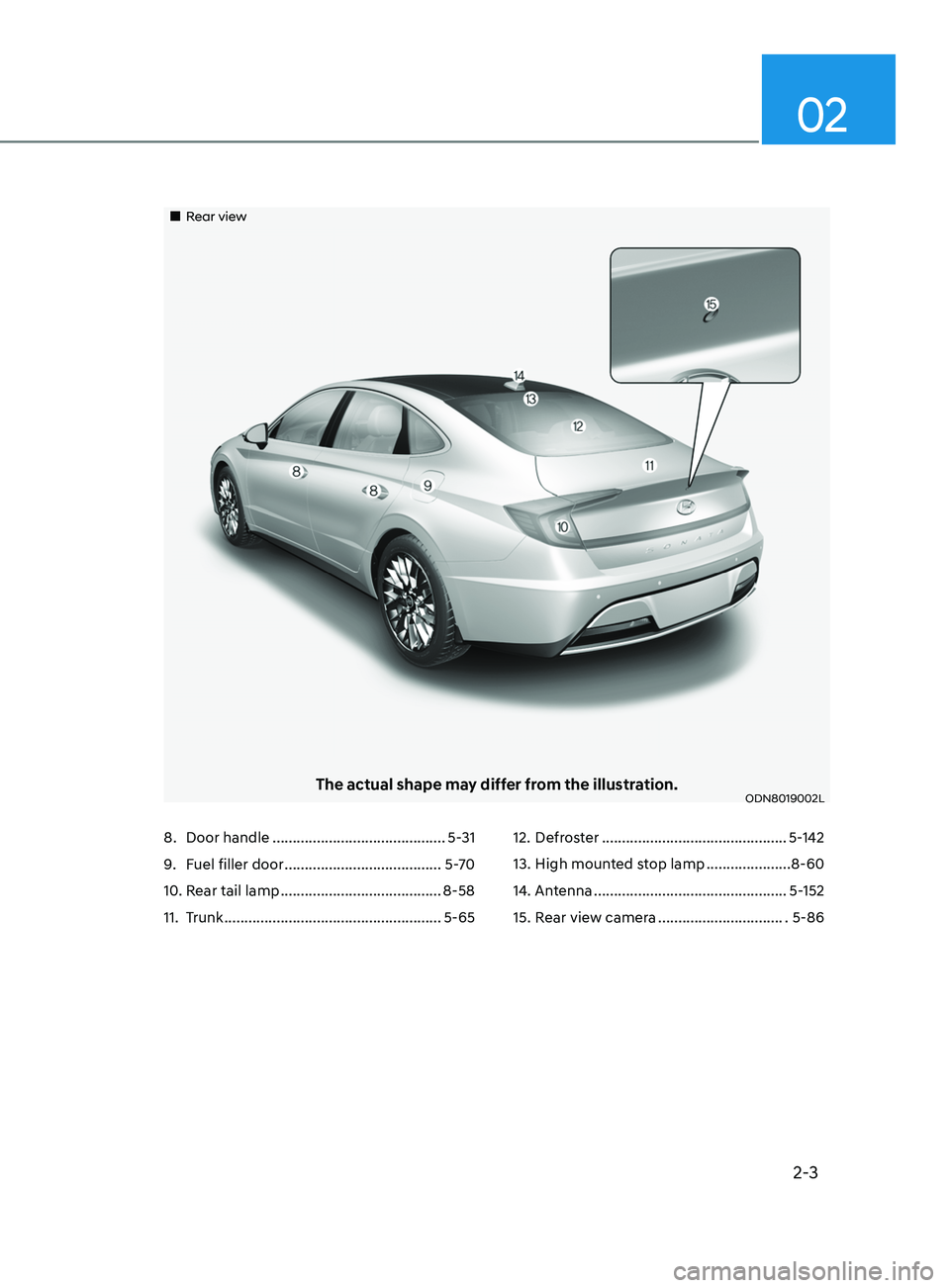
„„Rear view
The actual shape may differ from the illustration.ODN8019002L
8. Door handle ........................................... 5-31
9.
F
uel filler door ....................................... 5-70
10.
R
ear tail lamp ........................................ 8-58
11.
T
runk
...................................................... 5-6512.
De froster ..............................................
5-142
13.
High moun
ted stop lamp .....................8-60
14.
An
tenna ................................................5-152
15.
R
ear view camera ................................ 5-86
Page 29 of 546
Safety System
3. Seats & Safety System
3
Important Safety Precautions ....................................................................... 3 -2Always Wear Your Seat Belt ........................................................................\
.............3 -2
Restrain All Children ........................................................................\
......................... 3-2
Air Bag Hazards
........................................................................\
................................ 3-2
Driver Distraction
........................................................................\
............................. 3-2
Control Your Speed
........................................................................\
.......................... 3-2
Keep Your Vehicle in Safe Condition
....................................................................... 3
-2
Seats ........................................................................\
.......................................3 -3Safety Precautions ........................................................................\
...........................3-4
F ront Seats ........................................................................\
........................................ 3-5
Rear Seats
........................................................................\
........................................ 3-10
Head Restraints
........................................................................\
................................ 3-11
Seat Warmers and Air Ventilation Seats
................................................................3-15
Seat Belts ........................................................................\
............................... 3- 19Seat Belt Safety Precautions ........................................................................\
..........3- 19
Seat Belt Warning Light ........................................................................\
................. 3-20
Seat Belt Restraint System
........................................................................\
............. 3-21
Additional Seat Belt Safety Precautions
...............................................................3-26
Care of Seat Belts
........................................................................\
........................... 3-28
Child Restraint System (CRS) ......................................................................3- 29Children Always in the Rear ........................................................................\
...........3- 29
Selecting a Child Restraint System (CRS) .............................................................3-30
Installing a Child Restraint System (CRS)
..............................................................3-31
Air Bag - Advanced Supplemental Restraint System ................................3- 37Where Are the Air Bags? ........................................................................\
................3- 39
How Does the Air Bag System Operate? ...............................................................3-42
What to Expect After an Air Bag Inflates
..............................................................3-46
Occupant Classification System (OCS)
................................................................. 3-47
Why Didn’t My Air Bag Go Off in a Collision?
.......................................................3-52
SRS Care
........................................................................\
......................................... 3-56
Additional Safety Precautions
........................................................................\
....... 3-57
Air Bag Warning Labels
........................................................................\
.................. 3-57
This chapter provides you with important information about how to protect yourself and your
passengers. It explains how to properly use your seats and seat belts, and how your air bags work.
Additionally, this chapter explains how to properly restrain infants and children in your vehicle.
Page 59 of 546
03
3-31
ODN8039028
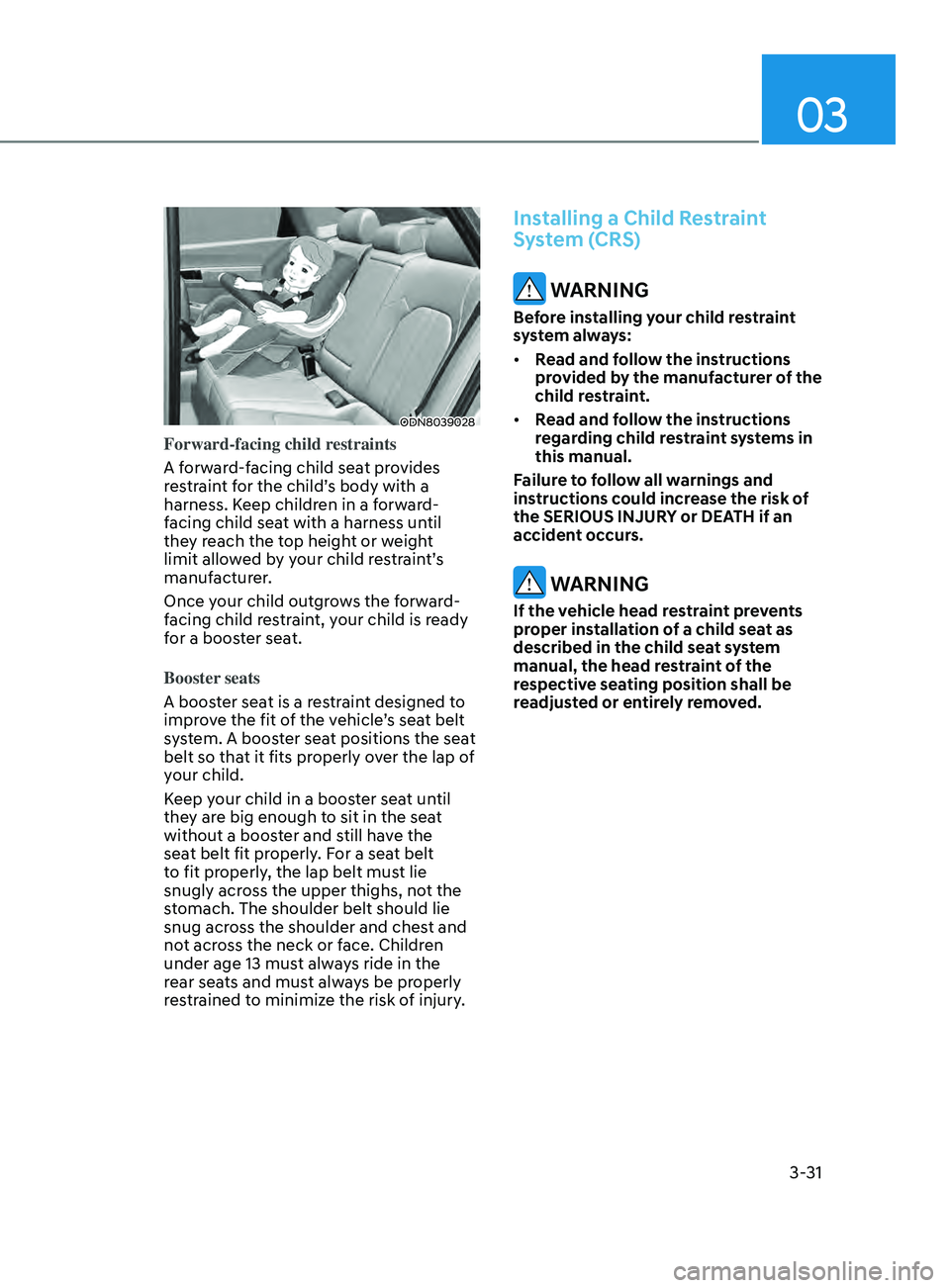
Forward-facing child restraints
A forward-facing child seat provides
restraint for the child’s body with a
harness. Keep children in a forward-
facing child seat with a harness until
they reach the top height or weight
limit allowed by your child restraint’s
manufacturer.
Once your child outgrows the forward-
facing child restraint, your child is ready
for a booster seat.
Booster seats
A booster seat is a restraint designed to
improve the fit of the vehicle’s seat belt
system. A booster seat positions the seat
belt so that it fits properly over the lap of
your child.
Keep your child in a booster seat until
they are big enough to sit in the seat
without a booster and still have the
seat belt fit properly. For a seat belt
to fit properly, the lap belt must lie
snugly across the upper thighs, not the
stomach. The shoulder belt should lie
snug across the shoulder and chest and
not across the neck or face. Children
under age 13 must always ride in the
rear seats and must always be properly
restrained to minimize the risk of injury.
Installing a Child Restraint
System (CRS)
WARNING
Before installing your child restraint
system always:
• Read and follow the instructions
provided by the manufacturer of the
child restraint.
• Read and follow the instructions
regarding child restraint systems in
this manual.
Failure to follow all warnings and
instructions could increase the risk of
the SERIOUS INJURY or DEATH if an
accident occurs.
WARNING
If the vehicle head restraint prevents
proper installation of a child seat as
described in the child seat system
manual, the head restraint of the
respective seating position shall be
readjusted or entirely removed.
Page 86 of 546

Instrument Cluster
4
Instrument Cluster ........................................................................\
.................4 -2Instrument Cluster Control ........................................................................\
..............4 -3
Gauges and Meters ........................................................................\
.......................... 4-3
Transmission Shift Indicator
........................................................................\
............ 4-6
Warning and Indicator Lights
........................................................................\
.......... 4 -7
LCD Display Messages
........................................................................\
.................... 4-15
LCD Display (TYPE A, B) ........................................................................\
.......4- 19LCD Display Control ........................................................................\
........................4- 19
LCD Display Modes ........................................................................\
........................ 4-20
Trip Computer........................................................................\
.................................. 4-31
LCD Display (TYPE C) ........................................................................\
........... 4- 34LCD Display Control ........................................................................\
.......................4- 34
View Modes ........................................................................\
.................................... 4-35
Utility View Mode
........................................................................\
........................... 4-36
Option Menu
........................................................................\
................................... 4-38
User Settings Mode
........................................................................\
........................ 4-39
4. Instrument Cluster
Page 116 of 546
04
4-31
Trip Computer
The trip computer is a microcomputer-
controlled driver information system that
displays information related to driving.
Information
Some driving information stored in the
trip computer (for example Average
Vehicle Speed) resets if the battery is
disconnected.
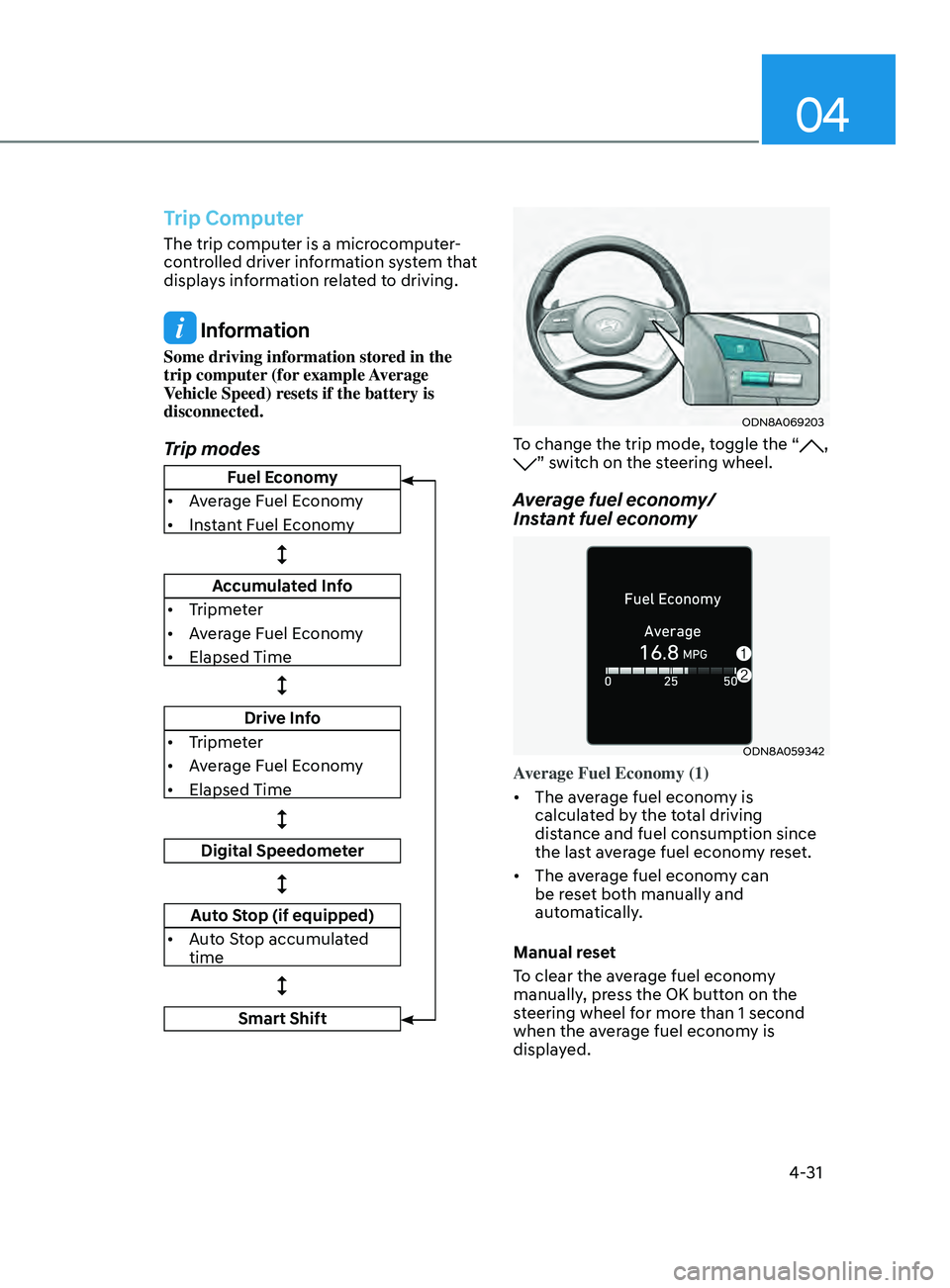
Trip modes
ODN8A069203
To change the trip mode, toggle the “, ” switch on the steering wheel.
Average fuel economy/
Instant fuel economy
ODN8A059342
Average Fuel Economy (1)
• The average fuel economy is
calculated by the total driving
distance and fuel consumption since
the last average fuel econ
om
y reset.
• The average fuel economy can
be reset both manually and
automatically.
Manual reset
To clear the average fuel economy
manually, press the OK button on the
steering wheel for more than 1 second
when the average fuel economy is
displayed.
Fuel Economy
• Average Fuel Economy
• Instant Fuel Economy
Accumulated Info
• Tripmeter
• Average Fuel Economy
• Elapsed Time
Drive Info
• Tripmeter
• Average Fuel Economy
• Elapsed Time
Digital Speedometer
Auto Stop (if equipped)
• Auto Stop accumulated
time
Smart Shift
Page 161 of 546
05
5-31
Door locKs
Operating Door Locks from
Outside the Vehicle
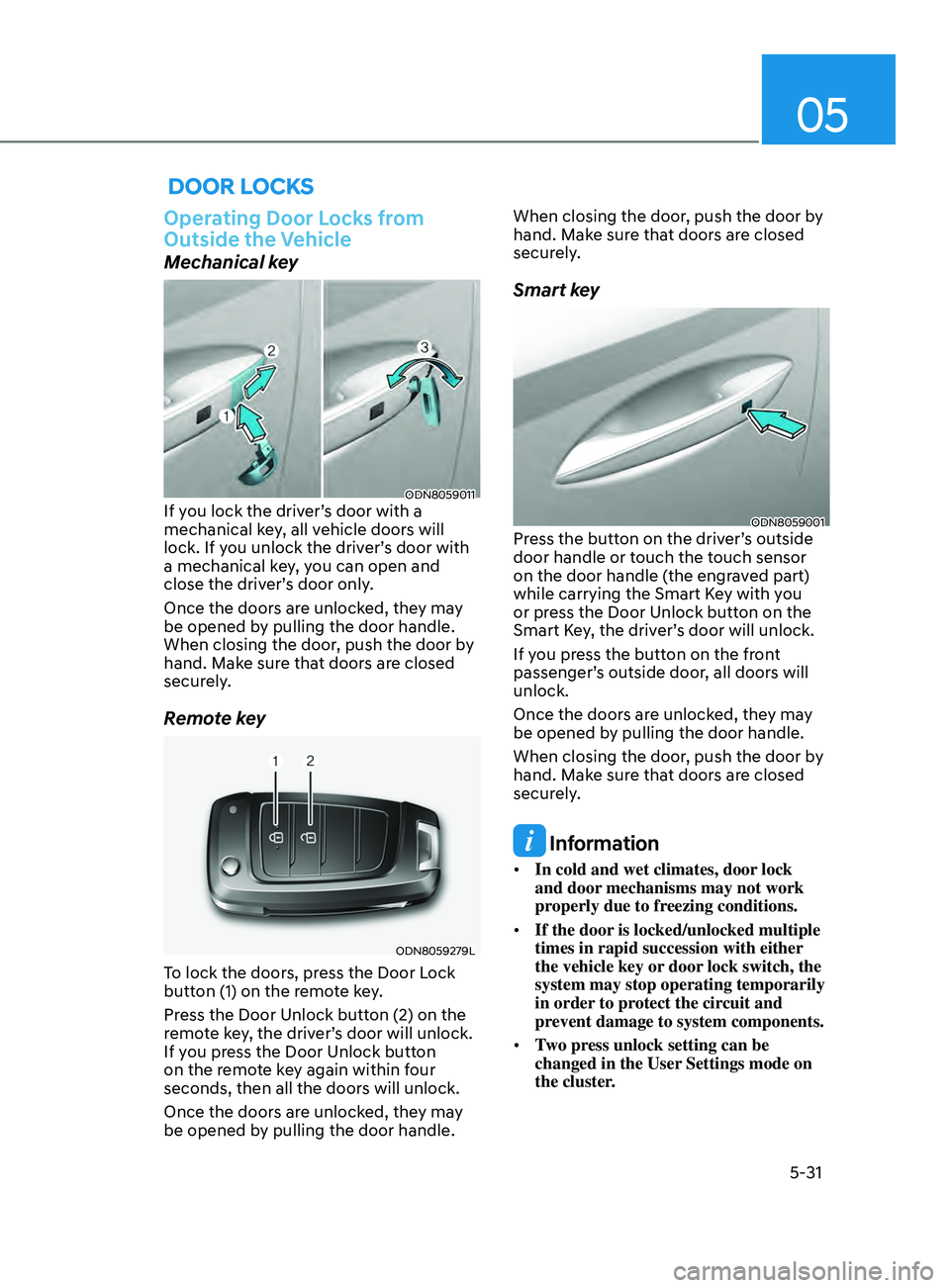
Mechanical key
ODN8059011If you lock the driver’s door with a
mechanical key, all vehicle doors will
lock. If you unlock the driver’s door with
a mechanical key, you can open and
close the driver’s door only.
Once the doors are unlocked, they may
be opened by pulling the door handle.
When closing the door, push the door by
hand. Make sure that doors are closed
securely.
Remote key
ODN8059279L
To lock the doors, press the Door Lock
button (1) on the remote key.
Press the Door Unlock button (2) on the
remote key, the driver’s door will unlock.
If you press the Door Unlock button
on the remote key again within four
seconds, then all the doors will unlock.
Once the doors are unlocked, they may
be opened by pulling the door handle. When closing the door, push the door by
hand. Make sure that doors are closed
securely.
Smart key
ODN8059001Press the button on the driver’s outside
door handle or touch the touch sensor
on the door handle (the engraved part)
while carrying the Smart Key with you
or press the Door Unlock button on the
Smart Key, the driver’s door will unlock.
If you press the button on the front
passenger’s outside door, all doors will
unlock.
Once the doors are unlocked, they may
be opened by pulling the door handle.
When closing the door, push the door by
hand. Make sure that doors are closed
securely.
Information
•
In cold and wet climates, door lock
and door mechanisms may not work
properly due to freezing conditions.
• If the door is locked/unlocked multiple
times in rapid succession with either
the vehicle key or door lock switch, the
system may stop operating temporarily
in order to protect the circuit and
prevent damage to system components.
• Two press unlock setting can be
changed in the User Settings mode on
the cluster.
Page 285 of 546

6
6. While Driving
Before Driving ........................................................................\
........................6-5Before Entering the Vehicle ........................................................................\
.............6-5
Be fore Starting ........................................................................\
................................. 6-5
Ignition Switch ........................................................................\
.......................6-6Key Ignition Switch ........................................................................\
........................... 6-6
E ngine Start/Stop Button ........................................................................\
................ 6-9
Remote Start
........................................................................\
.................................... 6-12
Automatic Transmission ........................................................................\
.......6- 13Automatic Transmission Operation ........................................................................\
6- 13
Parking ........................................................................\
............................................. 6-16
LCD Display Message
........................................................................\
...................... 6-17
Good Driving Practices
........................................................................\
.................. 6-18
Paddle Shifter (Manual Shift Mode)
......................................................................
6-19
Brake System ........................................................................\
........................6- 20Power Brakes ........................................................................\
..................................6- 20
Disc Brakes Wear Indicator........................................................................\
............ 6-20
Electronic Parking Brake (EPB)
........................................................................\
....... 6-21
Auto Hold
........................................................................\
........................................ 6-24
Anti-lock Brake System (ABS) .....................................................................6- 27Electronic Stability Control (ESC) ........................................................................\
.6- 29
Vehicle Stability Management (VSM) .................................................................... 6-31
Hill-Start Assist Control (HAC)
........................................................................\
....... 6-32
Good Braking Practices
........................................................................\
................. 6-32
ISG (Idle Stop and Go) system..................................................................... 6-33To Activate the ISG System ........................................................................\
............6- 33
To Deactivate the ISG System ........................................................................\
....... 6-35
ISG System Malfunction
........................................................................\
................ 6-35
Battery Sensor Deactivation
........................................................................\
.......... 6-36
Drive Mode Integrated Control System ......................................................6- 37Drive Mode ........................................................................\
.....................................6- 37
Forward Collision – Avoidance Assist (FCA) - Sensor Fusion ..................6-40System Setting and Activation ........................................................................\
..... 6-40
F CA Warning Message and Brake Control ............................................................6-42
FCA Sensor
........................................................................\
..................................... 6-45
System Malfunction
........................................................................\
....................... 6-47
Limitations of the System
........................................................................\
.............. 6-48
Forward Collision-Avoidance Assist - Junction Turning
......................................6-55
Page 315 of 546
06
6-31
ESC OFF usage
When Driving
The ESC OFF mode should only be used
briefly to help free the vehicle if stuck in
snow by temporarily stopping operation
of the ESC to maintain wheel torque.
To turn ESC off while driving, press the
ESC OFF button while driving on a flat
road surface.
NOTICE
To prevent damage to the transmission:
• Do not allow wheel(s) of one axle to
spin excessively while the ESC, ABS,
and parking brake warning lights
are displayed. The repairs would not
be covered by the vehicle warranty.
Reduce engine power and do not
spin the wheel(s) excessively while
these lights are displayed.
• When operating the vehicle on
a dynamometer, make sure the
ESC is turned off (ESC OFF light
illuminated).
Information
Turning the ESC off does not affect ABS
or standard brake system operation.
Vehicle Stability Management
(VSM)
The Vehicle Stability Management (VSM)
is a function of the Electronic Stability
Control (ESC) system. It helps ensure the
vehicle stays stable when accelerating
or braking suddenly on wet, slippery and
rough roads where traction over the four
tires can suddenly become uneven.
WARNING
Take the following precautions when
using the Vehicle Stability Management
(VSM):
• ALWAYS check the speed and the
distance to the vehicle ahead. The
VSM is not a substitute for safe
driving practices.
• Never drive too fast for the road
conditions. The VSM system will not
prevent accidents. Excessive speed
in bad weather, slippery and uneven
roads can result in severe accidents.
VSM operation
VSM ON condition
The VSM operates when:
The Electronic Stability Control (ESC) is
on.
When operating
When you apply your brakes under
conditions which may activate the ESC,
you may hear sounds from the brakes,
or feel a corresponding sensation in the
brake pedal. This is normal and it means
your VSM is active.
NOTICE
The VSM does not operate when:
• Driving on a banked road such as
gradient or incline.
• Driving rearward.
• ESC OFF indicator light is on.
• EPS (Electric Power Steering)
warning light (
) is on or blinks.
Page 476 of 546
Maintenance
8-22
For mixing percentage, refer to the
following table:
Ambient
Temperature Mixture Percentage
(volume)
Antifreeze Water
5°F (-15°C) 35 65
-13°F (-25°C) 40 60
-31°F (-35°C) 50 50
-49°F (-45°C) 60 40
Information
If in doubt about the mix ratio, a 50%
water and 50% antifreeze mix is the
easiest to mix together as it will be the
same quantity of each. It is suitable to use
for most temperature ranges of - 31°F and
higher.
WARNING
Make sure the coolant cap is properly
closed after refilling coolant. Otherwise
the engine could be overheated while
driving.
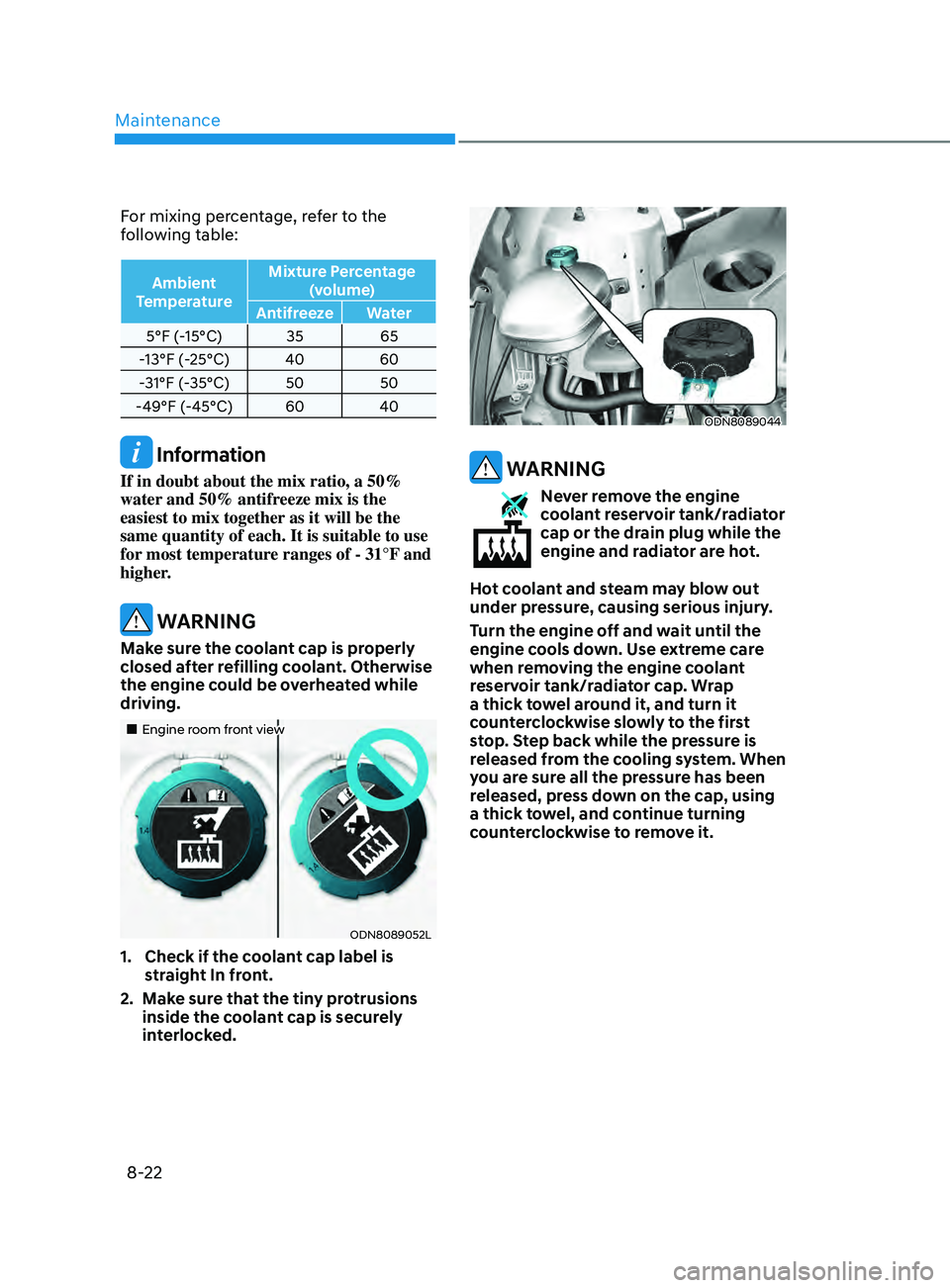
„„Engine room front view
ODN8089052L
1. Check if the c oolant cap label is
straight In front.
2.
M
ake sure that the tiny protrusions
inside the coolant cap is securely
interlocked.
ODN8089044
WARNING
Never remove the engine
coolant reservoir tank/radiator
cap or the drain plug while the
engine and radiator are hot.
Hot coolant and steam may blow out
under pressure, causing serious injury.
Turn the engine off and wait until the
engine cools down. Use extreme care
when removing the engine coolant
reservoir tank/radiator cap. Wrap
a thick towel around it, and turn it
counterclockwise slowly to the first
stop. Step back while the pressure is
released from the cooling system. When
you are sure all the pressure has been
released, press down on the cap, using
a thick towel, and continue turning
counterclockwise to remove it.
Page 485 of 546
08
8-31
WARNING
To prevent SERIOUS INJURY or DEATH
to you or bystanders, always follow
these precautions when working near
or handling the battery:
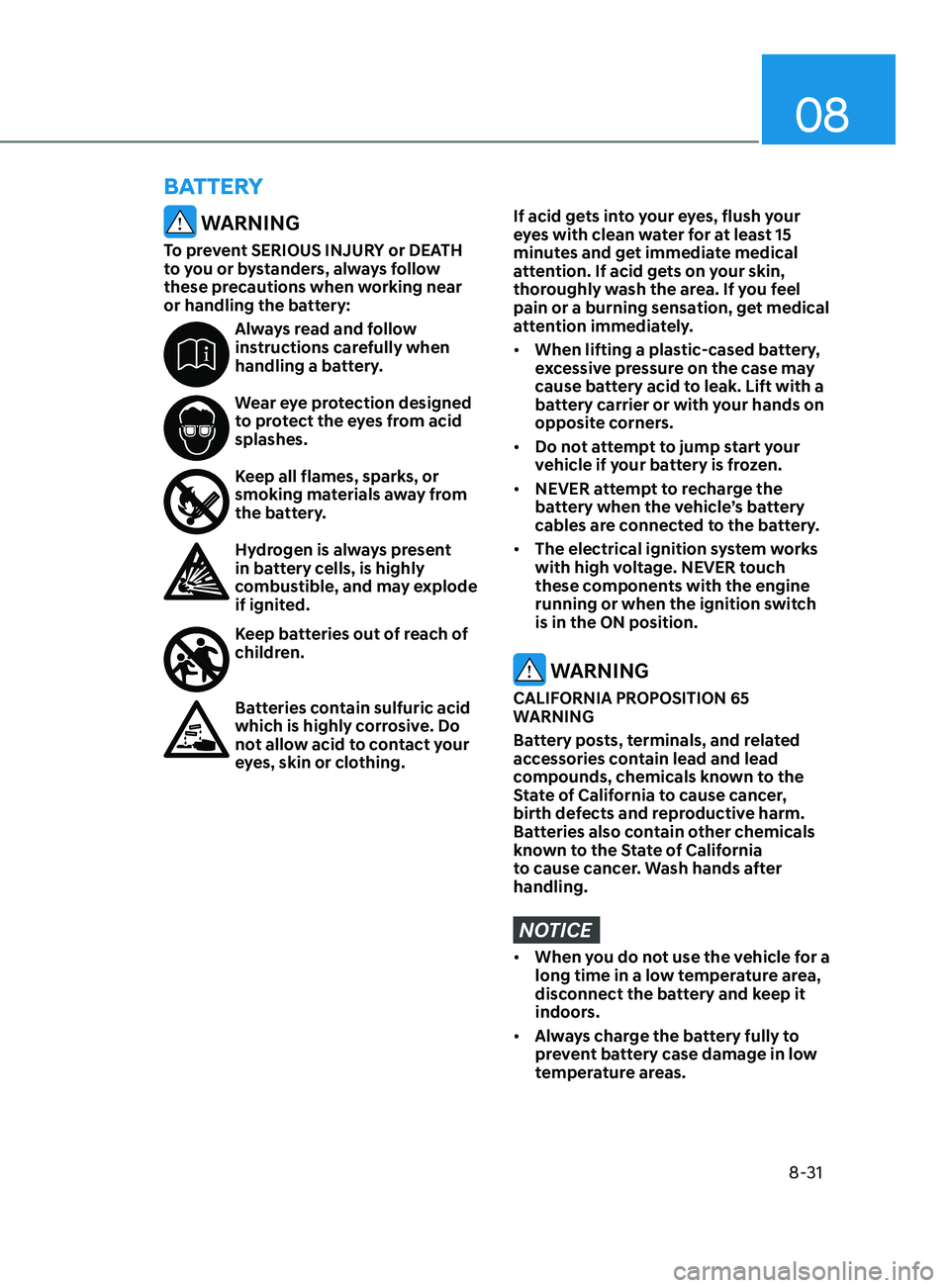
Always read and follow
instructions carefully when
handling a battery.
Wear eye protection designed
to protect the eyes from acid
splashes.
Keep all flames, sparks, or
smoking materials away from
the battery.
Hydrogen is always present
in battery cells, is highly
combustible, and may explode
if ignited.
Keep batteries out of reach of
children.
Batteries contain sulfuric acid
which is highly corrosive. Do
not allow acid to contact your
eyes, skin or clothing.
If acid gets into your eyes, flush your
eyes with clean water for at least 15
minutes and get immediate medical
attention. If acid gets on your skin,
thoroughly wash the area. If you feel
pain or a burning sensation, get medical
attention immediately.
• When lifting a plastic-cased battery,
excessive pressure on the case may
cause battery acid to leak. Lift with a
battery carrier or with your hands on
opposite corners.
• Do not attempt to jump start your
vehicle if your battery is frozen.
• NEVER attempt to recharge the
battery when the vehicle’s battery
cables are connected to the battery.
• The electrical ignition system works
with high voltage. NEVER touch
these components with the engine
running or when the ignition switch
is in the ON position.
WARNING
CALIFORNIA PROPOSITION 65
WARNING
Battery posts, terminals, and related
accessories contain lead and lead
compounds, chemicals known to the
State of California to cause cancer,
birth defects and reproductive harm.
Batteries also contain other chemicals
known to the State of California
to cause cancer. Wash hands after
handling.
NOTICE
• When you do not use the vehicle for a
long time in a low temperature area,
disconnect the battery and keep it
indoors.
• Always charge the battery fully to
prevent battery case damage in low
temperature areas.
BattEry