turn signal Hyundai Sonata
[x] Cancel search | Manufacturer: HYUNDAI, Model Year: , Model line: , Model:Pages: 411, PDF Size: 8.68 MB
Page 158 of 411
Features of your vehicle76
4To signal a lane change, move the turn
signal lever slightly and hold it in position
(B). The lever will return to the OFF posi-
tion when released.
If an indicator stays on and does not
flash or if it flashes abnormally, one of the
turn signal bulbs may be burned out and
will require replacement.One-touch triple turn signal To activate an one-touch triple turn signal
move the turn signal lever up or down
slightly and then release it. The lane
change signals will blink 3 times.✽ ✽
NOTICEIf an indicator flash is abnormally quick
or slow, a bulb may be burned out or
have a poor electrical connection in the
circuit.
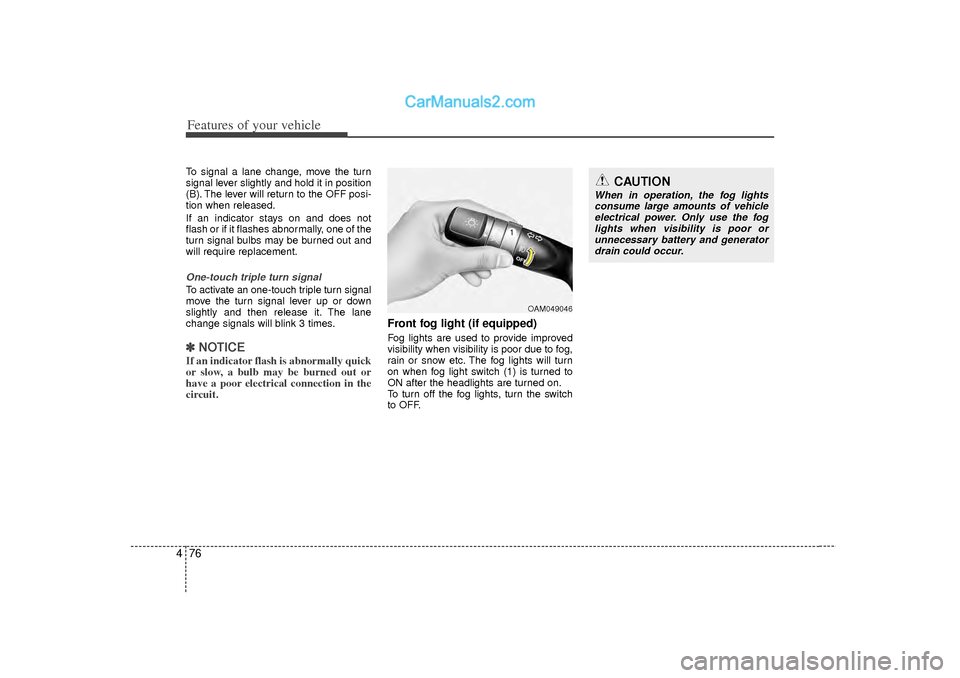
Front fog light (if equipped) Fog lights are used to provide improved
visibility when visibility is poor due to fog,
rain or snow etc. The fog lights will turn
on when fog light switch (1) is turned to
ON after the headlights are turned on.
To turn off the fog lights, turn the switch
to OFF.
CAUTION
When in operation, the fog lights
consume large amounts of vehicle electrical power. Only use the foglights when visibility is poor orunnecessary battery and generator drain could occur.
OAM049046
Page 208 of 411
Features of your vehicle126
4HD RADIO
TM
INFORMATION
Licensing informationHD Radio
TM
Technology Manufactured
Under License From iBiquity Digital
Corporation. U.S. and Foreign Patents.
HD Radio
TM
and the HD and HD Radio
logos are proprietary trademarks of
iBiquity Digital Corporation.
Availability informationHD Radio
TM reception is available in the
United States, including Alaska and
Hawaii.
What is HD Radio
TM
technology?
The vehicle audio system (if equipped) is
able to receive standard analog FM/AM
radio broadcasting as well as digital HD
Radio
TMFM/AM broadcasting.
HD RadioTM
technology provides digital
and analog reception using existing FM
and AM broadcasting frequencies. Currently, radio stations broadcasting an
HD Radio
TM
signal are operating in a
hybrid mode of both, analog and digital,
in order to reach both receivers. In both
modes, analog and digital, the broad-
casted program contents is the
same(except of multicasting, see below).
Eventually, as analog receivers are
replaced by digital ones, radio stations
may be able to turn off their analog
broadcasting and use only digital broad-
casting.
MulticastingHD Radio
TMFM stations are able to broad-
cast multiple digital program
streams(channels) over a single FM fre-
quency. For example, a HD Radio
TM
FM
station can run a main channel of music
and a sub channel of news(or even two dif-
ferent music channels) at one frequency.
But only the program content of the main
channel is broadcasted in analog.
HD Radio
TM
signal delay
To overcome the delay that digital sys-
tems inherently produce, HD Radio
TM
technology first uses the audio signal of
the analog broadcasting when you tune
to an AM station or to the main channel
of a FM station. After that, the system will
blend from analog to digital signal.
Normally, this blending is very smooth. If
you experience a skip in program content
of several seconds, the radio station has
not implemented HD Radio
TMbroadcast-
ing correctly. This is not a problem with
your audio system.
Due to the fact that sub channels are only
broadcasting digital, blending from analog
to digital signal is not possible if you tune
to a sub channel. In this case playback of
the sub channel starts after several sec-
onds, this is a normal function.
Page 227 of 411
4 145
Features of your vehicle
CAUTION IN USING
BLUETOOTH
®CELLULAR
PHONE
Do not use a cellular phone or
perform Bluetooth
®settings (e.g.
pairing a phone) while driving.
Some Bluetooth
®-enabled phones
may not be recognized by the system or fully compatible withthe system.
Before using Bluetooth
®related
features of the audio system, refer your phone’s User’s Manual for phone-side Bluetooth®opera-
tions.
The phone must be paired to the audio system to use Bluetooth
®
related features. You will not be able to use the hands-free feature when yourphone (in the car) is outside ofthe cellular service area (e.g. in atunnel, in a underground, in a mountainous area, etc.).
If the cellular phone signal is poor or the vehicles interior noise istoo loud, it may be difficult to hearthe other person’s voice during a call.
(Continued)
(Continued) Do not place the phone near or inside metallic objects, otherwise
communications with Bluetooth
®
system or cellular service sta-tions can be disturbed.
While a phone is connected through Bluetooth
®
your phone may dis-
charge quicker than usual for addi- tional Bluetooth
®-related operations.
Some cellular phones or other devices may cause interferencenoise or malfunction to audio system. In this case, store thedevice in a different location mayresolve the condition.
Phone contact names should be saved in English or they may notbe displayed correctly.
If Priority is set upon vehicle igni- tion(IGN/ACC ON), the Bluetooth
®
phone will be automatically con-nected. Even if you are outside, theBluetooth
®
phone will be auto-
matically connected once you are in the vicinity of the vehicle.
If you do not want automaticBluetooth
®
connection, turn the
Bluetooth
®feature off.
(Continued)
(Continued) The hands-free call volume and quality may differ depending onthe mobile phone type.
Page 297 of 411
What to do in an emergency26ROAD WARNING Hazard warning flasher The hazard warning flasher serves as a
warning to other drivers to exercise
extreme caution when approaching,
overtaking, or passing your vehicle.It should be used whenever emergency
repairs are being made or when the vehi-
cle is stopped near the edge of a road-
way.
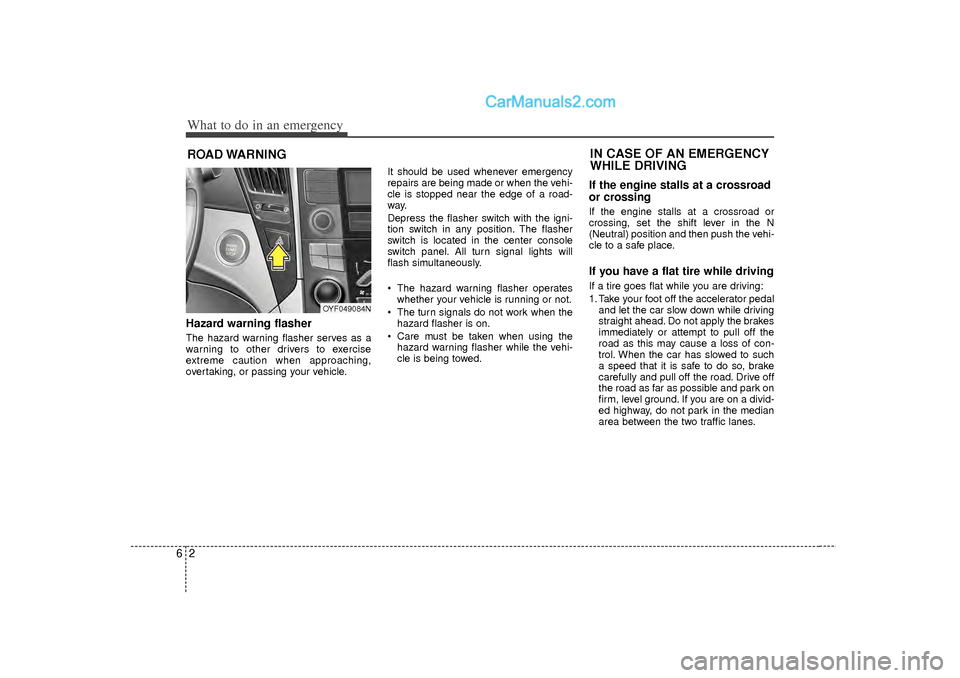
Depress the flasher switch with the igni-
tion switch in any position. The flasher
switch is located in the center console
switch panel. All turn signal lights will
flash simultaneously.
• The hazard warning flasher operates
whether your vehicle is running or not.
The turn signals do not work when the hazard flasher is on.
Care must be taken when using the hazard warning flasher while the vehi-
cle is being towed.
If the engine stalls at a crossroad
or crossingIf the engine stalls at a crossroad or
crossing, set the shift lever in the N
(Neutral) position and then push the vehi-
cle to a safe place.If you have a flat tire while drivingIf a tire goes flat while you are driving:
1. Take your foot off the accelerator pedaland let the car slow down while driving
straight ahead. Do not apply the brakes
immediately or attempt to pull off the
road as this may cause a loss of con-
trol. When the car has slowed to such
a speed that it is safe to do so, brake
carefully and pull off the road. Drive off
the road as far as possible and park on
firm, level ground. If you are on a divid-
ed highway, do not park in the median
area between the two traffic lanes.IN CASE OF AN EMERGENCY
WHILE DRIVING
OYF049084N
Page 376 of 411
Maintenance60
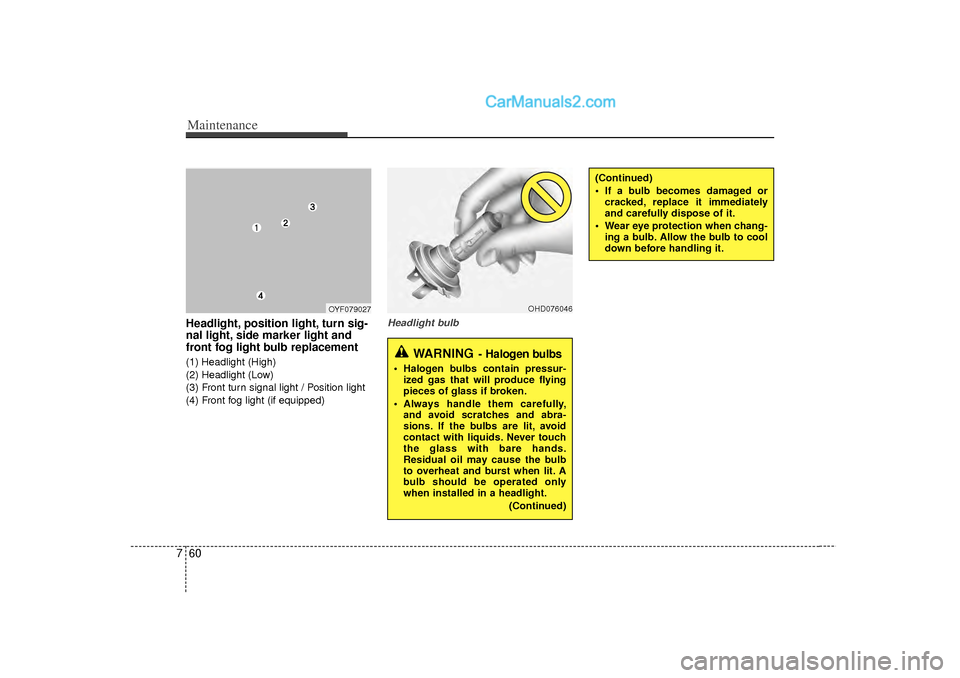
7Headlight, position light, turn sig-
nal light, side marker light and
front fog light bulb replacement(1) Headlight (High)
(2) Headlight (Low)
(3) Front turn signal light / Position light
(4) Front fog light (if equipped)
Headlight bulb
(Continued)
If a bulb becomes damaged or
cracked, replace it immediately
and carefully dispose of it.
Wear eye protection when chang- ing a bulb. Allow the bulb to cool
down before handling it.
OHD076046
WARNING
- Halogen bulbs
Halogen bulbs contain pressur-ized gas that will produce flying
pieces of glass if broken.
Always handle them carefully, and avoid scratches and abra-
sions. If the bulbs are lit, avoid
contact with liquids. Never touch
the glass with bare hands.
Residual oil may cause the bulb
to overheat and burst when lit. A
bulb should be operated only
when installed in a headlight.
(Continued)
OYF079027
Page 377 of 411
761
Maintenance
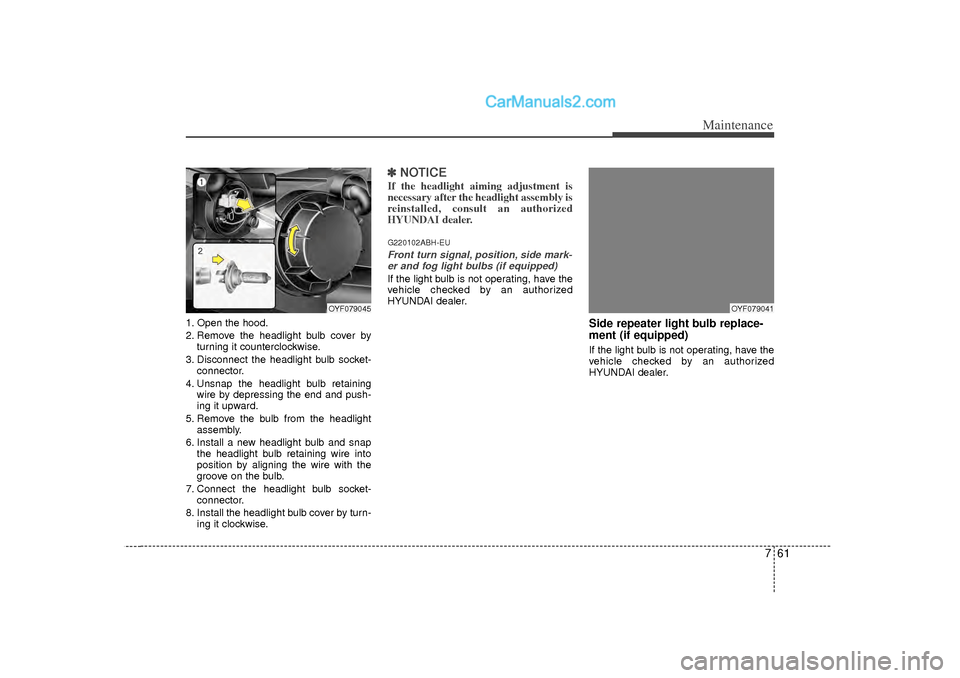
1. Open the hood.
2. Remove the headlight bulb cover byturning it counterclockwise.
3. Disconnect the headlight bulb socket- connector.
4. Unsnap the headlight bulb retaining wire by depressing the end and push-
ing it upward.
5. Remove the bulb from the headlight assembly.
6. Install a new headlight bulb and snap the headlight bulb retaining wire into
position by aligning the wire with the
groove on the bulb.
7. Connect the headlight bulb socket- connector.
8. Install the headlight bulb cover by turn- ing it clockwise.
✽ ✽NOTICEIf the headlight aiming adjustment is
necessary after the headlight assembly is
reinstalled, consult an authorized
HYUNDAI dealer.G220102ABH-EUFront turn signal, position, side mark-
er and fog light bulbs (if equipped)If the light bulb is not operating, have the
vehicle checked by an authorized
HYUNDAI dealer.
Side repeater light bulb replace-
ment (if equipped)If the light bulb is not operating, have the
vehicle checked by an authorized
HYUNDAI dealer.
OYF079041
OYF079045
Page 378 of 411
Maintenance62
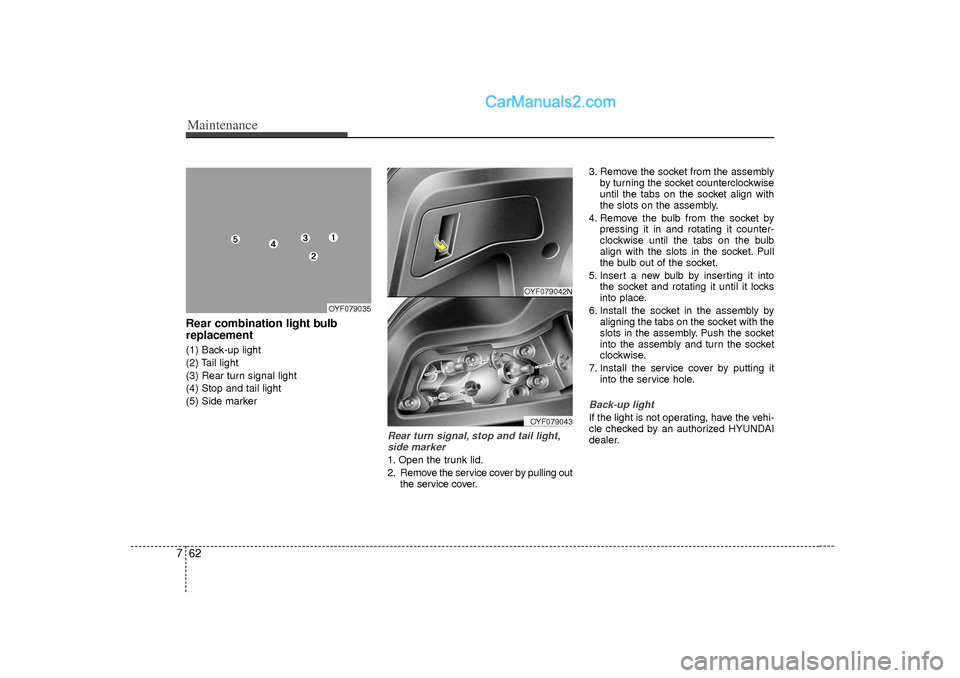
7Rear combination light bulb
replacement(1) Back-up light
(2) Tail light
(3) Rear turn signal light
(4) Stop and tail light
(5) Side marker
Rear turn signal, stop and tail light,
side marker1. Open the trunk lid.
2. Remove the service cover by pulling out the service cover. 3. Remove the socket from the assembly
by turning the socket counterclockwise
until the tabs on the socket align with
the slots on the assembly.
4. Remove the bulb from the socket by pressing it in and rotating it counter-
clockwise until the tabs on the bulb
align with the slots in the socket. Pull
the bulb out of the socket.
5. Insert a new bulb by inserting it into the socket and rotating it until it locks
into place.
6. Install the socket in the assembly by aligning the tabs on the socket with the
slots in the assembly. Push the socket
into the assembly and turn the socket
clockwise.
7. Install the service cover by putting it into the service hole.
Back-up lightIf the light is not operating, have the vehi-
cle checked by an authorized HYUNDAI
dealer.
OYF079042N
OYF079035
OYF079043
Page 394 of 411
Specifications, Consumer information, Reporting safety defects28DIMENSIONS
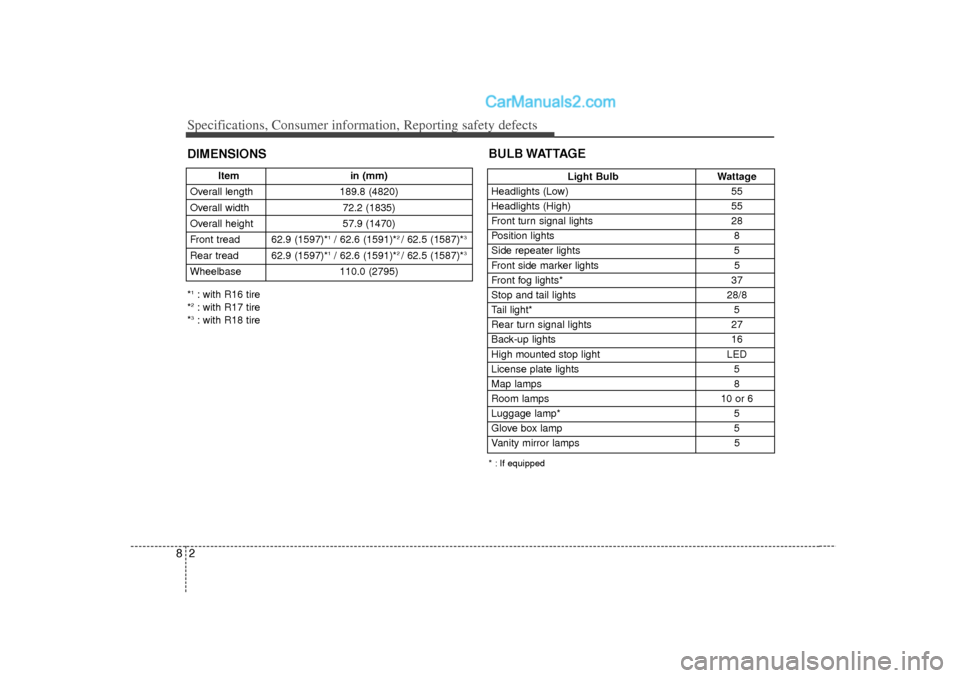
Light BulbWattage
Headlights (Low) 55
Headlights (High) 55
Front turn signal lights 28
Position lights 8
Side repeater lights 5
Front side marker lights 5
Front fog lights* 37
Stop and tail lights 28/8
Tail light* 5
Rear turn signal lights 27
Back-up lights 16
High mounted stop light LED
License plate lights 5
Map lamps 8
Room lamps 10 or 6
Luggage lamp* 5
Glove box lamp 5
Vanity mirror lamps 5
BULB WATTAGE* : If equipped
Itemin (mm)
Overall length 189.8 (4820)
Overall width 72.2 (1835)
Overall height 57.9 (1470)
Front tread 62.9 (1597)*
1/ 62.6 (1591)*
2 / 62.5 (1587)*
3
Rear tread 62.9 (1597)*
1/ 62.6 (1591)*
2 / 62.5 (1587)*
3
Wheelbase 110.0 (2795)*1: with R16 tire
*2: with R17 tire
*3: with R18 tire