radio Hyundai Sonata
[x] Cancel search | Manufacturer: HYUNDAI, Model Year: , Model line: , Model:Pages: 411, PDF Size: 8.68 MB
Page 235 of 411
4 153
Features of your vehicle
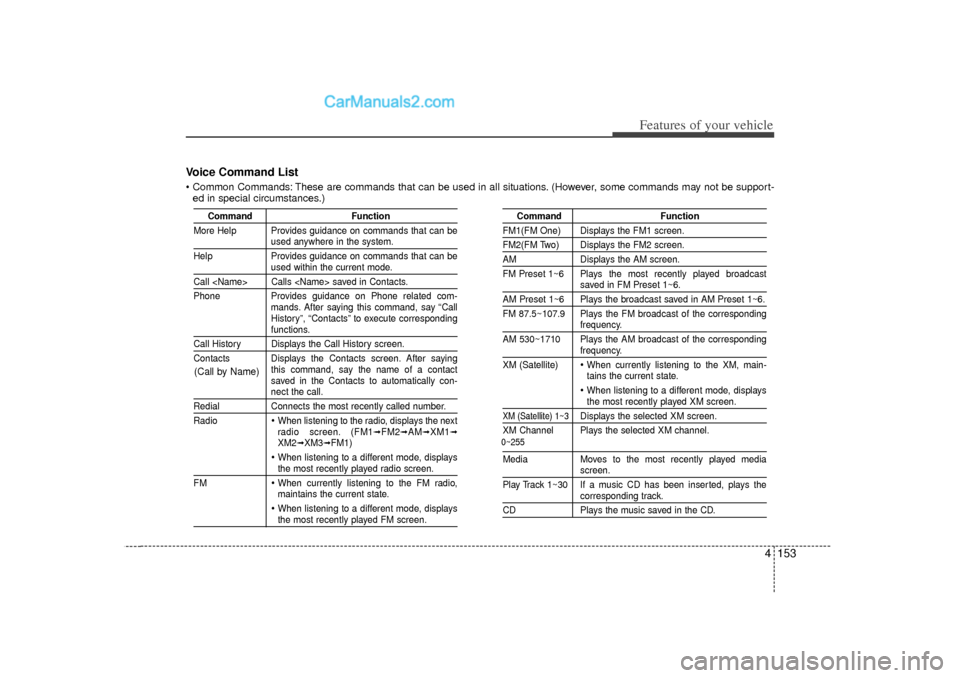
Voice Command List Common Commands: These are commands that can be used in all situations. (However, some commands may not be support-ed in special circumstances.)
Command Function
More Help Provides guidance on commands that can be
used anywhere in the system.
Help Provides guidance on commands that can beused within the current mode.
Call
Phone Provides guidance on Phone related com- mands. After saying this command, say “Call
History”, “Contacts” to execute corresponding
functions.
Call History Displays the Call History screen.
Contacts Displays the Contacts screen. After sayingthis command, say the name of a contact
saved in the Contacts to automatically con-
nect the call.
RedialConnects the most recently called number.
Radio
When listening to the radio, displays the next
radio screen. (FM1
➟FM2
➟AM
➟XM1
➟
XM2
➟XM3
➟FM1)
When listening to a different mode, displaysthe most recently played radio screen.
FM When currently listening to the FM radio,
maintains the current state. When listening to a different mode, displaysthe most recently played FM screen.
Command Function
FM1(FM One) Displays the FM1 screen.FM2(FM Two) Displays the FM2 screen.AMDisplays the AM screen.
FM Preset 1~6 Plays the most recently played broadcast
saved in FM Preset 1~6.
AM Preset 1~6 Plays the broadcast saved in AM Preset 1~6.
FM 87.5~107.9 Plays the FM broadcast of the corresponding
frequency.
AM 530~1710 Plays the AM broadcast of the correspondingfrequency.
XM (Satellite) When currently listening to the XM, main-
tains the current state. When listening to a different mode, displaysthe most recently played XM screen.
XM (Satellite) 1~3
Displays the selected XM screen.
XM Channel Plays the selected XM channel.
Media Moves to the most recently played media
screen.
Play Track 1~30 If a music CD has been inserted, plays thecorresponding track.
CD Plays the music saved in the CD.
(Call by Name)
0~255
Page 236 of 411
Features of your vehicle154
4
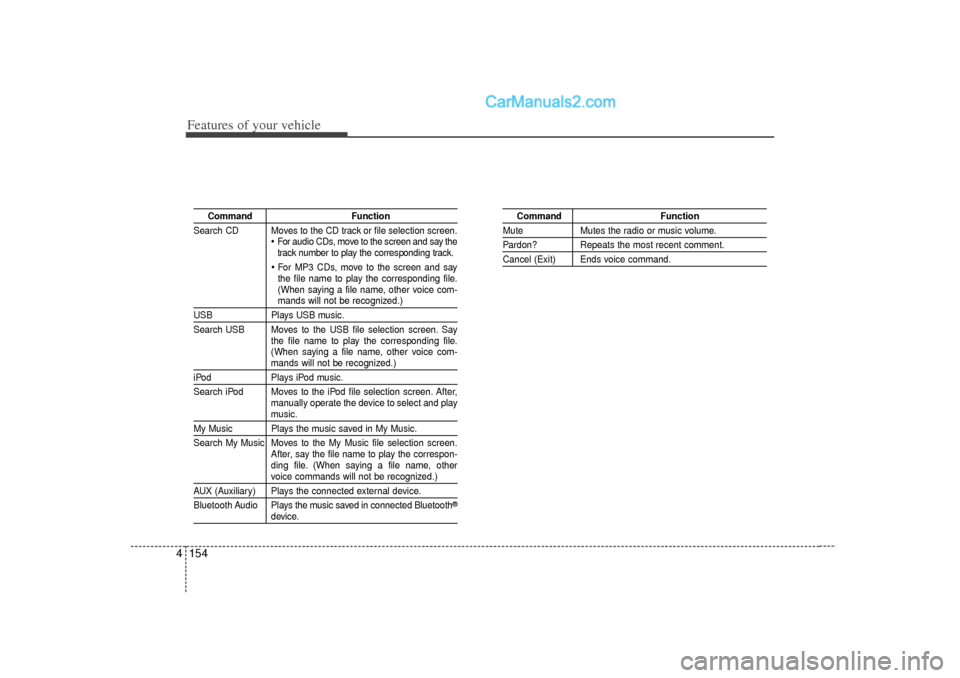
Command Function
Search CD Moves to the CD track or file selection screen.
For audio CDs, move to the screen and say the
track number to play the corresponding track. For MP3 CDs, move to the screen and say
the file name to play the corresponding file.
(When saying a file name, other voice com-mands will not be recognized.)
USB Plays USB music.
Search USB Moves to the USB file selection screen. Say the file name to play the corresponding file.
(When saying a file name, other voice com-
mands will not be recognized.)
iPodPlays iPod music.
Search iPod Moves to the iPod file selection screen. After, manually operate the device to select and play
music.
My Music Plays the music saved in My Music.
Search My Music Moves to the My Music file selection screen.After, say the file name to play the correspon-
ding file. (When saying a file name, other
voice commands will not be recognized.)
AUX (Auxiliary) Plays the connected external device.
Bluetooth Audio Plays the music saved in connected Bluetooth
®
device.
Command Function
MuteMutes the radio or music volume.Pardon? Repeats the most recent comment.Cancel (Exit) Ends voice command.
Page 237 of 411
4 155
Features of your vehicle
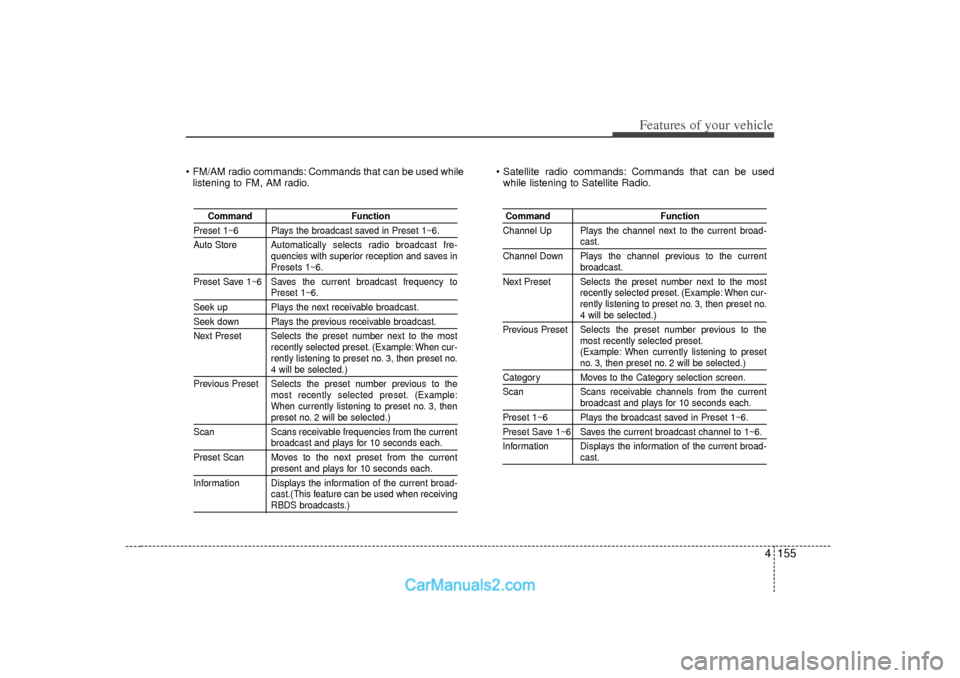
FM/AM radio commands: Commands that can be used whilelistening to FM, AM radio. Satellite radio commands: Commands that can be used
while listening to Satellite Radio.
Command Function
Preset 1~6 Plays the broadcast saved in Preset 1~6.
Auto Store Automatically selects radio broadcast fre-
quencies with superior reception and saves in
Presets 1~6.
Preset Save 1~6 Saves the current broadcast frequency toPreset 1~6.
Seek up Plays the next receivable broadcast.Seek down Plays the previous receivable broadcast.
Next Preset Selects the preset number next to the most recently selected preset. (Example: When cur-
rently listening to preset no. 3, then preset no.
4 will be selected.)
Previous Preset Selects the preset number previous to the most recently selected preset. (Example:
When currently listening to preset no. 3, thenpreset no. 2 will be selected.)
Scan Scans receivable frequencies from the currentbroadcast and plays for 10 seconds each.
Preset Scan Moves to the next preset from the currentpresent and plays for 10 seconds each.
Information Displays the information of the current broad- cast.(This feature can be used when receivingRBDS broadcasts.)
Command Function
Channel Up Plays the channel next to the current broad-
cast.
Channel Down Plays the channel previous to the currentbroadcast.
Next Preset Selects the preset number next to the most recently selected preset. (Example: When cur-
rently listening to preset no. 3, then preset no.4 will be selected.)
Previous Preset Selects the preset number previous to the most recently selected preset.
(Example: When currently listening to presetno. 3, then preset no. 2 will be selected.)
Category Moves to the Category selection screen.
Scan Scans receivable channels from the current
broadcast and plays for 10 seconds each.
Preset 1~6 Plays the broadcast saved in Preset 1~6.Preset Save 1~6 Saves the current broadcast channel to 1~6.
Information Displays the information of the current broad-
cast.
Page 304 of 411
69
What to do in an emergency
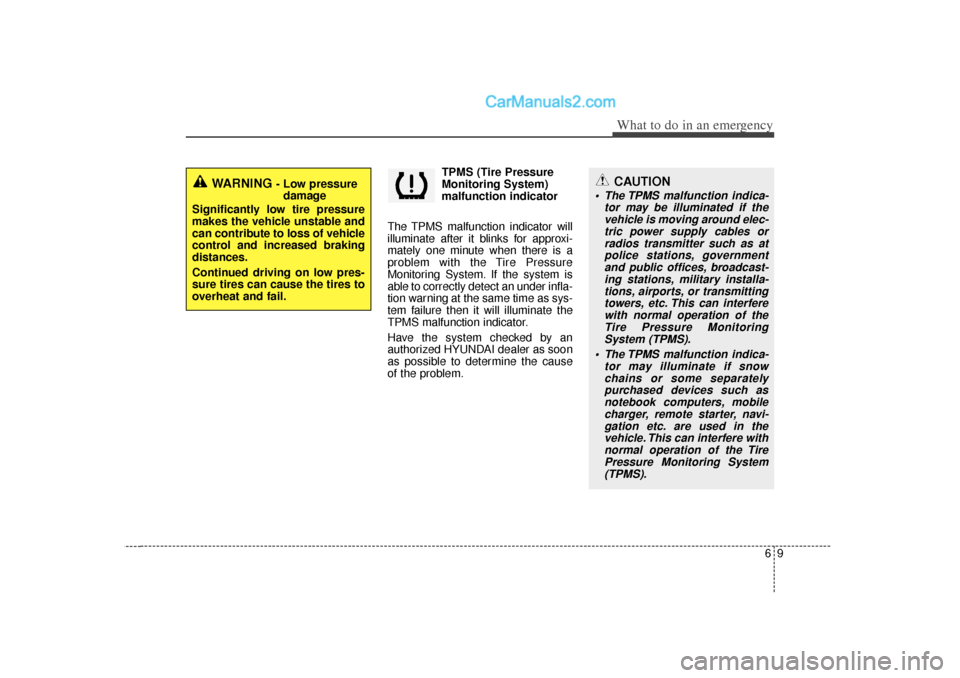
TPMS (Tire Pressure
Monitoring System)
malfunction indicator
The TPMS malfunction indicator will
illuminate after it blinks for approxi-
mately one minute when there is a
problem with the Tire Pressure
Monitoring System. If the system is
able to correctly detect an under infla-
tion warning at the same time as sys-
tem failure then it will illuminate the
TPMS malfunction indicator.
Have the system checked by an
authorized HYUNDAI dealer as soon
as possible to determine the cause
of the problem.
WARNING
- Low pressure damage
Significantly low tire pressure
makes the vehicle unstable and
can contribute to loss of vehicle
control and increased braking
distances.
Continued driving on low pres-
sure tires can cause the tires to
overheat and fail.
CAUTION
The TPMS malfunction indica- tor may be illuminated if thevehicle is moving around elec-tric power supply cables orradios transmitter such as atpolice stations, governmentand public offices, broadcast-ing stations, military installa-tions, airports, or transmittingtowers, etc. This can interferewith normal operation of theTire Pressure MonitoringSystem (TPMS).
The TPMS malfunction indica- tor may illuminate if snowchains or some separatelypurchased devices such asnotebook computers, mobilecharger, remote starter, navi-gation etc. are used in thevehicle. This can interfere withnormal operation of the TirePressure Monitoring System(TPMS).