window Hyundai Sonata
[x] Cancel search | Manufacturer: HYUNDAI, Model Year: , Model line: , Model:Pages: 411, PDF Size: 8.68 MB
Page 173 of 411
491
Features of your vehicle
✽
✽NOTICE• While using the air conditioning sys-
tem, monitor the engine temperature
gauge closely while driving up hills or
in heavy traffic when outside temper-
atures are high. Air conditioning sys-
tem operation may cause engine over-
heating. Continue to use the blower
fan but turn the air conditioning sys-
tem off if the engine temperature
gauge indicates engine overheating.
• Opening the windows in humid weather while air conditioning oper-
ates may create water droplets inside
the vehicle. Since excessive water
droplets may cause damage to electri-
cal equipment, air conditioning
should only be used with the windows
closed.
Air conditioning system operation tips
If the vehicle has been parked in direct
sunlight during hot weather, open the
windows for a short time to let the hot
air inside the vehicle escape.
To help reduce moisture inside of the windows on rainy or humid days,
decrease the humidity inside the vehi-
cle by operating the air conditioning
system.
During air conditioning system opera- tion, you may occasionally notice a
slight change in engine speed as the
air conditioning compressor cycles.
This is a normal system operation
characteristic.
Use the air conditioning system every month only for a few minutes to ensure
maximum system performance.
When using the air conditioning sys- tem, you may notice clear water drip-
ping (or even puddling) on the ground
under the passenger side of the vehi-
cle. This is a normal system operation
characteristic. Operating the air conditioning system
in the recirculated air position provides
maximum cooling, however, continual
operation in this mode may cause the
air inside the vehicle to become stale.
During cooling operation, you may occasionally notice a misty air flow
because of rapid cooling and humid air
intake. This is a normal system opera-
tion characteristic.
If you operate air conditioner exces- sively, the difference between the tem-
perature of the outside air and that of
the windshield could cause the outer
surface of the windshield to fog up,
causing loss of visibility. In this case,
set the mode selection knob or button
to the position and fan speed con-
trol to the lower speed.
Page 175 of 411
493
Features of your vehicle
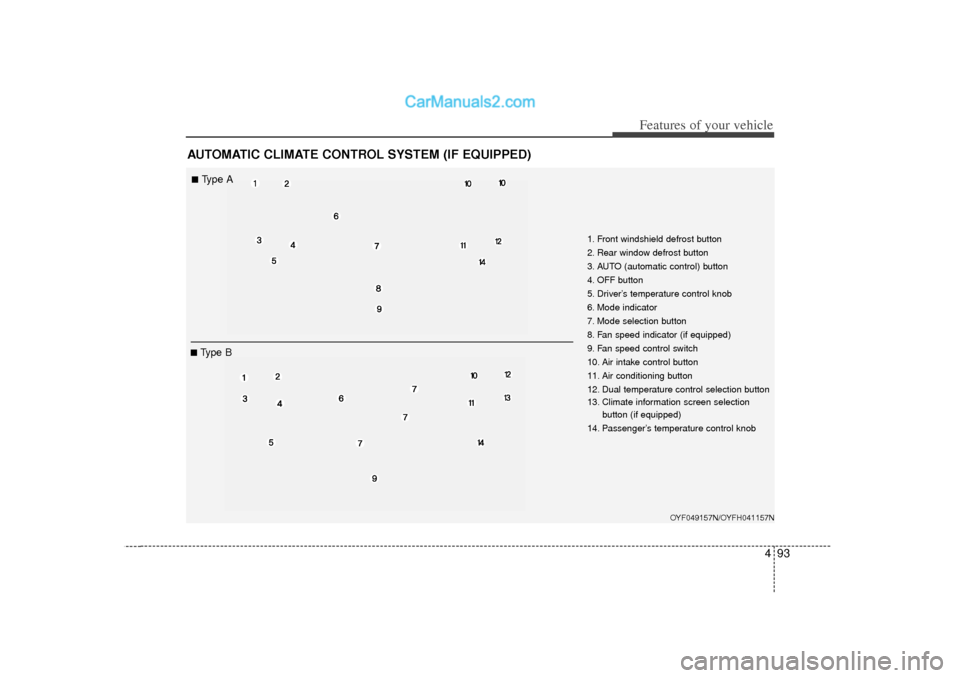
AUTOMATIC CLIMATE CONTROL SYSTEM (IF EQUIPPED)
1. Front windshield defrost button
2. Rear window defrost button
3. AUTO (automatic control) button
4. OFF button
5. Driver’s temperature control knob
6. Mode indicator
7. Mode selection button
8. Fan speed indicator (if equipped)
9. Fan speed control switch
10. Air intake control button
11. Air conditioning button
12. Dual temperature control selection button
13. Climate information screen selection button (if equipped)
14. Passenger’s temperature control knob
OYF049157N/OYFH041157N
■Type A■Type B
Page 177 of 411
495
Features of your vehicle
Manual heating and air condition-
ingThe heating and cooling system can be
controlled manually by pressing buttons
or turning knob(s) other than the AUTO
button. In this case, the system works
sequentially according to the order of
buttons or knob(s) selected.
1. Start the engine.
2. Set the mode to the desired position.For improving the effectiveness of
heating and cooling;
- Heating:
- Cooling:
3. Set the temperature control to the desired position.
4. Set the air intake control to the outside (fresh) air position.
5. Set the fan speed control to the desired speed.
6. If air conditioning is desired, turn the air conditioning system on.
Press the AUTO button in order to con-
vert to full automatic control of the sys-
tem.
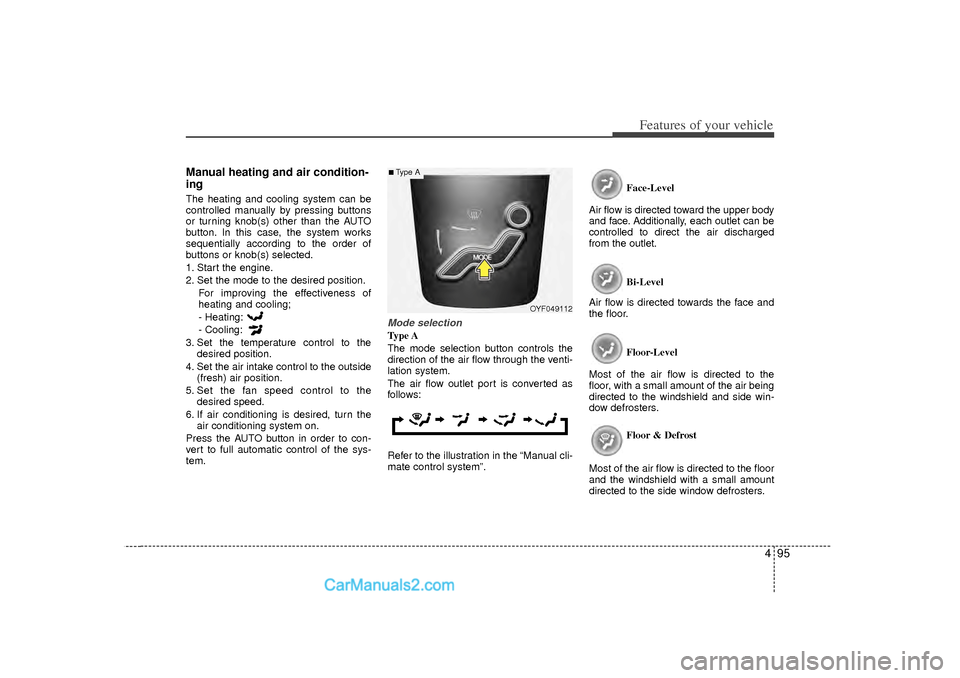
Mode selectionType A
The mode selection button controls the
direction of the air flow through the venti-
lation system.
The air flow outlet port is converted as
follows:
Refer to the illustration in the “Manual cli-
mate control system”. Face-Level
Air flow is directed toward the upper body
and face. Additionally, each outlet can be
controlled to direct the air discharged
from the outlet.
Bi-Level
Air flow is directed towards the face and
the floor.
Floor-Level
Most of the air flow is directed to the
floor, with a small amount of the air being
directed to the windshield and side win-
dow defrosters.
Floor & Defrost
Most of the air flow is directed to the floor
and the windshield with a small amount
directed to the side window defrosters.
OYF049112
■Type A
Page 179 of 411
497
Features of your vehicle
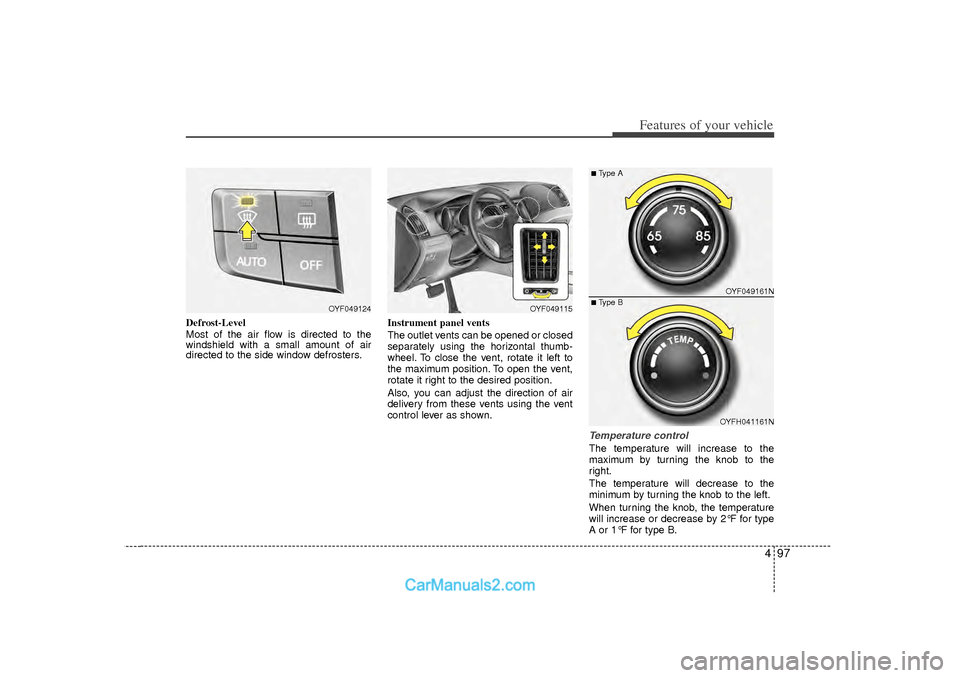
Defrost-Level
Most of the air flow is directed to the
windshield with a small amount of air
directed to the side window defrosters.Instrument panel vents
The outlet vents can be opened or closed
separately using the horizontal thumb-
wheel. To close the vent, rotate it left to
the maximum position. To open the vent,
rotate it right to the desired position.
Also, you can adjust the direction of air
delivery from these vents using the vent
control lever as shown.
Temperature controlThe temperature will increase to the
maximum by turning the knob to the
right.
The temperature will decrease to the
minimum by turning the knob to the left.
When turning the knob, the temperature
will increase or decrease by 2°F for type
A or 1°F for type B.
OYF049124
OYF049115
OYF049161NOYFH041161N
■Type A■Type B
Page 181 of 411
499
Features of your vehicle
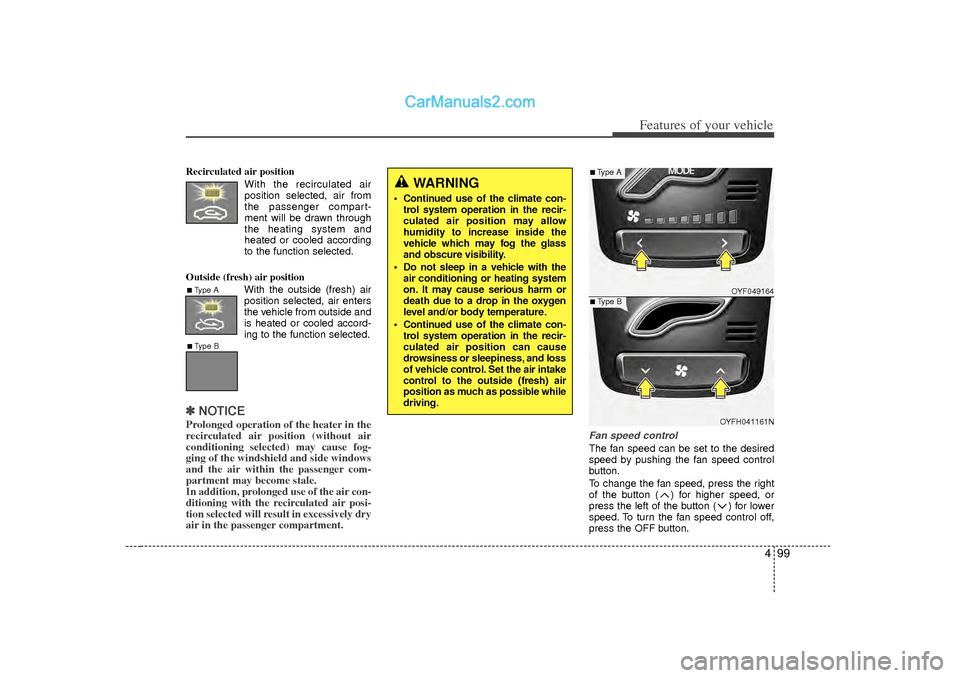
Recirculated air positionWith the recirculated airposition selected, air from
the passenger compart-
ment will be drawn through
the heating system and
heated or cooled according
to the function selected.
Outside (fresh) air position With the outside (fresh) air
position selected, air enters
the vehicle from outside and
is heated or cooled accord-
ing to the function selected.✽ ✽NOTICEProlonged operation of the heater in the
recirculated air position (without air
conditioning selected) may cause fog-
ging of the windshield and side windows
and the air within the passenger com-
partment may become stale.
In addition, prolonged use of the air con-
ditioning with the recirculated air posi-
tion selected will result in excessively dry
air in the passenger compartment.
Fan speed controlThe fan speed can be set to the desired
speed by pushing the fan speed control
button.
To change the fan speed, press the right
of the button ( ) for higher speed, or
press the left of the button ( ) for lower
speed. To turn the fan speed control off,
press the OFF button.
WARNING
Continued use of the climate con-
trol system operation in the recir-
culated air position may allow
humidity to increase inside the
vehicle which may fog the glass
and obscure visibility.
Do not sleep in a vehicle with the air conditioning or heating system
on. It may cause serious harm or
death due to a drop in the oxygen
level and/or body temperature.
Continued use of the climate con- trol system operation in the recir-
culated air position can cause
drowsiness or sleepiness, and loss
of vehicle control. Set the air intake
control to the outside (fresh) air
position as much as possible while
driving.
■Type A■Type B
OYF049164
OYFH041161N
■Type A■Type B
Page 183 of 411
4 101
Features of your vehicle
For maximum defrosting, set the tem-perature control to the extreme
right/hot position and the fan speed
control to the highest speed.
If warm air to the floor is desired while defrosting or defogging, set the mode
to the floor-defrost position.
Before driving, clear all snow and ice from the windshield, rear window, out-
side rear view mirrors, and all side win-
dows.
Clear all snow and ice from the hood and air inlet in the cowl grill to improve
heater and defroster efficiency and to
reduce the probability of fogging up the
inside of the windshield.
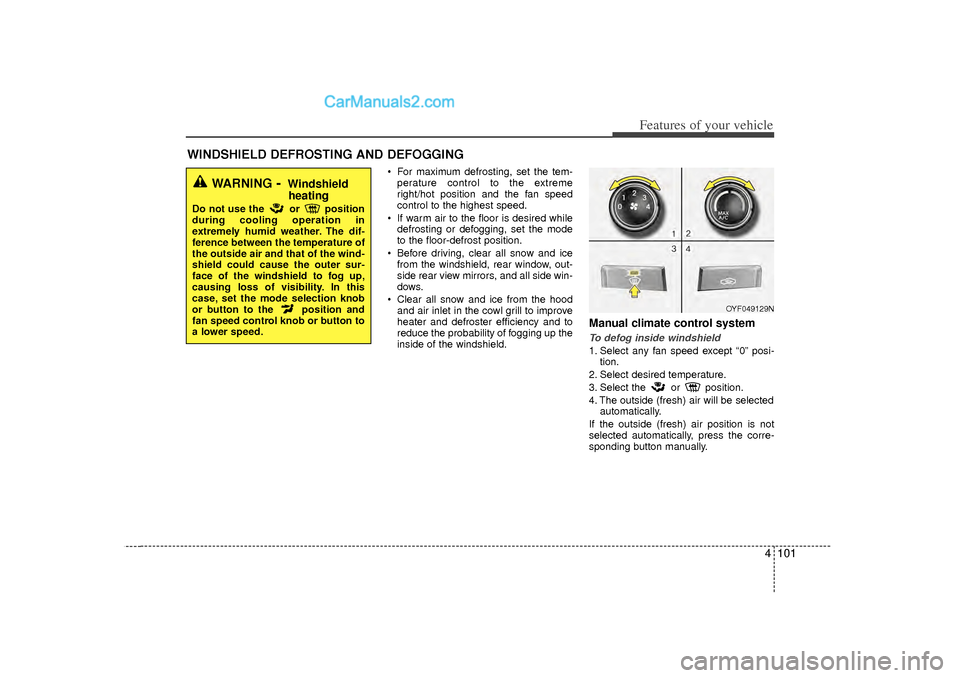
Manual climate control systemTo defog inside windshield1. Select any fan speed except “0” posi- tion.
2. Select desired temperature.
3. Select the or position.
4. The outside (fresh) air will be selected automatically.
If the outside (fresh) air position is not
selected automatically, press the corre-
sponding button manually.
WINDSHIELD DEFROSTING AND DEFOGGING
WARNING
- Windshield heating
Do not use the or position
during cooling operation in
extremely humid weather. The dif-
ference between the temperature of
the outside air and that of the wind-
shield could cause the outer sur-
face of the windshield to fog up,
causing loss of visibility. In this
case, set the mode selection knob
or button to the position and
fan speed control knob or button to
a lower speed.
OYF049129N
Page 189 of 411
4 107
Features of your vehicle
INTERIOR FEATURES Cup holder
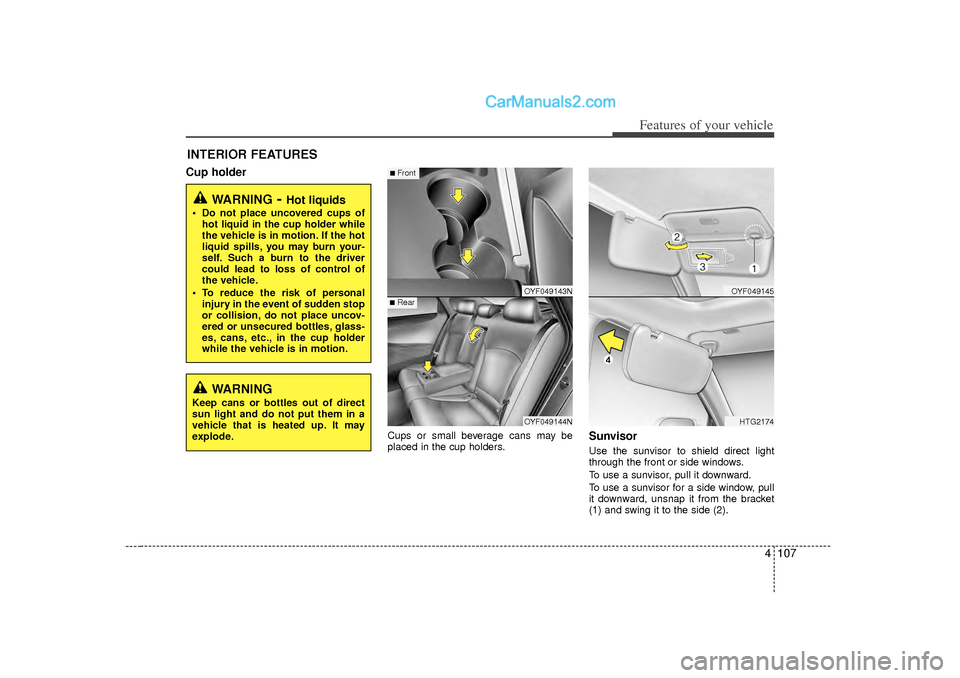
Cups or small beverage cans may be
placed in the cup holders.
SunvisorUse the sunvisor to shield direct light
through the front or side windows.
To use a sunvisor, pull it downward.
To use a sunvisor for a side window, pull
it downward, unsnap it from the bracket
(1) and swing it to the side (2).
WARNING
- Hot liquids
Do not place uncovered cups ofhot liquid in the cup holder while
the vehicle is in motion. If the hot
liquid spills, you may burn your-
self. Such a burn to the driver
could lead to loss of control of
the vehicle.
To reduce the risk of personal injury in the event of sudden stop
or collision, do not place uncov-
ered or unsecured bottles, glass-
es, cans, etc., in the cup holder
while the vehicle is in motion.
OYF049143NOYF049144N
■Rear■Front
OYF049145HTG2174
WARNING
Keep cans or bottles out of direct
sun light and do not put them in a
vehicle that is heated up. It may
explode.
Page 215 of 411
4 133
Features of your vehicle
Care of disc If the temperature inside the car is toohigh, open the car windows to ventilate
before using the system.
It is illegal to copy and use MP3/WMA files without permission. Use CDs that
are created only by lawful means.
Do not apply volatile agents, such as benzene and thinner, normal cleaners
and magnetic sprays made for ana-
logue disc onto CDs.
To prevent the disc surface from get- ting damaged, hold CDs by the edges
or the center hole only.
Clean the disc surface with a piece of soft cloth before playback (wipe it from
the center to the outside edge).
Do not damage the disc surface or attach pieces of sticky tape or paper.
Make certain only CDs are inserted into the CD player (Do not insert more
than one CD at a time).
Keep CDs in their cases after use to protect them from scratches or dirt.
Depending on the type of CD-R/CD-RW
CDs, certain CDs may not operate nor-
mally according to manufacturing compa-
nies or making and recording methods. In
such circumstances, continued use may
cause malfunctions to your audio system.
\b \b NOTICE
- Playing an
Incompatible Copy
Protected Audio CD
Some copy protected CDs, which do not
comply with international audio CD
standards (Red Book), may not play on
your car audio. Please note that inabili-
ties to properly play a copy protected
CD may indicate that the CD is defec-
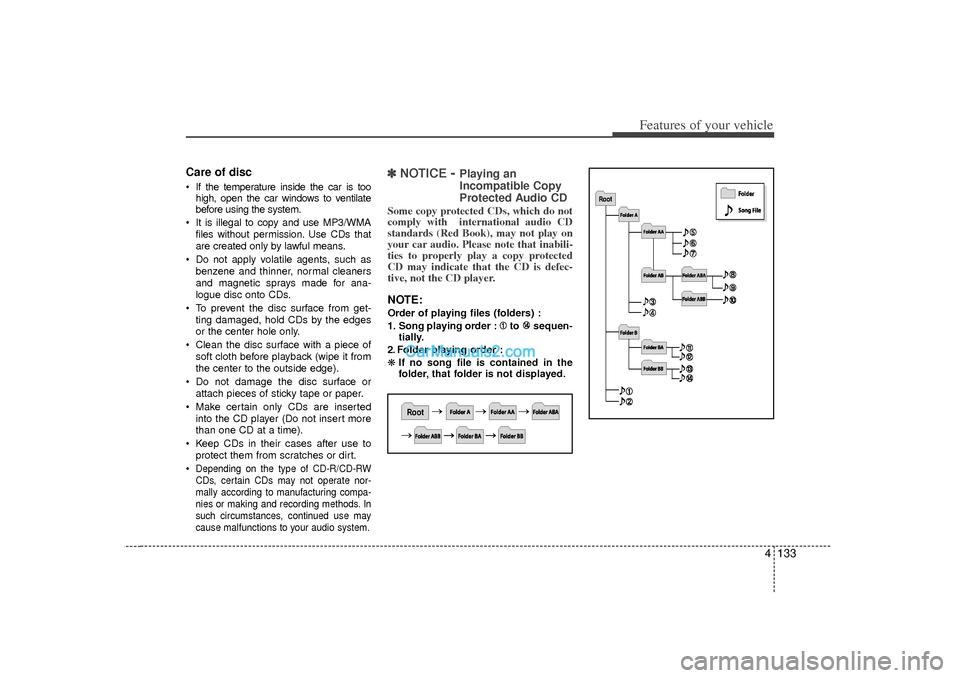
tive, not the CD player.NOTE:Order of playing files (folders) :
1. Song playing order : to sequen-
tially.
2. Folder playing order :
❋ If no song file is contained in the
folder, that folder is not displayed.
Page 232 of 411
![Hyundai Sonata Features of your vehicle150
4
VOICE COMMANDStarting Voice Command To start voice command, shortly press
the key on the steering wheel
remote controller.
If voice command is in [Normal Mode], then](/img/35/16810/w960_16810-231.png "Hyundai Sonata Features of your vehicle150
4
VOICE COMMANDStarting Voice Command To start voice command, shortly press
the key on the steering wheel
remote controller.
If voice command is in [Normal Mode], then")
Features of your vehicle150
4
VOICE COMMANDStarting Voice Command To start voice command, shortly press
the key on the steering wheel
remote controller.
If voice command is in [Normal Mode], then the system will say “Please say a
command. Beep”
❈ If voice command is in [Expert Mode],
then the system will only say a “Beep-”
❈ Setting Voice command [Normal
Mode]/[Expert Mode]:
Press the key Select [System]
through the TUNE knob or
key Select [Voice Command Mode]
through the TUNE knob Set
[Normal Mode]/[Expert Mode]
Say the voice command.
5
SETUP
CAUTION
For proper voice recognition, say the voice command after the guid- ance message and the “Beep”sound.
(Continued)
After do wnloading Bluetooth con-
tacts, the system requires some times to convert the contacts intovoice information. During this time, voice recognition may notoperate properly.
Upon inputting your contacts, special symbols and numberscannot be recognized by voice.For example, “# John Doe%&” willbe recognized as “John Doe”.
CAUTION IN USING
VOICE COMMAND
The voice recognition feature of this product supports recognitionof the commands listed withinthis user’s manual.
While using voice recognition, oper- ating the steering remote controlor the device will terminate voicerecognition and allow you to man-ually operate desired functions. Position the microphone above the head of the driver’s seat. For superi-or performance, maintain good pos-ture when saying voice commands. Voice recognition may not func- tion properly due to outsidenoise. The following conditions can affect the performance ofVoice Recognition:
- When the windows and sunroof are open
- When the heating/cooling sys- tem is on
- When passing a tunnel - When driving on rugged and uneven roads
(Continued)
Page 245 of 411
Driving your vehicle25
WARNING
- ENGINE EXHAUST CAN BE DANGEROUS!
Engine exhaust fumes can be extremely dangerous. If, at any time, you smell exhaust fumes inside the vehicle, open the win-
dows immediately.
• Do not inhale exhaust fumes.Exhaust fumes contain carbon monoxide, a colorless, odorless gas that can cause unconsciousness and death by asphyxia-
tion.
Be sure the exhaust system does not leak. The exhaust system should be checked whenever the vehicle is raised to change the oil or for any other purpose. If you hear
a change in the sound of the exhaust or if you drive over something that strikes the underneath side of the car, have the
exhaust system checked as soon as possible by an authorized HYUNDAI dealer.
Do not run the engine in an enclosed area. Letting the engine idle in your garage, even with the garage door open, is a hazardous practice. Never run the engine in your
garage any longer than it takes to start the engine and back the car out.
Avoid idling the engine for prolonged periods with people inside the car. If it is necessary to idle the engine for a prolonged period with people inside the car, be sure to do so only in an open area
with the air intake set at "Fresh" and fan operating at one of the higher speeds so fresh air is drawn into the interior.
If you must drive with the trunk lid open because you are carrying objects that make this necessary:
1. Close all windows.
2. Open side vents.
3. Set the air intake control at "Fresh", the air flow control at "Floor" or "Face" and the fan at one of the higher speeds.
To assure proper operation of the ventilation system, be sure the ventilation air intakes located just in front of the windshield are
kept clear of snow, ice, leaves or other obstructions.