radio Hyundai Terracan 2005 User Guide
[x] Cancel search | Manufacturer: HYUNDAI, Model Year: 2005, Model line: Terracan, Model: Hyundai Terracan 2005Pages: 539, PDF Size: 18.03 MB
Page 149 of 539
1
FEATURES OF YOUR HYUNDAI
135
B290H03HP-GAT The CD auto changer is located in the right side of the luggage compartment.
o To use the CD auto changer.
1. Open the sliding lid of the CD auto changer.
2. To eject the compact disc maga-
zine, press the EJECT button lo- cated inside the CD auto changer.
3. Insert the discs into the magazine.
4. Push the magazine into the CD auto changer and close the sliding lid.
o The CD auto changer can be used when the ignition switch is in either"ON" or "ACC" position.
1. CD CHANGER Select Button When the CD changer magazine con- tains discs, press the "CD/CDC" but-ton and the CD changer can be used even if the radio or cassette player is being used. The Hyundai CD changercan hold up to eight discs. The disc number will be lit, and the track num- ber, and elapsed time will be displayed. 2. DISC Select Button To select the CD you want, push " " to change the disc number. 3. TRACK UP/DOWN
o The desired track on the disc cur-
rently being played can be selected using the track number.
o Press once to skip forward to the beginning of the next track. Press once to skip back to the begin-ning of the track.
4. FF/REW ( / ) If you want to fast forward or reverse through the compact disc track, push and hold in the FF ( ) or REW ( ) button.When you release the button, the com- pact disc player will resume playing. 5. REPEAT
o To repeat the track you are listening to, press the RPT button. To cancel, press again. o If you do not release RPT operation
when the track ends, it will automati-cally be replayed. This process will be continued until you push the button again.
6. SCAN Button (If Installed)
o Press the SCAN button to playback the first 10 seconds of each track.
o Press the SCAN button again within 10 sec. for the desired track.
7. EQ Button Press the EQ button to select the CLASSIC, JAZZ, ROCK and DEFEATMODE for the desired tone quality. Each press of the button changes the display as follows;
TUNE DISC
CLASSIC JAZZ ROCK DEFEAT
Page 155 of 539
1
FEATURES OF YOUR HYUNDAI
141
!
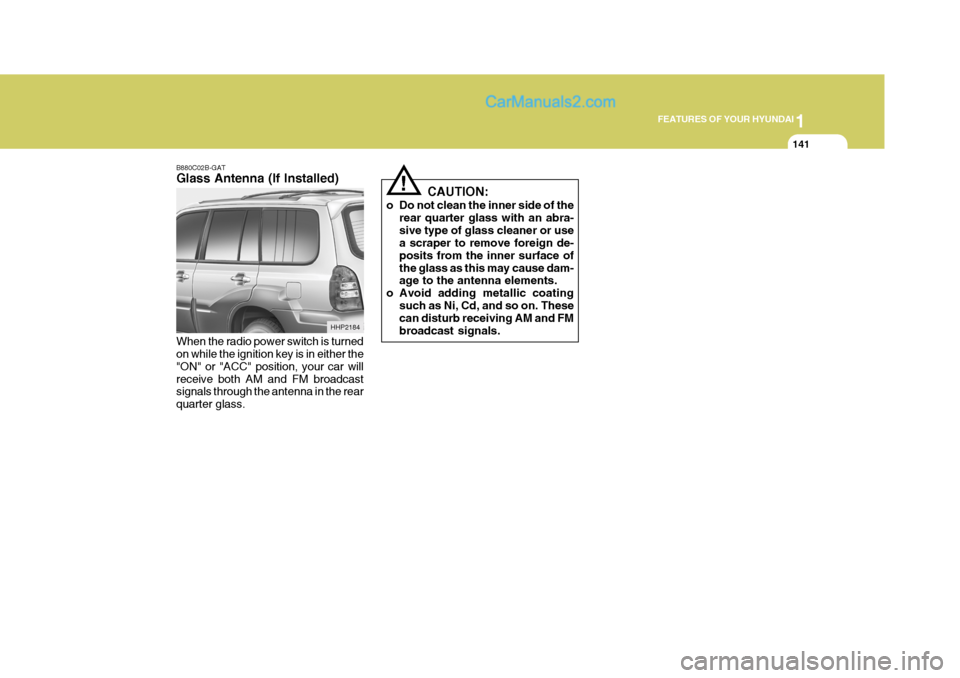
B880C02B-GAT Glass Antenna (If Installed) When the radio power switch is turned on while the ignition key is in either the "ON" or "ACC" position, your car willreceive both AM and FM broadcast signals through the antenna in the rear quarter glass. CAUTION:
o Do not clean the inner side of the rear quarter glass with an abra-sive type of glass cleaner or use a scraper to remove foreign de- posits from the inner surface ofthe glass as this may cause dam- age to the antenna elements.
o Avoid adding metallic coating
such as Ni, Cd, and so on. Thesecan disturb receiving AM and FM broadcast signals.
HHP2184
Page 159 of 539
2 DRIVING YOUR HYUNDAI
4
!WARNING: (Diesel only)
To ensure that sufficient vacuum exists within the brake system dur- ing cold weather start-up condi- tions, it is necessary to run theengine at idle after starting accord- ing to the following table.
Ambient temp. Above -15°C (5°F) Below -15°C (5°F)
After starting the engine, do not drive the vehicle until the brake vacuum warning light has turn-ed off. Failure to carry out the above pro- cedure may result in the need toapply greater pedal pressure in or- der to effect the necessary braking effort. Warm up time 3 min. or longer 6 min. or longer
KEY POSITIONS
!
C040A01A-AAT
WARNING:
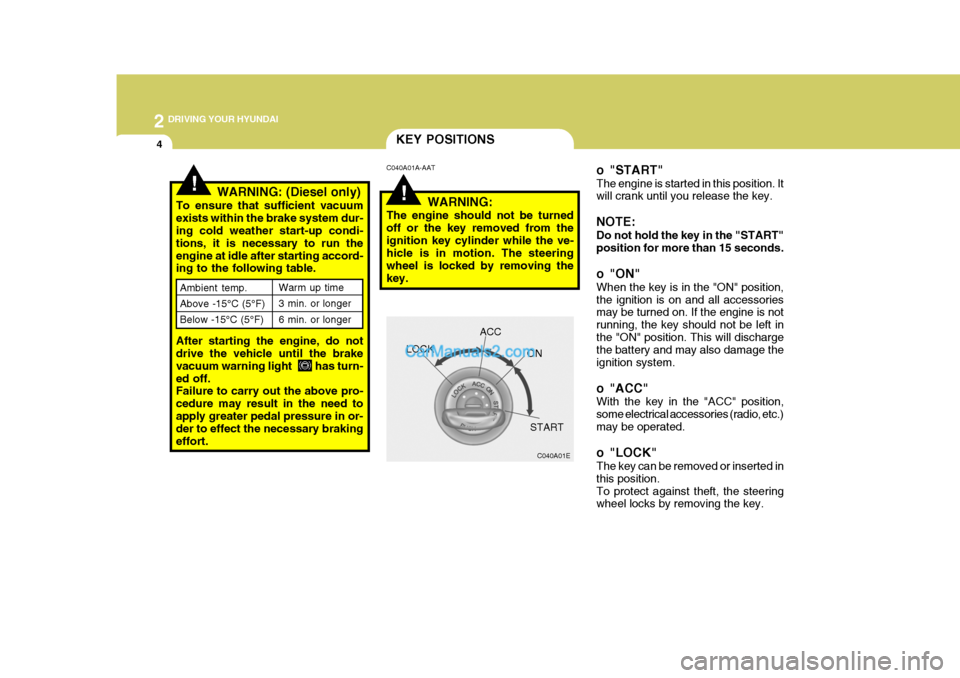
The engine should not be turned off or the key removed from theignition key cylinder while the ve- hicle is in motion. The steering wheel is locked by removing thekey. o "START" The engine is started in this position. It will crank until you release the key. NOTE: Do not hold the key in the "START" position for more than 15 seconds.
o "ON" When the key is in the "ON" position, the ignition is on and all accessories may be turned on. If the engine is not running, the key should not be left inthe "ON" position. This will discharge the battery and may also damage the ignition system.
o "ACC" With the key in the "ACC" position, some electrical accessories (radio, etc.)may be operated.
o "LOCK" The key can be removed or inserted in this position.To protect against theft, the steering wheel locks by removing the key.
C040A01E
LOCK
ACC
ON
START
Page 236 of 539
6 DO-IT-YOURSELF MAINTENANCE
14SPARK PLUGS
!
G060A01HP-GAT
(Gasoline Engine Only)
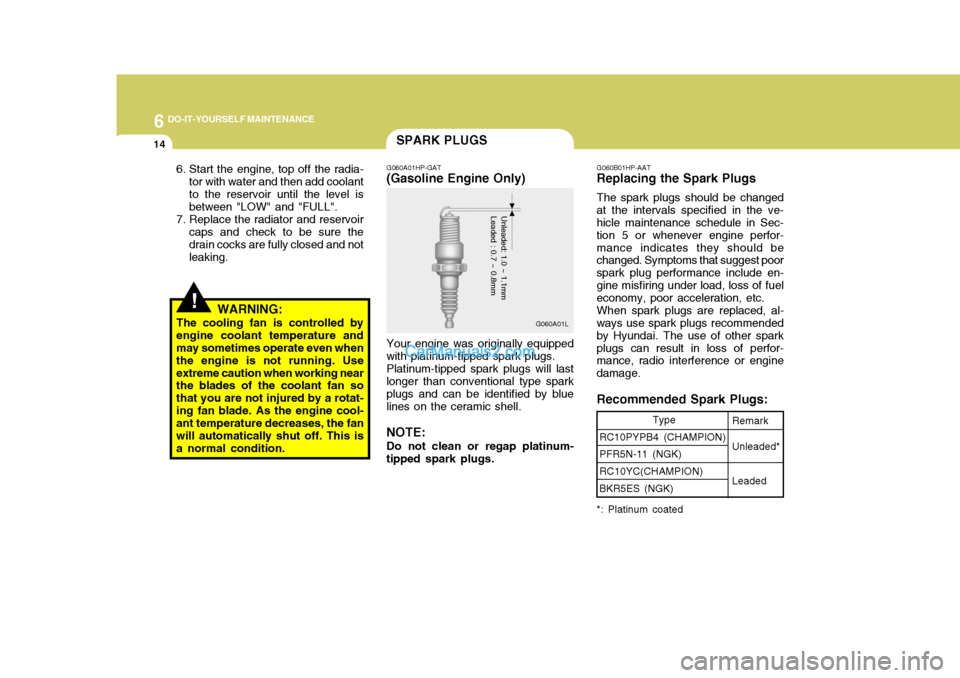
Your engine was originally equipped
with platinum-tipped spark plugs.
Platinum-tipped spark plugs will last
longer than conventional type spark plugs and can be identified by blue lines on the ceramic shell.
NOTE: Do not clean or regap platinum-
tipped spark plugs.
Unleaded: 1.0 ~ 1.1mm Leaded : 0.7 ~ 0.8mm
Type
RC10PYPB4 (CHAMPION) PFR5N-11 (NGK) RC10YC(CHAMPION)BKR5ES (NGK)
G060B01HP-AAT
Replacing the Spark Plugs
The spark plugs should be changed
at the intervals specified in the ve- hicle maintenance schedule in Sec- tion 5 or whenever engine perfor-mance indicates they should be changed. Symptoms that suggest poor spark plug performance include en-gine misfiring under load, loss of fuel economy, poor acceleration, etc.
When spark plugs are replaced, al-
ways use spark plugs recommended by Hyundai. The use of other sparkplugs can result in loss of perfor- mance, radio interference or engine damage. Recommended Spark Plugs:Remark Unleaded* Leaded
*: Platinum coated
6. Start the engine, top off the radia- tor with water and then add coolant to the reservoir until the level is between "LOW" and "FULL".
7. Replace the radiator and reservoir caps and check to be sure thedrain cocks are fully closed and not leaking.
WARNING:
The cooling fan is controlled byengine coolant temperature and may sometimes operate even when the engine is not running. Useextreme caution when working near the blades of the coolant fan so that you are not injured by a rotat-ing fan blade. As the engine cool- ant temperature decreases, the fan will automatically shut off. This isa normal condition. G060A01L
Page 253 of 539
6
DO-IT-YOURSELF MAINTENANCE
31
G200B02HP-GAT
Replacing Accessory Fuses
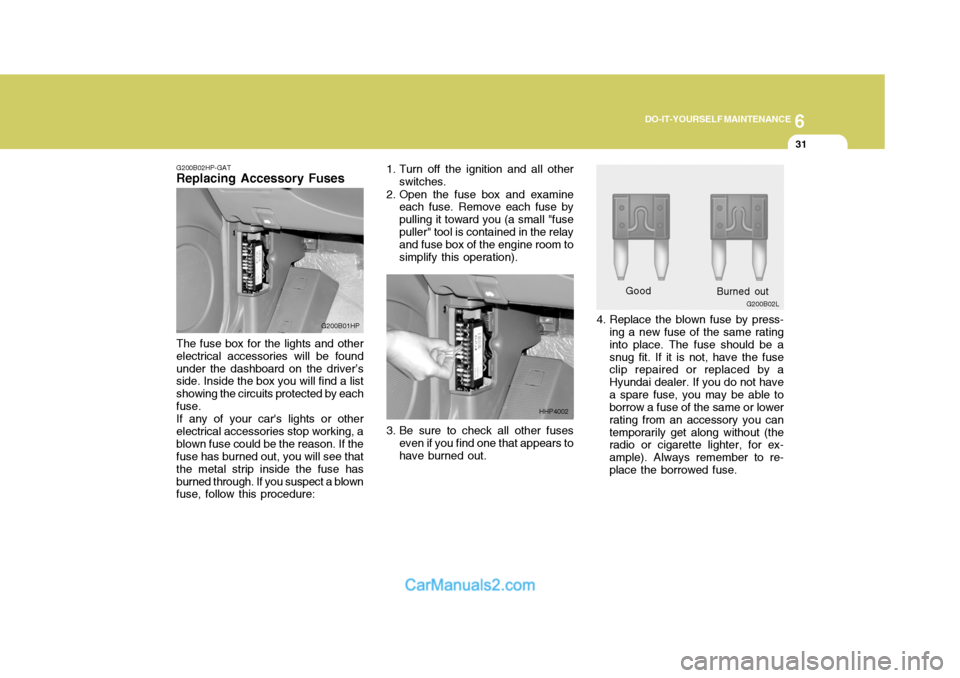
The fuse box for the lights and other electrical accessories will be foundunder the dashboard on the driver’s side. Inside the box you will find a list showing the circuits protected by eachfuse.If any of your car's lights or otherelectrical accessories stop working, ablown fuse could be the reason. If the fuse has burned out, you will see that the metal strip inside the fuse hasburned through. If you suspect a blown fuse, follow this procedure: G200B01HP
4. Replace the blown fuse by press-
ing a new fuse of the same rating into place. The fuse should be asnug fit. If it is not, have the fuse clip repaired or replaced by a Hyundai dealer. If you do not havea spare fuse, you may be able to borrow a fuse of the same or lower rating from an accessory you cantemporarily get along without (the radio or cigarette lighter, for ex- ample). Always remember to re-place the borrowed fuse.
3. Be sure to check all other fuses
even if you find one that appears tohave burned out. Good
1. Turn off the ignition and all other
switches.
2. Open the fuse box and examine each fuse. Remove each fuse bypulling it toward you (a small "fusepuller" tool is contained in the relay and fuse box of the engine room to simplify this operation).
HHP4002 G200B02L
Burned out
Page 292 of 539
10
INDEX
5
O Odometer .................................................................. 1-67
P Parking Brake ........................................................... 1-91
Part-time 4WD Operation .............. ...........................2-14
Power Driver's Seat .................................................. 1-21
Power Outle t ............................................................. 1-80
Power Steering Fluid Level ............................. ..........6-34
R Rear Seat W arning ................................................... 1-31
Rear Window Defroster Switch ................................ 1-78
Roof Rack ................................................................. 1-94
S Seat Belts 3-Point system ............................................. 1-34, 1-37
2-Point Static Type ................................................ 1-36
Adjusting your seat be lt .........................................1-35
Care of seat belts .................................................. 1-33
Precautions ............................................................ 1-31
Pretensioner Seat Belt ............... ............................ 1-45
Seat Warmer ............................................................. 1-23
Second Seat
Adjusting seatback angle ................. ...................... 1-24
Adjustable headrests . ............................................. 1-24
Folding rear seatback and seat cushion ...............1-25Side Under View Mirro
r ............................................ 1-90
Sound Brake Pad Wear Warning Sound ..........................1-65
Spark Plugs ............................................................... 6-14
Speedometer ............................................................. 1-67
Starting Procedure ...................................................... 2-5
Steering Wheel
Free-play ................................................................ 6-28
Steering wheel tilt lever .................... ..................... 1-99
Stereo Radio Operation (H240, H280) ....... 1-121, 1-126Stereo Sound System ............................................. 1-119
Sun roof .................................................................... 1-84
Sun viso r ................................................................... 1-97
Sunshad e .................................................................. 1-83
TTachometer ............................................................... 1-66
Tail Gat e ................................................................... 1-92
Theft-Alarm system ................................................... 1-13
Third Seat Adjusting Seatback Angle ......................................1-27
Folding Rear Seatback and seat cushion .............1-28
To get in and out of the third seat ........................1-30
Tires Balancing .................................................................. 8-5
Chains ...................................................................... 8-4
Changing a flat tire .................................................. 3-7
If you have a flat tire ............................................... 3-7
Information ............................................................... 8-3
Page 299 of 539
SA040A1-E SA050A1-E
TWO WAY RADIO INSTALLATION
This vehicle is fitted with electronically controlled fuel injection or other micro processor controlled equipment. It is possible for incorrectly installed two way radio equipment including mobiletelephones to adversely affect these systems. Before radio equipment of this kind is installed, please contact your Hyundai dealer for recommendation regarding the suitability of the particular radio equipmentconcerned and the recommended method of installation and equipment location. Incorrectly installed or unsuitable equipment which gives rise to incorrect functioning of or damage to electronic vehicle components will not fall within the scope of thevehicle manufacturers warranty.
CAUTION: MODIFICATIONS TO ORIGINAL VEHICLE SPECIFICATION
Modification to the original vehicle specification may invalidate the manufacturers warranty and may adversely affect the safety and durability of the vehicle. Components which are subject to modification or are added to the original vehiclespecification without the express approval of the manufacturer and result in conse- quential loss or damage are not covered by the vehicle manufacturers warranty.!
Page 410 of 539
1
CONTROLS AND EQUIPMENT
105STEREO SOUND SYSTEM
B750A02A-AAT How Car Audio Works
Ionosphere
FM reception
B750A01L
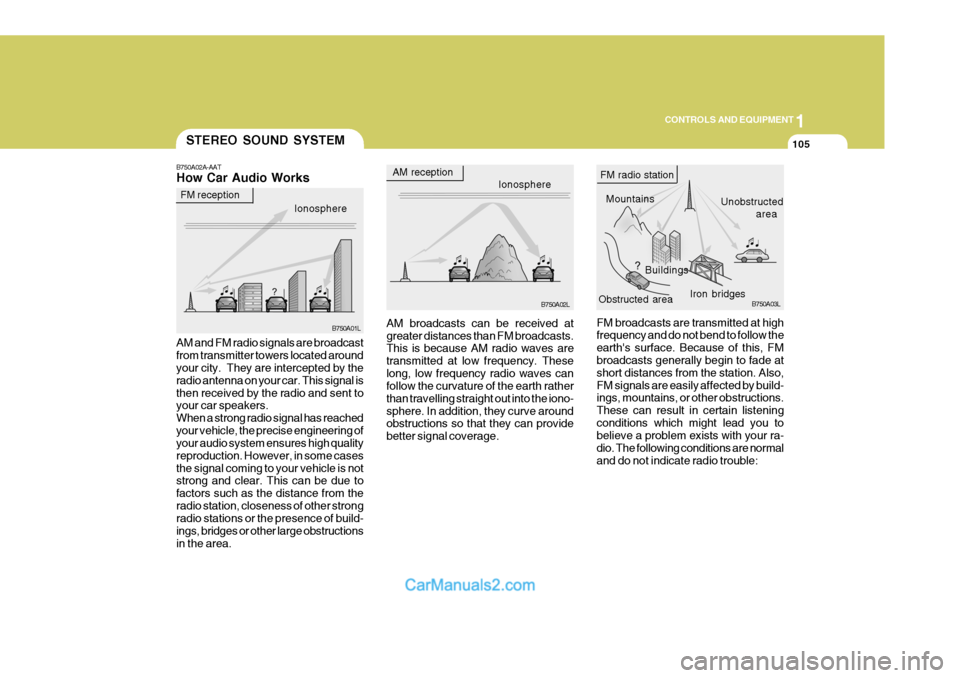
AM and FM radio signals are broadcast from transmitter towers located around your city. They are intercepted by the radio antenna on your car. This signal isthen received by the radio and sent to your car speakers. When a strong radio signal has reachedyour vehicle, the precise engineering of your audio system ensures high quality reproduction. However, in some casesthe signal coming to your vehicle is not strong and clear. This can be due to factors such as the distance from theradio station, closeness of other strong radio stations or the presence of build- ings, bridges or other large obstructionsin the area. AM broadcasts can be received atgreater distances than FM broadcasts. This is because AM radio waves are transmitted at low frequency. Theselong, low frequency radio waves can follow the curvature of the earth rather than travelling straight out into the iono-sphere. In addition, they curve around obstructions so that they can provide better signal coverage.
AM reception
Ionosphere
B750A02L
MountainsBuildings Unobstructed
area
FM radio station
B750A03L
Obstructed area Iron bridges
FM broadcasts are transmitted at high frequency and do not bend to follow the earth's surface. Because of this, FM broadcasts generally begin to fade at short distances from the station. Also,FM signals are easily affected by build- ings, mountains, or other obstructions. These can result in certain listeningconditions which might lead you to believe a problem exists with your ra- dio. The following conditions are normaland do not indicate radio trouble:
Page 411 of 539
1CONTROLS AND EQUIPMENT
106
!
B750B02Y-AAT Using a cellular phone or a two- way radio When a cellular phone is used inside the vehicle, noise may be producedfrom the audio equipment. This does not mean that something is wrong with the audio equipment. In such a case,use the cellular phone at a place as far as possible from the audio equipment.
CAUTION:
When using a communication sys- tem such a cellular phone or a radio set inside the vehicle, a separate external antenna must be fitted.When a cellular phone or a radio set is used with an internal antenna alone, it may interfere with thevehicle's electrical system and ad- versely affect safe operation of the vehicle.
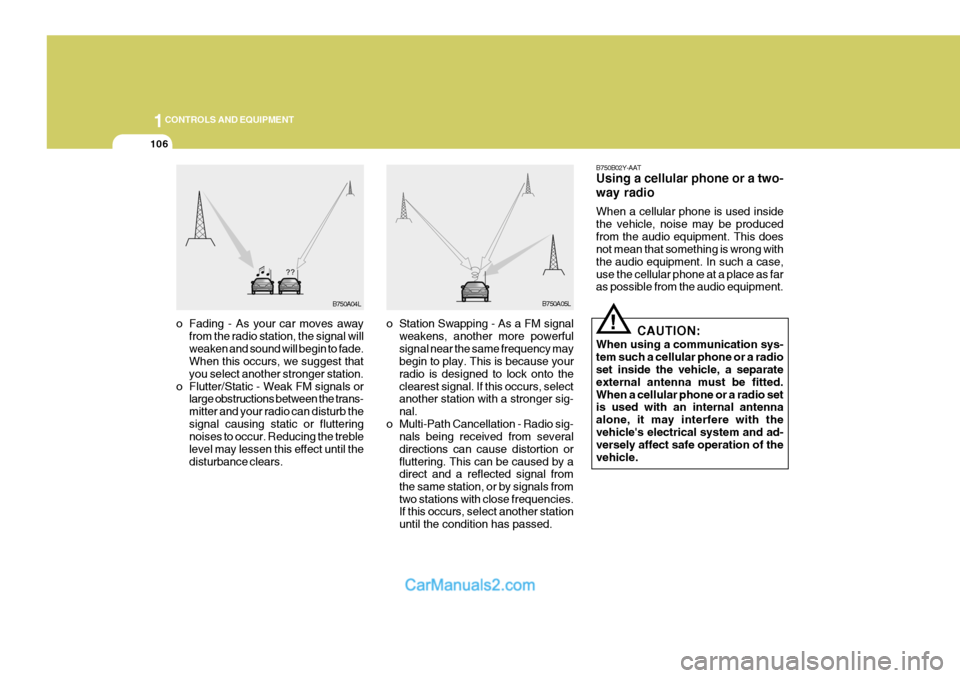
o Fading - As your car moves away
from the radio station, the signal willweaken and sound will begin to fade. When this occurs, we suggest that you select another stronger station.
o Flutter/Static - Weak FM signals or large obstructions between the trans-mitter and your radio can disturb thesignal causing static or fluttering noises to occur. Reducing the treble level may lessen this effect until thedisturbance clears. o Station Swapping - As a FM signal
weakens, another more powerfulsignal near the same frequency may begin to play. This is because your radio is designed to lock onto theclearest signal. If this occurs, select another station with a stronger sig- nal.
o Multi-Path Cancellation - Radio sig- nals being received from severaldirections can cause distortion orfluttering. This can be caused by a direct and a reflected signal from the same station, or by signals fromtwo stations with close frequencies. If this occurs, select another station until the condition has passed.
B750A04L B750A05L
Page 413 of 539
1CONTROLS AND EQUIPMENT
108
!
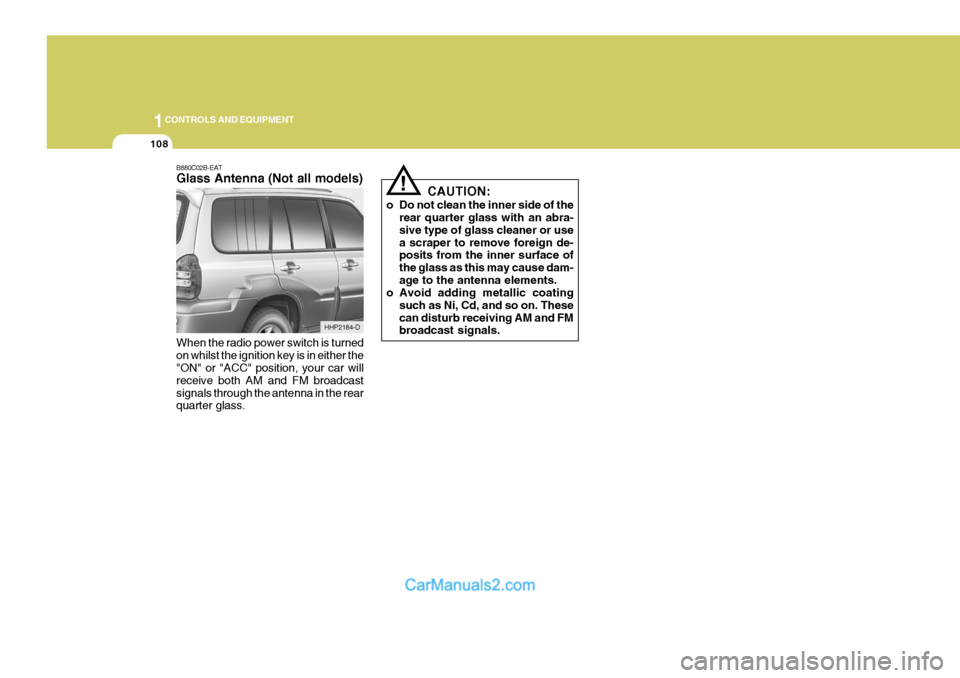
B880C02B-EAT Glass Antenna (Not all models) When the radio power switch is turned on whilst the ignition key is in either the "ON" or "ACC" position, your car will receive both AM and FM broadcastsignals through the antenna in the rear quarter glass. CAUTION:
o Do not clean the inner side of the rear quarter glass with an abra- sive type of glass cleaner or usea scraper to remove foreign de- posits from the inner surface of the glass as this may cause dam-age to the antenna elements.
o Avoid adding metallic coating
such as Ni, Cd, and so on. Thesecan disturb receiving AM and FM broadcast signals.
HHP2184-D