light Hyundai Tiburon 2005 Repair Manual
[x] Cancel search | Manufacturer: HYUNDAI, Model Year: 2005, Model line: Tiburon, Model: Hyundai Tiburon 2005Pages: 262, PDF Size: 11.12 MB
Page 216 of 262

6
DO-IT-YOURSELF MAINTENANCE
27
!
!
CHECKING ELECTRIC COOLING
FANS!
G220A01A-AAT
WARNING:
The cooling fan is controlled by engine
coolant temperature and may sometimes
operate even when the engine is not run-
ning. Use extreme caution when working
near the blades of the coolant fan, so that
you are not injured by a rotating fan blade.
As the engine coolant temperature de-
creases the fan will automatically shut off.
This is a normal condition.
WARNING:Always read the following in-
structions carefully when han-
dling a battery.
Keep lighted cigarettes and all
other flames or sparks away from
the battery.
Hydrogen, which is a highly com-
bustible gas, is always present in
battery cells and may explode if
ignited.
Keep batteries out of the reach of
children because batteries con-
tain highly corrosive SULFURIC
ACID. Do not allow battery acid
to contact your skin, eyes, cloth-
ing or paint finish.
If any electrolyte gets into your
eyes, flush your eyes with clean
water for at least 15 minutes and
get immediate medical attention.
If possible, continue to apply
water with a sponge or cloth until
medical attention is received.If electrolyte gets on your skin,
thoroughly wash the contacted
area.
If you feel a pain or a burning
sensation, get medical attention
immediately.
Wear eye protection when charg-
ing or working near a battery.
Always provide ventilation when
working in an enclosed space.
o When lifting a plastic-cased battery, ex-
cessive pressure on the case may cause
battery acid to leak, resulting in personal
injury. Lift with a battery carrier or with
your hands on opposite corners.
o Never attempt to charge the battery when
the battery cables are connected.
o The electrical ignition system works with
high voltage.
Never touch these components with the
engine running or the ignition switched
on.
WARNING:
Page 218 of 262
6
DO-IT-YOURSELF MAINTENANCE
29
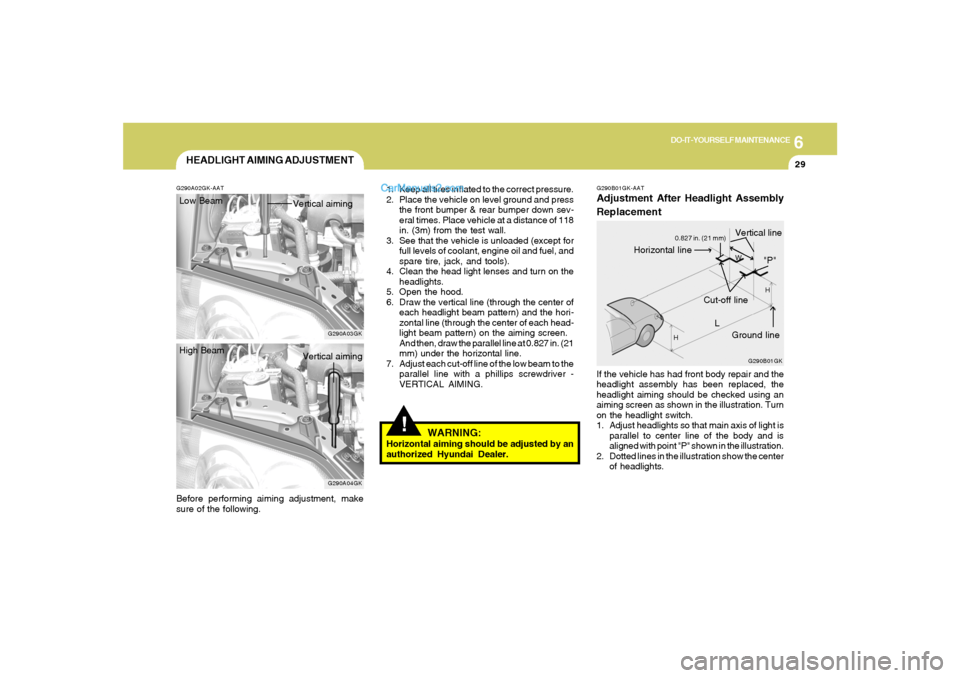
G290B01GK-AATAdjustment After Headlight Assembly
ReplacementIf the vehicle has had front body repair and the
headlight assembly has been replaced, the
headlight aiming should be checked using an
aiming screen as shown in the illustration. Turn
on the headlight switch.
1. Adjust headlights so that main axis of light is
parallel to center line of the body and is
aligned with point "P" shown in the illustration.
2. Dotted lines in the illustration show the center
of headlights.
G290B01GK
L
W
H
H
Cut-off line
Ground line
"P"
Horizontal line
Vertical line
0.827 in. (21 mm)
HEADLIGHT AIMING ADJUSTMENT
G290A03GK G290A02GK-AAT
!
1. Keep all tires inflated to the correct pressure.
2. Place the vehicle on level ground and press
the front bumper & rear bumper down sev-
eral times. Place vehicle at a distance of 118
in. (3m) from the test wall.
3. See that the vehicle is unloaded (except for
full levels of coolant, engine oil and fuel, and
spare tire, jack, and tools).
4. Clean the head light lenses and turn on the
headlights.
5. Open the hood.
6. Draw the vertical line (through the center of
each headlight beam pattern) and the hori-
zontal line (through the center of each head-
light beam pattern) on the aiming screen.
And then, draw the parallel line at 0.827 in. (21
mm) under the horizontal line.
7. Adjust each cut-off line of the low beam to the
parallel line with a phillips screwdriver -
VERTICAL AIMING.
WARNING:
Horizontal aiming should be adjusted by an
authorized Hyundai Dealer. Low Beam
Vertical aiming
Before performing aiming adjustment, make
sure of the following.
G290A04GK
High Beam
Vertical aiming
Page 219 of 262
6
DO-IT-YOURSELF MAINTENANCE
30
SPECIFICATION:"H"
Horizontal center line of headlights from ground:
Low Beam: 26.7 in. (679mm)
High Beam: 26.5 in. (672mm)
"W"
Distance between each headlight center :
Low Beam: 47.3 in. (1,202mm)
High Beam: 38.0 in. (966mm)
"L"
Distance between the headlights and the wall
that the lights are tested against : 118 in. (3,000
mm)
REPLACEMENT OF LIGHT BULBS!
G260A02A-AATBefore attempting to replace a light bulb, be sure
the switch is turned to the "OFF" position.
The next paragraph shows how to reach the
light bulbs so they may be changed. Be sure to
replace the burned-out bulb with one of the
same number and wattage rating.
See page 6-38 for the wattage description.
CAUTION:
Keep the lamps out of contact with petro-
leum products, such as oil, gasoline, etc.
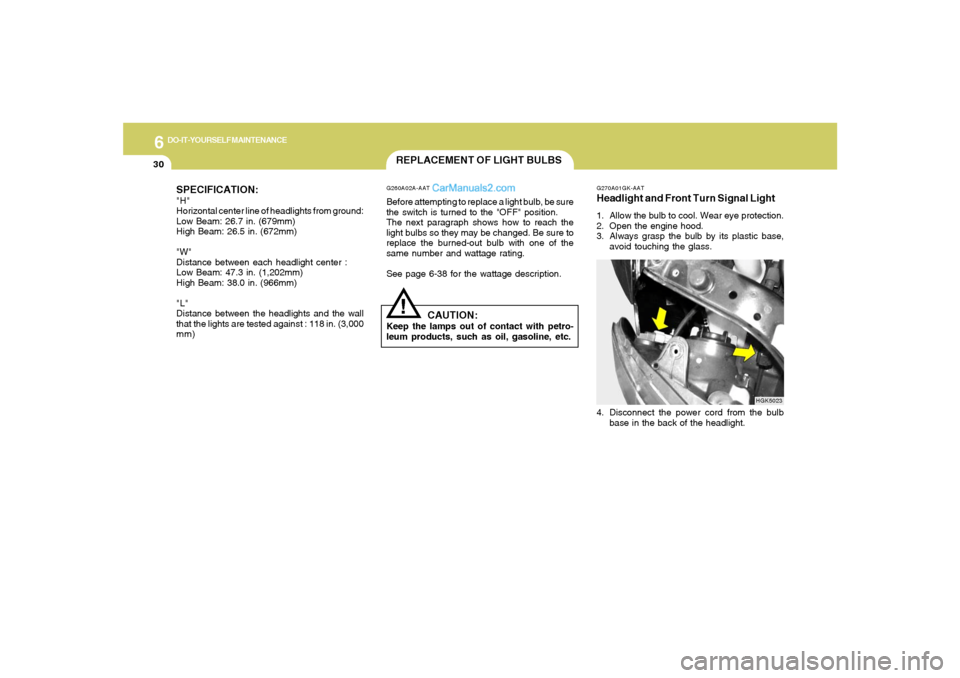
G270A01GK-AATHeadlight and Front Turn Signal Light1. Allow the bulb to cool. Wear eye protection.
2. Open the engine hood.
3. Always grasp the bulb by its plastic base,
avoid touching the glass.4. Disconnect the power cord from the bulb
base in the back of the headlight.
HGK5023
Page 220 of 262
6
DO-IT-YOURSELF MAINTENANCE
31
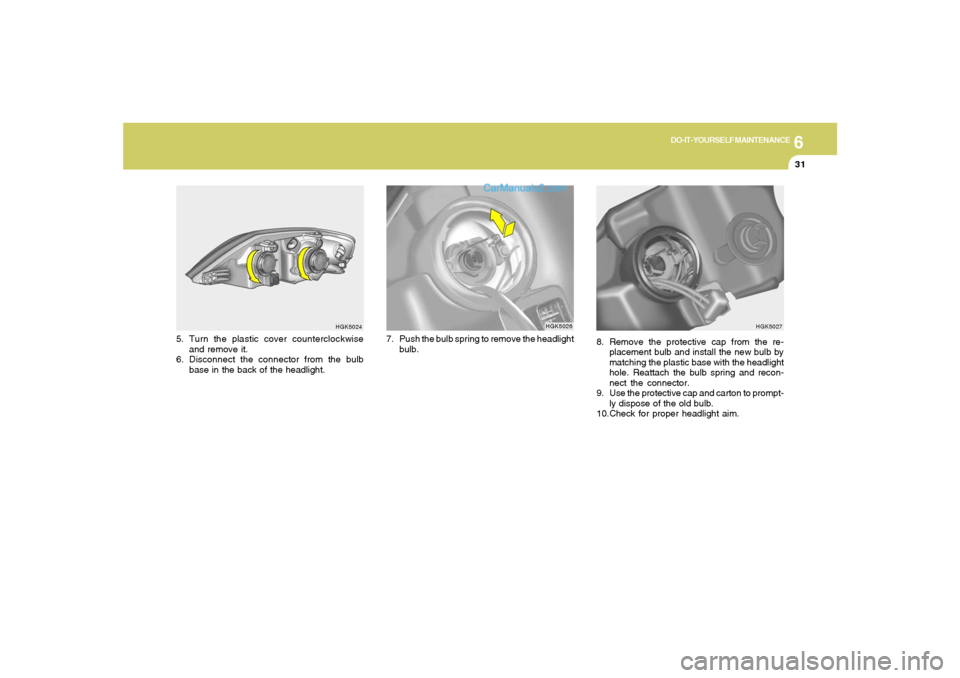
8. Remove the protective cap from the re-
placement bulb and install the new bulb by
matching the plastic base with the headlight
hole. Reattach the bulb spring and recon-
nect the connector.
9. Use the protective cap and carton to prompt-
ly dispose of the old bulb.
10.Check for proper headlight aim.
HGK5027
HGK5024
5. Turn the plastic cover counterclockwise
and remove it.
6. Disconnect the connector from the bulb
base in the back of the headlight.
HGK5026
7. Push the bulb spring to remove the headlight
bulb.
Page 221 of 262
6
DO-IT-YOURSELF MAINTENANCE
32
!
WARNING:
This halogen bulb contains gas under pres-
sure and if impacted could shatter, result-
ing in flying fragments. Always wear eye
protection when servicing the bulb. Protect
the bulb against abrasions or scratches
and against liquids when lighted. Turn the
bulb on only when installing in a headlight.
Replace the headlight if damaged or cracked.
Keep the bulb out of the reach of children
and dispose of the used bulb with care.
HGK5036G270A03O
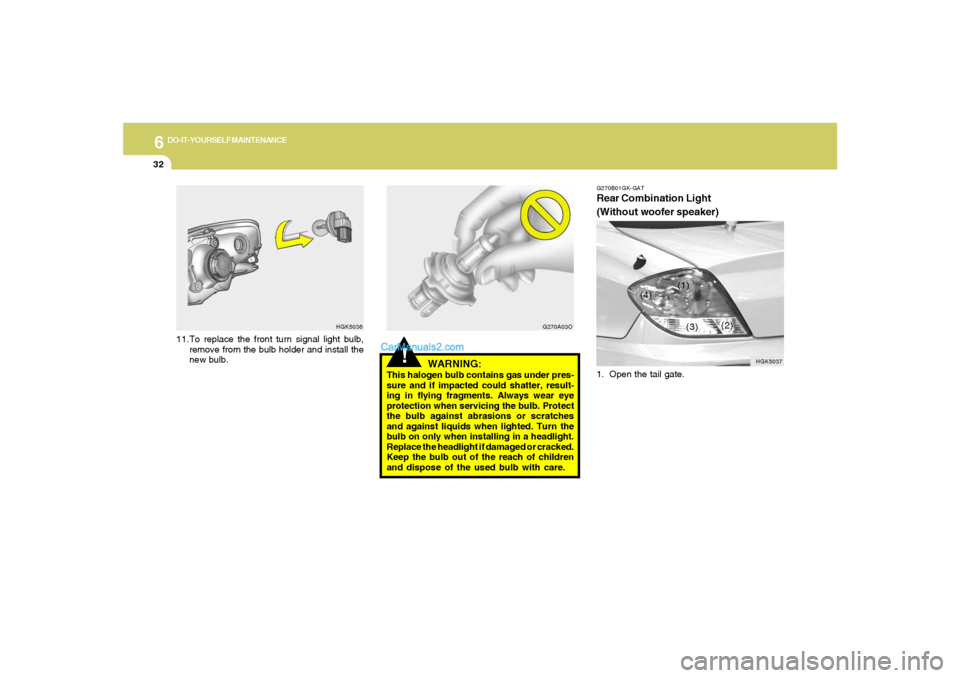
11.To replace the front turn signal light bulb,
remove from the bulb holder and install the
new bulb.
G270B01GK-GATRear Combination Light
(Without woofer speaker)1. Open the tail gate.
HGK5037
(1)
(2)
(3) (4)
Page 222 of 262
6
DO-IT-YOURSELF MAINTENANCE
33
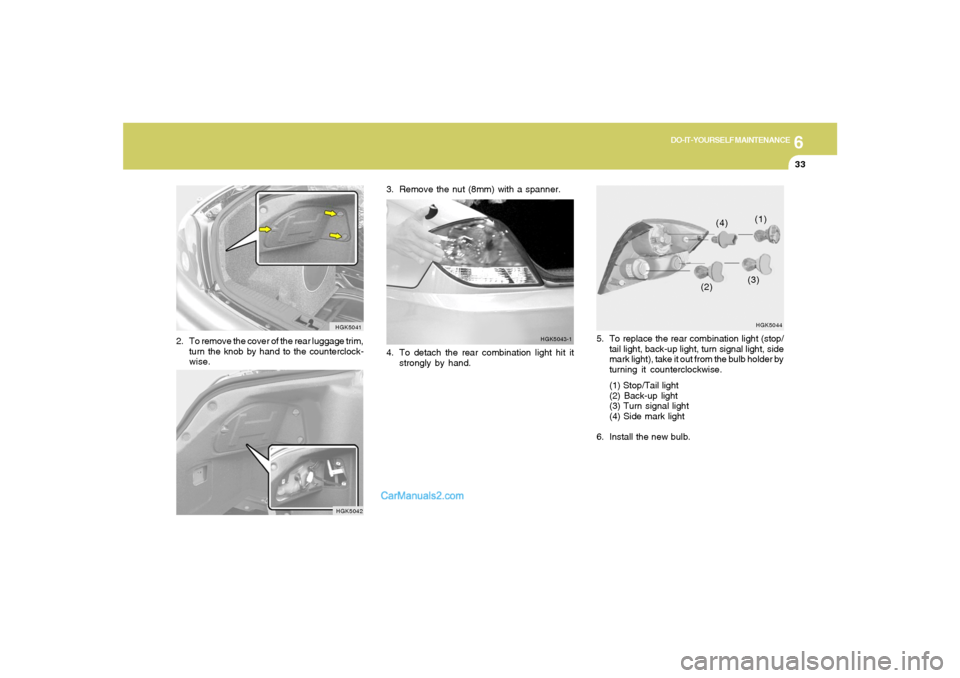
5. To replace the rear combination light (stop/
tail light, back-up light, turn signal light, side
mark light), take it out from the bulb holder by
turning it counterclockwise.
(1) Stop/Tail light
(2) Back-up light
(3) Turn signal light
(4) Side mark light
6. Install the new bulb.
HGK5044(1)
(2)(3) (4)
HGK5041
2. To remove the cover of the rear luggage trim,
turn the knob by hand to the counterclock-
wise.
HGK5042
3. Remove the nut (8mm) with a spanner.
4. To detach the rear combination light hit it
strongly by hand.
HGK5043-1
Page 223 of 262
6
DO-IT-YOURSELF MAINTENANCE
34
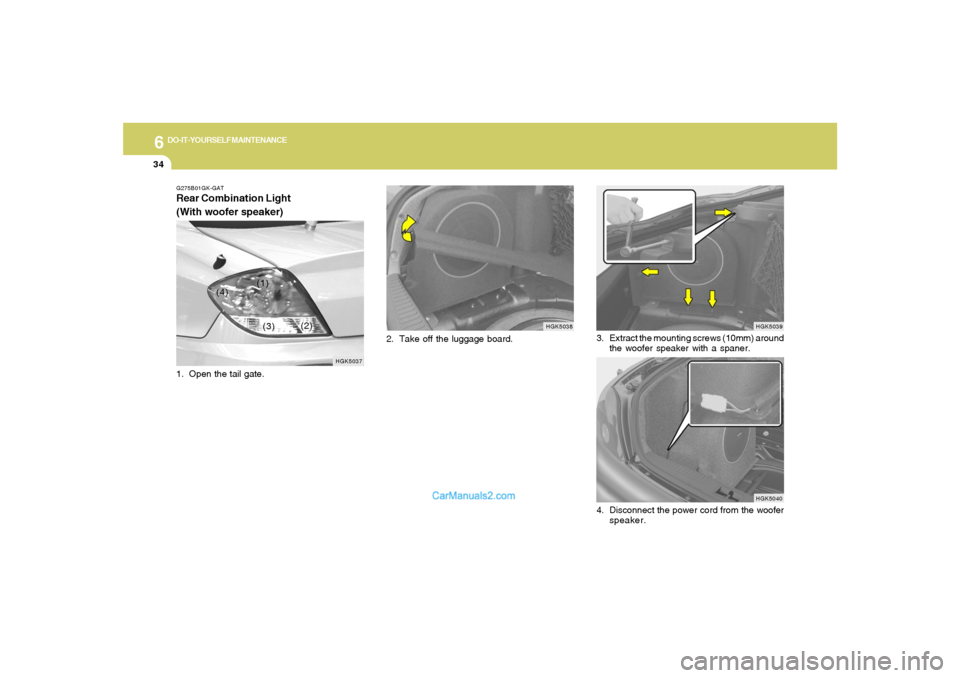
2. Take off the luggage board.
HGK5038 G275B01GK-GAT
Rear Combination Light
(With woofer speaker)
HGK5037
(1)
(2)
(3) (4)
1. Open the tail gate.
HGK5039
HGK5040
3. Extract the mounting screws (10mm) around
the woofer speaker with a spaner.
4. Disconnect the power cord from the woofer
speaker.
Page 224 of 262
6
DO-IT-YOURSELF MAINTENANCE
35
HGK5044(1)
(2)(3) (4)
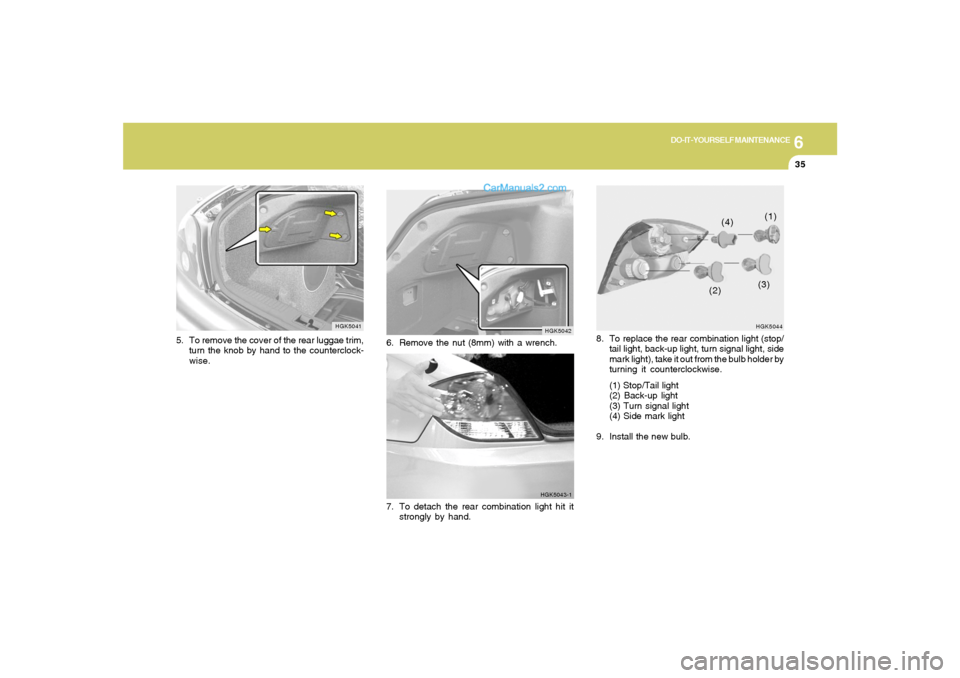
8. To replace the rear combination light (stop/
tail light, back-up light, turn signal light, side
mark light), take it out from the bulb holder by
turning it counterclockwise.
(1) Stop/Tail light
(2) Back-up light
(3) Turn signal light
(4) Side mark light
9. Install the new bulb.
HGK5041
5. To remove the cover of the rear luggae trim,
turn the knob by hand to the counterclock-
wise.
HGK5042
6. Remove the nut (8mm) with a wrench.
HGK5043-1
7. To detach the rear combination light hit it
strongly by hand.
Page 225 of 262
6
DO-IT-YOURSELF MAINTENANCE
36
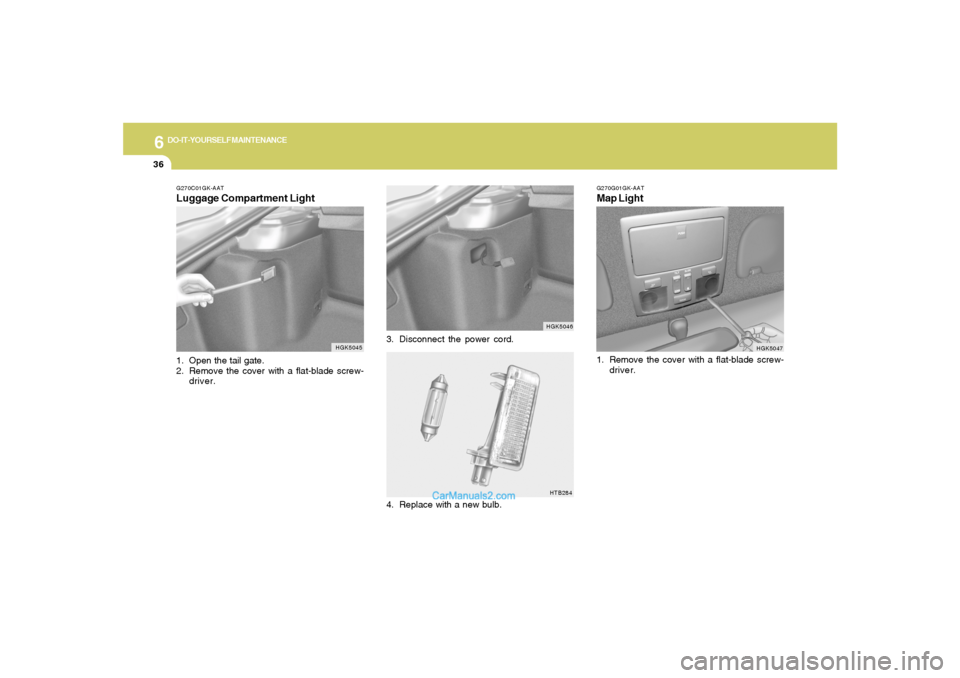
3. Disconnect the power cord.
HGK5046HTB284
G270C01GK-AATLuggage Compartment Light1. Open the tail gate.
2. Remove the cover with a flat-blade screw-
driver.
HGK5045
4. Replace with a new bulb.
G270G01GK-AATMap Light
HGK5047
1. Remove the cover with a flat-blade screw-
driver.
Page 226 of 262
6
DO-IT-YOURSELF MAINTENANCE
37
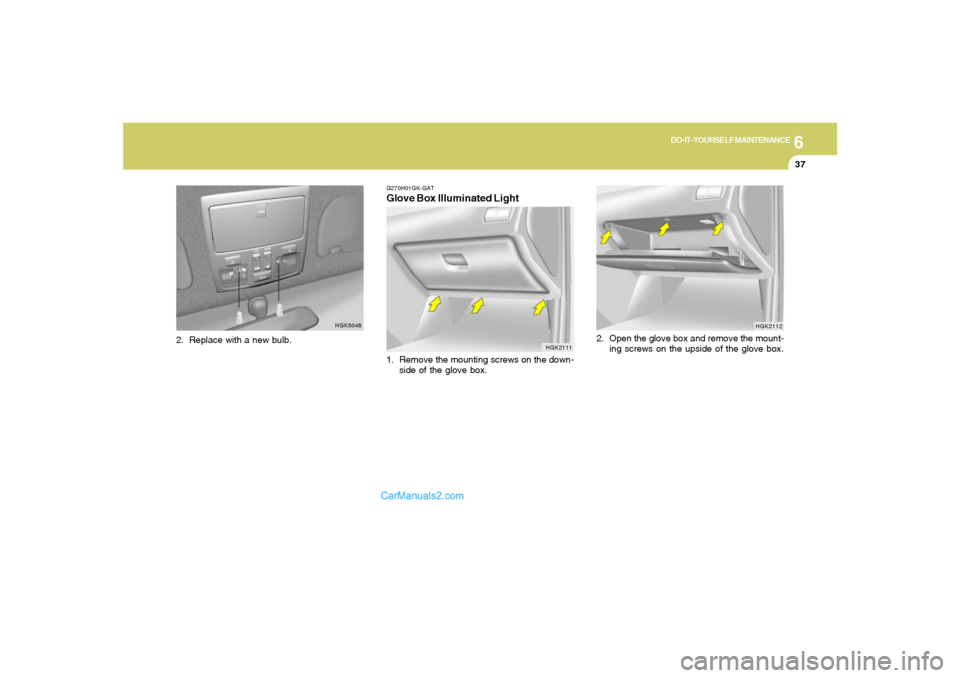
HGK2112
2. Open the glove box and remove the mount-
ing screws on the upside of the glove box.
HGK5048
G270H01GK-GATGlove Box Illuminated Light1. Remove the mounting screws on the down-
side of the glove box.
HGK2111
2. Replace with a new bulb.