side indicator Hyundai Tiburon 2007 User Guide
[x] Cancel search | Manufacturer: HYUNDAI, Model Year: 2007, Model line: Tiburon, Model: Hyundai Tiburon 2007Pages: 269, PDF Size: 10.37 MB
Page 83 of 269
1
FEATURES OF YOUR HYUNDAI
71
DAY/NIGHT INSIDE REAR VIEW
MIRROR
!
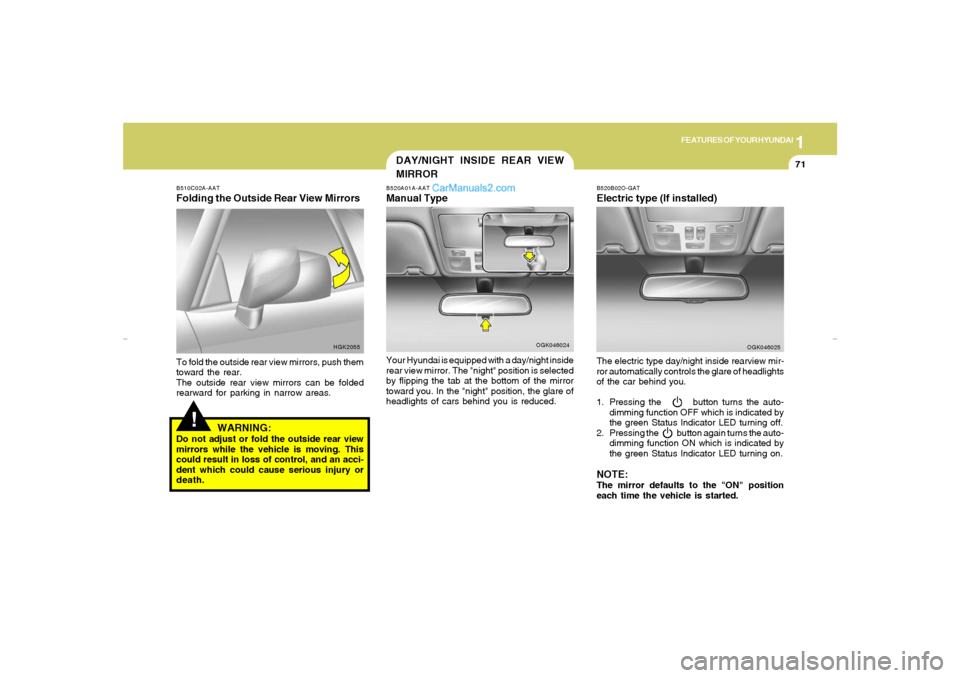
B510C02A-AATFolding the Outside Rear View MirrorsTo fold the outside rear view mirrors, push them
toward the rear.
The outside rear view mirrors can be folded
rearward for parking in narrow areas.
HGK2055
WARNING:
Do not adjust or fold the outside rear view
mirrors while the vehicle is moving. This
could result in loss of control, and an acci-
dent which could cause serious injury or
death.
B520A01A-AATManual TypeYour Hyundai is equipped with a day/night inside
rear view mirror. The "night" position is selected
by flipping the tab at the bottom of the mirror
toward you. In the "night" position, the glare of
headlights of cars behind you is reduced.
OGK046024
B520B02O-GATElectric type (If installed)The electric type day/night inside rearview mir-
ror automatically controls the glare of headlights
of the car behind you.
1. Pressing the button turns the auto-
dimming function OFF which is indicated by
the green Status Indicator LED turning off.
2. Pressing the button again turns the auto-
dimming function ON which is indicated by
the green Status Indicator LED turning on.NOTE:The mirror defaults to the "ON" position
each time the vehicle is started.
OGK046025
gkflhma-1a.p659/12/2006, 3:17 PM 71
Page 84 of 269
1FEATURES OF YOUR HYUNDAI72
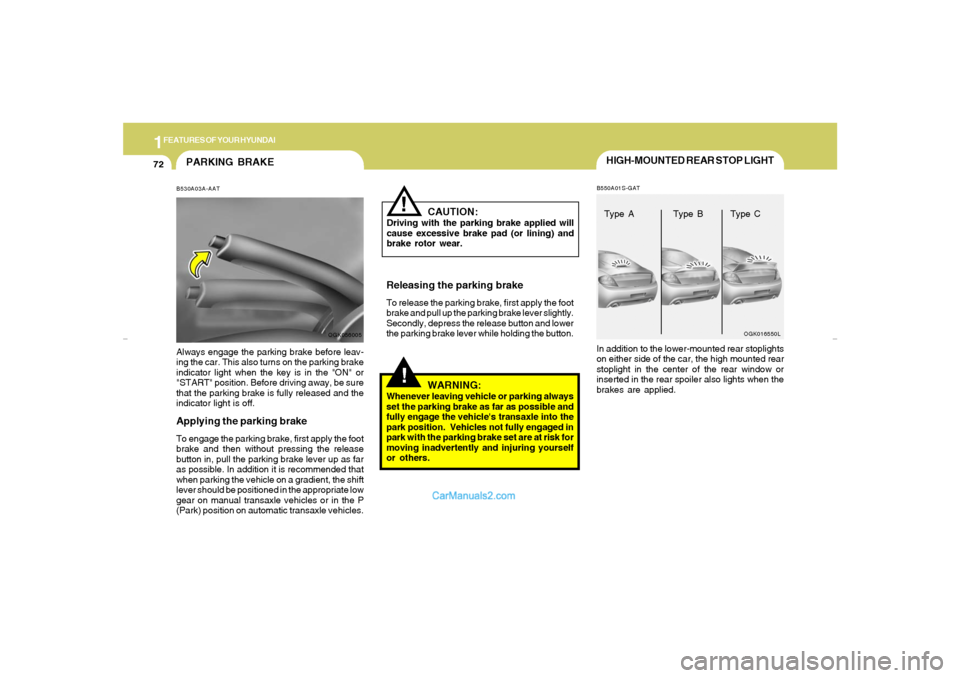
HIGH-MOUNTED REAR STOP LIGHTB550A01S-GATIn addition to the lower-mounted rear stoplights
on either side of the car, the high mounted rear
stoplight in the center of the rear window or
inserted in the rear spoiler also lights when the
brakes are applied.
OGK016550L
Type A Type B Type C
PARKING BRAKEB530A03A-AATAlways engage the parking brake before leav-
ing the car. This also turns on the parking brake
indicator light when the key is in the "ON" or
"START" position. Before driving away, be sure
that the parking brake is fully released and the
indicator light is off.Applying the parking brakeTo engage the parking brake, first apply the foot
brake and then without pressing the release
button in, pull the parking brake lever up as far
as possible. In addition it is recommended that
when parking the vehicle on a gradient, the shift
lever should be positioned in the appropriate low
gear on manual transaxle vehicles or in the P
(Park) position on automatic transaxle vehicles.
OGK056005
!
CAUTION:
Driving with the parking brake applied will
cause excessive brake pad (or lining) and
brake rotor wear.Releasing the parking brakeTo release the parking brake, first apply the foot
brake and pull up the parking brake lever slightly.
Secondly, depress the release button and lower
the parking brake lever while holding the button.
!
WARNING:
Whenever leaving vehicle or parking always
set the parking brake as far as possible and
fully engage the vehicle's transaxle into the
park position. Vehicles not fully engaged in
park with the parking brake set are at risk for
moving inadvertently and injuring yourself
or others.
gkflhma-1a.p659/12/2006, 3:17 PM 72
Page 100 of 269
1FEATURES OF YOUR HYUNDAI88
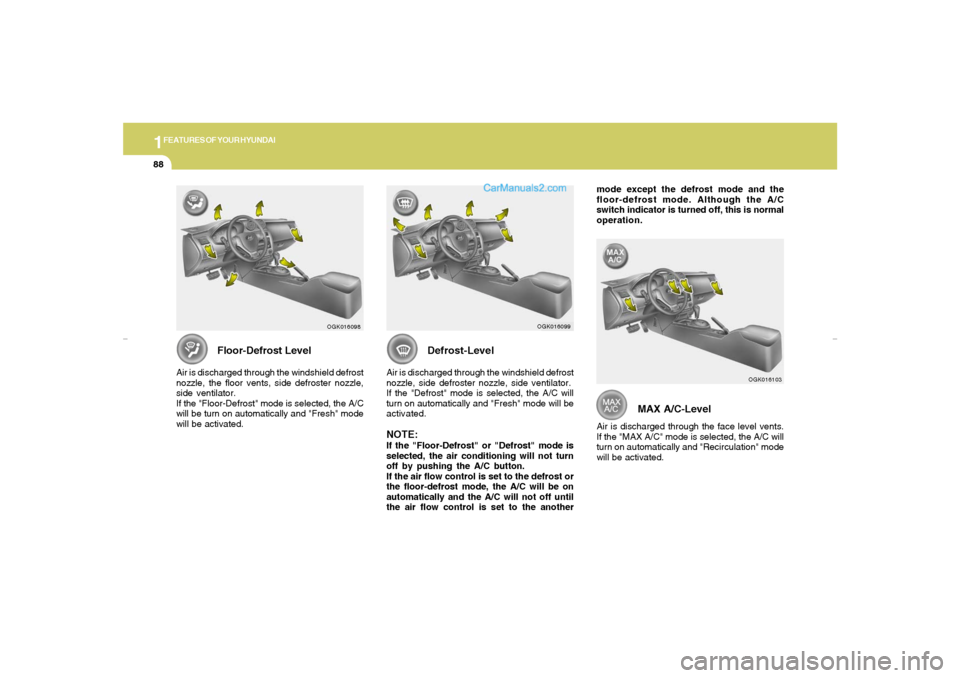
MAX A/C-Level
Air is discharged through the face level vents.
If the "MAX A/C" mode is selected, the A/C will
turn on automatically and "Recirculation" mode
will be activated.
OGK016103
mode except the defrost mode and the
floor-defrost mode. Although the A/C
switch indicator is turned off, this is normal
operation.
Defrost-Level
Air is discharged through the windshield defrost
nozzle, side defroster nozzle, side ventilator.
If the "Defrost" mode is selected, the A/C will
turn on automatically and "Fresh" mode will be
activated.NOTE:If the "Floor-Defrost" or "Defrost" mode is
selected, the air conditioning will not turn
off by pushing the A/C button.
If the air flow control is set to the defrost or
the floor-defrost mode, the A/C will be on
automatically and the A/C will not off until
the air flow control is set to the another
OGK016099
Floor-Defrost Level
Air is discharged through the windshield defrost
nozzle, the floor vents, side defroster nozzle,
side ventilator.
If the "Floor-Defrost" mode is selected, the A/C
will be turn on automatically and "Fresh" mode
will be activated.
OGK016098
gkflhma-1b.p659/12/2006, 3:18 PM 88
Page 109 of 269
1
FEATURES OF YOUR HYUNDAI
97
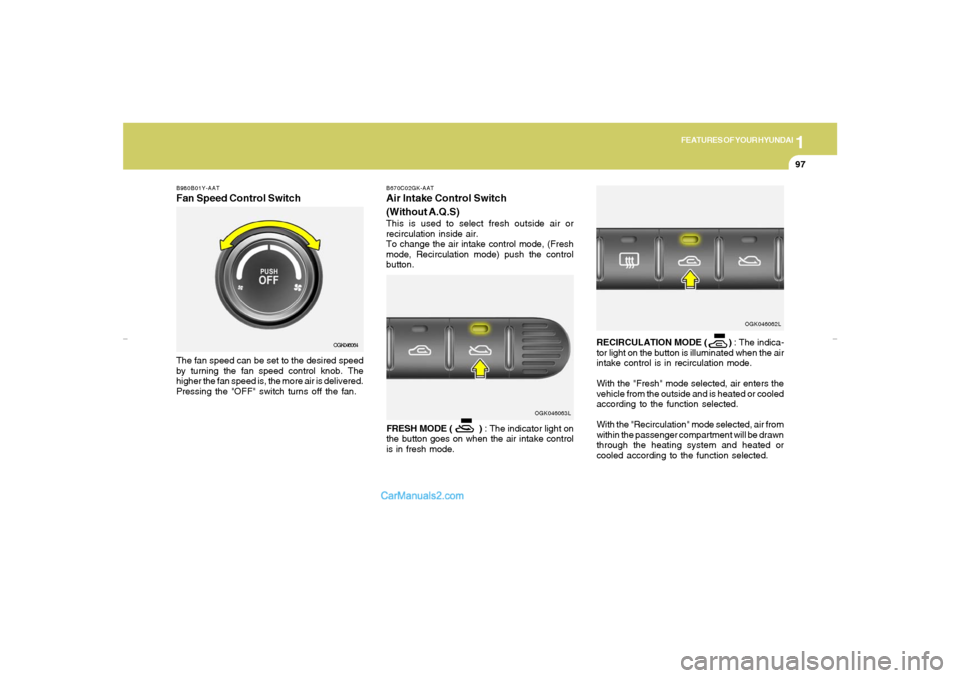
B980B01Y-AATFan Speed Control SwitchThe fan speed can be set to the desired speed
by turning the fan speed control knob. The
higher the fan speed is, the more air is delivered.
Pressing the "OFF" switch turns off the fan.
OGK046064
OGK046063L B670C02GK-AAT
Air Intake Control Switch
(Without A.Q.S)This is used to select fresh outside air or
recirculation inside air.
To change the air intake control mode, (Fresh
mode, Recirculation mode) push the control
button.
FRESH MODE ( ) : The indicator light on
the button goes on when the air intake control
is in fresh mode.RECIRCULATION MODE ( ) : The indica-
tor light on the button is illuminated when the air
intake control is in recirculation mode.
With the "Fresh" mode selected, air enters the
vehicle from the outside and is heated or cooled
according to the function selected.
With the "Recirculation" mode selected, air from
within the passenger compartment will be drawn
through the heating system and heated or
cooled according to the function selected.
OGK046062L
gkflhma-1b.p659/12/2006, 3:19 PM 97
Page 113 of 269
1
FEATURES OF YOUR HYUNDAI
101
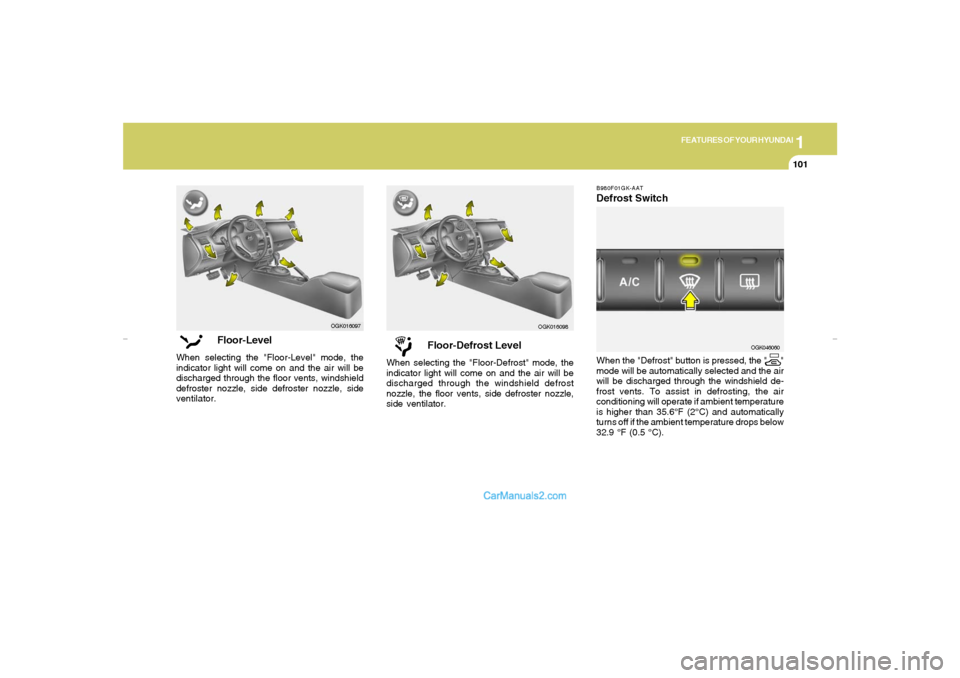
Floor-Defrost Level
When selecting the "Floor-Defrost" mode, the
indicator light will come on and the air will be
discharged through the windshield defrost
nozzle, the floor vents, side defroster nozzle,
side ventilator.
OGK016098B980F01GK-AAT
Defrost SwitchWhen the "Defrost" button is pressed, the " "
mode will be automatically selected and the air
will be discharged through the windshield de-
frost vents. To assist in defrosting, the air
conditioning will operate if ambient temperature
is higher than 35.6°F (2°C) and automatically
turns off if the ambient temperature drops below
32.9 °F (0.5 °C).
OGK046060
Floor-Level
When selecting the "Floor-Level" mode, the
indicator light will come on and the air will be
discharged through the floor vents, windshield
defroster nozzle, side defroster nozzle, side
ventilator.
OGK016097
gkflhma-1b.p659/12/2006, 3:19 PM 101
Page 124 of 269
1FEATURES OF YOUR HYUNDAI
112
H280F01GK-GAT1. CD DeckMake sure the printed side of the disk faces
upward when you insert the disk. If you insert
the disk when the ignition switch of the automo-
bile is set to ACC (1st notch) or ON (2nd notch),
the CD Deck will automatically play CD even if
the power was off. This CD Deck can play both
12cm and 8cm audio disks. If you insert video
CD, then the screen will display "ERROR DISC"
and eject the disk.2. CD IndicatorThis indicator light will be on if the CD is inside
the CDP deck whether the audio system is on
or not. This light will go off when the CD is
ejected.3. CD Eject ButtonPress [
] button to eject the disk while playing
the disk. This will eject the CD whether or not the
ignition switch is on or off.
4. CD Selection ButtonPress this button while the disk is inside the CDP
deck to listen to the CD even if the radio or tape
was on or if CD changer was in action. If you
press [CD/MP3] button when the disk is ejected
and hanging in the opening, the system will
automatically insert the disk and play the CD.
5. Fast Backward (REW)Press and hold [REW] button while playing CD
then the player will play the disk backwards 5
times the regular speed for first 5 seconds and
15 times faster after that. The sound will be
reduced by 12dB while you are holding the
button.6. Fast Forward (FF)Press and hold [FF] button while playing CD
then the player will play the disk forward 5 times
the regular speed for first 5 seconds and 15
times faster after that. The sound will be re-
duced by 12dB while you are holding the button.NOTE:If you press this button when the power is
off and CD is inside the deck, the power will
be automatically turned on.7. Automatic Previous Track Selection
ButtonPress [TRACK
] button to go to the beginning
of the song you are listening to while playing the
CD. Press the button again to go to the beginning
of the song before the song you were listening
to. When you press this button while listening to
the first track of the CD then the system will
move to the beginning of the last track of the CD.
8. Automatic Next Track Selection But-
tonPress [SEEK
] button to go to the beginning
of the song next to the song you are listening to
while playing the CD.
9. Section Repeat Button (RPT)Press [RPT] button to repeat the song you are
listening to. Press this button again to cancel
repetition.10. Information Display Screen (LCD)Various status of the CD will be displayed on the
screen while listening to the CD such as "CD"
while playing the CD, the track title and number,
RPT, RDM and MARK.11. BOOKMARK ButtonThis button lets you select the songs you want
to listen to in the CD. Move to the track and press
[MARK] for more than 1 second then the screen
will display "M" and select the track. Press the
button less than 1 second to play the songs you
selected and the system will display "M"12. RDM (Random) ButtonPress [RDM] button to play the songs in random
order.
gkflhma-1b.p659/12/2006, 3:19 PM 112
Page 130 of 269
1FEATURES OF YOUR HYUNDAI
118
H265D01GK-GAT1. CD DeckMake sure the printed side of the disk faces
upward when you insert the disk. If you insert
the disk when the ignition switch of the automo-
bile is set to ACC (1st notch) or ON (2nd notch),
the CD DECK will automatically play CD even if
the power was off.
This CD DECK can play both 12cm and 8cm
audio disks. If you insert video CD, then the
screen will display the status of the CD but it will
not play the video file and therefore there will be
no sound.2. CD IndicatorThis indicator light will be on if the CD is inside
the CD DECK if the ignition switch of the auto-
mobile is set to ACC (1st notch) or ON (2nd
notch) regardless of whether the audio system
is on or off. This light will go off when the CD is
ejected.3. CD Eject ButtonPress [
] button to eject the disk while playing
the disk. This will eject the CD whether or not the
ignition switch is on or off.
4. CD Selection ButtonPress this button while the disk is inside the CD
DECK to listen to the CD. If the radio was on
previously then it will be turned off and CD player
will be activated. If you press [CD] button when
the disk is ejected and hanging in the opening the
system will automatically insert the disk and
play the CD.5. Fast Backward (REW)Press and hold [REW] button while playing CD
then the player will play the disk backwards 5
times the regular speed for first 5 seconds and
15 times faster after that. The sound will be
reduced by 12dB while you are holding the
button.6. Fast Forward (FF)Press and hold [FF] button while playing CD
then the player will play the disk forward 5 times
the regular speed for first 5 seconds and 15
times faster after that. The sound will be re-
duced by 12dB while you are holding the button.
7. Automatic Previous Track Selection
ButtonPress [
] button to go to the beginning of the
song you are listening to while playing the CD.
Press the button again to go to the beginning of
the song before the song you were listening to.
When you press this button while listening to the
first track of the CD then the system will move
to the beginning of the last track of the CD.
8. Automatic Next Track Selection But-
tonPress [
] button to go to the beginning of the
song next to the song you are listening to while
playing the CD. When you press this button
while listening to the last track of the CD then the
system will move to the beginning of the first
track of the CD.
9. Section Repeat Button (RPT)Press [RPT] button to repeat the song you are
listening to. Press this button again to cancel
repetition.10. Information Display Screen (LCD)Various status of the CD will be displayed on the
screen while listening to the CD such as "CD"
while playing the CD, the track title and number
and RPT.
gkflhma-1b.p659/12/2006, 3:19 PM 118
Page 154 of 269
2
DRIVING YOUR HYUNDAI
14
GOOD BRAKING PRACTICES!
C130A02A-AAT
WARNING:
o Whenever leaving vehicle or parking,
always set the parking brake as far as
possible and fully engage the vehicle's
transaxle into the park position. Ve-
hicles not fully engaged in park with the
parking brake set are at risk for moving
inadvertently and injuring yourself or
others.
o All vehicles should always have the park-
ing brake fully engaged when parking to
avoid inadvertent movement of the car
which can injure occupants or pedestri-
ans.
o Nothing should be carried on top of the
shelf panel behind the rear seat. If there
were an accident or a sudden stop, such
objects could move forward and cause
damage to the vehicle or injure the occu-
pants.o After being parked, check to be sure the
parking brake is not engaged and that the
parking brake indicator light is out before
driving away.
o Driving through water may get the brakes
wet. They can also get wet when the car is
washed. Wet brakes can be dangerous!
Your car will not stop as quickly if the brakes
are wet. Wet brakes cause the car to pull to
one side. To dry the brakes, apply the
brakes lightly while driving slowly until the
braking action returns to normal, taking care
to keep the car under control at all times. If
the braking action does not return to normal,
stop as soon as it is safe to do so and call your
Hyundai dealer for assistance.
o Don’t coast down hills with the car out of gear.
This is extremely hazardous. Keep the car
in gear at all times, use the brakes to slow
down, then shift to a lower gear so that engine
braking will help you maintain a safe speed.
o Don’t "ride" the brake pedal. Resting your
foot on the brake pedal while driving can be
dangerous because it can result in the brakes
overheating and losing their effectiveness. It
also increases the wear of the brake com-
ponents.
o If a tire goes flat while you are driving, apply
the brakes gently and keep the car pointed
straight ahead while you slow down. When
you are moving slowly enough for it to be safe
to do so, pull off the road and stop in a safe
place.
C310D01JM-AATIndicators and WarningThe indicators should illuminate when the igni-
tion key is turned to ON or START but should
go out after three seconds.
If the indicators do not illuminate, or the ESC or
ESC-OFF indicator does not go out after 3
seconds, have the vehicle checked by an
authorized dealer.
Should there be any unusual conditions in the
device while driving, ESC-OFF indicator illumi-
nates as a warning.
If ESC-OFF indicator illuminates, pull your car
to a safe place and stop the engine.
Then, start the engine again to check if the ESC-
OFF indicator goes out.
If the indicator remains lit even after the engine
has been started, have your car checked by an
authorized Hyundai dealer.
gkflhma-2.p659/12/2006, 3:20 PM 14
Page 173 of 269
36WHAT TO DO IN AN EMERGENCYYour vehicle has also been equipped
with a TPMS malfunction indicator to
indicate when the system is not operat-
ing properly. The TPMS malfunction
indicator is provided by a separate tell-
tale, which displays the symbol "TPMS"
when illuminated. When the malfunc-
tion indicator is illuminated, the system
may not be able to detect or signal low
tire pressure as intended. TPMS mal-
functions may occur for a variety of
reasons, including the installation of
replacement or alternate tires or wheels
on the vehicle that prevent the TPMS
from functioning properly. Always check
the TPMS malfunction telltale after re-
placing one or more tires or wheels on
your vehicle to ensure that the replace-
ment or alternate tires and wheels allow
the TPMS to continue to function prop-
erly.Low tire pressure telltale
When the tire pressure monitoring sys-
tem warning telltale is illuminated, one
or more of your tires is significantly
under-inflated.
Immediately reduce your speed, avoid
hard cornering and anticipate increased
stopping distances. You should stop
and check your tires as soon as pos-
sible. Inflate the tires to the proper
pressure as indicated on the vehicle’s
placard or tire inflation pressure label
located on the driver’s side center pillar
outer panel. If you cannot reach a ser-
vice station or if the tire cannot hold the
newly added air, replace the low pres-
sure tire with the temporary spare tire.
Then the TPMS malfunction indicator
may turn on and the Low Tire Pressure
telltale may turn off after restarting and
about 20 minutes of continuous driving
before you have the low-pressure tire
repaired and replaced on the vehicle.CAUTION:
In winter or cold weather, the low tire
pressure telltale may be illuminated
if the tire pressure was adjusted to
the recommended tire inflation pres-
sure in warm weather. It does not
mean your TPMS is malfunctioning
because the decreased temperature
leads to a proportional lowering of
tire pressure.
When you drive your vehicle from a
warm area to a cold area or from a
cold area to a warm area, or the
outside temperature is greatly higher
or lower, you should check the tire
inflation pressure and adjust the tires
to the recommended tire inflation
pressure.
!
gkflhma-3.p659/12/2006, 3:21 PM 6
Page 174 of 269
3
WHAT TO DO IN AN EMERGENCY
7
!
WARNING:
Significantly low tire pressure makes
the vehicle unstable and can contrib-
ute to loss of vehicle control and
increased braking distances.
Continued driving on low pressure
tires will cause the tires to overheat
and fail.TPMS (Tire pressure monitoring
system) malfunction telltale
The TPMS malfunction indicator turns
on and stays on when there is a problem
with the Tire Pressure Monitoring Sys-
tem. If the system is able to correctly
detect an under-inflation warning at the
same time as system failure then it will
illuminate both the TPMS malfunction
and the low tire pressure telltale e.g. if
Front Left sensor fails, the TPMS mal-
function indicator turns, but if Front
Right, Rear Left, or Rear Right tire is
under-inflated, the low tire pressure tell-tale may turn on at the same time as the
TPMS malfunction indicator.
Have the system checked by an autho-
rized Hyundai dealer as soon as pos-
sible to determine the cause of the
problem.
NOTE:
o The TPMS malfunction indicator
may be illuminated if the vehicle
is operated in areas close to elec-
tric power supply cables or radio
transmitters such as near police
stations, government and public
offices, broadcasting stations,
military installations, airports, or
transmitting towers, etc. which can
interfere with normal operation of
the Tire Pressure Monitoring Sys-
tem (TPMS).
o The TPMS malfunction indicator
may be illuminated if some elec-
tronic devices, such as notebook
computers, are used in the ve-
hicle. This can interfere with nor-
mal operation of the Tire Pressure
Monitoring System (TPMS).o If there is a failed tire sensor, it is
possible for the TPMS to tempo-
rarily learn a replacement sensor
if closely driven to another vehicle
that is also equipped with TPMS.
In rare cases, this may tempo-
rarily delay the TPMS malfunction
indicator from turning on.
Changing a tire with TPMS
If you have a flat tire, the Low Tire
Pressure telltale will turn on. Have the
flat tire repaired by an authorized Hyundai
dealer as soon as possible or replace
the flat tire with the temporary spare
tire. NEVER use a puncture-repairing
agent to repair and/or inflate a low
pressure tire. If used, you will have to
replace the tire pressure sensor.
Each wheel is equipped with a tire
pressure sensor mounted inside the tire
behind the valve stem. You must use
TPMS specific wheels. It is recom-
mended that you always have your tires
serviced by an authorized Hyundai dealer
as soon as possible.
gkflhma-3.p659/12/2006, 3:21 PM 7