display Hyundai Tiburon 2007 Owner's Guide
[x] Cancel search | Manufacturer: HYUNDAI, Model Year: 2007, Model line: Tiburon, Model: Hyundai Tiburon 2007Pages: 269, PDF Size: 10.37 MB
Page 130 of 269
1FEATURES OF YOUR HYUNDAI
118
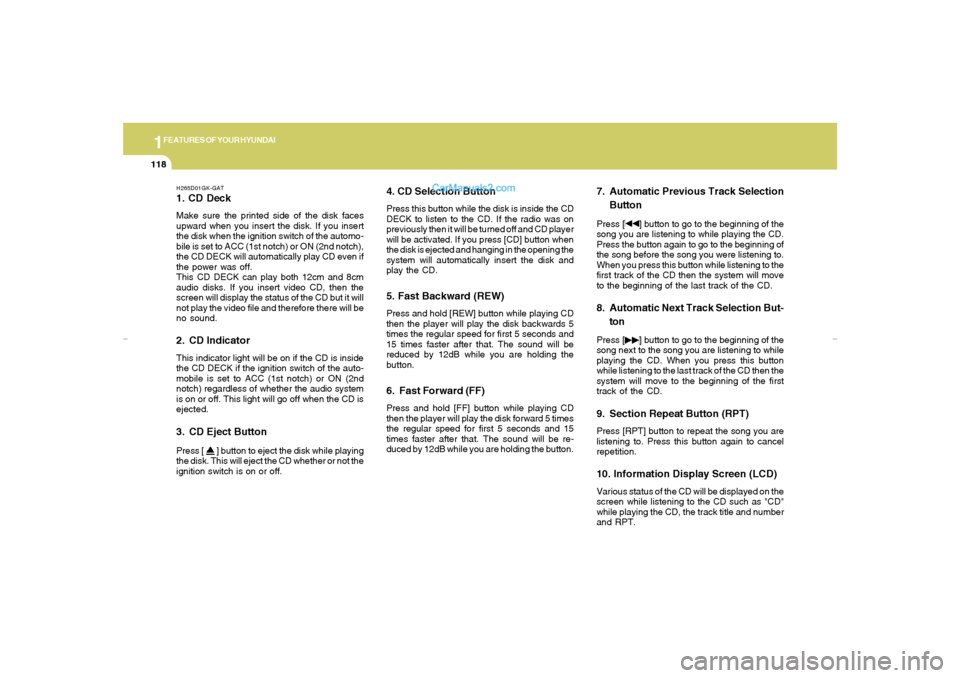
H265D01GK-GAT1. CD DeckMake sure the printed side of the disk faces
upward when you insert the disk. If you insert
the disk when the ignition switch of the automo-
bile is set to ACC (1st notch) or ON (2nd notch),
the CD DECK will automatically play CD even if
the power was off.
This CD DECK can play both 12cm and 8cm
audio disks. If you insert video CD, then the
screen will display the status of the CD but it will
not play the video file and therefore there will be
no sound.2. CD IndicatorThis indicator light will be on if the CD is inside
the CD DECK if the ignition switch of the auto-
mobile is set to ACC (1st notch) or ON (2nd
notch) regardless of whether the audio system
is on or off. This light will go off when the CD is
ejected.3. CD Eject ButtonPress [
] button to eject the disk while playing
the disk. This will eject the CD whether or not the
ignition switch is on or off.
4. CD Selection ButtonPress this button while the disk is inside the CD
DECK to listen to the CD. If the radio was on
previously then it will be turned off and CD player
will be activated. If you press [CD] button when
the disk is ejected and hanging in the opening the
system will automatically insert the disk and
play the CD.5. Fast Backward (REW)Press and hold [REW] button while playing CD
then the player will play the disk backwards 5
times the regular speed for first 5 seconds and
15 times faster after that. The sound will be
reduced by 12dB while you are holding the
button.6. Fast Forward (FF)Press and hold [FF] button while playing CD
then the player will play the disk forward 5 times
the regular speed for first 5 seconds and 15
times faster after that. The sound will be re-
duced by 12dB while you are holding the button.
7. Automatic Previous Track Selection
ButtonPress [
] button to go to the beginning of the
song you are listening to while playing the CD.
Press the button again to go to the beginning of
the song before the song you were listening to.
When you press this button while listening to the
first track of the CD then the system will move
to the beginning of the last track of the CD.
8. Automatic Next Track Selection But-
tonPress [
] button to go to the beginning of the
song next to the song you are listening to while
playing the CD. When you press this button
while listening to the last track of the CD then the
system will move to the beginning of the first
track of the CD.
9. Section Repeat Button (RPT)Press [RPT] button to repeat the song you are
listening to. Press this button again to cancel
repetition.10. Information Display Screen (LCD)Various status of the CD will be displayed on the
screen while listening to the CD such as "CD"
while playing the CD, the track title and number
and RPT.
gkflhma-1b.p659/12/2006, 3:19 PM 118
Page 132 of 269
1FEATURES OF YOUR HYUNDAI
120
H465A01GK-GATStereo Radio Operation (H465) (If Installed)
GK_465_NA
1, 23
58
4
9
6
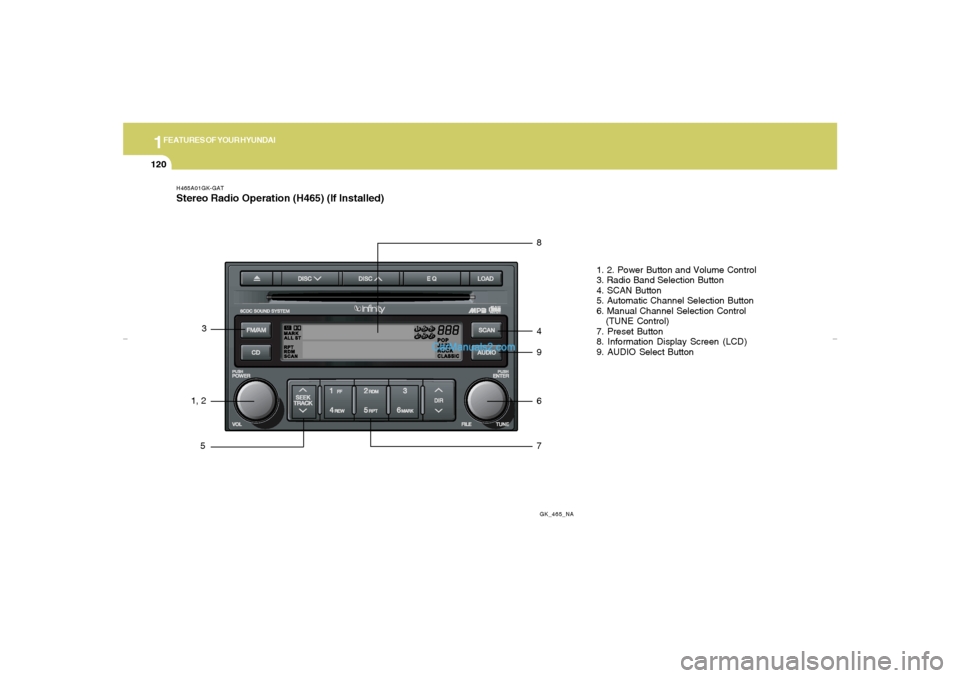
71. 2. Power Button and Volume Control
3. Radio Band Selection Button
4. SCAN Button
5. Automatic Channel Selection Button
6. Manual Channel Selection Control
(TUNE Control)
7. Preset Button
8. Information Display Screen (LCD)
9. AUDIO Select Button
gkflhma-1b.p659/12/2006, 3:19 PM 120
Page 133 of 269
1
FEATURES OF YOUR HYUNDAI
121
H465B01GK-GAT1. Power Button (POWER ON)Press this button when the ignition switch of the
automobile is set to ACC (1st notch) or ON (2nd
notch) to turn on the power and the audio
system. Press once again when the audio
system is on to turn off the power.2. Volume Control (VOLUME)Turn the volume control clockwise to increase
volume and counterclockwise to reduce. The
volume level will be displayed on the screen
when you adjust the volume.3. Radio Band Selection Button (FM/AM)o Press this button to listen to either FM or AM.
o The radio will be set to each of the following
modes each time you press the button.
FM1 ➟ FM2 ➟ AMNOTE:Push this button when the power is off to
turn on the power automatically.
4. SCAN ButtonPress this button to automatically select chan-
nels starting from the current channel and play
each channel for 5 seconds. Press again to
keep listening to the channel currently selected.5. Automatic Channel Selection Button
(SEEK)Press the [SEEK
] button to automatically
increase frequency and press the [TRACK
] button to automatically decrease frequency to
select and play the next available channel. If the
received channel is memorized in the preset
buttons then the screen will display the memo-
rized channel.6. Manual Channel Selection Control
(TUNE)Turn the TUNE control clockwise to increase
frequency and counterclockwise to reduce fre-
quency by 1 step for each click.7. Preset Button (1~6)Press this button to listen to the channels
memorized to each button. If you want to memo-
rize the current channel to the preset button,
press the button for more than 1.5 seconds then
the channel will be memorized to the button with
a beep.
8. Information Display Screen (LCD)A variety of information will be displayed on the
screen including the radio bands (FM1/FM2/
AM) while listening to the radio, frequency of
each channel, the number of preset channel
and "ST" for FM stereo broadcasting.9. AUDIO Select ButtonPress this button to control tone. Each time you
press the button, the mode will switch from
BASS➟MIDDLE➟TREBLE➟FADER➟BALANCE
and the mode will be displayed on the screen.BASS
MIDDLE
TREBLE
Turn the TUNE Controller
clockwise to increase bass
tone and counterclockwise
to decrease.
Turn the TUNE Controller
clockwise to increase
middle tone and counter-
clockwise to decrease.
Turn the TUNE Controller
clockwise to increase
treble tone and counter-
clockwise to decrease.
gkflhma-1b.p659/12/2006, 3:19 PM 121
Page 135 of 269
1
FEATURES OF YOUR HYUNDAI
123
H465C01GK-GATCompact Disc Player Operation (H465) (If installed)
GK_465_NA
10
91
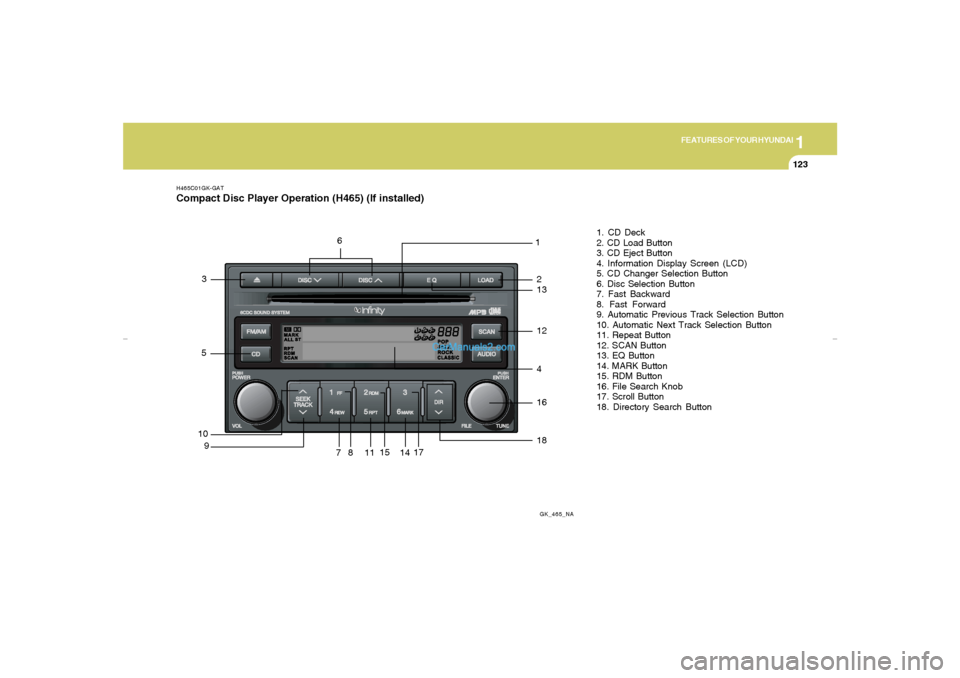
81. CD Deck
2. CD Load Button
3. CD Eject Button
4. Information Display Screen (LCD)
5. CD Changer Selection Button
6. Disc Selection Button
7. Fast Backward
8. Fast Forward
9. Automatic Previous Track Selection Button
10. Automatic Next Track Selection Button
11. Repeat Button
12. SCAN Button
13. EQ Button
14. MARK Button
15. RDM Button
16. File Search Knob
17. Scroll Button
18. Directory Search Button
71117
41618
14
15
53
12132
6
gkflhma-1b.p659/12/2006, 3:20 PM 123
Page 136 of 269
![Hyundai Tiburon 2007 Owners Guide 1FEATURES OF YOUR HYUNDAI
124
H465D01GK-GAT1.CD DeckThe deck will open only when you press [LOAD]
button. Make sure the printed side of the disk
faces upward when you insert the disk. The CD
changer c](/img/35/19688/w960_19688-135.png "Hyundai Tiburon 2007 Owners Guide 1FEATURES OF YOUR HYUNDAI
124
H465D01GK-GAT1.CD DeckThe deck will open only when you press [LOAD]
button. Make sure the printed side of the disk
faces upward when you insert the disk. The CD
changer c")
1FEATURES OF YOUR HYUNDAI
124
H465D01GK-GAT1.CD DeckThe deck will open only when you press [LOAD]
button. Make sure the printed side of the disk
faces upward when you insert the disk. The CD
changer can only play 12cm disks. If you insert
video CD or DATA CD, then the screen will
display "ERROR DISC," eject the disk and
return to the previous mode.2. CD Load ButtonWhen you press [LOAD] button, the empty lots
of the CD Changer will be opened in the order
of 1, 2, 3, 4, 5 and 6. When you insert CD, you
can listen to the corresponding CD. In this case,
the last CD you inserted will be played. If you do
not take any actions after pressing (LOAD) then
the (LOAD) will be cancelled.3. CD Eject ButtonWhen you press [
] button, the currently
played CD will be ejected. If you press the button
for more than 2 seconds, you will be able to eject
all CDs. If currently played CD is in the 3rd slot,
the ejection order will be 3, 4, 5, 6, 1 and 2.
4. Information Display Screen (LCD)This shows the location of disk inside the CD
Changer and the corresponding CD deck num-
ber will flicker when you load or eject the CD.
5. CD Changer Selection ButtonIf the power was turned off when the CD is inside
the CD changer or if you press "CD" button
when radio was on, the system will play CD. If
you press [CD] button when there is no CD in
the changer then the system will display "NO
DISK" for 2 seconds and return to the previous
mode.NOTE:If you press this button when the power is
off and CD is inside the deck, the power will
be automatically turned on.6. Disc Selection ButtonIf you press [DISC
] button while using CD
Changer, the next disc will be played (If you
press the button when you are listening to CD
1, the CD 2 will be played).
If you wish to listen to the previous CD, then
press [DISC
] button then the previous disc
will be played (If you press the button when you
are listening to CD 2, the CD 1 will be played).
If the CD Changer is not fully loaded, this will
move to the next available deck. When the
player moves from deck to deck, the screen will
display the selected deck number.
7. Fast Backward (REW)Press and hold [REW] button while playing CD
then the player will play the disk backwards 5
times the regular speed for first 5 seconds and
15 times faster after that. The sound will be
reduced by 12dB while you are holding the
button.8. Fast Forward (FF)Press and hold [FF] button while playing CD
then the player will play the disk forward 5 times
the regular speed for first 5 seconds and 15
times faster after that. The sound will be re-
duced by 12dB while you are holding the button.9. Automatic Previous Track Selection
ButtonPress [TRACK
] button to go to the beginning
of the song you are listening to while playing the
CD. Press the button again to go to the beginning
of the song before the song you were listening
to.
10. Automatic Next Track Selection
ButtonPress [SEEK
] button to go to the beginning
of the song next to the song you are listening to
while playing the CD.
gkflhma-1b.p659/12/2006, 3:20 PM 124
Page 137 of 269
![Hyundai Tiburon 2007 Owners Guide 1
FEATURES OF YOUR HYUNDAI
125
11. Section Repeat Button (RPT)Press [RPT] button to repeat the song you are
listening to. Press this button again to cancel
repetition.12. SCAN ButtonIf you press this](/img/35/19688/w960_19688-136.png "Hyundai Tiburon 2007 Owners Guide 1
FEATURES OF YOUR HYUNDAI
125
11. Section Repeat Button (RPT)Press [RPT] button to repeat the song you are
listening to. Press this button again to cancel
repetition.12. SCAN ButtonIf you press this")
1
FEATURES OF YOUR HYUNDAI
125
11. Section Repeat Button (RPT)Press [RPT] button to repeat the song you are
listening to. Press this button again to cancel
repetition.12. SCAN ButtonIf you press this button, the player will play 10
seconds of each track. Press it again to cancel
scanning.13. EQ ButtonEach time you press this button the sound
equalizer setting will switch from
POP➟JAZZ➟ROCK➟CLASSIC➟OFF (Not
displayed).14. BOOKMARK ButtonThis button lets you select the songs you want
to listen to in the CD. Move to the track and press
(MARK) for more than 1 second then the screen
will display " M " and select the track. Press the
button less than 1 second to play the songs you
selected and the system will display " M "15. RDM (Random) ButtonPress [RDM] button to play the songs in random
order.
NOTE:When you use CD-R or CD-RW, the CD may
not be played due to the manufacturing
method of CD makers and the recording
method of the user. In this case, change CD
unless the continuous use of such CDs
may cause damage to the system.16. FILE Search KnobTurn this knob to the left and right while listening
to CD to change track number. If you press the
button within 5 seconds then the selected track
will be played. If you do not press the button
within 5 seconds then it will display the currently
played track.17. SCROLL ButtonIf the title of MP3 or WMA file is too long, press
this button to scroll the entire song title on the
LCD screen.18. Directory Search ButtonIn case the MP3/WMA CD contains more than
2 folders, press this button up and down to
search each directory. You can move to the
directory and turn the search knob to search
through the tracks. If you do not press the knob
within 5 seconds after you select a track then
the system will automatically return to the cur-
rent track.
CAUTION:
o Do not insert warped or poor quality
discs into the CD player as damage to the
unit may occur.
o Do not insert anything like coins into the
player slot as damage to the unit may
occur.
o Do not place beverages close to the
audio system. The playback mechanism
may be damaged if you spill them.
o Do not strike or allow anything to impact
the audio system, damage to the system
mechanisms could occur.
o Off-road or rough surface driving may
cause the compact disc to skip. Do not
use the compact disc when driving in
such conditions as damage to the com-
pact disc face could occur.
o Do not attempt to grab or pull the com-
pact disc out while the disc is being
pulled into the audio unit by the self-
loading mechanism. Damage to the
audio unit and compact disc could oc-
cur.
o Avoid using recorded compact discs in
your audio unit. Original compact discs
are recommended.
!
gkflhma-1b.p659/12/2006, 3:20 PM 125
Page 173 of 269
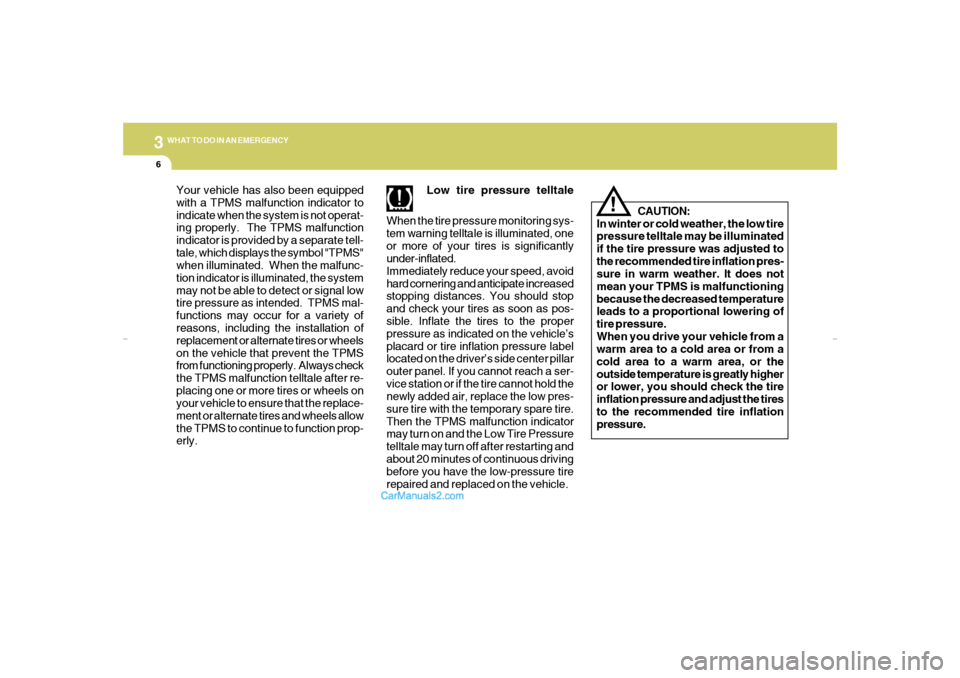
36WHAT TO DO IN AN EMERGENCYYour vehicle has also been equipped
with a TPMS malfunction indicator to
indicate when the system is not operat-
ing properly. The TPMS malfunction
indicator is provided by a separate tell-
tale, which displays the symbol "TPMS"
when illuminated. When the malfunc-
tion indicator is illuminated, the system
may not be able to detect or signal low
tire pressure as intended. TPMS mal-
functions may occur for a variety of
reasons, including the installation of
replacement or alternate tires or wheels
on the vehicle that prevent the TPMS
from functioning properly. Always check
the TPMS malfunction telltale after re-
placing one or more tires or wheels on
your vehicle to ensure that the replace-
ment or alternate tires and wheels allow
the TPMS to continue to function prop-
erly.Low tire pressure telltale
When the tire pressure monitoring sys-
tem warning telltale is illuminated, one
or more of your tires is significantly
under-inflated.
Immediately reduce your speed, avoid
hard cornering and anticipate increased
stopping distances. You should stop
and check your tires as soon as pos-
sible. Inflate the tires to the proper
pressure as indicated on the vehicle’s
placard or tire inflation pressure label
located on the driver’s side center pillar
outer panel. If you cannot reach a ser-
vice station or if the tire cannot hold the
newly added air, replace the low pres-
sure tire with the temporary spare tire.
Then the TPMS malfunction indicator
may turn on and the Low Tire Pressure
telltale may turn off after restarting and
about 20 minutes of continuous driving
before you have the low-pressure tire
repaired and replaced on the vehicle.CAUTION:
In winter or cold weather, the low tire
pressure telltale may be illuminated
if the tire pressure was adjusted to
the recommended tire inflation pres-
sure in warm weather. It does not
mean your TPMS is malfunctioning
because the decreased temperature
leads to a proportional lowering of
tire pressure.
When you drive your vehicle from a
warm area to a cold area or from a
cold area to a warm area, or the
outside temperature is greatly higher
or lower, you should check the tire
inflation pressure and adjust the tires
to the recommended tire inflation
pressure.
!
gkflhma-3.p659/12/2006, 3:21 PM 6
Page 237 of 269
6
DO-IT-YOURSELF MAINTENANCE
37
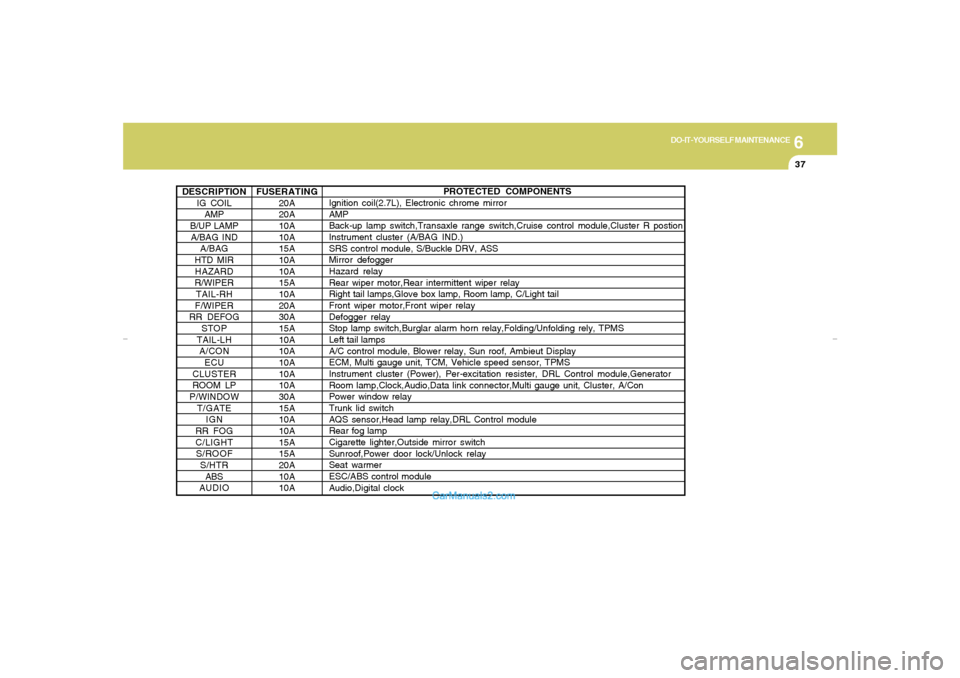
DESCRIPTION
IG COIL
AMP
B/UP LAMP
A/BAG IND
A/BAG
HTD MIR
HAZARD
R/WIPER
TAIL-RH
F/WIPER
RR DEFOG
STOP
TAIL-LH
A/CON
ECU
CLUSTER
ROOM LP
P/WINDOW
T/GATE
IGN
RR FOG
C/LIGHT
S/ROOF
S/HTR
ABS
AUDIO
PROTECTED COMPONENTS
Ignition coil(2.7L), Electronic chrome mirror
AMP
Back-up lamp switch,Transaxle range switch,Cruise control module,Cluster R postion
Instrument cluster (A/BAG IND.)
SRS control module, S/Buckle DRV, ASS
Mirror defogger
Hazard relay
Rear wiper motor,Rear intermittent wiper relay
Right tail lamps,Glove box lamp, Room lamp, C/Light tail
Front wiper motor,Front wiper relay
Defogger relay
Stop lamp switch,Burglar alarm horn relay,Folding/Unfolding rely, TPMS
Left tail lamps
A/C control module, Blower relay, Sun roof, Ambieut Display
ECM, Multi gauge unit, TCM, Vehicle speed sensor, TPMS
Instrument cluster (Power), Per-excitation resister, DRL Control module,Generator
Room lamp,Clock,Audio,Data link connector,Multi gauge unit, Cluster, A/Con
Power window relay
Trunk lid switch
AQS sensor,Head lamp relay,DRL Control module
Rear fog lamp
Cigarette lighter,Outside mirror switch
Sunroof,Power door lock/Unlock relay
Seat warmer
ESC/ABS control module
Audio,Digital clock FUSERATING
20A
20A
10A
10A
15A
10A
10A
15A
10A
20A
30A
15A
10A
10A
10A
10A
10A
30A
15A
10A
10A
15A
15A
20A
10A
10A
gkflhma-6.p659/12/2006, 3:24 PM 37