Tire Hyundai Tiburon 2007 Owner's Manual
[x] Cancel search | Manufacturer: HYUNDAI, Model Year: 2007, Model line: Tiburon, Model: Hyundai Tiburon 2007Pages: 269, PDF Size: 10.37 MB
Page 12 of 269
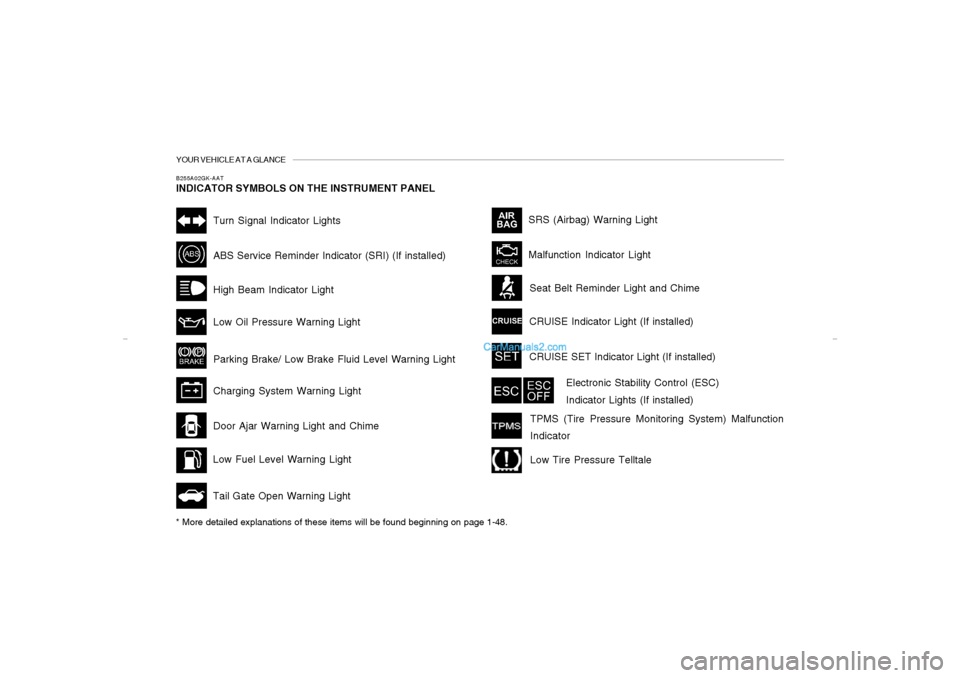
YOUR VEHICLE AT A GLANCEB255A02GK-AATINDICATOR SYMBOLS ON THE INSTRUMENT PANEL* More detailed explanations of these items will be found beginning on page 1-48.
Malfunction Indicator LightSRS (Airbag) Warning Light
Tail Gate Open Warning Light
Low Fuel Level Warning LightDoor Ajar Warning Light and ChimeABS Service Reminder Indicator (SRI) (If installed)Turn Signal Indicator LightsHigh Beam Indicator Light
Low Oil Pressure Warning Light
Parking Brake/ Low Brake Fluid Level Warning Light
Charging System Warning LightCRUISE Indicator Light (If installed)
Seat Belt Reminder Light and Chime
CRUISE SET Indicator Light (If installed)
Electronic Stability Control (ESC)
Indicator Lights (If installed)
TPMS (Tire Pressure Monitoring System) Malfunction
IndicatorLow Tire Pressure Telltale
gkflhma-0.p659/12/2006, 3:13 PM 12
Page 30 of 269

1FEATURES OF YOUR HYUNDAI18
B160C01A-AATKeep Belts Clean and DrySeat belts should be kept clean and dry. If belts
become dirty, they can be cleaned by using a
mild soap solution and warm water. Bleach, dye,
strong detergents or abrasives should not be
used because they may damage and weaken
the fabric.B160D01A-AATWhen to Replace Seat BeltsEntire in-use seat belt assembly or assemblies
should be replaced if the vehicle has been
involved in an accident. This should be done
even if no damage is visible. Additional ques-
tions concerning seat belt operation should be
directed to your Hyundai Dealer.
!
B150G02A-AATDo Not Lie DownTo reduce the chance of injuries in the event of
an accident and to achieve maximum effective-
ness of the restraint system, all passengers
should be sitting up and the front seats should
be in an upright position when the car is moving.
A seat belt cannot provide proper protection if
the person is lying down in the rear seat or if the
front seat is in a reclined position.
WARNING:
Riding with a reclined seatback increases
your chance of serious or fatal injuries in
the event of a collision or sudden stop. The
protection of your restraint system (seat
belts and airbags) is greatly reduced by
reclining your seat. Seat belts must be snug
against your hips and chest to work prop-
erly. The more the seatback is reclined, the
greater the chance that an occupant's hips
will slide under the lap belt causing serious
internal injuries or the occupant's neck
could strike the shoulder belt. Drivers and
passengers should always sit well back in
their seats, properly belted (see page 1-19),
and with the seatbacks upright.
!
B160A02A-AATCare of Seat BeltsSeat belt systems should never be disassembled
or modified. In addition, care should be taken to
assure that seat belts and belt hardware are not
damaged by seat hinges, doors or other abuse.
WARNING:
When you return the rear seatback to its
upright position after the rear seatback was
folded down, be careful not to damage the
seat belt webbing or buckle. Be sure that
the webbing or buckle does not get caught
or pinched in the rear seat. A seat belt with
damaged webbing or buckle will not be as
strong and could possibly fail during a
collision or sudden stop, resulting in seri-
ous injury.
B160B01A-AATPeriodic InspectionIt is recommended that all seat belts be in-
spected periodically for wear or damage of any
kind. Parts of the system that are damaged
should be replaced as soon as possible.
gkflhma-1a.p659/12/2006, 3:15 PM 18
Page 39 of 269
1
FEATURES OF YOUR HYUNDAI
27
!
WARNING:
o If the retractor is not in the Automatic
Locking mode, the child restraint can
move when your vehicle turns or stops
suddenly. A child can be seriously in-
jured or killed if the child restraint is not
properly anchored to the car, including
setting the retractor to the Automatic
Locking mode.
o Do not install any child restraint system
in the front passenger seat. Should an
accident occur and cause the passenger
side airbag to deploy, it could severely
injure or kill an infant or child seated in
an infant or child seat. Therefore, only
use a child restraint system in the rear
seat of your vehicle. If the retractor is in the automatic locking mode,
the belt will be locked. After installation of the
child restraint system, try to move it in all
directions to be sure the child restraint system
is securely installed. If you need to tighten the
belt, pull more webbing toward the retractor.
When you unbuckle the seat belt and allow it to
retract, the retractor will automatically revert
back to its normal seated passenger emer-
gency locking usage condition.
NOTE:o Before installing the child restraint sys-
tem in any seating position, read the
instructions supplied by the child re-
straint system manufacturer.
o If the seat belt does not operate as de-
scribed, have the system checked imme-
diately by your authorized Hyundai
dealer.
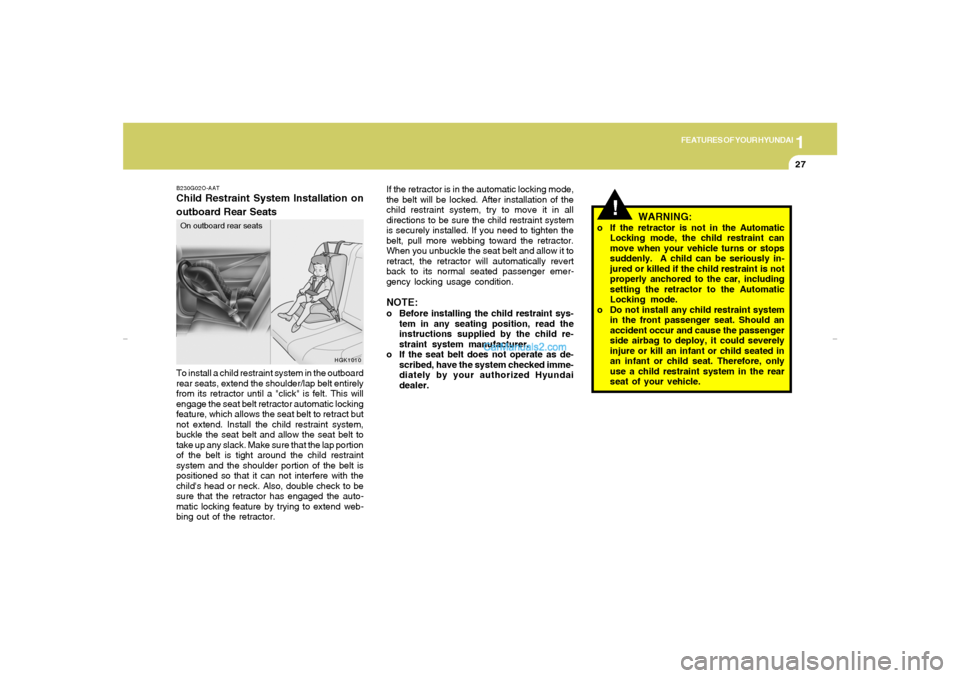
B230G02O-AATChild Restraint System Installation on
outboard Rear SeatsTo install a child restraint system in the outboard
rear seats, extend the shoulder/lap belt entirely
from its retractor until a "click" is felt. This will
engage the seat belt retractor automatic locking
feature, which allows the seat belt to retract but
not extend. Install the child restraint system,
buckle the seat belt and allow the seat belt to
take up any slack. Make sure that the lap portion
of the belt is tight around the child restraint
system and the shoulder portion of the belt is
positioned so that it can not interfere with the
child's head or neck. Also, double check to be
sure that the retractor has engaged the auto-
matic locking feature by trying to extend web-
bing out of the retractor.On outboard rear seats
HGK1010
gkflhma-1a.p659/12/2006, 3:15 PM 27
Page 59 of 269
1
FEATURES OF YOUR HYUNDAI
47
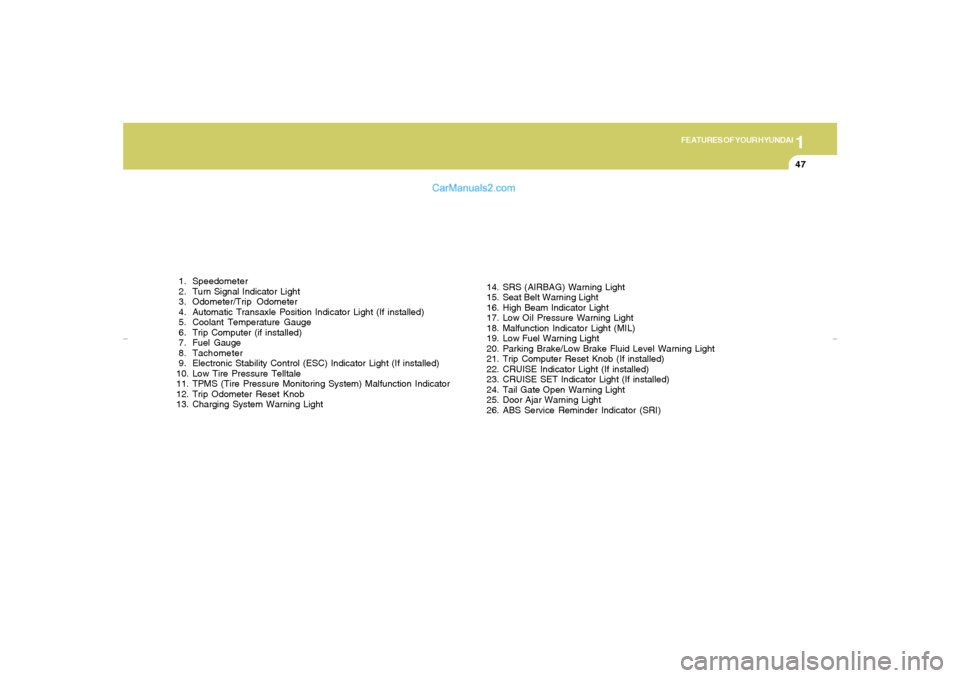
1. Speedometer
2. Turn Signal Indicator Light
3. Odometer/Trip Odometer
4. Automatic Transaxle Position Indicator Light (If installed)
5. Coolant Temperature Gauge
6. Trip Computer (if installed)
7. Fuel Gauge
8. Tachometer
9. Electronic Stability Control (ESC) Indicator Light (If installed)
10. Low Tire Pressure Telltale
11. TPMS (Tire Pressure Monitoring System) Malfunction Indicator
12. Trip Odometer Reset Knob
13. Charging System Warning Light14. SRS (AIRBAG) Warning Light
15. Seat Belt Warning Light
16. High Beam Indicator Light
17. Low Oil Pressure Warning Light
18. Malfunction Indicator Light (MIL)
19. Low Fuel Warning Light
20. Parking Brake/Low Brake Fluid Level Warning Light
21. Trip Computer Reset Knob (If installed)
22. CRUISE Indicator Light (If installed)
23. CRUISE SET Indicator Light (If installed)
24. Tail Gate Open Warning Light
25. Door Ajar Warning Light
26. ABS Service Reminder Indicator (SRI)
gkflhma-1a.p659/12/2006, 3:16 PM 47
Page 60 of 269
1FEATURES OF YOUR HYUNDAI48
WARNING AND INDICATOR LIGHTSB260D01A-AAT
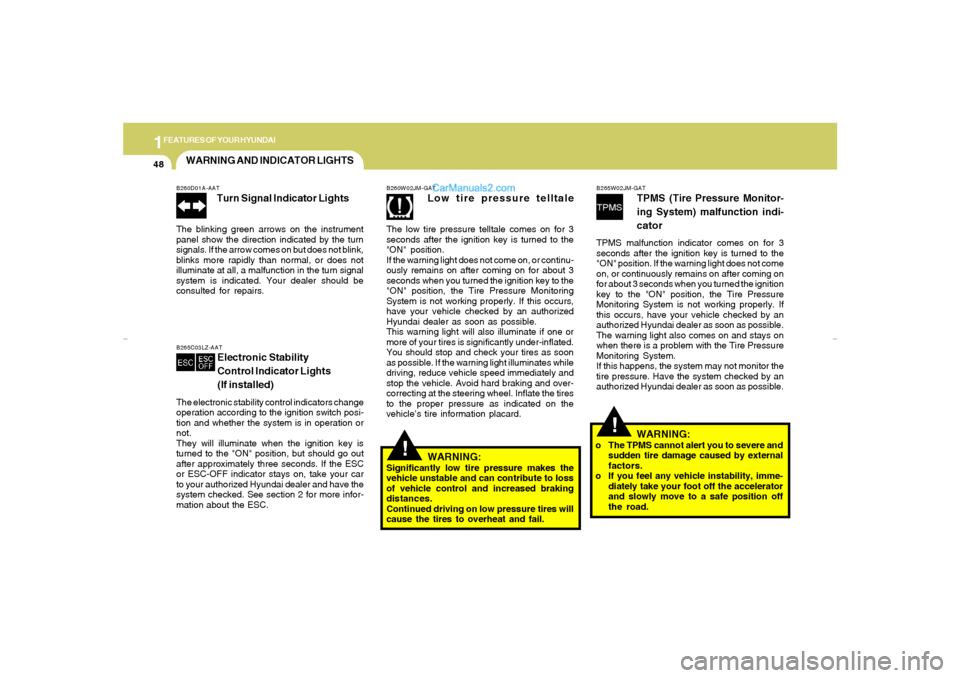
Turn Signal Indicator Lights
The blinking green arrows on the instrument
panel show the direction indicated by the turn
signals. If the arrow comes on but does not blink,
blinks more rapidly than normal, or does not
illuminate at all, a malfunction in the turn signal
system is indicated. Your dealer should be
consulted for repairs.B265C03LZ-AAT
Electronic Stability
Control Indicator Lights
(If installed)
The electronic stability control indicators change
operation according to the ignition switch posi-
tion and whether the system is in operation or
not.
They will illuminate when the ignition key is
turned to the "ON" position, but should go out
after approximately three seconds. If the ESC
or ESC-OFF indicator stays on, take your car
to your authorized Hyundai dealer and have the
system checked. See section 2 for more infor-
mation about the ESC.
!
!
WARNING:
Significantly low tire pressure makes the
vehicle unstable and can contribute to loss
of vehicle control and increased braking
distances.
Continued driving on low pressure tires will
cause the tires to overheat and fail.B260W02JM-GAT
Low tire pressure telltale
The low tire pressure telltale comes on for 3
seconds after the ignition key is turned to the
"ON" position.
If the warning light does not come on, or continu-
ously remains on after coming on for about 3
seconds when you turned the ignition key to the
"ON" position, the Tire Pressure Monitoring
System is not working properly. If this occurs,
have your vehicle checked by an authorized
Hyundai dealer as soon as possible.
This warning light will also illuminate if one or
more of your tires is significantly under-inflated.
You should stop and check your tires as soon
as possible. If the warning light illuminates while
driving, reduce vehicle speed immediately and
stop the vehicle. Avoid hard braking and over-
correcting at the steering wheel. Inflate the tires
to the proper pressure as indicated on the
vehicle’s tire information placard.
B265W02JM-GAT
TPMS (Tire Pressure Monitor-
ing System) malfunction indi-
cator
TPMS malfunction indicator comes on for 3
seconds after the ignition key is turned to the
"ON" position. If the warning light does not come
on, or continuously remains on after coming on
for about 3 seconds when you turned the ignition
key to the "ON" position, the Tire Pressure
Monitoring System is not working properly. If
this occurs, have your vehicle checked by an
authorized Hyundai dealer as soon as possible.
The warning light also comes on and stays on
when there is a problem with the Tire Pressure
Monitoring System.
If this happens, the system may not monitor the
tire pressure. Have the system checked by an
authorized Hyundai dealer as soon as possible.
WARNING:
o The TPMS cannot alert you to severe and
sudden tire damage caused by external
factors.
o If you feel any vehicle instability, imme-
diately take your foot off the accelerator
and slowly move to a safe position off
the road.
gkflhma-1a.p659/12/2006, 3:16 PM 48
Page 77 of 269
1
FEATURES OF YOUR HYUNDAI
65
DRINK HOLDER
!
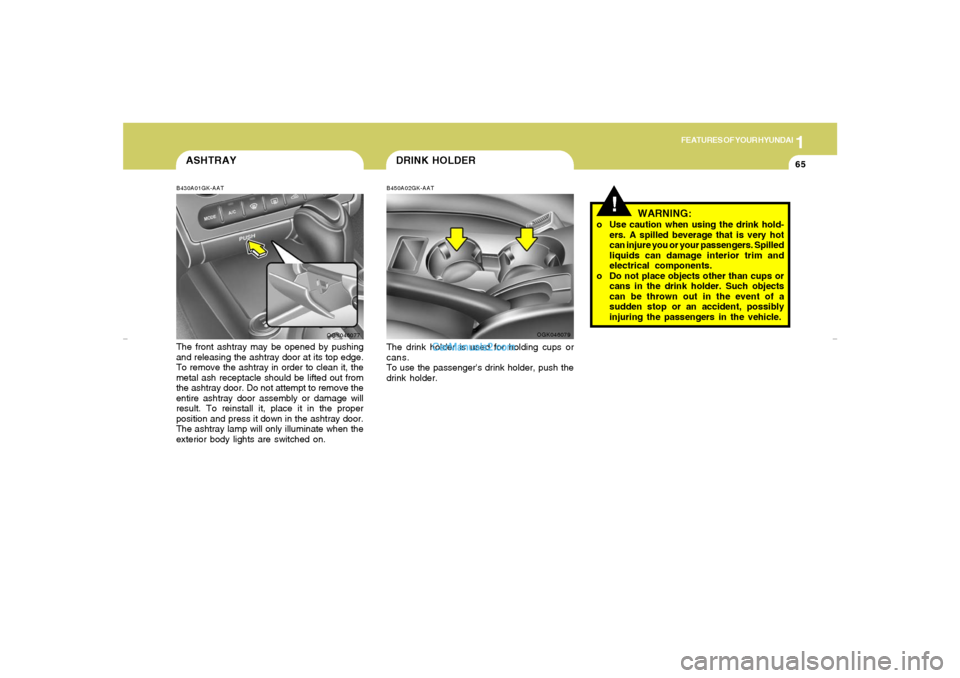
B450A02GK-AATThe drink holder is used for holding cups or
cans.
To use the passenger's drink holder, push the
drink holder.
OGK046079
WARNING:
o Use caution when using the drink hold-
ers. A spilled beverage that is very hot
can injure you or your passengers. Spilled
liquids can damage interior trim and
electrical components.
o Do not place objects other than cups or
cans in the drink holder. Such objects
can be thrown out in the event of a
sudden stop or an accident, possibly
injuring the passengers in the vehicle.
ASHTRAYB430A01GK-AATThe front ashtray may be opened by pushing
and releasing the ashtray door at its top edge.
To remove the ashtray in order to clean it, the
metal ash receptacle should be lifted out from
the ashtray door. Do not attempt to remove the
entire ashtray door assembly or damage will
result. To reinstall it, place it in the proper
position and press it down in the ashtray door.
The ashtray lamp will only illuminate when the
exterior body lights are switched on.
OGK046077
gkflhma-1a.p659/12/2006, 3:17 PM 65
Page 125 of 269
1
FEATURES OF YOUR HYUNDAI
113
!
13. SCROLL ButtonIf the title of MP3 or WMA file is too long, press
this button to scroll the entire song title on the
LCD screen.14. FILE Search KnobTurn this knob to the left and right while listening
to CD to change track number. If you press the
button within 5 seconds then the selected track
will be played. If you do not press the button
within 5 seconds then it will display the currently
played track.15. Directory Search ButtonIn case the MP3/WMA CD contains more than
2 folders, press this button up and down to
search each directory. You can move to the
directory and turn the search knob to search
through the tracks. If you do not press the knob
within 5 seconds after you select a track then
the system will automatically return to the cur-
rent track.16. SCAN ButtonIf you press this button, the player will play 10
seconds of each track. Press it again to cancel
scanning.
CAUTION:
o Do not insert warped or poor quality
discs into the CD player as damage to the
unit may occur.
o Do not insert anything like coins into the
player slot as damage to the unit may
occur.
o Do not place beverages close to the
audio system. The playback mechanism
may be damaged if you spill them.
o Do not strike or allow anything to impact
the audio system, damage to the system
mechanisms could occur.
o Off-road or rough surface driving may
cause the compact disc to skip. Do not
use the compact disc when driving in
such conditions as damage to the com-
pact disc face could occur.
o Do not attempt to grab or pull the com-
pact disc out while the disc is being
pulled into the audio unit by the self-
loading mechanism. Damage to the
audio unit and compact disc could oc-
cur.
o Avoid using recorded compact discs in
your audio unit. Original compact discs
are recommended.
NOTE:When you use CD-R or CD-RW, the CD may
not be played due to the manufacturing
method of CD makers and the recording
method of the user. In this case, change CD
unless the continuous use of such CDs
may cause damage to the system.
gkflhma-1b.p659/12/2006, 3:19 PM 113
Page 137 of 269
![Hyundai Tiburon 2007 Owners Manual 1
FEATURES OF YOUR HYUNDAI
125
11. Section Repeat Button (RPT)Press [RPT] button to repeat the song you are
listening to. Press this button again to cancel
repetition.12. SCAN ButtonIf you press this](/img/35/19688/w960_19688-136.png "Hyundai Tiburon 2007 Owners Manual 1
FEATURES OF YOUR HYUNDAI
125
11. Section Repeat Button (RPT)Press [RPT] button to repeat the song you are
listening to. Press this button again to cancel
repetition.12. SCAN ButtonIf you press this")
1
FEATURES OF YOUR HYUNDAI
125
11. Section Repeat Button (RPT)Press [RPT] button to repeat the song you are
listening to. Press this button again to cancel
repetition.12. SCAN ButtonIf you press this button, the player will play 10
seconds of each track. Press it again to cancel
scanning.13. EQ ButtonEach time you press this button the sound
equalizer setting will switch from
POP➟JAZZ➟ROCK➟CLASSIC➟OFF (Not
displayed).14. BOOKMARK ButtonThis button lets you select the songs you want
to listen to in the CD. Move to the track and press
(MARK) for more than 1 second then the screen
will display " M " and select the track. Press the
button less than 1 second to play the songs you
selected and the system will display " M "15. RDM (Random) ButtonPress [RDM] button to play the songs in random
order.
NOTE:When you use CD-R or CD-RW, the CD may
not be played due to the manufacturing
method of CD makers and the recording
method of the user. In this case, change CD
unless the continuous use of such CDs
may cause damage to the system.16. FILE Search KnobTurn this knob to the left and right while listening
to CD to change track number. If you press the
button within 5 seconds then the selected track
will be played. If you do not press the button
within 5 seconds then it will display the currently
played track.17. SCROLL ButtonIf the title of MP3 or WMA file is too long, press
this button to scroll the entire song title on the
LCD screen.18. Directory Search ButtonIn case the MP3/WMA CD contains more than
2 folders, press this button up and down to
search each directory. You can move to the
directory and turn the search knob to search
through the tracks. If you do not press the knob
within 5 seconds after you select a track then
the system will automatically return to the cur-
rent track.
CAUTION:
o Do not insert warped or poor quality
discs into the CD player as damage to the
unit may occur.
o Do not insert anything like coins into the
player slot as damage to the unit may
occur.
o Do not place beverages close to the
audio system. The playback mechanism
may be damaged if you spill them.
o Do not strike or allow anything to impact
the audio system, damage to the system
mechanisms could occur.
o Off-road or rough surface driving may
cause the compact disc to skip. Do not
use the compact disc when driving in
such conditions as damage to the com-
pact disc face could occur.
o Do not attempt to grab or pull the com-
pact disc out while the disc is being
pulled into the audio unit by the self-
loading mechanism. Damage to the
audio unit and compact disc could oc-
cur.
o Avoid using recorded compact discs in
your audio unit. Original compact discs
are recommended.
!
gkflhma-1b.p659/12/2006, 3:20 PM 125
Page 143 of 269
2
DRIVING YOUR HYUNDAI
3
BEFORE STARTING THE ENGINEC020A02A-AATBefore you start the engine, you should always:
1. Look around the vehicle to be sure there are
no flat tires, puddles of oil, water or other
indications of possible trouble.
2. After entering the car, check to be sure the
parking brake is engaged.
3. Check that all windows, and lights are clean.
4. Check that the interior and exterior mirrors
are clean and in position.
5. Check your seat, seatback and headrest to
be sure they are in their proper positions.
6. Close all the doors.
7. Fasten your seat belt and be sure that all
other occupants have fastened theirs.
8. Turn off all lights and accessories that are
not needed.
9. When you turn the ignition switch to "ON",
check that all appropriate warning lights are
operating and that you have sufficient fuel.
10.Check the operation of warning lights and all
bulbs when key is in the "ON" position.
TO START THE ENGINEC030A01A-AATCombination Ignition Switcho If your Hyundai is equipped with a manual
transaxle, place the shift lever in neutral and
depress the clutch pedal fully.
o If your Hyundai has an automatic transaxle,
place the shift lever in "P" (park).
o To start the engine, insert the ignition key and
turn it to the "START" position. Release it as
soon as the engine starts. Do not hold the
key in the "START" position for more than 15
seconds.NOTE:o For safety, the engine will not start if the
clutch pedal is not depressed fully
(Manual transaxle) or the shift lever is
not in "P" or "N" Position (Automatic
transaxle).
o The ignition key cannot be turned from
"ACC" position to "LOCK" position un-
less the shift lever is in the "P" (Park)
position or the negative battery terminal
is disconnected from the battery. To
remove the key, always confirm that the
shift lever is securely positioned in "P"
(Park) (For Automatic transaxle)
!
WARNING:
o All passengers must be properly belted
whenever the vehicle is moving. Refer to
pages: 1-16 through 1-20 for more infor-
mation on their proper use.
o Always check the surrounding areas near
your vehicle for people, especially chil-
dren, before putting a car into 'drive.'
o Always wear appropriate shoes when
operating your vehicle.
Unsuitable shoes (high heels, ski boots,
etc.) may interfere with your ability to
use the brake and accelerator pedal, and
the clutch (if installed).
gkflhma-2.p659/12/2006, 3:20 PM 3
Page 152 of 269
2
DRIVING YOUR HYUNDAI
12
!
ANTI-LOCK BRAKE SYSTEM (ABS)C120A03A-AAT(If installed)The Anti-Lock Brake System (ABS) is designed
to prevent wheel lock-up during sudden braking
or on hazardous road surfaces. The ABS con-
trol module monitors the wheel speed and con-
trols the pressure applied to each brake. Thus,
in emergency situations or on slick roads, ABS
will increase vehicle control during braking.NOTE:o A click sound may be heard in the engine
compartment when the vehicle begins
to move after the engine is started. These
conditions are normal and indicate that
the anti-lock brake system (Electronic
Stability Program) is functioning prop-
erly.
o During ABS operation, a slight pulsation
may be felt in the brake pedal when the
brakes are applied. Also, a noise may be
heard in the engine compartment while
braking. These conditions are normal
and indicate that the anti-lock brake
system is functioning properly.
WARNING:
ABS will not prevent accidents due to im-
proper or dangerous driving maneuvers.
Even though vehicle control is improved
during emergency braking, always main-
tain a safe distance between you and ob-
jects ahead. Vehicle speeds should always
be reduced during extreme road condi-
tions.
The braking distance for cars equipped
with an anti-lock braking system may be
longer than for those without it in the
following road conditions.
During these conditions the vehicle should
be driven at reduced speeds.
o Rough, gravel or snow-covered roads.
o With tire chains installed.
o Roads where the road surface is pitted or
has different surface height.
The safety features of an ABS equipped
vehicle should not be tested by high speed
driving or cornering. This could endanger
the safety of yourself or others.
ELECTRONIC STABILITY
CONTROL (ESC) SYSTEMC310A04JM-AAT(If installed)
!
WARNING:
Never drive too fast for the road conditions
or too quickly when cornering. Electronic
stability control (ESC) will not prevent ac-
cidents. Excessive speed in turns, abrupt
maneuvers and hydroplaning on wet sur-
faces can still result in serious accidents.
Only a safe and attentive driver can prevent
accidents by avoiding maneuvers that
cause the vehicle to lose traction. Even with
ESC installed, always follow all the normal
precautions for driving - including driving
at safe speeds for the conditions.
gkflhma-2.p659/12/2006, 3:20 PM 12