radio Hyundai Tiburon 2008 User Guide
[x] Cancel search | Manufacturer: HYUNDAI, Model Year: 2008, Model line: Tiburon, Model: Hyundai Tiburon 2008Pages: 268, PDF Size: 9.93 MB
Page 123 of 268
1
FEATURES OF YOUR HYUNDAI
111
H280F01GK-GAT1. CD DeckMake sure the printed side of the disk faces
upward when you insert the disk. If you insert
the disk when the ignition switch of the automo-
bile is set to ACC (1st notch) or ON (2nd notch),
the CD Deck will automatically play CD even if
the power was off. This CD Deck can play both
12cm and 8cm audio disks. If you insert video
CD, then the screen will display "ERROR DISC"
and eject the disk.2. CD IndicatorThis indicator light will be on if the CD is inside
the CDP deck whether the audio system is on
or not. This light will go off when the CD is
ejected.3. CD Eject ButtonPress [
] button to eject the disk while playing
the disk. This will eject the CD whether or not the
ignition switch is on or off.
4. CD Selection ButtonPress this button while the disk is inside the CDP
deck to listen to the CD even if the radio or tape
was on or if CD changer was in action. If you
press [CD/MP3] button when the disk is ejected
and hanging in the opening, the system will
automatically insert the disk and play the CD.
5. Fast Backward (REW)Press and hold [REW] button while playing CD
then the player will play the disk backwards 5
times the regular speed for first 5 seconds and
15 times faster after that. The sound will be
reduced by 12dB while you are holding the
button.6. Fast Forward (FF)Press and hold [FF] button while playing CD
then the player will play the disk forward 5 times
the regular speed for first 5 seconds and 15
times faster after that. The sound will be re-
duced by 12dB while you are holding the button.NOTE:If you press this button when the power is
off and CD is inside the deck, the power will
be automatically turned on.7. Automatic Previous Track Selection
ButtonPress [TRACK
] button to go to the beginning
of the song you are listening to while playing the
CD. Press the button again to go to the beginning
of the song before the song you were listening
to. When you press this button while listening to
the first track of the CD then the system will
move to the beginning of the last track of the CD.
8. Automatic Next Track Selection But-
tonPress [SEEK
] button to go to the beginning
of the song next to the song you are listening to
while playing the CD.
9. Section Repeat Button (RPT)Press [RPT] button to repeat the song you are
listening to. Press this button again to cancel
repetition.10. Information Display Screen (LCD)Various status of the CD will be displayed on the
screen while listening to the CD such as "CD"
while playing the CD, the track title and number,
RPT, RDM and MARK.11. BOOKMARK ButtonThis button lets you select the songs you want
to listen to in the CD. Move to the track and press
[MARK] for more than 1 second then the screen
will display "M" and select the track. Press the
button less than 1 second to play the songs you
selected and the system will display "M"12. RDM (Random) ButtonPress [RDM] button to play the songs in random
order.
Page 125 of 268
1
FEATURES OF YOUR HYUNDAI
113
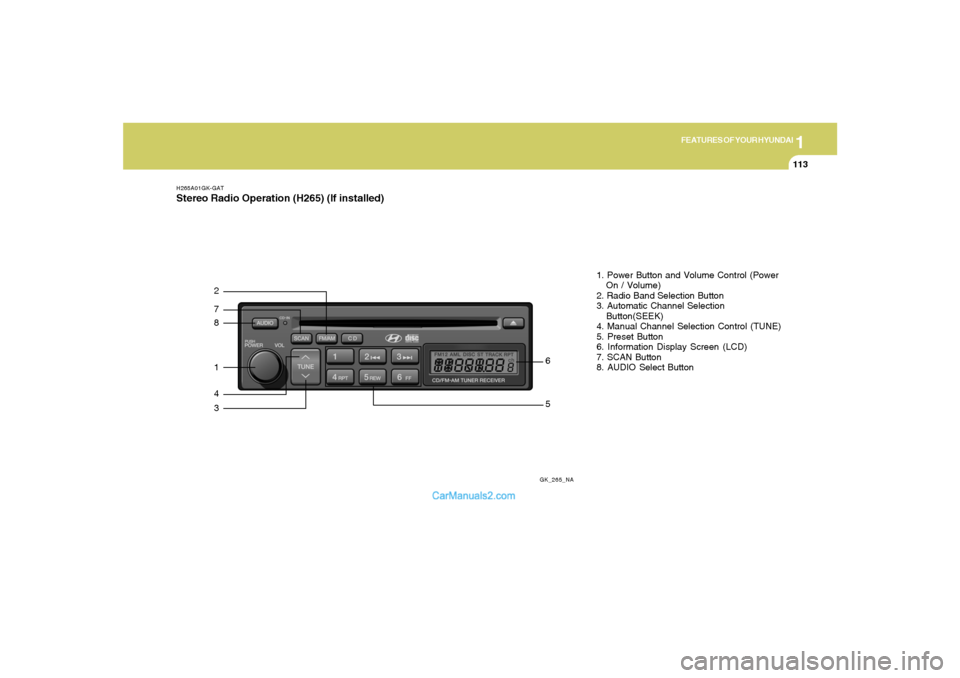
H265A01GK-GATStereo Radio Operation (H265) (If installed)
GK_265_NA
872143
561. Power Button and Volume Control (Power
On / Volume)
2. Radio Band Selection Button
3. Automatic Channel Selection
Button(SEEK)
4. Manual Channel Selection Control (TUNE)
5. Preset Button
6. Information Display Screen (LCD)
7. SCAN Button
8. AUDIO Select Button
Page 126 of 268
1FEATURES OF YOUR HYUNDAI
114
H265B01GK-GAT1. Power Button and Volume Control
(POWER ON/ VOLUME)Press this button when the ignition switch of the
automobile is set to ACC (1st notch) or ON (2nd
notch) to turn on the power of the audio system.
When the power is turned on, turn the volume
control clockwise to increase volume and coun-
terclockwise to reduce. Press once again when
the audio system is on to turn off the power.2. Radio Band Selection Button (FM/AM)North American Standard
o Press this button to listen to either FM or AM.
o The radio will be set to each mode each time
you press the button in a loop;
FM1➟FM2➟AM➟FM1 and soon.
European Standard
o Press this button to listen to either FM or AM.
o The radio will be set to each mode each time
you press the button in a loop;
FM1➟FM2➟MW➟LW➟FM1 and soon.
5. Preset Button (1~6)Press this button but do not hold for no more than
2 seconds to listen to the channels memorized
to each button. If you want to memorize the
current channel to the preset button when you
are listening to channel not memorized to any of
the preset buttons, press the button and hold for
more than 2 seconds then the channel will be
memorized to the button with the beep.6. Information Display Screen (LCD)A variety of information will be displayed on the
screen including the radio bands (FM1/FM2/
AM) while listening to the radio, frequency of
each channel, the number of preset channel
and "ST" for FM stereo broadcasting.7. Automatic Channel Scan ButtonPress this button to automatically select next
available channel and play the channel for 5
seconds and continuously move to the next
available channel and play. Press again when
you find the channel you would like to listen to
while scanning, press the button again to stop
scanning and continue to listen to the channel
you selected. And continue to listen to the
current channel.
3. Automatic Channel Selection Button
(SEEK)Press and hold the [
] button for more than 0.5
seconds until you hear the beep to automatically
increase frequency and press and hold the [
] button for more than 0.5 seconds until you hear
the beep to automatically decrease frequency to
select and play the next available channel. If the
received channel is memorized in the preset
buttons then the screen will display the memo-
rized channel.4. Manual Channel Selection Control
(TUNE)Press and hold [
] button for less than 0.5
seconds to increase frequency by 1 step and
[
] to decrease.
Press and hold [
] or [
] button for more than
0.5 seconds even after you hear the beep then
the frequency will increase or decrease quickly.
When you release the button, the system will
turn to the automatic selection mode.
Page 129 of 268
1
FEATURES OF YOUR HYUNDAI
117
H265D01GK-GAT1. CD DeckMake sure the printed side of the disk faces
upward when you insert the disk. If you insert
the disk when the ignition switch of the automo-
bile is set to ACC (1st notch) or ON (2nd notch),
the CD DECK will automatically play CD even if
the power was off.
This CD DECK can play both 12cm and 8cm
audio disks. If you insert video CD, then the
screen will display the status of the CD but it will
not play the video file and therefore there will be
no sound.2. CD IndicatorThis indicator light will be on if the CD is inside
the CD DECK if the ignition switch of the auto-
mobile is set to ACC (1st notch) or ON (2nd
notch) regardless of whether the audio system
is on or off. This light will go off when the CD is
ejected.3. CD Eject ButtonPress [
] button to eject the disk while playing
the disk. This will eject the CD whether or not the
ignition switch is on or off.
4. CD Selection ButtonPress this button while the disk is inside the CD
DECK to listen to the CD. If the radio was on
previously then it will be turned off and CD player
will be activated. If you press [CD] button when
the disk is ejected and hanging in the opening the
system will automatically insert the disk and
play the CD.5. Fast Backward (REW)Press and hold [REW] button while playing CD
then the player will play the disk backwards 5
times the regular speed for first 5 seconds and
15 times faster after that. The sound will be
reduced by 12dB while you are holding the
button.6. Fast Forward (FF)Press and hold [FF] button while playing CD
then the player will play the disk forward 5 times
the regular speed for first 5 seconds and 15
times faster after that. The sound will be re-
duced by 12dB while you are holding the button.
7. Automatic Previous Track Selection
ButtonPress [
] button to go to the beginning of the
song you are listening to while playing the CD.
Press the button again to go to the beginning of
the song before the song you were listening to.
When you press this button while listening to the
first track of the CD then the system will move
to the beginning of the last track of the CD.
8. Automatic Next Track Selection But-
tonPress [
] button to go to the beginning of the
song next to the song you are listening to while
playing the CD. When you press this button
while listening to the last track of the CD then the
system will move to the beginning of the first
track of the CD.
9. Section Repeat Button (RPT)Press [RPT] button to repeat the song you are
listening to. Press this button again to cancel
repetition.10. Information Display Screen (LCD)Various status of the CD will be displayed on the
screen while listening to the CD such as "CD"
while playing the CD, the track title and number
and RPT.
Page 131 of 268
1
FEATURES OF YOUR HYUNDAI
119
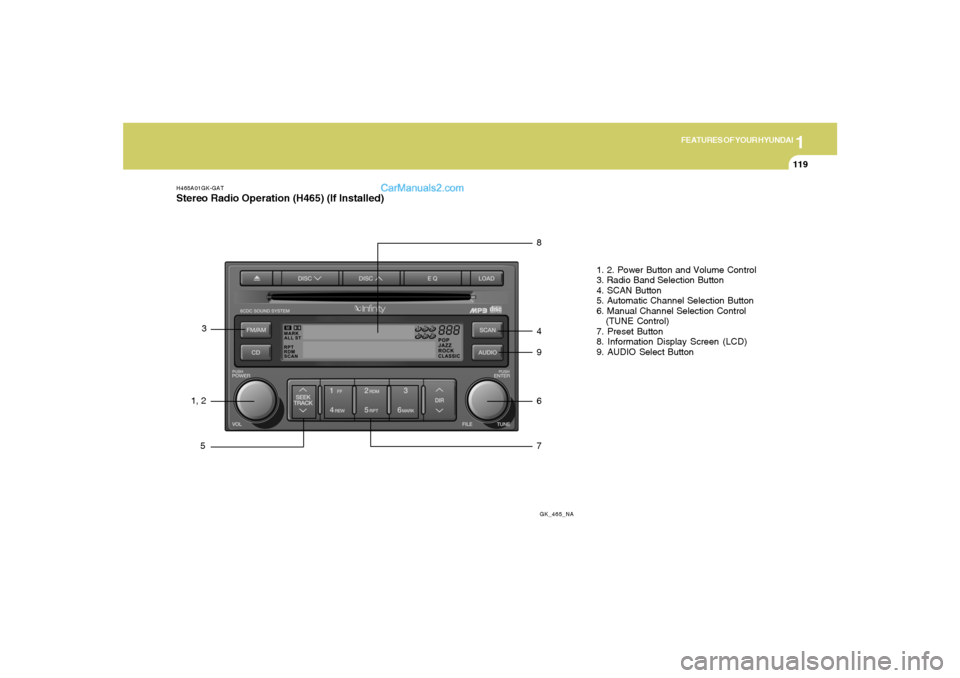
H465A01GK-GATStereo Radio Operation (H465) (If Installed)
GK_465_NA
1, 23
58
4
9
6
71. 2. Power Button and Volume Control
3. Radio Band Selection Button
4. SCAN Button
5. Automatic Channel Selection Button
6. Manual Channel Selection Control
(TUNE Control)
7. Preset Button
8. Information Display Screen (LCD)
9. AUDIO Select Button
Page 132 of 268
1FEATURES OF YOUR HYUNDAI
120
H465B01GK-GAT1. Power Button (POWER ON)Press this button when the ignition switch of the
automobile is set to ACC (1st notch) or ON (2nd
notch) to turn on the power and the audio
system. Press once again when the audio
system is on to turn off the power.2. Volume Control (VOLUME)Turn the volume control clockwise to increase
volume and counterclockwise to reduce. The
volume level will be displayed on the screen
when you adjust the volume.3. Radio Band Selection Button (FM/AM)o Press this button to listen to either FM or AM.
o The radio will be set to each of the following
modes each time you press the button.
FM1 ➟ FM2 ➟ AMNOTE:Push this button when the power is off to
turn on the power automatically.
4. SCAN ButtonPress this button to automatically select chan-
nels starting from the current channel and play
each channel for 5 seconds. Press again to
keep listening to the channel currently selected.5. Automatic Channel Selection Button
(SEEK)Press the [SEEK
] button to automatically
increase frequency and press the [TRACK
] button to automatically decrease frequency to
select and play the next available channel. If the
received channel is memorized in the preset
buttons then the screen will display the memo-
rized channel.6. Manual Channel Selection Control
(TUNE)Turn the TUNE control clockwise to increase
frequency and counterclockwise to reduce fre-
quency by 1 step for each click.7. Preset Button (1~6)Press this button to listen to the channels
memorized to each button. If you want to memo-
rize the current channel to the preset button,
press the button for more than 1.5 seconds then
the channel will be memorized to the button with
a beep.
8. Information Display Screen (LCD)A variety of information will be displayed on the
screen including the radio bands (FM1/FM2/
AM) while listening to the radio, frequency of
each channel, the number of preset channel
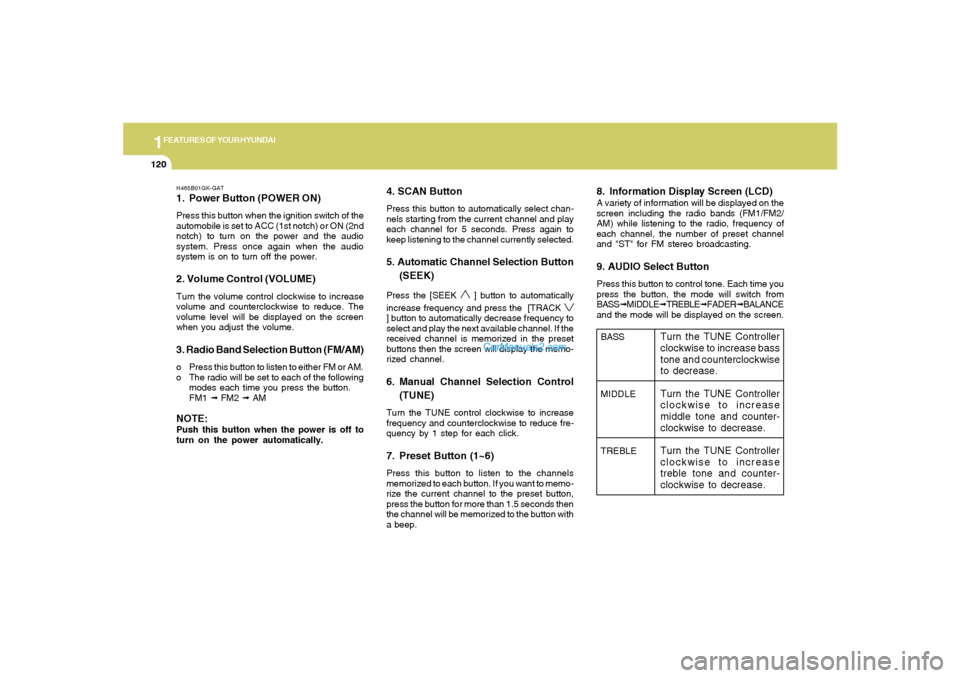
and "ST" for FM stereo broadcasting.9. AUDIO Select ButtonPress this button to control tone. Each time you
press the button, the mode will switch from
BASS➟MIDDLE➟TREBLE➟FADER➟BALANCE
and the mode will be displayed on the screen.BASS
MIDDLE
TREBLE
Turn the TUNE Controller
clockwise to increase bass
tone and counterclockwise
to decrease.
Turn the TUNE Controller
clockwise to increase
middle tone and counter-
clockwise to decrease.
Turn the TUNE Controller
clockwise to increase
treble tone and counter-
clockwise to decrease.
Page 135 of 268
![Hyundai Tiburon 2008 User Guide 1
FEATURES OF YOUR HYUNDAI
123
H465D01GK-GAT1.CD DeckThe deck will open only when you press [LOAD]
button. Make sure the printed side of the disk
faces upward when you insert the disk. The CD
changer](/img/35/19687/w960_19687-134.png "Hyundai Tiburon 2008 User Guide 1
FEATURES OF YOUR HYUNDAI
123
H465D01GK-GAT1.CD DeckThe deck will open only when you press [LOAD]
button. Make sure the printed side of the disk
faces upward when you insert the disk. The CD
changer")
1
FEATURES OF YOUR HYUNDAI
123
H465D01GK-GAT1.CD DeckThe deck will open only when you press [LOAD]
button. Make sure the printed side of the disk
faces upward when you insert the disk. The CD
changer can only play 12cm disks. If you insert
video CD or DATA CD, then the screen will
display "ERROR DISC," eject the disk and
return to the previous mode.2. CD Load ButtonWhen you press [LOAD] button, the empty lots
of the CD Changer will be opened in the order
of 1, 2, 3, 4, 5 and 6. When you insert CD, you
can listen to the corresponding CD. In this case,
the last CD you inserted will be played. If you do
not take any actions after pressing (LOAD) then
the (LOAD) will be cancelled.3. CD Eject ButtonWhen you press [
] button, the currently
played CD will be ejected. If you press the button
for more than 2 seconds, you will be able to eject
all CDs. If currently played CD is in the 3rd slot,
the ejection order will be 3, 4, 5, 6, 1 and 2.
4. Information Display Screen (LCD)This shows the location of disk inside the CD
Changer and the corresponding CD deck num-
ber will flicker when you load or eject the CD.
5. CD Changer Selection ButtonIf the power was turned off when the CD is inside
the CD changer or if you press "CD" button
when radio was on, the system will play CD. If
you press [CD] button when there is no CD in
the changer then the system will display "NO
DISK" for 2 seconds and return to the previous
mode.NOTE:If you press this button when the power is
off and CD is inside the deck, the power will
be automatically turned on.6. Disc Selection ButtonIf you press [DISC
] button while using CD
Changer, the next disc will be played (If you
press the button when you are listening to CD
1, the CD 2 will be played).
If you wish to listen to the previous CD, then
press [DISC
] button then the previous disc
will be played (If you press the button when you
are listening to CD 2, the CD 1 will be played).
If the CD Changer is not fully loaded, this will
move to the next available deck. When the
player moves from deck to deck, the screen will
display the selected deck number.
7. Fast Backward (REW)Press and hold [REW] button while playing CD
then the player will play the disk backwards 5
times the regular speed for first 5 seconds and
15 times faster after that. The sound will be
reduced by 12dB while you are holding the
button.8. Fast Forward (FF)Press and hold [FF] button while playing CD
then the player will play the disk forward 5 times
the regular speed for first 5 seconds and 15
times faster after that. The sound will be re-
duced by 12dB while you are holding the button.9. Automatic Previous Track Selection
ButtonPress [TRACK
] button to go to the beginning
of the song you are listening to while playing the
CD. Press the button again to go to the beginning
of the song before the song you were listening
to.
10. Automatic Next Track Selection
ButtonPress [SEEK
] button to go to the beginning
of the song next to the song you are listening to
while playing the CD.
Page 143 of 268
2
DRIVING YOUR HYUNDAI
4
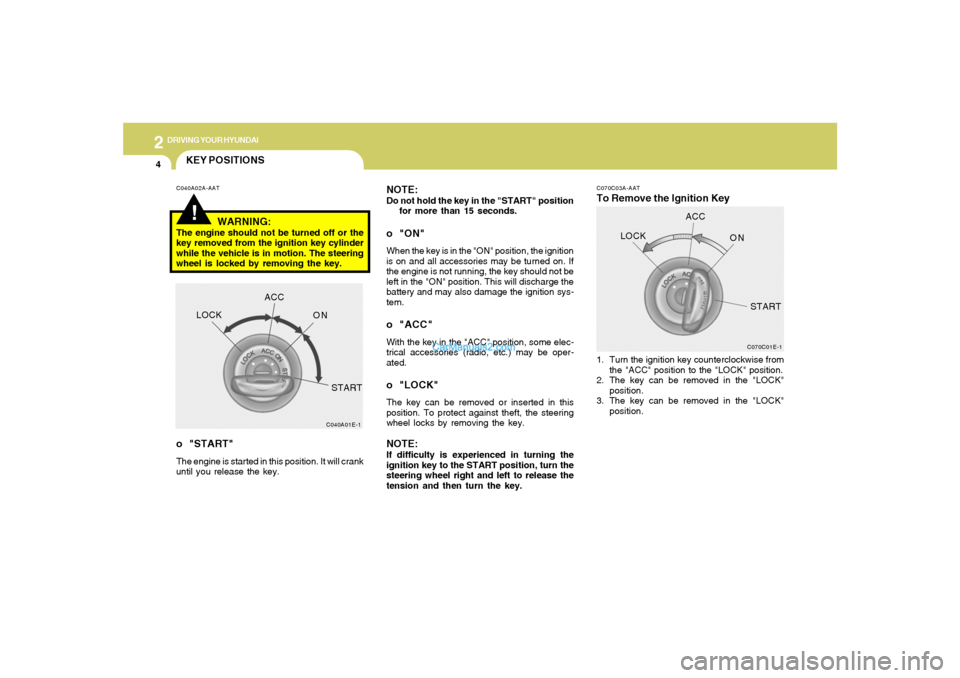
C070C03A-AATTo Remove the Ignition Key NOTE:
Do not hold the key in the "START" position
for more than 15 seconds.o "ON"When the key is in the "ON" position, the ignition
is on and all accessories may be turned on. If
the engine is not running, the key should not be
left in the "ON" position. This will discharge the
battery and may also damage the ignition sys-
tem.o "ACC"With the key in the "ACC" position, some elec-
trical accessories (radio, etc.) may be oper-
ated.o "LOCK"The key can be removed or inserted in this
position. To protect against theft, the steering
wheel locks by removing the key.NOTE:If difficulty is experienced in turning the
ignition key to the START position, turn the
steering wheel right and left to release the
tension and then turn the key.1. Turn the ignition key counterclockwise from
the "ACC" position to the "LOCK" position.
2. The key can be removed in the "LOCK"
position.
3. The key can be removed in the "LOCK"
position.
C070C01E-1
LOCKACC
ON
START
!KEY POSITIONSC040A02A-AAT
WARNING:
The engine should not be turned off or the
key removed from the ignition key cylinder
while the vehicle is in motion. The steering
wheel is locked by removing the key.o "START"The engine is started in this position. It will crank
until you release the key.
C040A01E-1
LOCKACC
ON
START
Page 173 of 268
3
WHAT TO DO IN AN EMERGENCY
7
!
WARNING:
Significantly low tire pressure makes
the vehicle unstable and can contrib-
ute to loss of vehicle control and
increased braking distances.
Continued driving on low pressure
tires will cause the tires to overheat
and fail.TPMS (Tire pressure monitoring
system) malfunction telltale
The TPMS malfunction indicator turns
on and stays on when there is a problem
with the Tire Pressure Monitoring Sys-
tem. If the system is able to correctly
detect an under-inflation warning at the
same time as system failure then it will
illuminate both the TPMS malfunction
and the low tire pressure telltale e.g. if
Front Left sensor fails, the TPMS mal-
function indicator turns, but if Front
Right, Rear Left, or Rear Right tire is
under-inflated, the low tire pressure tell-tale may turn on at the same time as the
TPMS malfunction indicator.
Have the system checked by an autho-
rized Hyundai dealer as soon as pos-
sible to determine the cause of the
problem.
NOTE:
o The TPMS malfunction indicator
may be illuminated if the vehicle
is operated in areas close to elec-
tric power supply cables or radio
transmitters such as near police
stations, government and public
offices, broadcasting stations,
military installations, airports, or
transmitting towers, etc. which can
interfere with normal operation of
the Tire Pressure Monitoring Sys-
tem (TPMS).
o The TPMS malfunction indicator
may be illuminated if snow chains
some electronic devices, such as
notebook computers, are used in
the vehicle. This can interfere with
normal operation of the Tire Pres-
sure Monitoring System (TPMS).o If there is a failed tire sensor, it is
possible for the TPMS to tempo-
rarily learn a replacement sensor
if closely driven to another vehicle
that is also equipped with TPMS.
In rare cases, this may tempo-
rarily delay the TPMS malfunction
indicator from turning on.
Changing a tire with TPMS
If you have a flat tire, the Low Tire
Pressure telltale will turn on. Have the
flat tire repaired by an authorized Hyundai
dealer as soon as possible or replace
the flat tire with the temporary spare
tire. NEVER use a puncture-repairing
agent to repair and/or inflate a low
pressure tire. If used, you will have to
replace the tire pressure sensor.
Each wheel is equipped with a tire
pressure sensor mounted inside the tire
behind the valve stem. You must use
TPMS specific wheels. It is recom-
mended that you always have your tires
serviced by an authorized Hyundai dealer
as soon as possible.
Page 219 of 268
6
DO-IT-YOURSELF MAINTENANCE
19
!
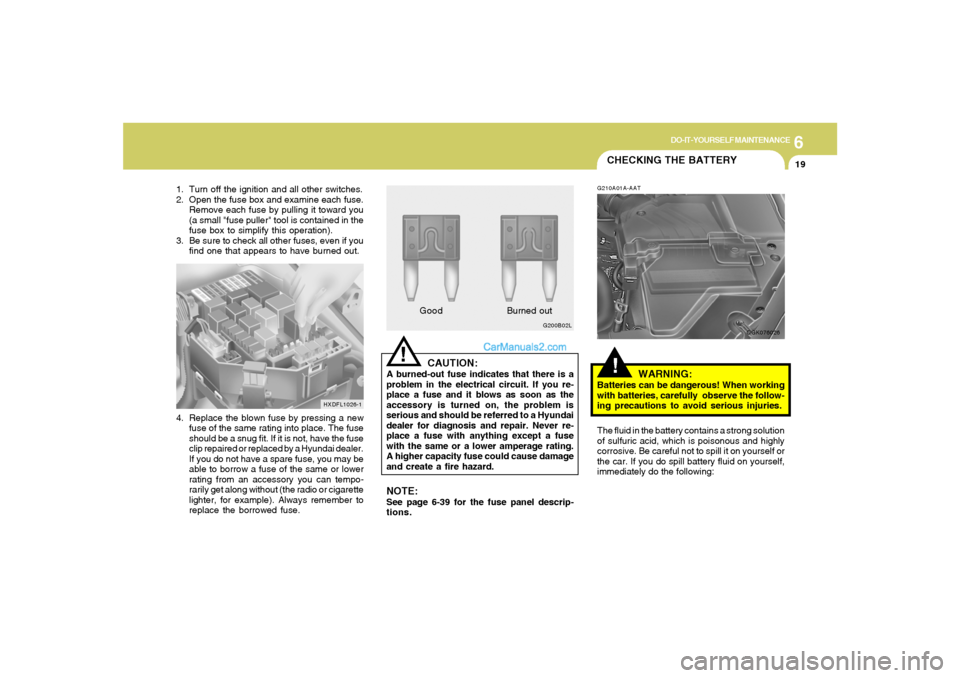
CAUTION:
A burned-out fuse indicates that there is a
problem in the electrical circuit. If you re-
place a fuse and it blows as soon as the
accessory is turned on, the problem is
serious and should be referred to a Hyundai
dealer for diagnosis and repair. Never re-
place a fuse with anything except a fuse
with the same or a lower amperage rating.
A higher capacity fuse could cause damage
and create a fire hazard.
G200B02L
GoodBurned out
1. Turn off the ignition and all other switches.
2. Open the fuse box and examine each fuse.
Remove each fuse by pulling it toward you
(a small "fuse puller" tool is contained in the
fuse box to simplify this operation).
3. Be sure to check all other fuses, even if you
find one that appears to have burned out.
HXDFL1026-1
4. Replace the blown fuse by pressing a new
fuse of the same rating into place. The fuse
should be a snug fit. If it is not, have the fuse
clip repaired or replaced by a Hyundai dealer.
If you do not have a spare fuse, you may be
able to borrow a fuse of the same or lower
rating from an accessory you can tempo-
rarily get along without (the radio or cigarette
lighter, for example). Always remember to
replace the borrowed fuse.
NOTE:See page 6-39 for the fuse panel descrip-
tions.
CHECKING THE BATTERY!
G210A01A-AAT
WARNING:
Batteries can be dangerous! When working
with batteries, carefully observe the follow-
ing precautions to avoid serious injuries.
The fluid in the battery contains a strong solution
of sulfuric acid, which is poisonous and highly
corrosive. Be careful not to spill it on yourself or
the car. If you do spill battery fluid on yourself,
immediately do the following:
OGK076026