reset Hyundai Tiburon 2008 User Guide
[x] Cancel search | Manufacturer: HYUNDAI, Model Year: 2008, Model line: Tiburon, Model: Hyundai Tiburon 2008Pages: 268, PDF Size: 9.93 MB
Page 117 of 268
1
FEATURES OF YOUR HYUNDAI
105
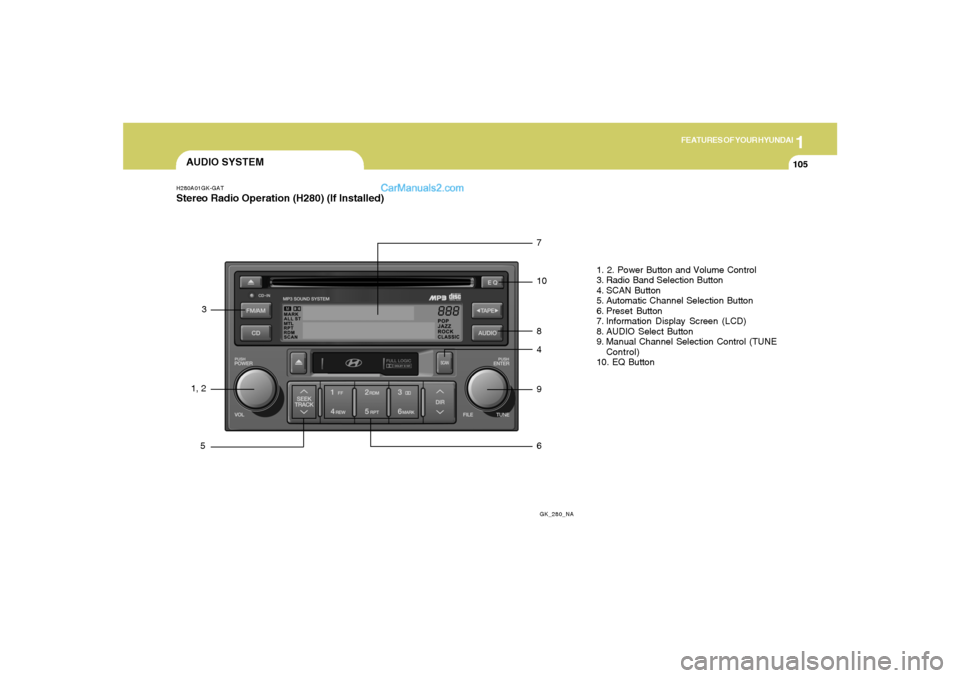
AUDIO SYSTEMH280A01GK-GATStereo Radio Operation (H280) (If Installed)
GK_280_NA
1, 23
57
10
8
4
9
61. 2. Power Button and Volume Control
3. Radio Band Selection Button
4. SCAN Button
5. Automatic Channel Selection Button
6. Preset Button
7. Information Display Screen (LCD)
8. AUDIO Select Button
9. Manual Channel Selection Control (TUNE
Control)
10. EQ Button
Page 118 of 268
1FEATURES OF YOUR HYUNDAI
106
H280B01GK-GAT1. Power Button (POWER ON)Press this button when the ignition switch of the
automobile is set to ACC (1st notch) or ON (2nd
notch) to turn on the power and the audio
system. Press once again when the audio
system is on to turn off the power.2. Volume Control (VOLUME)Turn the volume control clockwise to increase
volume and counterclockwise to reduce. The
volume level will be displayed on the screen
when you adjust the volume.3. Radio Band Selection Button (FM/AM)o Press this button to listen to either FM or AM.
o The radio will be set to each of the following
modes each time you press the button.
FM1 ➟ FM2 ➟ AMNOTE:Push this button when the power is off to
turn on the power automatically.4. SCAN ButtonPress this button to automatically select chan-
nels starting from the current channel and play
each channel for 5 seconds.
5. Automatic Channel Selection Button
(SEEK)Press the upper side of the button to automati-
cally increase frequency and select and play
the receivable channel. Press the lower side of
the button to automatically decrease frequency
and select and play the next available channel.6. Preset Button (1~6)Press this button to listen to the channels
memorized to each button. If you want to memo-
rize the current channel to the preset button,
press the button for more than 1.5 seconds then
the channel will be memorized to the button with
a beep.7. Information Display Screen (LCD)A variety of information will be displayed on the
screen including the radio bands (FM1/FM2/
AM) while listening to the radio, frequency of
each channel, the number of preset channel
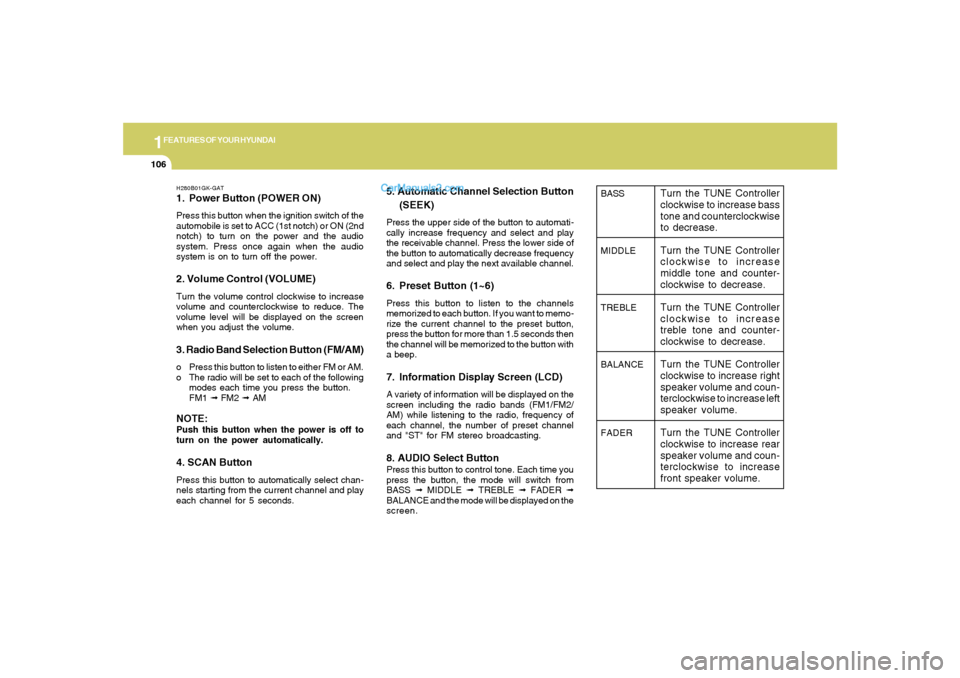
and "ST" for FM stereo broadcasting.8. AUDIO Select ButtonPress this button to control tone. Each time you
press the button, the mode will switch from
BASS ➟ MIDDLE ➟ TREBLE ➟ FADER ➟
BALANCE and the mode will be displayed on the
screen.
BASS
MIDDLE
TREBLE
BALANCE
FADER
Turn the TUNE Controller
clockwise to increase bass
tone and counterclockwise
to decrease.
Turn the TUNE Controller
clockwise to increase
middle tone and counter-
clockwise to decrease.
Turn the TUNE Controller
clockwise to increase
treble tone and counter-
clockwise to decrease.
Turn the TUNE Controller
clockwise to increase right
speaker volume and coun-
terclockwise to increase left
speaker volume.
Turn the TUNE Controller
clockwise to increase rear
speaker volume and coun-
terclockwise to increase
front speaker volume.
Page 125 of 268
1
FEATURES OF YOUR HYUNDAI
113
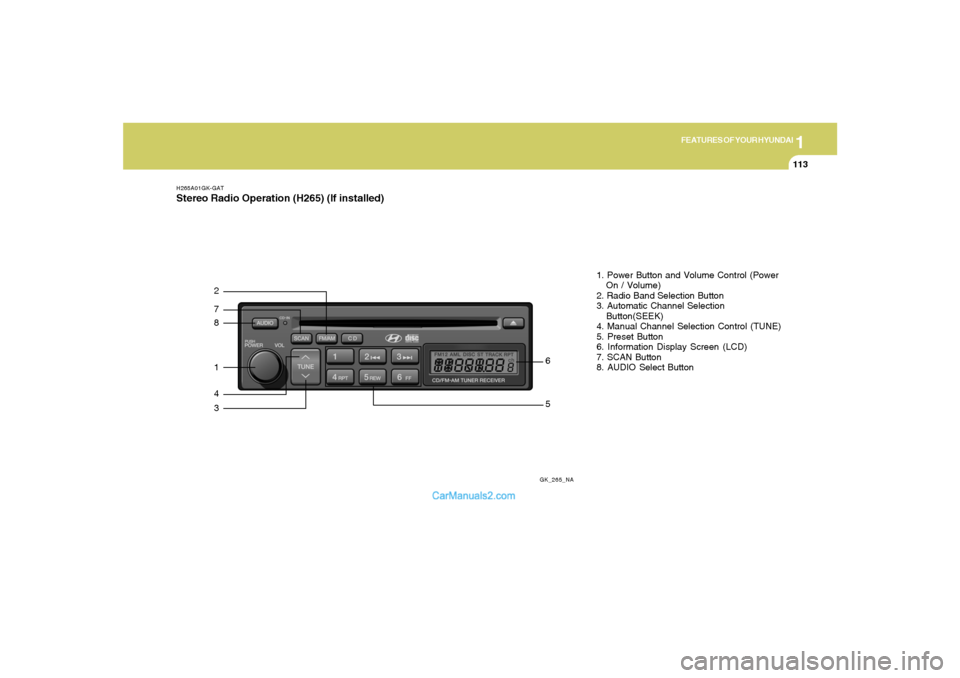
H265A01GK-GATStereo Radio Operation (H265) (If installed)
GK_265_NA
872143
561. Power Button and Volume Control (Power
On / Volume)
2. Radio Band Selection Button
3. Automatic Channel Selection
Button(SEEK)
4. Manual Channel Selection Control (TUNE)
5. Preset Button
6. Information Display Screen (LCD)
7. SCAN Button
8. AUDIO Select Button
Page 126 of 268
1FEATURES OF YOUR HYUNDAI
114
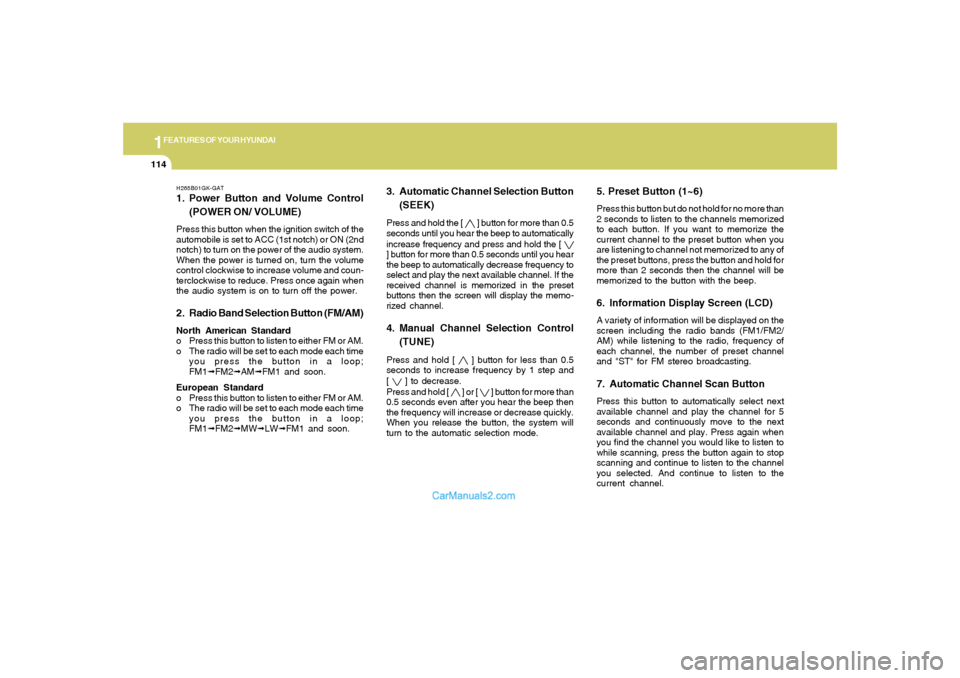
H265B01GK-GAT1. Power Button and Volume Control
(POWER ON/ VOLUME)Press this button when the ignition switch of the
automobile is set to ACC (1st notch) or ON (2nd
notch) to turn on the power of the audio system.
When the power is turned on, turn the volume
control clockwise to increase volume and coun-
terclockwise to reduce. Press once again when
the audio system is on to turn off the power.2. Radio Band Selection Button (FM/AM)North American Standard
o Press this button to listen to either FM or AM.
o The radio will be set to each mode each time
you press the button in a loop;
FM1➟FM2➟AM➟FM1 and soon.
European Standard
o Press this button to listen to either FM or AM.
o The radio will be set to each mode each time
you press the button in a loop;
FM1➟FM2➟MW➟LW➟FM1 and soon.
5. Preset Button (1~6)Press this button but do not hold for no more than
2 seconds to listen to the channels memorized
to each button. If you want to memorize the
current channel to the preset button when you
are listening to channel not memorized to any of
the preset buttons, press the button and hold for
more than 2 seconds then the channel will be
memorized to the button with the beep.6. Information Display Screen (LCD)A variety of information will be displayed on the
screen including the radio bands (FM1/FM2/
AM) while listening to the radio, frequency of
each channel, the number of preset channel
and "ST" for FM stereo broadcasting.7. Automatic Channel Scan ButtonPress this button to automatically select next
available channel and play the channel for 5
seconds and continuously move to the next
available channel and play. Press again when
you find the channel you would like to listen to
while scanning, press the button again to stop
scanning and continue to listen to the channel
you selected. And continue to listen to the
current channel.
3. Automatic Channel Selection Button
(SEEK)Press and hold the [
] button for more than 0.5
seconds until you hear the beep to automatically
increase frequency and press and hold the [
] button for more than 0.5 seconds until you hear
the beep to automatically decrease frequency to
select and play the next available channel. If the
received channel is memorized in the preset
buttons then the screen will display the memo-
rized channel.4. Manual Channel Selection Control
(TUNE)Press and hold [
] button for less than 0.5
seconds to increase frequency by 1 step and
[
] to decrease.
Press and hold [
] or [
] button for more than
0.5 seconds even after you hear the beep then
the frequency will increase or decrease quickly.
When you release the button, the system will
turn to the automatic selection mode.
Page 131 of 268
1
FEATURES OF YOUR HYUNDAI
119
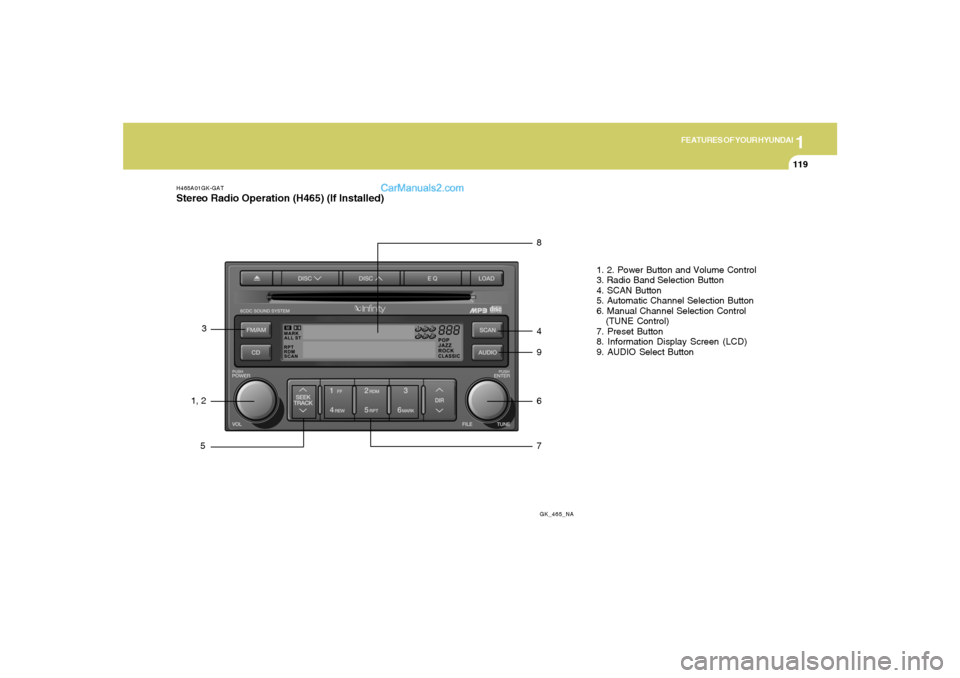
H465A01GK-GATStereo Radio Operation (H465) (If Installed)
GK_465_NA
1, 23
58
4
9
6
71. 2. Power Button and Volume Control
3. Radio Band Selection Button
4. SCAN Button
5. Automatic Channel Selection Button
6. Manual Channel Selection Control
(TUNE Control)
7. Preset Button
8. Information Display Screen (LCD)
9. AUDIO Select Button
Page 132 of 268
1FEATURES OF YOUR HYUNDAI
120
H465B01GK-GAT1. Power Button (POWER ON)Press this button when the ignition switch of the
automobile is set to ACC (1st notch) or ON (2nd
notch) to turn on the power and the audio
system. Press once again when the audio
system is on to turn off the power.2. Volume Control (VOLUME)Turn the volume control clockwise to increase
volume and counterclockwise to reduce. The
volume level will be displayed on the screen
when you adjust the volume.3. Radio Band Selection Button (FM/AM)o Press this button to listen to either FM or AM.
o The radio will be set to each of the following
modes each time you press the button.
FM1 ➟ FM2 ➟ AMNOTE:Push this button when the power is off to
turn on the power automatically.
4. SCAN ButtonPress this button to automatically select chan-
nels starting from the current channel and play
each channel for 5 seconds. Press again to
keep listening to the channel currently selected.5. Automatic Channel Selection Button
(SEEK)Press the [SEEK
] button to automatically
increase frequency and press the [TRACK
] button to automatically decrease frequency to
select and play the next available channel. If the
received channel is memorized in the preset
buttons then the screen will display the memo-
rized channel.6. Manual Channel Selection Control
(TUNE)Turn the TUNE control clockwise to increase
frequency and counterclockwise to reduce fre-
quency by 1 step for each click.7. Preset Button (1~6)Press this button to listen to the channels
memorized to each button. If you want to memo-
rize the current channel to the preset button,
press the button for more than 1.5 seconds then
the channel will be memorized to the button with
a beep.
8. Information Display Screen (LCD)A variety of information will be displayed on the
screen including the radio bands (FM1/FM2/
AM) while listening to the radio, frequency of
each channel, the number of preset channel
and "ST" for FM stereo broadcasting.9. AUDIO Select ButtonPress this button to control tone. Each time you
press the button, the mode will switch from
BASS➟MIDDLE➟TREBLE➟FADER➟BALANCE
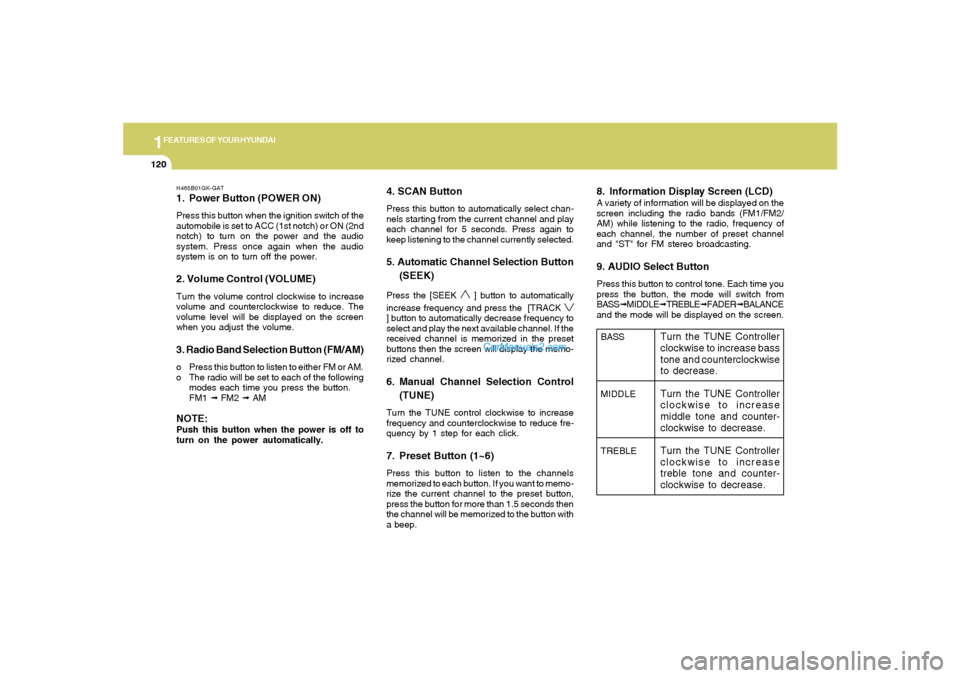
and the mode will be displayed on the screen.BASS
MIDDLE
TREBLE
Turn the TUNE Controller
clockwise to increase bass
tone and counterclockwise
to decrease.
Turn the TUNE Controller
clockwise to increase
middle tone and counter-
clockwise to decrease.
Turn the TUNE Controller
clockwise to increase
treble tone and counter-
clockwise to decrease.