fuel consumption HYUNDAI TUCSON 2005 Owners Manual
[x] Cancel search | Manufacturer: HYUNDAI, Model Year: 2005, Model line: TUCSON, Model: HYUNDAI TUCSON 2005Pages: 273, PDF Size: 11.53 MB
Page 61 of 273
1FEATURES OF YOUR HYUNDAI50
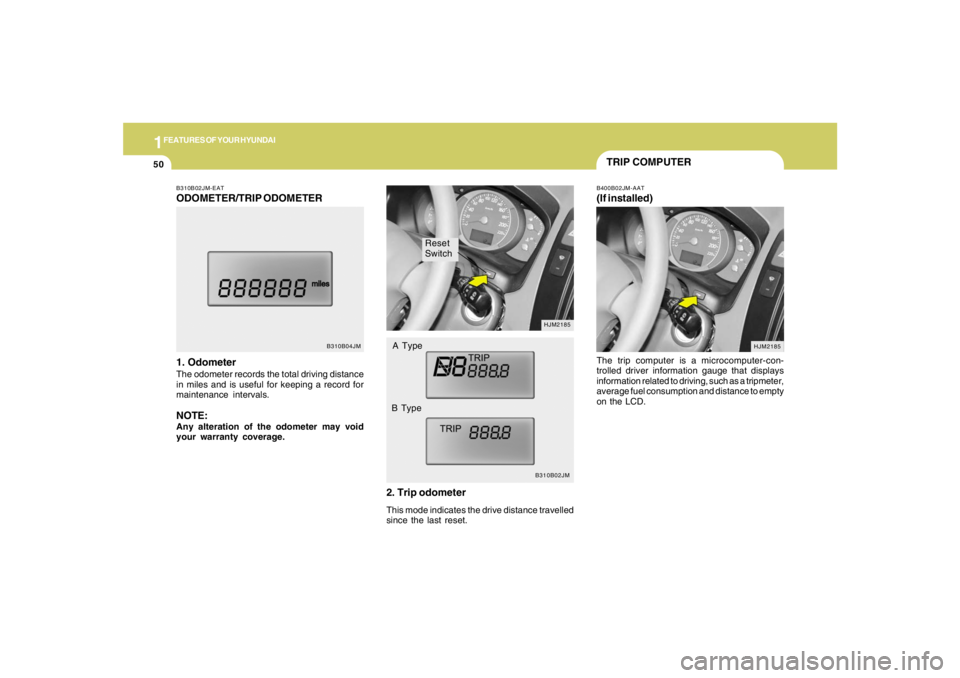
Reset
Switch
B310B02JMHJM2185
A Type
B Type
B310B02JM-EATODOMETER/TRIP ODOMETER
1. OdometerThe odometer records the total driving distance
in miles and is useful for keeping a record for
maintenance intervals.NOTE:Any alteration of the odometer may void
your warranty coverage.
B310B04JM
2. Trip odometerThis mode indicates the drive distance travelled
since the last reset.
TRIP COMPUTERB400B02JM-AAT(If installed)The trip computer is a microcomputer-con-
trolled driver information gauge that displays
information related to driving, such as a tripmeter,
average fuel consumption and distance to empty
on the LCD.
HJM2185
Page 62 of 273
1
FEATURES OF YOUR HYUNDAI
51
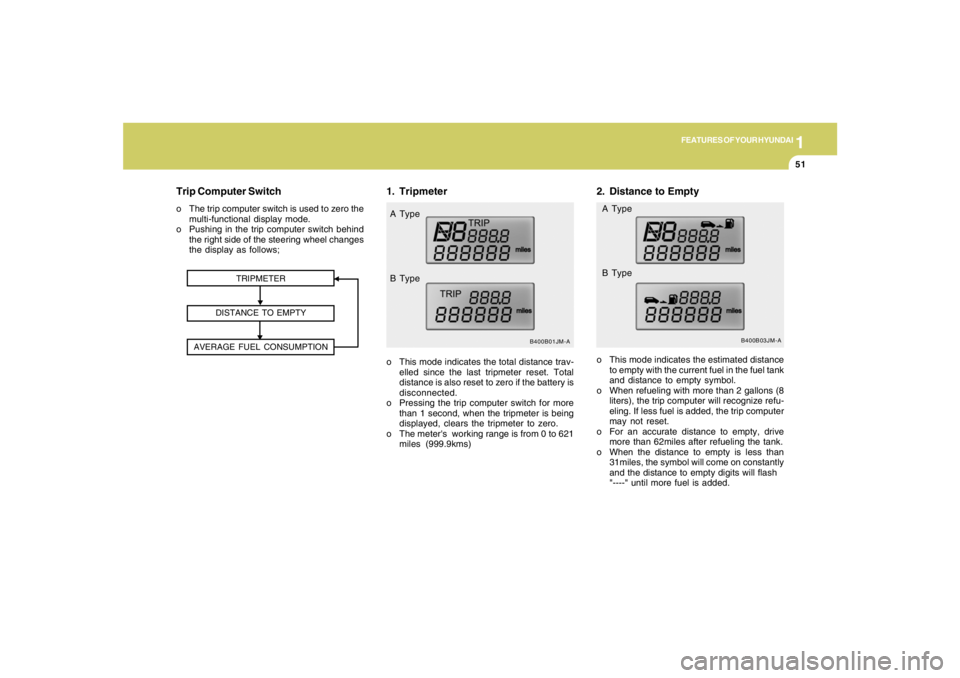
2. Distance to Empty
B400B03JM-A
o This mode indicates the estimated distance
to empty with the current fuel in the fuel tank
and distance to empty symbol.
o When refueling with more than 2 gallons (8
liters), the trip computer will recognize refu-
eling. If less fuel is added, the trip computer
may not reset.
o For an accurate distance to empty, drive
more than 62miles after refueling the tank.
o When the distance to empty is less than
31miles, the symbol will come on constantly
and the distance to empty digits will flash
"----" until more fuel is added. A Type
B Type
1. Tripmeter
TRIPMETER
DISTANCE TO EMPTY
AVERAGE FUEL CONSUMPTION
B400B01JM-A
o This mode indicates the total distance trav-
elled since the last tripmeter reset. Total
distance is also reset to zero if the battery is
disconnected.
o Pressing the trip computer switch for more
than 1 second, when the tripmeter is being
displayed, clears the tripmeter to zero.
o The meter's working range is from 0 to 621
miles (999.9kms) A Type
B Type
Trip Computer Switcho The trip computer switch is used to zero the
multi-functional display mode.
o Pushing in the trip computer switch behind
the right side of the steering wheel changes
the display as follows;
Page 63 of 273
1FEATURES OF YOUR HYUNDAI52
MULTI-FUNCTION LIGHT SWITCHB340A01A-AATCOMBINATION TURN SIGNAL,
HEADLIGHT AND HIGH-BEAM
SWITCH
Turn Signal OperationPulling down on the lever causes the turn
signals on the left side of the car to blink. Pushing
upwards on the lever causes the turn signals on
the right side of the car to blink. As the turn is
completed, the lever will automatically return to
the center position and turn off the turn signals
at the same time. If either turn signal indicator
light blinks more rapidly than usual, goes on but
does not blink, or does not go on at all, there is
a malfunction in the system. Check for a burned-
out fuse or bulb or see your Hyundai dealer.
B400B02JM-A
NOTE:o The distance to empty can differ from
the actual tripmeter according to driving
condition habits.
o The distance to empty can vary accord-
ing to the driving conditions, driving
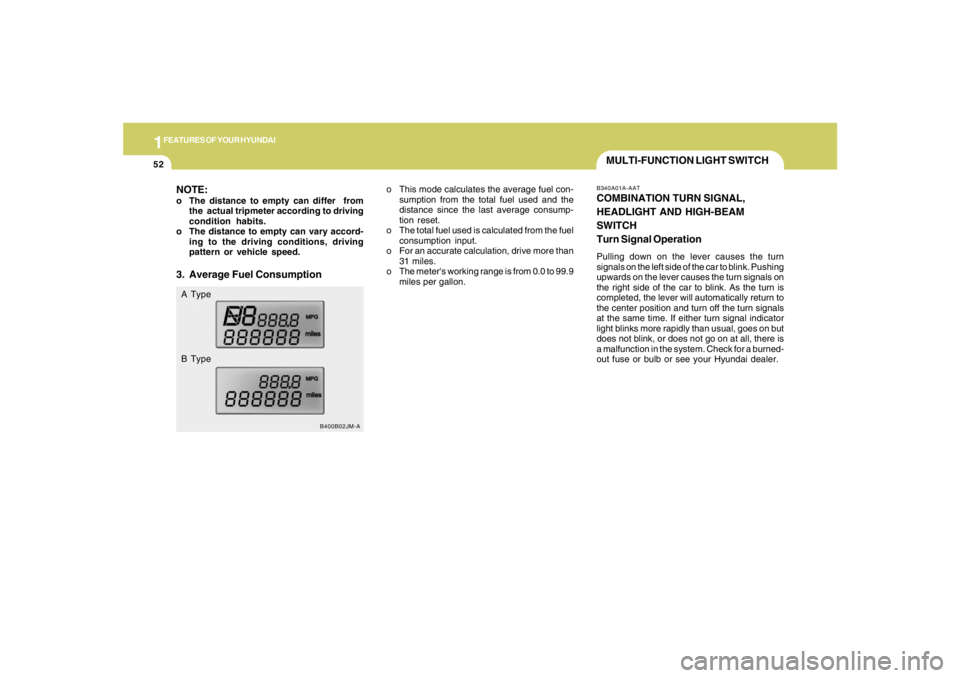
pattern or vehicle speed.3. Average Fuel ConsumptionA Type
B Typeo This mode calculates the average fuel con-
sumption from the total fuel used and the
distance since the last average consump-
tion reset.
o The total fuel used is calculated from the fuel
consumption input.
o For an accurate calculation, drive more than
31 miles.
o The meter's working range is from 0.0 to 99.9
miles per gallon.
Page 165 of 273
2
DRIVING YOUR HYUNDAI
19
o Use caution when parking on a hill. Engage
the parking brake and place the gear selec-
tor lever in "P" (automatic transaxle) or in first
or reverse gear (manual transaxle). If your
car is facing downhill, turn the front wheels
into the curb to help keep the car from rolling.
If your car is facing uphill, turn the front
wheels away from the curb to help keep the
car from rolling. If there is no curb or if it is
required by other conditions to keep the car
from rolling, block the wheels.
o Under some conditions your parking brake
can freeze in the engaged position. This is
most likely to happen when there is an ac-
cumulation of snow or ice around or near the
rear brakes or if the brakes are wet. If there
is a risk that the parking brake may freeze,
apply it only temporarily while you put the
gear selector lever in "P" (automatic) or in
first or reverse gear (manual transaxle) and
block the rear wheels so the car cannot roll.
Then release the parking brake.
o Do not hold the vehicle on the upgrade with
the accelerator pedal. This can cause the
transaxle to overheat. Always use the brake
pedal or parking brake. o Don't coast down hills with the car out of gear.
This is extremely hazardous. Keep the car
in gear at all times, use the brakes to slow
down, then shift to a lower gear so that engine
braking will help you maintain a safe speed.
o Don't "ride" the brake pedal. Resting your
foot on the brake pedal while driving can be
dangerous because it can result in the brakes
overheating and losing their effectiveness. It
also increases the wear of the brake com-
ponents.
o If a tire goes flat while you are driving, apply
the brakes gently and keep the car pointed
straight ahead while you slow down. When
you are moving slowly enough for it to be safe
to do so, pull off the road and stop in a safe
place.
o If your car is equipped with an automatic
transaxle, don't let your car creep forward.
To avoid creeping forward, keep your foot
firmly on the brake pedal when the car is
stopped.
DRIVING FOR ECONOMYC140A01A-AATYou can save fuel and get more miles from your
car if you follow these suggestions:
o Drive smoothly. Accelerate at a moderate
rate. Don't make "jack-rabbit" starts or full-
throttle shifts and maintain a steady cruising
speed. Don't race between stoplights. Try to
adjust your speed to that of the other traffic
so you don't have to change speeds unnec-
essarily. Avoid heavy traffic whenever pos-
sible. Always maintain a safe distance from
other vehicles so you can avoid unneces-
sary braking. This also reduces brake wear.
o Drive at a moderate speed. The faster you
drive, the more fuel your car uses. Driving at
a moderate speed, especially on the high-
way, is one of the most effective ways to
reduce fuel consumption.
o Don't "ride" the brake or clutch pedal. This
can increase fuel consumption and also
increase wear on these components. In
addition, driving with your foot resting on the
brake pedal may cause the brakes to over-
heat, which reduces their effectiveness and
may lead to more serious consequences.
o Take care of your tires. Keep them inflated
to the recommended pressure. Incorrect
inflation, either too much or too little, results
in unnecessary tire wear. Check the tire
pressures at least once a month.
Page 166 of 273
2
DRIVING YOUR HYUNDAI
20
SMOOTH CORNERINGC150A01A-AATAvoid braking or gear changing in corners,
especially when roads are wet. Ideally, corners
should always be taken under gentle accelera-
tion. If you follow these suggestions, tire wear
will be held to a minimum. o Be sure that the wheels are aligned cor-
rectly. Improper alignment can result from
hitting curbs or driving too fast over irregular
surfaces. Poor alignment causes faster tire
wear and may also result in other problems
as well as greater fuel consumption.
o Keep your car in good condition. For better
fuel economy and reduced maintenance
costs, maintain your car in accordance with
the maintenance schedule in Section 5. If
you drive your car in severe conditions,
more frequent maintenance is required (see
Section 5 for details).
o Keep your car clean. For maximum service,
your Hyundai should be kept clean and free
of corrosive materials. It is especially impor-
tant that mud, dirt, ice, etc. not be allowed to
accumulate on the underside of the car. This
extra weight can result in increased fuel
consumption and also contribute to corro-
sion.
o Travel lightly. Don't carry unnecessary
weight in your car. Weight reduces fuel
economy.
o Don't let the engine idle longer than neces-
sary. If you are waiting (and not in traffic),
turn off your engine and restart only when
you're ready to go.o Remember, your Hyundai does not require
extended warm-up. As soon as the engine
is running smoothly, you can drive away. In
very cold weather, however, give your en-
gine a slightly longer warm-up period.
o Don't "lug" or "over-rev" the engine. Lugging
is driving too slowly in too high a gear result-
ing in the engine bucking. If this happens,
shift to a lower gear. Over-revving is racing
the engine beyond its safe limit. This can be
avoided by shifting at the recommended
speeds.
o Use your air conditioning sparingly. The air
conditioning system is operated by engine
power so your fuel economy is reduced
when you use it.