air condition HYUNDAI TUCSON 2007 User Guide
[x] Cancel search | Manufacturer: HYUNDAI, Model Year: 2007, Model line: TUCSON, Model: HYUNDAI TUCSON 2007Pages: 306, PDF Size: 11.82 MB
Page 106 of 306
1FEATURES OF YOUR HYUNDAI94
VENTILATION
BI-LEVEL HEATING
B710A01S-AAT B700A02E-AAT
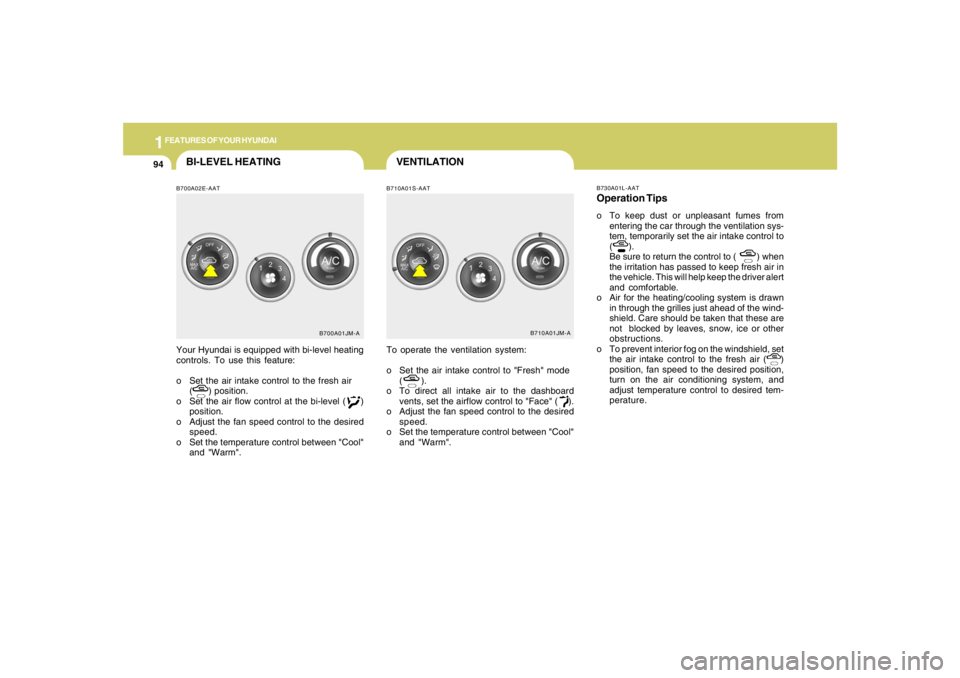
Your Hyundai is equipped with bi-level heating
controls. To use this feature:
o Set the air intake control to the fresh air
( ) position.
o Set the air flow control at the bi-level ( )
position.
o Adjust the fan speed control to the desired
speed.
o Set the temperature control between "Cool"
and "Warm".To operate the ventilation system:
o Set the air intake control to "Fresh" mode
( ).
o To direct all intake air to the dashboard
vents, set the airflow control to "Face" ( ).
o Adjust the fan speed control to the desired
speed.
o Set the temperature control between "Cool"
and "Warm".
B700A01JM-AB710A01JM-AB730A01L-AAT
Operation Tipso To keep dust or unpleasant fumes from
entering the car through the ventilation sys-
tem, temporarily set the air intake control to
( ).
Be sure to return the control to ( ) when
the irritation has passed to keep fresh air in
the vehicle. This will help keep the driver alert
and comfortable.
o Air for the heating/cooling system is drawn
in through the grilles just ahead of the wind-
shield. Care should be taken that these are
not blocked by leaves, snow, ice or other
obstructions.
o To prevent interior fog on the windshield, set
the air intake control to the fresh air ( )
position, fan speed to the desired position,
turn on the air conditioning system, and
adjust temperature control to desired tem-
perature.
Page 107 of 306
1
FEATURES OF YOUR HYUNDAI
9595959595
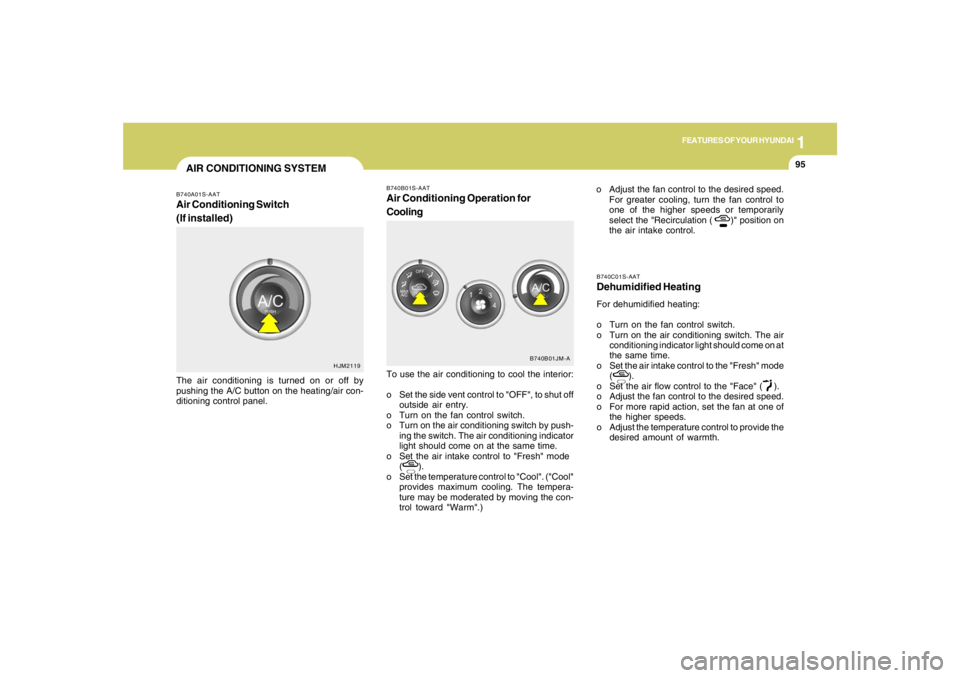
B740C01S-AATDehumidified HeatingFor dehumidified heating:
o Turn on the fan control switch.
o Turn on the air conditioning switch. The air
conditioning indicator light should come on at
the same time.
o Set the air intake control to the "Fresh" mode
( ).
o Set the air flow control to the "Face" ( ).
o Adjust the fan control to the desired speed.
o For more rapid action, set the fan at one of
the higher speeds.
o Adjust the temperature control to provide the
desired amount of warmth.
B740B01S-AATAir Conditioning Operation for
CoolingTo use the air conditioning to cool the interior:
o Set the side vent control to "OFF", to shut off
outside air entry.
o Turn on the fan control switch.
o Turn on the air conditioning switch by push-
ing the switch. The air conditioning indicator
light should come on at the same time.
o Set the air intake control to "Fresh" mode
( ).
o Set the temperature control to "Cool". ("Cool"
provides maximum cooling. The tempera-
ture may be moderated by moving the con-
trol toward "Warm".)o Adjust the fan control to the desired speed.
For greater cooling, turn the fan control to
one of the higher speeds or temporarily
select the "Recirculation ( )" position on
the air intake control.
B740B01JM-A
AIR CONDITIONING SYSTEMB740A01S-AATAir Conditioning Switch
(If installed)The air conditioning is turned on or off by
pushing the A/C button on the heating/air con-
ditioning control panel.
HJM2119
Page 108 of 306
1FEATURES OF YOUR HYUNDAI96
B740D01A-AATOperation Tipso If the interior of the car is hot when you first
get in, open the windows for a few minutes
to expel the hot air.
o When you are using the air conditioning
system, keep all windows closed to keep hot
air out.
o When moving slowly, as in heavy traffic, shift
to a lower gear. This increases engine speed,
which in turn increases the speed of the air
conditioning compressor.
o On steep grades, turn the air conditioning off
to avoid the possibility of the engine over-
heating.
o During winter months or in periods when the
air conditioning is not used regularly, run the
air conditioning once every month for a few
minutes. This will help circulate the lubri-
cants and keep your system in peak oper-
ating condition.
Page 110 of 306
1FEATURES OF YOUR HYUNDAI98
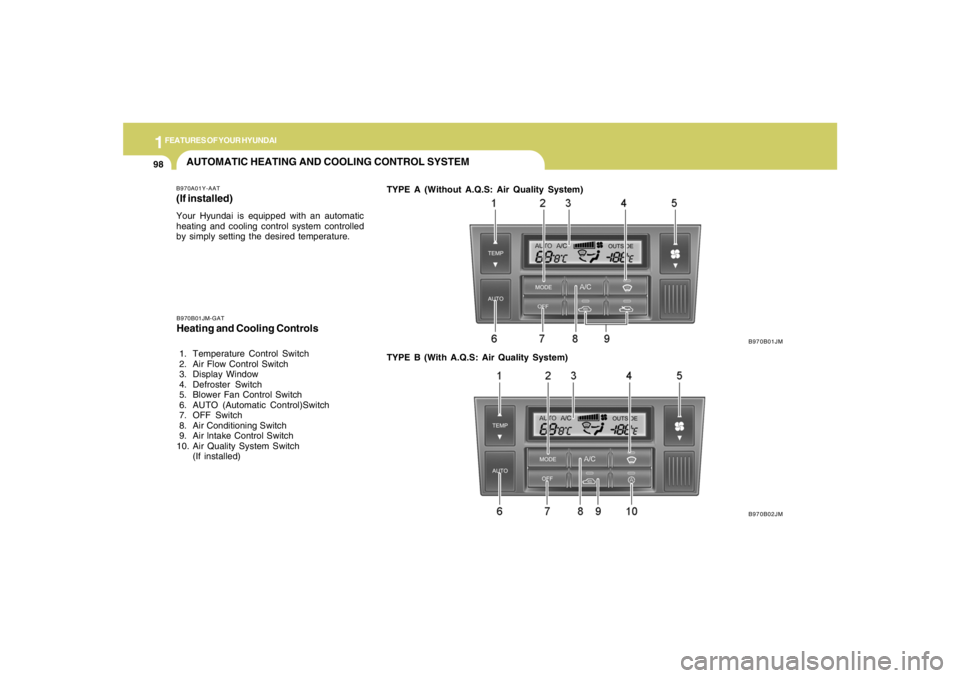
AUTOMATIC HEATING AND COOLING CONTROL SYSTEMB970A01Y-AAT(If installed)Your Hyundai is equipped with an automatic
heating and cooling control system controlled
by simply setting the desired temperature.TYPE A (Without A.Q.S: Air Quality System)
B970B01JM
B970B02JM B970B01JM-GAT
Heating and Cooling Controls 1. Temperature Control Switch
2. Air Flow Control Switch
3. Display Window
4. Defroster Switch
5. Blower Fan Control Switch
6. AUTO (Automatic Control)Switch
7. OFF Switch
8. Air Conditioning Switch
9. Air lntake Control Switch
10. Air Quality System Switch
(If installed)TYPE B (With A.Q.S: Air Quality System)
Page 111 of 306
1
FEATURES OF YOUR HYUNDAI
9999999999
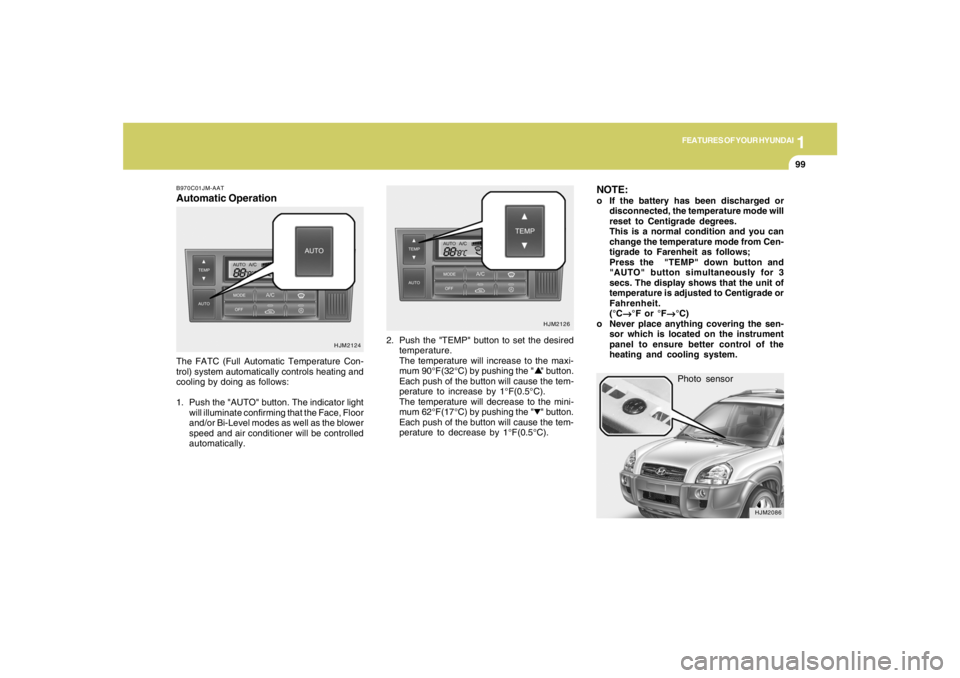
Photo sensor
HJM2086
NOTE:o If the battery has been discharged or
disconnected, the temperature mode will
reset to Centigrade degrees.
This is a normal condition and you can
change the temperature mode from Cen-
tigrade to Farenheit as follows;
Press the "TEMP" down button and
"AUTO" button simultaneously for 3
secs. The display shows that the unit of
temperature is adjusted to Centigrade or
Fahrenheit.
(°C
→ →→ →
→°F or °F
→ →→ →
→°C)
o Never place anything covering the sen-
sor which is located on the instrument
panel to ensure better control of the
heating and cooling system.
B970C01JM-AATAutomatic OperationThe FATC (Full Automatic Temperature Con-
trol) system automatically controls heating and
cooling by doing as follows:
1. Push the "AUTO" button. The indicator light
will illuminate confirming that the Face, Floor
and/or Bi-Level modes as well as the blower
speed and air conditioner will be controlled
automatically.2. Push the "TEMP" button to set the desired
temperature.
The temperature will increase to the maxi-
mum 90°F(32°C) by pushing the " " button.
Each push of the button will cause the tem-
perature to increase by 1°F(0.5°C).
The temperature will decrease to the mini-
mum 62°F(17°C) by pushing the " " button.
Each push of the button will cause the tem-
perature to decrease by 1°F(0.5°C).
HJM2124HJM2126
Page 113 of 306
1
FEATURES OF YOUR HYUNDAI
101101101101101
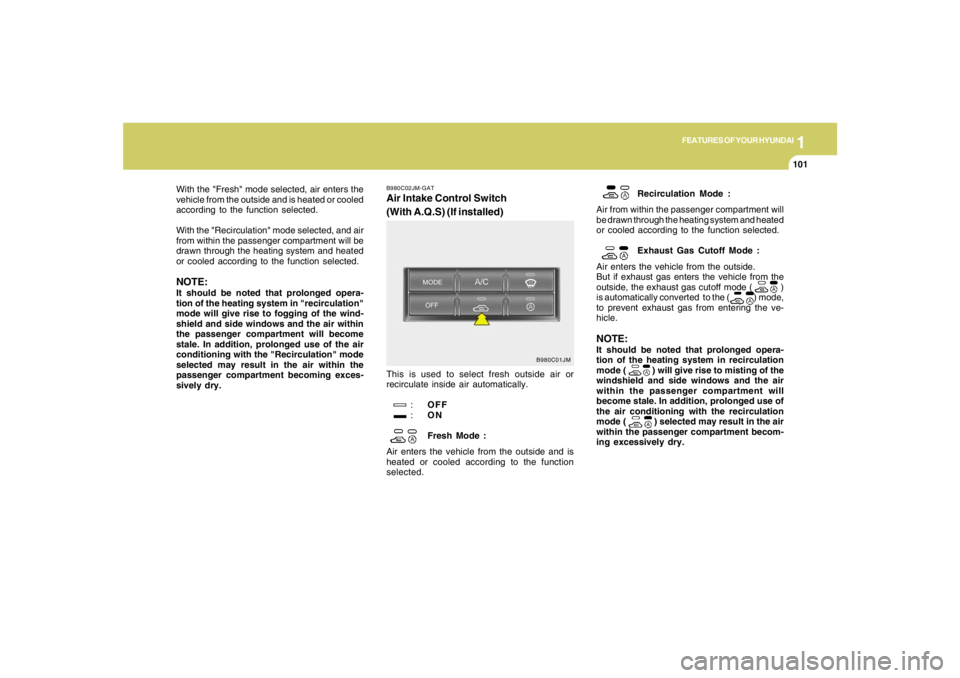
B980C02JM-GATAir Intake Control Switch
(With A.Q.S) (If installed)This is used to select fresh outside air or
recirculate inside air automatically.
:OFF
:ON
Fresh Mode :
Air enters the vehicle from the outside and is
heated or cooled according to the function
selected.Recirculation Mode :
Air from within the passenger compartment will
be drawn through the heating system and heated
or cooled according to the function selected.
Exhaust Gas Cutoff Mode :
Air enters the vehicle from the outside.
But if exhaust gas enters the vehicle from the
outside, the exhaust gas cutoff mode ( )
is automatically converted to the ( ) mode,
to prevent exhaust gas from entering the ve-
hicle.
NOTE:It should be noted that prolonged opera-
tion of the heating system in recirculation
mode (
) will give rise to misting of the
windshield and side windows and the air
within the passenger compartment will
become stale. In addition, prolonged use of
the air conditioning with the recirculation
mode ( ) selected may result in the air
within the passenger compartment becom-
ing excessively dry.
B980C01JM
With the "Fresh" mode selected, air enters the
vehicle from the outside and is heated or cooled
according to the function selected.
With the "Recirculation" mode selected, and air
from within the passenger compartment will be
drawn through the heating system and heated
or cooled according to the function selected.NOTE:It should be noted that prolonged opera-
tion of the heating system in "recirculation"
mode will give rise to fogging of the wind-
shield and side windows and the air within
the passenger compartment will become
stale. In addition, prolonged use of the air
conditioning with the "Recirculation" mode
selected may result in the air within the
passenger compartment becoming exces-
sively dry.
Page 116 of 306
1FEATURES OF YOUR HYUNDAI
104
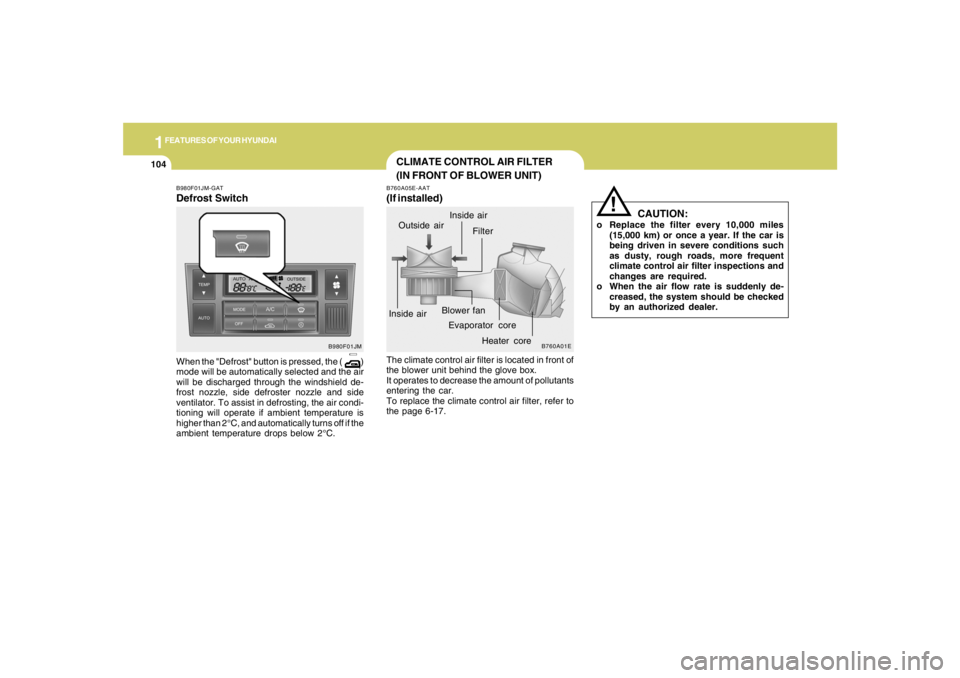
CLIMATE CONTROL AIR FILTER
(IN FRONT OF BLOWER UNIT)B760A05E-AAT(If installed)The climate control air filter is located in front of
the blower unit behind the glove box.
It operates to decrease the amount of pollutants
entering the car.
To replace the climate control air filter, refer to
the page 6-17.
CAUTION:
o Replace the filter every 10,000 miles
(15,000 km) or once a year. If the car is
being driven in severe conditions such
as dusty, rough roads, more frequent
climate control air filter inspections and
changes are required.
o When the air flow rate is suddenly de-
creased, the system should be checked
by an authorized dealer.
!
B760A01E
Evaporator coreFilter
Heater core Outside air
Inside airInside airBlower fan
B980F01JM-GATDefrost SwitchWhen the "Defrost" button is pressed, the ( )
mode will be automatically selected and the air
will be discharged through the windshield de-
frost nozzle, side defroster nozzle and side
ventilator. To assist in defrosting, the air condi-
tioning will operate if ambient temperature is
higher than 2°C, and automatically turns off if the
ambient temperature drops below 2°C.
B980F01JM
Page 117 of 306
1
FEATURES OF YOUR HYUNDAI
105105105105105
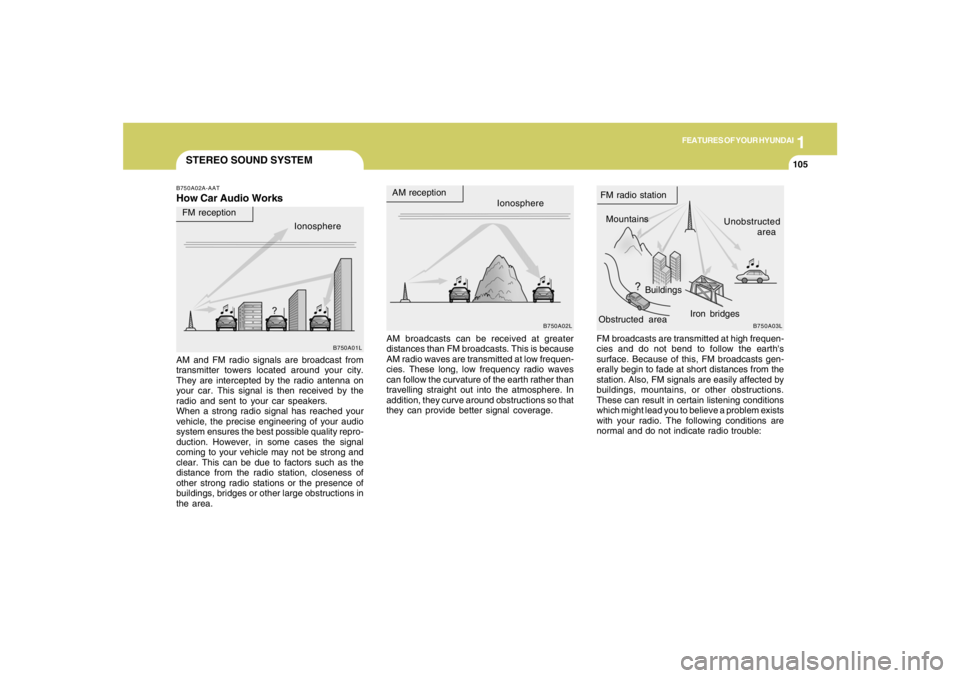
STEREO SOUND SYSTEMB750A02A-AATHow Car Audio Works
AM broadcasts can be received at greater
distances than FM broadcasts. This is because
AM radio waves are transmitted at low frequen-
cies. These long, low frequency radio waves
can follow the curvature of the earth rather than
travelling straight out into the atmosphere. In
addition, they curve around obstructions so that
they can provide better signal coverage. AM and FM radio signals are broadcast from
transmitter towers located around your city.
They are intercepted by the radio antenna on
your car. This signal is then received by the
radio and sent to your car speakers.
When a strong radio signal has reached your
vehicle, the precise engineering of your audio
system ensures the best possible quality repro-
duction. However, in some cases the signal
coming to your vehicle may not be strong and
clear. This can be due to factors such as the
distance from the radio station, closeness of
other strong radio stations or the presence of
buildings, bridges or other large obstructions in
the area.FM broadcasts are transmitted at high frequen-
cies and do not bend to follow the earth's
surface. Because of this, FM broadcasts gen-
erally begin to fade at short distances from the
station. Also, FM signals are easily affected by
buildings, mountains, or other obstructions.
These can result in certain listening conditions
which might lead you to believe a problem exists
with your radio. The following conditions are
normal and do not indicate radio trouble:
Ionosphere
B750A02L
AM reception
Mountains
BuildingsUnobstructed
area FM radio station
B750A03L
Ionosphere FM reception
B750A01L
Obstructed areaIron bridges
Page 123 of 306
1
FEATURES OF YOUR HYUNDAI
111111111111111
B260D02O-AAT1. Playing CDo Insert the CD with the label facing upward.
o Insert the CD to start CD playback, during
radio operation.
o When a disc is in the CD deck, if you press
the play button, the CD player will begin
playing even if the radio is being used.
o The CD player can be used when the ignition
switch is in either the "ON" or "ACC" position.2. TRACK UP/DOWNo The desired track on the disc currently being
played can be selected using the track
number.
o Press once to skip forward to the beginning
of the next track. Press
once to skip back to the beginning of the
track.3. FF/REW ( / )If you want to fast forward or reverse through
the compact disc track, push and hold the FF
( ) or REW ( ) button. When you release
the button, the compact disc player will resume
playing.
4. REPEAT Buttono To repeat the track you are currently listen-
ing to, press the RPT button. To cancel ,
press again.
o If you do not release RPT operation when the
track ends, it will automatically be replayed.
This process will be continued until you push
the button again.5. SCAN Buttono Press the SCAN button to playback the first
10 seconds of each track.
o Press the SCAN button again within 10 sec.
when you have reached the desired track.6. EJECT ButtonWhen the EJECT button is pressed with
a CD loaded, the CD will eject.
NOTE:
o If the CD does not operate properly or if
the ER2 fault code is displayed, use one
of two methods to reset the CD deck
function.
- Remove the audio fuse for 5 minutes.
Then, reinstall the audio fuse.
- Diconnect the negative terminal of the
battery and wait 5 minutes. Then re-
connect the negative battery terminal.o To assure proper operation of the unit,
keep the vehicle interior temperature
within a normal range by using the
vehicle's air conditioning or heating
system.
o When replacing the fuse, replace it with
a fuse having the correct capacity.
o The preset station frequencies are all
erased when the car battery is discon-
nected. Therefore, all data will have to be
set again if this should occur.
o Do not add any oil to the rotating parts.
Keep magnets, screwdrivers and other
metallic objects away from the tape
mechanism and head.
o This equipment is designed to be used
only in a 12 volt DC battery system with
negative ground.
o This unit is made of precision parts. Do
not attempt to disassemble or adjust
any parts.
o When driving your vehicle, be sure to
keep the volume of the unit set low
enough to allow you to hear sounds
coming from the outside.
o Do not expose this equipment (includ-
ing the speakers) to water or excessive
moisture.
Page 129 of 306
1
FEATURES OF YOUR HYUNDAI
117117117117117
H290D01O-GAT1. FF/REWo Fast forward tape winding starts when the
FF ( ) button is pressed during PLAY or
REW mode.
o Tape PLAY starts when the FF ( ) button
is pressed again during FF mode.
o Tape rewinding starts when the REW ( )
button is pressed during PLAY or FF mode.
o Tape PLAY starts when the REW ( ) button
pressed again during REW mode.2. AUTO MUSIC SelectPress the button to find the starting point of each
song in a prerecorded music tape. The quiet
space between songs (must have at least 4
sec. gap) can be accepted by the AUTO MUSIC
Select button.
o Pressing the button will play the beginning
of the next music segment.
o Pressing the button will start replay at
the beginning of the music just listened to.
3. TAPE PROGRAM Buttono This allows you to play the reverse side of the
tape by merely depressing the program
button. An arrow will appear in the display to
show tape direction.
o Push the TAPE button to turn on that function
without pushing power ON
ˆOFF control knob.
4. REPEATo To repeat the track you are currently listen-
ing to, press the RPT button. To cancel,
press again.
o If you do not release RPT operation when the
track ends, it will automatically be replayed.
This process will be continued until you push
the button again.5. Equalizer (EQ)Press the EQ button to select the CLASSIC,
JAZZ, ROCK and DEFEAT MODE for the
desired tone quality. Each press of the button
changes the display as follows;
6. DOLBYIf you get background noise during tape PLAY,
you can reduce this considerably by merely
pressing the DOLBY button. If you want to
cancel the DOLBY feature, press the button
again.7. TAPE EJECTo When the button is pressed with a cassette
loaded, the cassette will eject.
o When the button is pressed during FF/
REW mode, the cassette will eject.NOTE:o To assure proper operation of the unit,
keep the vehicle interior temperature
within a normal range by using the
vehicle's air conditioning or heating
system.
o When replacing the fuse, replace it with
a fuse having the correct capacity.
o The preset station frequencies are all
erased when the car battery is discon-
nected. Therefore, all data will have to be
set again if this should occur.
o Do not add any oil to the rotating parts.
Keep magnets, screwdrivers and other
metallic objects away from the tape
mechanism and head.
CLASSIC → JAZZ → ROCK → DEFEAT