audio HYUNDAI TUCSON 2007 User Guide
[x] Cancel search | Manufacturer: HYUNDAI, Model Year: 2007, Model line: TUCSON, Model: HYUNDAI TUCSON 2007Pages: 306, PDF Size: 11.82 MB
Page 131 of 306
1
FEATURES OF YOUR HYUNDAI
119119119119119
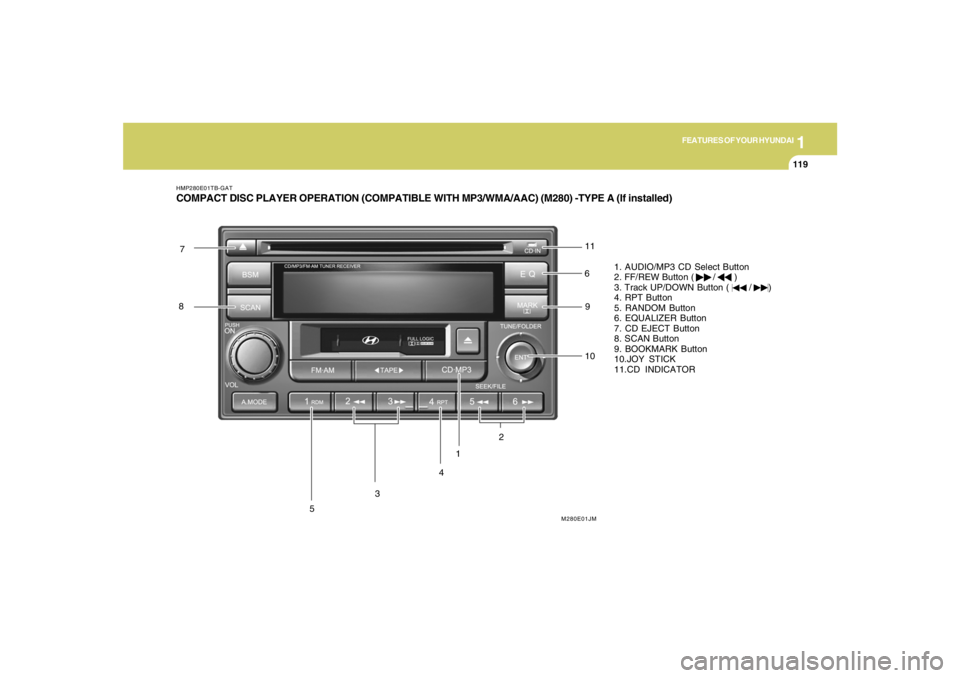
HMP280E01TB-GATCOMPACT DISC PLAYER OPERATION (COMPATIBLE WITH MP3/WMA/AAC) (M280) -TYPE A (If installed)
1
M280E01JM
3
54 6 7
8
9
10 11
2
1. AUDIO/MP3 CD Select Button
2. FF/REW Button ( / )
3. Track UP/DOWN Button ( / )
4. RPT Button
5. RANDOM Button
6. EQUALIZER Button
7. CD EJECT Button
8. SCAN Button
9. BOOKMARK Button
10.JOY STICK
11.CD INDICATOR
Page 132 of 306
1FEATURES OF YOUR HYUNDAI
120
H290F02O-GAT1. AUDIO/MP3 CD Select Buttono Insert the CD with the label facing upward.
o Insert the CD to start CD playback, during
radio operation or cassette tape playing.
o When a disc is in the CD deck, if you press
the CD button the CD player will begin playing
even if the radio or cassette player is being
used.
o The CD player can be used when the ignition
switch is in either the "ON" or "ACC" position.
o Push the CD
˜MP3 button to turn on that
function without pushing Power ON-OFF
control knob.
NOTE:o Do not stick paper or tape etc., onto the
label side or the recording side of any
discs, as it may cause a malfunction.
o The unit cannot play a CD-R(Recordable
CD) and CD-RW(Rewritable CD) that is
not finalized. Please refer to the manual
of CD-R/CD-RW recoder or CD-R/CD-RW
software for more information on final-
ization process.
o Depending on the recording status,
some CD-Rs/CD-RWs may not be played
on this unit.
2. FF/REW ( / )If you want to fast forward or reverse through
the compact disc track, push and hold the FF
( ) or REW ( ) button.
When you release the button, the compact disc
player will resume playing.3. TRACK UP/DOWNo The desired track on the disc currently being
played can be selected using the track
number.
o Press button once to skip forward to
the beginning of the next track. Press
button once to skip back to the beginning of
the track.4. REPEAT (RPT)o To repeat the track you are currently listen-
ing to, press the RPT button. To cancel,
press it again.
o To repeat the music within selected folder,
press the RPT button for more than 2 sec-
onds. To cancel, press it again. (MP3 CD
only)
o If you do not release RPT operation when the
track ends, it will automatically be replayed.
This process will be continued until you push
the button again.
5. RANDOM (RDM)o Press the RDM button to listen the tracks in
random, rather than sequential, order. Press
it again to cancel random play.
o To listen the music within the selected folder
in random order, press the RDM button for
more than 2 seconds. To cancel press it
again. (MP3 CD only)6. EQUALIZER (EQ)Press the EQ button to select the CLASSIC,
JAZZ, ROCK and DEFEAT MODE for the
desired tone quality. Each press of the button
changes the display as follows;CLASSIC → JAZZ → ROCK → DEFEAT7. CD EJECTWhen the button is pressed with a CD loaded,
the CD will eject.
Page 134 of 306
1FEATURES OF YOUR HYUNDAI
122
CAUTION:
o Do not insert warped or poor quality
discs into the CD player as damage to the
unit may occur.
o Do not insert anything like coins into the
player slot as damage to the unit may
occur.
o Do not place beverages close to the
audio system. The playback mechanism
may be damaged if you spill them.
o Do not impact on the audio system, or
the playback mechanism could be dam-
aged.
o Driving off-road or other vibrations may
skip your compact disc.
Do not use the audio system off-road as
the discs could be scratched and dam-
aged.
o Do not grip or pull out the disc with your
hand while the disc is being pulled into
the unit by the self loading mechanism.
These can cause poor disc scratching to
occur or trouble in the compact disc
player.
o Avoid using CD-Recordable or CD-
Rewritable to ensure proper operation.
When using the compact disc player,
genuine CDs are recommended.
!
Page 137 of 306
1
FEATURES OF YOUR HYUNDAI
125125125125125
!
CAUTION:
o Do not insert warped or poor quality
discs into the CD changer as damage to
the unit may occur.
o Do not insert anything like coins into the
changer slot as damage to the unit may
occur.
o Do not place beverages close to the
audio system. The playback mechanism
may be damaged if you spill them.
o Do not impact on the audio system, or
the playback mechanism could be dam-
aged.
o Driving off-road or other vibrations may
skip your compact disc.
Do not use the audio system off-road as
the discs could be scratched and dam-
aged.
o Do not grip or pull out the disc with your
hand while the disc is being pulled into
the unit by the self loading mechanism.
These can cause disc scratching to oc-
cur or trouble in the compact disc
changer.
o Avoid using CD-Recordable or CD-
Rewritable to ensure proper operation.
When using the compact disc changer,
genuine CDs are recommended.
Page 138 of 306
1FEATURES OF YOUR HYUNDAI
126
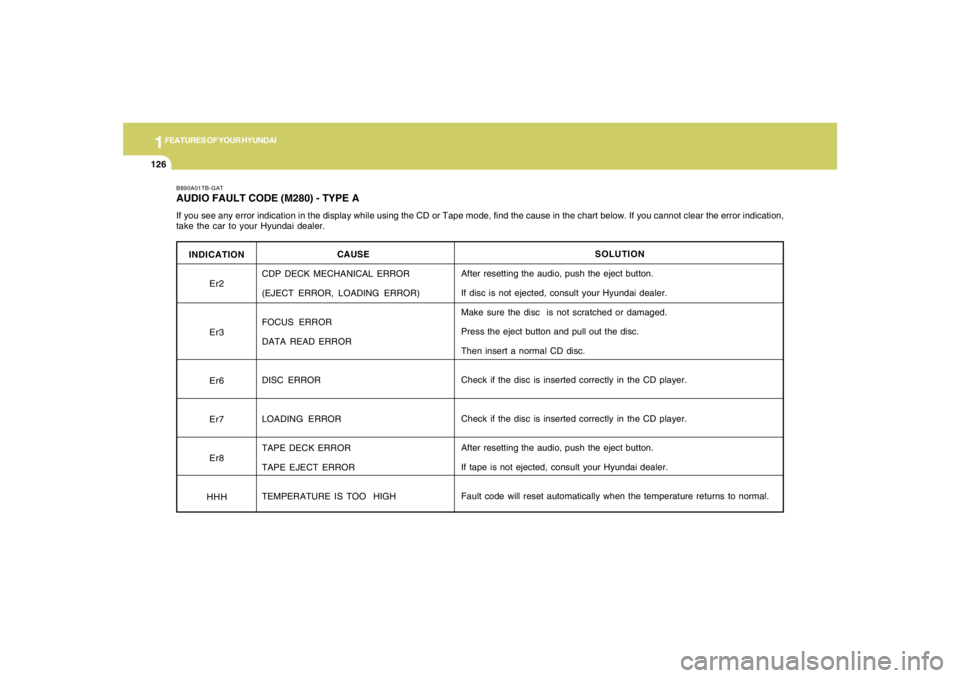
INDICATION
Er2
Er3
Er6
Er7
Er8
HHH
B890A01TB-GATAUDIO FAULT CODE (M280) - TYPE AIf you see any error indication in the display while using the CD or Tape mode, find the cause in the chart below. If you cannot clear the error indication,
take the car to your Hyundai dealer.
SOLUTION
After resetting the audio, push the eject button.
If disc is not ejected, consult your Hyundai dealer.
Make sure the disc is not scratched or damaged.
Press the eject button and pull out the disc.
Then insert a normal CD disc.
Check if the disc is inserted correctly in the CD player.
Check if the disc is inserted correctly in the CD player.
After resetting the audio, push the eject button.
If tape is not ejected, consult your Hyundai dealer.
Fault code will reset automatically when the temperature returns to normal. CAUSE
CDP DECK MECHANICAL ERROR
(EJECT ERROR, LOADING ERROR)
FOCUS ERROR
DATA READ ERROR
DISC ERROR
LOADING ERROR
TAPE DECK ERROR
TAPE EJECT ERROR
TEMPERATURE IS TOO HIGH
Page 139 of 306
1
FEATURES OF YOUR HYUNDAI
127127127127127
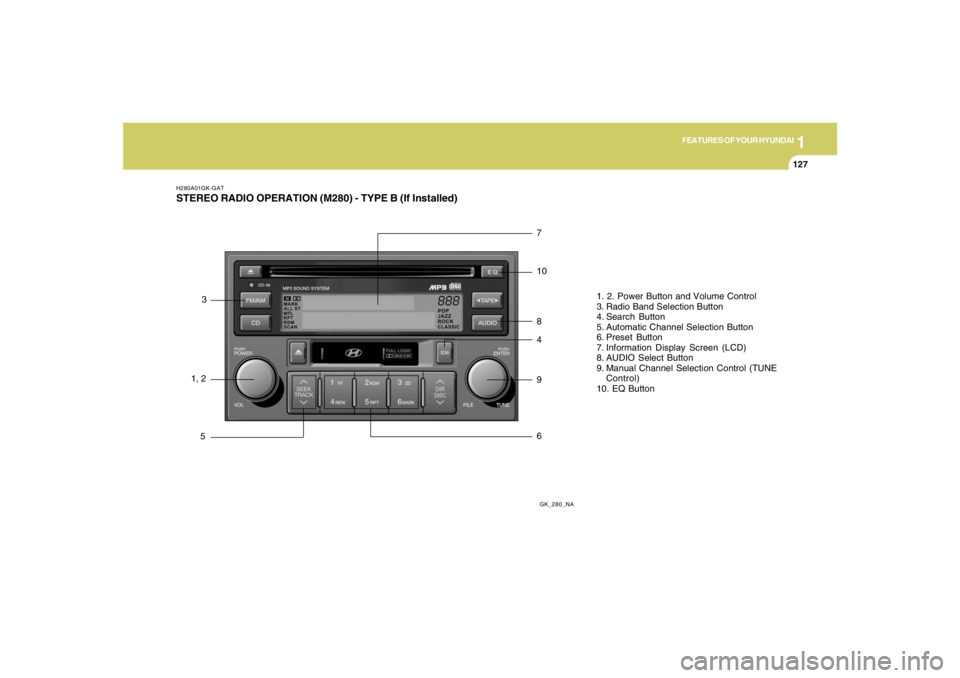
H280A01GK-GATSTEREO RADIO OPERATION (M280) - TYPE B (If Installed)
GK_280_NA
1, 23
57
10
8
4
9
61. 2. Power Button and Volume Control
3. Radio Band Selection Button
4. Search Button
5. Automatic Channel Selection Button
6. Preset Button
7. Information Display Screen (LCD)
8. AUDIO Select Button
9. Manual Channel Selection Control (TUNE
Control)
10. EQ Button
Page 140 of 306
1FEATURES OF YOUR HYUNDAI
128
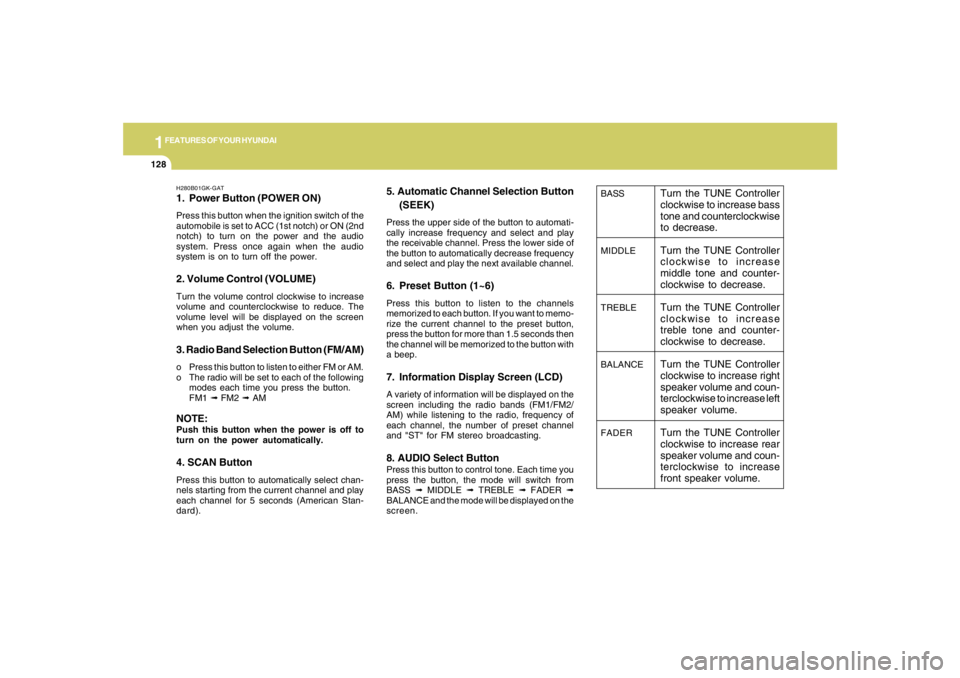
BASS
MIDDLE
TREBLE
BALANCE
FADER
Turn the TUNE Controller
clockwise to increase bass
tone and counterclockwise
to decrease.
Turn the TUNE Controller
clockwise to increase
middle tone and counter-
clockwise to decrease.
Turn the TUNE Controller
clockwise to increase
treble tone and counter-
clockwise to decrease.
Turn the TUNE Controller
clockwise to increase right
speaker volume and coun-
terclockwise to increase left
speaker volume.
Turn the TUNE Controller
clockwise to increase rear
speaker volume and coun-
terclockwise to increase
front speaker volume.
H280B01GK-GAT1. Power Button (POWER ON)Press this button when the ignition switch of the
automobile is set to ACC (1st notch) or ON (2nd
notch) to turn on the power and the audio
system. Press once again when the audio
system is on to turn off the power.2. Volume Control (VOLUME)Turn the volume control clockwise to increase
volume and counterclockwise to reduce. The
volume level will be displayed on the screen
when you adjust the volume.3. Radio Band Selection Button (FM/AM)o Press this button to listen to either FM or AM.
o The radio will be set to each of the following
modes each time you press the button.
FM1 ➟ FM2 ➟ AMNOTE:Push this button when the power is off to
turn on the power automatically.4. SCAN ButtonPress this button to automatically select chan-
nels starting from the current channel and play
each channel for 5 seconds (American Stan-
dard).
5. Automatic Channel Selection Button
(SEEK)Press the upper side of the button to automati-
cally increase frequency and select and play
the receivable channel. Press the lower side of
the button to automatically decrease frequency
and select and play the next available channel.6. Preset Button (1~6)Press this button to listen to the channels
memorized to each button. If you want to memo-
rize the current channel to the preset button,
press the button for more than 1.5 seconds then
the channel will be memorized to the button with
a beep.7. Information Display Screen (LCD)A variety of information will be displayed on the
screen including the radio bands (FM1/FM2/
AM) while listening to the radio, frequency of
each channel, the number of preset channel
and "ST" for FM stereo broadcasting.8. AUDIO Select ButtonPress this button to control tone. Each time you
press the button, the mode will switch from
BASS ➟ MIDDLE ➟ TREBLE ➟ FADER ➟
BALANCE and the mode will be displayed on the
screen.
Page 141 of 306
1
FEATURES OF YOUR HYUNDAI
129129129129129
!
CAUTION:
o Do not place beverages close to the
audio system. The audio system mecha-
nism may be damaged if you spill them.
o Do not strike or allow anything to impact
the audio system, damage to the system
mechanisms could occur.9. Manual Channel Selection ControlTurn this controller while listening to the radio to
manually adjust frequency. Turn clockwise to
increase frequency and counterclockwise to
reduce frequency.10. EQ ButtonEach time you press this button the sound
equalizer setting will switch from POP ➟ JAZZ
➟ ROCK ➟ CLASSIC ➟ OFF (Not displayed).
Page 143 of 306
1
FEATURES OF YOUR HYUNDAI
131131131131131
H280D01GK-GAT1. TATE MODE Selection Button / TAPE
Side Selection ButtonPress this button to turn to the TAPE mode. The
system will play the tape if the tape is inside the
deck and turn off CD or radio if either mode was
on.
If you press this button while the tape is being
played, the other side of the tape will be played.
The screen will display "PLAY" along with the
direction of play.2. Cassette Tape Deck (Tape Insert)When you insert the tape, push it into the deck
while the side of tape you want to listen to face
upward. If the ignition switch of the automobile
is set to ACC (1st notch) or ON (2nd notch), the
tape will be automatically played when you
insert it even if the power of the audio system is
off.3. Tape EJECT ButtonPress this button while the tape is being played
to eject the tape.
This will eject the tape even when the ignition
switch of the automobile is set to OFF.NOTE:Push this button to turn the power on
automatically when the TAPE is inside and
the power is off.
4. DOLBY Selection ButtonPress this button when you play Dolbyized type
to reduce noise in the medium to high bands due
to Dolby effect. The screen will display "DOLBY."
The "DOLBY" mark will disappear when you
press it again.5. Fast Rewind (REW)Press [REW] button while playing the tape to
rewind the tape to the beginning and the screen
will display "REW." Press it again while rewind-
ing to play from the current position.6. Fast Forward (FF)Press [FF] button while playing the tape to wind
the tape to the end and the screen will display
"FF." Press it again while winding to play from
the current position.7. Automatic Previous Track Selection
Button (TRACK DOWN)Press [TRACK
] button to rewind the tape to
the beginning of the song you are listening to.
While rewinding the tape, the screen will display
"AMS." Press the button again while rewinding
the tape to play from the current position.
8. Automatic Next Track Selection
Button (TRACK UP)Press [SEEK
] button to wind the tape to the
beginning of the song next to the song you are
listening to. While winding the tape, the screen
will display "AMS." Press the button again while
winding the tape to play from the current posi-
tion.
9. Section Repeat Button
(REPEAT)Press [RPT] button to repeat the song you are
listening to.10. Information Display Screen (LCD)Various status of cassette tape will be displayed
on the screen while listening to the tape such as
"PLAY" while playing the tape, the direction of
play "
or
", "FF" and "REW" for fast forward
and rewind, "METAL" for playing metal tapes as
well as "DOLBY" and "RPT."
Page 144 of 306
1FEATURES OF YOUR HYUNDAI
132
!
CAUTION:
o Do not insert anything like coins into the
player slot as damage to the unit may
occur.
o Do not place beverages close to the
audio system. The playback mechanism
may be damaged if you spill them.
o Do not strike or allow anything to impact
the audio system, damage to the system
mechanisms could occur.