lock HYUNDAI TUCSON 2008 Service Manual
[x] Cancel search | Manufacturer: HYUNDAI, Model Year: 2008, Model line: TUCSON, Model: HYUNDAI TUCSON 2008Pages: 275, PDF Size: 10.93 MB
Page 96 of 275
1FEATURES OF YOUR HYUNDAI84
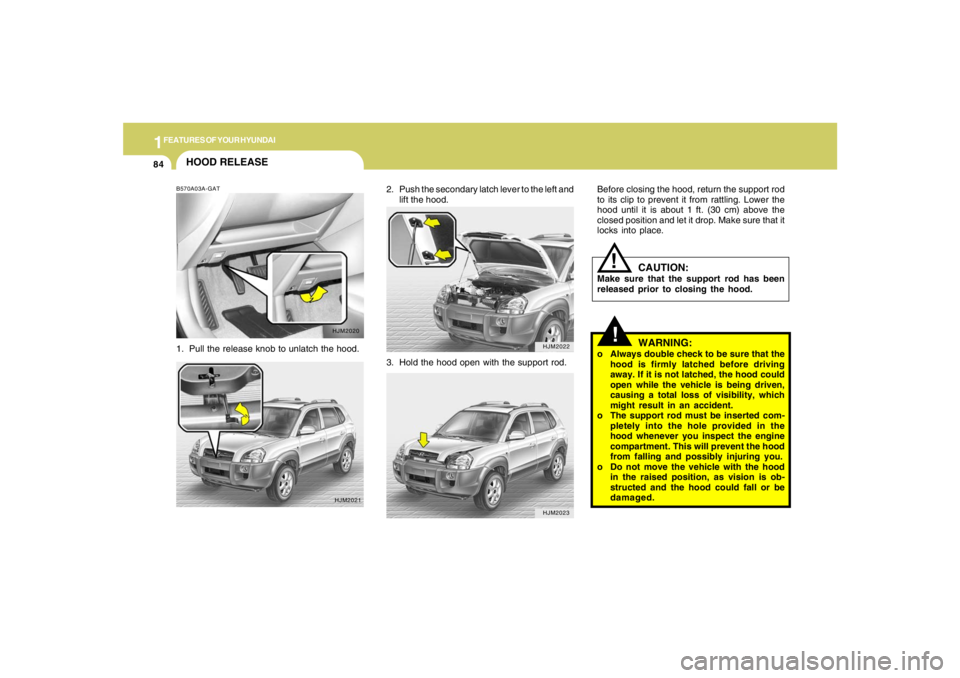
2. Push the secondary latch lever to the left and
lift the hood.
HJM2022HJM2023
HOOD RELEASEB570A03A-GAT1. Pull the release knob to unlatch the hood.
HJM2020
HJM2021
3. Hold the hood open with the support rod.
!
Before closing the hood, return the support rod
to its clip to prevent it from rattling. Lower the
hood until it is about 1 ft. (30 cm) above the
closed position and let it drop. Make sure that it
locks into place.
WARNING:
o Always double check to be sure that the
hood is firmly latched before driving
away. If it is not latched, the hood could
open while the vehicle is being driven,
causing a total loss of visibility, which
might result in an accident.
o The support rod must be inserted com-
pletely into the hole provided in the
hood whenever you inspect the engine
compartment. This will prevent the hood
from falling and possibly injuring you.
o Do not move the vehicle with the hood
in the raised position, as vision is ob-
structed and the hood could fall or be
damaged.
CAUTION:
Make sure that the support rod has been
released prior to closing the hood.
!
Page 98 of 275
1FEATURES OF YOUR HYUNDAI86
HJM2067
STEERING WHEEL TILT LEVER!
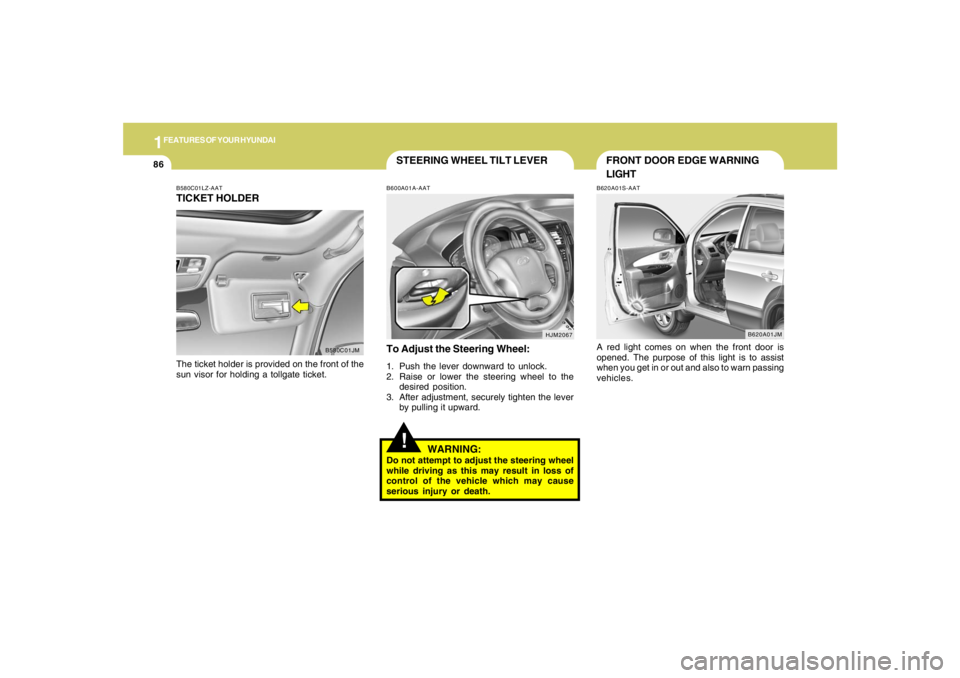
To Adjust the Steering Wheel:1. Push the lever downward to unlock.
2. Raise or lower the steering wheel to the
desired position.
3. After adjustment, securely tighten the lever
by pulling it upward.
WARNING:
Do not attempt to adjust the steering wheel
while driving as this may result in loss of
control of the vehicle which may cause
serious injury or death.B600A01A-AAT
B580C01LZ-AATTICKET HOLDERThe ticket holder is provided on the front of the
sun visor for holding a tollgate ticket.
B580C01JM
FRONT DOOR EDGE WARNING
LIGHTB620A01S-AATA red light comes on when the front door is
opened. The purpose of this light is to assist
when you get in or out and also to warn passing
vehicles.
B620A01JM
Page 110 of 275
1FEATURES OF YOUR HYUNDAI98
VENTILATION
BI-LEVEL HEATING
B710A01S-AAT B700A02E-AAT
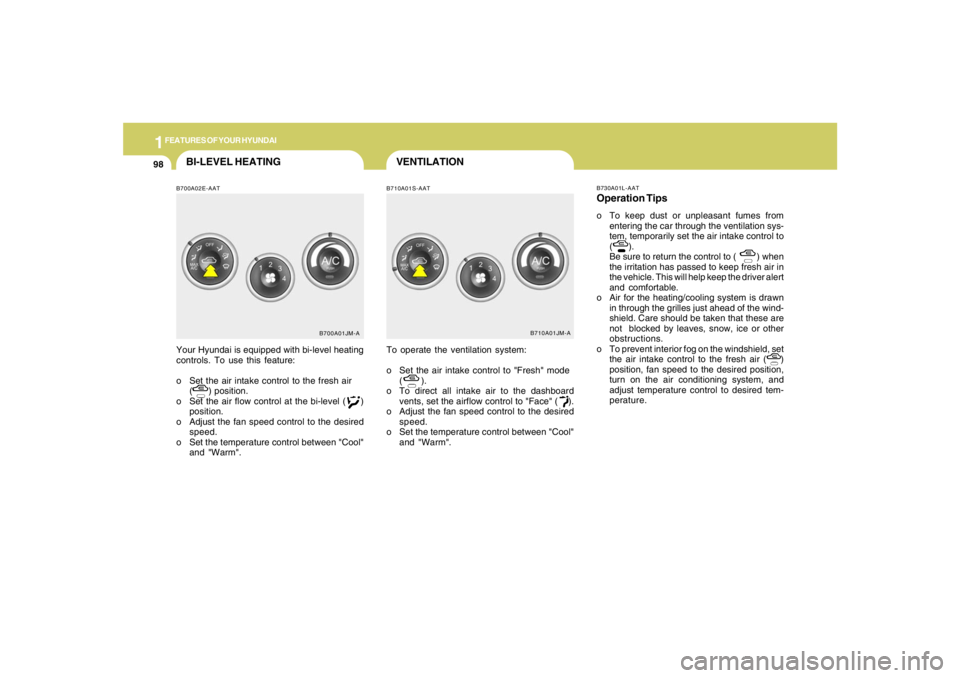
Your Hyundai is equipped with bi-level heating
controls. To use this feature:
o Set the air intake control to the fresh air
( ) position.
o Set the air flow control at the bi-level ( )
position.
o Adjust the fan speed control to the desired
speed.
o Set the temperature control between "Cool"
and "Warm".To operate the ventilation system:
o Set the air intake control to "Fresh" mode
( ).
o To direct all intake air to the dashboard
vents, set the airflow control to "Face" ( ).
o Adjust the fan speed control to the desired
speed.
o Set the temperature control between "Cool"
and "Warm".
B700A01JM-AB710A01JM-AB730A01L-AAT
Operation Tipso To keep dust or unpleasant fumes from
entering the car through the ventilation sys-
tem, temporarily set the air intake control to
( ).
Be sure to return the control to ( ) when
the irritation has passed to keep fresh air in
the vehicle. This will help keep the driver alert
and comfortable.
o Air for the heating/cooling system is drawn
in through the grilles just ahead of the wind-
shield. Care should be taken that these are
not blocked by leaves, snow, ice or other
obstructions.
o To prevent interior fog on the windshield, set
the air intake control to the fresh air ( )
position, fan speed to the desired position,
turn on the air conditioning system, and
adjust temperature control to desired tem-
perature.
Page 122 of 275
1FEATURES OF YOUR HYUNDAI
110
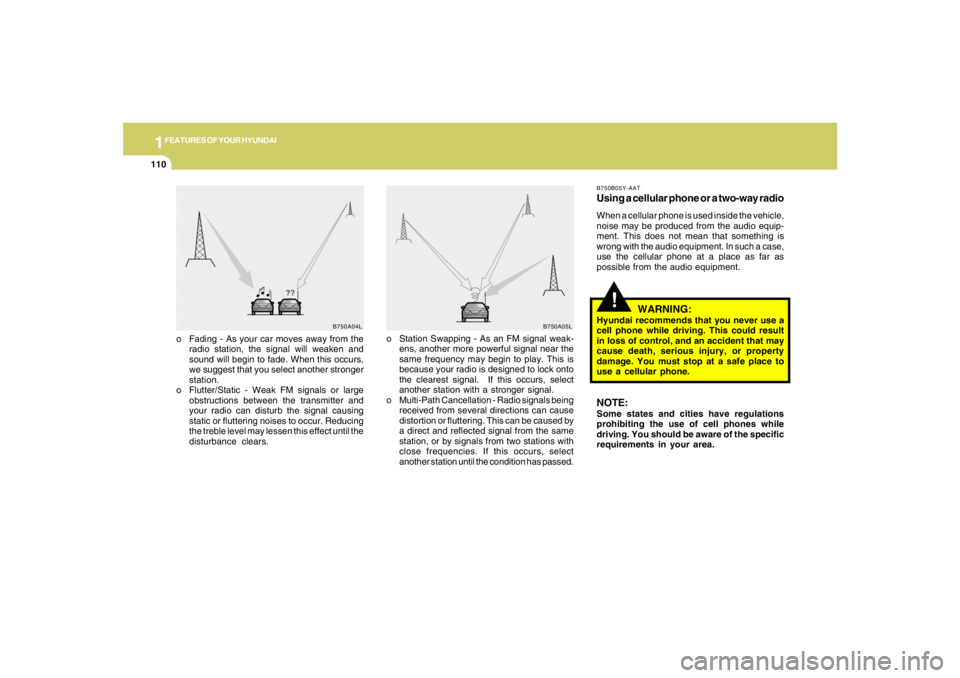
o Fading - As your car moves away from the
radio station, the signal will weaken and
sound will begin to fade. When this occurs,
we suggest that you select another stronger
station.
o Flutter/Static - Weak FM signals or large
obstructions between the transmitter and
your radio can disturb the signal causing
static or fluttering noises to occur. Reducing
the treble level may lessen this effect until the
disturbance clears.o Station Swapping - As an FM signal weak-
ens, another more powerful signal near the
same frequency may begin to play. This is
because your radio is designed to lock onto
the clearest signal. If this occurs, select
another station with a stronger signal.
o Multi-Path Cancellation - Radio signals being
received from several directions can cause
distortion or fluttering. This can be caused by
a direct and reflected signal from the same
station, or by signals from two stations with
close frequencies. If this occurs, select
another station until the condition has passed.
B750A04L
B750A05L
!
B750B05Y-AATUsing a cellular phone or a two-way radioWhen a cellular phone is used inside the vehicle,
noise may be produced from the audio equip-
ment. This does not mean that something is
wrong with the audio equipment. In such a case,
use the cellular phone at a place as far as
possible from the audio equipment.
WARNING:
Hyundai recommends that you never use a
cell phone while driving. This could result
in loss of control, and an accident that may
cause death, serious injury, or property
damage. You must stop at a safe place to
use a cellular phone.NOTE:Some states and cities have regulations
prohibiting the use of cell phones while
driving. You should be aware of the specific
requirements in your area.
Page 125 of 275
1
FEATURES OF YOUR HYUNDAI
113113113113113
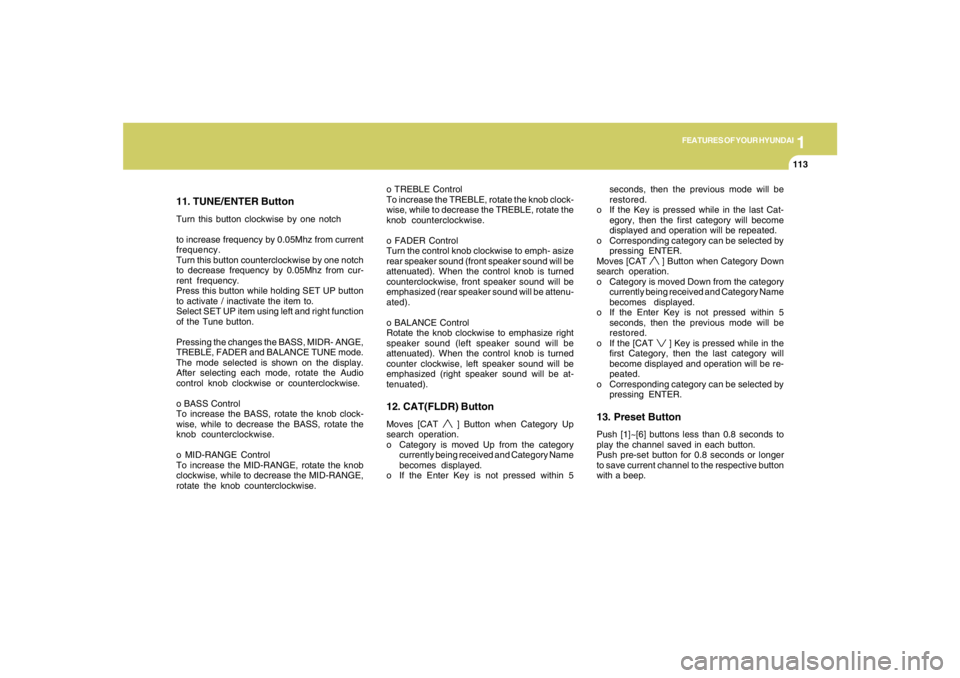
11. TUNE/ENTER ButtonTurn this button clockwise by one notch
to increase frequency by 0.05Mhz from current
frequency.
Turn this button counterclockwise by one notch
to decrease frequency by 0.05Mhz from cur-
rent frequency.
Press this button while holding SET UP button
to activate / inactivate the item to.
Select SET UP item using left and right function
of the Tune button.
Pressing the changes the BASS, MIDR- ANGE,
TREBLE, FADER and BALANCE TUNE mode.
The mode selected is shown on the display.
After selecting each mode, rotate the Audio
control knob clockwise or counterclockwise.
o BASS Control
To increase the BASS, rotate the knob clock-
wise, while to decrease the BASS, rotate the
knob counterclockwise.
o MID-RANGE Control
To increase the MID-RANGE, rotate the knob
clockwise, while to decrease the MID-RANGE,
rotate the knob counterclockwise.o TREBLE Control
To increase the TREBLE, rotate the knob clock-
wise, while to decrease the TREBLE, rotate the
knob counterclockwise.
o FADER Control
Turn the control knob clockwise to emph- asize
rear speaker sound (front speaker sound will be
attenuated). When the control knob is turned
counterclockwise, front speaker sound will be
emphasized (rear speaker sound will be attenu-
ated).
o BALANCE Control
Rotate the knob clockwise to emphasize right
speaker sound (left speaker sound will be
attenuated). When the control knob is turned
counter clockwise, left speaker sound will be
emphasized (right speaker sound will be at-
tenuated).
12. CAT(FLDR) ButtonMoves [CAT
] Button when Category Up
search operation.
o Category is moved Up from the category
currently being received and Category Name
becomes displayed.
o If the Enter Key is not pressed within 5seconds, then the previous mode will be
restored.
o If the Key is pressed while in the last Cat-
egory, then the first category will become
displayed and operation will be repeated.
o Corresponding category can be selected by
pressing ENTER.
Moves [CAT
] Button when Category Down
search operation.
o Category is moved Down from the category
currently being received and Category Name
becomes displayed.
o If the Enter Key is not pressed within 5
seconds, then the previous mode will be
restored.
o If the [CAT ] Key is pressed while in the
first Category, then the last category will
become displayed and operation will be re-
peated.
o Corresponding category can be selected by
pressing ENTER.
13. Preset ButtonPush [1]~[6] buttons less than 0.8 seconds to
play the channel saved in each button.
Push pre-set button for 0.8 seconds or longer
to save current channel to the respective button
with a beep.
Page 127 of 275
1
FEATURES OF YOUR HYUNDAI
115115115115115
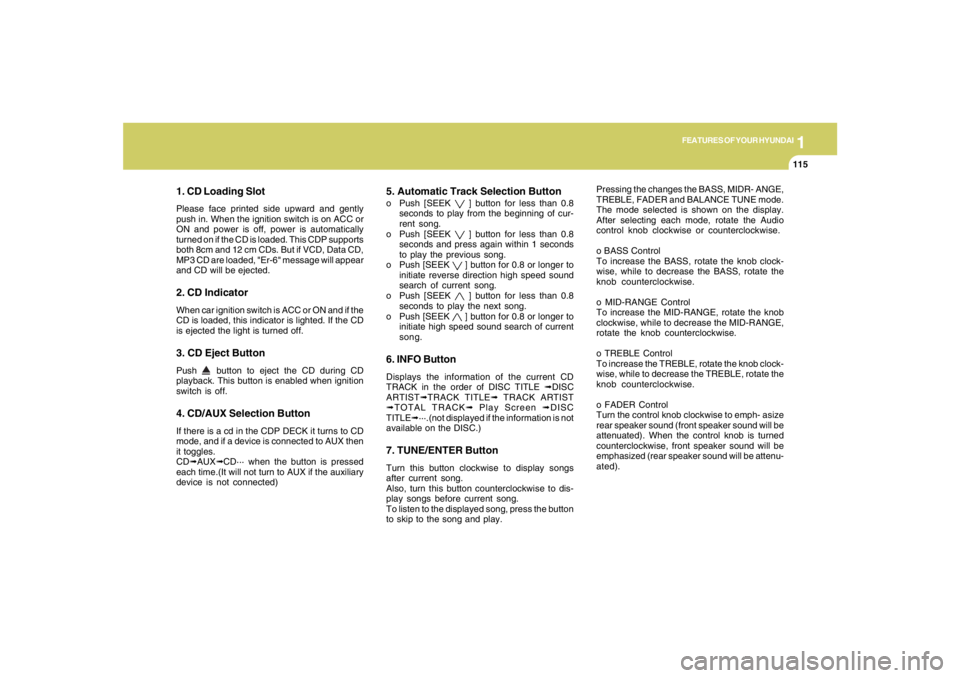
1. CD Loading SlotPlease face printed side upward and gently
push in. When the ignition switch is on ACC or
ON and power is off, power is automatically
turned on if the CD is loaded. This CDP supports
both 8cm and 12 cm CDs. But if VCD, Data CD,
MP3 CD are loaded, "Er-6" message will appear
and CD will be ejected.2. CD IndicatorWhen car ignition switch is ACC or ON and if the
CD is loaded, this indicator is lighted. If the CD
is ejected the light is turned off.3. CD Eject ButtonPush
button to eject the CD during CD
playback. This button is enabled when ignition
switch is off.
4. CD/AUX Selection ButtonIf there is a cd in the CDP DECK it turns to CD
mode, and if a device is connected to AUX then
it toggles.
CD➟AUX➟CD··· when the button is pressed
each time.(It will not turn to AUX if the auxiliary
device is not connected)
5. Automatic Track Selection Buttono Push [SEEK
] button for less than 0.8
seconds to play from the beginning of cur-
rent song.
o Push [SEEK ] button for less than 0.8
seconds and press again within 1 seconds
to play the previous song.
o Push [SEEK ] button for 0.8 or longer to
initiate reverse direction high speed sound
search of current song.
o Push [SEEK ] button for less than 0.8
seconds to play the next song.
o Push [SEEK ] button for 0.8 or longer to
initiate high speed sound search of current
song.
6. INFO ButtonDisplays the information of the current CD
TRACK in the order of DISC TITLE ➟DISC
ARTIST➟TRACK TITLE➟ TRACK ARTIST
➟TOTAL TRACK➟ Play Screen ➟DISC
TITLE➟···.(not displayed if the information is not
available on the DISC.)7. TUNE/ENTER ButtonTurn this button clockwise to display songs
after current song.
Also, turn this button counterclockwise to dis-
play songs before current song.
To listen to the displayed song, press the button
to skip to the song and play.Pressing the changes the BASS, MIDR- ANGE,
TREBLE, FADER and BALANCE TUNE mode.
The mode selected is shown on the display.
After selecting each mode, rotate the Audio
control knob clockwise or counterclockwise.
o BASS Control
To increase the BASS, rotate the knob clock-
wise, while to decrease the BASS, rotate the
knob counterclockwise.
o MID-RANGE Control
To increase the MID-RANGE, rotate the knob
clockwise, while to decrease the MID-RANGE,
rotate the knob counterclockwise.
o TREBLE Control
To increase the TREBLE, rotate the knob clock-
wise, while to decrease the TREBLE, rotate the
knob counterclockwise.
o FADER Control
Turn the control knob clockwise to emph- asize
rear speaker sound (front speaker sound will be
attenuated). When the control knob is turned
counterclockwise, front speaker sound will be
emphasized (rear speaker sound will be attenu-
ated).
Page 128 of 275
1FEATURES OF YOUR HYUNDAI
116
o BALANCE Control
Rotate the knob clockwise to emphasize right
speaker sound (left speaker sound will be
attenuated). When the control knob is turned
counter clockwise, left speaker sound will be
emphasized (right speaker sound will be at-
tenuated).
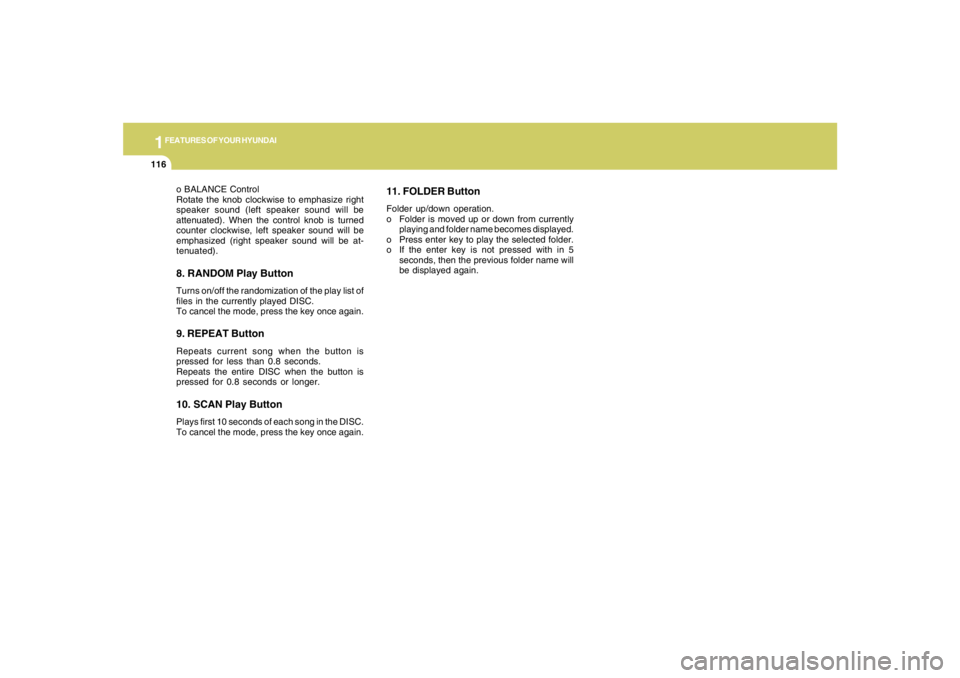
8. RANDOM Play ButtonTurns on/off the randomization of the play list of
files in the currently played DISC.
To cancel the mode, press the key once again.9. REPEAT ButtonRepeats current song when the button is
pressed for less than 0.8 seconds.
Repeats the entire DISC when the button is
pressed for 0.8 seconds or longer.10. SCAN Play ButtonPlays first 10 seconds of each song in the DISC.
To cancel the mode, press the key once again.
11. FOLDER ButtonFolder up/down operation.
o Folder is moved up or down from currently
playing and folder name becomes displayed.
o Press enter key to play the selected folder.
o If the enter key is not pressed with in 5
seconds, then the previous folder name will
be displayed again.
Page 131 of 275
1
FEATURES OF YOUR HYUNDAI
119119119119119
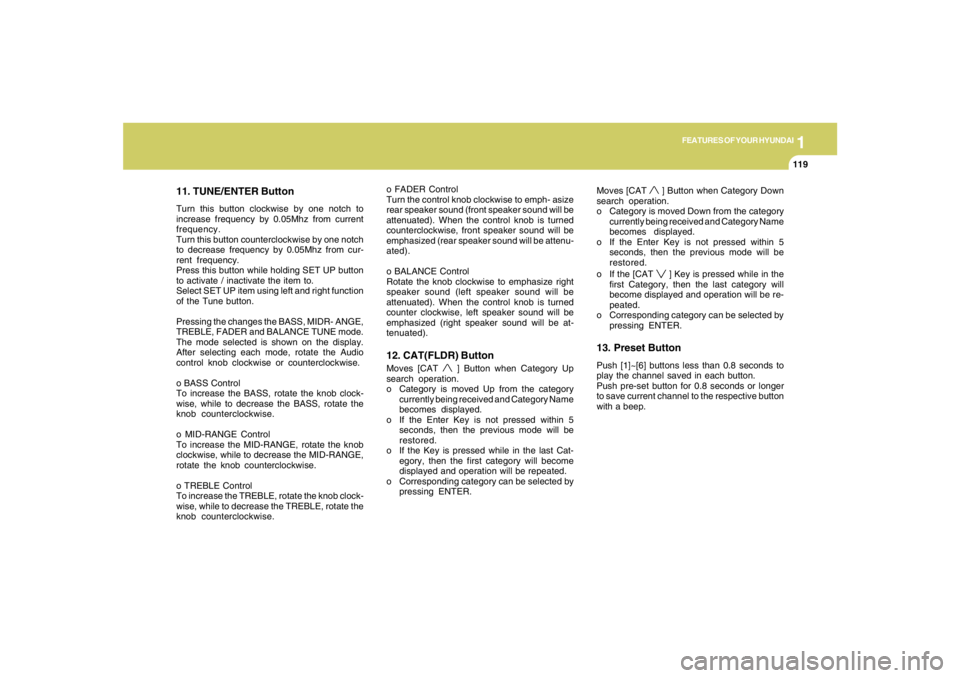
11. TUNE/ENTER ButtonTurn this button clockwise by one notch to
increase frequency by 0.05Mhz from current
frequency.
Turn this button counterclockwise by one notch
to decrease frequency by 0.05Mhz from cur-
rent frequency.
Press this button while holding SET UP button
to activate / inactivate the item to.
Select SET UP item using left and right function
of the Tune button.
Pressing the changes the BASS, MIDR- ANGE,
TREBLE, FADER and BALANCE TUNE mode.
The mode selected is shown on the display.
After selecting each mode, rotate the Audio
control knob clockwise or counterclockwise.
o BASS Control
To increase the BASS, rotate the knob clock-
wise, while to decrease the BASS, rotate the
knob counterclockwise.
o MID-RANGE Control
To increase the MID-RANGE, rotate the knob
clockwise, while to decrease the MID-RANGE,
rotate the knob counterclockwise.
o TREBLE Control
To increase the TREBLE, rotate the knob clock-
wise, while to decrease the TREBLE, rotate the
knob counterclockwise.o FADER Control
Turn the control knob clockwise to emph- asize
rear speaker sound (front speaker sound will be
attenuated). When the control knob is turned
counterclockwise, front speaker sound will be
emphasized (rear speaker sound will be attenu-
ated).
o BALANCE Control
Rotate the knob clockwise to emphasize right
speaker sound (left speaker sound will be
attenuated). When the control knob is turned
counter clockwise, left speaker sound will be
emphasized (right speaker sound will be at-
tenuated).
12. CAT(FLDR) ButtonMoves [CAT
] Button when Category Up
search operation.
o Category is moved Up from the category
currently being received and Category Name
becomes displayed.
o If the Enter Key is not pressed within 5
seconds, then the previous mode will be
restored.
o If the Key is pressed while in the last Cat-
egory, then the first category will become
displayed and operation will be repeated.
o Corresponding category can be selected by
pressing ENTER.Moves [CAT
] Button when Category Down
search operation.
o Category is moved Down from the category
currently being received and Category Name
becomes displayed.
o If the Enter Key is not pressed within 5
seconds, then the previous mode will be
restored.
o If the [CAT ] Key is pressed while in the
first Category, then the last category will
become displayed and operation will be re-
peated.
o Corresponding category can be selected by
pressing ENTER.
13. Preset ButtonPush [1]~[6] buttons less than 0.8 seconds to
play the channel saved in each button.
Push pre-set button for 0.8 seconds or longer
to save current channel to the respective button
with a beep.
Page 133 of 275
1
FEATURES OF YOUR HYUNDAI
121121121121121
1. CD Loading SlotPlease face printed side upward and gently
push in. When the ignition switch is on ACC or
ON and power is off, power is automatically
turned on if the CD is loaded. This CDP supports
both 8cm and 12 cm CDs. But if VCD, Data CD,
MP3 CD are loaded, "Er-6" message will appear
and CD will be ejected.2. CD Eject ButtonPush
button to eject the CD during CD
playback. This button is enabled when ignition
switch is off.
3. CD LOAD ButtonPush [LOAD] button to load CDs to available
CDC deck (from 1~6). Push [LOAD] button for
more than 2 seconds to load into all available
decks.
The last CD will play. 10 seconds idle status will
disable loading process.4. CD/AUX Selection ButtonIf the auxiliary device is connected, it turns to
AUX MODE to play the sound from the auxiliary
player.
If no auxiliary device is connected, it displays
""NO MEDIA"" for 5 seconds and returns to the
previous mode."
5. Automatic Track Selection Buttono Push [SEEK
] button for less than 0.8
seconds to play from the beginning of cur-
rent song.
o Push [SEEK ] button for less than 0.8
seconds and press again within 1 seconds
to play the previous song.
o Push [SEEK ] button for 0.8 or longer to
initiate reverse direction high speed sound
search of current song.
o Push [SEEK ] button for less than 0.8
seconds to play the next song.
o Push [SEEK ] button for 0.8 or longer to
initiate high speed sound search of current
song.
6. INFO ButtonDisplays the information of the current CD
TRACK in the order of DISC TITLE ➟DISC
ARTIST➟TRACK TITLE➟ TRACK
ARTIST➟TOTAL TRACK➟Play Screen ➟DISC
TITLE➟···.(not displayed if the information is not
available on the DISC.)7. TUNE/ENTER ButtonTurn this button clockwise to display songs
after current song.
Also, turn this button counterclockwise to dis-
play songs before current song.To listen to the displayed song, press the button
to skip to the song and play.
Pressing the changes the BASS, MIDR- ANGE,
TREBLE, FADER and BALANCE TUNE mode.
The mode selected is shown on the display.
After selecting each mode, rotate the Audio
control knob clockwise or counterclockwise.
o BASS Control
To increase the BASS, rotate the knob clock-
wise, while to decrease the BASS, rotate the
knob counterclockwise.
o MID-RANGE Control
To increase the MID-RANGE, rotate the knob
clockwise, while to decrease the MID-RANGE,
rotate the knob counterclockwise.
o TREBLE Control
To increase the TREBLE, rotate the knob clock-
wise, while to decrease the TREBLE, rotate the
knob counterclockwise.
o FADER Control
Turn the control knob clockwise to emph- asize
rear speaker sound (front speaker sound will be
attenuated). When the control knob is turned
counterclockwise, front speaker sound will be
emphasized (rear speaker sound will be attenu-
ated).
Page 134 of 275
1FEATURES OF YOUR HYUNDAI
122
o BALANCE Control
Rotate the knob clockwise to emphasize right
speaker sound (left speaker sound will be
attenuated). When the control knob is turned
counter clockwise, left speaker sound will be
emphasized (right speaker sound will be at-
tenuated).
8. RANDOM Play ButtonTurns on/off the randomization of the play list of
files in the currently played DISC.
To cancel the mode, press the key once again.9. REPEAT ButtonRepeats current song when the button is
pressed for less than 0.8 seconds.
Repeats the entire DISC when the button is
pressed for 0.8 seconds or longer.10. DISC Selection Buttono [DISC
] Change Button
Changes disc to the previous disc.
o [DISC ] Change Button
Changes disc to the next disc.
11. SCAN Play ButtonPlays first 10 seconds of each song in the DISC.
To cancel the mode, press the key once again.
12. FOLDER ButtonFolder up/down operation.
o Folder is moved up or down from currently
playing and folder name becomes displayed.
o Press enter key to play the selected folder.
o If the enter key is not pressed with in 5
seconds, then the previous folder name will
be displayed again.