display HYUNDAI TUCSON 2008 Owners Manual
[x] Cancel search | Manufacturer: HYUNDAI, Model Year: 2008, Model line: TUCSON, Model: HYUNDAI TUCSON 2008Pages: 275, PDF Size: 10.93 MB
Page 67 of 275
1
FEATURES OF YOUR HYUNDAI
55
B310B02JM-C
(AT)
(MT)(1)
(1)
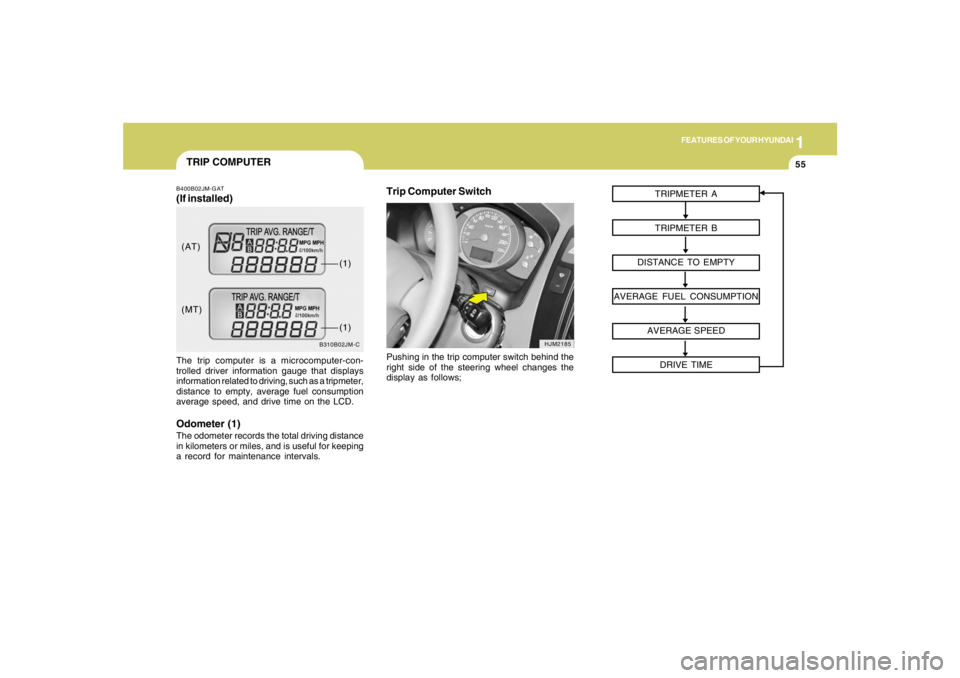
TRIP COMPUTERB400B02JM-GAT(If installed)The trip computer is a microcomputer-con-
trolled driver information gauge that displays
information related to driving, such as a tripmeter,
distance to empty, average fuel consumption
average speed, and drive time on the LCD.Odometer (1)The odometer records the total driving distance
in kilometers or miles, and is useful for keeping
a record for maintenance intervals.
Trip Computer Switch
HJM2185
Pushing in the trip computer switch behind the
right side of the steering wheel changes the
display as follows;TRIPMETER A
TRIPMETER B
DISTANCE TO EMPTY
AVERAGE FUEL CONSUMPTION
AVERAGE SPEED
DRIVE TIME
Page 68 of 275
1FEATURES OF YOUR HYUNDAI56
HJM2186-C
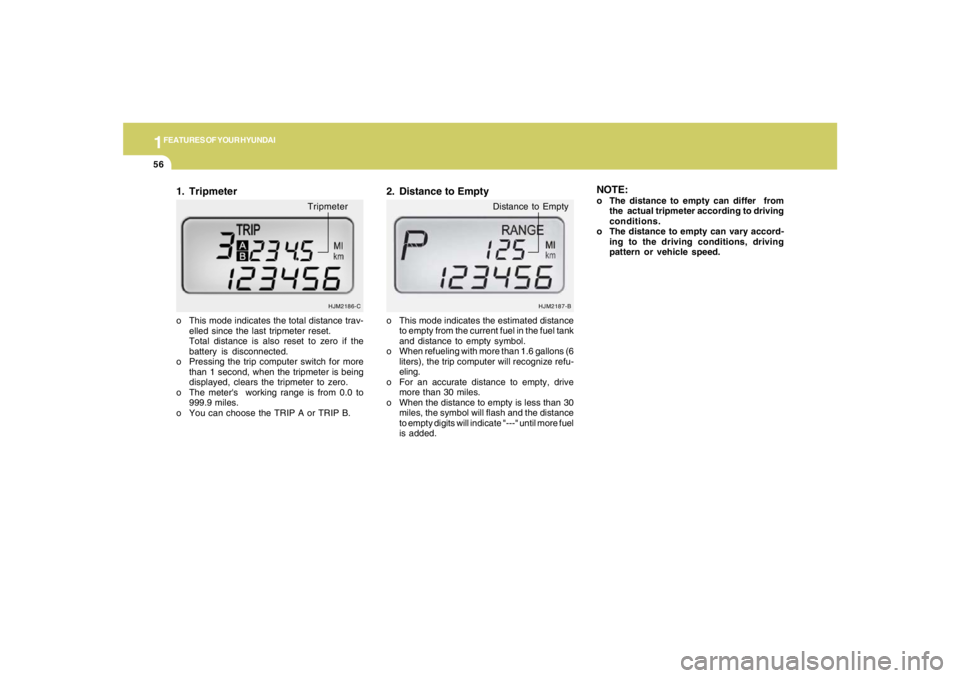
o This mode indicates the total distance trav-
elled since the last tripmeter reset.
Total distance is also reset to zero if the
battery is disconnected.
o Pressing the trip computer switch for more
than 1 second, when the tripmeter is being
displayed, clears the tripmeter to zero.
o The meter's working range is from 0.0 to
999.9 miles.
o You can choose the TRIP A or TRIP B.1. Tripmeter
Tripmeter
o This mode indicates the estimated distance
to empty from the current fuel in the fuel tank
and distance to empty symbol.
o When refueling with more than 1.6 gallons (6
liters), the trip computer will recognize refu-
eling.
o For an accurate distance to empty, drive
more than 30 miles.
o When the distance to empty is less than 30
miles, the symbol will flash and the distance
to empty digits will indicate "---" until more fuel
is added.2. Distance to Empty
HJM2187-B
Distance to Empty
NOTE:o The distance to empty can differ from
the actual tripmeter according to driving
conditions.
o The distance to empty can vary accord-
ing to the driving conditions, driving
pattern or vehicle speed.
Page 69 of 275
1
FEATURES OF YOUR HYUNDAI
57
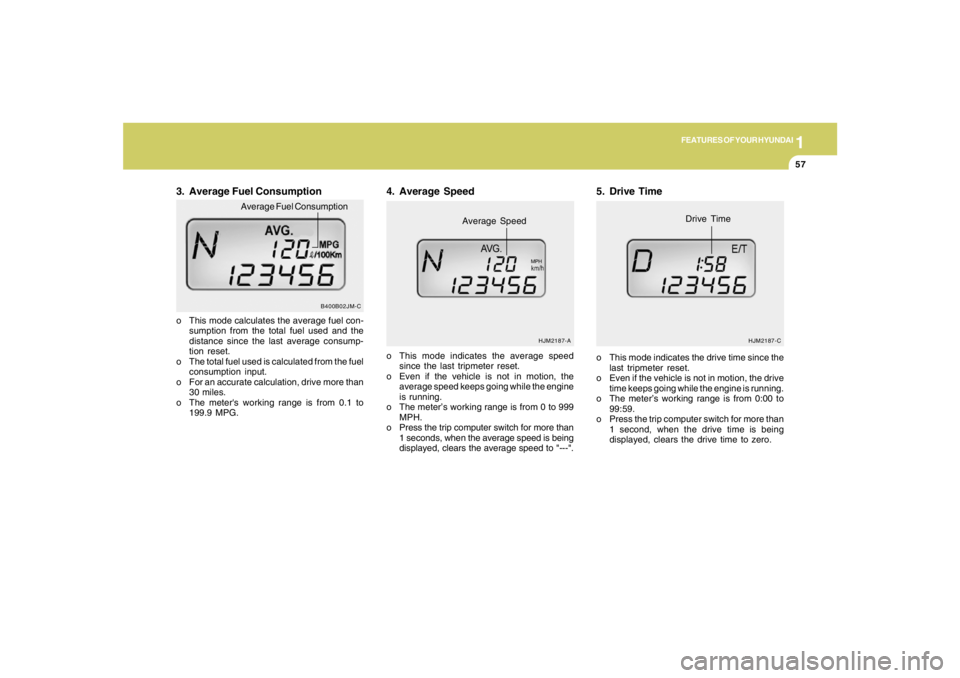
3. Average Fuel Consumptiono This mode calculates the average fuel con-
sumption from the total fuel used and the
distance since the last average consump-
tion reset.
o The total fuel used is calculated from the fuel
consumption input.
o For an accurate calculation, drive more than
30 miles.
o The meter's working range is from 0.1 to
199.9 MPG.o This mode indicates the average speed
since the last tripmeter reset.
o Even if the vehicle is not in motion, the
average speed keeps going while the engine
is running.
o The meter’s working range is from 0 to 999
MPH.
o Press the trip computer switch for more than
1 seconds, when the average speed is being
displayed, clears the average speed to "---".
4. Average Speed
HJM2187-A
Average Speed
MPH
5. Drive Timeo This mode indicates the drive time since the
last tripmeter reset.
o Even if the vehicle is not in motion, the drive
time keeps going while the engine is running.
o The meter’s working range is from 0:00 to
99:59.
o Press the trip computer switch for more than
1 second, when the drive time is being
displayed, clears the drive time to zero.
HJM2187-C
Drive Time
B400B02JM-C
Average Fuel Consumption
Page 77 of 275
1
FEATURES OF YOUR HYUNDAI
65
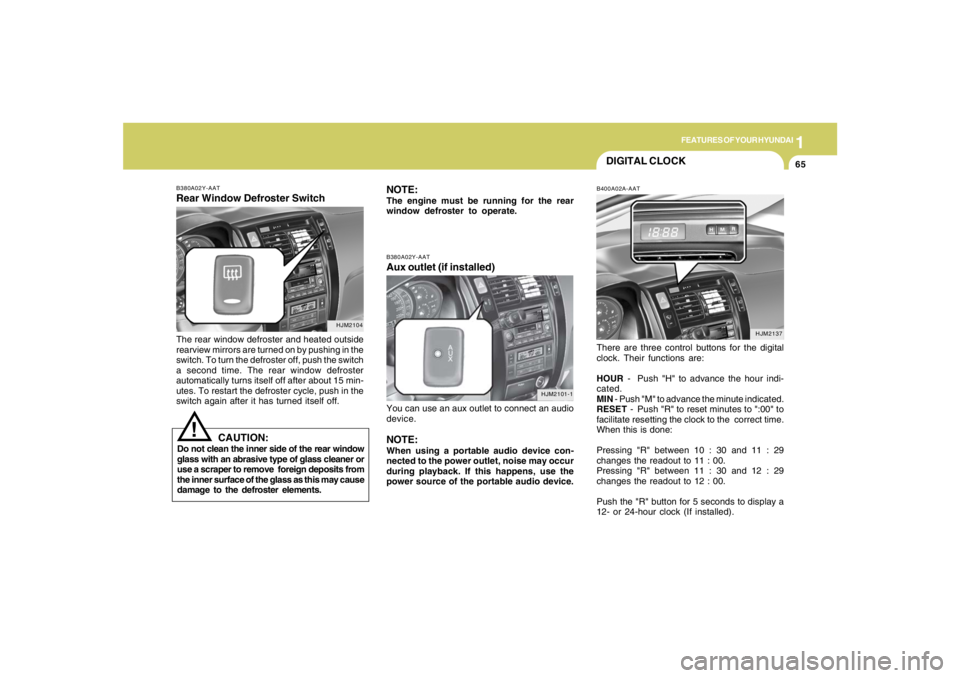
B380A02Y-AATRear Window Defroster SwitchThe rear window defroster and heated outside
rearview mirrors are turned on by pushing in the
switch. To turn the defroster off, push the switch
a second time. The rear window defroster
automatically turns itself off after about 15 min-
utes. To restart the defroster cycle, push in the
switch again after it has turned itself off.
HJM2104
NOTE:The engine must be running for the rear
window defroster to operate.
CAUTION:
Do not clean the inner side of the rear window
glass with an abrasive type of glass cleaner or
use a scraper to remove foreign deposits from
the inner surface of the glass as this may cause
damage to the defroster elements.
!
DIGITAL CLOCKB400A02A-AATThere are three control buttons for the digital
clock. Their functions are:
HOUR - Push "H" to advance the hour indi-
cated.
MIN - Push "M" to advance the minute indicated.
RESET - Push "R" to reset minutes to ":00" to
facilitate resetting the clock to the correct time.
When this is done:
Pressing "R" between 10 : 30 and 11 : 29
changes the readout to 11 : 00.
Pressing "R" between 11 : 30 and 12 : 29
changes the readout to 12 : 00.
Push the "R" button for 5 seconds to display a
12- or 24-hour clock (If installed).
HJM2137 B380A02Y-AAT
Aux outlet (if installed)You can use an aux outlet to connect an audio
device.NOTE:When using a portable audio device con-
nected to the power outlet, noise may occur
during playback. If this happens, use the
power source of the portable audio device.
HJM2101-1
Page 87 of 275
1
FEATURES OF YOUR HYUNDAI
75
!
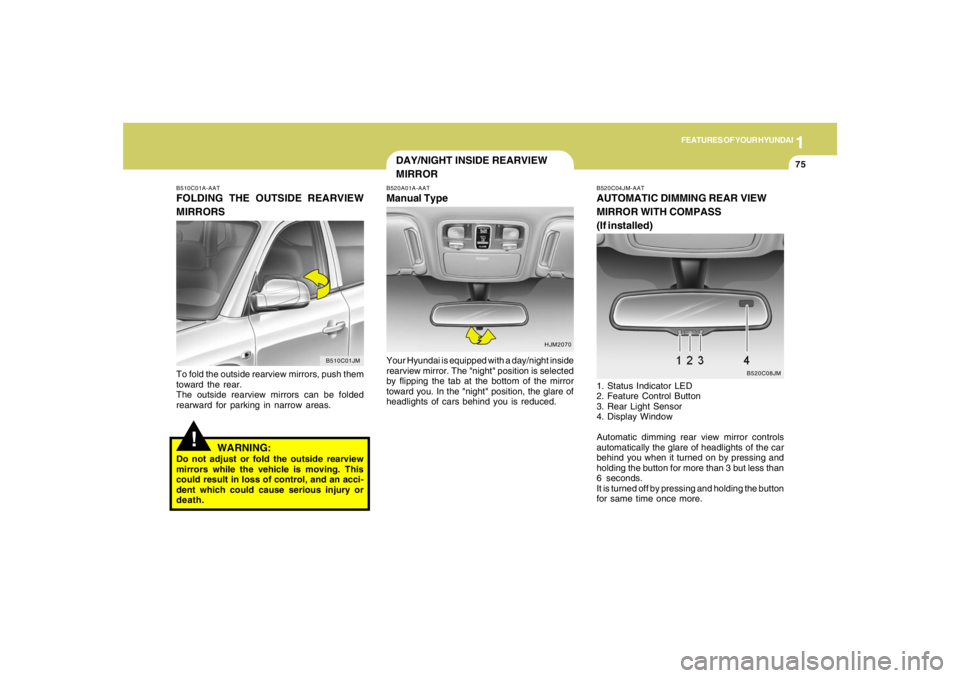
B510C01A-AATFOLDING THE OUTSIDE REARVIEW
MIRRORSTo fold the outside rearview mirrors, push them
toward the rear.
The outside rearview mirrors can be folded
rearward for parking in narrow areas.
WARNING:
Do not adjust or fold the outside rearview
mirrors while the vehicle is moving. This
could result in loss of control, and an acci-
dent which could cause serious injury or
death.
B510C01JM
DAY/NIGHT INSIDE REARVIEW
MIRRORB520A01A-AATManual TypeYour Hyundai is equipped with a day/night inside
rearview mirror. The "night" position is selected
by flipping the tab at the bottom of the mirror
toward you. In the "night" position, the glare of
headlights of cars behind you is reduced.
HJM2070B520C04JM-AAT
AUTOMATIC DIMMING REAR VIEW
MIRROR WITH COMPASS
(If installed)1. Status Indicator LED
2. Feature Control Button
3. Rear Light Sensor
4. Display Window
Automatic dimming rear view mirror controls
automatically the glare of headlights of the car
behind you when it turned on by pressing and
holding the button for more than 3 but less than
6 seconds.
It is turned off by pressing and holding the button
for same time once more.
B520C08JM
Page 88 of 275
1FEATURES OF YOUR HYUNDAI76
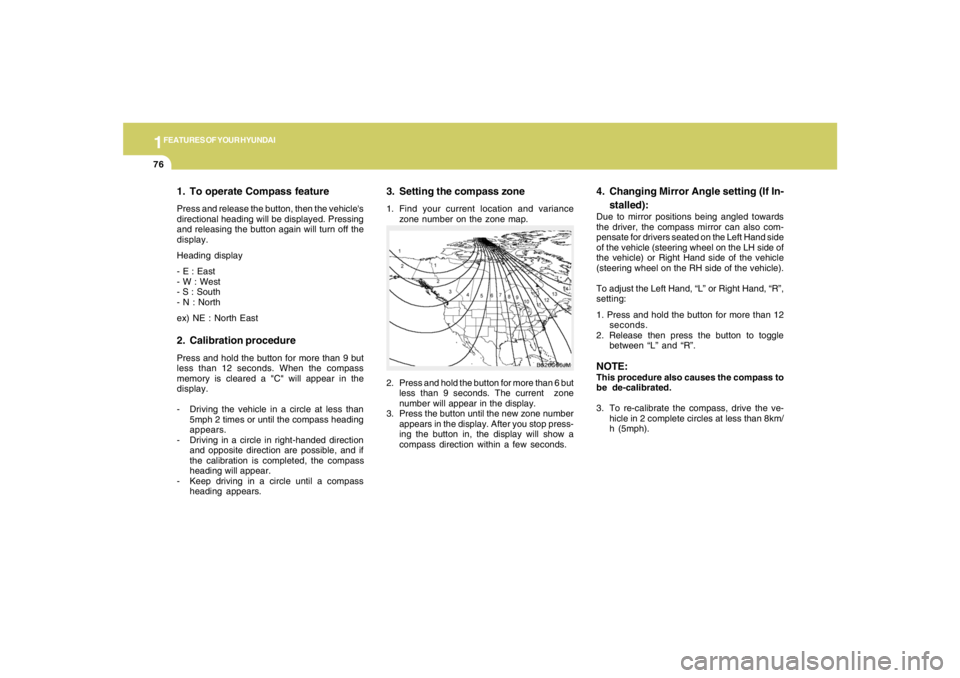
3. Setting the compass zone1. Find your current location and variance
zone number on the zone map.
2. Press and hold the button for more than 6 but
less than 9 seconds. The current zone
number will appear in the display.
3. Press the button until the new zone number
appears in the display. After you stop press-
ing the button in, the display will show a
compass direction within a few seconds.
B520C06JM
4. Changing Mirror Angle setting (If In-
stalled):Due to mirror positions being angled towards
the driver, the compass mirror can also com-
pensate for drivers seated on the Left Hand side
of the vehicle (steering wheel on the LH side of
the vehicle) or Right Hand side of the vehicle
(steering wheel on the RH side of the vehicle).
To adjust the Left Hand, “L” or Right Hand, “R”,
setting:
1. Press and hold the button for more than 12
seconds.
2. Release then press the button to toggle
between “L” and “R”.NOTE:This procedure also causes the compass to
be de-calibrated.
3. To re-calibrate the compass, drive the ve-
hicle in 2 complete circles at less than 8km/
h (5mph).
1. To operate Compass featurePress and release the button, then the vehicle's
directional heading will be displayed. Pressing
and releasing the button again will turn off the
display.
Heading display
- E : East
- W : West
- S : South
- N : North
ex) NE : North East2. Calibration procedurePress and hold the button for more than 9 but
less than 12 seconds. When the compass
memory is cleared a "C" will appear in the
display.
- Driving the vehicle in a circle at less than
5mph 2 times or until the compass heading
appears.
- Driving in a circle in right-handed direction
and opposite direction are possible, and if
the calibration is completed, the compass
heading will appear.
- Keep driving in a circle until a compass
heading appears.
Page 114 of 275
1FEATURES OF YOUR HYUNDAI
102
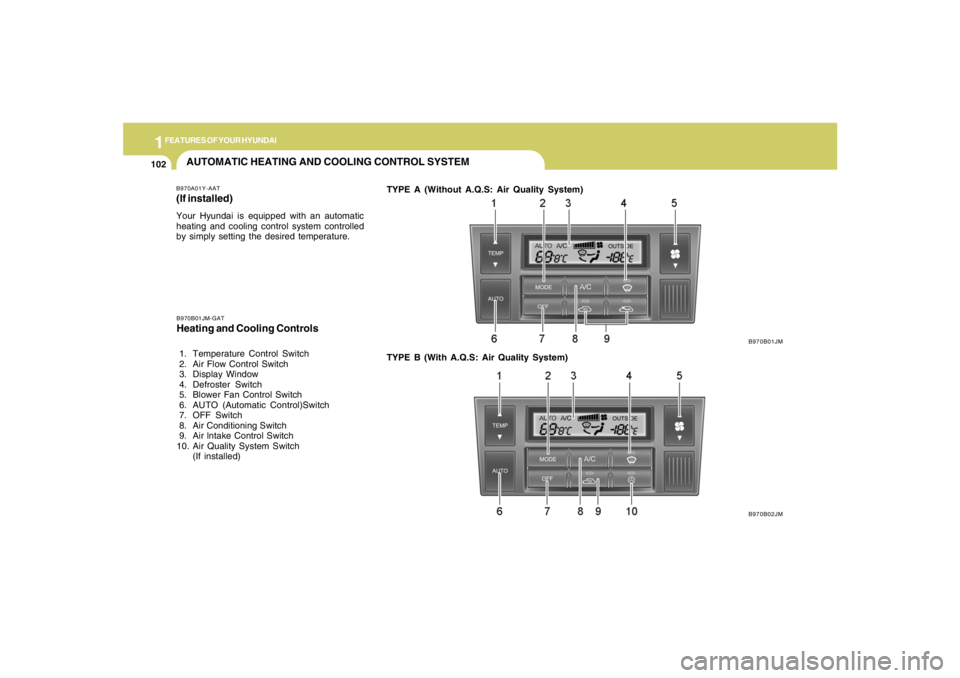
AUTOMATIC HEATING AND COOLING CONTROL SYSTEMB970A01Y-AAT(If installed)Your Hyundai is equipped with an automatic
heating and cooling control system controlled
by simply setting the desired temperature.TYPE A (Without A.Q.S: Air Quality System)
B970B01JM
B970B02JM B970B01JM-GAT
Heating and Cooling Controls 1. Temperature Control Switch
2. Air Flow Control Switch
3. Display Window
4. Defroster Switch
5. Blower Fan Control Switch
6. AUTO (Automatic Control)Switch
7. OFF Switch
8. Air Conditioning Switch
9. Air lntake Control Switch
10. Air Quality System Switch
(If installed)TYPE B (With A.Q.S: Air Quality System)
Page 115 of 275
1
FEATURES OF YOUR HYUNDAI
103103103103103
Photo sensor
HJM2086
NOTE:o If the battery has been discharged or
disconnected, the temperature mode will
reset to Centigrade degrees.
This is a normal condition and you can
change the temperature mode from Cen-
tigrade to Farenheit as follows;
Press the "TEMP" down button and
"AUTO" button simultaneously for 3
secs. The display shows that the unit of
temperature is adjusted to Centigrade or
Fahrenheit.
(°C
→ →→ →
→°F or °F
→ →→ →
→°C)
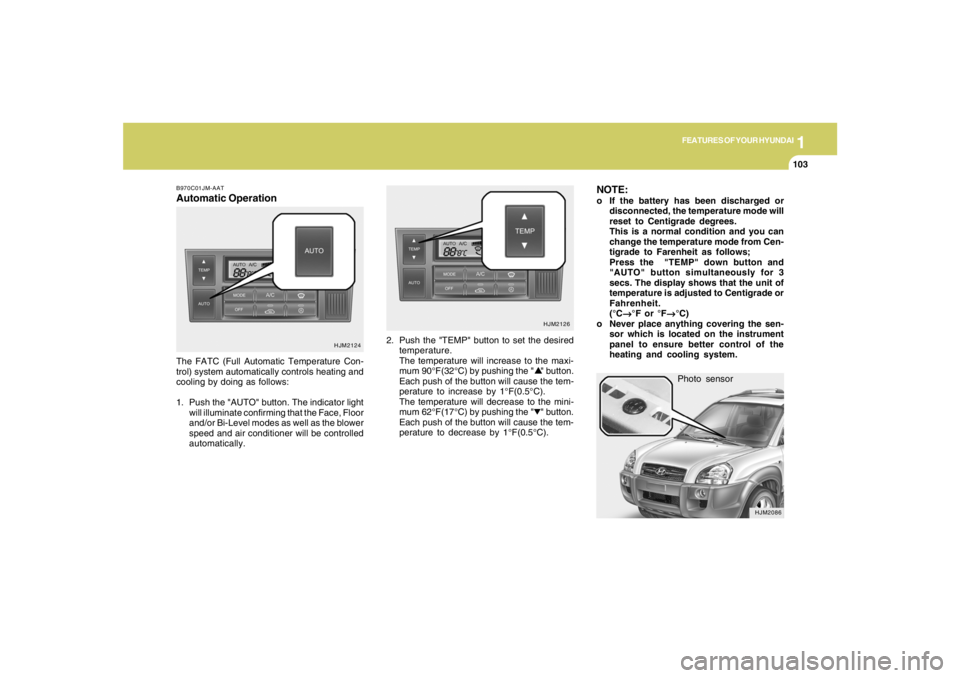
o Never place anything covering the sen-
sor which is located on the instrument
panel to ensure better control of the
heating and cooling system.
B970C01JM-AATAutomatic OperationThe FATC (Full Automatic Temperature Con-
trol) system automatically controls heating and
cooling by doing as follows:
1. Push the "AUTO" button. The indicator light
will illuminate confirming that the Face, Floor
and/or Bi-Level modes as well as the blower
speed and air conditioner will be controlled
automatically.2. Push the "TEMP" button to set the desired
temperature.
The temperature will increase to the maxi-
mum 90°F(32°C) by pushing the " " button.
Each push of the button will cause the tem-
perature to increase by 1°F(0.5°C).
The temperature will decrease to the mini-
mum 62°F(17°C) by pushing the " " button.
Each push of the button will cause the tem-
perature to decrease by 1°F(0.5°C).
HJM2124HJM2126
Page 123 of 275
1
FEATURES OF YOUR HYUNDAI
111111111111111
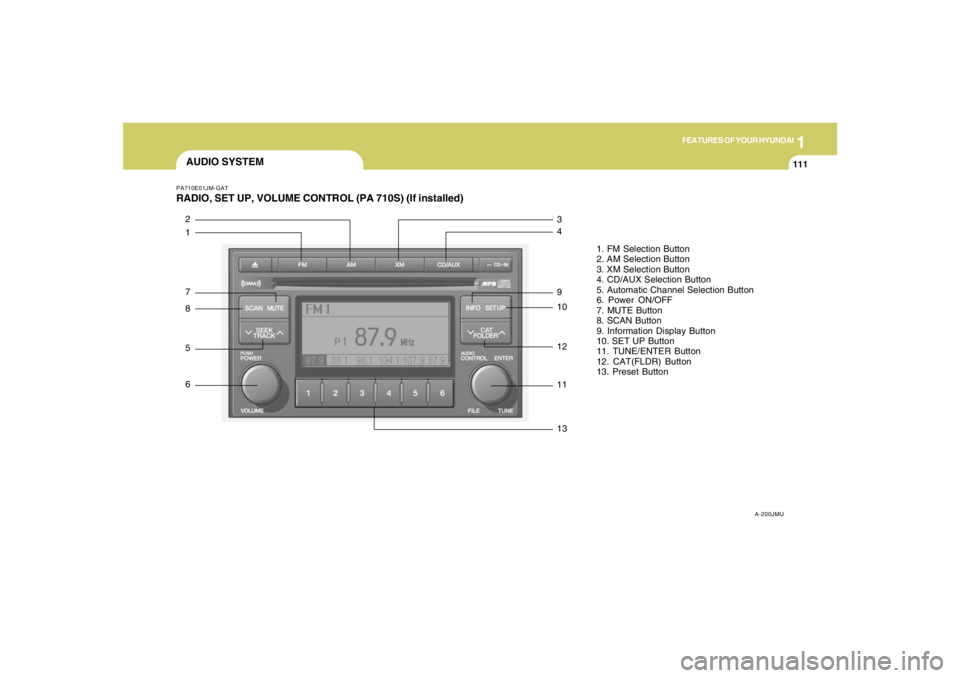
AUDIO SYSTEMPA710E01JM-GATRADIO, SET UP, VOLUME CONTROL (PA 710S) (If installed)
A-200JMU
1. FM Selection Button
2. AM Selection Button
3. XM Selection Button
4. CD/AUX Selection Button
5. Automatic Channel Selection Button
6. Power ON/OFF
7. MUTE Button
8. SCAN Button
9. Information Display Button
10. SET UP Button
11. TUNE/ENTER Button
12. CAT(FLDR) Button
13. Preset Button
1 2
7
8
5
6
13 11 12 10 9 4 3
Page 124 of 275
1FEATURES OF YOUR HYUNDAI
112
1. FM Selection ButtonTurns to FM mode and toggles FM1 and FM2
when the button is pressed each time.2. AM Selection ButtonTurns to AM mode, and toggles in the order of
AM1➟AM2➟···➟AM1···when the button is
pressed each time.3. XM Selection ButtonTurns to XM mode, and toggles in the order of
XM1➟XM2➟XM3➟···➟XM1··· when the button
is pressed each time.4. CD/AUX Selection ButtonIf there is a cd in the CDP DECK it turns to CD
mode, and if a device is connected to AUX then
it toggles.
CD➟AUX➟CD··· when the button is pressed
each time.(It will not turn to AUX if the auxiliary
device is not connected)
5. Automatic Channel Selection Buttono When the [SEEK
]button is pressed, it
reduces the band frequency by 200khz to
automatically select channel. Stops at the
previous frequency if no channel is found.
o When the [SEEK ]button is pressed, it
increases the band frequency by 50khz to
automatically select channel. Stops at the
previous frequency if no channel is found.
6. Power ON/OFF & Volume Control
ButtonTurns on/off the set when the IGNITION
SWITCH is on ACC or ON. If the button is turned
to the right, it increases the volume and left,
decreases the volume.7. MUTE ButtonPress to temporarily cut off the Sound.8. SCAN ButtonIf this button is pressed, the frequencies will
become increased and receive the correspond-
ing broadcasts.
This function will play the frequencies for 5
seconds (XM MODE : 10 seconds) each and
find other broadcasts as the frequency in-
creases.Press the button again when desiring to con-
tinue listening to the currently playing broad-
cast.
9. Information Display ButtonInformation Display function operation (Infor-
mation is displayed each time (the) Key is
pressed) : Pressing the Category ➟Channel
Name ➟Artist Name➟Song Title➟Category-
KEY for 3 seconds will display the correspond-
ing text then become restored.
Text Scroll operation
After pressing (the) Key, if the text to be dis-
played is longer than the LCD text line, then
rotating the Tune Knob will operate the Page up
function displaying 8 characters for 3 seconds
each - displays the maximum lines of text
supported by XM.10. SET UP ButtonPress this button to turn to the XMoption, SCROLL
and adjustment mode.
If no action is taken for 5 seconds after pressing
the button, it will return to the play mode.(After
entering SET UP mode, move between items
using the left, right and PUSH functions of the
TUNE button.)
The set up item changes from AUDIO adjust-
ment, TEXT SCROLL, XM setup.