radio HYUNDAI TUCSON 2008 Owners Manual
[x] Cancel search | Manufacturer: HYUNDAI, Model Year: 2008, Model line: TUCSON, Model: HYUNDAI TUCSON 2008Pages: 275, PDF Size: 10.93 MB
Page 4 of 275
F2
A070A01A-AAT
CAUTION: MODIFICATIONS TO YOUR HYUNDAI
Your Hyundai should not be modified in any way. Such modifications may adversely affect the performance, safety
or durability of your Hyundai and may, in addition, violate conditions of the limited warranties covering the vehicle.
Certain modifications may also be in violation of regulations established by the U.S. Department of Transportation
and other federal or state agencies.A080A01S-AAT
TWO-WAY RADIO OR CELLULAR TELEPHONE INSTALLATION
Your vehicle is equipped with electronic fuel injection and other electronic components. It is possible for an
improperly installed/adjusted two-way radio or cellular telephone to adversely affect electronic systems. For this
reason, we recommend that you carefully follow the radio manufacturer's instructions or consult your Hyundai
dealer for precautionary measures or special instructions if you choose to install one of these devices.
!
Page 20 of 275
1FEATURES OF YOUR HYUNDAI8
B070B02JM
UNLOCK LOCK
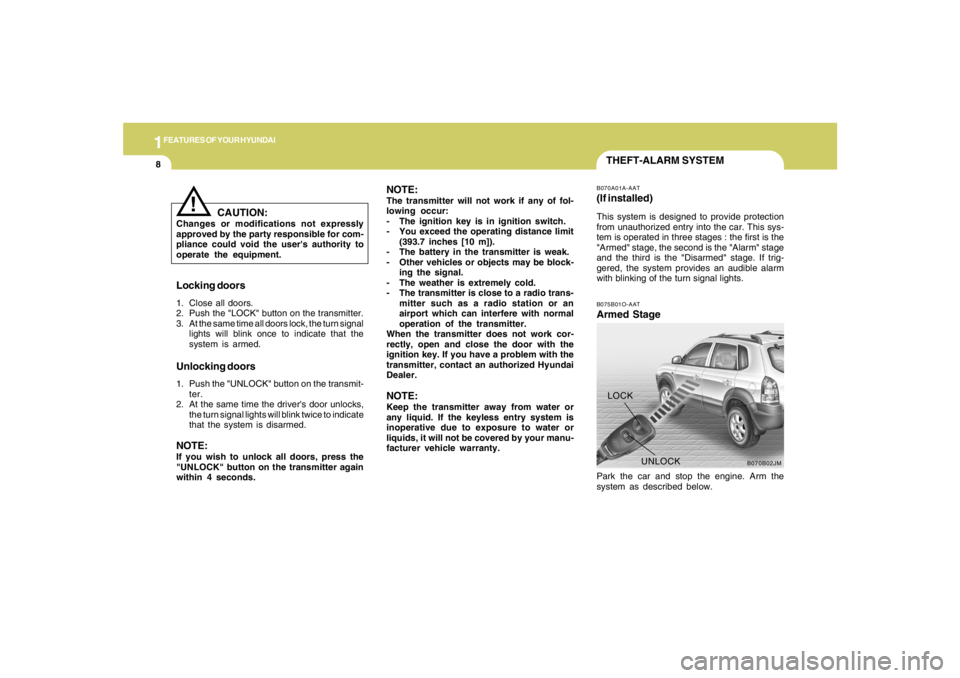
THEFT-ALARM SYSTEMB075B01O-AATArmed StagePark the car and stop the engine. Arm the
system as described below.B070A01A-AAT(If installed)This system is designed to provide protection
from unauthorized entry into the car. This sys-
tem is operated in three stages : the first is the
"Armed" stage, the second is the "Alarm" stage
and the third is the "Disarmed" stage. If trig-
gered, the system provides an audible alarm
with blinking of the turn signal lights.
Locking doors1. Close all doors.
2. Push the "LOCK" button on the transmitter.
3. At the same time all doors lock, the turn signal
lights will blink once to indicate that the
system is armed.Unlocking doors1. Push the "UNLOCK" button on the transmit-
ter.
2. At the same time the driver's door unlocks,
the turn signal lights will blink twice to indicate
that the system is disarmed.NOTE:If you wish to unlock all doors, press the
"UNLOCK" button on the transmitter again
within 4 seconds.
CAUTION:
Changes or modifications not expressly
approved by the party responsible for com-
pliance could void the user's authority to
operate the equipment.
!
NOTE:The transmitter will not work if any of fol-
lowing occur:
- The ignition key is in ignition switch.
- You exceed the operating distance limit
(393.7 inches [10 m]).
- The battery in the transmitter is weak.
- Other vehicles or objects may be block-
ing the signal.
- The weather is extremely cold.
- The transmitter is close to a radio trans-
mitter such as a radio station or an
airport which can interfere with normal
operation of the transmitter.
When the transmitter does not work cor-
rectly, open and close the door with the
ignition key. If you have a problem with the
transmitter, contact an authorized Hyundai
Dealer.NOTE:Keep the transmitter away from water or
any liquid. If the keyless entry system is
inoperative due to exposure to water or
liquids, it will not be covered by your manu-
facturer vehicle warranty.
Page 121 of 275
1
FEATURES OF YOUR HYUNDAI
109109109109109
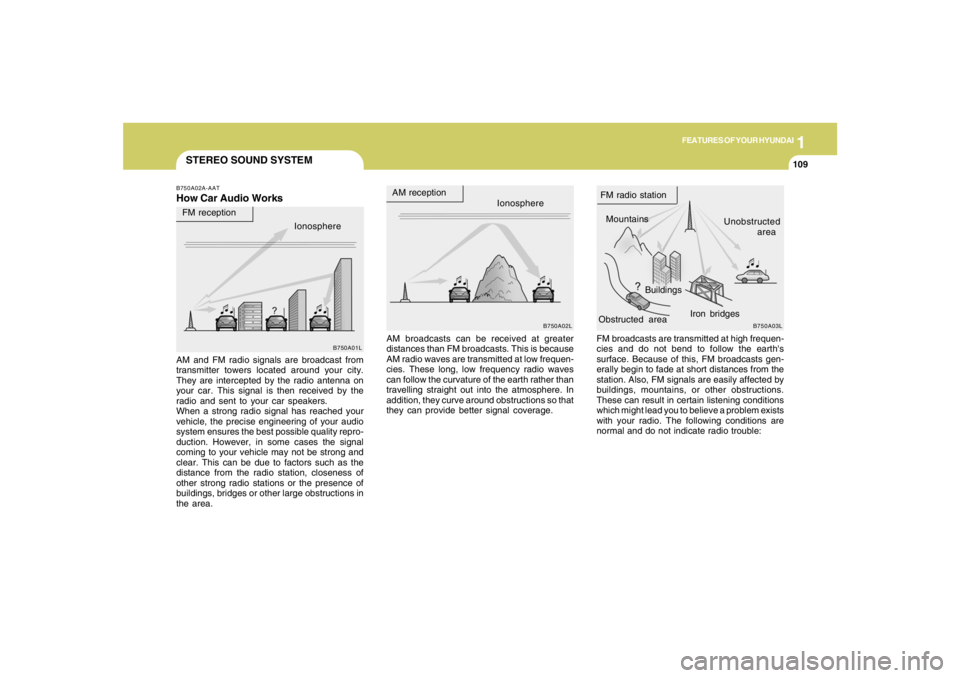
STEREO SOUND SYSTEMB750A02A-AATHow Car Audio Works
AM broadcasts can be received at greater
distances than FM broadcasts. This is because
AM radio waves are transmitted at low frequen-
cies. These long, low frequency radio waves
can follow the curvature of the earth rather than
travelling straight out into the atmosphere. In
addition, they curve around obstructions so that
they can provide better signal coverage. AM and FM radio signals are broadcast from
transmitter towers located around your city.
They are intercepted by the radio antenna on
your car. This signal is then received by the
radio and sent to your car speakers.
When a strong radio signal has reached your
vehicle, the precise engineering of your audio
system ensures the best possible quality repro-
duction. However, in some cases the signal
coming to your vehicle may not be strong and
clear. This can be due to factors such as the
distance from the radio station, closeness of
other strong radio stations or the presence of
buildings, bridges or other large obstructions in
the area.FM broadcasts are transmitted at high frequen-
cies and do not bend to follow the earth's
surface. Because of this, FM broadcasts gen-
erally begin to fade at short distances from the
station. Also, FM signals are easily affected by
buildings, mountains, or other obstructions.
These can result in certain listening conditions
which might lead you to believe a problem exists
with your radio. The following conditions are
normal and do not indicate radio trouble:
Ionosphere
B750A02L
AM reception
Mountains
BuildingsUnobstructed
area FM radio station
B750A03L
Ionosphere FM reception
B750A01L
Obstructed areaIron bridges
Page 122 of 275
1FEATURES OF YOUR HYUNDAI
110
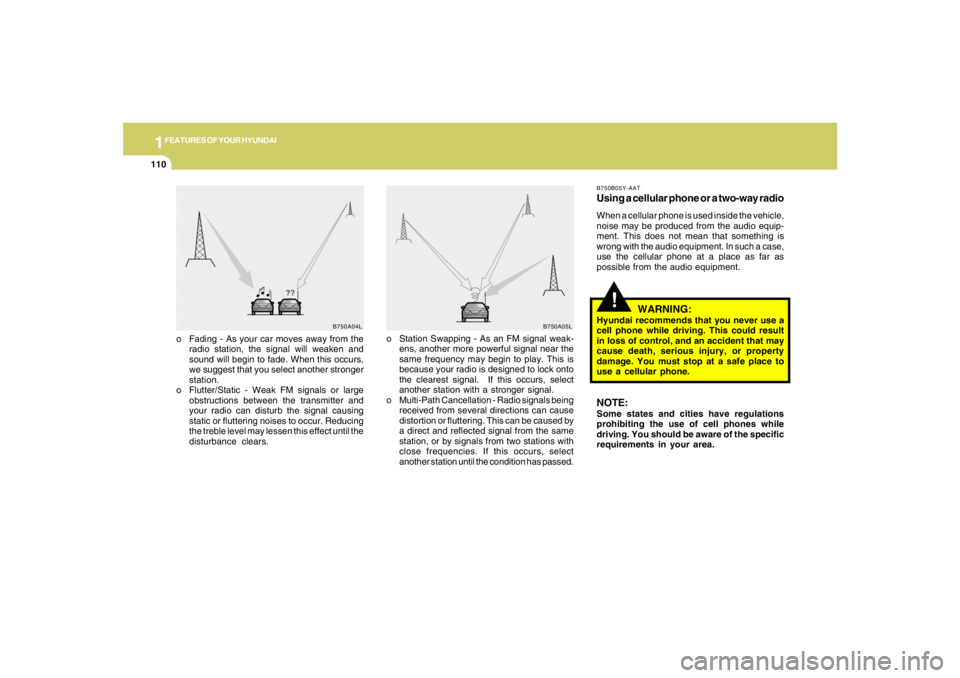
o Fading - As your car moves away from the
radio station, the signal will weaken and
sound will begin to fade. When this occurs,
we suggest that you select another stronger
station.
o Flutter/Static - Weak FM signals or large
obstructions between the transmitter and
your radio can disturb the signal causing
static or fluttering noises to occur. Reducing
the treble level may lessen this effect until the
disturbance clears.o Station Swapping - As an FM signal weak-
ens, another more powerful signal near the
same frequency may begin to play. This is
because your radio is designed to lock onto
the clearest signal. If this occurs, select
another station with a stronger signal.
o Multi-Path Cancellation - Radio signals being
received from several directions can cause
distortion or fluttering. This can be caused by
a direct and reflected signal from the same
station, or by signals from two stations with
close frequencies. If this occurs, select
another station until the condition has passed.
B750A04L
B750A05L
!
B750B05Y-AATUsing a cellular phone or a two-way radioWhen a cellular phone is used inside the vehicle,
noise may be produced from the audio equip-
ment. This does not mean that something is
wrong with the audio equipment. In such a case,
use the cellular phone at a place as far as
possible from the audio equipment.
WARNING:
Hyundai recommends that you never use a
cell phone while driving. This could result
in loss of control, and an accident that may
cause death, serious injury, or property
damage. You must stop at a safe place to
use a cellular phone.NOTE:Some states and cities have regulations
prohibiting the use of cell phones while
driving. You should be aware of the specific
requirements in your area.
Page 123 of 275
1
FEATURES OF YOUR HYUNDAI
111111111111111
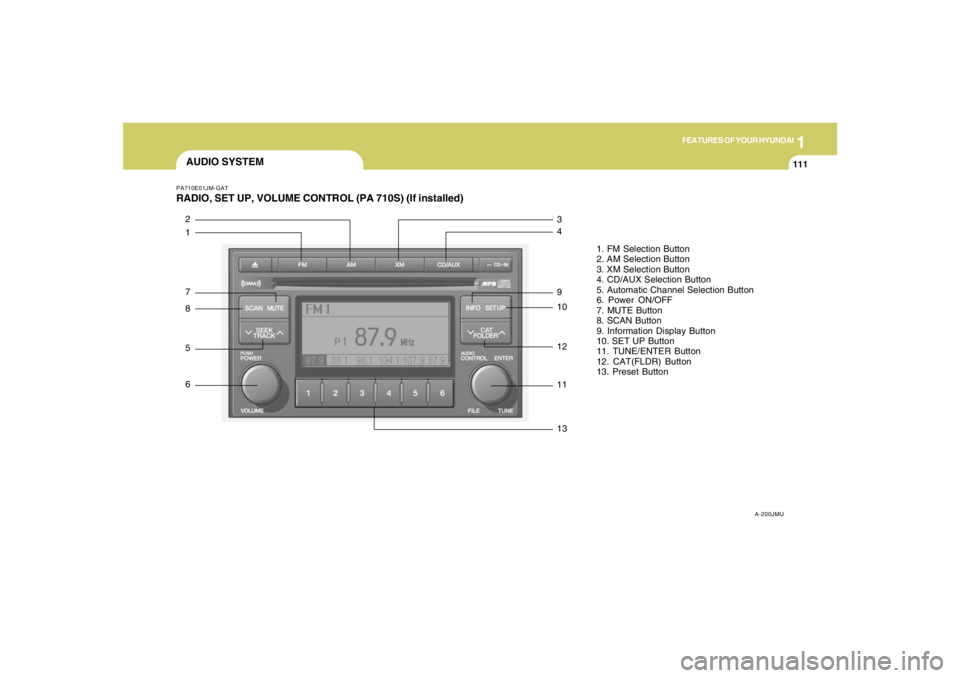
AUDIO SYSTEMPA710E01JM-GATRADIO, SET UP, VOLUME CONTROL (PA 710S) (If installed)
A-200JMU
1. FM Selection Button
2. AM Selection Button
3. XM Selection Button
4. CD/AUX Selection Button
5. Automatic Channel Selection Button
6. Power ON/OFF
7. MUTE Button
8. SCAN Button
9. Information Display Button
10. SET UP Button
11. TUNE/ENTER Button
12. CAT(FLDR) Button
13. Preset Button
1 2
7
8
5
6
13 11 12 10 9 4 3
Page 129 of 275
1
FEATURES OF YOUR HYUNDAI
117117117117117
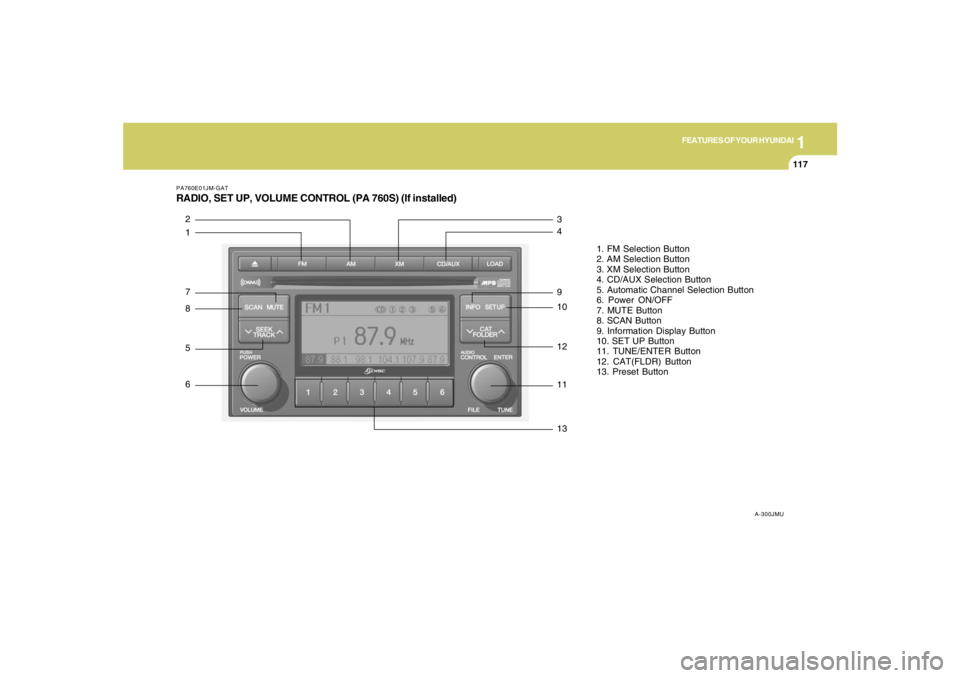
PA760E01JM-GATRADIO, SET UP, VOLUME CONTROL (PA 760S) (If installed)
A-300JMU
1. FM Selection Button
2. AM Selection Button
3. XM Selection Button
4. CD/AUX Selection Button
5. Automatic Channel Selection Button
6. Power ON/OFF
7. MUTE Button
8. SCAN Button
9. Information Display Button
10. SET UP Button
11. TUNE/ENTER Button
12. CAT(FLDR) Button
13. Preset Button
1 2
7
8
5
6
13 11 12 10 9 4 3
Page 136 of 275
1FEATURES OF YOUR HYUNDAI
124
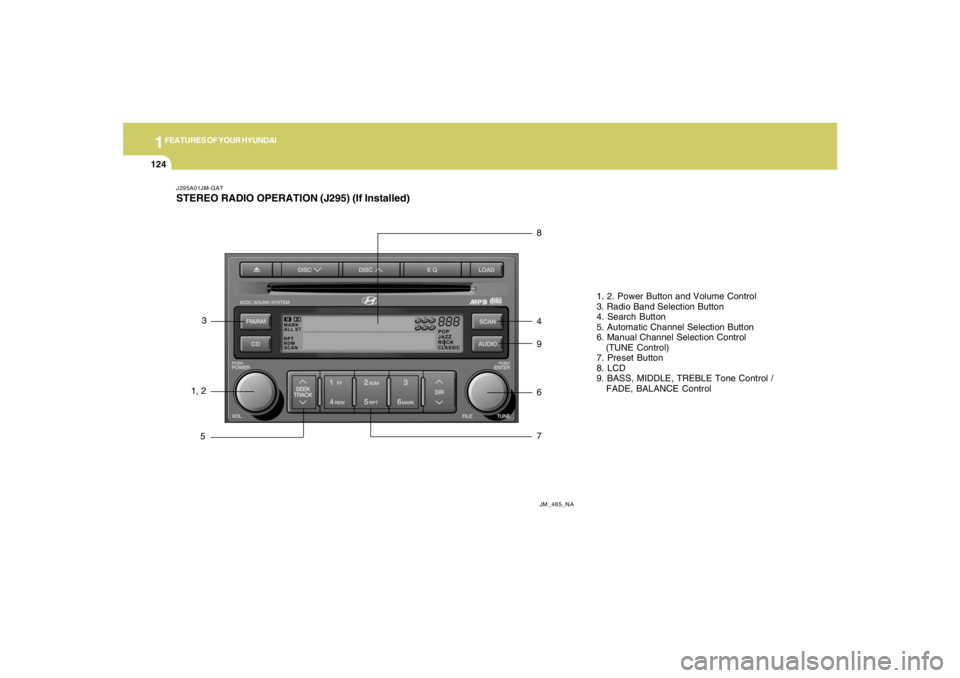
J295A01JM-GATSTEREO RADIO OPERATION (J295) (If Installed)
JM_465_NA
1, 23
58
4
9
6
71. 2. Power Button and Volume Control
3. Radio Band Selection Button
4. Search Button
5. Automatic Channel Selection Button
6. Manual Channel Selection Control
(TUNE Control)
7. Preset Button
8. LCD
9. BASS, MIDDLE, TREBLE Tone Control /
FADE, BALANCE Control
Page 137 of 275
1
FEATURES OF YOUR HYUNDAI
125125125125125
J295B01JM-GAT1. Power Button (POWER ON)Press this button when the ignition switch of the
automobile is set to ACC (1st notch) or ON (2nd
notch) to turn on the power and the audio
system. Press once again when the audio
system is on to turn off the power.2. Volume Control (VOLUME)Turn the volume control clockwise to increase
volume and counterclockwise to reduce. The
volume level will be displayed on the screen
when you adjust the volume.3. Radio Band Selection Button (FM/AM)o Press this button to listen to either FM or AM.
o The radio will be set to each of the following
modes each time you press the button.
FM1 ➟ FM2 ➟ AMNOTE:Push this button when the power is off to
turn on the power automatically.4. SCAN ButtonPress this button to automatically select chan-
nels starting from the current channel and play
each channel for 5 seconds. Press again to
keep listening to the channel currently selected.
5. Automatic Channel Selection Button
(SEEK)Press the [SEEK
] button to automatically
increase frequency and press the [TRACK
]
button to automatically decrease frequency to
select and play the next available channel. If the
received channel is memorized in the preset
buttons then the screen will display the memo-
rized channel.
6. Manual Channel Selection Control
(TUNE)Turn the TUNE control clockwise to increase
frequency and counterclockwise to reduce fre-
quency by 1 step for each click.
o FM: Increases/Decreases by 0.2MHz
(87.5➟87.7➟87.9…87.9➟87.7➟87.5)
o AM: Increases/Decreases by 10MHz
(530➟540➟550…550➟540➟530)7. Preset Button (1~6)Press this button to listen to the channels
memorized to each button. If you want to memo-
rize the current channel to the preset button,
press the button for more than 1.5 seconds then
the channel will be memorized to the button with
a beep.
8. Information Display Screen (LCD)A variety of information will be displayed on the
screen including the radio bands (FM1/FM2/
AM) while listening to the radio, frequency of
each channel, the number of preset channel
and "ST" for FM stereo broadcasting.9. BASS, MIDDLE, TREBLE Tone Control
/ FADE, BALANCE ControlPress this button to control tone. Each time you
press the button, the mode will switch from
BASS➟MIDDLE➟TREBLE➟FADER➟BALANCE
and the mode will be displayed on the screen.
Page 140 of 275
![HYUNDAI TUCSON 2008 Owners Manual 1FEATURES OF YOUR HYUNDAI
128
J295D01JM-GAT1. CD DeckThe deck will open only when you press [LOAD]
button. Make sure the printed side of the disk
faces upward when you insert the disk. The CD
changer](/img/35/56209/w960_56209-139.png "HYUNDAI TUCSON 2008 Owners Manual 1FEATURES OF YOUR HYUNDAI
128
J295D01JM-GAT1. CD DeckThe deck will open only when you press [LOAD]
button. Make sure the printed side of the disk
faces upward when you insert the disk. The CD
changer")
1FEATURES OF YOUR HYUNDAI
128
J295D01JM-GAT1. CD DeckThe deck will open only when you press [LOAD]
button. Make sure the printed side of the disk
faces upward when you insert the disk. The CD
changer can only play 12cm disks. If you insert
video CD or DATA CD, then the screen will
display "ERROR DISC," eject the disk and
return to the previous mode.2. CD Load ButtonWhen you press [LOAD] button, the empty lots
of the CD Changer will be opened in the order
of 1, 2, 3, 4, 5 and 6. When you insert CD, you
can listen to the corresponding CD. In this case,
the last CD you inserted will be played. If you do
not take any actions after pressing (LOAD) then
the (LOAD) will be cancelled.3. CD Ejection ButtonWhen you press [
] button, the currently
played CD will be ejected. If you press the button
for more than 2 seconds, you will be able to eject
all CDs. If currently played CD is in the 3rd slot,
the ejection order will be 3, 4, 5, 6, 1 and 2.
4. DISC DisplayThis shows the location of disk inside the CD
Changer and the corresponding CD deck num-
ber will flicker when you load or eject the CD.5. CD Changer Selection ButtonIf the power was turned off when the CD is inside
the CD changer or if you press "CD" button
when radio was on, the system will play CD. If
you press (CD/MP3) when there is no CD in the
changer then the system will display "NO DISK"
for 2 seconds and return to the previous mode.NOTE:If you press this button when the power is
off and CD is inside the deck, the power will
be automatically turned on.6. Disc Selection ButtonIf you press [DISC
] button while using CD
Changer, the next disc will be played (If you
press the button when you are listening to CD
1, the CD 2 will be played).
If you wish to listen to the previous CD, then
press [DISC
] button then the previous disc
will be played (If you press the button when you
are listening to CD 2, the CD 1 will be played).
If the CD Changer is not fully loaded, this will
move to the next available deck. When the
player moves from deck to deck, the screen will
display the selected deck number.
7. Fast Backward ButtonPress and hold [4 REW] button while playing CD
then the player will play the disk backwards 5
times the regular speed for first 5 seconds and
15 times faster after that. The sound will be
reduced by 12dB while you are holding the
button.8. Fast Forward ButtonPress and hold [1 FF] button while playing CD
then the player will play the disk forward 5 times
the regular speed for first 5 seconds and 15
times faster after that. The sound will be re-
duced by 12dB while you are holding the button.9. Automatic Previous Track Selection
ButtonPress [TRACK
] button to go to the beginning
of the song you are listening to while playing the
CD. Press the button again to go to the beginning
of the song before the song you were listening
to.
10. Automatic Next Track Selection
ButtonPress [SEEK
] button to go to the beginning
of the song next to the song you are listening to
while playing the CD.
Page 149 of 275
2
DRIVING YOUR HYUNDAI
5
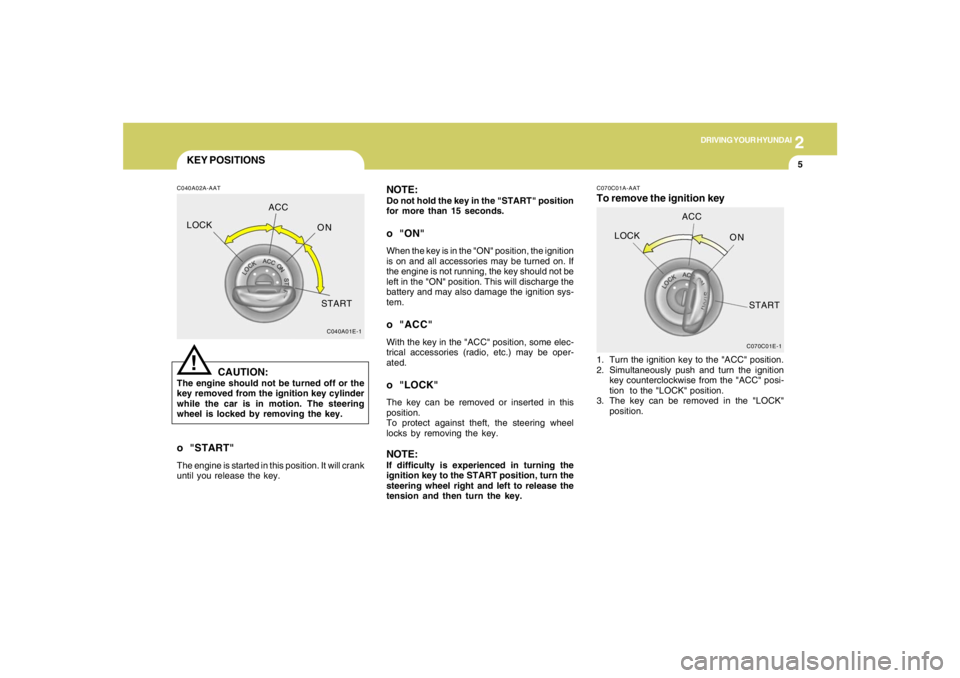
KEY POSITIONSC040A02A-AAT
CAUTION:
The engine should not be turned off or the
key removed from the ignition key cylinder
while the car is in motion. The steering
wheel is locked by removing the key.
!
o "START"The engine is started in this position. It will crank
until you release the key.
C040A01E-1
LOCKACC
ON
START
NOTE:Do not hold the key in the "START" position
for more than 15 seconds.o "ON"When the key is in the "ON" position, the ignition
is on and all accessories may be turned on. If
the engine is not running, the key should not be
left in the "ON" position. This will discharge the
battery and may also damage the ignition sys-
tem.o "ACC"With the key in the "ACC" position, some elec-
trical accessories (radio, etc.) may be oper-
ated.o "LOCK"The key can be removed or inserted in this
position.
To protect against theft, the steering wheel
locks by removing the key.NOTE:If difficulty is experienced in turning the
ignition key to the START position, turn the
steering wheel right and left to release the
tension and then turn the key.
C070C01E-1
LOCKACC
ON
START
C070C01A-AATTo remove the ignition key1. Turn the ignition key to the "ACC" position.
2. Simultaneously push and turn the ignition
key counterclockwise from the "ACC" posi-
tion to the "LOCK" position.
3. The key can be removed in the "LOCK"
position.