light HYUNDAI TUCSON 2009 Workshop Manual
[x] Cancel search | Manufacturer: HYUNDAI, Model Year: 2009, Model line: TUCSON, Model: HYUNDAI TUCSON 2009Pages: 273, PDF Size: 10.29 MB
Page 128 of 273

1
FEATURES OF YOUR HYUNDAI
117117117117117
1. CD Loading SlotPlease face printed side upward and gen-
tly push in. When the ignition switch is on
ACC or ON and power is off, power is
automatically turned on if the CD is loaded.
This CDP supports both 8cm and 12 cm
CDs. But if VCD, Data CD, MP3 CD are
loaded, "Er-6" message will appear and
CD will be ejected.2. CD IndicatorWhen car ignition switch is ACC or ON and
if the CD is loaded, this indicator is lighted.
If the CD is ejected the light is turned off.3. CD Eject ButtonPush
button to eject the CD during CD
playback. This button is enabled when
ignition switch is off.
4. CD/AUX Selection ButtonIf there is a cd in the CDP DECK it turns to
CD mode, and if a device is connected to
AUX then it toggles.
CD➟AUX➟CD··· when the button is
pressed each time.(It will not turn to AUX if
the auxiliary device is not connected)
5. Automatic Track Selection Buttono Push [SEEK
] button for less than 0.8
seconds to play from the beginning of
current song.
o Push [SEEK ] button for less than 0.8
seconds and press again within 1 sec-
onds to play the previous song.
o Push [SEEK ] button for 0.8 or longer
to initiate reverse direction high speed
sound search of current song.
o Push [SEEK ] button for less than 0.8
seconds to play the next song.
o Push [SEEK ] button for 0.8 or longer
to initiate high speed sound search of
current song.
6. INFO ButtonDisplays the information of the current CD
TRACK in the order of DISC TITLE ➟DISC
ARTIST➟TRACK TITLE➟ TRACK ART-
IST ➟TOTAL TRACK➟ Play Screen ➟DISC
TITLE➟···.(not displayed if the information
is not available on the DISC.)7. TUNE/ENTER ButtonTurn this button clockwise to display songs
after current song.
Also, turn this button counterclockwise to
display songs before current song.
To listen to the displayed song, press the
button to skip to the song and play.Pressing the changes the BASS, MIDR-
ANGE, TREBLE, FADER and BALANCE
TUNE mode.
The mode selected is shown on the dis-
play. After selecting each mode, rotate the
Audio control knob clockwise or counter-
clockwise.
o BASS Control
To increase the BASS, rotate the knob
clockwise, while to decrease the BASS,
rotate the knob counterclockwise.
o MID-RANGE Control
To increase the MID-RANGE, rotate the
knob clockwise, while to decrease the
MID-RANGE, rotate the knob counterclock-
wise.
o TREBLE Control
To increase the TREBLE, rotate the knob
clockwise, while to decrease the TREBLE,
rotate the knob counterclockwise.
o FADER Control
Turn the control knob clockwise to emph-
asize rear speaker sound (front speaker
sound will be attenuated). When the con-
trol knob is turned counterclockwise, front
speaker sound will be emphasized (rear
speaker sound will be attenuated).
Page 139 of 273
2
DRIVING YOUR HYUNDAI
4
TO START THE ENGINEC030A01E-AATCOMBINATION IGNITION SWITCHo If your Hyundai is equipped with a
manual transaxle, place the shift lever
in neutral and depress the clutch pedal
fully.
o If your Hyundai has an automatic
transaxle, place the shift lever in "P"
(park).
o To start the engine, insert the ignition
key and turn it to the "START" position.
Release it as soon as the engine starts.
Do not hold the key in the "START"
position for more that 15 seconds.NOTE:o For safety, the engine will not start if
the clutch pedal is not depressed fully
(Manual Transaxle) or the shift lever
is not in "P" or "N" Position (Auto-
matic Transaxle).
o The ignition key cannot be turned from
"ACC" position to "LOCK" position
unless the shift lever is in the "P"
(Park) position or the negative bat-
tery terminal is disconnected from
the battery. To remove the key, al-
ways confirm that the shift lever is
securely positioned in "P" (Park) (For
Automatic Transaxle).
o For additional information about start-
ing, see page 2-6.
BEFORE STARTING THE EN-
GINEC020A04A-AATBefore you start the engine, you should
always:
1. Look around the vehicle to be sure
there are no flat tires, puddles of oil,
water or other indications of possible
trouble.
2. After entering the car, check to be sure
the parking brake is engaged.
3. Check that all windows, and lights are
clean.
4. Check that the interior and exterior mir-
rors are clean and in position.
5. Check your seat, seatback and head-
rest to be sure they are in their proper
positions.
6. Lock all the doors.
7. Fasten your seat belt and be sure that all
other occupants have fastened theirs.
8. Turn off all lights and accessories that
are not needed.
9. When you turn the ignition switch to
"ON", check that all appropriate warn-
ing lights are operating and that you
have sufficient fuel.
10. Check the operation of warning lights
and all bulbs when key is in the "ON"
position.
!
WARNING:
o All passengers must be properly
belted whenever the vehicle is mov-
ing. Refer to pages: 1-19 through 1-
25 for more information on their proper
use.
o Always check the surrounding areas
near your vehicle for people, espe-
cially children, before putting a car
into 'drive.'
!
WARNING:
Always wear appropriate shoes when
operating your vehicle.
Unsuitable shoes (high heels, ski boots,
etc.) may interfere with your ability to
use the brake and accelerator pedal,
and the clutch (if installed).
!
WARNING:
When you intend to park or stop the
vehicle with the engine on, be careful not
to depress the accelerator pedal for a
long period of time. It may overheat the
engine or exhaust system and cause
fire.
Page 141 of 273
2
DRIVING YOUR HYUNDAI
6
!
4. Turn the ignition key to the "START"
position and release it when the engine
starts.
After the engine has started, allow the
engine to run for 10 to 20 seconds prior
to placing the vehicle in gear.
The starter should not be operated for
more than 15 seconds at a time. Wait
15-30 seconds between starting at-
tempts to protect the starter from over-
heating.
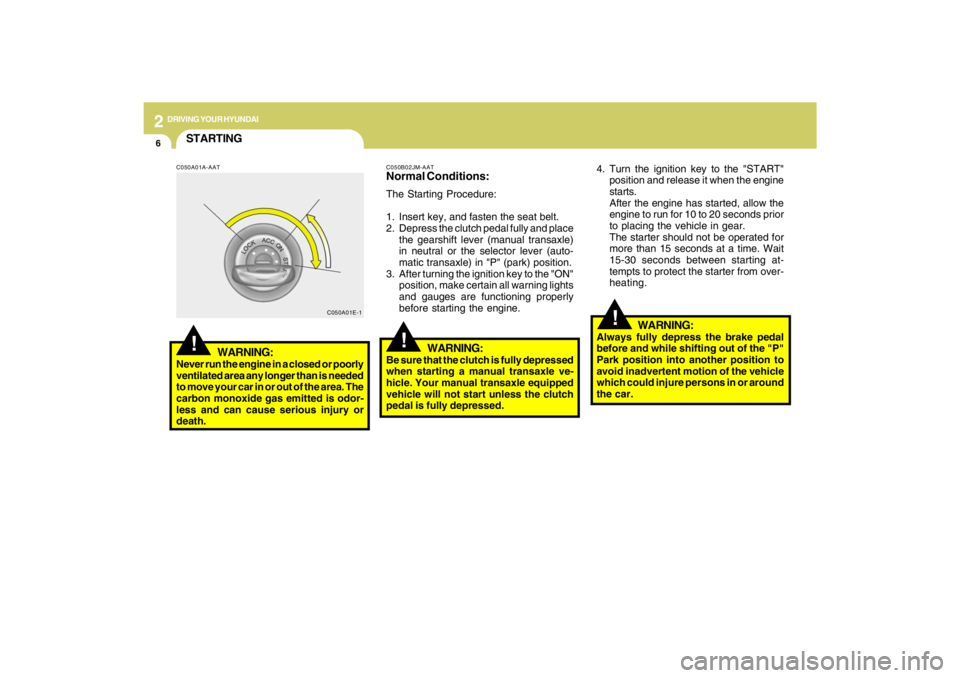
C050B02JM-AATNormal Conditions:The Starting Procedure:
1. Insert key, and fasten the seat belt.
2. Depress the clutch pedal fully and place
the gearshift lever (manual transaxle)
in neutral or the selector lever (auto-
matic transaxle) in "P" (park) position.
3. After turning the ignition key to the "ON"
position, make certain all warning lights
and gauges are functioning properly
before starting the engine.
WARNING:
Be sure that the clutch is fully depressed
when starting a manual transaxle ve-
hicle. Your manual transaxle equipped
vehicle will not start unless the clutch
pedal is fully depressed.
!
C050A01E-1
STARTING!
C050A01A-AAT
WARNING:
Never run the engine in a closed or poorly
ventilated area any longer than is needed
to move your car in or out of the area. The
carbon monoxide gas emitted is odor-
less and can cause serious injury or
death.
WARNING:
Always fully depress the brake pedal
before and while shifting out of the "P"
Park position into another position to
avoid inadvertent motion of the vehicle
which could injure persons in or around
the car.
Page 144 of 273
2
DRIVING YOUR HYUNDAI
9
HJM3018
OPERATING THE AUTOMATIC
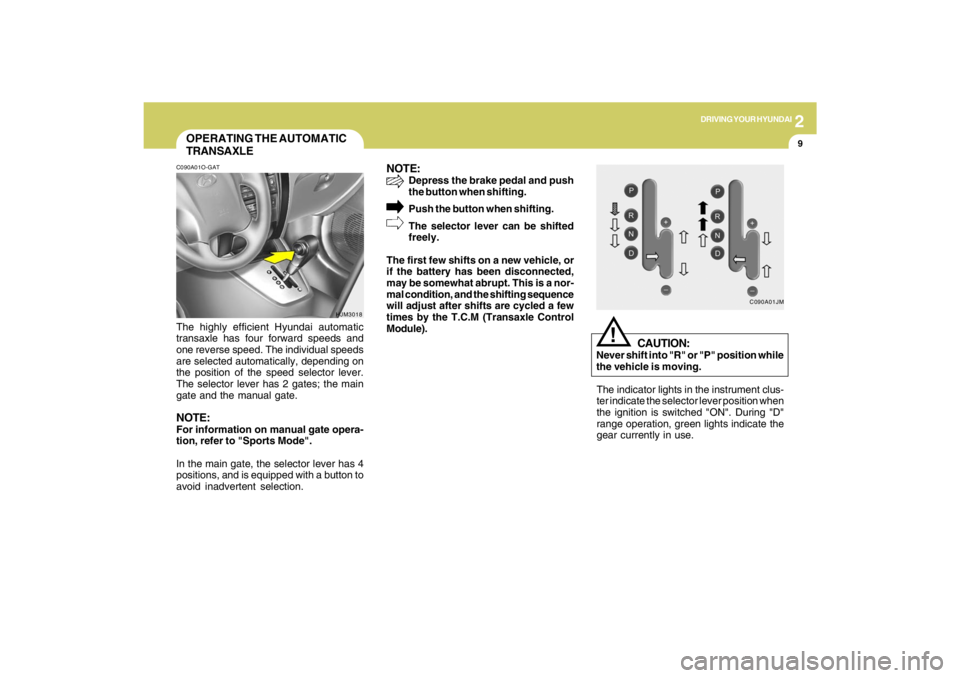
TRANSAXLEC090A01O-GATThe highly efficient Hyundai automatic
transaxle has four forward speeds and
one reverse speed. The individual speeds
are selected automatically, depending on
the position of the speed selector lever.
The selector lever has 2 gates; the main
gate and the manual gate.NOTE:For information on manual gate opera-
tion, refer to "Sports Mode".
In the main gate, the selector lever has 4
positions, and is equipped with a button to
avoid inadvertent selection.
NOTE:
Depress the brake pedal and push
the button when shifting.
Push the button when shifting.
The selector lever can be shifted
freely.
The first few shifts on a new vehicle, or
if the battery has been disconnected,
may be somewhat abrupt. This is a nor-
mal condition, and the shifting sequence
will adjust after shifts are cycled a few
times by the T.C.M (Transaxle Control
Module).
C090A01JM
The indicator lights in the instrument clus-
ter indicate the selector lever position when
the ignition is switched "ON". During "D"
range operation, green lights indicate the
gear currently in use.
CAUTION:
Never shift into "R" or "P" position while
the vehicle is moving.
!
Page 149 of 273
2
DRIVING YOUR HYUNDAI
14
!
Driving HintsTCS does not actively apply brakes. Be
sure to decelerate the car sufficiently be-
fore entering curves.
CAUTION:
When the TCS indicator blinks, SLIP
control function has been activated. It
also means that the road is slippery or
your car is accelerating excessively. In
this situation, gently release foot pres-
sure from the accelerator pedal and
maintain moderate speed.
!
WARNING:
Traction control is a driving aid; all nor-
mal precautions for driving in inclement
weather and on slippery driving surfaces
should be observed.
C310B02O-AATTCS ON/OFF ModeWhen the TCS is operating, the TCS indi-
cator in the instrument cluster will blink.
If you turn the system off by pressing the
TCS switch, the TCS-OFF indicator will
come on and stay on. In the TCS-OFF
mode, the SLIP control will be deactivated.
Adjust you driving accordingly. To turn the
system back on, press the switch again.
The TCS-OFF indicator should go off.NOTE:1) The TCS mode will automatically be
turned ON after the engine is turned
off and restarted.
2) When the traction control system is
operating properly, you can feel a
slight pulsation in the vehicle. This is
only the effect of brake control and
indicates nothing unusual.
3) When the engine starts, a click may
be heard from the engine compart-
ment; this is the sound of the traction
control being checked.
4) When moving out of the mud or fresh
snow, pressing the accelerator pedal
may not cause the engine speed to
increase due to TCS operation.
C310D01JM-AATIndicators and WarningThe indicators should illuminate when the
ignition key is turned to ON or START but
should go out after approximately three
seconds.
If the indicators do not illuminate, or the
TCS or TCS-OFF indicator does not go out
after 3 seconds, have the system checked
by an authorized dealer.
Should there be any unusual conditions in
the TCS System while driving, TCS-OFF
indicator illuminates as a warning.
If TCS-OFF indicator illuminates, pull your
car to a safe place and stop the engine.
Then, start the engine again to check if the
TCS-OFF indicator goes out.
If the indicator remains lit even after the
engine has been started, have your car
checked by an authorized Hyundai dealer.NOTE:When the TCS-OFF indicator illuminates,
traction control is automatically deacti-
vated.
Page 154 of 273
2
DRIVING YOUR HYUNDAI
19
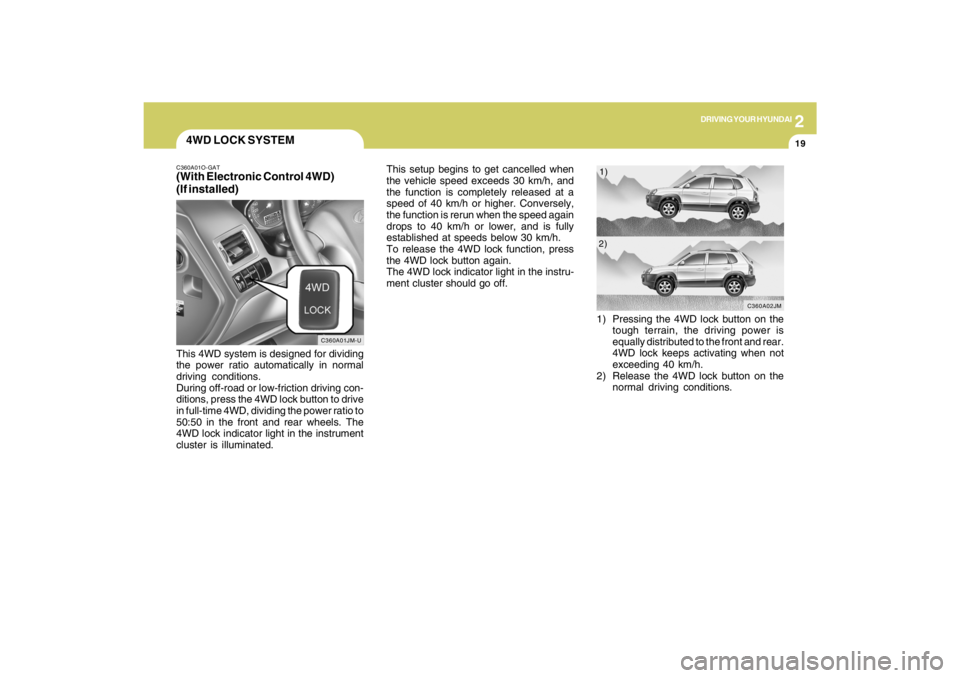
4WD LOCK SYSTEMC360A01O-GAT(With Electronic Control 4WD)
(If installed)This 4WD system is designed for dividing
the power ratio automatically in normal
driving conditions.
During off-road or low-friction driving con-
ditions, press the 4WD lock button to drive
in full-time 4WD, dividing the power ratio to
50:50 in the front and rear wheels. The
4WD lock indicator light in the instrument
cluster is illuminated.This setup begins to get cancelled when
the vehicle speed exceeds 30 km/h, and
the function is completely released at a
speed of 40 km/h or higher. Conversely,
the function is rerun when the speed again
drops to 40 km/h or lower, and is fully
established at speeds below 30 km/h.
To release the 4WD lock function, press
the 4WD lock button again.
The 4WD lock indicator light in the instru-
ment cluster should go off.
C360A01JM-U
1) Pressing the 4WD lock button on the
tough terrain, the driving power is
equally distributed to the front and rear.
4WD lock keeps activating when not
exceeding 40 km/h.
2) Release the 4WD lock button on the
normal driving conditions.
C360A02JM
1)
2)
Page 155 of 273
2
DRIVING YOUR HYUNDAI
20
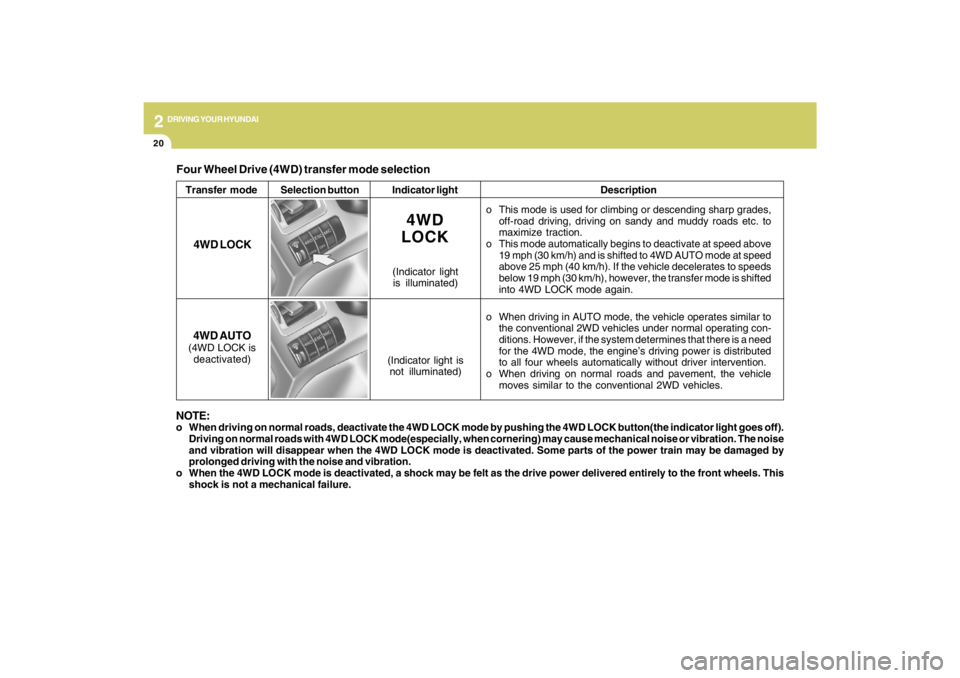
Four Wheel Drive (4WD) transfer mode selectionTransfer mode Selection buttonIndicator lightDescription
o This mode is used for climbing or descending sharp grades,
off-road driving, driving on sandy and muddy roads etc. to
maximize traction.
o This mode automatically begins to deactivate at speed above
19 mph (30 km/h) and is shifted to 4WD AUTO mode at speed
above 25 mph (40 km/h). If the vehicle decelerates to speeds
below 19 mph (30 km/h), however, the transfer mode is shifted
into 4WD LOCK mode again.
o When driving in AUTO mode, the vehicle operates similar to
the conventional 2WD vehicles under normal operating con-
ditions. However, if the system determines that there is a need
for the 4WD mode, the engine’s driving power is distributed
to all four wheels automatically without driver intervention.
o When driving on normal roads and pavement, the vehicle
moves similar to the conventional 2WD vehicles.
4WD
LOCK
(Indicator light
is illuminated)
4WD LOCK
4WD AUTO(4WD LOCK is
deactivated)
(Indicator light is
not illuminated)
NOTE:o When driving on normal roads, deactivate the 4WD LOCK mode by pushing the 4WD LOCK button(the indicator light goes off).
Driving on normal roads with 4WD LOCK mode(especially, when cornering) may cause mechanical noise or vibration. The noise
and vibration will disappear when the 4WD LOCK mode is deactivated. Some parts of the power train may be damaged by
prolonged driving with the noise and vibration.
o When the 4WD LOCK mode is deactivated, a shock may be felt as the drive power delivered entirely to the front wheels. This
shock is not a mechanical failure.
Page 156 of 273
2
DRIVING YOUR HYUNDAI
21
GOOD BRAKING PRACTICESC130A02A-AAT
WARNING:
o Whenever leaving vehicle or parking,
always set the parking brake as far as
possible and fully engage the vehicle's
transaxle into the park position. Ve-
hicles not fully engaged in park with
the parking brake set are at risk for
moving inadvertently and injuring
yourself or others.
o All vehicles should always have the
parking brake fully engaged when
parking to avoid inadvertent move-
ment of the car which can injure occu-
pants or pedestrians.
o Nothing should be carried on top of
the shelf panel behind the rear seat. If
there were an accident or a sudden
stop, such objects could move for-
ward and cause damage to the ve-
hicle or injure the occupants.
o After being parked, check to be sure the
parking brake is not engaged and that
the parking brake indicator light is out
before driving away.
!
o If your car is equipped with an automatic
transaxle, don't let your car creep for-
ward. To avoid creeping forward, keep
your foot firmly on the brake pedal when
the car is stopped.
o Use caution when parking on a hill.
Firmly engage the parking brake and
place the gear selector lever in "P" (au-
tomatic transaxle) or in first or reverse
gear (manual transaxle). If your car is
facing downhill, turn the front wheels
into the curb to help keep the car from
rolling. If your car is facing uphill, turn
the front wheels away from the curb to
help keep the car from rolling. If there is
no curb or if it is required by other
conditions to keep the car from rolling,
block the wheels.
o Under some conditions your parking
brake can freeze in the engaged posi-
tion. This is most likely to happen when
there is an ac-cumulation of snow or ice
around or near the rear brakes or if the
brakes are wet. If there is a risk that the
parking brake may freeze, apply it only
temporarily while you put the gear se-
lector lever in "P" (automatic) or in first
or reverse gear (manual transaxle) and
block the rear wheels so the car cannot
roll. Then release the parking brake.
o Do not hold the vehicle on the upgrade
with the accelerator pedal. This can
cause the transaxle to overheat. Always
use the brake pedal or parking brake. o Driving through water may get the
brakes wet. They can also get wet when
the car is washed. Wet brakes can be
dangerous! Your car will not stop as
quickly if the brakes are wet. Wet brakes
may cause the car to pull to one side. To
dry the brakes, apply the brakes lightly
while driving slowly until the braking
action returns to normal, taking care to
keep the car under control at all times.
If the braking action does not return to
normal, stop as soon as it is safe to do
so and call your Hyundai dealer for
assistance.
o Don't coast down hills with the car out of
gear. This is extremely hazardous. Keep
the car in gear at all times, use the
brakes to slow down, then shift to a
lower gear so that engine braking will
help you maintain a safe speed.
o Don't "ride" the brake pedal. Resting
your foot on the brake pedal while driv-
ing can be dangerous because it can
result in the brakes overheating and
losing their effectiveness. It also in-
creases the wear of the brake compo-
nents.
o If a tire goes flat while you are driving,
apply the brakes gently and keep the
car pointed straight ahead while you
slow down. When you are moving slowly
enough for it to be safe to do so, pull off
the road and stop in a safe place.
Page 157 of 273

2
DRIVING YOUR HYUNDAI
22
o Take care of your tires. Keep them in-
flated to the recommended pressure.
Incorrect inflation, either too much or
too little, results in unnecessary tire
wear. Check the tire pressures at least
once a month.
o Be sure that the wheels are aligned
correctly. Improper alignment can re-
sult from hitting curbs or driving too fast
over irregular surfaces. Poor alignment
causes faster tire wear and may also
result in other problems as well as
greater fuel consumption.
o Keep your car in good condition. For
better fuel economy and reduced main-
tenance costs, maintain your car in ac-
cordance with the maintenance sched-
ule in Section 5. If you drive your car in
severe conditions, more frequent main-
tenance is required (see Section 5 for
details).
o Keep your car clean. For maximum
service, your Hyundai should be kept
clean and free of corrosive materials. It
is especially important that mud, dirt,
ice, etc. not be allowed to accumulate
on the underside of the car. This extra
weight can result in increased fuel con-
sumption and also contribute to corro-
sion.o Travel lightly. Don't carry unnecessary
weight in your car. Weight reduces fuel
economy.
o Don't let the engine idle longer than
necessary. If you are waiting (and not in
traffic), turn off your engine and restart
only when you're ready to go.
o Remember, your Hyundai does not re-
quire extended warm-up. After the en-
gine has started, allow the engine to run
for 10 to 20 seconds prior to placing the
vehicle in gear. In very cold weather,
however, give your engine a slightly
longer warm-up period.
o Don't "lug" or "over-rev" the engine.
Lugging is driving too slowly in too high
a gear resulting in the engine bucking.
If this happens, shift to a lower gear.
Over-revving is racing the engine be-
yond its safe limit. This can be avoided
by shifting at the recommended speeds.
o Use your air conditioning sparingly. The
air conditioning system is operated by
engine power so your fuel economy is
reduced when you use it.
DRIVING FOR ECONOMYC140A02A-AATYou can save fuel and get more miles from
your car if you follow these suggestions:
o Drive smoothly. Accelerate at a moder-
ate rate. Don't make "jack-rabbit" starts
or full-throttle shifts and maintain a
steady cruising speed. Don't race be-
tween stoplights. Try to adjust your
speed to that of the other traffic so you
don't have to change speeds unneces-
sarily. Avoid heavy traffic whenever pos-
sible. Always maintain a safe distance
from other vehicles so you can avoid
unnecessary braking. This also reduces
brake wear.
o Drive at a moderate speed. The faster
you drive, the more fuel your car uses.
Driving at a moderate speed, espe-
cially on the highway, is one of the most
effective ways to reduce fuel consump-
tion.
o Don't "ride" the brake or clutch pedal.
This can increase fuel consumption and
also increase wear on these compo-
nents. In addition, driving with your foot
resting on the brake pedal may cause
the brakes to overheat, which reduces
their effectiveness and may lead to more
serious consequences.
Page 159 of 273

2
DRIVING YOUR HYUNDAI
24
C160K01A-AATCarry Emergency EquipmentDepending on the severity of the weather
where you drive your car, you should carry
appropriate emergency equipment. Some
of the items you may want to carry include
tire chains, tow straps or chains, flashlight,
emergency flares, sand, a shovel, jumper
cables, a window scraper, gloves, ground
cloth, coveralls, a blanket, etc.
C160H02A-AATUse Approved Window Washer Anti-
Freeze in SystemTo keep the water in the window washer
system from freezing, add an approved
window washer anti-freeze solution in
accordance with instructions on the con-
tainer. Window washer anti-freeze is avail-
able from Hyundai dealers and most auto
parts outlets. Do not use engine coolant or
other types of anti-freeze as these may
damage the paint finish.
C160G01A-AATTo Keep Locks from FreezingTo keep the locks from freezing, squirt an
approved de-icer fluid or glycerine into the
key opening. If a lock is covered with ice,
squirt it with an approved de-icing fluid to
remove the ice. If the lock is frozen inter-
nally, you may be able to thaw it out by
using a heated key. Handle the heated key
with care to avoid injury.
C160J01A-AATDon't Let Ice and Snow Accumulate
UnderneathUnder some conditions, snow and ice can
build up under the fenders and interfere
with the steering. When driving in severe
winter conditions where this may happen,
you should periodically check underneath
the car to be sure the movement of the front
wheels and the steering components is
not obstructed.
C160I01A-AATDon't Let Your Parking Brake FreezeUnder some conditions your parking brake
can freeze in the engaged position. This
is most likely to happen when there is an
accumulation of snow or ice around or
near the rear brakes or if the brakes are
wet. If there is a risk the parking brake may
freeze, apply it only temporarily while you
put the gear selector lever in "P" (auto-
matic) or in first or reverse gear (manual
transaxle) and block the rear wheels so the
car cannot roll. Then release the parking
brake.
C160F01A-AATCheck Spark Plugs and Ignition
SystemInspect your spark plugs as described in
Section 6 and replace them if necessary.
Also check all ignition wiring and compo-
nents to be sure they are not cracked, worn
or damaged in any way.C160E01A-AATChange to "Winter Weight" Oil if
NecessaryIn some climates it is recommended that a
lower viscosity "winter weight" oil be used
during cold weather. See Section 9 for
recommendations. If you aren't sure what
weight oil you should use, consult your
Hyundai dealer.