cruise control HYUNDAI TUCSON 2009 Owners Manual
[x] Cancel search | Manufacturer: HYUNDAI, Model Year: 2009, Model line: TUCSON, Model: HYUNDAI TUCSON 2009Pages: 273, PDF Size: 10.29 MB
Page 10 of 273
F9
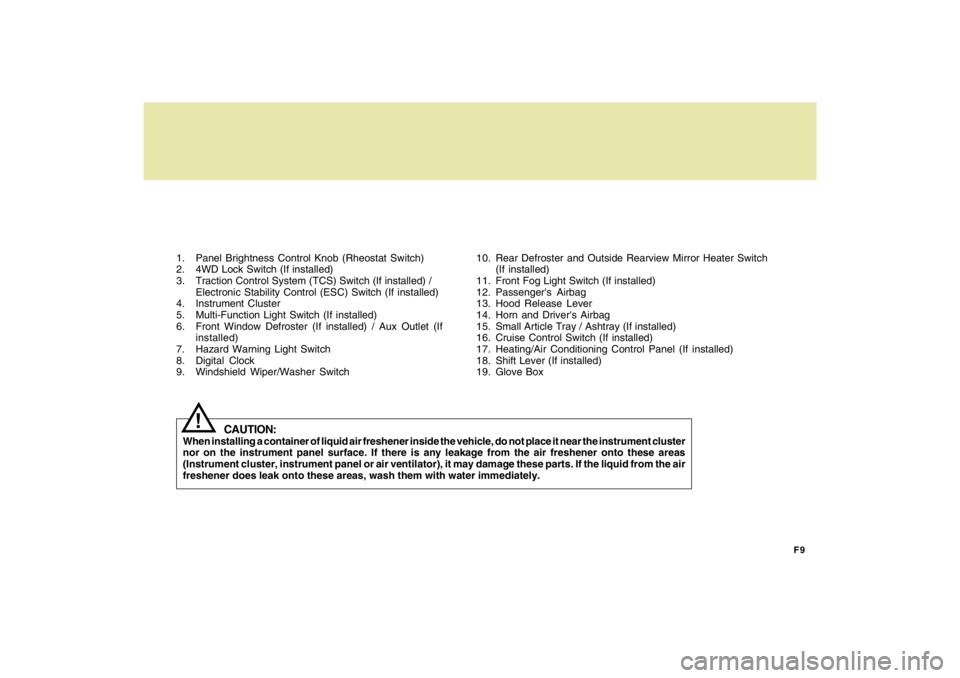
1. Panel Brightness Control Knob (Rheostat Switch)
2. 4WD Lock Switch (If installed)
3. Traction Control System (TCS) Switch (If installed) /
Electronic Stability Control (ESC) Switch (If installed)
4. Instrument Cluster
5. Multi-Function Light Switch (If installed)
6. Front Window Defroster (If installed) / Aux Outlet (If
installed)
7. Hazard Warning Light Switch
8. Digital Clock
9. Windshield Wiper/Washer Switch10. Rear Defroster and Outside Rearview Mirror Heater Switch
(If installed)
11. Front Fog Light Switch (If installed)
12. Passenger's Airbag
13. Hood Release Lever
14. Horn and Driver's Airbag
15. Small Article Tray / Ashtray (If installed)
16. Cruise Control Switch (If installed)
17. Heating/Air Conditioning Control Panel (If installed)
18. Shift Lever (If installed)
19. Glove Box
CAUTION:
When installing a container of liquid air freshener inside the vehicle, do not place it near the instrument cluster
nor on the instrument panel surface. If there is any leakage from the air freshener onto these areas
(Instrument cluster, instrument panel or air ventilator), it may damage these parts. If the liquid from the air
freshener does leak onto these areas, wash them with water immediately.
!
Page 11 of 273

YOUR VEHICLE AT A GLANCE
F10
SRS (Airbag) Service Reminder Indicator (SRI)
B255A03JM-AATINDICATOR SYMBOLS ON THE INSTRUMENT PANEL
Turn Signal Indicator LightsHigh Beam Indicator Light
Low Oil Pressure Warning Light
Charging System Warning LightSeat Belt Reminder Light and Chime
* More detailed explanations of these items will be found begin-
ning on page 1-50.
Parking Brake/Brake Fluid Level Warning LightMalfunction Indicator Light Tail Gate Open Warning LightLow Fuel Level Warning LightDoor Ajar Warning Light and Chime (If installed)Traction Control Indicator Light
(If installed)
ABS Service Reminder Indicator (If installed)Cruise Indicator (If installed)
4WD Lock Indicator Light (If installed)4WD System Warning Light (If installed)SET Indicator Light (If installed)
Electronic Stability Control (ESC) Indicator
Lights (If Installed)
Low tire pressure telltale (If installed)
TPMS (Tire pressure monitoring system) malfunc-
tion indicator (If installed)
Engine coolant temperature warning light
Page 12 of 273
1
Fuel Recommendations ................................................ 1-2
Breaking in Your New Hyundai ..................................... 1-3
Keys.............................................................................. 1-3
Door .............................................................................. 1-4
Power Windows..........................................................1-12
Seats...........................................................................1-13
Seat Belts....................................................................1-19
Child Restraint System ...............................................1-26
Supplemental Restraint (AIRBAG) system .................1-34
Instrument Cluster and Indicator Lights...................... 1-48
Warning and Indicator Lights......................................1-50
Multi-Function Light Switch .........................................1-60
Windshield Wiper/Washer Switch...............................1-62
Sunroof.......................................................................1-72
Mirror...........................................................................1-76
How to use Luggage Room ........................................1-80
Hood Release .............................................................1-85
Cruise Control.............................................................1-88
Heating and Cooling Control .......................................1-93
Stereo Sound System...............................................1-109
Antenna.....................................................................1-111
Audio System............................................................1-113
1
FEATURES OF YOUR HYUNDAI
Page 60 of 273

1
FEATURES OF YOUR HYUNDAI
49
1. Tachometer
2. Turn Signal Indicator Light
3. Seat Belt Warning Light
4. Supplemental Restraint (AirBag) System
Service Reminder Indicator (SRI)
5. Speedometer
6. Parking Brake/Low Brake Fluid Level Warning Light
7. Low Oil Pressure Warning Light
8. High Beam Indicator Light
9. Engine Temperature Warning Light
10. Fuel Gauge
11. Tail Gate Open Warning Light
12. Traction Control Indicator Light (If installed)/
Electronic Stability Control (ESC) Indicator Light
(If installed)13. ABS Service Reminder Indicator (If installed)
14. Immobilizer Warning Light (If installed)
15. Door Ajar Warning Light
16. Automatic Transaxle Position Indicator Light (If installed)
17. Odometer/ Trip odmeter
18. Trip Computer (If installed)
19. Malfunction Indicator Light (MIL)
20. Charging System Warning Light
21. Low Tire Pressure Telltale (If installed)
22. 4WD System Warning Light (If installed)
23. TPMS (Tire Pressure Monitoring System) Malfunction Indicator
(If installed)
24. 4WD Lock Indicator Light
25. Cruise Indicator (If installed)
26. Low Fuel Warning Light
Page 64 of 273

1
FEATURES OF YOUR HYUNDAI
53
B260T01O-GAT
4WD System Warning Light
(If installed)
When the key is turned to the "ON" position,
the 4WD(Four Wheel Drive) system warn-
ing light will come on and then go off in a
few seconds.CAUTION:
If the 4WD system warning light ( )
blinks while driving, this indicates that
there is a malfunction in the 4WD sys-
tem. If this occurs, have your vehicle
checked by an authorized Hyundai dealer
as soon as possible.
!
B265C02LZ-AAT
Electronic Stability
Control Indicator Lights(If installed)
The electronic stability control indicators
change operation according to the ignition
switch position and whether the system is
in operation or not.
They will illuminate when the ignition key
is turned to the "ON" position, but should go
out after three seconds. If the ESC or ESC-
OFF indicator stays on, take your car to
your authorized Hyundai dealer and have
the system checked. See section 2 for
more information about the ESC.
B260V01JM-GAT
4WD Lock Indicator Light
(If installed)
The 4WD (Four Wheel Drive) lock indica-
tor light in the instrument cluster is illumi-
nated when the The 4WD lock switch is
pushed. The purpose of this switch is to
increase the drive power when driving on
wet pavement, snow-covered roads and/
or off-road. The 4WD lock indicator light is
turned off by pushing the switch again.
NOTE:Do not use 4WD on normal dry pavement
conditions.
B260R01E-GAT
SET Indicator Light
(If installed)
The SET indicator light in the instrument
cluster is illuminated when the cruise con-
trol switch is pushed downward to "SET
(COAST)".
The SET indicator light does not illuminate
when the control switch is in the "CANCEL"
position.
B260Q01E-GAT
Cruise Indicator Light
(If installed)
The cruise indicator light in the instrument
cluster is illuminated when the cruise con-
trol main switch on the end of the barrel is
pushed.
When the cruise control main switch is
pushed a second time, the cruise control
system will be and the light will turn off.
Information on the use of cruise control
may be found on page 1-88.
B265C01O-AAT
Traction Control Indicator
Lights (If installed)
The traction control indicators change op-
eration according to the ignition switch
position and whether the system is in
operation or not.
They will illuminate when the ignition key
is turned to the "ON" position, but should go
out after three seconds. If the TCS or TCS-
OFF indicator stays on, take your car to
your authorized Hyundai dealer and have
the system checked. See section 2 for
more information about the TCS.
Page 99 of 273
1FEATURES OF YOUR HYUNDAI88
B610A01JM
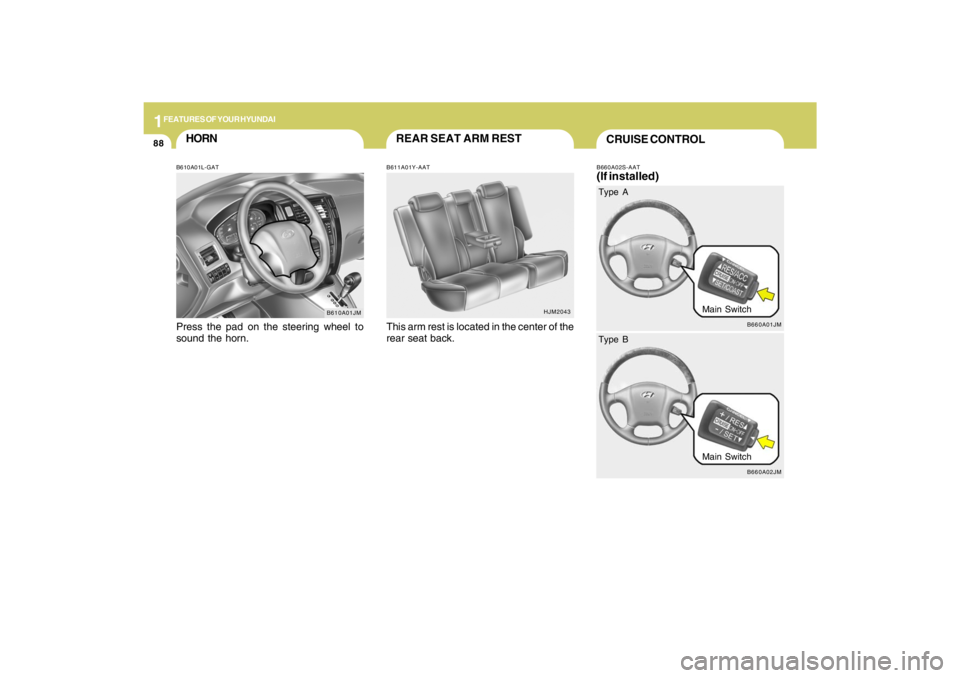
HORNB610A01L-GATPress the pad on the steering wheel to
sound the horn.
HJM2043
REAR SEAT ARM RESTB611A01Y-AATThis arm rest is located in the center of the
rear seat back.
CRUISE CONTROLB660A02S-AAT(If installed)
B660A01JM
Main Switch Type A
B660A02JM
Main Switch Type B
Page 100 of 273
1
FEATURES OF YOUR HYUNDAI
89
!
B660B04E-AATTo Set the Cruise Speed
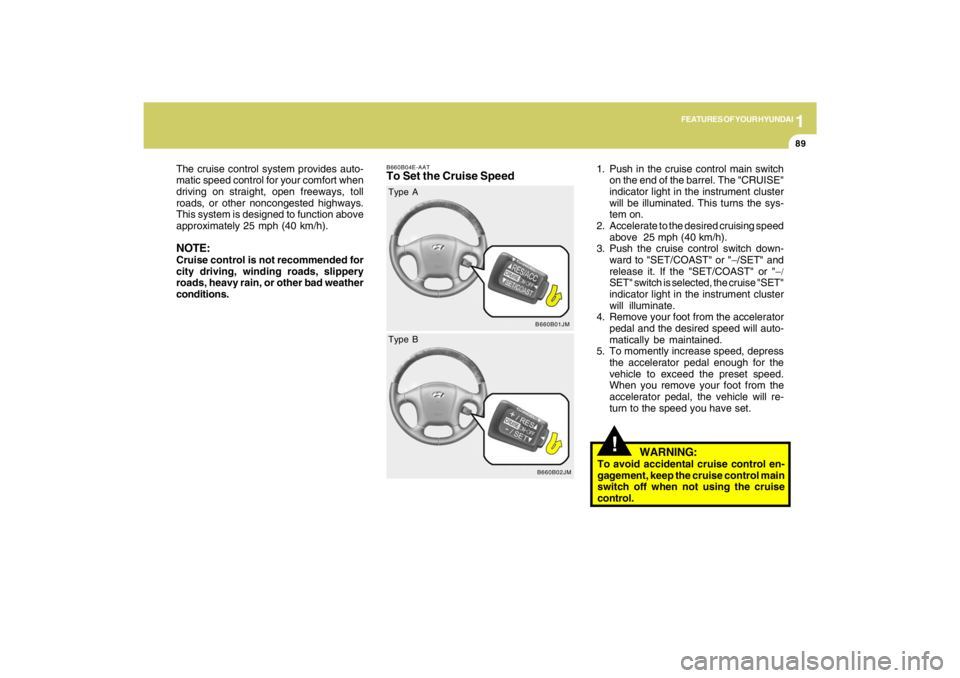
1. Push in the cruise control main switch
on the end of the barrel. The "CRUISE"
indicator light in the instrument cluster
will be illuminated. This turns the sys-
tem on.
2. Accelerate to the desired cruising speed
above 25 mph (40 km/h).
3. Push the cruise control switch down-
ward to "SET/COAST" or "−/SET" and
release it. If the "SET/COAST" or "−/
SET" switch is selected, the cruise "SET"
indicator light in the instrument cluster
will illuminate.
4. Remove your foot from the accelerator
pedal and the desired speed will auto-
matically be maintained.
5. To momently increase speed, depress
the accelerator pedal enough for the
vehicle to exceed the preset speed.
When you remove your foot from the
accelerator pedal, the vehicle will re-
turn to the speed you have set. The cruise control system provides auto-
matic speed control for your comfort when
driving on straight, open freeways, toll
roads, or other noncongested highways.
This system is designed to function above
approximately 25 mph (40 km/h).
NOTE:Cruise control is not recommended for
city driving, winding roads, slippery
roads, heavy rain, or other bad weather
conditions.
B660B01JM
Type A
B660B02JM
Type B
WARNING:
To avoid accidental cruise control en-
gagement, keep the cruise control main
switch off when not using the cruise
control.
Page 101 of 273
1FEATURES OF YOUR HYUNDAI90
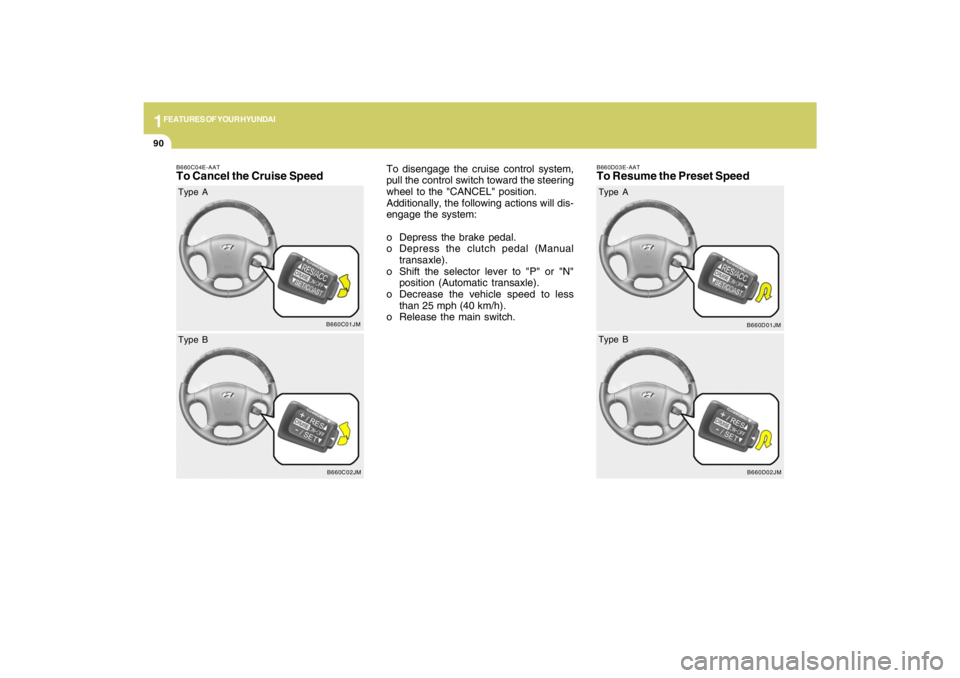
B660C04E-AATTo Cancel the Cruise Speed
To disengage the cruise control system,
pull the control switch toward the steering
wheel to the "CANCEL" position.
Additionally, the following actions will dis-
engage the system:
o Depress the brake pedal.
o Depress the clutch pedal (Manual
transaxle).
o Shift the selector lever to "P" or "N"
position (Automatic transaxle).
o Decrease the vehicle speed to less
than 25 mph (40 km/h).
o Release the main switch.
B660C01JM
Type A
B660C02JM
Type B
B660D03E-AATTo Resume the Preset Speed
B660D01JM
Type A
B660D02JM
Type B
Page 102 of 273
1
FEATURES OF YOUR HYUNDAI
91
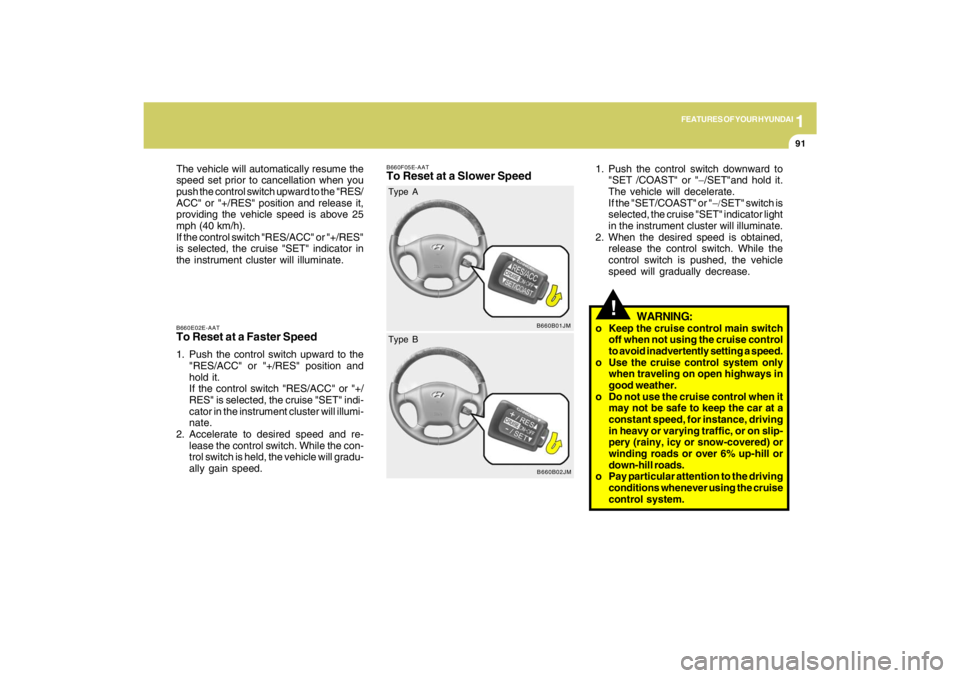
B660E02E-AATTo Reset at a Faster Speed1. Push the control switch upward to the
"RES/ACC" or "+/RES" position and
hold it.
If the control switch "RES/ACC" or "+/
RES" is selected, the cruise "SET" indi-
cator in the instrument cluster will illumi-
nate.
2. Accelerate to desired speed and re-
lease the control switch. While the con-
trol switch is held, the vehicle will gradu-
ally gain speed. The vehicle will automatically resume the
speed set prior to cancellation when you
push the control switch upward to the "RES/
ACC" or "+/RES" position and release it,
providing the vehicle speed is above 25
mph (40 km/h).
If the control switch "RES/ACC" or "+/RES"
is selected, the cruise "SET" indicator in
the instrument cluster will illuminate.
B660F05E-AATTo Reset at a Slower Speed
1. Push the control switch downward to
"SET /COAST" or "−/SET"and hold it.
The vehicle will decelerate.
If the "SET/COAST" or "−/SET" switch is
selected, the cruise "SET" indicator light
in the instrument cluster will illuminate.
2. When the desired speed is obtained,
release the control switch. While the
control switch is pushed, the vehicle
speed will gradually decrease.
!
WARNING:
o Keep the cruise control main switch
off when not using the cruise control
to avoid inadvertently setting a speed.
o Use the cruise control system only
when traveling on open highways in
good weather.
o Do not use the cruise control when it
may not be safe to keep the car at a
constant speed, for instance, driving
in heavy or varying traffic, or on slip-
pery (rainy, icy or snow-covered) or
winding roads or over 6% up-hill or
down-hill roads.
o Pay particular attention to the driving
conditions whenever using the cruise
control system.
B660B01JM
Type A
B660B02JM
Type B
Page 103 of 273
1FEATURES OF YOUR HYUNDAI92
!
WARNING:
o During cruise-control driving with a
manual transaxle vehicle, do not shift
into neutral without depressing the
clutch pedal, or the engine will be
overrevved. If this happens, depress
the clutch pedal or release the main
switch.
o With the cruise control engaged, when
the brake pedal is applied, it is normal
to hear the cruise control system de-
activate. This is an indication of nor-
mal system operation.
o During normal cruise control opera-
tion, when the "SET/COAST" or "
− −− −
−/
SET" is activated or reactivated after
applying the brakes, the cruise con-
trol will energize after approximately
3 seconds. This delay is normal.