fuel consumption HYUNDAI TUCSON 2009 Owners Manual
[x] Cancel search | Manufacturer: HYUNDAI, Model Year: 2009, Model line: TUCSON, Model: HYUNDAI TUCSON 2009Pages: 273, PDF Size: 10.29 MB
Page 67 of 273
1FEATURES OF YOUR HYUNDAI56
B310B02JM-C
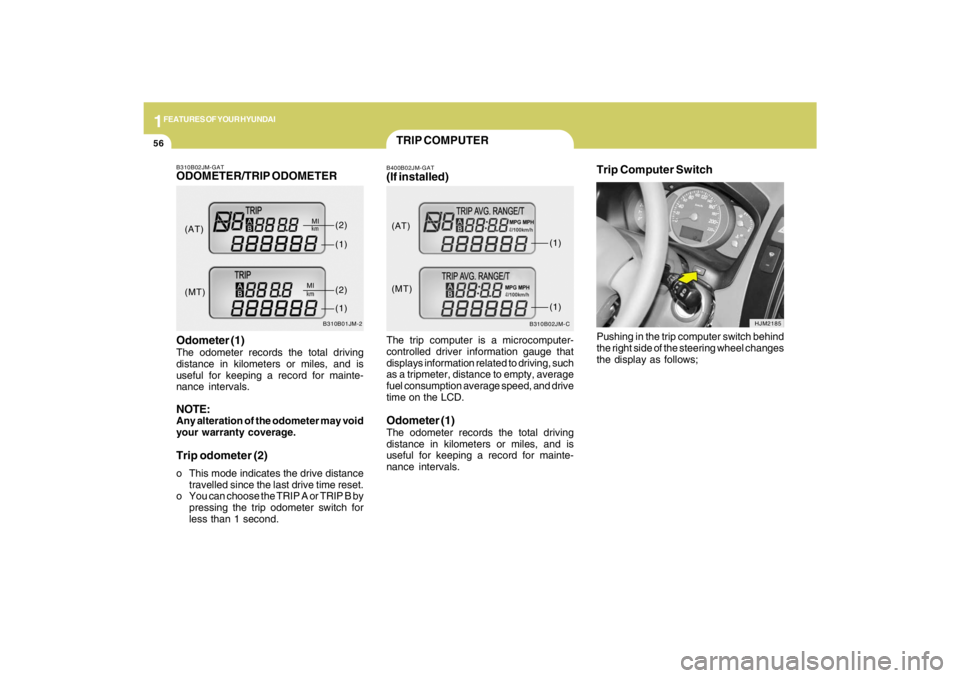
(AT)
(MT)(1)
(1)
TRIP COMPUTERB400B02JM-GAT(If installed)The trip computer is a microcomputer-
controlled driver information gauge that
displays information related to driving, such
as a tripmeter, distance to empty, average
fuel consumption average speed, and drive
time on the LCD.Odometer (1)The odometer records the total driving
distance in kilometers or miles, and is
useful for keeping a record for mainte-
nance intervals.
Trip Computer Switch
HJM2185
Pushing in the trip computer switch behind
the right side of the steering wheel changes
the display as follows;
B310B02JM-GATODOMETER/TRIP ODOMETER
B310B01JM-2
Odometer (1)The odometer records the total driving
distance in kilometers or miles, and is
useful for keeping a record for mainte-
nance intervals.NOTE:Any alteration of the odometer may void
your warranty coverage.Trip odometer (2)o This mode indicates the drive distance
travelled since the last drive time reset.
o You can choose the TRIP A or TRIP B by
pressing the trip odometer switch for
less than 1 second.(AT)
(MT)(1)
(2)(1)(2)
Page 68 of 273
1
FEATURES OF YOUR HYUNDAI
57
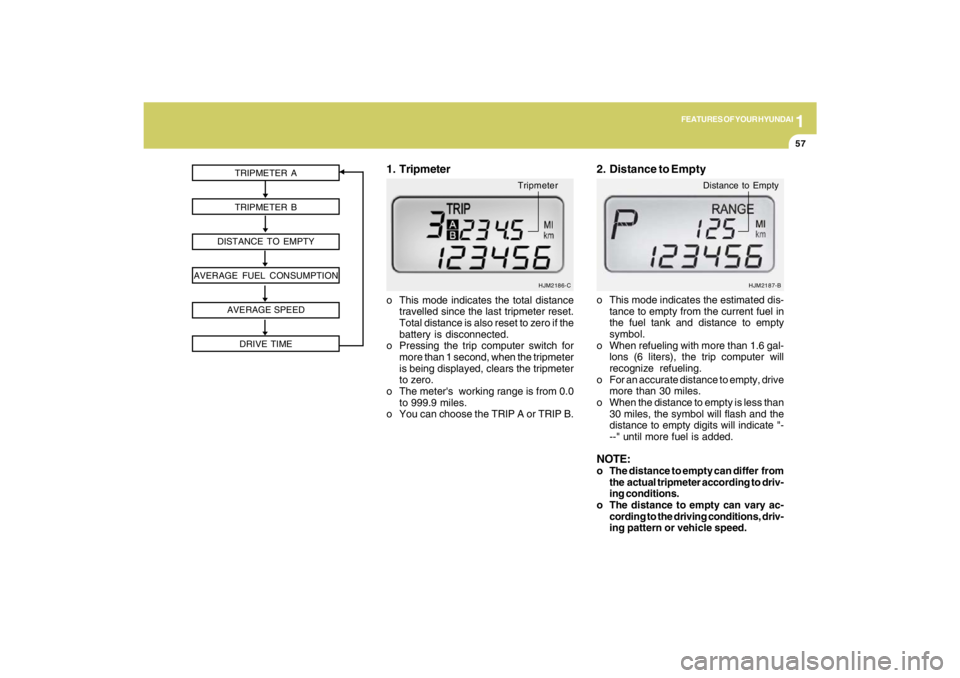
TRIPMETER A
TRIPMETER B
DISTANCE TO EMPTY
AVERAGE FUEL CONSUMPTION
AVERAGE SPEED
DRIVE TIME
HJM2186-C
o This mode indicates the total distance
travelled since the last tripmeter reset.
Total distance is also reset to zero if the
battery is disconnected.
o Pressing the trip computer switch for
more than 1 second, when the tripmeter
is being displayed, clears the tripmeter
to zero.
o The meter's working range is from 0.0
to 999.9 miles.
o You can choose the TRIP A or TRIP B.1. Tripmeter
Tripmeter
o This mode indicates the estimated dis-
tance to empty from the current fuel in
the fuel tank and distance to empty
symbol.
o When refueling with more than 1.6 gal-
lons (6 liters), the trip computer will
recognize refueling.
o For an accurate distance to empty, drive
more than 30 miles.
o When the distance to empty is less than
30 miles, the symbol will flash and the
distance to empty digits will indicate "-
--" until more fuel is added.NOTE:o The distance to empty can differ from
the actual tripmeter according to driv-
ing conditions.
o The distance to empty can vary ac-
cording to the driving conditions, driv-
ing pattern or vehicle speed.2. Distance to Empty
HJM2187-B
Distance to Empty
Page 69 of 273
1FEATURES OF YOUR HYUNDAI58
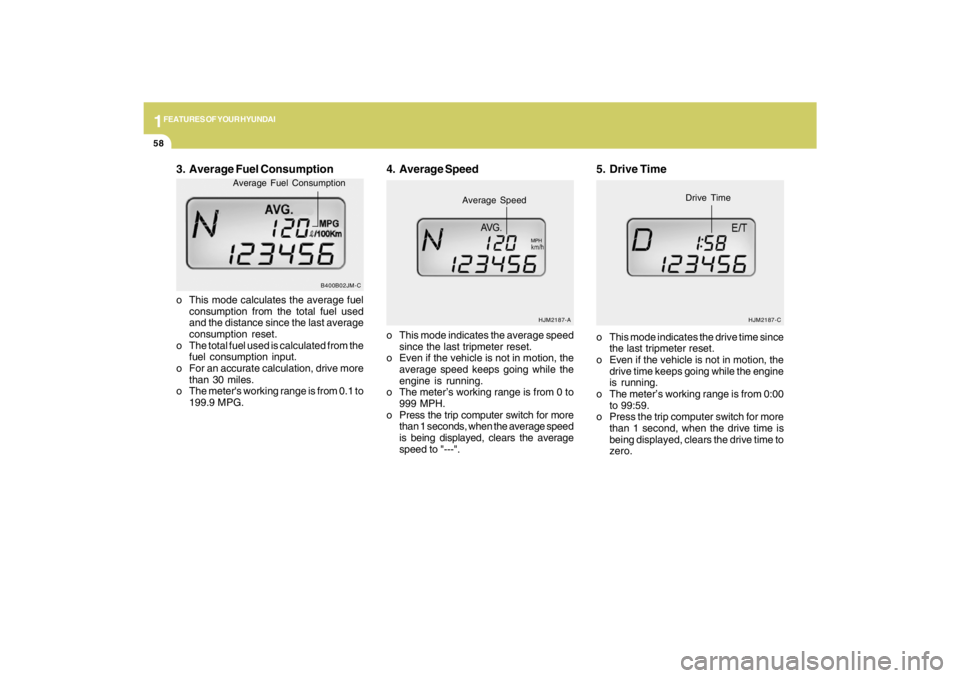
3. Average Fuel Consumptiono This mode calculates the average fuel
consumption from the total fuel used
and the distance since the last average
consumption reset.
o The total fuel used is calculated from the
fuel consumption input.
o For an accurate calculation, drive more
than 30 miles.
o The meter's working range is from 0.1 to
199.9 MPG.o This mode indicates the average speed
since the last tripmeter reset.
o Even if the vehicle is not in motion, the
average speed keeps going while the
engine is running.
o The meter’s working range is from 0 to
999 MPH.
o Press the trip computer switch for more
than 1 seconds, when the average speed
is being displayed, clears the average
speed to "---".
4. Average Speed
HJM2187-A
Average Speed
MPH
5. Drive Timeo This mode indicates the drive time since
the last tripmeter reset.
o Even if the vehicle is not in motion, the
drive time keeps going while the engine
is running.
o The meter’s working range is from 0:00
to 99:59.
o Press the trip computer switch for more
than 1 second, when the drive time is
being displayed, clears the drive time to
zero.
HJM2187-C
Drive Time
B400B02JM-C
Average Fuel Consumption
Page 157 of 273
2
DRIVING YOUR HYUNDAI
22
o Take care of your tires. Keep them in-
flated to the recommended pressure.
Incorrect inflation, either too much or
too little, results in unnecessary tire
wear. Check the tire pressures at least
once a month.
o Be sure that the wheels are aligned
correctly. Improper alignment can re-
sult from hitting curbs or driving too fast
over irregular surfaces. Poor alignment
causes faster tire wear and may also
result in other problems as well as
greater fuel consumption.
o Keep your car in good condition. For
better fuel economy and reduced main-
tenance costs, maintain your car in ac-
cordance with the maintenance sched-
ule in Section 5. If you drive your car in
severe conditions, more frequent main-
tenance is required (see Section 5 for
details).
o Keep your car clean. For maximum
service, your Hyundai should be kept
clean and free of corrosive materials. It
is especially important that mud, dirt,
ice, etc. not be allowed to accumulate
on the underside of the car. This extra
weight can result in increased fuel con-
sumption and also contribute to corro-
sion.o Travel lightly. Don't carry unnecessary
weight in your car. Weight reduces fuel
economy.
o Don't let the engine idle longer than
necessary. If you are waiting (and not in
traffic), turn off your engine and restart
only when you're ready to go.
o Remember, your Hyundai does not re-
quire extended warm-up. After the en-
gine has started, allow the engine to run
for 10 to 20 seconds prior to placing the
vehicle in gear. In very cold weather,
however, give your engine a slightly
longer warm-up period.
o Don't "lug" or "over-rev" the engine.
Lugging is driving too slowly in too high
a gear resulting in the engine bucking.
If this happens, shift to a lower gear.
Over-revving is racing the engine be-
yond its safe limit. This can be avoided
by shifting at the recommended speeds.
o Use your air conditioning sparingly. The
air conditioning system is operated by
engine power so your fuel economy is
reduced when you use it.
DRIVING FOR ECONOMYC140A02A-AATYou can save fuel and get more miles from
your car if you follow these suggestions:
o Drive smoothly. Accelerate at a moder-
ate rate. Don't make "jack-rabbit" starts
or full-throttle shifts and maintain a
steady cruising speed. Don't race be-
tween stoplights. Try to adjust your
speed to that of the other traffic so you
don't have to change speeds unneces-
sarily. Avoid heavy traffic whenever pos-
sible. Always maintain a safe distance
from other vehicles so you can avoid
unnecessary braking. This also reduces
brake wear.
o Drive at a moderate speed. The faster
you drive, the more fuel your car uses.
Driving at a moderate speed, espe-
cially on the highway, is one of the most
effective ways to reduce fuel consump-
tion.
o Don't "ride" the brake or clutch pedal.
This can increase fuel consumption and
also increase wear on these compo-
nents. In addition, driving with your foot
resting on the brake pedal may cause
the brakes to overheat, which reduces
their effectiveness and may lead to more
serious consequences.