key HYUNDAI TUCSON 2010 Owner's Manual
[x] Cancel search | Manufacturer: HYUNDAI, Model Year: 2010, Model line: TUCSON, Model: HYUNDAI TUCSON 2010Pages: 382, PDF Size: 7.39 MB
Page 138 of 382
455
Features of your vehicle
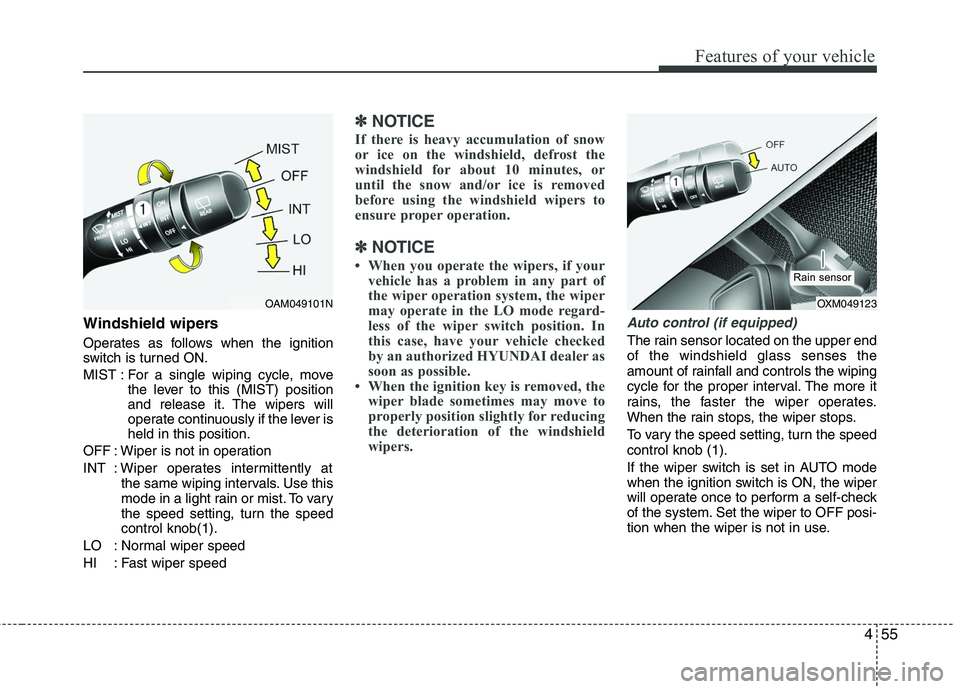
Windshield wipers
Operates as follows when the ignition
switch is turned ON.
MIST : For a single wiping cycle, movethe lever to this (MIST) position
and release it. The wipers will
operate continuously if the lever is
held in this position.
OFF : Wiper is not in operation
INT : Wiper operates intermittently at the same wiping intervals. Use this
mode in a light rain or mist. To vary
the speed setting, turn the speed
control knob(1).
LO : Normal wiper speed
HI : Fast wiper speed
✽ ✽ NOTICE
If there is heavy accumulation of snow
or ice on the windshield, defrost the
windshield for about 10 minutes, or
until the snow and/or ice is removed
before using the windshield wipers to
ensure proper operation.
✽ ✽NOTICE
• When you operate the wipers, if your
vehicle has a problem in any part of
the wiper operation system, the wiper
may operate in the LO mode regard-
less of the wiper switch position. In
this case, have your vehicle checked
by an authorized HYUNDAI dealer as
soon as possible.
• When the ignition key is removed, the wiper blade sometimes may move to
properly position slightly for reducing
the deterioration of the windshield
wipers.
Auto control (if equipped)
The rain sensor located on the upper end
of the windshield glass senses the
amount of rainfall and controls the wiping
cycle for the proper interval. The more it
rains, the faster the wiper operates.
When the rain stops, the wiper stops.
To vary the speed setting, turn the speed
control knob (1).
If the wiper switch is set in AUTO mode
when the ignition switch is ON, the wiper
will operate once to perform a self-check
of the system. Set the wiper to OFF posi-
tion when the wiper is not in use.
OAM049101N
OXM049123
Rain sensor
Page 164 of 382
481
Features of your vehicle
These compartments can be used to
store small items required by the driver
or passengers.
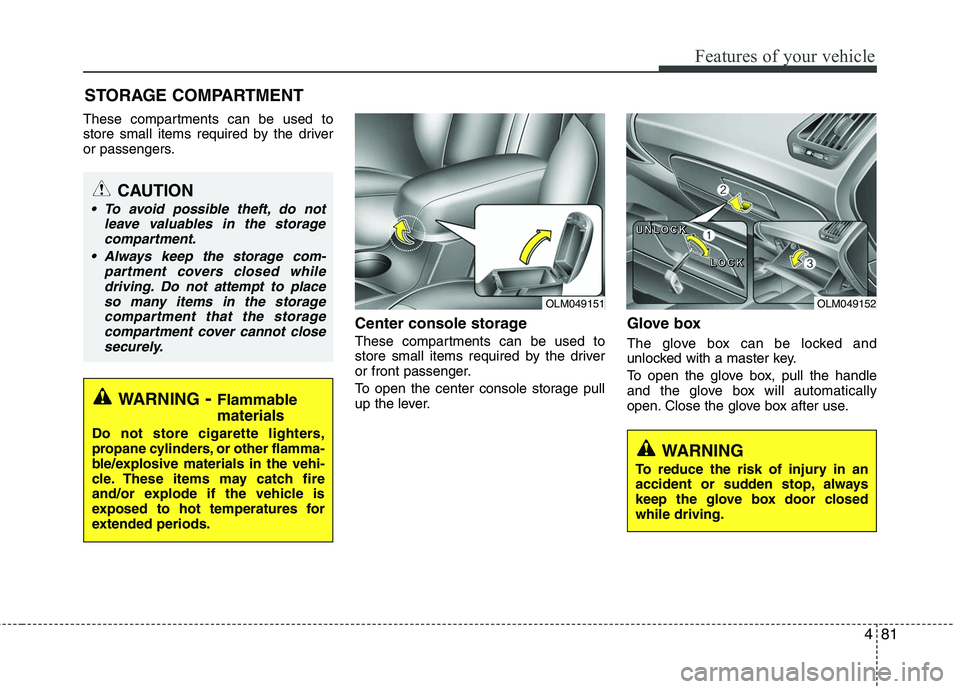
Center console storage
These compartments can be used to
store small items required by the driver
or front passenger.
To open the center console storage pull
up the lever.
Glove box
The glove box can be locked and
unlocked with a master key.
To open the glove box, pull the handle
and the glove box will automatically
open. Close the glove box after use.
STORAGE COMPARTMENT
WARNING- Flammable
materials
Do not store cigarette lighters,
propane cylinders, or other flamma-
ble/explosive materials in the vehi-
cle. These items may catch fire
and/or explode if the vehicle is
exposed to hot temperatures for
extended periods.
CAUTION
To avoid possible theft, do not
leave valuables in the storagecompartment.
Always keep the storage com- partment covers closed whiledriving. Do not attempt to placeso many items in the storage compartment that the storagecompartment cover cannot closesecurely.
WARNING
To reduce the risk of injury in an
accident or sudden stop, always
keep the glove box door closed
while driving.
OLM049151
OLM049152
U
U
U
U
N
N
N
N
L
L
L
L
O
O
O
O
C
C
C
C
K
K
K
K
L
L
L
L
O
O
O
O
C
C
C
C
K
K
K
K
Page 186 of 382
4103
Features of your vehicle
(Continued) If USB device is divided by logical drives, only the music files on thehighest-priority drive are recog-nized by car audio.
Devices such as MP3 Player/ Cellular phone/Digital camerathose are not recognizable bystandard USB I/F can be unrecog-nizable.
USB devices other than standard- ized goods (METAL COVER TYPEUSB) can be unrecognizable.
USB flash memory reader (such as CF, SD, microSD, etc.) or exter-nal-HDD type devices can beunrecognizable.
Music files protected by DRM (DIGITAL RIGHTS MANAGEMENT)are not recognizable.
The data in the USB memory may be lost while using this AUDIO. Itis recommended to back upimportant data on a personalstorage device.
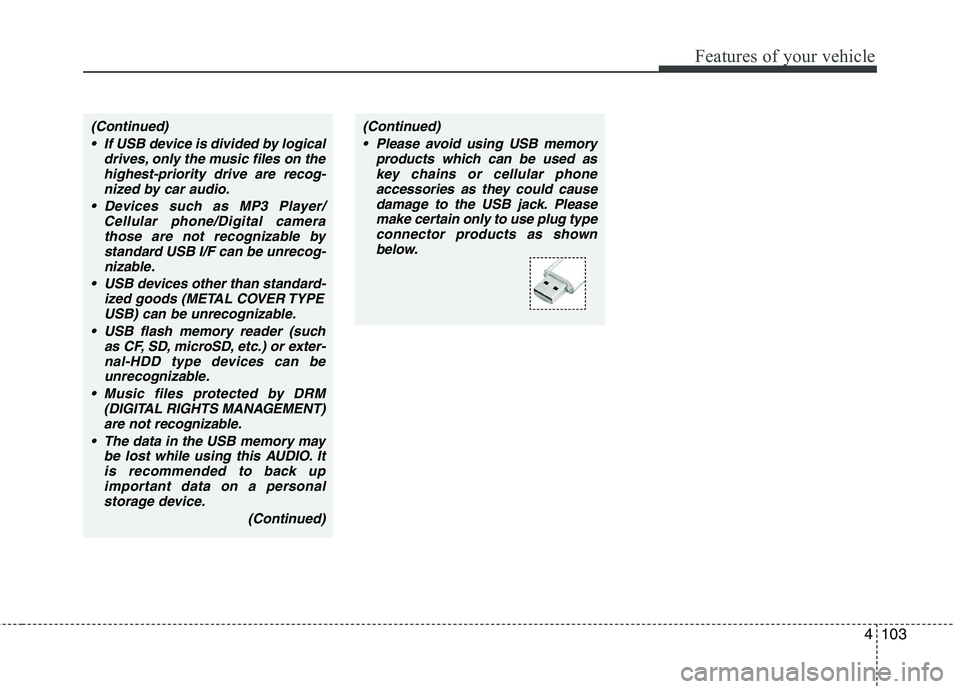
(Continued)(Continued) Please avoid using USB memory products which can be used askey chains or cellular phoneaccessories as they could causedamage to the USB jack. Pleasemake certain only to use plug type connector products as shownbelow.
Page 198 of 382
4115
Features of your vehicle
Note:
Once pairing with the phone is com-
pleted, there is no need to pair with
that phone again unless the phone is
deleted manually from the audio sys-
tem (refer “Deleting Phone” section)
or the vehicle’s information is
removed from the phone.
1. Press button.
2. Say “Set Up”.- The system replies with availablecommands.
- To skip the information message, press again and then a beep is
heard.
3. Say “Pair Phone”
4. Say “Yes” to proceed.
5. Say the name of your phone when prompted.
- Use any name to uniquely describe your phone.
6. Bluetooth
®system will repeat the
name you stated.
7. Say "Yes" to confirm.
8. The audio displays “searching ----
passkey: 0000” and asks you to initiate
pairing procedure from the phone. 9. Search the Bluetooth
®system on your
phone .Your phone should display your
[vehicle model name] on the
Bluetooth
®device list. Then attempt
pairing on your phone
10. After Pairing is completed, your phone will start to transfer phone/con-
tact list to the audio system.
- This process may take from a few minutes to over 10 minutes depend-
ing on the phone model and number
of entries in the phone/contact list.
11. By manual operation: - Select “PAIR” in PHONE menu, thenproceed from step 5
Note:
Until the audio displays “Transfer
Complete”, Bluetooth®hands-free
feature may not be fully operational.
Note:
If the phone is paired to two or more
vehicles of the same model, i.e. both
vehicles are HMC TUCSON, some
phones may not handle Bluetooth
®
devices of that name correctly. In this
case, you may need to change the
name displayed on your phone from
TUCSON.
Refer to your phone’s User’s Guide, or
contact your cellular carrier or phone
manufacturer for instructions.
Page 204 of 382
5
Before driving / 5-3
Key positions / 5-5
Manual transaxle / 5-7
Automatic transaxle / 5-10
All wheel drive (AWD) / 5-17
Brake system / 5-24
Cruise control system / 5-36
Economical operation / 5-40
Special driving conditions / 5-42
Winter driving / 5-46
Trailer towing / 5-50
Vehicle load limit / 5-57
Vehicle weight / 5-61
Driving your vehicle
Page 208 of 382
55
Driving your vehicle
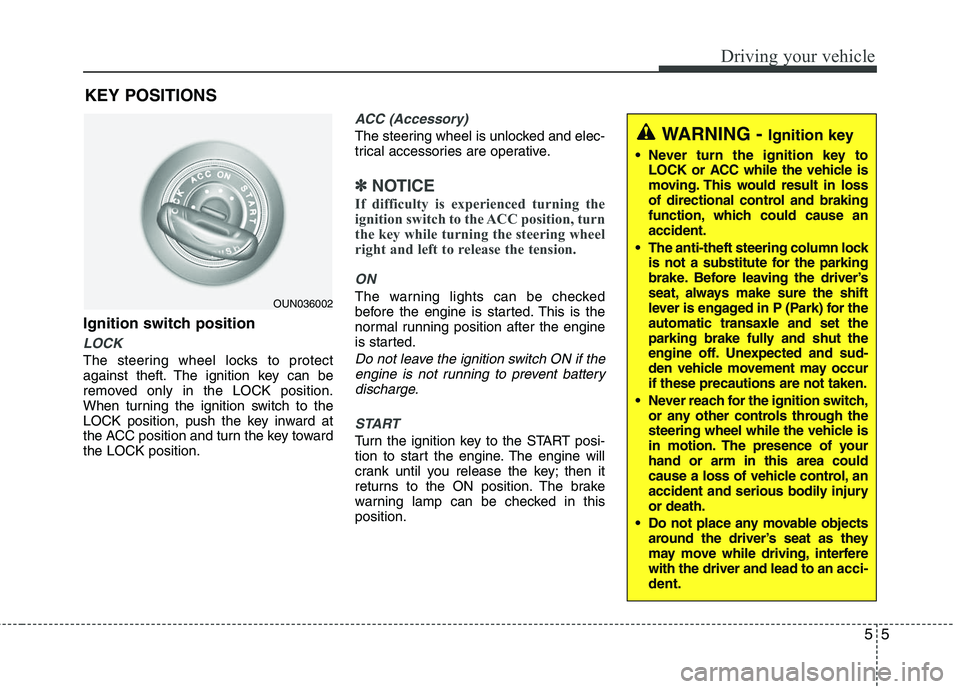
Ignition switch position
LOCK
The steering wheel locks to protect
against theft. The ignition key can be
removed only in the LOCK position.
When turning the ignition switch to the
LOCK position, push the key inward at
the ACC position and turn the key toward
the LOCK position.
ACC (Accessory)
The steering wheel is unlocked and elec-
trical accessories are operative.
✽ ✽NOTICE
If difficulty is experienced turning the
ignition switch to the ACC position, turn
the key while turning the steering wheel
right and left to release the tension.
ON
The warning lights can be checked
before the engine is started. This is the
normal running position after the engine
is started.
Do not leave the ignition switch ON if the
engine is not running to prevent batterydischarge.
START
Turn the ignition key to the START posi-
tion to start the engine. The engine will
crank until you release the key; then it
returns to the ON position. The brake
warning lamp can be checked in this
position.
WARNING - Ignition key
Never turn the ignition key to LOCK or ACC while the vehicle is
moving. This would result in loss
of directional control and braking
function, which could cause an
accident.
The anti-theft steering column lock is not a substitute for the parking
brake. Before leaving the driver’s
seat, always make sure the shift
lever is engaged in P (Park) for the
automatic transaxle and set the
parking brake fully and shut the
engine off. Unexpected and sud-
den vehicle movement may occur
if these precautions are not taken.
Never reach for the ignition switch, or any other controls through the
steering wheel while the vehicle is
in motion. The presence of your
hand or arm in this area could
cause a loss of vehicle control, an
accident and serious bodily injury
or death.
Do not place any movable objects around the driver’s seat as they
may move while driving, interfere
with the driver and lead to an acci-
dent.
OUN036002
KEY POSITIONS
Page 209 of 382
Driving your vehicle
6
5
Starting the engine1. Make sure the parking brake is
applied.
2. Manual Transaxle - Depress the
clutch pedal fully and shift the
transaxle into Neutral. Keep the clutch
pedal and brake pedal depressed
while turning the ignition switch to the
start position.
Automatic Transaxle - Place the
transaxle shift lever in P (Park).
Depress the brake pedal fully.
You can also start the engine when the shift lever is in the N (Neutral)position.
3. Turn the ignition switch to START and hold it there until the engine starts (a
maximum of 10 seconds), then
release the key.
4. In extremely cold weather (below -18°C / 0°F) or after the vehicle has
not been operated for several days, let
the engine warm up without depress-
ing the accelerator.
Whether the engine is cold or warm, itshould be started without depressing
the accelerator.
WARNING
Always wear appropriate shoes when
operating your vehicle. Unsuitable
shoes (high heels, ski boots,etc.)
may interfere with your ability to use
the brake and accelerator pedal, and
the clutch (if equipped).
CAUTION
If the engine stalls while the vehicle in motion, do not attempt to movethe shift lever to the P (Park) posi-tion. If traffic and road conditionspermit, you may put the shift leverin the N (Neutral) position while the vehicle is still moving and turn theignition switch to the START posi- tion in an attempt to restart theengine.
CAUTION
Do not engage the starter for more than 10 seconds. If the engine stallsor fails to start, wait 5 to 10 secondsbefore re-engaging the starter.Improper use of the starter maydamage it.
Page 217 of 382
Driving your vehicle
14
5
Shift lock system
For your safety, the automatic transaxle
has a shift lock system which prevents
shifting the transaxle from P (Park) or N
(Neutral) into R (Reverse) unless the
brake pedal is depressed.
To shift the transaxle from P (Park) or N
(Neutral) into R (Reverse):
1. Depress and hold the brake pedal.
2. Start the engine or turn the ignition
switch to the ON position.
3. Move the shift lever.
If the brake pedal is repeatedly
depressed and released with the shift
lever in the P (Park) position, a chattering
noise near the shift lever may be heard.
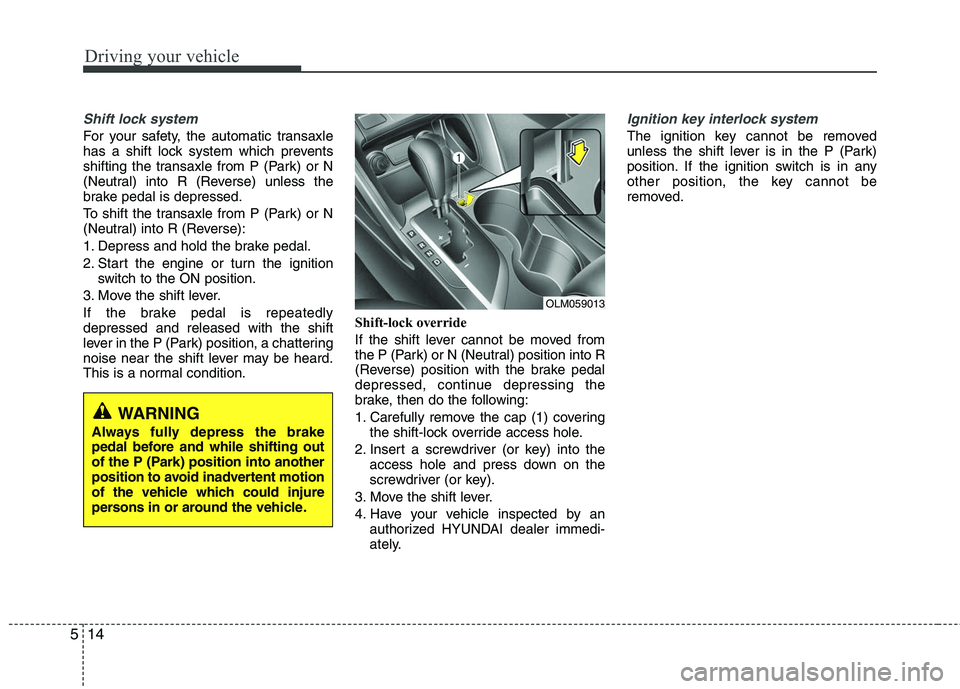
This is a normal condition. Shift-lock override
If the shift lever cannot be moved from
the P (Park) or N (Neutral) position into R
(Reverse) position with the brake pedal
depressed, continue depressing the
brake, then do the following:
1. Carefully remove the cap (1) covering
the shift-lock override access hole.
2. Insert a screwdriver (or key) into the access hole and press down on the
screwdriver (or key).
3. Move the shift lever.
4. Have your vehicle inspected by an authorized HYUNDAI dealer immedi-
ately.
Ignition key interlock system
The ignition key cannot be removed
unless the shift lever is in the P (Park)
position. If the ignition switch is in any
other position, the key cannot be
removed.
WARNING
Always fully depress the brake
pedal before and while shifting out
of the P (Park) position into another
position to avoid inadvertent motion
of the vehicle which could injure
persons in or around the vehicle.
OLM059013
Page 252 of 382
549
Driving your vehicle
To keep locks from freezing
To keep the locks from freezing, squirt an
approved de-icer fluid or glycerine into
the key opening. If a lock is covered with
ice, squirt it with an approved de-icing
fluid to remove the ice. If the lock is
frozen internally, you may be able to thaw
it out by using a heated key. Handle the
heated key with care to avoid injury.
Use approved window washer
anti-freeze in system
To keep the water in the window washer
system from freezing, add an approved
window washer anti-freeze solution in
accordance with instructions on the con-
tainer. Window washer anti-freeze is
available from an authorized HYUNDAI
dealer and most auto parts outlets. Do
not use engine coolant or other types of
anti-freeze as these may damage the
paint finish.
Don't let your parking brake
freeze
Under some conditions your parking
brake can freeze in the engaged position.
This is most likely to happen when there
is an accumulation of snow or ice around
or near the rear brakes or if the brakes
are wet. If there is a risk the parking
brake may freeze, apply it only temporar-
ily while you put the shift lever in P (auto-
matic transaxle) or in first or reverse gear
(manual transaxle) and block the rear
wheels so the car cannot roll. Then
release the parking brake.
Don't let ice and snow accumu-
late underneath
Under some conditions, snow and ice
can build up under the fenders and inter-
fere with the steering. When driving in
severe winter conditions where this may
happen, you should periodically check
underneath the vehicle to be sure the
movement of the front wheels and the
steering components is not obstructed.
Carry emergency equipment
Depending on the severity of the weath-
er, you should carry appropriate emer-
gency equipment. Some of the items you
may want to carry include tire chains, tow
straps or chains, flashlight, emergency
flares, sand, a shovel, jumper cables, a
window scraper, gloves, ground cloth,
coveralls, a blanket, etc.
Page 363 of 382
775
Maintenance
CALIFORNIA PERCHLORATE NOTICE
Perchlorate Material-special handling
may apply, See www.dtsc.ca.gov/haz-
ardouswaste/perchlorate.
Notice to California Vehicle Dismantlers:
Perchlorate containing materials, such as
air bag inflators, seatbelt pretensioners
and keyless remote entry batteries, must
be disposed of according to Title 22
California Code of Regulations Section
67384.10 (a).