instrument panel HYUNDAI TUCSON 2011 User Guide
[x] Cancel search | Manufacturer: HYUNDAI, Model Year: 2011, Model line: TUCSON, Model: HYUNDAI TUCSON 2011Pages: 382, PDF Size: 5.43 MB
Page 68 of 382
Safety features of your vehicle
50
3
The seat belt buckle sensors determine if
the driver and front passenger's seat
belts are fastened.
The passenger’s front air bag is designed
to help reduce the injury of children sit-
ting close to the instrument panel in low
speed collisions. However, children are
safer if they are restraint in the rear seat.
According to the impact severity and seat
belt usage, the SRSCM (SRS Control Module) controls the air bag inflation.
Failure to properly wear seat belts can
increase the risk or severity of injury in an accident. Additionally, your vehicle is equipped with an occupant classification system in
the front passenger's seat. The occupant classification system detects the pres- ence of a passenger in the front passen-
ger's seat and will turn off the front pas-
senger's air bag under certain condi-
tions. For more detail, see "Occupantclassification system" in this section.
WARNING
If an occupant classification sys-
tem is not working properly, the
SRS air bag warning light onthe instrument panel will illuminate
because the SRS air bag warning light is connected with the occu-
pant classification system. If the
SRS air bag warning light does not
illuminate when the ignition switchis turned to the ON position,
remains illuminated after approxi-
mately 6 seconds when the ignition
switch is turned to the ON position,
or if it illuminates while the vehicle
is being driven, have an authorized
HYUNDAI dealer inspect the
advanced SRS air bag system as
soon as possible.
WARNING
Do not place any objects under-
neath the front seats as they could
interfere with the occupant classifi- cation system.
Page 70 of 382
Safety features of your vehicle
52
3
OEP036096N
OVQ036018N
1VQA2091
Rear impact
Side impact
Rollover
(Continued)
No objects should be placed over
or near the air bag modules on
the steering wheel, instrument
panel, and the front passenger's
panel above the glove box,
because any such object could
cause harm if the vehicle is in a
crash severe enough to cause
the air bags to deploy.
Never place covers, blankets or seat warmers on the passenger
seat as these may interfere with
the occupant classification sys- tem.
Do not tamper with or disconnect SRS wiring or other components
of the SRS system. Doing so
could result in injury, due to acci-
dental deployment of the air bags
or by rendering the SRS inopera-
tive.
If the SRS air bag warning light remains illuminated while the
vehicle is being driven, have an
authorized HYUNDAI dealer
inspect the air bag system as
soon as possible.
(Continued)(Continued)
Air bags can only be used once –have an authorized HYUNDAI
dealer replace the air bag imme-
diately after deployment.
The SRS is designed to deploy the front air bags only when an
impact is sufficiently severe andwhen the impact angle is less
than 30° from the forward longitu-
dinal axis of the vehicle.
Additionally, the air bags will only
deploy once. Seat belts must be
worn at all times.
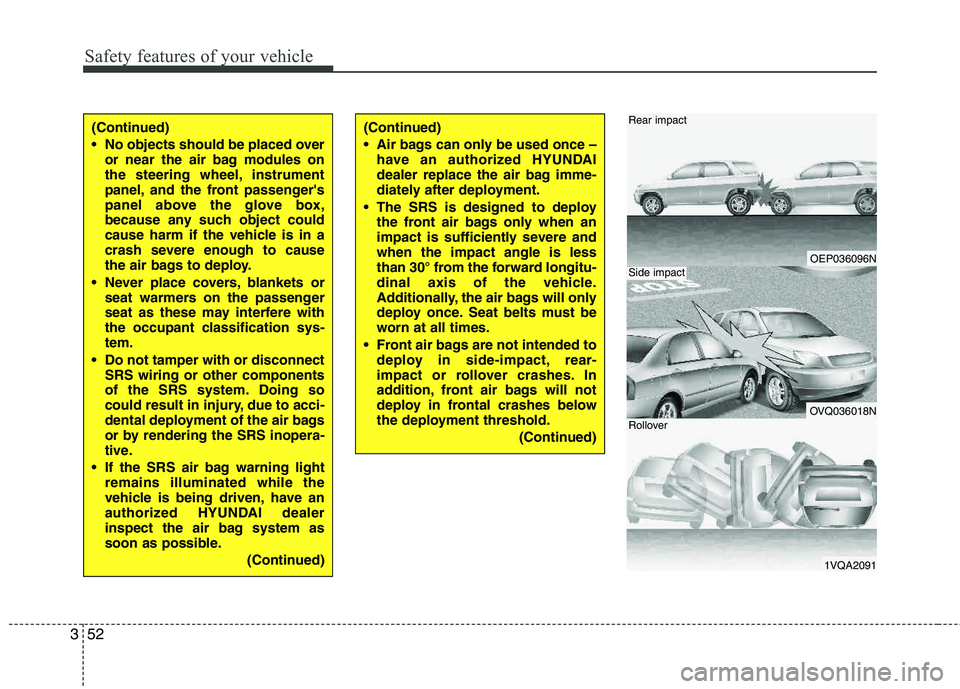
Front air bags are not intended to deploy in side-impact, rear-
impact or rollover crashes. In
addition, front air bags will not
deploy in frontal crashes below
the deployment threshold.
(Continued)
Page 79 of 382
361
Safety features of your vehicle
SRS Care
The SRS is virtually maintenance-free
and there are no parts you can safely
service by yourself. If the SRS air bag
warning light does not illuminate, or con-
tinuously remains on, have your vehicle
immediately inspected by an authorized
HYUNDAI dealer.
Any work on the SRS system, such as
removing, installing, repairing, or any
work on the steering wheel, the front passenger's panel, front seats and roof
rails must be performed by an authorized
HYUNDAI dealer. Improper handling of
the SRS system may result in serious
personal injury.WARNING
Modification to SRS components or wiring, including the addition
of any kind of badges to the pad
covers or modifications to the
body structure, can adversely
affect SRS performance and lead
to possible injury.
Not only the modification of the parts where the SRS sensors are
but also the modification of other
parts of the vehicle may affect the
SRS performance and lead to
possible injury.
For cleaning the air bag pad cov- ers, use only a soft, dry cloth or
one which has been moistened
with plain water. Solvents or
cleaners could adversely affect
the air bag covers and proper
deployment of the system.
No objects should be placed over
or near the air bag modules on the
steering wheel, instrument panel,
and the front passenger's panel
above the glove box, because any
such object could cause harm if the
vehicle is in a crash severe enough
to cause the air bags to inflate.
(Continued)
(Continued)
If the air bags inflate, they must be replaced by an authorized
HYUNDAI dealer.
Do not tamper with or disconnect SRS wiring, or other components
of the SRS system. Doing so
could result in injury, due to acci-
dental inflation of the air bags or
by rendering the SRS inopera-
tive.
If components of the air bag sys- tem must be discarded, or if the
vehicle must be scrapped, certain
safety precautions must be
observed. An authorized HYUNDAI
dealer knows these precautions
and can give you the necessary
information. Failure to follow these
precautions and procedures could
increase the risk of personal
injury.
If your vehicle was flooded and has soaked carpeting or water on
the floor, you shouldn't try to
start the engine; have the car
towed to an authorized HYUNDAI
dealer.
Page 115 of 382
Features of your vehicle
34
4
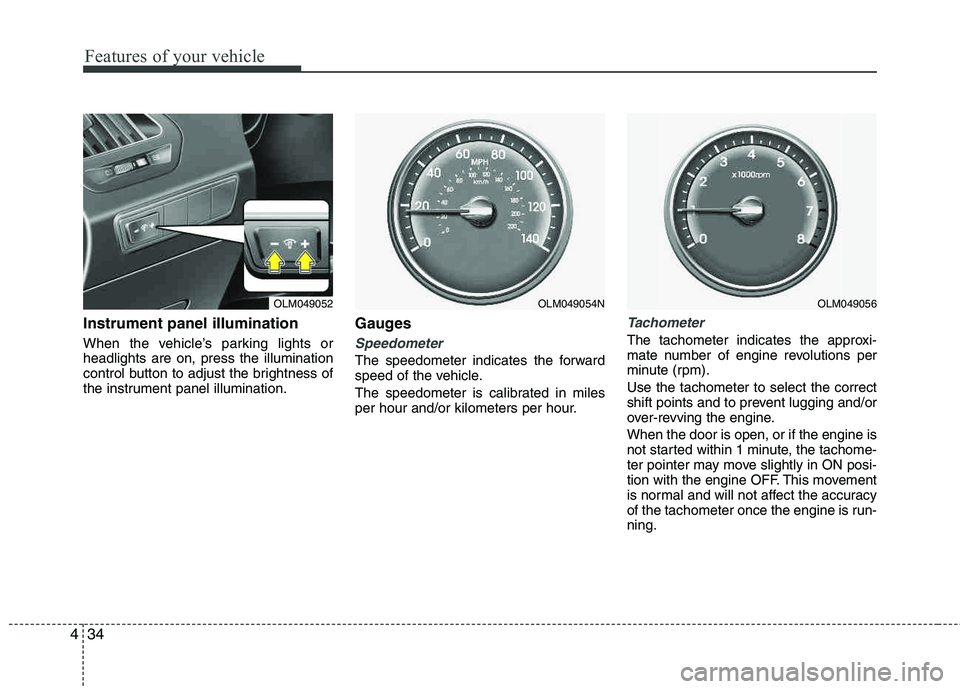
Instrument panel illumination
When the vehicle’s parking lights or headlights are on, press the illumination
control button to adjust the brightness of
the instrument panel illumination.
Gauges
Speedometer
The speedometer indicates the forward
speed of the vehicle.
The speedometer is calibrated in miles
per hour and/or kilometers per hour.
Tachometer
The tachometer indicates the approxi-
mate number of engine revolutions per
minute (rpm). Use the tachometer to select the correct
shift points and to prevent lugging and/or
over-revving the engine. When the door is open, or if the engine is
not started within 1 minute, the tachome-
ter pointer may move slightly in ON posi-
tion with the engine OFF. This movement
is normal and will not affect the accuracy
of the tachometer once the engine is run- ning.
OLM049052OLM049056OLM049054N
Page 131 of 382
Features of your vehicle
50
4
Headlight welcome function
When the headlight switch is in the ON
position or in the AUTO position and all doors (and tailgate) are closed and
locked, if you press the door unlock but-
ton on the transmitter, the headlight will
come on for about 15 seconds.
If the headlight switch is in the AUTO
position, the function can only operate atnight.
To turn off the headlight immediately, do
one of the following:
Press the door lock button.
Press the unlock button twice within 4
seconds.
Press the unlock button once more after 4 seconds.
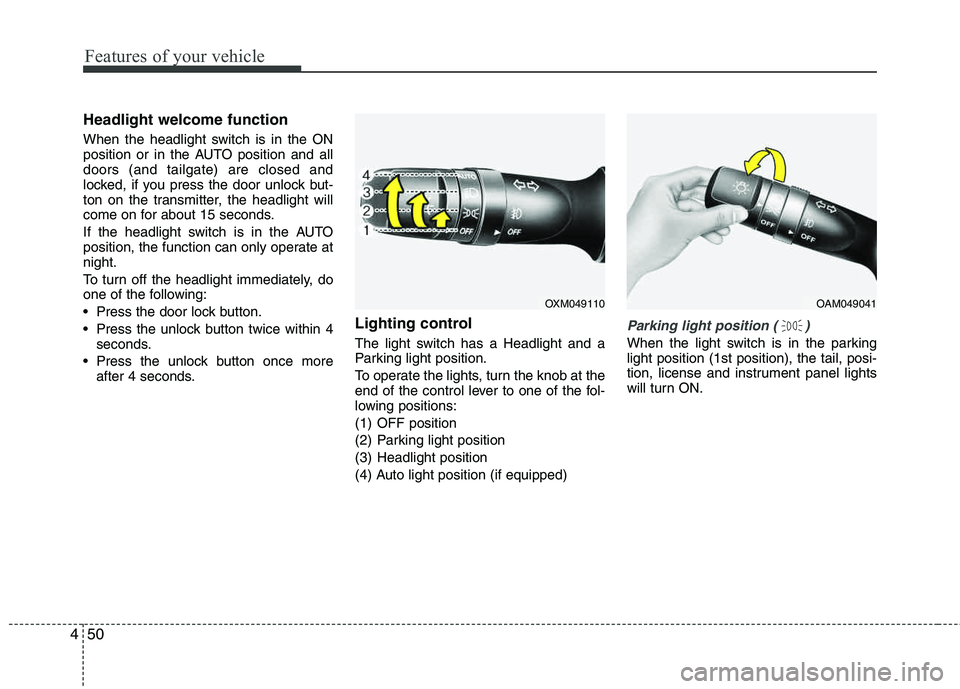
Lighting control
The light switch has a Headlight and a
Parking light position.
To operate the lights, turn the knob at the
end of the control lever to one of the fol-
lowing positions:
(1) OFF position
(2) Parking light position
(3) Headlight position
(4) Auto light position (if equipped)
Parking light position ( )
When the light switch is in the parking light position (1st position), the tail, posi-
tion, license and instrument panel lights
will turn ON.
OAM049041OXM049110
Page 132 of 382
451
Features of your vehicle
Headlight position ( )
When the light switch is in the headlight position (2nd position), the head, tail,
position, license and instrument panel
lights will turn ON.
✽✽NOTICE
The ignition switch must be in the ON
position to turn on the headlights.
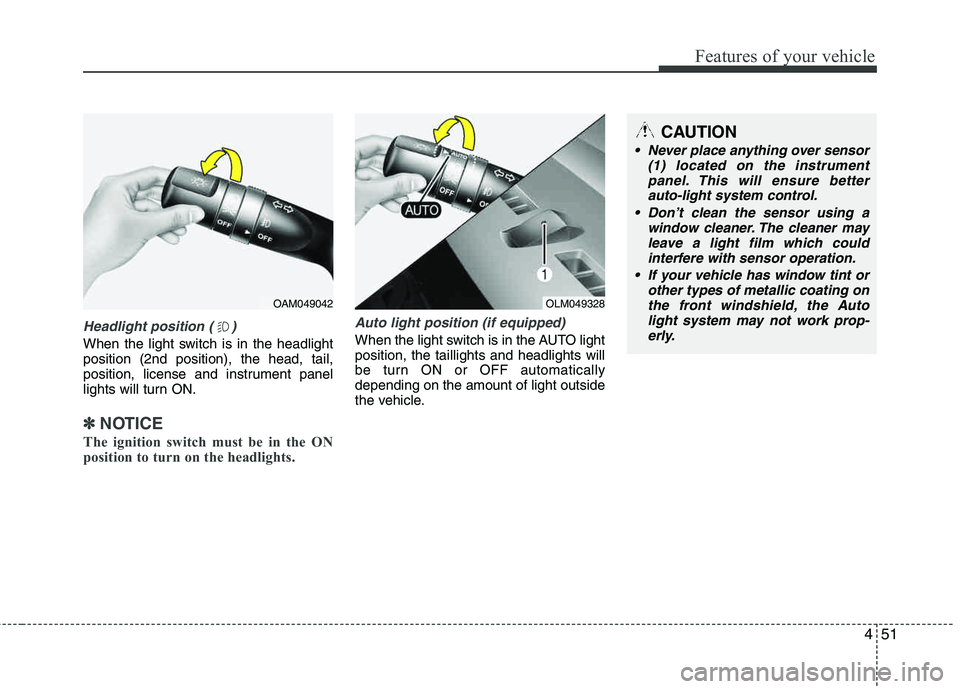
Auto light position (if equipped)
When the light switch is in the AUTO light position, the taillights and headlights will
be turn ON or OFF automaticallydepending on the amount of light outside
the vehicle.
OAM049042OLM049328
CAUTION
Never place anything over sensor (1) located on the instrumentpanel. This will ensure better
auto-light system control.
Don’t clean the sensor using a window cleaner. The cleaner mayleave a light film which could
interfere with sensor operation.
If your vehicle has window tint or other types of metallic coating on
the front windshield, the Auto light system may not work prop-erly.
Page 133 of 382
Features of your vehicle
52
4
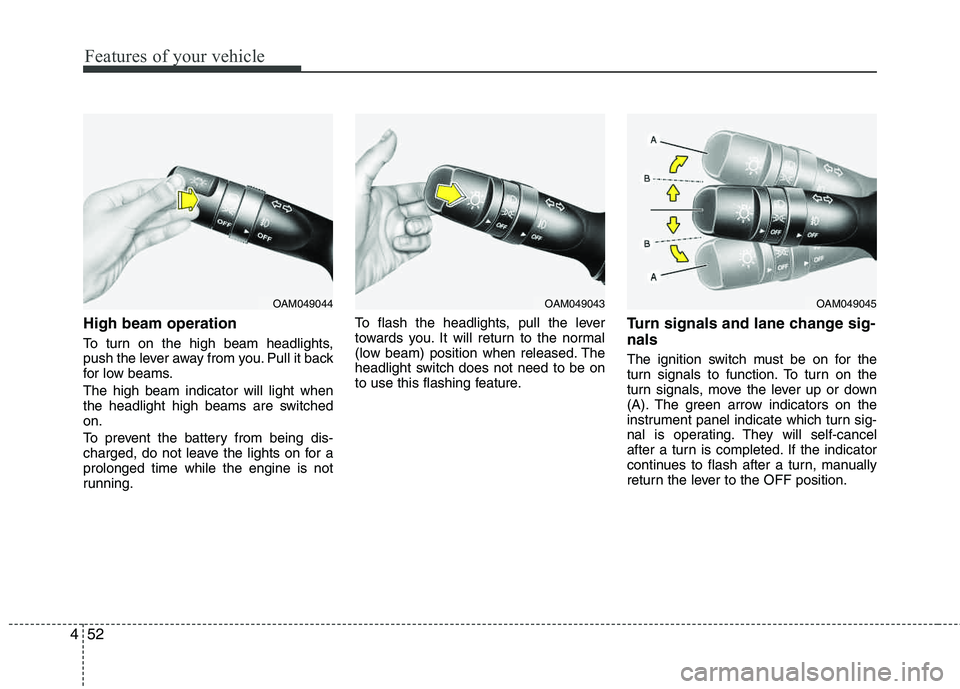
High beam operation
To turn on the high beam headlights,
push the lever away from you. Pull it back
for low beams. The high beam indicator will light when
the headlight high beams are switchedon.
To prevent the battery from being dis-
charged, do not leave the lights on for aprolonged time while the engine is not
running. To flash the headlights, pull the lever
towards you. It will return to the normal
(low beam) position when released. The
headlight switch does not need to be on
to use this flashing feature.
Turn signals and lane change sig- nals
The ignition switch must be on for the
turn signals to function. To turn on the
turn signals, move the lever up or down
(A). The green arrow indicators on the
instrument panel indicate which turn sig-
nal is operating. They will self-cancel
after a turn is completed. If the indicator
continues to flash after a turn, manually
return the lever to the OFF position.
OAM049044OAM049043OAM049045
Page 145 of 382
Features of your vehicle
64
4
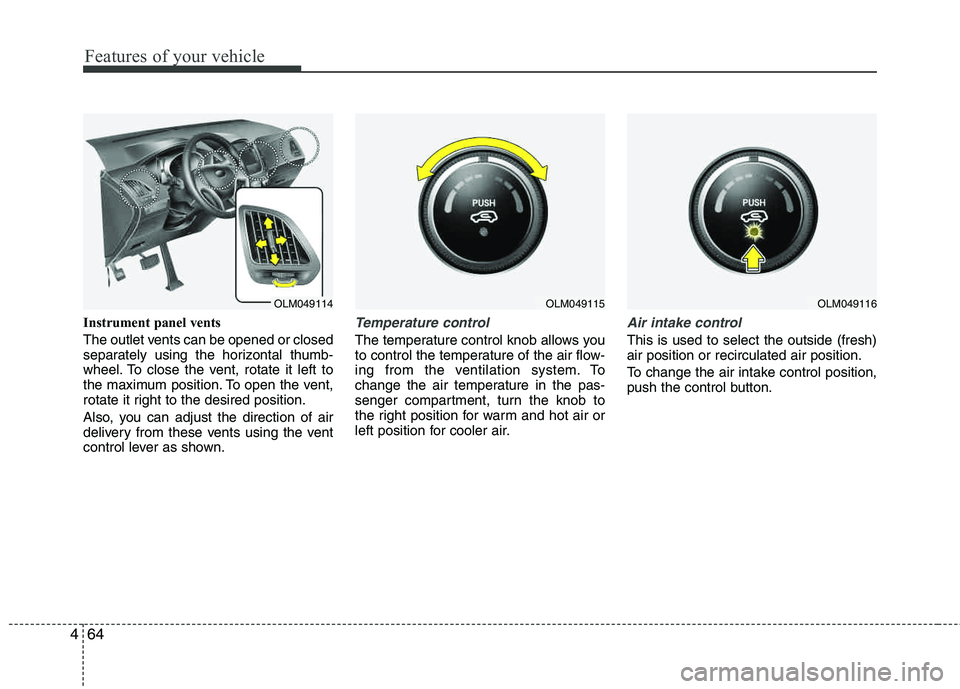
Instrument panel vents
The outlet vents can be opened or closed
separately using the horizontal thumb-
wheel. To close the vent, rotate it left to
the maximum position. To open the vent,
rotate it right to the desired position.
Also, you can adjust the direction of air
delivery from these vents using the vent
control lever as shown.Temperature control
The temperature control knob allows you
to control the temperature of the air flow-
ing from the ventilation system. To
change the air temperature in the pas-
senger compartment, turn the knob to
the right position for warm and hot air or
left position for cooler air.
Air intake control
This is used to select the outside (fresh) air position or recirculated air position.
To change the air intake control position,
push the control button.
OLM049115OLM049116OLM049114
Page 152 of 382
471
Features of your vehicle
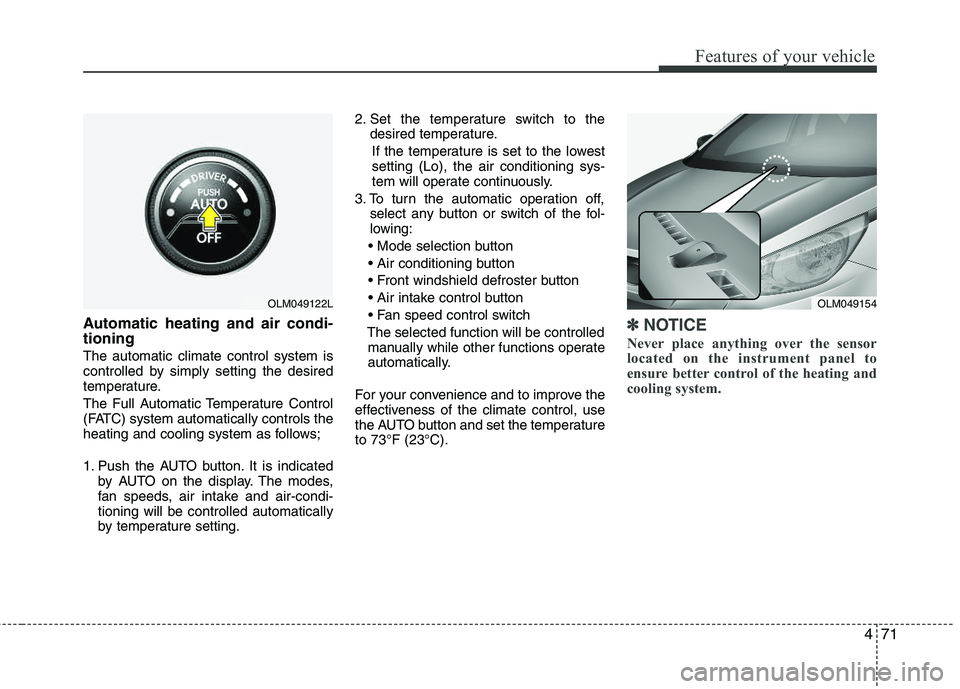
Automatic heating and air condi- tioning
The automatic climate control system is
controlled by simply setting the desired
temperature.
The Full Automatic Temperature Control
(FATC) system automatically controls the
heating and cooling system as follows;
1. Push the AUTO button. It is indicatedby AUTO on the display. The modes,
fan speeds, air intake and air-condi- tioning will be controlled automatically
by temperature setting. 2. Set the temperature switch to the
desired temperature.
If the temperature is set to the lowestsetting (Lo), the air conditioning sys-
tem will operate continuously.
3. To turn the automatic operation off, select any button or switch of the fol-
lowing:
The selected function will be controlled manually while other functions operate
automatically.
For your convenience and to improve the
effectiveness of the climate control, use
the AUTO button and set the temperature to 73°F (23°C).
✽✽ NOTICE
Never place anything over the sensor
located on the instrument panel to
ensure better control of the heating and
cooling system.
OLM049154OLM049122L
Page 154 of 382
473
Features of your vehicle
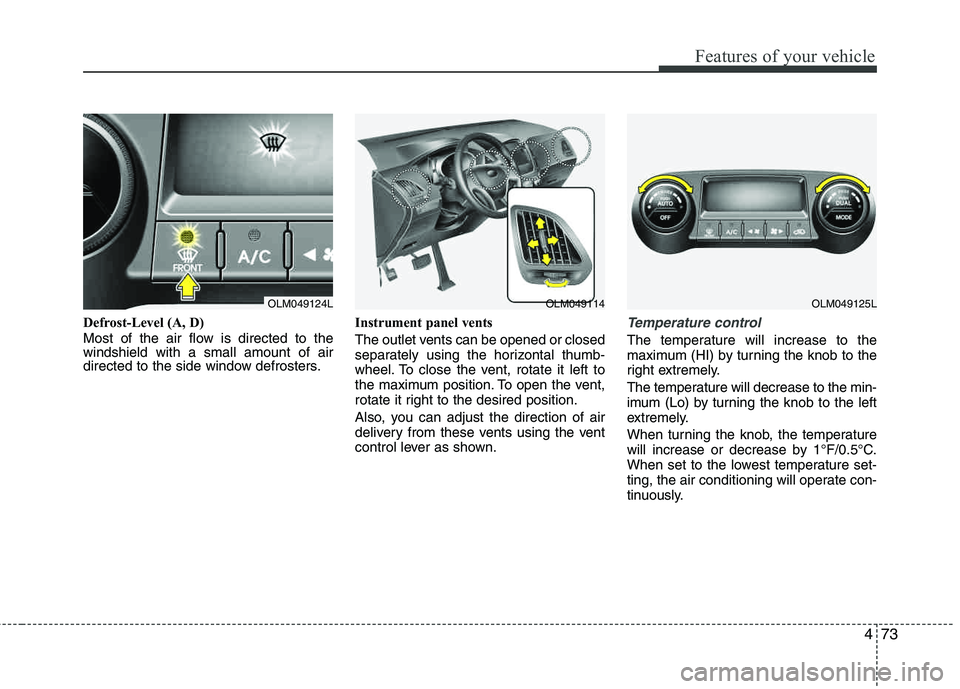
Defrost-Level (A, D)
Most of the air flow is directed to the windshield with a small amount of air
directed to the side window defrosters.Instrument panel vents
The outlet vents can be opened or closed
separately using the horizontal thumb-
wheel. To close the vent, rotate it left to
the maximum position. To open the vent,
rotate it right to the desired position.
Also, you can adjust the direction of air
delivery from these vents using the vent
control lever as shown.Temperature control
The temperature will increase to the
maximum (HI) by turning the knob to the
right extremely.
The temperature will decrease to the min-
imum (Lo) by tur
ning the knob to the left
extremely.
When turning the knob, the temperature
will increase or decrease by 1°F/0.5°C.
When set to the lowest temperature set-
ting, the air conditioning will operate con-
tinuously.
OLM049124LOLM049114OLM049125L