brake HYUNDAI TUCSON 2011 Owners Manual
[x] Cancel search | Manufacturer: HYUNDAI, Model Year: 2011, Model line: TUCSON, Model: HYUNDAI TUCSON 2011Pages: 382, PDF Size: 5.43 MB
Page 12 of 382
15
Introduction
As with other vehicles of this type, failure
to operate this vehicle correctly mayresult in loss of control, an accident or
vehicle rollover.
Specific design characteristics (higher
ground clearance, track, etc.) give this
vehicle a higher center of gravity than
other types of vehicles. It is not designed
for cornering at the same speeds as a
conventional 2-wheel drive sedans or
sports coupe. Avoid sharp turns or abrupt
maneuvers. Failure to operate this vehi-
cle correctly may result in loss of control,
an accident or vehicle rollover.Be sure
to read the “Reducing the risk of a
rollover” driving guidelines, in section
5 of this manual. No special break-in period is needed.
By following a few simple precautions
for the first 600 miles (1,000 km) you
may add to the performance, economy
and life of your vehicle.
Do not race the engine.
While driving, keep your engine speed
(rpm, or revolutions per minute)
between 2,000 rpm and 4,000 rpm.
Do not maintain a single speed for long periods of time, either fast or slow.
Varying engine speed is needed to
properly break-in the engine.
Avoid hard stops, except in emergen- cies, to allow the brakes to seat prop-
erly.
Don't let the engine idle longer than 3 minutes at one time.
Don't tow a trailer during the first 1,200
miles (2,000 km) of operation.
VEHICLE BREAK-IN PROCESS
VEHICLE HANDLING
INSTRUCTIONS
Page 13 of 382
Introduction
6
1
This vehicle is equipped with an event
data recorder (EDR). The main pur-
pose of an EDR is to record, in certaincrash or near crash-like situations,
such as an air bag deployment or hit-
ting a road obstacle, data that will
assist in understanding how a vehi-
cle's systems performed. The EDR is
designed to record data related to
vehicle dynamics and safety systems
for a short period of time, typically 30
seconds or less. The EDR in this vehi-
cle is designed to record such data as:
* How various systems in your vehicle
were operating:
* Whether or not the driver and pas- senger safety belts were buckled/ fastened;
* How far (if at all) the driver was depressing the accelerator and/or
brake pedal; and,
* How fast the vehicle was traveling. These data can help provide a better
understanding of the circumstances
in which crashes and injuries occur.
NOTE: EDR data are recorded by your
vehicle only if a nontrivial crash situa-
tion occurs; no data are recorded by the EDR under normal driving condi-
tions and no personal data (e.g.,
name, gender, age, and crash loca-
tion) are recorded. However, other
parties, such as law enforcement, could combine the EDR data with the
type of personally identifying data
routinely acquired during a crash
investigation.
To read data recorded by an EDR, spe-
cial equipment is required, and
access to the vehicle or the EDR is needed.
In addition to the vehicle manufactur-
er, other parties, such as law enforce-
ment, that have the special equip-
ment, can read the information if they
have access to the vehicle or the EDR.
VEHICLE DATA COLLECTION AND EVENT DATA RECORDERS
Page 14 of 382
17
Introduction
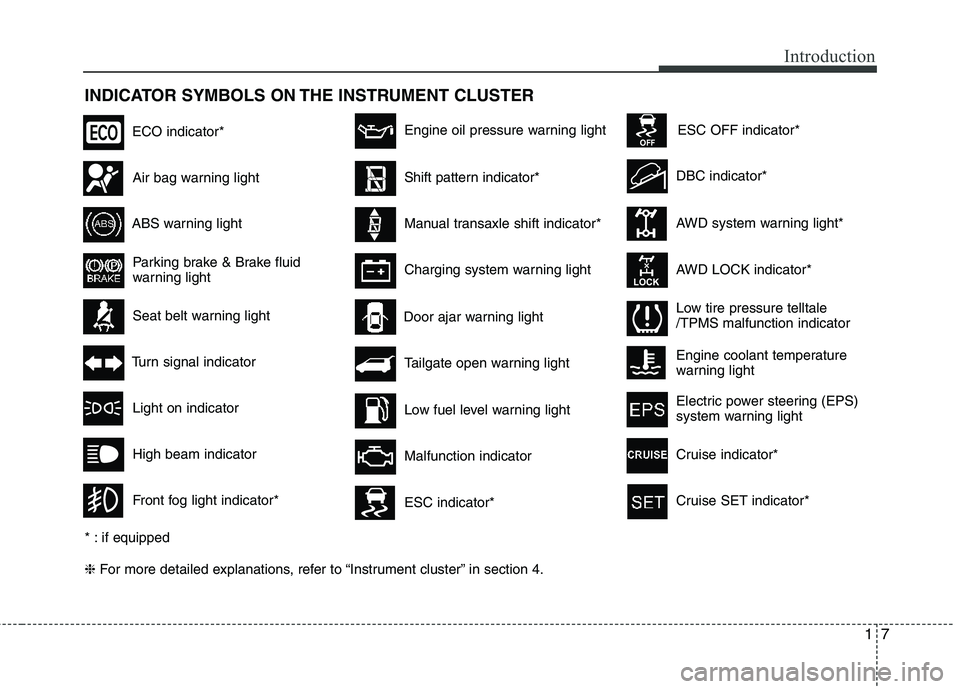
INDICATOR SYMBOLS ON THE INSTRUMENT CLUSTER ❈For more detailed explanations, refer to “Instrument cluster” in section 4.
Seat belt warning light
Tailgate open warning light
High beam indicator
Light on indicator
Turn signal indicator
Front fog light indicator*
ABS warning light
Parking brake & Brake fluid
warning light
Engine oil pressure warning light
AWD system warning light*
AWD LOCK indicator*
Malfunction indicator
Air bag warning light
Low fuel level warning light DBC indicator*
Charging system warning light
Door ajar warning light
* : if equipped
ESC indicator*
ESC OFF indicator*
Low tire pressure telltale /TPMS malfunction indicator
ECO indicator*
Shift pattern indicator*
Manual transaxle shift indicator*
Engine coolant temperature
warning light
Electric power steering (EPS)
system warning light
Cruise indicator*
Cruise SET indicator*
Page 16 of 382
Your vehicle at a glance
2
2
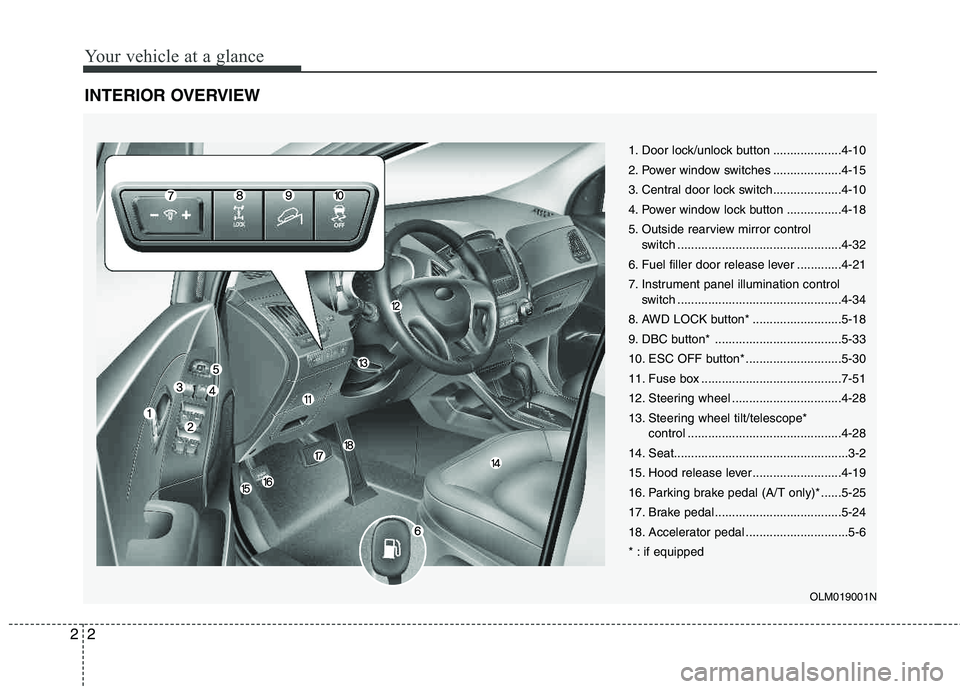
INTERIOR OVERVIEW
1. Door lock/unlock button ....................4-10
2. Power window switches ....................4-15
3. Central door lock switch....................4-10
4. Power window lock button ................4-18
5. Outside rearview mirror control
switch ................................................4-32
6. Fuel filler door release lever .............4-21
7. Instrument panel illumination control switch ................................................4-34
8. AWD LOCK button* ..........................5-18
9. DBC button* .....................................5-33
10. ESC OFF button* ............................5-30
11. Fuse box .........................................7-51
12. Steering wheel ................................4-28
13. Steering wheel tilt/telescope* control .............................................4-28
14. Seat...................................................3-2
15. Hood release lever ..........................4-19
16. Parking brake pedal (A/T only)* ......5-25
17. Brake pedal .....................................5-24
18. Accelerator pedal ..............................5-6
* : if equipped
OLM019001N
Page 18 of 382
Your vehicle at a glance
4
2
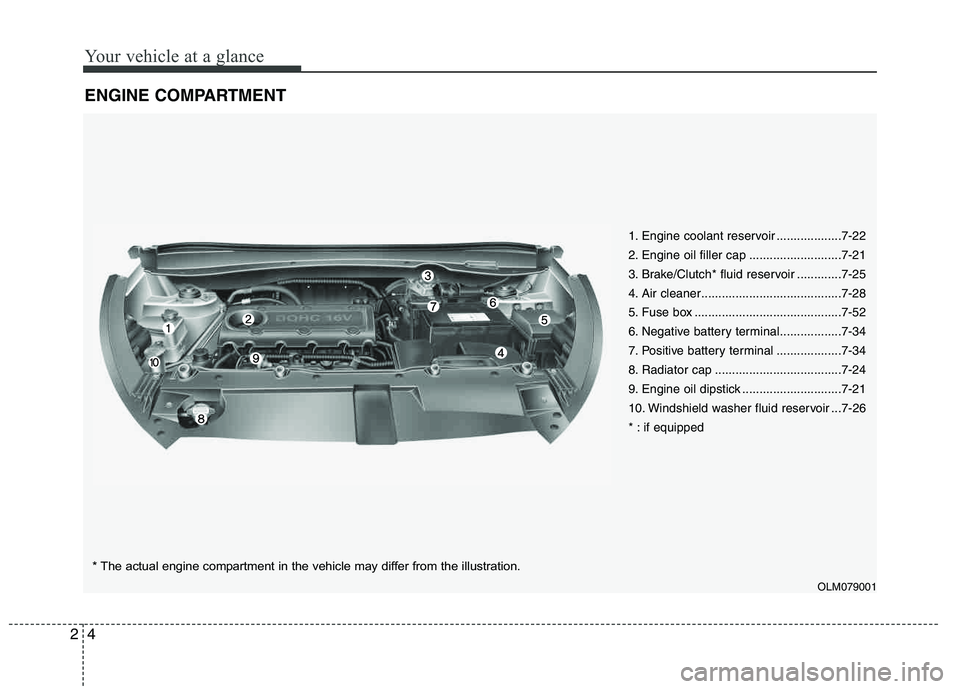
ENGINE COMPARTMENT
1. Engine coolant reservoir ...................7-22
2. Engine oil filler cap ...........................7-21
3. Brake/Clutch* fluid reservoir .............7-25
4. Air cleaner.........................................7-28
5. Fuse box ...........................................7-52
6. Negative battery terminal..................7-34
7. Positive battery terminal ...................7-34
8. Radiator cap .....................................7-24
9. Engine oil dipstick .............................7-21
10. Windshield washer fluid reservoir ...7-26
* : if equipped
OLM079001
* The actual engine compartment in the vehicle may differ from the illustration.
Page 33 of 382
315
Safety features of your vehicle
WARNING
When you return the rear seatback to its upright position after being
folded down:
Be careful not to damage the seat
belt webbing or buckle. Do not
allow the seat belt webbing or
buckle to get caught or pinched in
the rear seat. Ensure that the seat-
back is completely locked into its
upright position by pushing on the
top of the seatback. Otherwise, in
an accident or sudden stop, the
seat could fold down and allow
cargo to enter the passenger com-
partment, which could result in
serious injury or death.
CAUTION- Rear seat belts
When returning the rear seatbacks to the upright position, remember to
return the rear shoulder belts to theirproper position. Routing the seat beltwebbing through the rear seat belt guides will help keep the belts from
being trapped behind or under theseats.
CAUTION - Damaging rear
seat belt buckles
When you fold the rear seatback, push the buckle into the pocket inthe rear cushion. Doing so can pre-
vent the buckle from being dam-aged by the rear seatback.
WARNING- Cargo
Cargo should always be secured to
prevent it from being thrown about
the vehicle in a collision and caus-
ing injury to the vehicle occupants. Do not place objects on the rear
seats, since they cannot be proper-
ly secured and may hit the front seat occupants in a collision.
WARNING - Cargo loading
Make sure the engine is off, the
automatic transaxle is in P (Park) or
the manual transaxle is in reverse,
and the parking brake is securely
applied whenever loading or
unloading cargo. Failure to take
these steps may allow the vehicle
to move if the shift lever is inadver-
tently moved to another position.
Page 78 of 382
Safety features of your vehicle
60
3
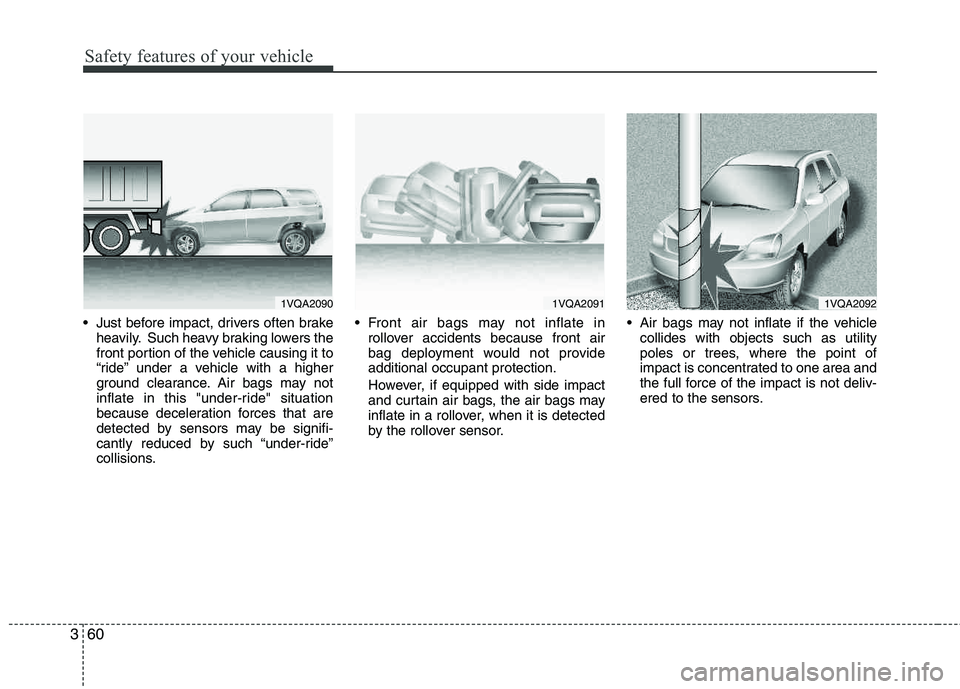
Just before impact, drivers often brake
heavily. Such heavy braking lowers the
front portion of the vehicle causing it to
“ride” under a vehicle with a higher
ground clearance. Air bags may not
inflate in this "under-ride" situation
because deceleration forces that are
detected by sensors may be signifi-
cantly reduced by such “under-ride”
collisions. Front air bags may not inflate in
rollover accidents because front air
bag deployment would not provide additional occupant protection.
However, if equipped with side impact
and curtain air bags, the air bags may
inflate in a rollover, when it is detected
by the rollover sensor. Air bags may not inflate if the vehicle
collides with objects such as utility
poles or trees, where the point of
impact is concentrated to one area and
the full force of the impact is not deliv-
ered to the sensors.
1VQA20901VQA20911VQA2092
Page 90 of 382
49
Features of your vehicle
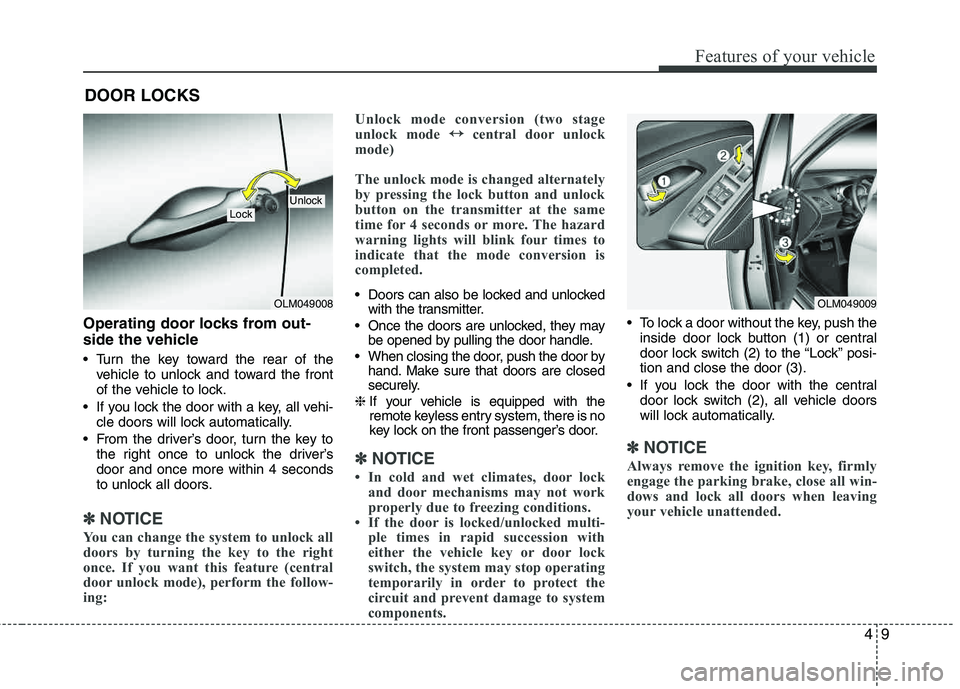
Operating door locks from out-
side the vehicle
Turn the key toward the rear of thevehicle to unlock and toward the front
of the vehicle to lock.
If you lock the door with a key, all vehi- cle doors will lock automatically.
From the driver’s door, turn the key to the right once to unlock the driver’sdoor and once more within 4 seconds
to unlock all doors.
✽✽ NOTICE
You can change the system to unlock all
doors by turning the key to the right
once. If you want this feature (central
door unlock mode), perform the follow-
ing: Unlock mode conversion (two stage
unlock mode
↔
↔
central door unlock
mode)
The unlock mode is changed alternately
by pressing the lock button and unlock
button on the transmitter at the same
time for 4 seconds or more. The hazard
warning lights will blink four times to
indicate that the mode conversion is
completed.
Doors can also be locked and unlocked with the transmitter.
Once the doors are unlocked, they may be opened by pulling the door handle.
When closing the door, push the door by hand. Make sure that doors are closed
securely.
❈ If your vehicle is equipped with the
remote keyless entry system, there is no
key lock on the front passenger’s door.
✽✽
NOTICE
In cold and wet climates, door lock and door mechanisms may not work
properly due to freezing conditions.
If the door is locked/unlocked multi- ple times in rapid succession with
either the vehicle key or door lock
switch, the system may stop operating
temporarily in order to protect the
circuit and prevent damage to system
components.
To lock a door without the key, push the
inside door lock button (1) or central
door lock switch (2 ) to the “Lock” posi-
tion and close the door (3).
If you lock the door with the central door lock switch (2), all vehicle doors
will lock automatically.
✽✽ NOTICE
Always remove the ignition key, firmly
engage the parking brake, close all win-
dows and lock all doors when leaving
your vehicle unattended.
DOOR LOCKS
OLM049008
LockUnlock
OLM049009
Page 92 of 382
411
Features of your vehicle
When pushing down on the front por-tion (1) of the switch, all vehicle doors
will lock.
When pushing down on the rear por- tion (2) of the switch, all vehicle doors
will unlock.
If the key is in the ignition switch and any front door is opened, the doors will
not lock even though the front portion
(1) of central door lock switch ispressed.
WARNING- Unlocked
vehicles
Leaving your vehicle unlocked can
invite theft or possible harm to you
or others from someone hiding in
your vehicle while you are gone.
Always remove the ignition key,
engage the parking brake, close all
windows and lock all doors when
leaving your vehicle unattended.
WARNING- Unattended
children
An enclosed vehicle can become
extremely hot, causing death or
severe injury to unattended chil- dren or animals who cannot escape
the vehicle. Furthermore, children
might operate features of the vehi-
cle that could injure them, or they
could encounter other harm, possi-
bly from someone gaining entry to
the vehicle. Never leave children or
animals unattended in your vehicle.
WARNING - Doors
The doors should always be fully closed and locked while the vehi-
cle is in motion to prevent acci-
dental opening of the door.
Locked doors will also discour-
age potential intruders when the
vehicle stops or slows.
Be careful when opening doors and watch for vehicles, motorcy-
cles, bicycles or pedestrians
approaching the vehicle in the
path of the door. Opening a door
when something is approaching
can cause damage or injury.
Page 121 of 382
Features of your vehicle
40
4
Warnings and indicators
All warning lights are checked by turning
the ignition switch ON (do not start the
engine). Any light that does not illuminate
should be checked by an authorized
HYUNDAI dealer.
After starting the engine, check to make
sure that all warning lights are off. If any are still on, this indicates a situation that
needs attention. When releasing the
parking brake, the brake system warning
light should go off. The fuel warning light
will stay on if the fuel level is low.
ECO indicator (if equipped)
The ECO indicator is a system that helps
you to drive economically.
It is displayed if you drive fuel efficiently
to help you improve fuel efficiency.
The ECO indicator (green) will turn on
when you are driving fuel efficiently in
the ECO ON mode.
If you don't want the indicator dis-
played, you can turn the ECO ON
mode to OFF mode by pressing the
TRIP button.
As per ECO ON/OFF Mode operation,
refer to the previous page.
The fuel-efficiency can be changed by the driver's driving habit and road con-dition.
The ECO indicator does not function in P (Park), N (Neutral), and R (Reverse).
Air bag warning light
This warning light will illuminate for
approximately 6 seconds each time you
turn the ignition switch to the ON posi- tion. This light also comes on when the
Supplemental Restraint System (SRS) is
not working properly. If the AIR BAG
warning light does not come on, or con-
tinuously remains on after operating for
about 6 seconds when you turned the
ignition switch to the ON position or start-
ed the engine, or if it comes on while
driving, have the SRS inspected by an
authorized HYUNDAI dealer.
ECO
WARNING
Don't keep watching the indicator
while driving. It will distract you while driving and cause an acci-
dent that results in severe personal
injury.