bluetooth HYUNDAI TUCSON 2013 User Guide
[x] Cancel search | Manufacturer: HYUNDAI, Model Year: 2013, Model line: TUCSON, Model: HYUNDAI TUCSON 2013Pages: 397, PDF Size: 5.55 MB
Page 200 of 397
Features of your vehicle
120
4
■ Bluetooth ®Wireless Technology
Language Setting
The system language can be changed by
the following steps:
1. Power on the audio system with the volume set to an audible level.
2. Press and hold button on the steering wheel until the audio displays
“Please Wait”.
- The
Bluetooth ®Wireless Technology
system will reply in currently selected
language that it is changing to the next
language.
- System language cycles between
English, Canadian French and USSpanish.
- Press and hold the button on the steering wheel for over 10 seconds.
3. When completed, the audio display returns to normal.
4. Repeat steps 2 and 3 for the next lan- guage selection.
NOTE:
The phone needs to be paired again
after changing system language.
- Avoid resting your thumb or fingeron the button as the language
could unintentionally change.
■ Receiving a Phone Call
When receiving a phone call, a ringtone
is audible from speakers and the audio
system changes into telephone mode.
When receiving a phone call, “Incoming
call” message and incoming phone num-
ber (if available) are displayed on the
audio.
To Answer a Call:
- Press button on the steeringwheel.
To Reject a Call:
- Press button on the steering wheel.
To Adjust Ring Volume: - Use VOLUME buttons on the steeringwheel.
To Transfer a Call to the Phone (Secret Call):
- Press and hold button on thesteering wheel until the audio system
transfers a call to the phone.
■ Talking on the Phone
When talking on the phone, “Active Call”
message and the other party’s phone
number (if available) are displayed on the
audio.
- Press button on the steering wheel.
✽✽ NOTICE
In the following situations, you or the
other party may have difficulty hearing
each other:
1. Speaking at the same time, your voice may not reach each other parties. (This
is not a malfunction.) Speak alternate-
ly with the other party on the phone.
2. Keep the Bluetooth®
Wireless
Technology volume to a low level.
High-level volume may result in dis-
tortion and echo.
3. When driving on a rough road.
4. When driving at high speeds.
5. When the window is open.
6. When the air conditioning vents are facing the microphone.
7. When the sound of the air condition-
ing fan is loud.
Page 201 of 397
4121
Features of your vehicle
■Bluetooth®Wireless Technology
Audio Music Streaming
The audio system supports Bluetooth
®Wireless Technology enabled A2DP
(Audio Advanced Distribution Profile) and
AVRCP (Audio Video Remote Control
Profile) technologies.
Both profiles provide steaming of music
via compatible “PAIRED”
Bluetooth ®Wireless Technology enabled Cellular
phone.
To stream music from the
Bluetooth®Wireless Technology enabled cellular
phone, play your music files on your cel-
lular phone according to your cellular
phone user’s manual and press the
, button on the audio
system until “MP3 play” is displayed on
the LCD.
The audio system head unit displays ‘MP3 MODE’.
NOTE:
all music and sound files your cellu-
lar phone supports can be played
by the audio system.
Bluetooth ®Wireless Technology
compatible cellular phones must
include A2DP and AVRCP capabili-ties.
AVRCP compatible
Bluetooth®Wireless Technology cel-
lular phones may not play music
through the audio system initially.
These cellular phones may need to
have the
Bluetooth ®Wireless
Technology streaming enabled, for
example;
i.e : M e n u
➟Filemanager➟Music➟Option➟Play via Bluetooth
cellular phone for more information.
To cancel
Bluetooth ®Wireless
Technology enabled cellular phone
music streaming, stop music play-
back on the cellular phone or
change the audio mode to AM/FM,
XM, CD, iPod, ect.
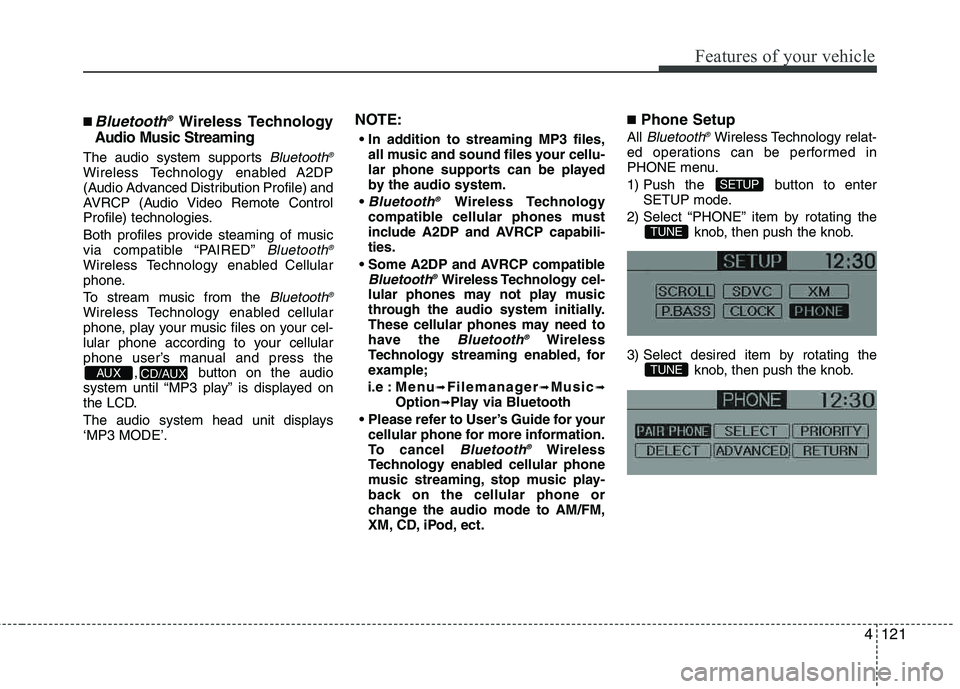
■ Phone Setup
All Bluetooth ®Wireless Technology relat-
ed operations can be performed in
PHONE menu.
1) Push the button to enter SETUP mode.
2) Select “PHONE” item by rotating the knob, then push the knob.
3) Select desired item by rotating the knob, then push the knob.
TUNE
TUNE
SETUP
CD/AUX AUX
Page 202 of 397
Features of your vehicle
122
4
Before using
Bluetooth ®Wireless
Technology features, the phone must be paired (registered) with the audio sys-
tem. Up to 5 phones can be paired with the system.
NOTE:
The pairing procedure of the phone
varies according to each phone
model. Before attempting to pair
phone, please see your phone’s
User’s Guide for instructions.
Once pairing with the phone is com-
pleted, there is no need to pair with
that phone again unless the phone
is deleted manually from the audio
system (refer “Deleting a Phone”
section) or the vehicle’s information
is removed from the phone.
➀Press button to enter SETUP
mode.
➁Select “PHONE”, then “PAIR PHONE”
in PHONE menu.
➂The audio displays “Device : [Name]
passkey: 0000”
➃Search and select the device name in
your mobile phone to starting the pair-
ing process.
NOTE:
If the phone is paired with two or
more vehicles of the same model,
some phones may not handle
Bluetooth ®Wireless Technology
devices of that name correctly. In
this case, you may need to change
the name displayed on your phone.
For example, if the vehicles' name is
HMC CAR, you may need to change
the name displayed on you phone
from HMC_CAR to JOHNS_CAR or
HMC CAR_1 to avoid ambiguity.
Refer to your phone User’s Guide,
or contact your cellular carrier or
phone manufacturer for instruc-tions.
When the
Bluetooth ®Wireless
Technology system is enabled, the
phone previously used is automatically
selected and re-connected. If you want to
select different phone previously paired, the phone can be selected through
“Select Phone” menu. Only a selected phone can be used with
the hands-free system at a time.
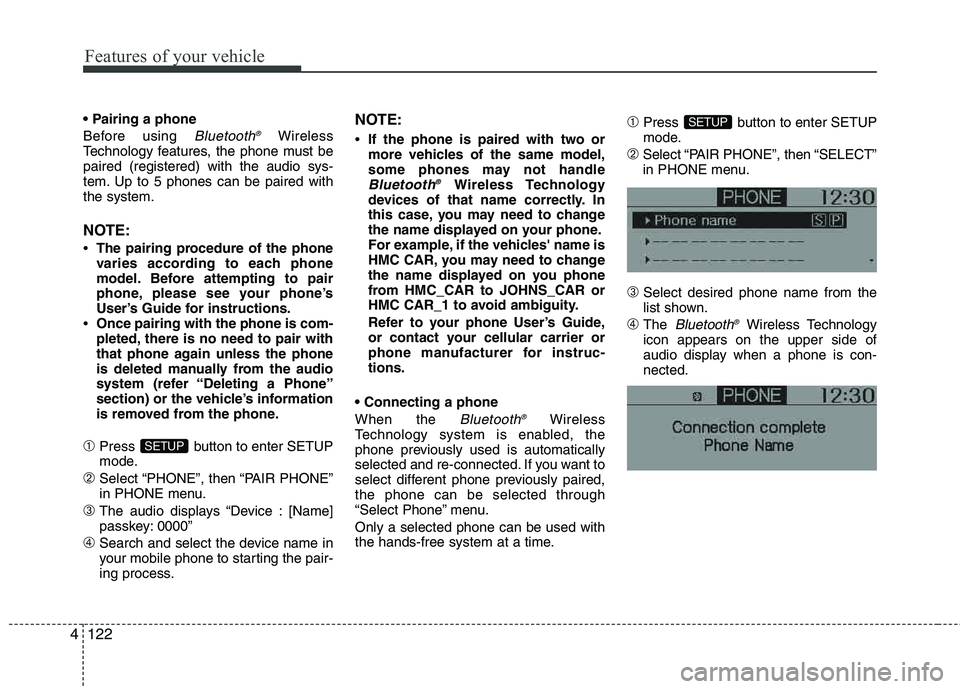
➀Press button to enter SETUP
mode.
➁Select “PAIR PHONE”, then “SELECT”
in PHONE menu.
➂Select desired phone name from the
list shown.
➃The Bluetooth ®Wireless Technology
icon appears on the upper side of
audio display when a phone is con- nected.
SETUP
SETUP
Page 203 of 397
4123
Features of your vehicle
If several phones are paired with theaudio system, the system attempts to
connect following order when the
Bluetooth®Wireless Technology system
is enabled:
1) “Priority” checked phone.
2) Previously connected phone
3) Gives up auto connection.
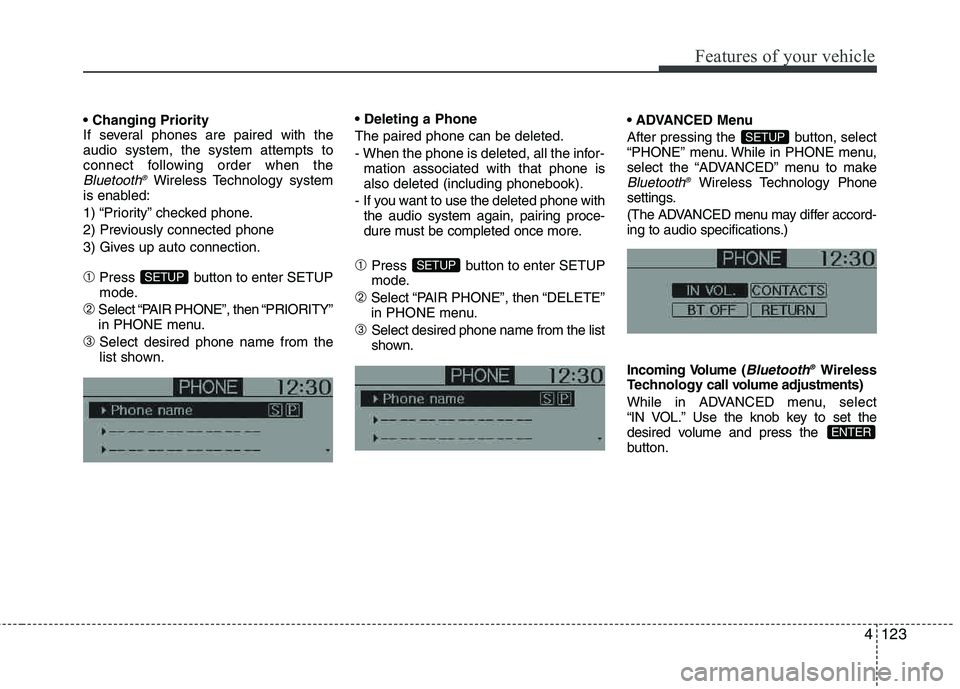
➀Press button to enter SETUP
mode.
➁Select “PAIR PHONE”, then “PRIORITY”
in PHONE menu.
➂Select desired phone name from the
list shown. The paired phone can be deleted.
- When the phone is deleted, all the infor-
mation associated with that phone is also deleted (including phonebook).
- If you want to use the deleted phone with the audio system again, pairing proce-
dure must be completed once more.
➀Press button to enter SETUP
mode.
➁Select “PAIR PHONE”, then “DELETE”
in PHONE menu.
➂Select desired phone name from the list
shown. Menu
After pressing the button, select
“PHONE” menu. While in PHONE menu,
select the “ADVANCED” menu to make
Bluetooth
®Wireless Technology
Phone
settings.
(The ADVANCED menu may differ accord-
ing to audio specifications.)
Incoming Volume (
Bluetooth ®Wireless
Technology call volume ad justments)
While in ADVANCED menu, select
“IN VOL.” Use the knob key to set the
desired volume and press the
button.
ENTER
SETUP
SETUPSETUP
Page 204 of 397
Features of your vehicle
124
4
Contacts Sync (Automatic Phonebook
download setting)
While in ADVANCED menu, select
“CONTACTS” To automatically save the
contacts and call history in your mobile
phone each time you connect a mobile
device, select ON. If you do not wish for
automatic download, select OFF.
It’s not available to make a phone call by
Bluetooth ®Wireless Technology audio
system while the phonebook is being
downloaded.
Bluetooth ®Wireless Technology sys-
tem off
While in ADVANCED menu, select
“BT OFF” to turn off the
Bluetooth ®Wireless Technology system.
■
Voice Recognition Activation
in the Bluetooth ®Wireless Technology
system can be activated in the followingconditions:
- Button Activation
The voice recognition system will be
active when the button is pressed
and after the sound of a Beep.
- Active Listening The voice recognition system will be
active for a period of time when the
Voice Recognition system has asked
for a customer response.
from zero to nine while number greater
than ten will not be recognized.
tion mode in following cases : When
pressing the button and saying
cancel following the beep. When not making a call and pressing the
button. When voice recognition has
failed 3 consecutive times.
At any time if you say “help”, the system will announce what commands are
available.
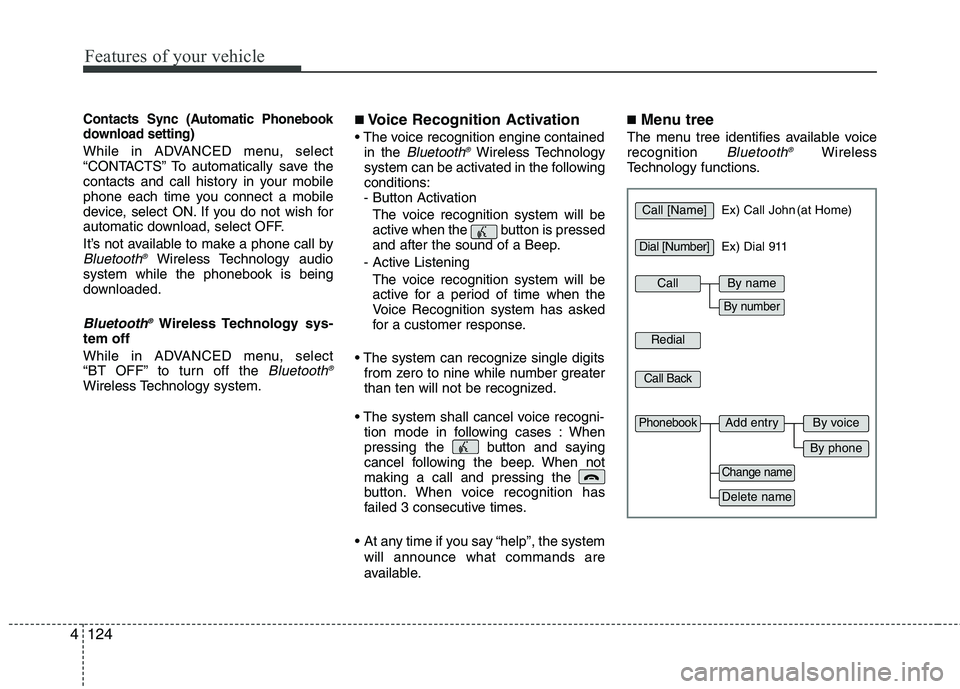
■ Menu tree
The menu tree identifies available voice recognition Bluetooth ®Wireless
Technology functions.
Call [Name]Ex) Call John (at Home)
Ex) Dial 911
Dial [Number]
Redial
Call Back
Add entryPhonebook
Change name
Delete name
By phone
By voice
CallBy name
By number
Page 207 of 397
4127
Features of your vehicle
➀Press button.
➁Say "Phonebook".
➂Say "Add Entry" after prompt.
➃Say "By Phone" to proceed.
➄Say “Yes” to confirm.
➅ Your phone will start to transfer phone/contact list to the audio system.
This process may take over 10 min- utes depending on the phone model
and number of entries
➆Wait till the audio displays “Transfer
Complete” message.
Changing Name
The registered names can be modified.
➀Press button.
➁Say “Phonebook”.
➂Say “Change Name” after prompt.
➃Say the name of the entry (voice tag).
➄Say “Yes” to confirm.
➅ Say new desired name.
Deleting Name
The registered names can be deleted.
➀Press button.
➁Say “Phonebook”.
➂Say “Delete Name” after prompt.
➃Say the name of the entry (voice tag).
➄Say “Yes” to confirm.
■Bluetooth ®Wireless Technology
Audio Speaker Adaptation
Speaker adaptation will improve perform-
ance of voice recognition system to a
particular user voice.
This will degrade the performance for
other users.
➀Press button for 10sec.
➁Say “Record profile”.
➂Say “Yes”.
➃Say the word displayed on Radio.
➀Press button for 10sec.
➁Say “Delete profile”.
➂Say “Yes”.