steering HYUNDAI TUCSON 2014 Service Manual
[x] Cancel search | Manufacturer: HYUNDAI, Model Year: 2014, Model line: TUCSON, Model: HYUNDAI TUCSON 2014Pages: 542, PDF Size: 7.59 MB
Page 362 of 542
5-26
Driving your vehicle
Emergency precautions
Tires
Do not use tire and wheel with differ-
ent size and type from the one origi-
nally installed on your vehicle. It can
affect the safety and performance of
your vehicle, which could lead to
steering failure or rollover causing
serious injury.
When replacing the tires, be sure to
equip all four tires with the tire and
wheel of the same size, type, tread,
brand and load-carrying capacity. If
you equip your vehicle with anytire/wheel combination not recom-
mended by HYUNDAI for off-road
driving, you should not use these
tires for highway driving.
Towing
AWD vehicles must be towed with awheel lift and dollies or flatbed equip-ment with all the wheels off the
ground. For more information, refer
to “Towing” in chapter 6.
Dynamometer testing
A full-time AWD vehicle must be test-
ed on a special four wheel chassis
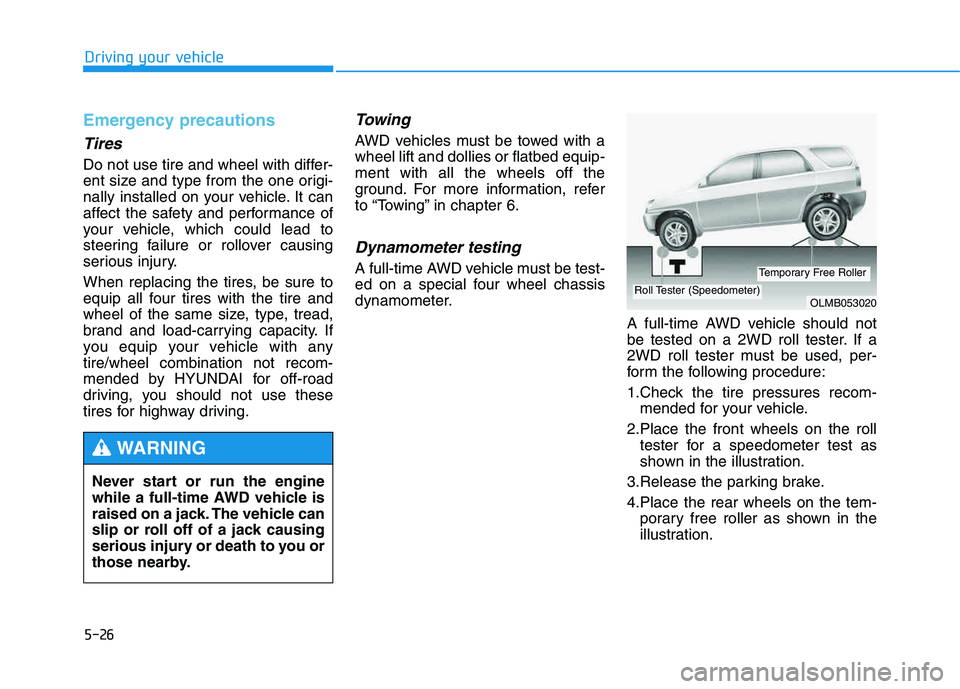
dynamometer.A full-time AWD vehicle should not
be tested on a 2WD roll tester. If a
2WD roll tester must be used, per-
form the following procedure:
1.Check the tire pressures recom-mended for your vehicle.
2.Place the front wheels on the roll tester for a speedometer test as
shown in the illustration.
3.Release the parking brake.
4.Place the rear wheels on the tem- porary free roller as shown in the
illustration.
Never start or run the engine
while a full-time AWD vehicle is
raised on a jack. The vehicle can
slip or roll off of a jack causing
serious injury or death to you or
those nearby.
WARNING
OLMB053020Roll Tester (Speedometer)
Temporary Free Roller
Page 364 of 542
5-28
Driving your vehicle
Power brakes
Your vehicle has power-assisted
brakes that adjust automatically
through normal usage.
If the engine is not running or is
turned off while driving, the power
assist for the brakes will not work.
You can still stop your vehicle by
applying greater force to the brake
pedal than typical. The stopping dis-
tance, however, will be longer than
with power brakes.
When the engine is not running, the
reserve brake power is partially
depleted each time the brake pedal
is applied. Do not pump the brake
pedal when the power assist has
been interrupted.
Pump the brake pedal only when
necessary to maintain steering con-
trol on slippery surfaces.
BBRRAA KKIINN GG SS YY SSTT EEMM
Take the following precautions:
Do not drive with your foot resting on the brake pedal.This will create abnormal high
brake temperatures, exces-sive brake lining and pad
wear, and increased stoppingdistances.
When descending a long or
steep hill, shift to a lower gear
and avoid continuous applica-
tion of the brakes. Applying
the brakes continuously will
cause the brakes to overheatand could result in a tempo-
rary loss of braking perform-
ance.
(Continued)
(Continued)
Wet brakes may impair the
vehicle’s ability to safely slow
down; the vehicle may alsopull to one side when the
brakes are applied. Applying
the brakes lightly will indicate
whether they have been
affected in this way. Always
test your brakes in this fash-
ion after driving through deep
water. To dry the brakes, light-
ly tap the brake pedal to heatup the brakes while maintain-
ing a safe forward speed until
brake performance returns to
normal. Avoid driving at highspeeds until the brakes func-
tion correctly.
WARNING
Page 371 of 542
5-35
Driving your vehicle
5
Electronic Stability Control (ESC)
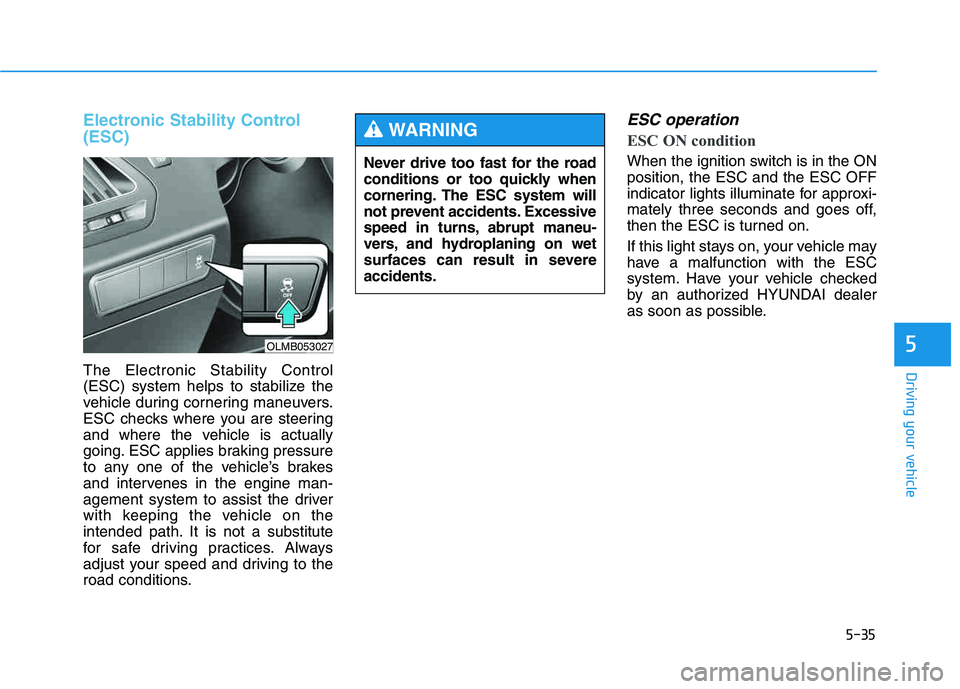
The Electronic Stability Control
(ESC) system helps to stabilize the
vehicle during cornering maneuvers.
ESC checks where you are steering
and where the vehicle is actually
going. ESC applies braking pressure
to any one of the vehicle’s brakes
and intervenes in the engine man-
agement system to assist the driver
with keeping the vehicle on the
intended path. It is not a substitute
for safe driving practices. Always
adjust your speed and driving to the
road conditions.
ESC operation
ESC ON condition
When the ignition switch is in the ON position, the ESC and the ESC OFF
indicator lights illuminate for approxi-
mately three seconds and goes off,
then the ESC is turned on.
If this light stays on, your vehicle may
have a malfunction with the ESC
system. Have your vehicle checked
by an authorized HYUNDAI dealer
as soon as possible.
Never drive too fast for the road
conditions or too quickly when
cornering. The ESC system will
not prevent accidents. Excessive
speed in turns, abrupt maneu-
vers, and hydroplaning on wet
surfaces can result in severeaccidents.
WARNING
OLMB053027
Page 375 of 542
5-39
Driving your vehicle
5
VSM operation
VSM ON condition
The VSM operates when:
The Electronic Stability Control(ESC) is on.
Vehicle speed is approximately above 9mph (15 km/h) on curve
roads.
Vehicle speed is approximately above 18mph (30 km/h) when the
vehicle is braking on rough roads.
When operating
When you apply your brakes under
conditions which may activate the
ESC, you may hear sounds from the
brakes, or feel a corresponding sen-
sation in the brake pedal. This is nor-
mal and it means your VSM is active.
✽✽ NOTICE
The VSM does not operate when:
Driving rearward.
ESC OFF indicator light is on.
EPS (Electric Power Steering) warning light ( ) is on. VSM OFF condition
To cancel VSM operation, press the
ESC OFF button. ESC OFF indicator
light ( ) will illuminate.
To turn on VSM, press the ESC OFF
button again. The ESC OFF indicatorlight will go out.
If ESC indicator light ( ) or EPS
warning light ( ) stays on,
your vehicle may have a mal-
function with the VSM system.When the warning light illumi-
nates, have your vehicle
checked by an authorized
HYUNDAI dealer as soon as pos-
sible.
WARNING
Page 377 of 542
5-41
Driving your vehicle
5
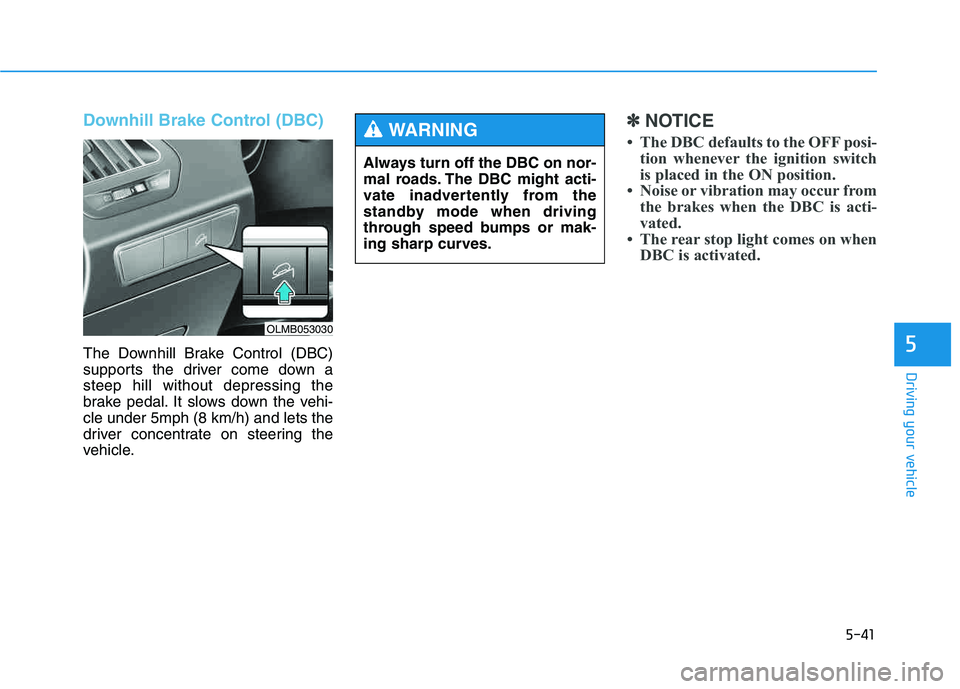
Downhill Brake Control (DBC)
The Downhill Brake Control (DBC)
supports the driver come down asteep hill without depressing the
brake pedal. It slows down the vehi-cle under 5mph (8 km/h) and lets the
driver concentrate on steering the
vehicle.
✽✽NOTICE
The DBC defaults to the OFF posi- tion whenever the ignition switch
is placed in the ON position.
Noise or vibration may occur from the brakes when the DBC is acti-
vated.
The rear stop light comes on when DBC is activated.
Always turn off the DBC on nor-
mal roads. The DBC might acti-
vate inadvertently from the
standby mode when driving
through speed bumps or mak-
ing sharp curves.
WARNING
OLMB053030
Page 383 of 542
5-47
Driving your vehicle
5
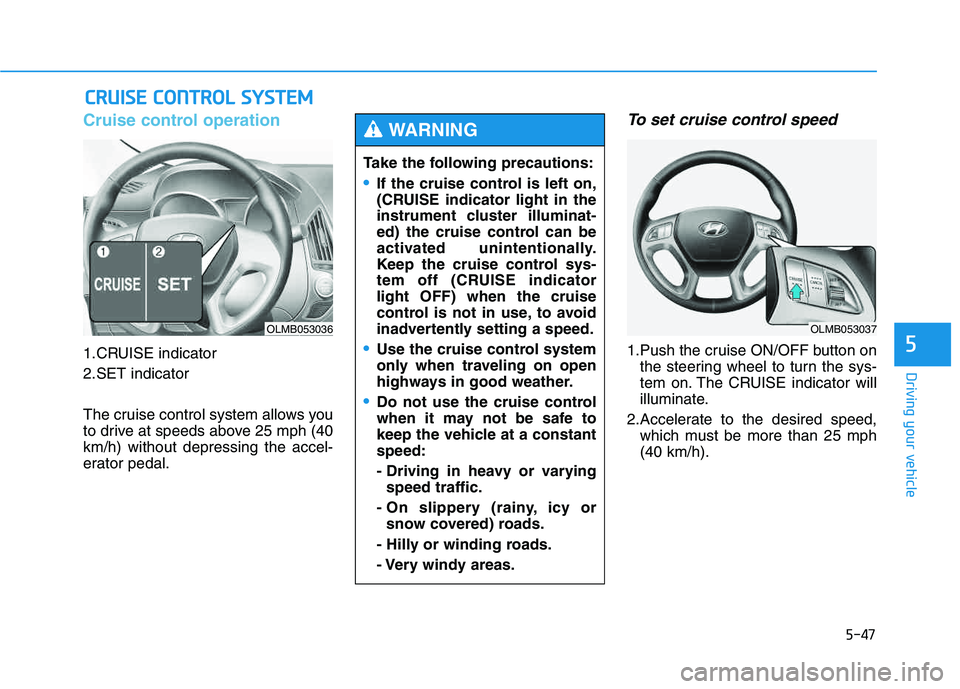
Cruise control operation
1.CRUISE indicator
2.SET indicator
The cruise control system allows you
to drive at speeds above 25 mph (40km/h) without depressing the accel-
erator pedal.
To set cruise control speed
1.Push the cruise ON/OFF button onthe steering wheel to turn the sys-
tem on. The CRUISE indicator will
illuminate.
2.Accelerate to the desired speed, which must be more than 25 mph(40 km/h).
CCRR UU IISS EE CC OO NNTTRR OO LL SS YY SSTT EEMM
OLMB053036
Take the following precautions:
If the cruise control is left on,
(CRUISE indicator light in the
instrument cluster illuminat-
ed) the cruise control can be
activated unintentionally.
Keep the cruise control sys-
tem off (CRUISE indicatorlight OFF) when the cruise
control is not in use, to avoid
inadvertently setting a speed.
Use the cruise control system
only when traveling on open
highways in good weather.
Do not use the cruise control
when it may not be safe to
keep the vehicle at a constantspeed:
- Driving in heavy or varying
speed traffic.
- On slippery (rainy, icy or snow covered) roads.
- Hilly or winding roads.
- Very windy areas.
WARNING
OLMB053037
Page 385 of 542
5-49
Driving your vehicle
5
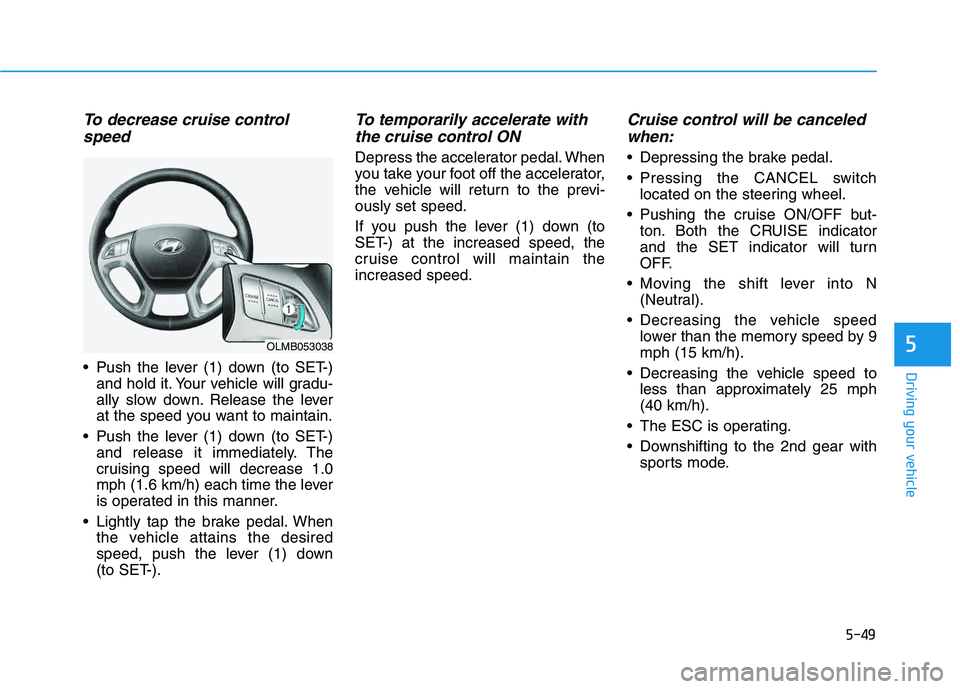
To decrease cruise controlspeed
Push the lever (1) down (to SET-) and hold it. Your vehicle will gradu-
ally slow down. Release the lever
at the speed you want to maintain.
Push the lever (1) down (to SET-) and release it immediately. The
cruising speed will decrease 1.0
mph (1.6 km/h) each time the lever
is operated in this manner.
Lightly tap the brake pedal. When the vehicle attains the desired
speed, push the lever (1) down
(to SET-).
To temporarily accelerate with
the cruise control ON
Depress the accelerator pedal. When
you take your foot off the accelerator,
the vehicle will return to the previ-ously set speed.
If you push the lever (1) down (to
SET-) at the increased speed, the
cruise control will maintain theincreased speed.
Cruise control will be canceledwhen:
Depressing the brake pedal.
Pressing the CANCEL switch located on the steering wheel.
Pushing the cruise ON/OFF but- ton. Both the CRUISE indicator
and the SET indicator will turn
OFF.
Moving the shift lever into N (Neutral).
Decreasing the vehicle speed lower than the memory speed by 9mph (15 km/h).
Decreasing the vehicle speed to less than approximately 25 mph(40 km/h).
The ESC is operating.
Downshifting to the 2nd gear with sports mode.
OLMB053038
Page 386 of 542
5-50
Driving your vehicle
✽✽NOTICE
Each of the above actions will cancel
cruise control operation (the SET
indicator light in the instrument
cluster will go off), but only pressing
the cruise ON/OFF button will turn
the system off. If you wish to resume
cruise control operation, push the
lever up (to RES+) located on your
steering wheel. You will return to
your previously preset speed, unless
the system was turned off using the
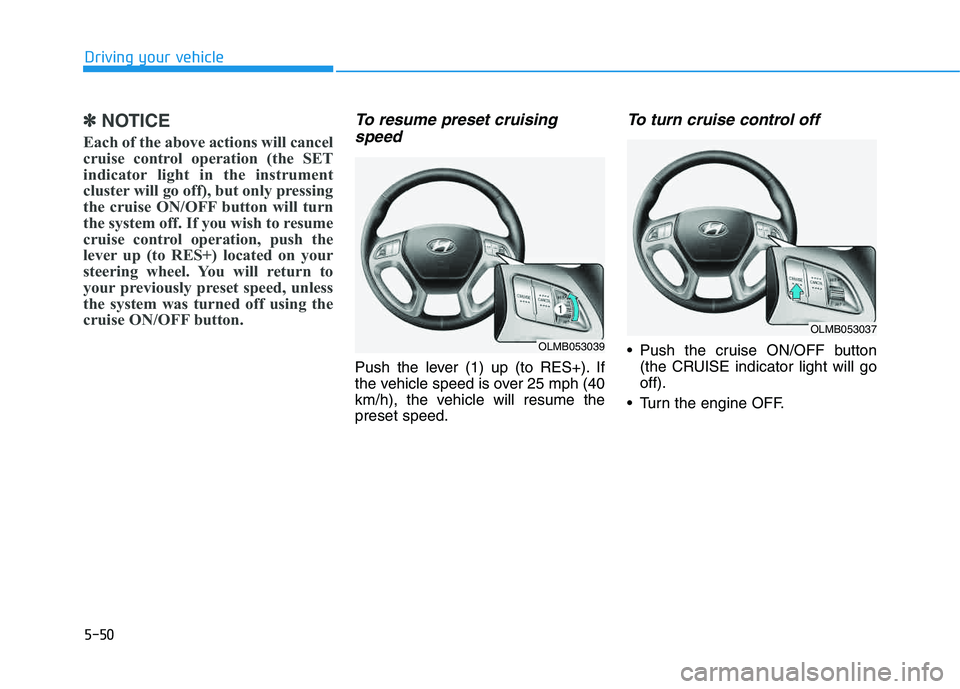
cruise ON/OFF button.To resume preset cruising speed
Push the lever (1) up (to RES+). If
the vehicle speed is over 25 mph (40
km/h), the vehicle will resume thepreset speed.
To turn cruise control off
Push the cruise ON/OFF button (the CRUISE indicator light will gooff).
Turn the engine OFF.OLMB053039
OLMB053037
Page 387 of 542
5-51
Driving your vehicle
5
Hazardous driving conditions
When hazardous driving conditions
are encountered such as water,
snow, ice, mud or sand:
Drive cautiously and allow extra dis-
tance for braking.
Avoid sudden movements in braking
or steering.
If stuck in snow, mud, or sand, use
second gear. Accelerate slowly to
avoid spinning the drive wheels.
Use sand, rock salt, or other non-slip
material under the drive wheels to
provide traction when stalled in ice,
snow, or mud.
Rocking the vehicle
If it is necessary to rock the vehicle
to free it from snow, sand, or mud,
first turn the steering wheel right and
left to clear the area around your
front wheels. Then, shift back and
forth between R (Reverse) and a for-
ward gear. Try to avoid spinning the
wheels, and do not race the engine.
To prevent transaxle wear, wait until
the wheels stop spinning before
shifting gears. Release the accelera-tor pedal while shifting, and press
lightly on the accelerator pedal while
the transaxle is in gear. Slowly spin-
ning the wheels in forward and
reverse directions causes a rocking
motion that may free the vehicle.
SSPP EECCIIAA LL DD RRIIVV IINN GG CC OO NNDDIITT IIOO NNSS
Downshifting with an automatic
transaxle, while driving on slip-
pery surfaces can cause an
accident. The sudden change intire speed could cause the tires
to skid. Be careful when down-
shifting on slippery surfaces.
WARNING
If the tires spin at high speed
the tires can explode, and you
or others may be injured. Do not
attempt this procedure if people
or objects are anywhere near
the vehicle.
The vehicle can overheat caus-
ing an engine compartment fire
or other damage. Spin the
wheels as little as possible and
avoid spinning the wheels at
speeds over 35 mph (56 km/h)as indicated on the speedome-
ter.
WARNING
Page 398 of 542
5-62
Driving your vehicle
Driving with a trailer
Towing a trailer requires a certain
amount of experience. Before setting
out for the open road, you must get
to know your trailer. Acquaint your-
self with the feel of handling and
braking with the added weight of the
trailer. And always keep in mind that
the vehicle you are driving is now
longer and not nearly as responsive
as your vehicle is by itself.
Before you start, check the trailer
hitch and platform, safety chains,
electrical connector(s), lights, tires
and brakes.
During your trip, occasionally check
to be sure that the load is secure,
and that the lights and trailer brakes
are still working.
Distance
Stay at least twice as far behind the
vehicle ahead as you would when
driving your vehicle without a trailer.
This can help you avoid situations
that require heavy braking and sud-
den turns.
Passing
You will need more passing distance
up ahead when you’re towing a trail-
er. And, because of the increased
vehicle length, you’ll need to go
much farther beyond the passed
vehicle before you can return to your
lane.
Backing up
Hold the bottom of the steering
wheel with one hand. Then, to move
the trailer to the left, move your hand
to the left. To move the trailer to the
right, move your hand to the right.
Always back up slowly and, if possi-
ble, have someone guide you.
Making turns
When you’re turning with a trailer,
make wider turns than normal. Do
this so your trailer won’t strike soft
shoulders, curbs, road signs, trees,
or other objects. Avoid jerky or sud-
den maneuvers. Signal well in
advance.