AUX HYUNDAI TUCSON 2014 Owners Manual
[x] Cancel search | Manufacturer: HYUNDAI, Model Year: 2014, Model line: TUCSON, Model: HYUNDAI TUCSON 2014Pages: 542, PDF Size: 7.59 MB
Page 16 of 542
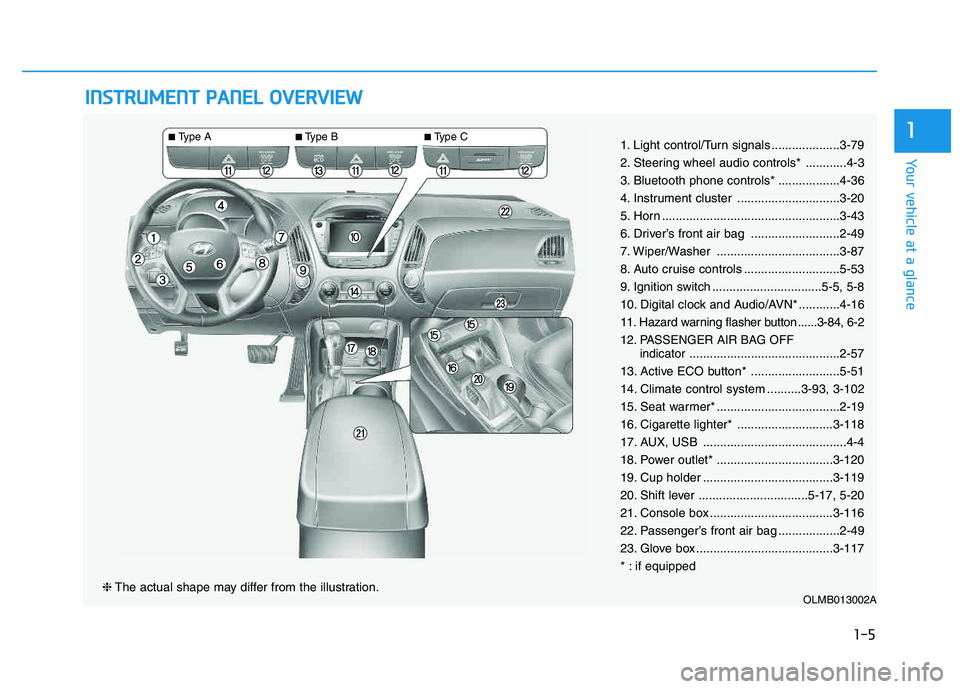
IINN SSTT RR UU MM EENN TT PP AA NN EELL OO VVEERR VV IIEE WW
OLMB013002A❈ The actual shape may differ from the illustration.
■Type A ■Type B ■
Type C
1-5
Your vehicle at a glance
11. Light control/Turn signals ....................3-79
2. Steering wheel audio controls* ............4-3
3. Bluetooth phone controls* ..................4-36
4. Instrument cluster ..............................3-20
5. Horn ....................................................3-43
6. Driver’s front air bag ..........................2-49
7. Wiper/Washer ....................................3-87
8. Auto cruise controls ............................5-53
9. Ignition switch ................................5-5, 5-8
10. Digital clock and Audio/AVN* ............4-16
11. Hazard warning flasher button ......3-84, 6-2
12. PASSENGER AIR BAG OFF
indicator............................................2-57
13. Active ECO button* ..........................5-51
14. Climate control system ..........3-93, 3-102
15. Seat warmer* ....................................2-19
16. Cigarette lighter* ............................3-118
17. AUX, USB ..........................................4-4
18. Power outlet* ..................................3-120
19. Cup holder ......................................3-119
20. Shift lever ................................5-17, 5-20
21. Console box ....................................3-116
22. Passenger’s front air bag ..................2-49
23. Glove box ........................................3-117
* : if equipped
Page 212 of 542
Multimedia System
AUDIO SYSTEM ......................................................4-2
HOW VEHICLE AUDIO WORKS .............................4-4
CD PLAYER : AC110TMKN, AC1B0TMKN, AC1B1TMAN ..................................4-16
System controllers and functions ...............................4-17
Setup ..................................................................................4-20
Radio : FM, AM OR XM .................................................4-24
Basic method of use ......................................................4-27
Bluetooth®Wireless Technology Audio .....................4-34
Phone .................................................................................4-36
Voice command list .........................................................4-53
CD PLAYER : AC111TMAN, AC110TMAN ..........4-59
System controllers and functions ...............................4-60
Steering remote controller ...........................................4-62
RADIO mode .....................................................................4-64 XM RADIO TM
mode...........................................................4-66
MEDIA mode .....................................................................4-70
AUDIO CD mode ...............................................................4-71
MP3 CD mode ..................................................................4-74
USB mode..........................................................................4-80
iPod ®
mode........................................................................4-85
AUX mode .........................................................................4-88
MY MUSIC mode .............................................................4-90
Bluetooth ®Wireless Technology Audio .....................4-94
Pairing a
Bluetooth ®Wireless Technology Device....4-95 Using
Bluetooth
® Wireless Technology....................4-100
Voice recognition ..........................................................4-108
Setup ................................................................................4-115
Rear view camera .........................................................4-121 Blue Link ®
........................................................................4-122
4
Page 214 of 542
4-3
Multimedia System
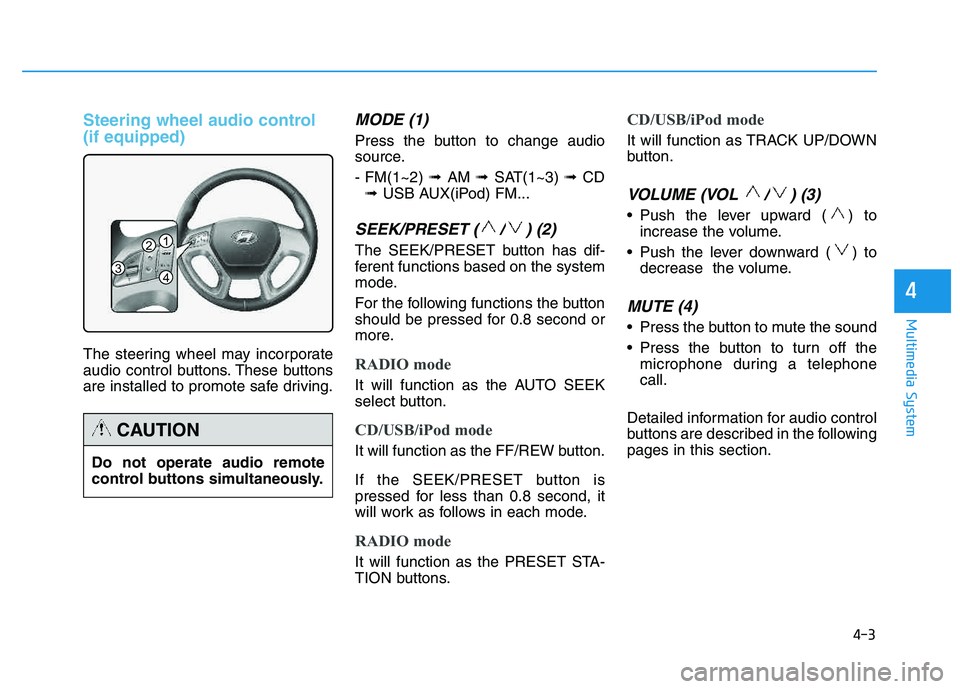
Steering wheel audio control (if equipped)
The steering wheel may incorporate
audio control buttons. These buttons
are installed to promote safe driving.
MODE (1)
Press the button to change audio
source. - FM(1~2) ➟ AM ➟ SAT(1~3) ➟ CD
➟ USB AUX(iPod) FM...
SEEK/PRESET ( / ) (2)
The SEEK/PRESET button has dif-
ferent functions based on the system
mode.
For the following functions the button
should be pressed for 0.8 second or
more.
RADIO mode
It will function as the AUTO SEEK
select button.
CD/USB/iPod mode
It will function as the FF/REW button.
If the SEEK/PRESET button is
pressed for less than 0.8 second, it
will work as follows in each mode.
RADIO mode
It will function as the PRESET STA-
TION buttons.
CD/USB/iPod mode
It will function as TRACK UP/DOWN
button.
VOLUME (VOL / ) (3)
• Push the lever upward ( ) to
increase the volume.
Push the lever downward ( ) to decrease the volume.
MUTE (4)
Press the button to mute the sound
Press the button to turn off themicrophone during a telephone call.
Detailed information for audio control
buttons are described in the followingpages in this section.
4
1
3
2
4
Do not operate audio remote
control buttons simultaneously.
CAUTION
Page 215 of 542
4-4
Multimedia System
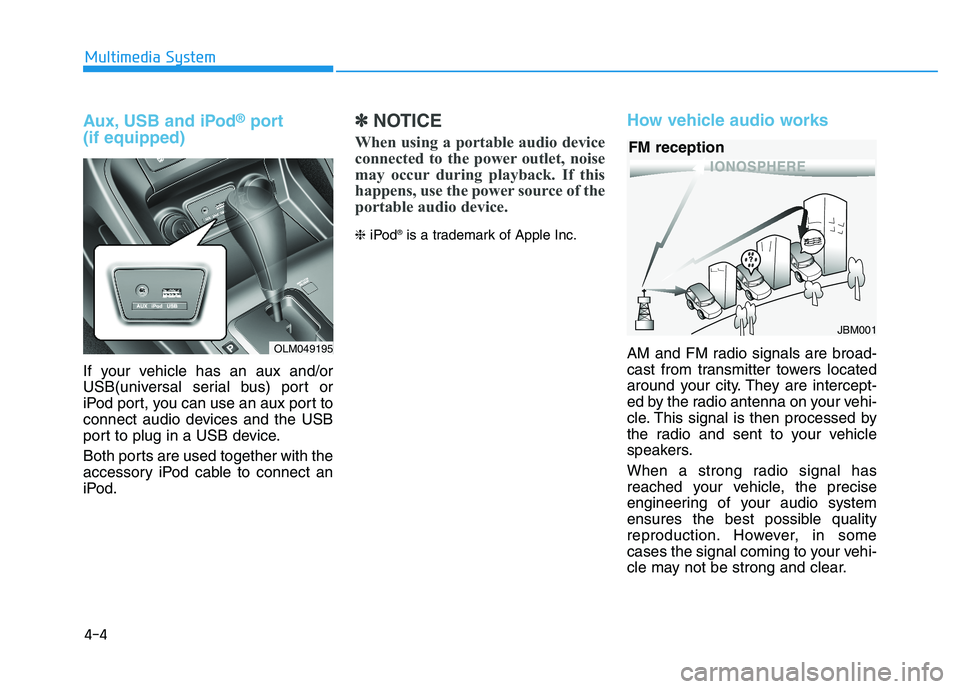
Aux, USB and iPod®port
(if equipped)
If your vehicle has an aux and/or
USB(universal serial bus) port or
iPod port, you can use an aux port to
connect audio devices and the USB
port to plug in a USB device.
Both ports are used together with the
accessory iPod cable to connect an
iPod.
✽✽ NOTICE
When using a portable audio device
connected to the power outlet, noise
may occur during playback. If this
happens, use the power source of the
portable audio device.
❈ iPod ®
is a trademark of Apple Inc.
How vehicle audio works
AM and FM radio signals are broad-
cast from transmitter towers located
around your city. They are intercept-
ed by the radio antenna on your vehi-
cle. This signal is then processed by
the radio and sent to your vehicle
speakers.
When a strong radio signal has
reached your vehicle, the precise
engineering of your audio system
ensures the best possible quality
reproduction. However, in some
cases the signal coming to your vehi-
cle may not be strong and clear.
JBM001
FM reception
OLM049195
Page 228 of 542
4-17
Multimedia System
4
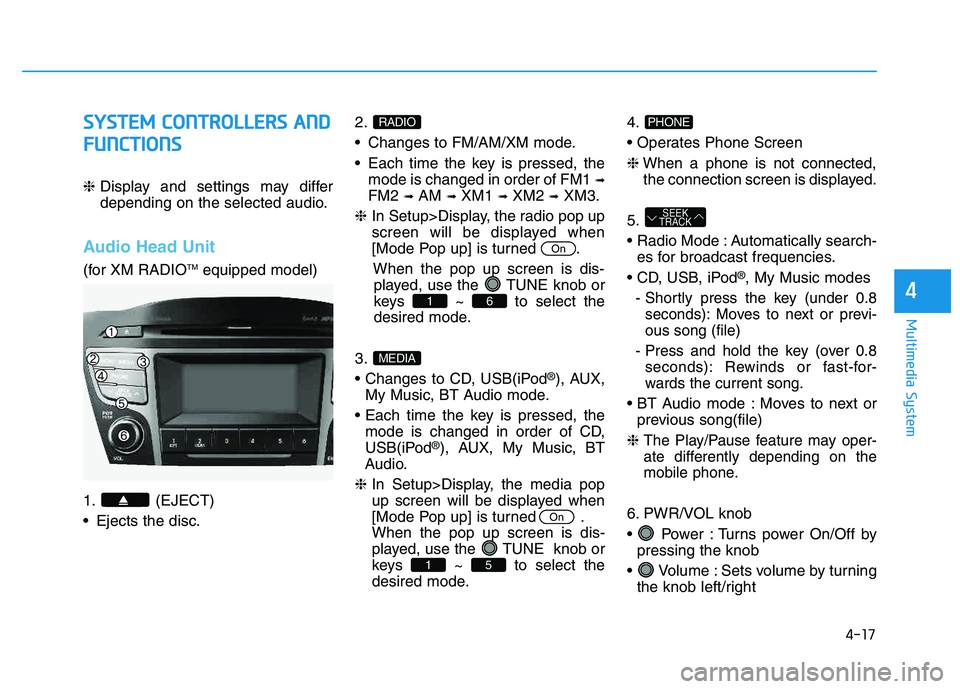
SSYY SSTT EEMM CC OO NNTTRR OO LLLLEE RR SS AA NN DD
F
F UU NNCCTT IIOO NNSS
❈ Display and settings may differ
depending on the selected audio.
Audio Head Unit
(for XM RADIO TM
equipped model)
1. (EJECT)
Ejects the disc. 2.
Changes to FM/AM/XM mode.
Each time the key is pressed, the
mode is changed in order of FM1 ➟
FM2 ➟AM ➟XM1 ➟XM2 ➟XM3.
❈ In Setup>Display, the radio pop up
screen will be displayed when
[Mode Pop up] is turned .
When the pop up screen is dis-played, use the TUNE knob or
keys ~ to select the
desired mode.
3.
®), AUX,
My Music, BT Audio mode.
mode is changed in order of CD,
USB(iPod
®), AUX, My Music, BT
Audio.
❈ In Setup>Display, the media pop
up screen will be displayed when
[Mode Pop up] is turned .When the pop up screen is dis-
played, use the TUNE knob or
keys ~ to select the
desired mode. 4.
❈
When a phone is not connected,
the connection screen is displayed.
5.
Automatically search- es for broadcast frequencies.
®, My Music modes
- Shortly press the key (under 0.8 seconds): Moves to next or previ- ous song (file)
- Press and hold the key (over 0.8 seconds): Rewinds or fast-for-
wards the current song.
Moves to next or previous song(file)
❈
The Play/Pause feature may oper-
ate differently depending on the
mobile phone.
6. PWR/VOL knob
Power : Turns power On/Off by pressing the knob
Volume : Sets volume by turning the knob left/right
SEEK
TRACK
PHONE
51
On
MEDIA
61
On
RADIO
Page 238 of 542
4-27
Multimedia System
4
BBAA SSIICC MM EETT HH OO DD OO FF UU SSEE ::
A
A uuddiioo CC DD // MM PP33 CC DD // UU SSBB //
i
i PP oodd ®®
// MM yy MM uussiicc
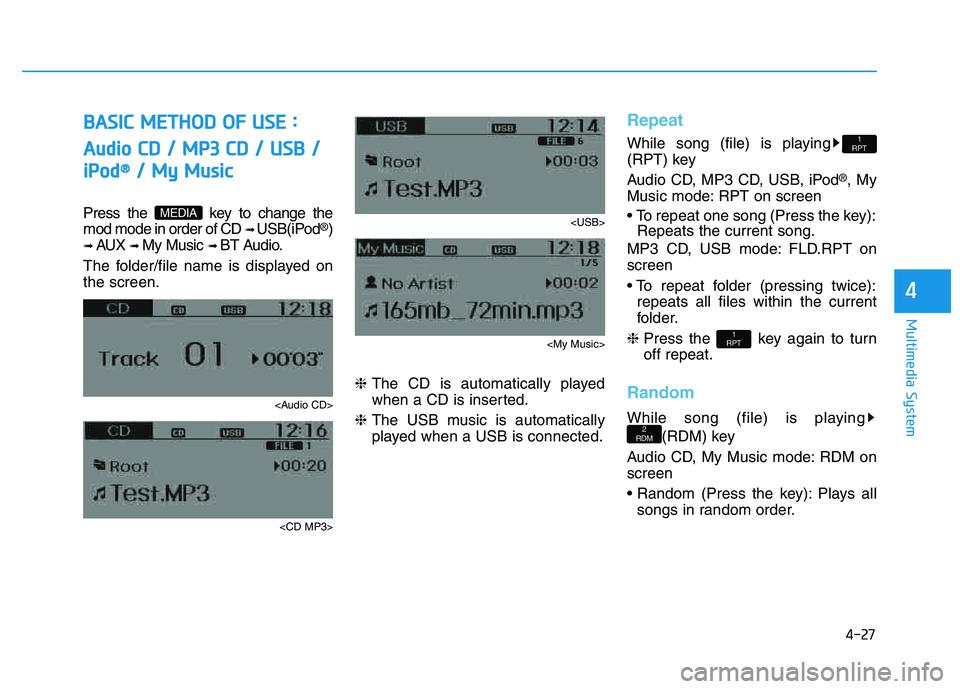
Press the key to change the mod mode in order of CD ➟ USB(iPod®)
➟ AUX ➟ My Music ➟ BT Audio.
The folder/file name is displayed on the screen.
Page 241 of 542
![HYUNDAI TUCSON 2014 Owners Manual 4-30
Multimedia System
Folder Random
Press the key Set [ F.RDM] through the
TUNEknob or
key to randomly play songs within the
current folder. ❈ Press F.RDM again to turn off.
Folder Repeat
Press](/img/35/56203/w960_56203-240.png "HYUNDAI TUCSON 2014 Owners Manual 4-30
Multimedia System
Folder Random
Press the key Set [ F.RDM] through the
TUNEknob or
key to randomly play songs within the
current folder. ❈ Press F.RDM again to turn off.
Folder Repeat
Press")
4-30
Multimedia System
Folder Random
Press the key Set [ F.RDM] through the
TUNEknob or
key to randomly play songs within the
current folder. ❈ Press F.RDM again to turn off.
Folder Repeat
Press the key Set [ F.RPT] through the
TUNEknob or
key to repeat songs within the cur-
rent folder. ❈ Press F.RPT again to turn off.
All Random
Press the key Set [ A.RDM] through the
TUNEknob or key
to randomly play all songs within the
CD. ❈ Press A.RDM again to turn off.
Information
Press the key Set [ Info] through the
TUNEknob or
key to display information of the cur-rent song. ❈ Press the key to turn off
info display.
Copy
Press the key Set [ Copy] through the
TUNEknob or
key.
song into My Music. You can play the copied Music in My Music
mode.
❈ If another key is pressed while
copying is in progress, a pop up
asking you whether to cancel
copying is displayed.
❈ If another media is connected or
inserted (USB, CD, iPod
®, AUX)
while copying is in progress, copy- ing is canceled.
❈ Music will not be played while
copying is in progress.
MENU : iPod®
In iPod®mode, press the key
to set the Repeat, Album Random, All
Random, Information and Search fea-
tures.
Repeat
Press the key Set [ RPT] through the
TUNEknob or
key to repeat the current song. ❈ Press RPT again to turn repeat off.
Album Random
Press the key Set [ Alb.RDM] through the TUNEknob or key.
Plays albums within the currently
playing category in random order. ❈ Press Alb.RDM again to turn off.
2
RDMMENU
1
RPTMENU
MENU
6
MENU
MENU
5
MENU
4
MENU
3
MENU
2
RDMMENU
Page 244 of 542
![HYUNDAI TUCSON 2014 Owners Manual 4-33
Multimedia System
4
Delete Selection
Press the key Set [ Del.Sel] through the TUNEknob or
key.
Songs within My Music are selected and deleted. ➀ Select the songs you wish to delete from the](/img/35/56203/w960_56203-243.png "HYUNDAI TUCSON 2014 Owners Manual 4-33
Multimedia System
4
Delete Selection
Press the key Set [ Del.Sel] through the TUNEknob or
key.
Songs within My Music are selected and deleted. ➀ Select the songs you wish to delete from the")
4-33
Multimedia System
4
Delete Selection
Press the key Set [ Del.Sel] through the TUNEknob or
key.
Songs within My Music are selected and deleted. ➀ Select the songs you wish to delete from the list.
➁ After selecting, press the key and
select the delete menu.
✽✽
NOTICE - USING THE My Music
Even if memory is available, a
maximum of 6,000 songs can be
stored.
The same song can be copied up to 1,000 times.
Memory info can be checked in the System menu of Setup.
AUX
AUX is used to play external MEDIA
currently connected with the AUX
terminal.
AUX mode will automatically start
when an external device is connect-
ed with the AUX terminal.
If an external device is connected,
you can also press the key to
change to AUX mode. ❈ AUX mode cannot be started
unless there is an external device
connected to the AUX terminal.
✽✽
NOTICE - USING THE AUX
Fully insert the AUX cable into the
AUX terminal for use.
MEDIA
6
MENU
Page 246 of 542
4-35
Multimedia System
4
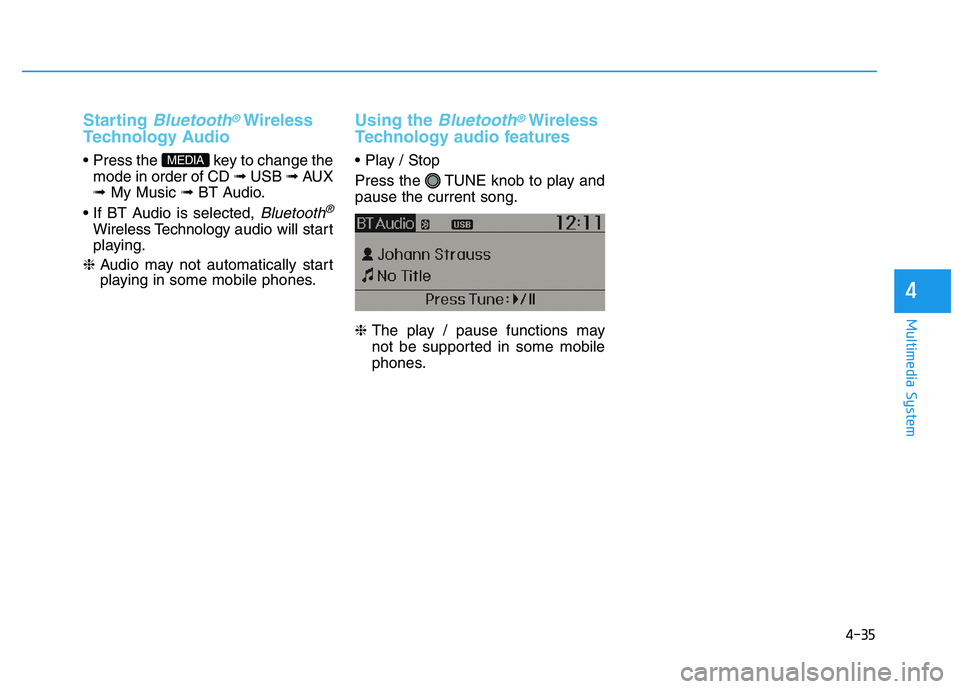
Starting Bluetooth®Wireless
Technology Audio
key to change the mode in order of CD ➟ USB ➟ AUX
➟ My Music ➟ BT Audio.
Bluetooth®
Wireless Technology audio will start
playing.
❈ Audio may not automatically start
playing in some mobile phones.
Using the Bluetooth®Wireless
Technology audio features
Press the TUNE knob to play and pause the current song. ❈ The play / pause functions may
not be supported in some mobile
phones.MEDIA
Page 265 of 542
4-54
Multimedia System
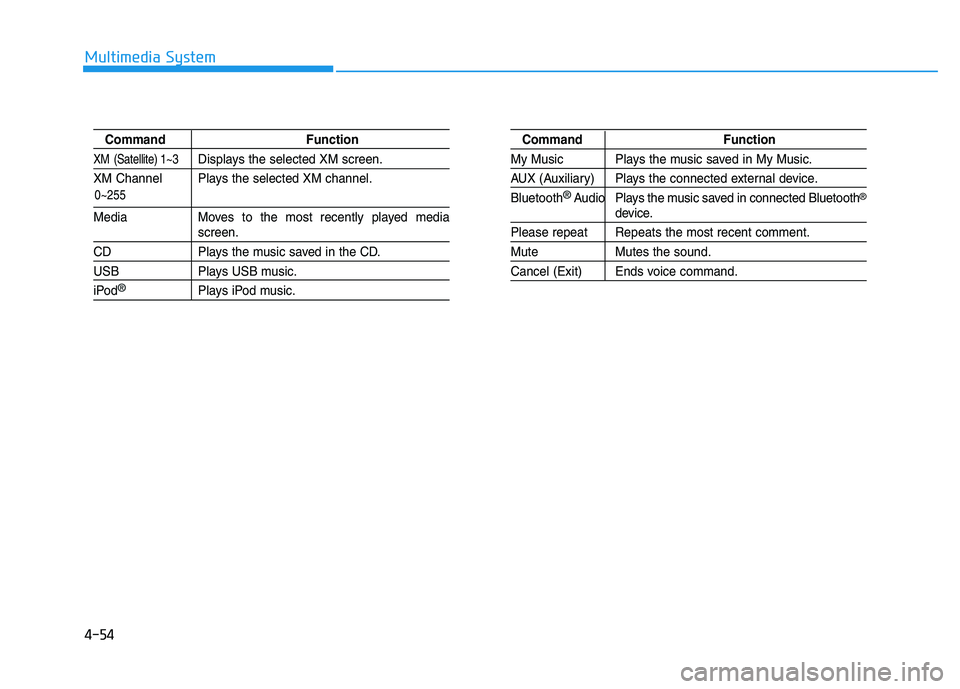
Command Function
XM (Satellite) 1~3Displays the selected XM screen.
XM Channel Plays the selected XM channel.
Media Moves to the most recently played mediascreen.
CD Plays the music saved in the CD.
USB Plays USB music.
iPod®Plays iPod music.
Command Function
My Music Plays the music saved in My Music.
AUX (Auxiliary) Plays the connected external device. Bluetooth
®Audio Plays the music saved in connected Bluetooth®
device.
Please repeat Repeats the most recent comment.
Mute Mutes the sound.
Cancel (Exit) Ends voice command.
0~255