audio HYUNDAI TUCSON 2015 Owners Manual
[x] Cancel search | Manufacturer: HYUNDAI, Model Year: 2015, Model line: TUCSON, Model: HYUNDAI TUCSON 2015Pages: 653, PDF Size: 8.45 MB
Page 425 of 653
4-214
Multimedia System
Bluetooth®Wireless
Technology Setting
Bluetooth®Wireless Technology
The Bluetooth®word mark and logos
are registered trademarks owned by
Bluetooth SIG, Inc. and any use of
such marks is under license. Other
trademarks and trade names are
those of their respective owners. A
Bluetooth®enabled cell phone is
required to use
Bluetooth®wireless
technology.
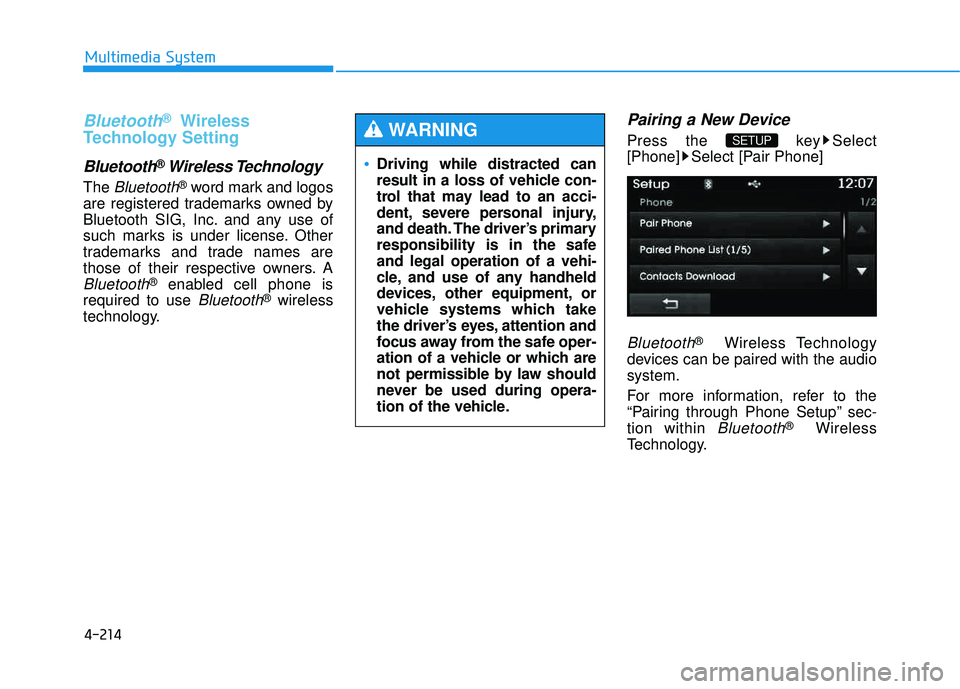
Pairing a New Device
Press the key Select
[Phone] Select [Pair Phone]
Bluetooth®Wireless Technology
devices can be paired with the audiosystem.
For more information, refer to the
“Pairing through Phone Setup” sec-tion within
Bluetooth®Wireless
Technology.
SETUP
Driving while distracted can
result in a loss of vehicle con-
trol that may lead to an acci-
dent, severe personal injury,
and death. The driver’s primary
responsibility is in the safeand legal operation of a vehi-
cle, and use of any handheld
devices, other equipment, or
vehicle systems which take
the driver’s eyes, attention and
focus away from the safe oper-
ation of a vehicle or which are
not permissible by law should
never be used during opera-
tion of the vehicle.
WARNING
Page 426 of 653
![HYUNDAI TUCSON 2015 Owners Manual 4-215
Multimedia System
4
Viewing Paired Phone List
Press the key Select
[Phone] Select [Paired Phone List]
This feature is used to view mobile
phones that have been paired with
the audio system.](/img/35/56202/w960_56202-425.png "HYUNDAI TUCSON 2015 Owners Manual 4-215
Multimedia System
4
Viewing Paired Phone List
Press the key Select
[Phone] Select [Paired Phone List]
This feature is used to view mobile
phones that have been paired with
the audio system.")
4-215
Multimedia System
4
Viewing Paired Phone List
Press the key Select
[Phone] Select [Paired Phone List]
This feature is used to view mobile
phones that have been paired with
the audio system. Upon selecting a
paired phone, the setup menu is dis-
played.
For more information, refer to the “Setting
Bluetooth®Wireless
Technology Connection” section with-in
Bluetooth®Wireless Technology.
1) : Moves to the previous screen
2) Connect/Disconnect Phone : Connect/ disconnects currently selected phone 3) Delete : Deletes the currently
selected phone
4) Change Priority : Sets currently selected phone to highest connec-
tion priority
✽✽NOTICE BEFORE DOWN-
LOADING CONTACTS
To learn more about whether your mobile phone supports contacts
downloads, refer to your mobile
phone user’s manual.
The contacts for only the connect- ed phone can be downloaded.
Downloading Contacts
Press the key Select
[Phone] Select [Contacts Download]
As the contacts are downloaded
from the mobile phone, a download
progress bar is displayed.
✽✽ NOTICE
Upon downloading phone con- tacts, the previous corresponding
data is deleted.
This feature may not be supported in some mobile phones.
Voice Recognition may not oper- ate while contacts are being down-
loaded.
SETUP SETUP
Page 427 of 653
![HYUNDAI TUCSON 2015 Owners Manual 4-216
Multimedia System
Outgoing Volume
Press the key Select
[Phone] Select [Outgoing Volume]
Use the , buttons to adjust the
outgoing volume level.
✽✽NOTICE
While on a call, the volume can](/img/35/56202/w960_56202-426.png "HYUNDAI TUCSON 2015 Owners Manual 4-216
Multimedia System
Outgoing Volume
Press the key Select
[Phone] Select [Outgoing Volume]
Use the , buttons to adjust the
outgoing volume level.
✽✽NOTICE
While on a call, the volume can")
4-216
Multimedia System
Outgoing Volume
Press the key Select
[Phone] Select [Outgoing Volume]
Use the , buttons to adjust the
outgoing volume level.
✽✽NOTICE
While on a call, the volume can be
changed by using the key.
Turning Bluetooth System Off
Press the key Select
[Phone] Select [Bluetooth SystemOff] Once
Bluetooth®Wireless Technology
is turned off,
Bluetooth®Wireless
Technology related features will not be
supported within the audio system.
SETUP
SEEK
TRACK
SETUP
Page 432 of 653
4-221
Multimedia System
4
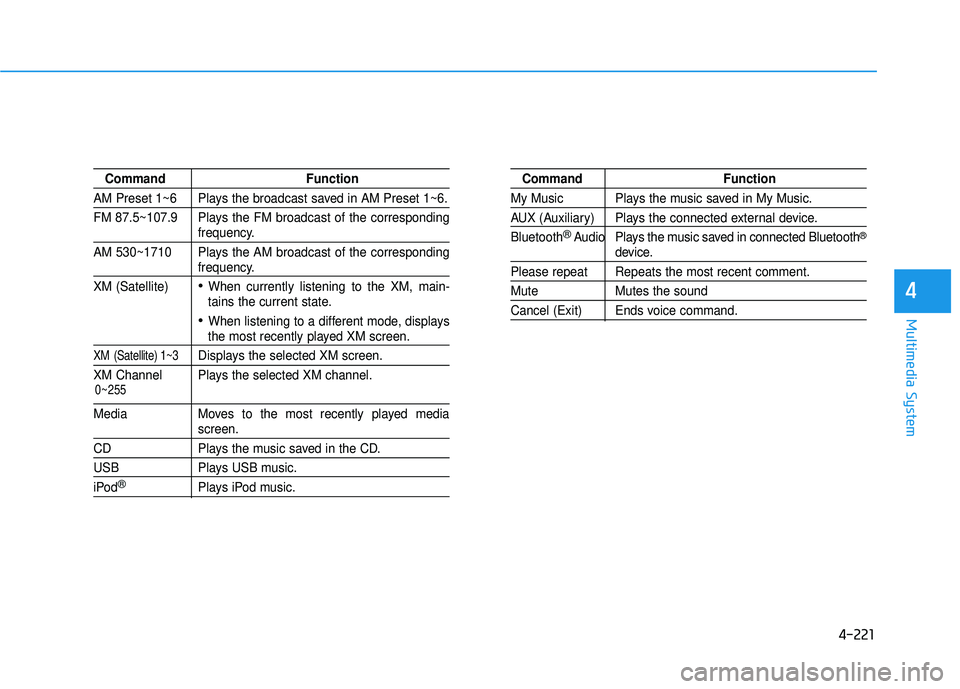
Command Function
AM Preset 1~6 Plays the broadcast saved in AM Preset 1~6.
FM 87.5~107.9 Plays the FM broadcast of the corresponding
frequency.
AM 530~1710 Plays the AM broadcast of the corresponding
frequency.
XM (Satellite)
When currently listening to the XM, main-
tains the current state.
When listening to a different mode, displaysthe most recently played XM screen.
XM (Satellite) 1~3Displays the selected XM screen.
XM Channel Plays the selected XM channel.
Media Moves to the most recently played mediascreen.
CD Plays the music saved in the CD.
USB Plays USB music.
iPod®Plays iPod music.
Command Function
My Music Plays the music saved in My Music.
AUX (Auxiliary) Plays the connected external device. Bluetooth
®Audio Plays the music saved in connected Bluetooth®
device.
Please repeat Repeats the most recent comment.
Mute Mutes the sound
Cancel (Exit) Ends voice command.
0~255
Page 434 of 653
4-223
Multimedia System
4
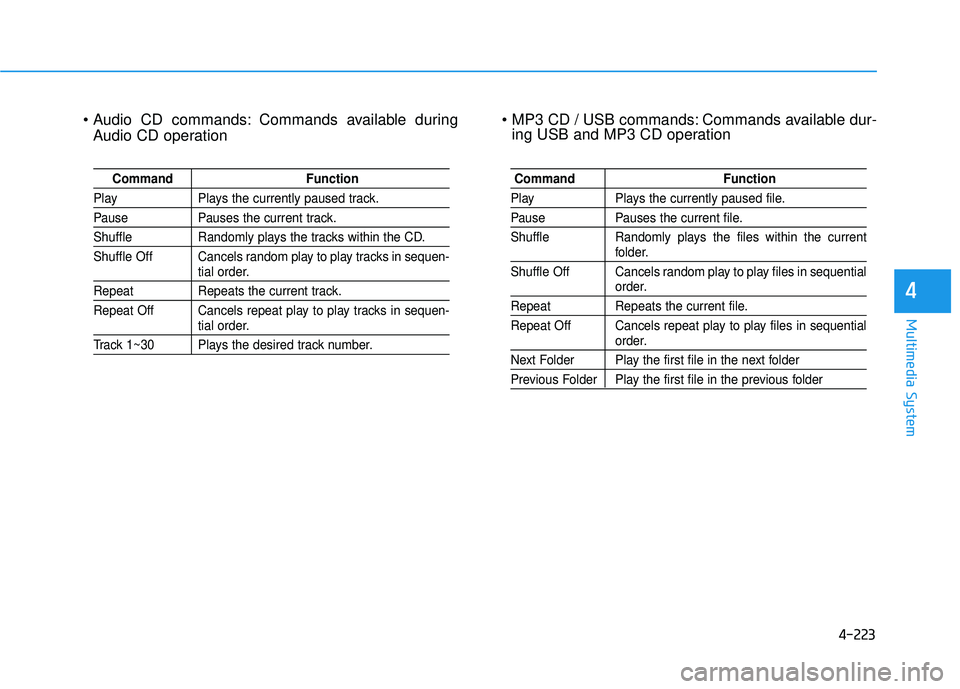
Commands available duringAudio CD operation Commands available dur-
ing USB and MP3 CD operation
Command Function
Play Plays the currently paused track.
Pause Pauses the current track.
Shuffle Randomly plays the tracks within the CD.
Shuffle Off Cancels random play to play tracks in sequen-
tial order.
Repeat Repeats the current track.
Repeat Off Cancels repeat play to play tracks in sequen-
tial order.
Track 1~30 Plays the desired track number.
Command Function
Play Plays the currently paused file.
Pause Pauses the current file.
Shuffle Randomly plays the files within the current
folder.
Shuffle Off Cancels random play to play files in sequential
order.
Repeat Repeats the current file.
Repeat Off Cancels repeat play to play files in sequential
order.
Next Folder Play the first file in the next folder
Previous Folder Play the first file in the previous folder
Page 439 of 653
![HYUNDAI TUCSON 2015 Owners Manual 4-228
Multimedia System
Touch Screen Beep
Press the key Select
[Sound] Select [Touch Screen Beep]
This feature is used to turn the touch
screen beep on/off.
Blue Link Voice Volume
Press the key](/img/35/56202/w960_56202-438.png "HYUNDAI TUCSON 2015 Owners Manual 4-228
Multimedia System
Touch Screen Beep
Press the key Select
[Sound] Select [Touch Screen Beep]
This feature is used to turn the touch
screen beep on/off.
Blue Link Voice Volume
Press the key")
4-228
Multimedia System
Touch Screen Beep
Press the key Select
[Sound] Select [Touch Screen Beep]
This feature is used to turn the touch
screen beep on/off.
Blue Link Voice Volume
Press the key Select
[Sound] Select [Blue Link Voice Vol.]
Turn the TUNE knob to adjust the
Blue Link Voice Volume. ❈ Blue Link
®may differ depending
on the selected audio.
Clock/Calendar Setting
Clock Setting
Press the key Select
[Clock/Calendar] Select [ClockSettings]
Use the , buttons to set the
Hour, Minutes and AM/PM setting.
✽✽ NOTICE
Press and hold the key (over
0.8 seconds) to set the Clock/Calendar
screen.
CLOCK
SETUP
SETUP SETUP
Page 440 of 653
![HYUNDAI TUCSON 2015 Owners Manual 4-229
Multimedia System
4
Calendar Setting
Press the key Select
[Clock/Calendar] Select [CalendarSettings]
Use the , buttons to set the
Month, Day and Year setting.
Time Format
Press the key Se](/img/35/56202/w960_56202-439.png "HYUNDAI TUCSON 2015 Owners Manual 4-229
Multimedia System
4
Calendar Setting
Press the key Select
[Clock/Calendar] Select [CalendarSettings]
Use the , buttons to set the
Month, Day and Year setting.
Time Format
Press the key Se")
4-229
Multimedia System
4
Calendar Setting
Press the key Select
[Clock/Calendar] Select [CalendarSettings]
Use the , buttons to set the
Month, Day and Year setting.
Time Format
Press the key Select
[Clock/Calendar] Select [Time Format]
This feature is used to change the
clock format between 12hr or 24hr.
Clock Display
Press the key Select
[Clock/Calendar] Select [Clock Display
(Power off)]
This feature is used to display a clock on the screen when the audio sys-
tem is turned off.SETUP SETUP SETUP
Page 587 of 653
7-46
Maintenance
Reset features
Some items need to be reset after
the battery has been discharged or
the battery has been disconnected.
See chapter 3 for:
Auto up/down window
Sunroof
Trip computer
Climate control system
Clock
Audio system
Page 606 of 653
7-65
7
Maintenance
In an emergency, if you do not have
a spare fuse, use a fuse of the same
rating from a circuit you may not
need for operating the vehicle, such
as the cigarette lighter fuse.
If the headlights or other electrical
components do not work and the
fuses are OK, check the fuse panel
in the engine compartment. If a fuse
is blown, it must be replaced.Memory fuse (SHUNT connector)
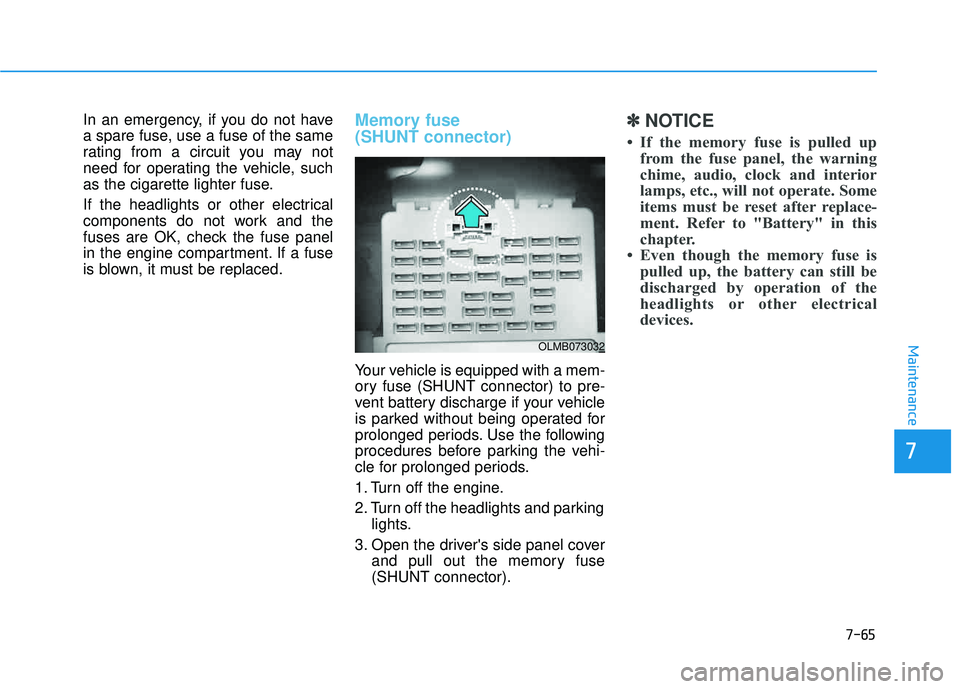
Your vehicle is equipped with a mem-
ory fuse (SHUNT connector) to pre-
vent battery discharge if your vehicle
is parked without being operated for
prolonged periods. Use the following
procedures before parking the vehi-
cle for prolonged periods.
1. Turn off the engine.
2. Turn off the headlights and parkinglights.
3. Open the driver's side panel cover and pull out the memory fuse (SHUNT connector).
✽✽ NOTICE
If the memory fuse is pulled up from the fuse panel, the warning
chime, audio, clock and interior
lamps, etc., will not operate. Some
items must be reset after replace-
ment. Refer to "Battery" in this
chapter.
Even though the memory fuse is pulled up, the battery can still be
discharged by operation of the
headlights or other electrical
devices.
OLMB073032
Page 610 of 653
7-69
7
Maintenance
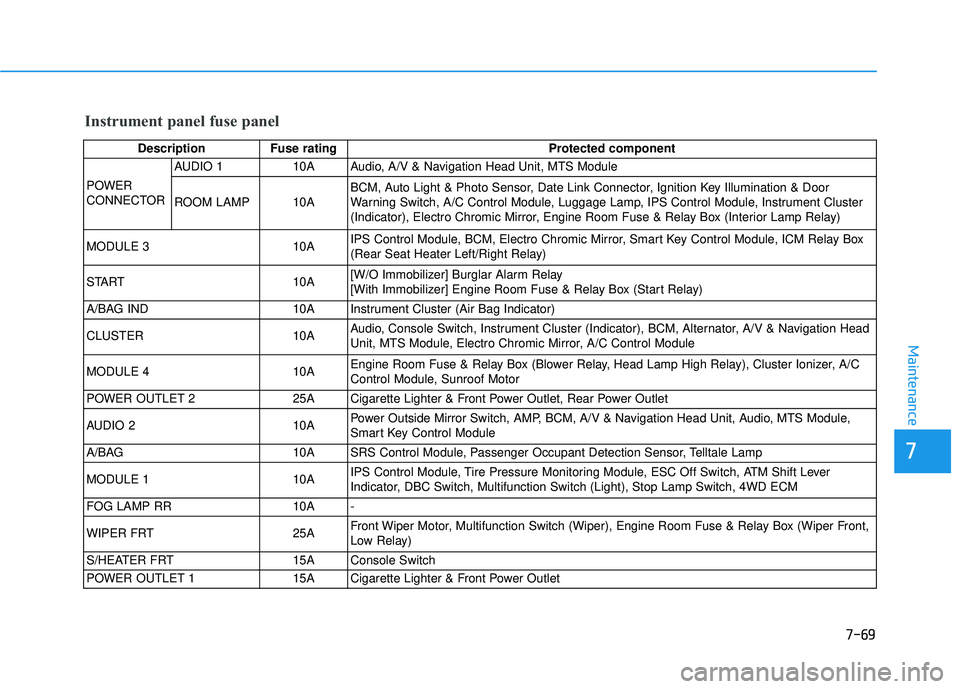
Instrument panel fuse panel
Description Fuse ratingProtected component
POWER
CONNECTOR AUDIO 1 10A Audio, A/V & Navigation Head Unit, MTS Module
ROOM LAMP 10A
BCM, Auto Light & Photo Sensor, Date Link Connector, Ignition Key Illumination & Door
Warning Switch, A/C Control Module, Luggage Lamp, IPS Control Module, Instrument Cluster
(Indicator), Electro Chromic Mirror, Engine Room Fuse & Relay Box (Interior Lamp Relay)
MODULE 3 10A IPS Control Module, BCM, Electro Chromic Mirror, Smart Key Control Module, ICM Relay Box
(Rear Seat Heater Left/Right Relay)
START 10A [W/O Immobilizer] Burglar Alarm Relay
[With Immobilizer] Engine Room Fuse & Relay Box (Start Relay)
A/BAG IND 10A Instrument Cluster (Air Bag Indicator)
CLUSTER 10A Audio, Console Switch, Instrument Cluster (Indicator), BCM, Alternator, A/V & Navigation Head
Unit, MTS Module, Electro Chromic Mirror, A/C Control Module
MODULE 4 10A Engine Room Fuse & Relay Box (Blower Relay, Head Lamp High Relay), Cluster Ionizer, A/C
Control Module, Sunroof Motor
POWER OUTLET 2 25A Cigarette Lighter & Front Power Outlet, Rear Power Outlet
AUDIO 2 10A Power Outside Mirror Switch, AMP, BCM, A/V & Navigation Head Unit, Audio, MTS Module,
Smart Key Control Module
A/BAG 10A SRS Control Module, Passenger Occupant Detection Sensor, Telltale Lamp
MODULE 1 10A IPS Control Module, Tire Pressure Monitoring Module, ESC Off Switch, ATM Shift Lever
Indicator, DBC Switch, Multifunction Switch (Light), Stop Lamp Switch, 4WD ECM
FOG LAMP RR 10A -
WIPER FRT 25A Front Wiper Motor, Multifunction Switch (Wiper), Engine Room Fuse & Relay Box (Wiper Front,
Low Relay)
S/HEATER FRT 15A Console Switch
POWER OUTLET 1 15A Cigarette Lighter & Front Power Outlet