stop start HYUNDAI TUCSON 2015 User Guide
[x] Cancel search | Manufacturer: HYUNDAI, Model Year: 2015, Model line: TUCSON, Model: HYUNDAI TUCSON 2015Pages: 653, PDF Size: 8.45 MB
Page 273 of 653
4-62
Multimedia System
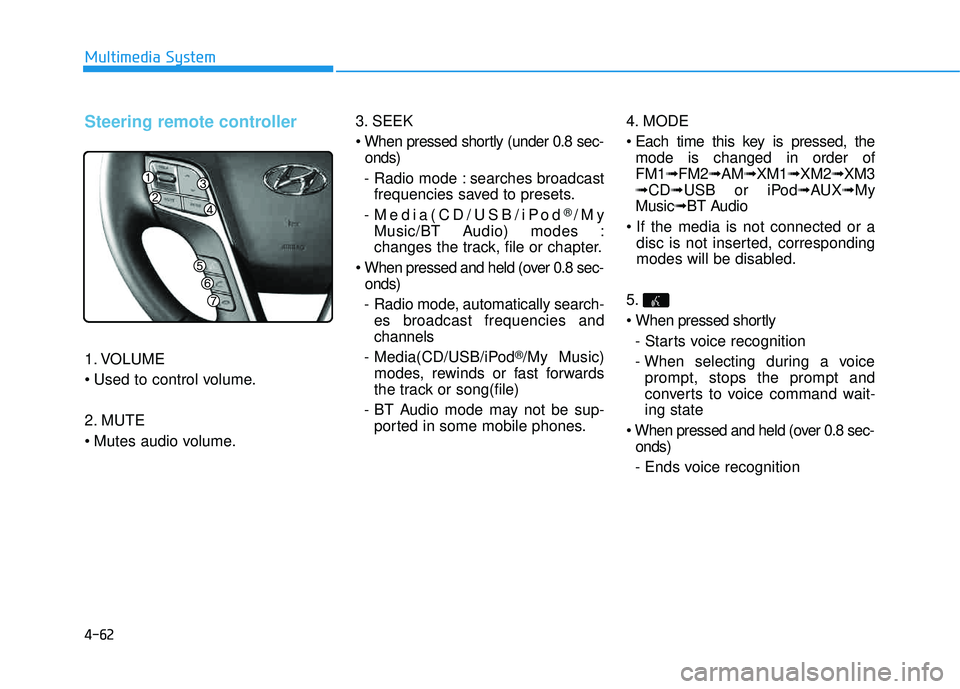
Steering remote controller
1. VOLUME
2. MUTE
3. SEEK
onds)
- Radio mode : searches broadcast frequencies saved to presets.
- Media(CD/USB/iPod
®/My
Music/BT Audio) modes :
changes the track, file or chapter.
onds)
- Radio mode, automatically search- es broadcast frequencies andchannels
- Media(CD/USB/iPod
®/My Music)
modes, rewinds or fast forwards
the track or song(file)
- BT Audio mode may not be sup- ported in some mobile phones. 4. MODE
mode is changed in order of FM1 ➟FM2 ➟AM ➟XM1 ➟XM2 ➟XM3
➟ CD ➟USB or iPod ➟AUX ➟My
Music ➟BT Audio
disc is not inserted, corresponding
modes will be disabled.
5.
- Starts voice recognition
- When selecting during a voice prompt, stops the prompt and
converts to voice command wait-ing state
onds)
- Ends voice recognition
Page 304 of 653
4-93
Multimedia System
4
After selecting the files you want to
delete, press the button to
delete the selected files.
✽✽NOTICE
If there is memory available, up to 6,000 files can be saved.
Identical files cannot be copied more than 1,000 times.
To check memory information, go to [System] [Memory
Information] ✽
✽
NOTICE - USING THE
Bluetooth®Wireless
Technology Audio Mode
Bluetooth ®
Wireless Technology
Audio Mode can be used only
when a Bluetooth®
Wireless
Technology phone has been con-
nected.
Bluetooth ®
Wireless Technology
Audio Mode will not be available
when connecting mobile phones
that do not support this feature.
While Bluetooth®
Wireless
Technology Audio is playing, if the
Bluetooth ®
Wireless Technology
phone is connected, then the music
will also stop.
Moving the Track up/down while playing Bluetooth®
Wireless
Technology audio mode may
result in pop noises in some mobile
phones.
Bluetooth ®
Wireless Technology
streaming audio may not be sup-
ported in some mobile phones. (Continued)(Continued)
When returning to Bluetooth®
Wireless Technology Audio mode
after ending a call, the mode may
not automatically restart in some
mobile phones.
Receiving an incoming call or mak- ing an outgoing call while playing
Bluetooth ®
Wireless Technology
Audio may result in audio interfer-
ence.
SETUP
Delete
Page 383 of 653
4-172
Multimedia System
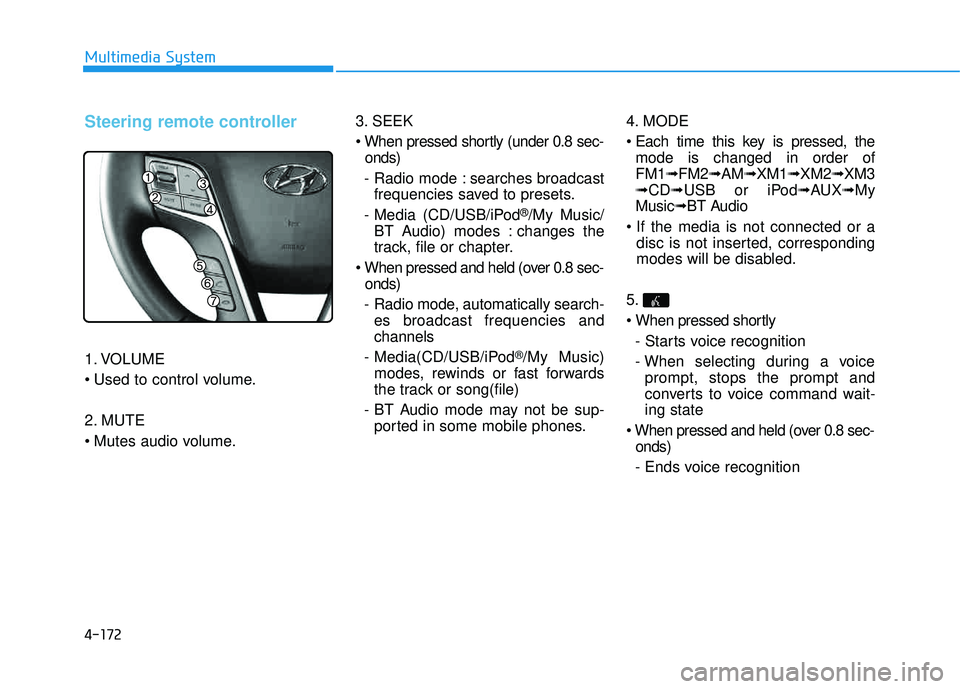
Steering remote controller
1. VOLUME
2. MUTE
3. SEEK
onds)
- Radio mode : searches broadcast frequencies saved to presets.
- Media (CD/USB/iPod
®/My Music/
BT Audio) modes : changes the
track, file or chapter.
onds)
- Radio mode, automatically search- es broadcast frequencies andchannels
- Media(CD/USB/iPod
®/My Music)
modes, rewinds or fast forwards
the track or song(file)
- BT Audio mode may not be sup- ported in some mobile phones. 4. MODE
mode is changed in order of FM1 ➟FM2 ➟AM ➟XM1 ➟XM2 ➟XM3
➟ CD ➟USB or iPod ➟AUX ➟My
Music ➟BT Audio
disc is not inserted, corresponding
modes will be disabled.
5.
- Starts voice recognition
- When selecting during a voice prompt, stops the prompt and
converts to voice command wait-ing state
onds)
- Ends voice recognition
Page 414 of 653
4-203
Multimedia System
4
After selecting the files you want to
delete, press the button to
delete the selected files.
✽✽NOTICE
If there is memory available, up to 6,000 files can be saved.
Identical files cannot be copied more than 1,000 times.
To check memory information, go to [System] [Memory
Information] ✽
✽
NOTICE - USING THE
Bluetooth®Wireless
Technology Audio Mode
Bluetooth ®
Wireless Technology
Audio Mode can be used only
when a Bluetooth®
Wireless
Technology phone has been con-
nected.
Bluetooth ®
Wireless Technology
Audio Mode will not be available
when connecting mobile phones
that do not support this feature.
While Bluetooth®
Wireless
Technology Audio is playing, if the
Bluetooth ®
Wireless Technology
phone is connected, then the music
will also stop.
Moving the Track up/down while playing Bluetooth®
Wireless
Technology audio mode may
result in pop noises in some mobile
phones.
Bluetooth ®
Wireless Technology
streaming audio may not be sup-
ported in some mobile phones. (Continued)(Continued)
When returning to Bluetooth®
Wireless Technology Audio mode
after ending a call, the mode may
not automatically restart in some
mobile phones.
Receiving an incoming call or mak- ing an outgoing call while playing
Bluetooth ®
Wireless Technology
Audio may result in audio interfer-
ence.
SETUP
Delete
Page 447 of 653
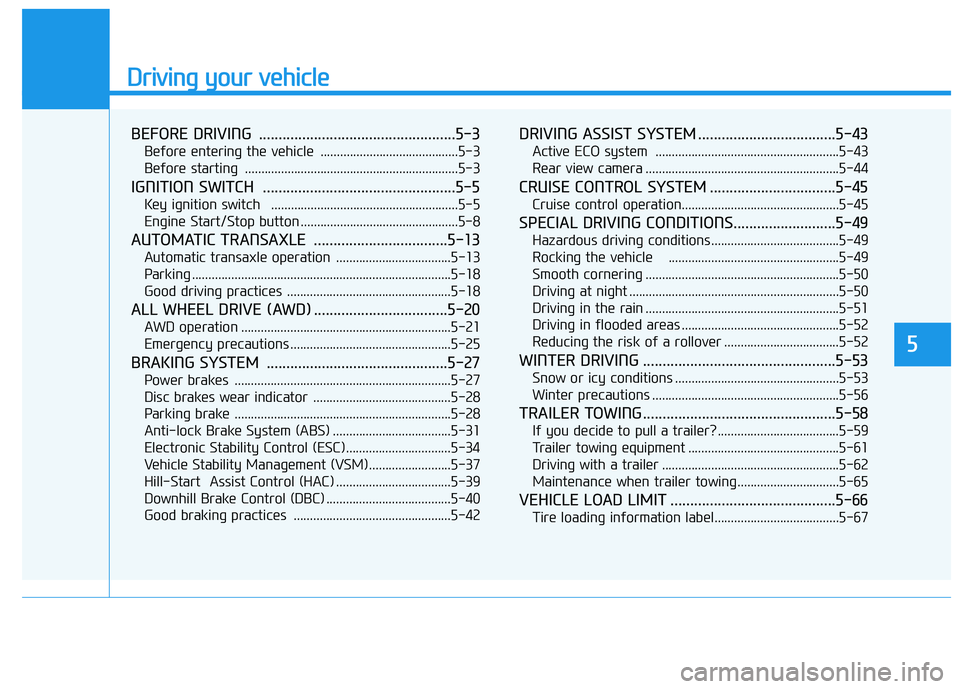
Driving your vehicle
BEFORE DRIVING ..................................................5-3
Before entering the vehicle ..........................................5-3
Before starting .................................................................5-3
IGNITION SWITCH .................................................5-5
Key ignition switch .........................................................5-5
Engine Start/Stop button ................................................5-8
AUTOMATIC TRANSAXLE ..................................5-13
Automatic transaxle operation ...................................5-13
Parking ...............................................................................5-18
Good driving practices ..................................................5-18
ALL WHEEL DRIVE (AWD) ..................................5-20
AWD operation ................................................................5-21
Emergency precautions .................................................5-25
BRAKING SYSTEM ..............................................5-27
Power brakes ..................................................................5-27
Disc brakes wear indicator ..........................................5-28
Parking brake ..................................................................5-28
Anti-lock Brake System (ABS) ....................................5-31
Electronic Stability Control (ESC) ................................5-34
Vehicle Stability Management (VSM).........................5-37
Hill-Start Assist Control (HAC) ...................................5-39
Downhill Brake Control (DBC) ......................................5-40
Good braking practices ................................................5-42
DRIVING ASSIST SYSTEM ...................................5-43
Active ECO system ........................................................5-43
Rear view camera ...........................................................5-44
CRUISE CONTROL SYSTEM ................................5-45
Cruise control operation................................................5-45
SPECIAL DRIVING CONDITIONS..........................5-49
Hazardous driving conditions.......................................5-49
Rocking the vehicle ....................................................5-49
Smooth cornering ...........................................................5-50
Driving at night ................................................................5-50
Driving in the rain ...........................................................5-51
Driving in flooded areas ................................................5-52
Reducing the risk of a rollover ...................................5-52
WINTER DRIVING .................................................5-53
Snow or icy conditions ..................................................5-53
Winter precautions .........................................................5-56
TRAILER TOWING.................................................5-58
If you decide to pull a trailer? .....................................5-59
Trailer towing equipment ..............................................5-61
Driving with a trailer ......................................................5-62
Maintenance when trailer towing ...............................5-65
VEHICLE LOAD LIMIT ..........................................5-66
Tire loading information label......................................5-67
5
Page 454 of 653
5-8
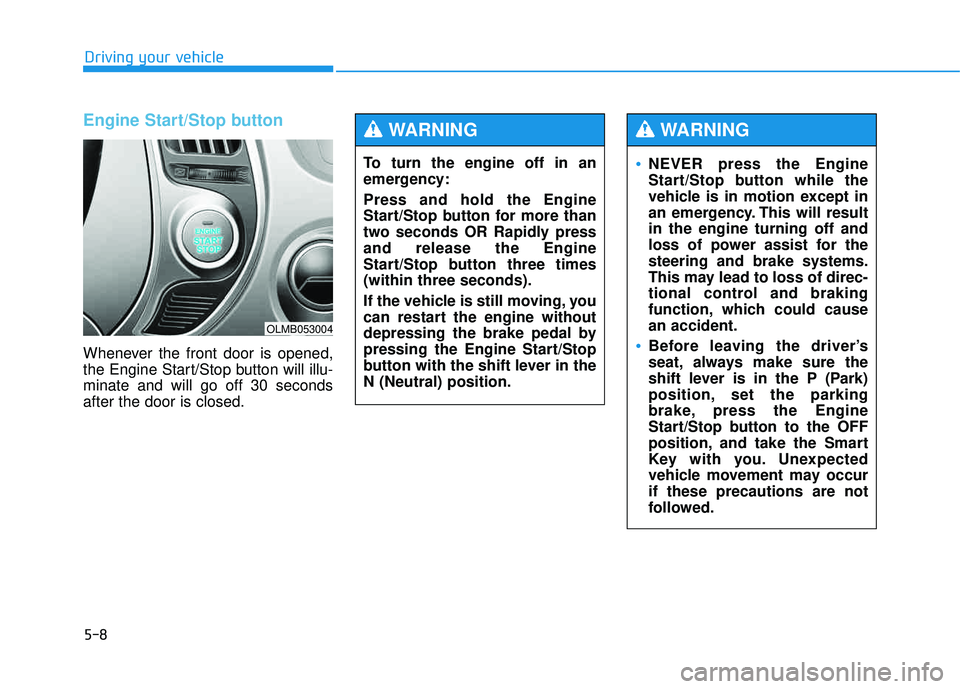
Engine Start/Stop button
Whenever the front door is opened,
the Engine Start/Stop button will illu-minate and will go off 30 secondsafter the door is closed.
Driving your vehicle
OLMB053004
To turn the engine off in an
emergency: Press and hold the Engine
Start/Stop button for more than
two seconds OR Rapidly pressand release the Engine
Start/Stop button three times(within three seconds).
If the vehicle is still moving, you
can restart the engine without
depressing the brake pedal by
pressing the Engine Start/Stop
button with the shift lever in theN (Neutral) position.
WARNING
NEVER press the Engine
Start/Stop button while the
vehicle is in motion except in
an emergency. This will resultin the engine turning off and
loss of power assist for thesteering and brake systems.
This may lead to loss of direc-
tional control and braking
function, which could causean accident.
Before leaving the driver’s
seat, always make sure the
shift lever is in the P (Park)
position, set the parking
brake, press the Engine
Start/Stop button to the OFF
position, and take the Smart
Key with you. Unexpected
vehicle movement may occurif these precautions are not
followed.
WARNING
Page 455 of 653
5-9
Driving your vehicle
5
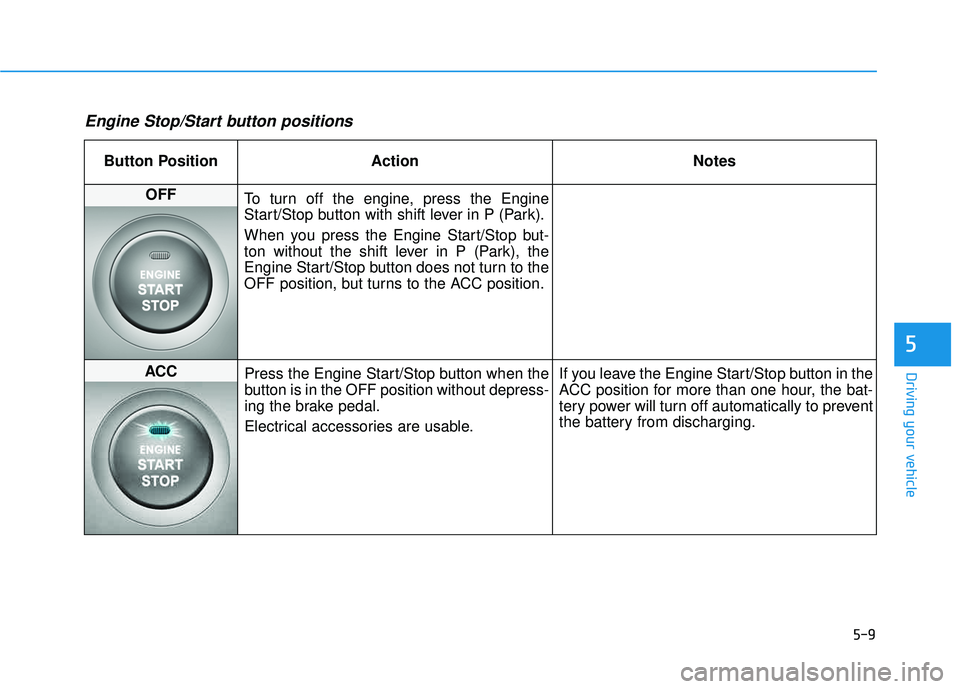
Engine Stop/Start button positions
Button Position ActionNotes
OFF
To turn off the engine, press the Engine
Start/Stop button with shift lever in P (Park).
When you press the Engine Start/Stop but-
ton without the shift lever in P (Park), the
Engine Start/Stop button does not turn to the
OFF position, but turns to the ACC position.
ACC Press the Engine Start/Stop button when the
button is in the OFF position without depress-
ing the brake pedal.
Electrical accessories are usable. If you leave the Engine Start/Stop button in the
ACC position for more than one hour, the bat-
tery power will turn off automatically to prevent
the battery from discharging.
Page 456 of 653
5-10
Driving your vehicle
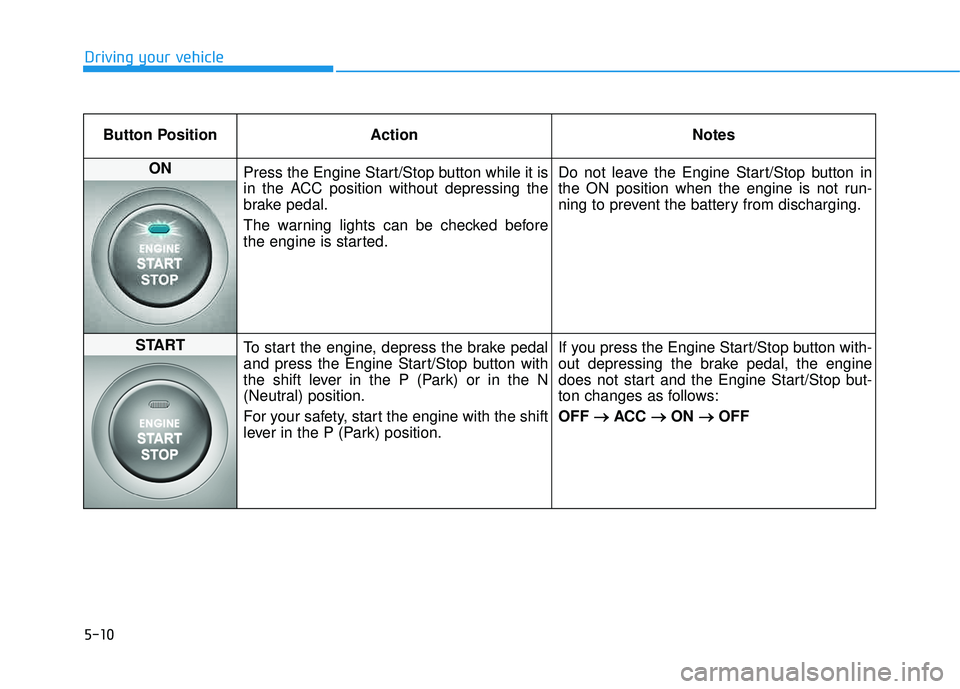
Button Position ActionNotes
ON
Press the Engine Start/Stop button while it is
in the ACC position without depressing the
brake pedal.
The warning lights can be checked before
the engine is started. Do not leave the Engine Start/Stop button in
the ON position when the engine is not run-
ning to prevent the battery from discharging.
START
To start the engine, depress the brake pedal
and press the Engine Start/Stop button with
the shift lever in the P (Park) or in the N
(Neutral) position.
For your safety, start the engine with the shift
lever in the P (Park) position. If you press the Engine Start/Stop button with-
out depressing the brake pedal, the engine
does not start and the Engine Start/Stop but-
ton changes as follows: OFF
ACC
ON
OFF
Page 457 of 653
5-11
Driving your vehicle
5
Starting the engine ✽✽NOTICE
The engine will start by pressing the Engine Start/Stop button, only
when the smart key is in the vehi-
cle.
Even if the smart key is in the vehicle, if it is far away from the
driver, the engine may not start.
When the Engine Start/Stop but- ton is in the ACC or ON position,
if any door is open, the system
checks for the smart key. If the
smart key is not in the vehicle, the
" " indicator and the “KEY
OUT” indicator will blink, and if
all doors are closed, the chime will
also sound for about 5 seconds.
The indicator will turn off while
the vehicle is moving. Keep the
smart key in the vehicle when
using the ACC position or if the
vehicle engine is ON.1.Always carry the smart key withyou.
2.Make sure the parking brake is applied.
3.Make sure the shift lever is in P (Park).
4.Depress the brake pedal.
5.Press the Engine Start/Stop button.
✽✽ NOTICE
Do not wait for the engine to warm up while the vehicle remains sta-
tionary. Start driving at moderate
engine speeds. (Steep accelerating
and decelerating should be avoid-
ed.)
Whether the engine is cold or warm, always start the vehicle
with your foot on the brake pedal.
Do not depress the accelerator
while starting the vehicle. Do not
race the engine while warming it
up.
Always wear appropriate shoes
when operating your vehicle.
Unsuitable shoes, such as high
heels, ski boots, sandals, flip-
flops, etc., may interfere with
your ability to use the brake,
accelerator and clutch pedals.
WARNING
Page 458 of 653
5-12
Driving your vehicle
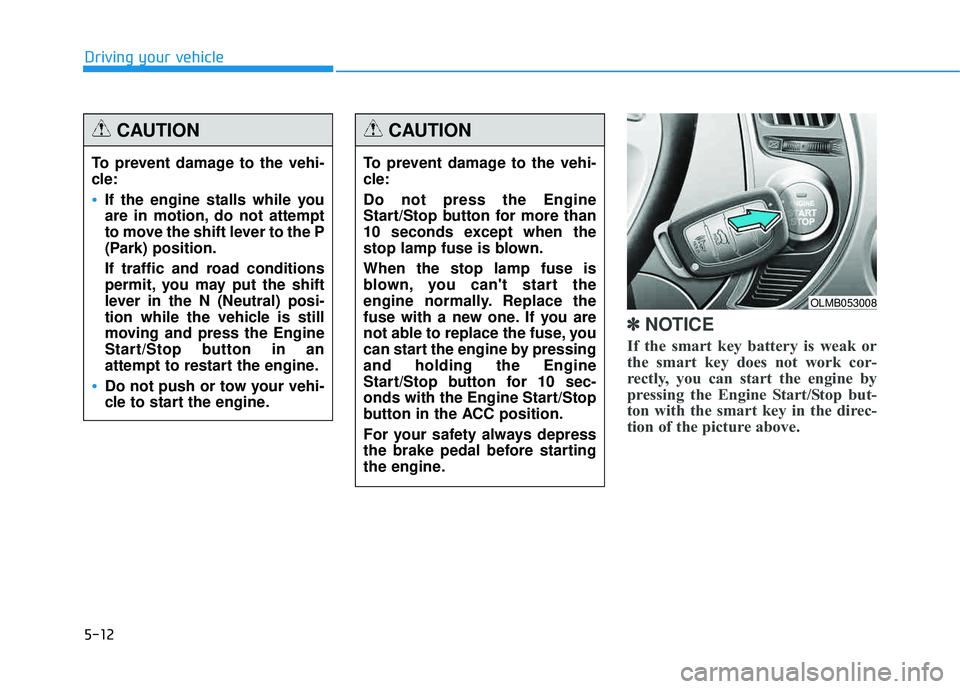
✽✽NOTICE
If the smart key battery is weak or
the smart key does not work cor-
rectly, you can start the engine by
pressing the Engine Start/Stop but-
ton with the smart key in the direc-
tion of the picture above.
To prevent damage to the vehi-
cle:
If the engine stalls while you
are in motion, do not attempt
to move the shift lever to the P
(Park) position.
If traffic and road conditions
permit, you may put the shift
lever in the N (Neutral) posi-
tion while the vehicle is still
moving and press the Engine
Start/Stop button in an
attempt to restart the engine.
Do not push or tow your vehi-
cle to start the engine.
CAUTION
To prevent damage to the vehi-
cle: Do not press the Engine
Start/Stop button for more than
10 seconds except when the
stop lamp fuse is blown. When the stop lamp fuse is
blown, you can't start the
engine normally. Replace the
fuse with a new one. If you are
not able to replace the fuse, you
can start the engine by pressingand holding the Engine
Start/Stop button for 10 sec-
onds with the Engine Start/Stop
button in the ACC position.
For your safety always depress
the brake pedal before starting
the engine.
CAUTION
OLMB053008