window HYUNDAI TUCSON 2015 User Guide
[x] Cancel search | Manufacturer: HYUNDAI, Model Year: 2015, Model line: TUCSON, Model: HYUNDAI TUCSON 2015Pages: 653, PDF Size: 8.45 MB
Page 103 of 653
3-17
Convenient features of your vehicle
3
If the key is in the ignition switchand any door is opened, the doors
will not lock even though the lock
button (1) of the central door lock
switch is pressed.
If the smart key is in the vehicle and any door is opened, the doors
will not lock even though the lock
button (1) of the central door lock
switch is pressed. Do not leave children or animals
unattended in your vehicle. An
enclosed vehicle can become
extremely hot, causing death or
serious injury to unattended
children or animals who cannot
escape the vehicle. Children
might operate features of the
vehicle that could injure them,
or they could encounter other
harm, possibly from someone
gaining entry to the vehicle.WARNING
The doors should always be
fully closed and locked while
the vehicle is in motion. If the
doors are unlocked, the risk of
being thrown from the vehicle ina crash is increased.
WARNING
Always secure your vehicle.
Leaving your vehicle unlocked increases the potential risk to
you or others from someone hid-
ing in your vehicle.
To secure your vehicle, while
depressing the brake, move the
shift lever to the P (Park) posi-
tion, engage the parking brake,
and place the ignition switch in
the LOCK/OFF position, close
all windows, lock all doors, and
always take the key with you.
WARNING
Opening a door when something
is approaching may cause dam-
age or injury. Be careful when
opening doors and watch for
vehicles, motorcycles, bicycles
or pedestrians approaching the
vehicle in the path of the door.
WARNING
Page 130 of 653
3-44
Convenient features of your vehicle
Interior rearview mirrors
Before you start driving, adjust the
rearview mirror to the center on the
view through the rear window.
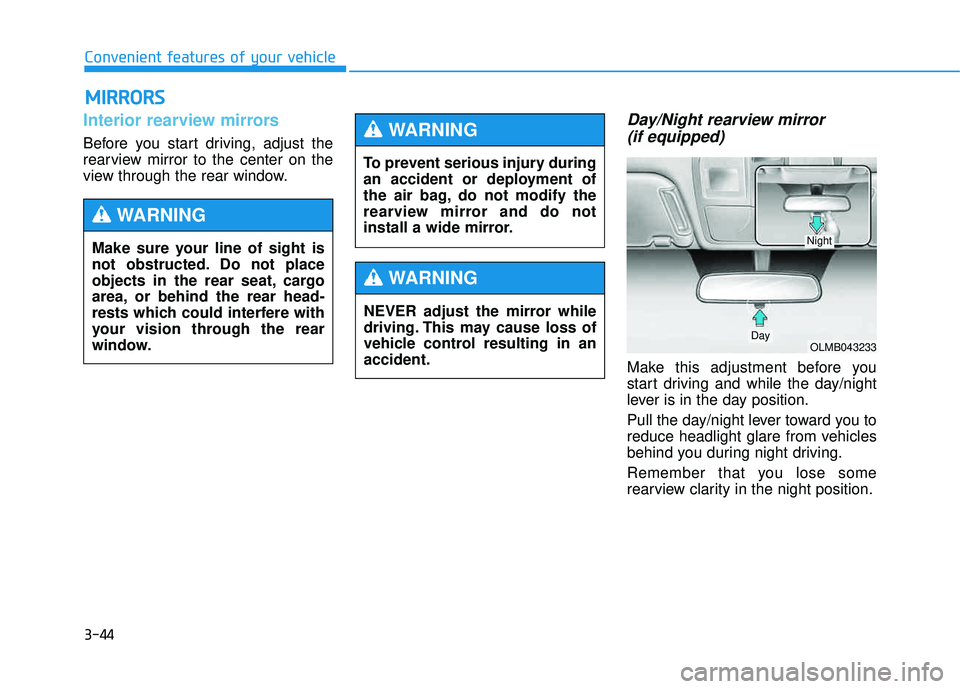
Day/Night rearview mirror (if equipped)
Make this adjustment before you
start driving and while the day/night
lever is in the day position.
Pull the day/night lever toward you to
reduce headlight glare from vehicles
behind you during night driving.
Remember that you lose some
rearview clarity in the night position.
MM IIRR RROO RRSS
Make sure your line of sight is
not obstructed. Do not place
objects in the rear seat, cargo
area, or behind the rear head-
rests which could interfere with
your vision through the rear
window.
WARNING
To prevent serious injury during
an accident or deployment of
the air bag, do not modify the
rearview mirror and do not
install a wide mirror.
WARNING
NEVER adjust the mirror while
driving. This may cause loss of
vehicle control resulting in anaccident.
WARNING
OLMB043233Day
Night
Page 133 of 653
3-47
Convenient features of your vehicle
3
Automatic-Dimming Night Vision
Safety™ (NVS®
) Mirror
(if equipped)
For more information regarding NVS ®
mirrors and other applications,
please refer to the Gentex website:
www.gentex.com The auto-dimming function can be
controlled by pressing the ON/OFF
button:
1. Pressing the button turns the auto-
dimming function OFF which is
indicated by the green Status
Indicator LED turning off.
2. Pressing the button again turns the auto-dimming function ON
which is indicated by the green
Status Indicator LED turning on.
The mirror defaults to the ON posi-
tion each time the vehicle is started.
Z-Nav™ Compass Display
The NVS™ Mirror in your vehicle is
also equipped with a Z-Nav™
Compass that shows the vehicle
Compass heading in the Display
Window using the 8 basic cardinalheadings (N, NE, E, SE, etc.).
The NVS ®
Mirror automatically
reduces glare by monitoring
light levels in the front and the
rear of the vehicle. Any objectthat obstructs either light sen-sor will degrade the automatic
dimming control feature.
CAUTION
Page 140 of 653
3-54
Convenient features of your vehicle
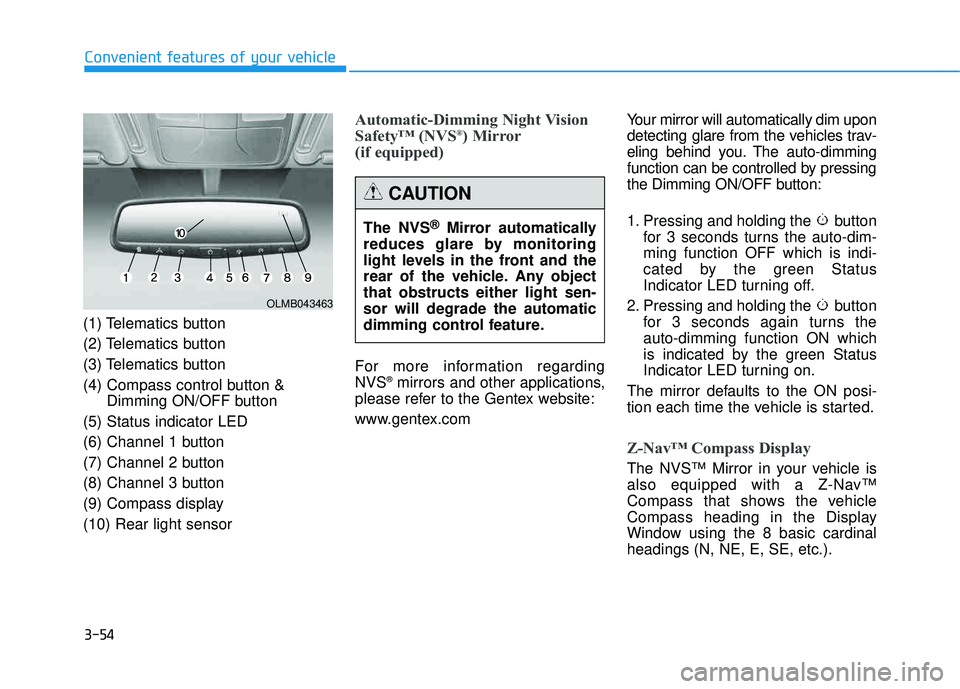
(1) Telematics button
(2) Telematics button
(3) Telematics button
(4) Compass control button &Dimming ON/OFF button
(5) Status indicator LED
(6) Channel 1 button
(7) Channel 2 button
(8) Channel 3 button
(9) Compass display(10) Rear light sensor
Automatic-Dimming Night Vision
Safety™ (NVS ®
) Mirror
(if equipped)
For more information regarding NVS ®
mirrors and other applications,
please refer to the Gentex website:
www.gentex.com Your mirror will automatically dim upon
detecting glare from the vehicles trav-
eling behind you. The auto-dimming
function can be controlled by pressing
the Dimming ON/OFF button:
1. Pressing and holding the button
for 3 seconds turns the auto-dim- ming function OFF which is indi-
cated by the green Status
Indicator LED turning off.
2. Pressing and holding the button for 3 seconds again turns theauto-dimming function ON which
is indicated by the green Status
Indicator LED turning on.
The mirror defaults to the ON posi-
tion each time the vehicle is started.
Z-Nav™ Compass Display
The NVS™ Mirror in your vehicle is
also equipped with a Z-Nav™
Compass that shows the vehicle
Compass heading in the Display
Window using the 8 basic cardinalheadings (N, NE, E, SE, etc.).
OLMB043463
The NVS ®
Mirror automatically
reduces glare by monitoring
light levels in the front and the
rear of the vehicle. Any objectthat obstructs either light sen-sor will degrade the automatic
dimming control feature.
CAUTION
Page 149 of 653
3-63
Convenient features of your vehicle
3
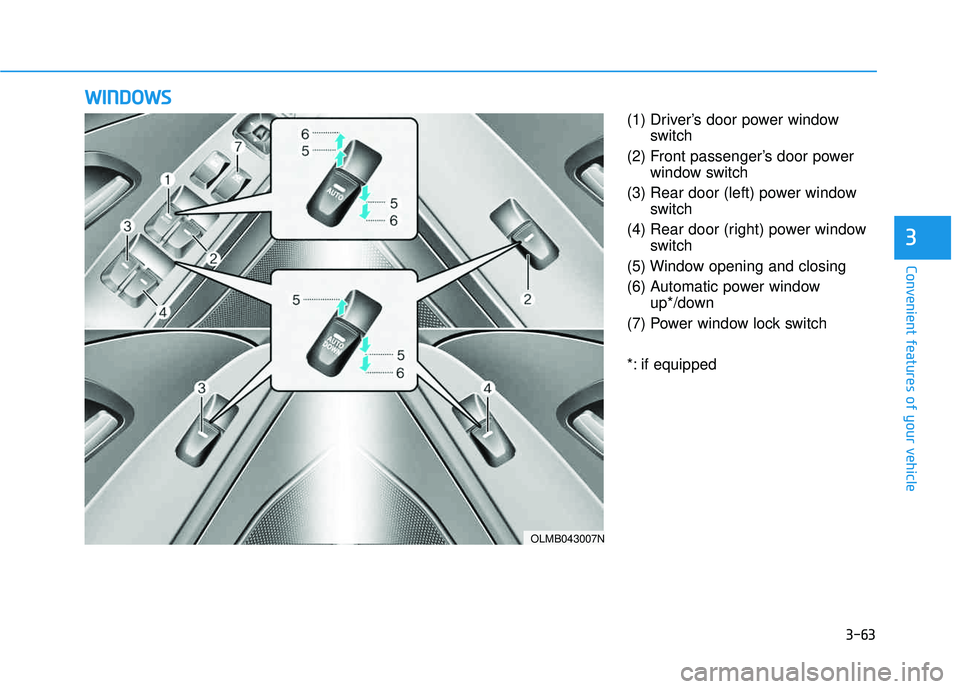
(1) Driver’s door power windowswitch
(2) Front passenger’s door power window switch
(3) Rear door (left) power window switch
(4) Rear door (right) power window switch
(5) Window opening and closing
(6) Automatic power window up*/down
(7) Power window lock switch
*: if equipped
WW IINN DDOO WW SS
OLMB043007N
Page 150 of 653
3-64
Convenient features of your vehicle
Power windows
The ignition switch must be in the ON
position to be able to raise or lower
the windows.
Each door has a Power Window
switch to control that door's window.
The driver has a Power Window Lock
switch which can block the operation
of passenger windows. The power
windows will operate for approxi-mately 30 seconds after the ignition
switch is placed in the ACC or
LOCK/OFF position. However, if the
front doors are opened, the Power
Windows cannot be operated even
within the 30 second period.
Window opening and closing
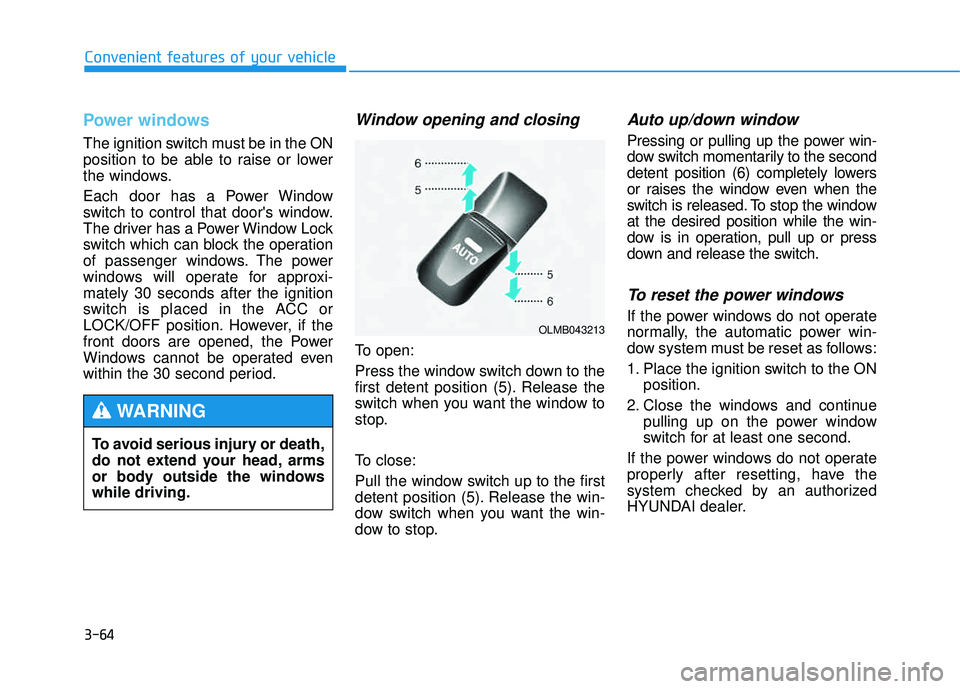
To open:
Press the window switch down to the
first detent position (5). Release the
switch when you want the window to
stop.
To close:
Pull the window switch up to the first
detent position (5). Release the win-
dow switch when you want the win-
dow to stop.
Auto up/down window
Pressing or pulling up the power win-
dow switch momentarily to the second
detent position (6) completely lowers
or raises the window even when the
switch is released. To stop the windowat the desired position while the win-
dow is in operation, pull up or press
down and release the switch.
To reset the power windows
If the power windows do not operate
normally, the automatic power win-
dow system must be reset as follows:
1. Place the ignition switch to the ONposition.
2. Close the windows and continue pulling up on the power window
switch for at least one second.
If the power windows do not operate
properly after resetting, have the
system checked by an authorized
HYUNDAI dealer.
To avoid serious injury or death,
do not extend your head, arms
or body outside the windowswhile driving.
WARNING
OLMB043213
Page 151 of 653
3-65
Convenient features of your vehicle
3
Automatic reverse
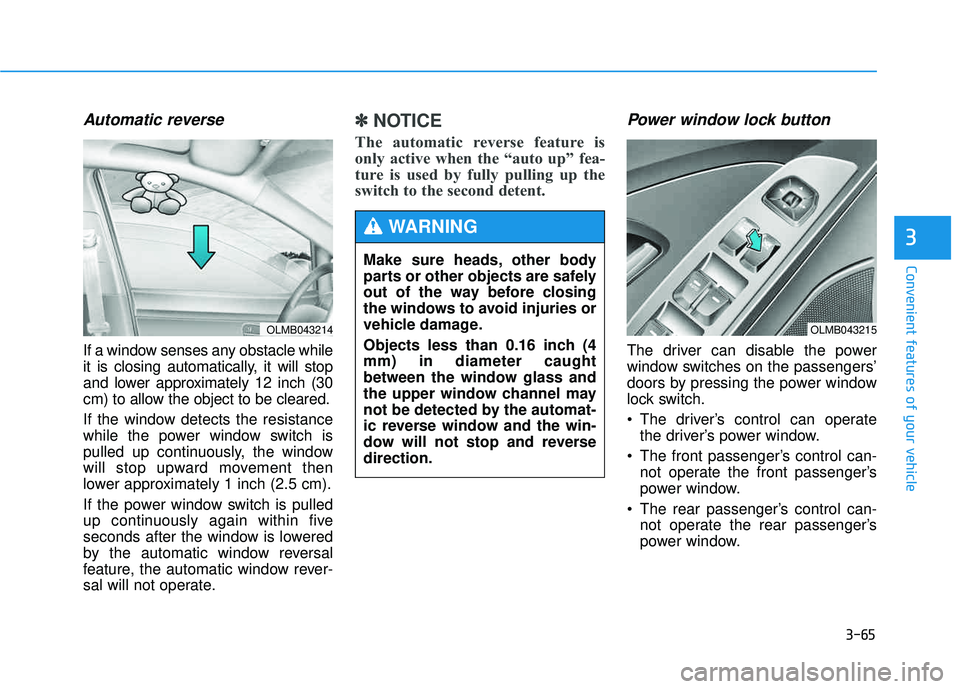
If a window senses any obstacle while
it is closing automatically, it will stop
and lower approximately 12 inch (30
cm) to allow the object to be cleared.
If the window detects the resistance
while the power window switch is
pulled up continuously, the window
will stop upward movement then
lower approximately 1 inch (2.5 cm).
If the power window switch is pulled
up continuously again within five
seconds after the window is lowered
by the automatic window reversal
feature, the automatic window rever-
sal will not operate.
✽✽NOTICE
The automatic reverse feature is
only active when the “auto up” fea-
ture is used by fully pulling up the
switch to the second detent. Power window lock button
The driver can disable the power
window switches on the passengers’
doors by pressing the power window
lock switch.
The driver’s control can operate the driver’s power window.
The front passenger’s control can- not operate the front passenger’s
power window.
The rear passenger’s control can- not operate the rear passenger’s
power window.
OLMB043214
Make sure heads, other body
parts or other objects are safely
out of the way before closing
the windows to avoid injuries or
vehicle damage.
Objects less than 0.16 inch (4 mm) in diameter caught
between the window glass and
the upper window channel may
not be detected by the automat-
ic reverse window and the win-
dow will not stop and reversedirection.
WARNING
OLMB043215
Page 152 of 653
3-66
Convenient features of your vehicle
Do not allow children to play
with the power windows. Keep
the driver’s door power window
lock switch in the LOCK position
(indicator illuminating). Serious
injury or death can result from
unintentional window operation
by a child.
WARNING
To prevent possible damage
to the power window system,
do not open or close two win-
dows or more at the same
time. This will also ensure the
longevity of the fuse.
Never try to operate the main
switch on the driver's door and
the individual door window
switch in opposing directions
at the same time. If this is
done, the window will stop and
cannot be opened or closed.
CAUTION
Page 153 of 653
3-67
Convenient features of your vehicle
3
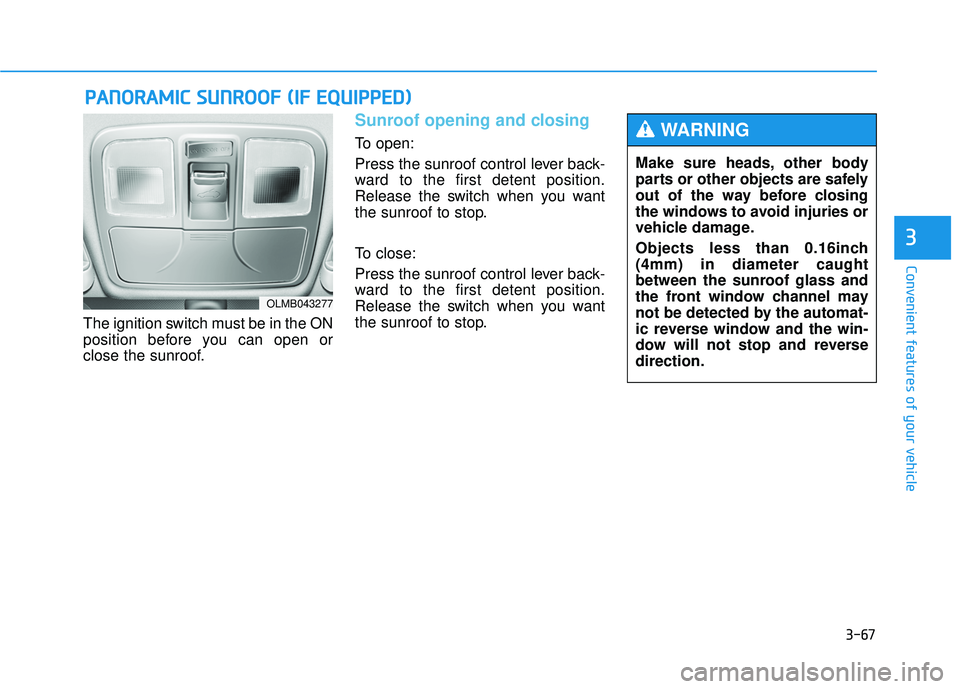
The ignition switch must be in the ON
position before you can open or
close the sunroof.
Sunroof opening and closing
To open:
Press the sunroof control lever back-
ward to the first detent position.
Release the switch when you want
the sunroof to stop.
To close:
Press the sunroof control lever back-
ward to the first detent position.
Release the switch when you want
the sunroof to stop.
PPAA NN OO RRAA MM IICC SS UU NNRROO OOFF (( IIFF EE QQ UUIIPP PP EEDD ))
OLMB043277
Make sure heads, other body
parts or other objects are safely
out of the way before closing
the windows to avoid injuries or
vehicle damage.
Objects less than 0.16inch (4mm) in diameter caught
between the sunroof glass and
the front window channel may
not be detected by the automat-
ic reverse window and the win-
dow will not stop and reversedirection.
WARNING
Page 166 of 653
3-80
Convenient features of your vehicle
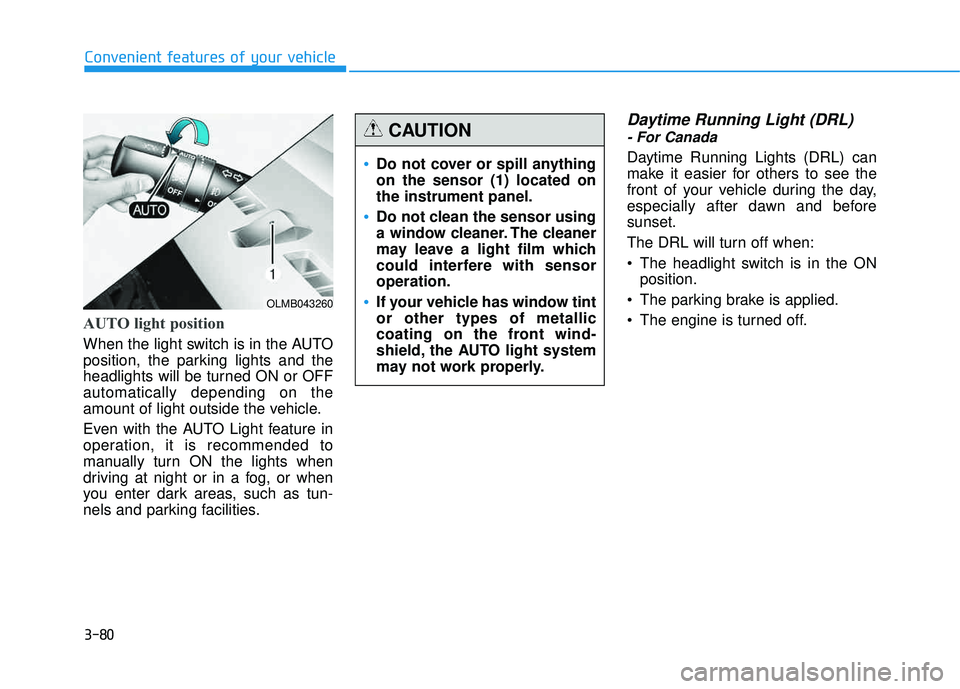
AUTO light position
When the light switch is in the AUTO
position, the parking lights and the
headlights will be turned ON or OFFautomatically depending on the
amount of light outside the vehicle.
Even with the AUTO Light feature in
operation, it is recommended to
manually turn ON the lights when
driving at night or in a fog, or when
you enter dark areas, such as tun-
nels and parking facilities.
Daytime Running Light (DRL)
- For Canada
Daytime Running Lights (DRL) can
make it easier for others to see the
front of your vehicle during the day,
especially after dawn and beforesunset.
The DRL will turn off when:
The headlight switch is in the ONposition.
The parking brake is applied.
The engine is turned off.
OLMB043260
Do not cover or spill anything on the sensor (1) located onthe instrument panel.
Do not clean the sensor using
a window cleaner. The cleaner
may leave a light film which
could interfere with sensoroperation.
If your vehicle has window tint or other types of metallic
coating on the front wind-
shield, the AUTO light system
may not work properly.
CAUTION